
Software de Transcrição para Pesquisa Qualitativa
Descubra o melhor software de transcrição para pesquisa qualitativa. Este guia abrange precisão, integração de fluxo de trabalho e privacidade de dados para uso acadêmico.
Praveen
November 20, 2024
Escolher o software de transcrição certo para pesquisa qualitativa é mais do que apenas um passo logístico — é a base de toda a sua análise. Acertando isso, você terá texto estruturado e pesquisável que acelera seus insights. Errando, você terá horas de correções tediosas pela frente.
Essa escolha impacta diretamente a integridade dos seus dados e a eficiência do seu fluxo de trabalho. Tudo se resume a equilibrar precisão, recursos específicos para pesquisa e segurança de dados sólida.
Escolhendo o Software de Transcrição Certo para Sua Pesquisa
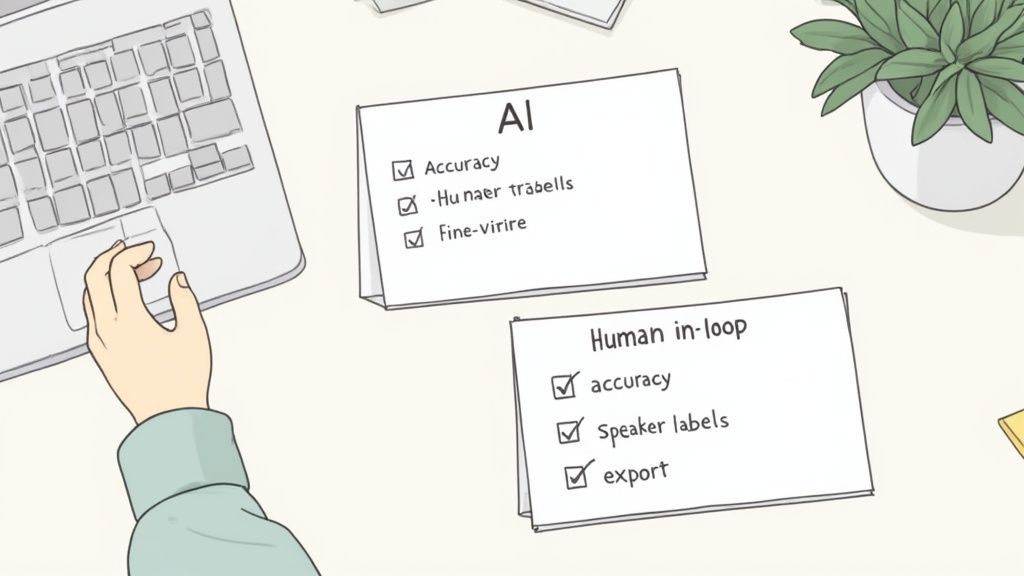
A pesquisa qualitativa vive nas nuances. São as pausas sutis, o diálogo sobreposto e o jargão específico que revelam o que realmente está acontecendo. Seu software de transcrição não é apenas uma ferramenta; é um parceiro na captura dessa riqueza. Uma escolha errada pode introduzir imprecisões que distorcem suas descobertas ou, pior ainda, comprometem a confidencialidade do participante.
Uma das primeiras coisas que você terá que decidir é se optará por um serviço de IA puramente automatizado ou por uma plataforma que tenha um humano no ciclo para revisão. A IA percorreu um longo caminho, mas ainda pode tropeçar em jargões acadêmicos, sotaques carregados ou gravações em cafés barulhentos. É aí que o toque humano fornece uma camada vital de controle de qualidade.
Recursos Essenciais que Todo Pesquisador Precisa
Ao procurar por software de transcrição para pesquisa qualitativa, você precisa pensar além do básico de fala para texto. Seu objetivo é encontrar recursos que realmente facilitem a parte da análise.
Aqui estão os itens inegociáveis:
Capacidades Essenciais de Transcrição para Pesquisadores
IA de última geração
Alimentado pelo Whisper da OpenAI para precisão líder na indústria. Suporte para vocabulários personalizados, arquivos de até 10 horas e resultados ultra rápidos.

Importar de múltiplas fontes
Importe arquivos de áudio e vídeo de várias fontes, incluindo upload direto, Google Drive, Dropbox, URLs, Zoom e mais.

Exportar em múltiplos formatos
Exporte suas transcrições em múltiplos formatos incluindo TXT, DOCX, PDF, SRT e VTT com opções de formatação personalizáveis.
- Alta Precisão: A transcrição tem que ser um registro fiel da conversa. Certifique-se de que o serviço consegue lidar com o seu tema específico e as condições de áudio.
- Rotulagem Confiável de Falantes: Você absolutamente precisa saber quem disse o quê, especialmente em grupos focais. A detecção automática de falantes economiza muito tempo, mas deve ser fácil de editar quando a IA errar.
- Carimbos de Data/Hora Precisos: Os carimbos de data/hora são sua linha de vida, conectando o texto de volta ao áudio original. É assim que você pode revisitar rapidamente o tom de um participante ou esclarecer uma frase murmurada diretamente do seu software de análise. Escrevemos um guia completo sobre a importância da transcrição com timecode se você quiser se aprofundar.
- Formatos de Exportação Flexíveis: O software tem que funcionar bem com o seu Software de Análise de Dados Qualitativos (QDAS). Procure opções de exportação simples como .docx ou .txt que você pode inserir diretamente em ferramentas como NVivo, ATLAS.ti ou Dedoose.
O objetivo é obter uma transcrição pronta para codificação imediatamente, não uma que precise de uma reescrita completa. Cada minuto que você gasta corrigindo formatação ou nomes é um minuto que você não está gastando em análise.
Por que a Formatação Pronta para Pesquisa Economiza Semanas de Trabalho?
Transcritos limpos reduzem o tempo de configuração em softwares de análise qualitativa. Rótulos de falante adequados, carimbos de data/hora e formatos de exportação simples permitem codificação instantânea sem reestruturar arquivos. Isso acelera drasticamente a transição da coleta de dados para a geração de insights.
Quando estiver pronto para avaliar diferentes plataformas, uma lista de verificação simples pode mantê-lo focado no que realmente importa para a pesquisa.
Lista de Verificação de Recursos Essenciais para Software de Pesquisa Qualitativa
| Recurso | Por que é Crítico para Pesquisadores | O que Procurar |
|---|---|---|
| Alta Precisão | Lixo entra, lixo sai. Transcrições imprecisas levam a análises falhas e podem comprometer todo o seu estudo. | Taxas de precisão de 98%+; capacidade de lidar com jargões, sotaques e ruído de fundo. |
| Rotulagem de Falantes | Essencial para rastrear o diálogo em entrevistas e grupos focais. Sem isso, você não pode atribuir citações corretamente. | Identificação automatizada de múltiplos falantes que é facilmente editável. |
| Carimbos de Data/Hora | Vincula o texto ao áudio original para verificação. Crucial para verificar tom, emoção e contexto. | Carimbos de data/hora em nível de palavra ou parágrafo que são fáceis de navegar. |
| Múltiplos Formatos de Exportação | Garante a compatibilidade com seu software de análise qualitativa preferido (QDAS). | Formatos .docx, .txt e .srt que importam de forma limpa em ferramentas como NVivo ou ATLAS.ti. |
| Segurança e Privacidade de Dados | Sua pesquisa geralmente envolve informações sensíveis. Proteger a confidencialidade dos participantes é obrigatório. | Políticas de privacidade claras, criptografia de dados e conformidade com padrões como GDPR ou HIPAA. |
Esta lista de verificação não é exaustiva, mas abrange a funcionalidade principal que tornará seu projeto uma brisa ou um pesadelo.
Quem se Beneficia Mais da Transcrição de Nível de Pesquisa?
Pesquisadores Acadêmicos
Converta entrevistas e grupos focais em conjuntos de dados estruturados para codificação, análise temática e insights prontos para publicação.
Estudantes de Doutorado e Mestrado
Transforme reuniões de supervisão gravadas e entrevistas de campo em materiais de estudo organizados e pesquisáveis.
Pesquisadores de UX e Mercado
Analise entrevistas com clientes mais rapidamente com transcritos rotulados por falante e com carimbos de data/hora prontos para mapeamento de jornada.
Analistas de Saúde e Políticas
Processe entrevistas sensíveis com segurança, mantendo conformidade e confidencialidade rigorosas.
Não é surpresa que o mercado para essas ferramentas esteja em expansão. O mercado de transcrição dos EUA foi avaliado em US$ 30,42 bilhões em 2024 e a projeção é que atinja US$ 41,93 bilhões até 2030, com software alimentado por IA liderando o avanço. Esse crescimento significa mais opções para pesquisadores, mas também significa que você precisa ser mais criterioso.
Em última análise, a escolha do seu software é uma decisão estratégica. Ao priorizar recursos que apoiam o trabalho árduo da análise qualitativa, você está preparando seu projeto para o sucesso desde o primeiro dia.
Decifrando Alegações de Precisão em Transcrição por IA
Na pesquisa qualitativa, a precisão não é apenas um número — é a base absoluta da sua análise. É a diferença entre capturar o insight genuíno de um participante e interpretar completamente mal o seu significado. Trata-se de preservar aquela expressão exata, a pausa hesitante ou a conversa sobreposta que está repleta de dados valiosos.
Embora as ferramentas de transcrição por IA tenham se tornado incrivelmente poderosas, seu marketing pode ser um campo minado para pesquisadores. Uma empresa pode exibir "95% de precisão" em sua página inicial, mas esse número é quase sempre baseado em condições de laboratório perfeitas: um único locutor claro, sem ruído de fundo e sem terminologia complexa.
A pesquisa qualitativa nunca acontece em um ambiente tão imaculado.
A Lacuna de Precisão no Mundo Real
Sejamos honestos, nossos dados são bagunçados. Grupos focais, notas de campo etnográficas e até mesmo entrevistas individuais estão cheios de múltiplos locutores, sotaques diversos, momentos emocionais e jargões acadêmicos. Nesses cenários do mundo real, o desempenho de uma IA pode despencar, colocando a integridade dos seus dados em sério risco.
Pense nessas situações comuns em que a IA muitas vezes tropeça:
- Interpretação Errada de Sarcasmo: Uma IA transcreverá um comentário sarcástico literalmente, perdendo completamente o tom irônico e distorcendo todo o significado da resposta do participante.
- Fusão de Locutores: Em um grupo focal acelerado, uma IA pode facilmente se confundir e atribuir uma citação crítica à pessoa errada.
- Ignorando Sinais Não Verbais: Um silêncio pensativo (por exemplo, "[pausa 5s]") ou uma risada compartilhada são dados contextuais cruciais que os sistemas automatizados quase sempre perdem.
- Erros com Jargões: Termos especializados em medicina, direito ou sociologia são frequentemente transcritos como qualquer bobagem fonética que a IA pensa ter ouvido, forçando você a passar horas limpando.
Estes não são apenas erros de digitação menores; são eventos de corrupção de dados. Eles podem levá-lo pelo caminho errado e diretamente a conclusões falhas. É por isso que você tem que olhar além dos números de marketing brilhantes e ser realista sobre as limitações.
Erros de IA Podem Invalidar os Resultados da Pesquisa
Mesmo pequenos erros de transcrição podem distorcer o significado do participante, introduzir códigos falsos e enfraquecer a validade da pesquisa. Sem revisão humana, transcritos gerados por IA podem introduzir silenciosamente vieses e desinformação em sua análise.
Por que 86% é uma Nota de Reprovação para Pesquisa
O salto da precisão da máquina para a precisão humana não é um pequeno passo — é um abismo massivo em qualidade. Estudos frequentemente mostram que a transcrição por IA atinge cerca de 86% de precisão em condições típicas, menos que perfeitas. Para trabalhos qualitativos onde cada palavra importa, isso simplesmente não é bom o suficiente.
Compare isso com serviços humanos profissionais, que podem atingir 99,9% de precisão. Essa lacuna tem um impacto direto na validade da sua análise.
Uma taxa de precisão de 86% significa que, em média, 14 de cada 100 palavras podem estar erradas. Em uma entrevista de 30 minutos (aproximadamente 4.500 palavras), isso se traduz em mais de 600 erros potenciais. Corrigir esse volume de erros não é apenas tedioso; é uma tarefa de pesquisa massiva por si só.
O erro mais perigoso não é aquele que é gritante. É o erro sutil que passa despercebido, se infiltra na sua codificação e é tratado como fato.
Uma Abordagem Híbrida para Proteger seu Trabalho
Isso não significa que a IA é inútil. Longe disso. Uma transcrição automatizada pode ser um excelente rascunho inicial, especialmente quando você está com um orçamento apertado ou um prazo. A chave é tratá-la exatamente como isso — um rascunho que exige uma revisão humana rigorosa. Esse fluxo de trabalho híbrido permite que você obtenha a velocidade da IA sem sacrificar a integridade dos seus dados.
Para realmente ter uma ideia do que influencia os resultados, é útil entender os detalhes do que torna uma transcrição precisa. Para um mergulho mais profundo, confira nosso guia sobre como a precisão da fala para texto é medida e aprimorada.
Ao avaliar software de transcrição para pesquisa qualitativa, sua escolha deve ser baseada no seu projeto específico. Se seu áudio for cristalino e o tópico for geral, a IA pode levá-lo a maior parte do caminho. Mas para a grande maioria dos projetos qualitativos — onde a nuance é tudo — orçar tempo para uma revisão humana completa não é apenas uma melhor prática. É uma obrigação ética para com seus participantes e sua pesquisa.
Integrando Transcrição ao seu Fluxo de Trabalho de Pesquisa
Sejamos honestos, a transcrição é frequentemente vista como a parte tediosa da pesquisa qualitativa — a tarefa que você tem que realizar antes que a análise real comece. Mas pensar assim é um erro.
Seu processo de transcrição não é apenas uma tarefa; é a ponte crítica entre áudio bruto e descobertas perspicazes. Um fluxo de trabalho desajeitado aqui não apenas desperdiça tempo — pode introduzir erros e criar gargalos que descarrilam todo o seu projeto. O objetivo real é um fluxo contínuo desde a gravação até a codificação.
Tudo isso se resume a quão bem seu software de transcrição interage com seu Software de Análise de Dados Qualitativos (QDAS). Os grandes nomes como NVivo, ATLAS.ti e Dedoose são construídos para lidar com texto estruturado, mas a qualidade dessa importação depende inteiramente da transcrição que você fornece a eles.
Além da Simples Importação e Exportação
A verdadeira integração é muito mais do que apenas despejar um arquivo de texto no seu QDAS. Trata-se de usar recursos na sua ferramenta de transcrição para tornar o processo de codificação mais rápido, mais preciso e, francamente, mais agradável.
Aqui está o que realmente importa para uma transição suave:
Integração de Fluxo de Trabalho e Ferramentas de Análise

Detecção de falantes
Identifique automaticamente diferentes falantes nas suas gravações e rotule-os com seus nomes.

Ferramentas de edição
Edite transcrições com ferramentas poderosas incluindo buscar e substituir, atribuição de falantes, formatos de texto rico e destaque.
Resumos e Chatbot
Gere resumos e outros insights da sua transcrição, prompts personalizados reutilizáveis e chatbot para o seu conteúdo.
Integrações
Conecte-se com suas ferramentas e plataformas favoritas para otimizar seu fluxo de trabalho de transcrição.
- Carimbos de Data/Hora Precisos: Isso muda o jogo. Quando os carimbos de data/hora estão incorporados à sua transcrição, você pode clicar em uma citação no seu QDAS e pular instantaneamente para aquele momento exato no áudio. É inestimável para captar o tom de um participante, esclarecer uma palavra murmurada ou reviver o contexto emocional de uma declaração poderosa.
- Rótulos de Falante Limpos: Rótulos de falante consistentes e precisos (como "Entrevistador", "Participante 1", "Dr. Smith") são absolutamente inegociáveis. Acertando isso, seu QDAS pode classificar automaticamente as citações por falante, tornando incrivelmente fácil comparar respostas ou rastrear a história de uma pessoa ao longo de toda a conversa.
- Opções Inteligentes de Exportação: As melhores ferramentas oferecem exportações projetadas especificamente para análise. Você deseja formatos simples e limpos como texto puro (.txt) ou documentos básicos do Word (.docx) que não atrapalhem suas ferramentas de importação do QDAS com formatação estranha.
Pense na sua transcrição como um conjunto de dados pré-organizado. Quanto mais estrutura você construir durante a transcrição — com falantes e carimbos de data/hora claros — menos trabalho braçal você terá que fazer durante a análise.
Este infográfico detalha como é um fluxo de trabalho sólido e de nível de pesquisa.
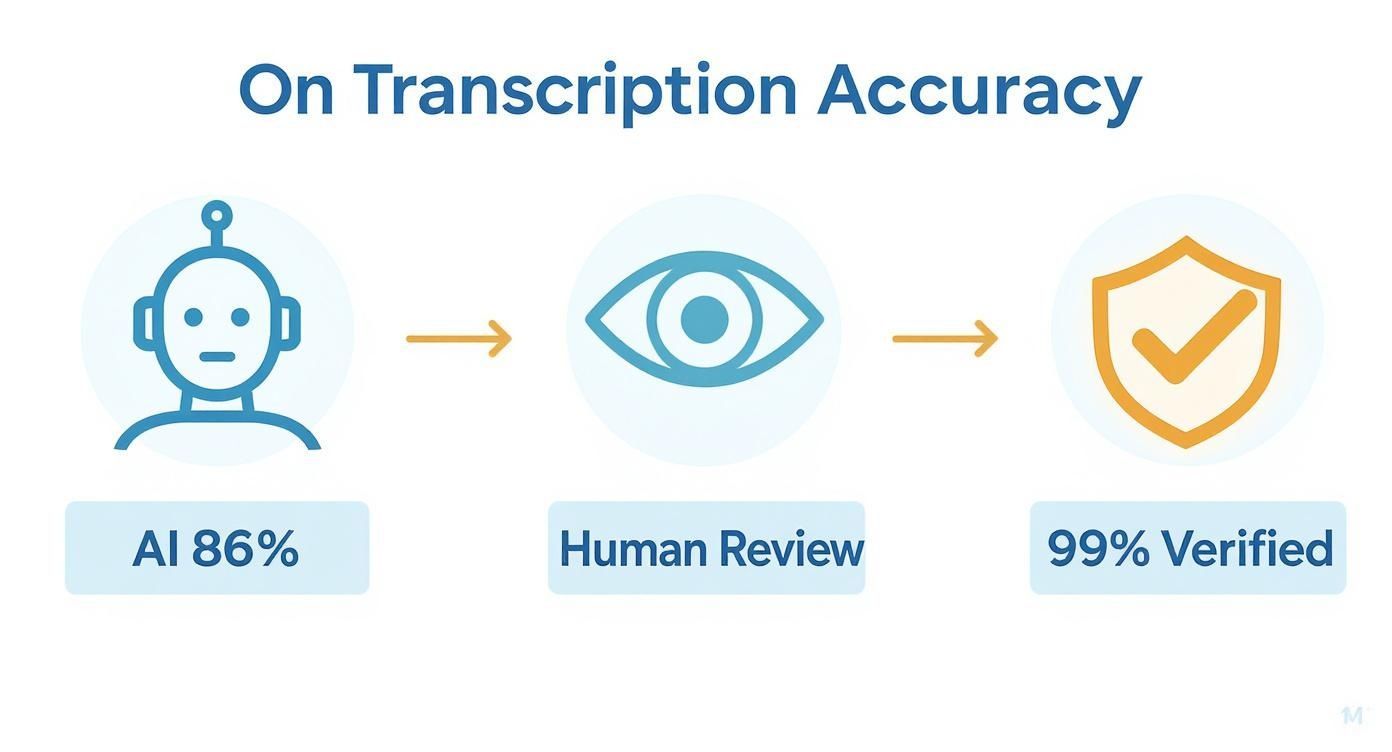
Como você pode ver, o processo começa com um bom rascunho de IA e, em seguida, depende da revisão humana para atingir a marca de 99% de precisão — o padrão necessário para pesquisas acadêmicas e profissionais rigorosas.
IA Híbrida + Revisão Humana é o Novo Padrão de Pesquisa
A maioria das universidades e conselhos de ética agora recomenda uma abordagem híbrida: IA para velocidade, revisão humana para precisão. Isso garante produtividade e integridade total dos dados na pesquisa qualitativa moderna.
Adaptando Fluxos de Trabalho para Diferentes Cenários de Pesquisa
Claro, seu fluxo de trabalho mudará com base em seu método de pesquisa. Uma entrevista individual é um mundo à parte de um grupo focal caótico.
- Para Entrevistas em Profundidade: Aqui, o foco está nos detalhes ricos e nuances de uma pessoa. Carimbos de data/hora em nível de palavra são uma grande ajuda para analisar pausas e hesitações. Uma exportação limpa significa que você pode codificar rapidamente todo o documento para o arquivo de caso desse participante no NVivo em segundos.
- Para Grupos Focais: A identificação do locutor é tudo. Antes mesmo de pensar em exportar, sua principal prioridade é garantir que cada locutor esteja corretamente e consistentemente rotulado. Esse trabalho preparatório permite que seu QDAS trate cada participante como uma fonte única, o que é essencial para comparar perspectivas dentro do grupo.
- Para Notas de Campo Etnográficas: Se você estiver ditando notas em movimento, uma transcrição sólida de IA pode transformar seus pensamentos falados em texto pesquisável quase instantaneamente. A partir daí, você pode importar o texto para seu software de análise e codificá-lo junto com seus outros dados.
Assim que seu texto estiver pronto, você precisará de estratégias eficazes para analisar dados de entrevistas para extrair essas percepções valiosas. Para um mergulho mais profundo nessa parte do processo, confira nosso guia sobre como analisar dados de entrevistas.
Conectando-se com Software de Análise de Dados Qualitativos
Não somos os únicos focados em melhor integração. O mercado global de software de análise de dados qualitativos foi avaliado em US$ 1,56 bilhão em 2024 e espera-se que atinja US$ 2,76 bilhões até 2033. Esse crescimento se deve à crescente demanda por ferramentas que funcionem juntas de forma integrada. Leia a pesquisa completa sobre o mercado de QDAS.
Construir um fluxo de trabalho de pesquisa eficiente significa ver a transcrição não como um produto final, mas como uma etapa preparatória crucial. Ao escolher uma ferramenta com forte integração em mente, você está investindo em um processo de pesquisa mais inteligente, rápido e rigoroso.
Transcrição por Método de Pesquisa
Entrevistas em Profundidade
Melhor suportado por carimbos de data/hora em nível de palavra e rotulagem limpa de falantes para análise emocional e narrativa.
Grupos Focais
Requer detecção de múltiplos falantes de alta precisão para comparar pontos de vista e dinâmicas de interação.
Estudos Etnográficos
A transcrição de notas de voz permite a transformação rápida de observações de campo em dados codificados.
Pesquisa de Políticas e Jurídica
Exige precisão extrema, armazenamento de dados de longo prazo e protocolos de segurança rigorosos.
Protegendo Dados e Confidencialidade dos Participantes
Quando seu trabalho envolve sujeitos humanos, a segurança dos dados não é apenas uma caixa de seleção técnica — é um pilar ético. Cada arquivo de áudio que você carrega contém informações sensíveis e pessoais que seus participantes confiaram a você. Colocar esses arquivos em uma ferramenta online não verificada pode facilmente violar os protocolos do Comitê de Ética em Pesquisa (CEP), quebrar acordos legais e, o mais importante, trair essa confiança.
A responsabilidade pela proteção desses dados recai inteiramente sobre você, como pesquisador. A conveniência de um serviço rápido e gratuito geralmente vem com um preço alto e oculto, geralmente enterrado profundamente em termos de serviço convolutos. Fazer parceria com um provedor de transcrição que adere aos mais altos padrões de ética em pesquisa é completamente inegociável.
Avaliando Políticas de Privacidade e Medidas de Segurança
Antes de carregar um único byte de dados, você precisa se sentir confortável em ler as políticas de privacidade. Sim, elas podem ser densas, mas contêm as pistas cruciais sobre como uma empresa realmente lidará com seus dados de pesquisa. Não apenas escaneie — procure ativamente respostas para algumas perguntas-chave.
É isso que você deve procurar:
- Criptografia de Ponta a Ponta: Este é o padrão mínimo. Garante que seus dados sejam embaralhados e ilegíveis desde o momento em que saem do seu computador até o momento em que são processados. Procure termos como criptografia AES-256, um padrão ouro para proteger dados.
- Protocolos Claros de Manuseio de Dados: A política deve declarar explicitamente quem pode acessar seus dados e por quê. Linguagem vaga é um grande sinal de alerta.
- Conformidade com Regulamentos: Dependendo de onde você e seus participantes estão, você precisará ver compromissos com padrões como o GDPR para dados europeus ou o HIPAA para informações relacionadas à saúde.
Seu princípio orientador aqui é simples: se um serviço não consegue explicar claramente como protege seus dados, presuma que não o faz. A confiança é construída sobre a transparência, não sobre a esperança.
Para um exemplo sólido do que isso parece na prática, você pode revisar documentação como a Política de Privacidade da Parakeet-AI. Este é o tipo de documento que você precisa para se sentir confiante no compromisso de segurança de uma plataforma.
Os Riscos Ocultos do Treinamento de Modelos de IA
Uma das maiores armadilhas éticas no uso de software de transcrição moderno para pesquisa qualitativa é como os modelos de IA são treinados. Muitos serviços, especialmente os gratuitos, inserem uma cláusula em seus termos que lhes dá o direito de usar seu áudio e transcrições para melhorar sua própria IA.
Isso é um impedimento para pesquisas confidenciais. Significa que as histórias, opiniões e dados pessoais de seus participantes podem se tornar parte de um conjunto de dados permanente e proprietário, usado para fins comerciais sobre os quais você não tem controle algum.
O Treinamento de IA em Dados de Pesquisa é uma Violação Ética
Se o seu provedor de transcrição usar dados de participantes para treinamento de IA, você poderá estar violando inadvertidamente acordos de consentimento, condições de IRB e leis internacionais de privacidade. Sempre exija uma política rigorosa de zero treinamento.
Você deve encontrar um serviço com uma política explícita de zero treinamento. Esta é uma promessa firme de que seus dados serão usados apenas para gerar sua transcrição — nada mais. Por exemplo, você pode ver como uma postura rigorosa de não treinamento protege seus dados nesta política de privacidade: https://transcript.lol/legal/privacy. Essa garantia é o padrão ouro absoluto para qualquer pesquisa acadêmica ou profissional séria.
Outro fator crucial é a residência de dados — a localização física e geográfica onde seus dados são armazenados. Muitas bolsas e requisitos de IRB determinam que os dados devem permanecer dentro de um país ou região específica (como a União Europeia). Um serviço confiável será transparente sobre onde seus servidores estão, permitindo que você cumpra suas obrigações institucionais e de financiamento sem qualquer adivinhação.
Seu Primeiro Projeto com Transcript.LOL
Vamos ser práticos. A teoria é ótima, mas a melhor maneira de ver como um bom software de transcrição para pesquisa qualitativa realmente muda as coisas é simplesmente mergulhar. Vou guiá-lo por um projeto de pesquisa do mundo real do início ao fim usando o Transcript.LOL para mostrar como ele resolve as dores de cabeça usuais.
https://www.youtube.com/embed/eSOssNY9v6A
Imagine o seguinte: você acabou de concluir um grupo focal de 45 minutos. Você tem três participantes e um moderador. O arquivo de áudio está na sua área de trabalho e você precisa colocá-lo no NVivo para codificação — sem perder uma semana em transcrição manual.
De Áudio Bruto a um Rascunho de Trabalho
Primeiro, você precisa colocar seu arquivo de áudio no sistema. Com o Transcript.LOL, você pode simplesmente arrastar e soltar o arquivo do seu computador ou até mesmo puxá-lo do armazenamento em nuvem como o Google Drive. Ele entra em ação imediatamente, alimentado pelo motor Whisper da OpenAI.
Em apenas alguns minutos, você terá um primeiro rascunho completo. A IA descobre automaticamente quem está falando e atribui rótulos como "Palestrante 1", "Palestrante 2" e assim por diante. Este não é o produto final, mas é uma base sólida para construir.
A interface é limpa e simples. Ela coloca o texto bem ao lado de um reprodutor de áudio, para que você possa ouvir e ler ao mesmo tempo.
Esta visualização é o seu centro de comando. Você pode ver as falas claras dos palestrantes e ter todas as ferramentas de edição de que precisa ali mesmo, tornando o processo de revisão muito mais rápido.
Refinando a Transcrição para Análise
É aqui que entra sua expertise como pesquisador. A IA é uma assistente fantástica, mas carece de contexto. Seu primeiro trabalho é dar significado a esses rótulos genéricos de palestrantes. Basta clicar em "Palestrante 1" e renomeá-lo para "Moderador", alterar "Palestrante 2" para "Participante A" e assim por diante. A melhor parte? A alteração se aplica a todos os lugares automaticamente. Chega de pesadelos de encontrar e substituir.
Em seguida, vêm os jargões e a terminologia. Vamos supor que seu grupo focal estivesse discutindo "fenomenologia hermenêutica", mas a IA ouviu "fenômeno hermético". Correção fácil. Você clica na frase e digita o termo correto.
Uma das funcionalidades mais poderosas para pesquisadores é a construção de um vocabulário personalizado. Se você disser ao software para sempre reconhecer "fenomenologia" ou o nome do seu pesquisador principal, você verá a precisão melhorar em todas as transcrições futuras para esse projeto. É um pequeno passo que economiza muito tempo de edição no futuro.
Esta é também a sua chance de fazer uma verificação final de qualidade. Você pode mesclar parágrafos se o pensamento de alguém foi dividido, corrigir qualquer pontuação errada e apenas garantir que a transcrição reflita verdadeiramente o fluxo da conversa original. É um passo rápido, mas absolutamente essencial.
Preparando a Exportação para o seu QDAS
Assim que você estiver satisfeito com a transcrição, é hora de exportá-la para o seu software de análise, como ATLAS.ti ou Dedoose. É aqui que as coisas costumam ficar confusas com outras ferramentas, mas uma plataforma criada para pesquisadores torna isso indolor.
Em vez de apenas cuspir um arquivo .txt genérico, você obtém opções personalizadas para análise de dados qualitativos.
Lista de Verificação de Exportação para NVivo ou ATLAS.ti:
- Selecione o formato .docx. Esta é a opção mais confiável para uma importação limpa, preservando seu texto sem formatação estranha que possa atrapalhar seu QDAS.
- Certifique-se de que os Rótulos de Palestrante estejam Ativados. Sua exportação precisa incluir os nomes corrigidos ("Moderador", "Participante A") para que seu software possa reconhecê-los como pessoas diferentes.
- Inclua Carimbos de Data/Hora. Você pode optar por adicionar carimbos de data/hora em intervalos definidos ou apenas no início de cada parágrafo. É isso que vincula o texto em seu software de análise ao momento exato no áudio.
Com essas configurações ajustadas, basta baixar o arquivo. Quando você importar este documento para o NVivo, ele reconhecerá automaticamente os diferentes palestrantes e sincronizará os carimbos de data/hora. Assim, você terá uma transcrição limpa e perfeitamente formatada pronta para codificação.
Você passou de um arquivo de áudio bruto para análise profunda em uma fração do tempo que levaria manualmente, tudo sem comprometer a precisão que sua pesquisa exige.
Tem Perguntas? Temos Respostas.
Quando você está imerso em pesquisa qualitativa, a transcrição pode parecer um campo minado de questões práticas e éticas. Entendemos. Você precisa de ferramentas que não sejam apenas precisas, mas que também se encaixem no seu fluxo de trabalho e respeitem seus dados. Vamos abordar algumas das perguntas mais comuns que ouvimos de pesquisadores.
Como Lidar com Gravações de Áudio Ruins?
Ah, a temida gravação de baixa qualidade. É provavelmente a maior dor de cabeça para qualquer transcrição, seja usando IA ou um humano. A melhor atitude é sempre a prevenção — sério, um microfone externo lhe dará resultados dramaticamente melhores do que o microfone embutido do seu laptop.
Mas às vezes, você está preso com o que tem. Nem tudo está perdido.
Antes mesmo de pensar em fazer o upload, tente limpá-lo com uma ferramenta gratuita como o Audacity. Seu filtro de redução de ruído pode fazer maravilhas com o zumbido de fundo, e a ferramenta de amplificação pode aumentar vozes muito baixas. Você ficaria surpreso com o quanto alguns ajustes simples podem ajudar.
Se o áudio for absolutamente crítico, mas ainda assim uma bagunça, é aqui que um transcritor humano profissional realmente ganha seu sustento. Eles são treinados para decifrar fala confusa e muitas vezes podem salvar insights importantes que um algoritmo simplesmente marcaria como [ininteligível].
Este Software Pode Lidar com Diferentes Idiomas e Sotaques?
A maioria dos serviços de transcrição de ponta lida com uma tonelada de idiomas, mas o desempenho pode ser uma mistura. Sempre verifique a lista de idiomas suportados do provedor, mas, mais importante, execute um teste rápido com um arquivo de áudio curto no seu idioma de destino para ver a precisão no mundo real por si mesmo.
Sotaques são um jogo totalmente diferente. Eles são um grande desafio para sistemas automatizados.
Embora muitas plataformas estejam melhorando com o inglês americano ou britânico padrão, dialetos regionais pesados ou sotaques não nativos podem fazer a precisão despencar.
Se sua pesquisa depende da análise de dialeto, sotaque ou nuances linguísticas, um transcritor humano que se especializa nesse dialeto específico é quase sempre a melhor escolha. Um algoritmo pode facilmente perder os detalhes sutis, mas significativos, que você está procurando.
Qual é a Melhor Maneira de Formatar Transcrições para Codificação?
O formato perfeito realmente se resume ao seu plano de análise e a qual Software de Análise de Dados Qualitativos (QDAS) você está usando, como NVivo ou ATLAS.ti. Para a maioria dos projetos, no entanto, o mais simples é o melhor.
Aqui estão algumas melhores práticas para garantir que suas transcrições funcionem bem com seu QDAS:
- Rótulos de Palestrante Limpos: Consistência é tudo. Use os mesmos rótulos — como "Entrevistador" e "Participante 1" — em todos os arquivos.
- Carimbos de Data/Hora Frequentes: Adicionar carimbos de data/hora em intervalos regulares (digamos, a cada 30-60 segundos) ou a cada mudança de palestrante é uma salvação. Isso permite que você clique em um trecho de texto e pule instantaneamente para aquele momento exato no áudio dentro do seu software de análise.
- Formatos de Exportação Simples: Atenha-se ao básico. Exportar como um arquivo .docx ou .txt garante uma importação limpa sem problemas de formatação estranhos que atrapalhem seu software.
Essa capacidade de sincronizar texto e áudio é ouro puro quando você precisa verificar o tom de um participante, verificar o contexto ou descobrir o que foi dito em uma frase murmurada durante o processo de codificação.
Vale a Pena Pagar por Software de Transcrição?
A tentação do "grátis" é forte, mas para qualquer projeto qualitativo sério, um serviço pago é um investimento que compensa. Ferramentas gratuitas muitas vezes têm custos ocultos que podem comprometer seriamente sua pesquisa.
É o que você geralmente encontra com serviços gratuitos:
- Menor Precisão: Eles usam modelos de IA mais antigos e menos sofisticados, o que significa mais erros e mais tempo gasto em correções manuais.
- Recursos Limitados: Você provavelmente não encontrará identificação de palestrante, limites minúsculos de tamanho de arquivo e opções de exportação básicas.
- Grandes Riscos de Privacidade: Este é o grande. Muitas ferramentas gratuitas se financiam usando seus dados confidenciais para treinar sua IA. Para qualquer pesquisa envolvendo participantes humanos, isso é uma violação ética massiva.
Um serviço pago respeitável oferece maior precisão e recursos indispensáveis, mas também fornece segurança sólida e uma política clara de privacidade de dados. Ele economiza uma quantidade enorme de tempo, protege a integridade de sua pesquisa e o ajuda a cumprir suas obrigações éticas.
Pronto para deixar seus dados prontos para análise em minutos, não em dias? Transcript.LOL é feito para pesquisadores. Oferecemos transcrição rápida, precisa e segura com recursos como identificação de palestrante, vocabulário personalizado e exportações flexíveis. Mais importante, temos uma política rigorosa de não treinamento para proteger a confidencialidade de seus participantes.