
Demystifying Speech to Text Accuracy
A complete guide to speech to text accuracy. Learn how it's measured, the factors that impact it, and actionable strategies to get clearer transcriptions.
Kate
October 4, 2023
We’ve all seen a comically bad automated caption that misses the mark entirely. But when the stakes are high, speech to text accuracy is non-negotiable. It’s the make-or-break measure of how well a machine turns spoken words into written text, and even tiny errors can create massive problems.
Why High-Stakes Industries Demand Precision
Think about a court reporter capturing every word of legal testimony. A single misinterpreted phrase—like transcribing "he has a known history of violence" as "he has no history of violence"—could completely change a case's outcome. This is a perfect example of why accuracy is more than just a technical score; it's the foundation of trust for critical applications.
The same goes for healthcare, where a transcription mistake in a doctor's notes could lead to the wrong diagnosis or medication. And for businesses trying to understand customer service calls, messy transcripts mean flawed data. You end up making strategic decisions based on a distorted picture of what your customers are actually saying.
The Evolution of Accuracy
Getting to today’s standards has been a long road. Back in 2001, speech recognition hit about 80% accuracy, which was a huge deal at the time. This was built on statistical models from the 1980s that grew vocabularies from just a few hundred words to thousands.
Then, around 2007, things really started to accelerate when Google Voice Search threw its massive dataset—a staggering 230 billion words from user searches—at the problem, dramatically improving its predictive power. You can actually explore the history of these improvements and see just how far the technology has come.
Inaccurate transcriptions create a ripple effect. They don't just cause confusion; they undermine trust in the technology, erode the value of data-driven insights, and can introduce serious compliance risks.
The bottom line is simple: bad accuracy makes voice data useless, or worse, dangerously misleading. Getting the highest possible speech to text accuracy is absolutely essential for any organization relying on voice for:
-
Compliance and Legal Documentation: Capturing every word precisely for legal records, depositions, and regulatory filings.
-
Business Intelligence: Pulling clear, actionable insights from customer feedback, sales calls, and internal meetings without corrupted data.
-
User Experience: Delivering reliable captions, accessible content, and voice commands that actually work, building user confidence instead of frustration.
How We Measure Transcription Accuracy
Before you can improve speech-to-text accuracy, you first have to measure it. How do you actually score how well a machine "listens"?
The industry-wide standard for this is a metric called Word Error Rate (WER). Think of it like a golf score for your transcripts—the lower the number, the better the performance. It gives us a simple, concrete way to judge how closely an AI's transcription matches a perfect, human-verified version.
A perfect transcript scores a 0% WER. Instead of some complex formula, it’s really just a simple count of the mistakes the AI made, divided by the total number of words in the correct transcript.
The Three Types of Transcription Errors
When we calculate WER, we're looking for three specific kinds of mistakes. Each one adds to the error count and pushes that score higher.
-
Substitutions (S): This is when the AI hears one word but writes down another. For example, the speaker says, "Let's meet on Tuesday," but the transcript reads, "Let's meet on Thursday."
-
Deletions (D): This one's simple—the AI just completely misses a word. The audio might say, "Please send the final report," but the transcript only captures, "Please send the report."
-
Insertions (I): The opposite of a deletion. Here, the AI adds a word that was never actually spoken. For instance, "Check the status" gets transcribed as "Check on the status."
To get the final score, you just add up all the substitutions, deletions, and insertions, then divide that total by the number of words in the original, correct transcript.
The formula looks like this: WER = (S + D + I) / N
Where S = Substitutions, D = Deletions, I = Insertions, and N = Total Number of Words in the correct transcript.
Let's walk through a quick example to see this in action.
Calculating Word Error Rate (WER) Example
This table breaks down how errors are counted when comparing the original spoken words to what the AI transcribed.
Error Type | Original Phrase | Transcribed Text | Error Count |
|---|---|---|---|
Deletion | "Send me the invoice" | "Send me invoice" | 1 |
Insertion | "Check the status" | "Check on the status" | 1 |
Substitution | "Meet on Tuesday" | "Meet on Thursday" | 1 |
Total Errors | 3 |
In this simple case, with a total of 10 original words and 3 identified errors, the WER would be 30%. This single percentage gives us a clear benchmark for performance.
The image below shows just how much different real-world factors can cause these errors to stack up, sending the WER climbing.
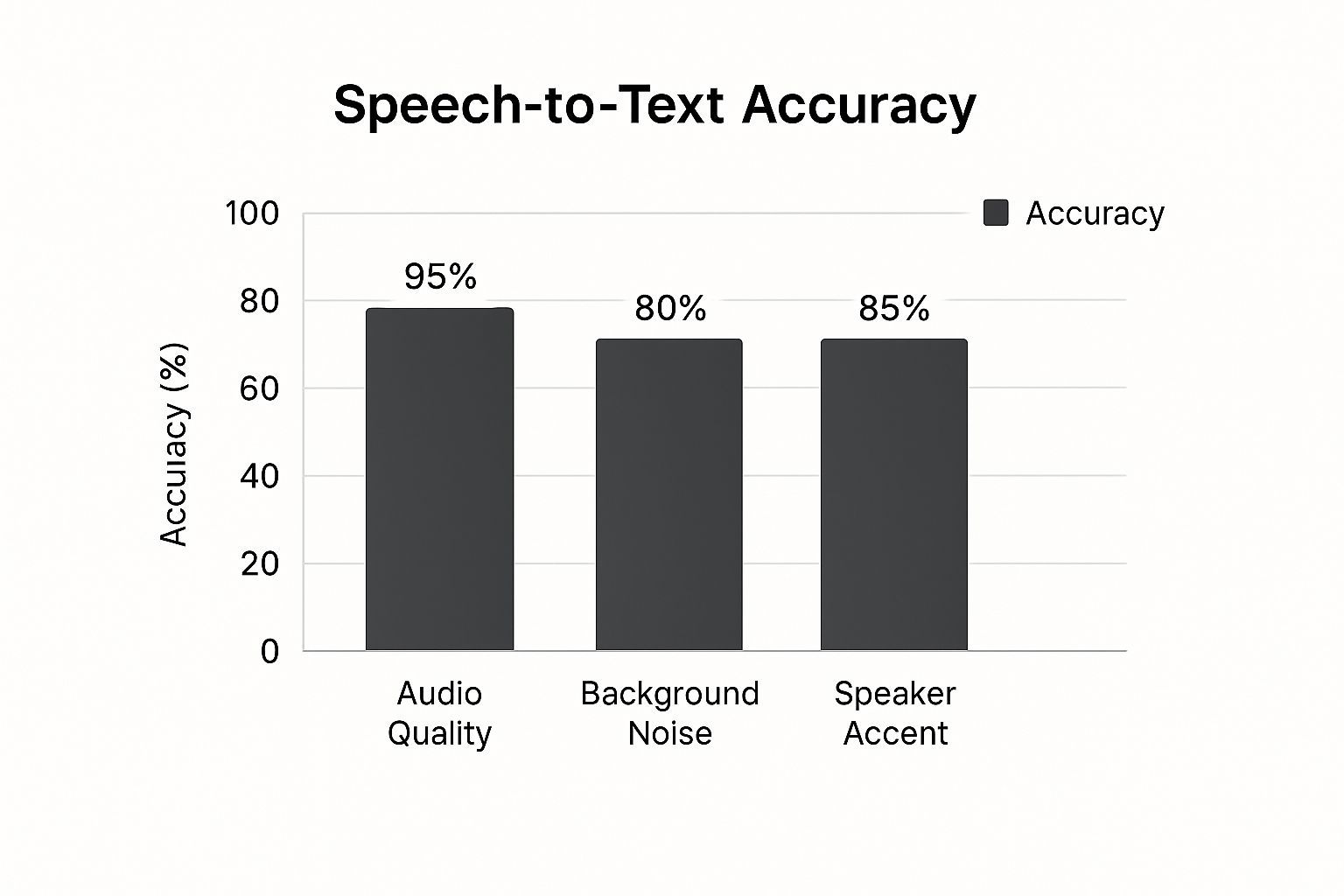
As you can see, nothing matters more than clean, high-quality audio. Things like heavy background noise, multiple people speaking at once, or strong accents can quickly degrade accuracy. Understanding what causes these errors is the first step toward preventing them.
The Real-World Factors That Impact Accuracy
If you've ever yelled "Hey, Siri!" only to get a baffling response, you already know that speech to text accuracy isn’t a sure thing. One minute, your voice assistant nails a complex command. The next, it stumbles over a simple name.
This isn't just random chance. It’s the result of real-world conditions getting in the way, challenging even the smartest AI models.
Think of it this way: an AI transcription tool is like a person trying to follow a conversation. In a quiet library, they'll catch every word. But put that same person in a noisy cafe with background chatter and clanging dishes, and they're going to miss things. It's the same exact principle for an AI.
The pristine, lab-quality audio used for testing is a world away from the messy, unpredictable audio of our daily lives. Getting a handle on these influencing factors is the first step to figuring out why your accuracy might be off and setting realistic expectations for your transcripts.
The Quality of Your Audio Source
This is the big one. The single most important factor for accurate transcription is the quality of the audio you feed the machine. It’s the classic "garbage in, garbage out" scenario. A clean, crisp recording gives the AI clear data to work with, while poor audio forces it to make educated guesses.
Several things feed into overall audio quality:
-
Microphone Quality: That built-in mic on your laptop? From across the room, it’s capturing a thin, echoey sound. A dedicated external mic placed close to the speaker, on the other hand, delivers a rich, clear signal that makes a world of difference.
-
Acoustic Environment: Recording in a room with lots of hard surfaces—think glass walls and tile floors—creates echo and reverb that muddies the sound. This confuses the AI. Soft furnishings like carpets, curtains, and even bookshelves are your friends here; they absorb those sound waves.
-
Audio Compression: When you heavily compress an audio file, you strip out subtle phonetic details to make the file smaller. This loss of information makes it much harder for the AI to tell the difference between similar-sounding words like "can" and "can't."
Navigating Noisy Environments and Speaker Differences
Beyond the technical specs of your recording, the context of the speech itself plays a massive role. Background noise is public enemy number one. Studies have shown again and again that even moderate noise can seriously tank your accuracy rate.
Just imagine trying to transcribe a call from a bustling customer support center. The AI has to pick out one person's voice from a sea of other agents talking, phones ringing, and keyboards clacking away. It's a huge challenge. That’s why isolating the main speaker's audio is so crucial for getting usable transcripts.
One study on how well different AI models handle background noise found that a leading model produced 73% fewer false outputs from noise compared to a competitor. This really drives home how vital a model's noise-handling tech is for real-world accuracy.
But it’s not just about noise. A whole host of speaker-related factors come into play:
-
Accents and Dialects: Most AI models are trained on massive datasets, but they can still have a "default" accent. A thick regional accent introduces phonetic quirks the AI might not have been trained to recognize.
-
Multiple Speakers: This is a tough one. When people talk over each other, their voices literally blend together into a single audio wave. Trying to untangle who said what is one of the hardest problems in transcription.
-
Pacing and Diction: Fast-talkers and mumblers are just as hard for an AI to understand as they are for us. Clear diction is key.
-
Specialized Terminology: An AI won't magically know your company's internal acronyms or complex industry jargon. It only knows what it's been trained on. This is where features like custom vocabularies become an absolute game-changer.
Comparing AI Transcription with Human Experts
When it’s time to transcribe audio, you’re faced with a big decision: do you go with a sophisticated AI or a seasoned human professional? The real answer isn’t about which one is flat-out “better,” but which one is the right tool for the job you have in front of you.
It’s the classic matchup: automated speed versus human insight.
AI transcription is your best friend when speed, cost, and scale are what matter most. Think about churning through hours of internal meeting recordings or getting a quick, rough draft of a podcast episode. For jobs like these, automated systems are in a league of their own. They can chew through huge amounts of audio in minutes, not days, and they do it for a tiny fraction of what a human service would charge. This makes AI a no-brainer for high-volume, low-stakes content where "good enough" is genuinely all you need.
But the conversation about accuracy gets a lot more serious when perfection is the goal. For high-stakes work—think legal depositions, medical dictation, or in-depth market research interviews—human experts are still the undisputed champions.
Where Humans Still Hold the Edge
A professional human transcriber does way more than just type out words. They get the context, the nuance, and the intent behind what’s being said. That human touch is essential for navigating the tricky situations that consistently trip up AI.
-
Handling Ambiguity: Humans can untangle overlapping conversations, figure out who is speaking, and catch the sarcasm or subtle shifts in tone that an algorithm just doesn't compute.
-
Navigating Poor Audio: AI throws in the towel when faced with heavy background noise or thick accents. A human, on the other hand, can often listen past the static and pull out the intended words.
-
Ensuring Verbatim Accuracy: In legal and medical contexts, every single word, pause, and "um" can be critically important. Humans deliver a true verbatim transcript that machines just can't replicate with perfect fidelity.
This isn't just a feeling; the numbers back it up. While some AI tools boast accuracy around 86% in a perfect, quiet lab, their real-world performance is closer to 61.92%. In sharp contrast, a professional human transcriber consistently hits nearly 99% accuracy. That’s a massive difference when the details really count.
To help you visualize the trade-offs, here’s a quick breakdown of how AI and human transcription stack up against each other.
AI vs Human Transcription A Head-to-Head Comparison
This table lays out the key differences to help you decide which service fits your specific project needs.
Feature | AI Transcription | Human Transcription |
|---|---|---|
Speed | Extremely fast, often delivering transcripts in minutes. | Slower, typically taking hours or days depending on audio length. |
Cost | Very low, usually priced per minute or via a subscription. | Significantly higher, priced per audio minute. |
Accuracy | Variable, ranging from 60-90%. Struggles with noise, accents, and jargon. | Very high, consistently around 99%. |
Contextual Awareness | Lacks understanding of nuance, sarcasm, or speaker intent. | Excellent at interpreting context, emotion, and identifying different speakers. |
Handling Poor Audio | Struggles significantly with background noise, crosstalk, and low quality. | Far more capable of deciphering challenging audio. |
Best For | Internal meetings, rough drafts, searchable archives, high-volume content. | Legal proceedings, medical records, market research, publishing, and public content. |
Ultimately, the best choice depends on what you're willing to trade: speed and cost for near-perfect accuracy and nuance.
Choosing the Right Transcription Method
Your decision really boils down to your project's needs and how much room you have for error. Need a quick, searchable text version of a lecture? AI is your answer. Need a flawless record of a sworn testimony for a court case? A human expert is the only way to go. To really appreciate the current state of AI's language abilities, it’s interesting to look at analyses like Google Translate's performance in the Turing Test.
In many cases, the smartest approach is a hybrid one. A lot of modern workflows now start with a fast, AI-generated transcript to get a first draft on the page. Then, a human editor comes in to clean up the errors, add the necessary nuance, and make sure the final version is polished to perfection.
Actionable Steps to Improve Your Transcription Results
Instead of just resigning yourself to flawed transcripts, you can take control and seriously boost your speech-to-text accuracy. Optimizing your recording process and giving the AI a little help upfront can dramatically improve your results.
A few small tweaks at the start will save you from hours of painful editing later on.
Think of it like giving someone directions. You could mumble from across a noisy room and hope for the best, or you could speak clearly and hand them a map. The second approach is always going to work better, and the same logic applies to transcription AI.
Control Your Recording Environment
The easiest wins for transcription accuracy start with your source audio. Before you even think about hitting “record,” take a moment to set yourself up for success. This has less to do with expensive studio gear and more to do with a few smart, simple choices.
First, kill the background noise. A quiet room is non-negotiable. That means turning off fans, silencing your phone, and closing the window. Even a quiet hum that you might not notice can be enough to throw off the AI and introduce errors.
Next, get closer to your microphone. Whether you're using a professional USB mic or just the one on your phone, shrinking the distance between your mouth and the mic is the single most effective thing you can do for audio clarity. This makes your voice the star of the show, not the room’s echo.
An AI model's accuracy is only as good as the data it receives. By providing clean, clear audio, you're not just hoping for a better transcript—you're actively guiding the AI toward the correct output from the very beginning.
To get the most out of your audio, nail these key areas:
-
Invest in a Decent Microphone: You'd be amazed at the quality jump you get from an external USB microphone compared to any built-in laptop or webcam mic.
-
Reduce Room Echo: Record in a space with soft surfaces. Carpets, curtains, and even a closet full of clothes work wonders for absorbing sound and preventing that hollow, reverberating effect.
-
Speak Clearly and Consistently: Try to avoid talking too fast or mumbling. A steady, natural pace and clear diction give the AI a much better shot at getting things right.
Enhance AI Transcription Accuracy
After ensuring your audio is clear, you can further boost transcription accuracy by providing the AI with relevant context. While modern transcription tools are quite advanced, they might not be familiar with your specific acronyms, brand names, or technical jargon. This is where your input becomes valuable.
Many platforms like Transcript LOL offer the option to create a custom vocabulary. By supplying the AI with a list of unique or less common words it might encounter, you improve its ability to recognize them accurately. Including terms like "SaaS," "ROI," or your company's project names helps the model identify them correctly every time.
Accurate Transcriptions
State-of-the-art AI
Powered by OpenAI's Whisper for industry-leading accuracy. Support for custom vocabularies, up to 10 hours long files, and ultra fast results.

Speaker detection
Automatically identify different speakers in your recordings and label them with their names.

Editing tools
Edit transcripts with powerful tools including find & replace, speaker assignment, rich text formats, and highlighting.
Another valuable feature is speaker diarization (also known as speaker labeling). This identifies who is speaking and when, making it incredibly useful for sorting out dialogue in meetings or interviews. The result is a clear, readable transcript where each line is correctly attributed to the speaker. This feature is essential for repurposing interviews or for applications where speaker clarity is necessary.
To maximize your results, consider exploring transcription software that includes these advanced features. This proactive approach ensures you generate trustworthy transcripts and creates a seamless workflow for content creation. Best meeting transcription software will guide you to tools that support these enhancements.
The Future of Voice Recognition Accuracy
The journey of speech-to-text accuracy is nothing short of incredible. Think about it: early systems could barely make out a few words, while today's models can navigate complex, fast-paced conversations with a skill that feels almost human. This leap forward is all thanks to massive datasets and the ever-smarter deep learning models that keep pushing the limits.
Looking back, you can draw a straight line from the 1950s to now, connecting computational power directly to performance. The very first system, a machine named Audrey back in 1952, could recognize single digits from a single speaker with over 90% accuracy—a huge deal at the time. Today, the best commercial systems can hit a ceiling of 95% accuracy under perfect conditions.
But "perfect conditions" is the key phrase. Error rates can still swing wildly, from nearly flawless on a small, predictable vocabulary to a frustrating 45% error rate on a massive, unpredictable one. It just goes to show how many challenges are still left to solve.
Beyond Words to True Comprehension
Looking ahead, the next big hurdle isn't just about chipping away at the Word Error Rate. It’s about teaching machines to achieve genuine understanding—to grasp all the subtle, human layers of communication that have always been just out of reach.
This means a full-on assault on some seriously complex problems, like:
-
Emotional Nuance: Can the AI tell the difference between genuine excitement and biting sarcasm based purely on vocal tone?
-
Contextual Awareness: Does it get the inside joke, the idiom, or the callback to something mentioned ten minutes ago?
-
Real-World Messiness: How well can it handle a dog barking, a siren wailing, or two people accidentally talking over each other?
The real goal is to finally close the gap between simple transcription and true comprehension. The future isn’t just an AI that hears words; it’s an AI that understands the meaning, the intent, and the feeling behind them, just like we do.
This drive for deeper understanding is what will power the next wave of sophisticated tools. For instance, the effectiveness of AI receptionist technology lives and dies by its ability to process spoken requests without a single hiccup. As these models get better at figuring out what we really mean, these tools will become completely seamless.
Common Questions About Transcription Accuracy
When you start digging into speech-to-text, you'll inevitably run into a few practical questions. It doesn't matter if you're using it for the first time or you've been transcribing for years—understanding the little details helps you know what to expect and, more importantly, how to get better results.
Let's clear up some of the most common questions we hear.
What Is a Good Speech to Text Accuracy Score?
This is the big one, and the honest answer is always: it depends on what you need it for. There’s no single number that defines "good" accuracy. It's all about what works for your specific job.
-
For your own notes or a rough first draft: An accuracy of 80-85% is often more than enough. You'll get the main points and key takeaways without needing perfection.
-
For public content like blog posts or video captions: Here, you'll want to aim for 95% or higher. It'll still need a human touch-up, but the heavy lifting is done.
-
For legal or medical transcripts: The gold standard is 99% or more. In these fields, a single mistake can have huge implications, so accuracy is non-negotiable.
A "good" score isn't about hitting a magic number. It's about whether the transcript does its job without forcing you into hours of painful editing.
Why Do Accuracy Scores Vary So Much?
Ever upload two different audio files to the same tool and get completely different accuracy scores? That's not a bug; it's just how this technology works.
An AI's performance is a direct reflection of the audio quality you feed it.
A crystal-clear podcast with one speaker using a quality mic might cruise past 95% accuracy. But take a noisy conference call with people talking over each other and dropping industry jargon, and you might be lucky to hit 75%. The AI is only as good as the source material.
If you've got more questions, our full transcription service FAQs page goes into even more detail.
Ready to turn your audio and video into clear, actionable text? Transcript.LOL provides fast, highly accurate AI-powered transcriptions with the features you need to get the job done right. Get started for free today at https://transcript.lol.