
M4A to Text Your Guide to Flawless Audio Transcription
Unlock the best ways to handle M4A to text conversion. This guide covers AI tools, real-world tips, and actionable methods for fast, accurate transcripts.
Kate
June 18, 2025
Já se viu com uma gravação de uma longa palestra, uma entrevista importante ou uma sessão de brainstorming no seu telemóvel? É provável que seja um ficheiro M4A. Este formato é fantástico para capturar áudio de alta qualidade sem consumir todo o seu espaço de armazenamento, especialmente em dispositivos Apple. Mas o áudio em si? Está bloqueado. Não o pode pesquisar, não o pode percorrer rapidamente e, definitivamente, não pode copiar e colar uma citação importante dele.
É aí que a conversão de M4A para texto muda tudo.
Em vez de se prender ao teclado durante horas, a digitar manualmente cada palavra — um trabalho tedioso que implora por erros — pode obter uma transcrição completa e precisa em minutos. Para um estudante, isto significa que uma palestra de duas horas se torna notas de estudo pesquisáveis. Para um criador de conteúdo, um único webinar pode ser transformado numa dúzia de publicações nas redes sociais e num blog detalhado.
O processo é surpreendentemente simples. Basta carregar o seu ficheiro de áudio para um serviço com inteligência artificial, e ele entrega uma transcrição editável. Ferramentas como o Transcript.LOL transformaram o que costumava ser um serviço profissional num fluxo de trabalho simples de arrastar e soltar.
IA de última geração
Alimentado pelo Whisper da OpenAI para precisão líder na indústria. Suporte para vocabulários personalizados, arquivos de até 10 horas e resultados ultra rápidos.

Importar de múltiplas fontes
Importe arquivos de áudio e vídeo de várias fontes, incluindo upload direto, Google Drive, Dropbox, URLs, Zoom e mais.

Detecção de falantes
Identifique automaticamente diferentes falantes nas suas gravações e rotule-os com seus nomes.
Why This Is a Game-Changer for Productivity
The most immediate benefit is the sheer amount of time you get back. A task that would have eaten up your entire afternoon is now done in the time it takes to brew a pot of coffee. This isn't just a small convenience; it's a fundamental shift in how we work with audio content.
This efficiency is fueling a massive industry. The global speech-to-text market was valued at USD 3,813.5 million and is expected to soar to USD 8,569.4 million by 2030. Think about it: with over 6.8 billion smartphone users creating audio every day, the demand for turning that audio into something useful is exploding.
Accuracy depends on clear Audio
AI transcription accuracy depends heavily on audio clarity, language selection, and speaker separation. Choosing the right settings before transcription can save significant editing time later.
Aqui está o que essa tecnologia desbloqueia para você:
- Reaproveitamento de Conteúdo: Um único episódio de podcast pode se tornar um post de blog, uma série de tweets e um e-mail promocional.
- Melhor Acessibilidade: Transcrições tornam seu conteúdo de áudio acessível para pessoas surdas ou com deficiência auditiva.
- Análise Profunda de Dados: Pesquisadores e jornalistas podem pesquisar instantaneamente horas de gravações de entrevistas em busca de citações ou palavras-chave específicas.
- Otimização para Mecanismos de Busca (SEO): Adicionar uma transcrição à sua página de podcast ou vídeo oferece aos mecanismos de busca como o Google uma tonelada de texto para rastrear, o que pode aumentar seriamente sua visibilidade.
A verdadeira mágica não é apenas obter palavras de um arquivo de áudio. É sobre transformar uma gravação estática em um ativo dinâmico, pesquisável e reutilizável que trabalha muito mais para você.
E vai além de apenas obter um arquivo de texto simples. Entender como alavancar o poder oculto das legendas para acessibilidade, SEO e engajamento mostra o verdadeiro valor aqui. Você não está apenas documentando o que foi dito; você está tornando seu conteúdo mais descoberto, mais inclusivo e, em última análise, mais impactante.
Um Guia Prático para Transcrição por IA
Ok, vamos da teoria à prática. Como você realmente transforma esse arquivo M4A em texto usando uma plataforma moderna de IA? Usarei uma ferramenta como Transcript.LOL para guiá-lo pelas etapas e configurações essenciais que realmente importam para obter um resultado polido e preciso. Todo o processo foi projetado para ser rápido e, francamente, bastante indolor.
Este fluxograma detalha todo o processo de conversão de M4A para texto em três ações simples.
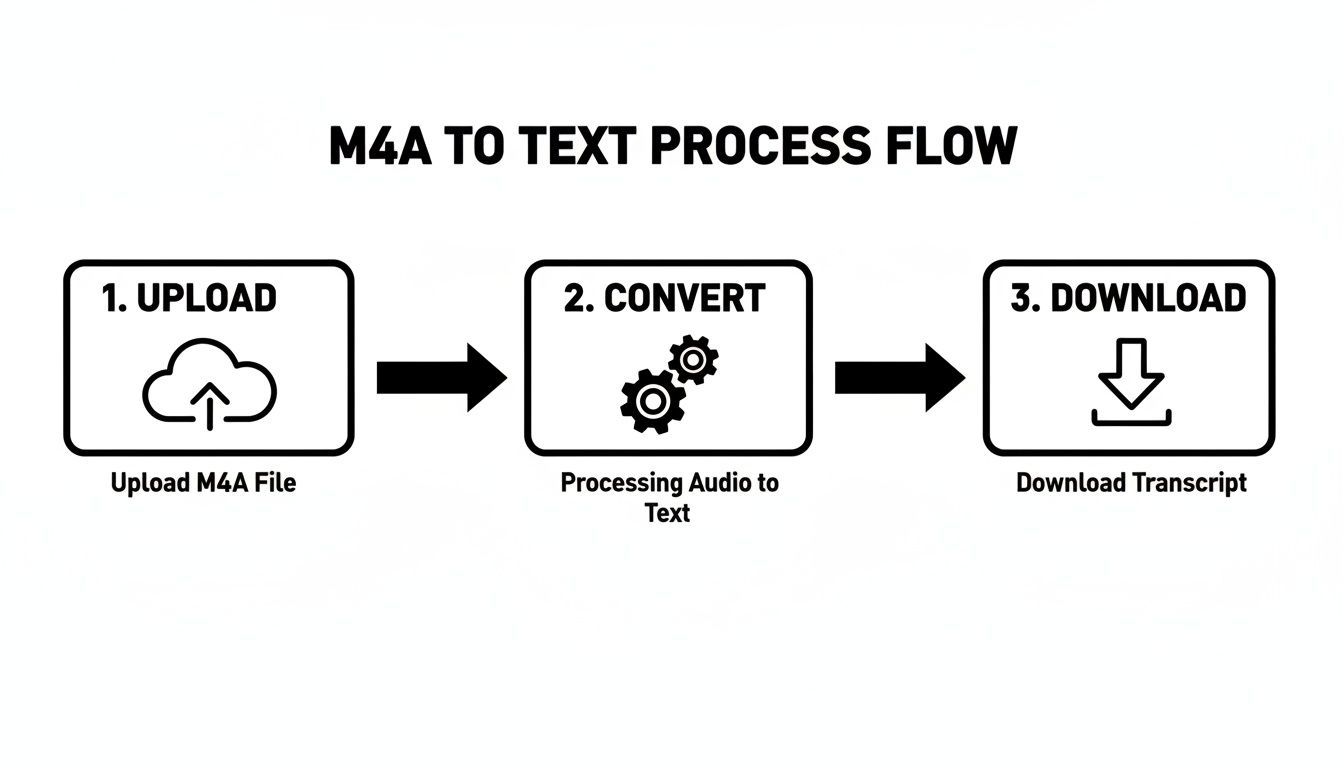
Como você pode ver, a jornada do áudio para um documento utilizável é surpreendentemente direta. O objetivo é fornecer os resultados de que você precisa sem se prender a obstáculos técnicos.
Carregando Seu Arquivo M4A
Primeiro, você precisa colocar seu áudio no sistema. A maioria das plataformas foi além do simples upload de arquivos, oferecendo algumas maneiras diferentes de começar. Você definitivamente não está limitado apenas aos arquivos que estão em seu desktop.
Ferramentas modernas oferecem flexibilidade para quase qualquer situação:
- Upload Direto: O clássico arrastar e soltar. Isso é perfeito para arquivos M4A que você acabou de gravar ou salvou diretamente em seu computador.
- Integração com a Nuvem: Conecte seu Google Drive, Dropbox ou OneDrive. Isso economiza muito tempo para projetos em equipe ou quando você está lidando com arquivos enormes que prefere não baixar e reenviar.
- Importação por URL: Basta colar um link direto para um arquivo de áudio. Acho isso super útil para pegar áudio de um site ou compartilhamento de nuvem público sem ter que salvá-lo localmente primeiro.
Esse tipo de flexibilidade significa que você pode iniciar uma transcrição de praticamente qualquer lugar, seja você esteja em sua mesa ou gerenciando arquivos em tempo real.
Configurando Suas Configurações de Transcrição
Antes de clicar no botão "Transcrever", reserve um momento para ajustar suas configurações. É aqui que você fornece à IA um contexto crucial, o que faz uma grande diferença na precisão do texto final. Muitas pessoas pulam isso e acabam com mais trabalho de limpeza depois.
A configuração mais importante é a seleção de idioma. Seja específico aqui. Se sua gravação for em inglês australiano, escolha essa opção em vez de um "Inglês" genérico. Esses modelos de IA são treinados em sotaques e dialetos regionais, e essa pequena escolha pode ter um impacto surpreendentemente grande.
Em seguida, você vai querer ativar a detecção de falante (às vezes chamada de "diarização"). Isso é inegociável para entrevistas, reuniões ou qualquer M4A com várias pessoas falando. A IA dividirá automaticamente o diálogo e marcará cada parte com "Falante 1", "Falante 2" e assim por diante, fornecendo um script limpo e legível logo de cara.
Editando e Refinando Sua Transcrição
Sejamos realistas: nenhuma IA é perfeita. Uma revisão humana rápida é sempre a etapa final e essencial.
Don't skip Final review
Even the best AI can misinterpret names, numbers, or technical terms. Skipping final proofreading may lead to costly errors, especially in legal, medical, or business transcripts.
The best platforms provide an interactive editor that syncs your M4A audio with the text it generated. This makes polishing the document incredibly fast.
You can click on any word in the transcript and instantly hear the corresponding audio, which makes finding and fixing errors a breeze.
As you go through it, you can correct any misunderstood words, tweak the punctuation, and assign actual names to the "Speaker 1" and "Speaker 2" labels. This is especially important for files recorded on Apple devices, and we actually have a whole guide on how to transcribe Apple Voice Memos with a few extra tips.
Once you’re happy with the edits, it’s time to export. The format you pick really just depends on what you need it for.
Features That Help You Use Transcripts Effectively

Ferramentas de edição
Edite transcrições com ferramentas poderosas incluindo buscar e substituir, atribuição de falantes, formatos de texto rico e destaque.

Exportar em múltiplos formatos
Exporte suas transcrições em múltiplos formatos incluindo TXT, DOCX, PDF, SRT e VTT com opções de formatação personalizáveis.
Resumos e Chatbot
Gere resumos e outros insights da sua transcrição, prompts personalizados reutilizáveis e chatbot para o seu conteúdo.
- .TXT para um arquivo de texto simples e direto.
- .DOCX para um documento polido, pronto para um relatório ou post de blog.
- .SRT ou .VTT para criar legendas de vídeo com carimbos de data/hora precisos.
Uma Olhada em Outros Conversores de M4A para Texto
Embora ferramentas dedicadas ofereçam uma experiência simplificada, o mundo da conversão de M4A para texto é maior do que qualquer plataforma única. Conhecer suas opções significa que você pode escolher um fluxo de trabalho que se encaixe perfeitamente no seu orçamento, nível de conforto técnico e nas necessidades específicas do seu projeto. Afinal, a ferramenta certa para um memorando de voz rápido nem sempre é a melhor para uma deposição legal de alto risco.
O mercado para essas coisas está explodindo. A indústria de transcrição de IA deve saltar de US$ 4,5 bilhões para incríveis US$ 19,2 bilhões até 2034. Esse crescimento vem de todos os lugares — saúde, mídia, educação — todas as indústrias que dependem de transformar palavras faladas em texto útil. Você pode ver mais estatísticas sobre isso em Sonix.ai.
Update
Rapid advances in large language models and speech recognition are pushing transcription accuracy beyond 95%, making AI tools viable even for professional-grade documentation.
O que este boom significa para você? Mais opções. De outros serviços baseados na web e poderosos modelos de código aberto a aplicativos que vivem diretamente no seu telefone.
Explorando Outros Serviços Online
Além de qualquer plataforma única, você encontrará uma tonelada de serviços online que lidam com a conversão de M4A para texto, cada um com seu próprio sabor. Alguns são construídos para transcrever reuniões ao vivo e se integram diretamente ao seu calendário e ferramentas de videoconferência. Outros são voltados para pesquisa acadêmica, com recursos feitos para lidar com entrevistas e grupos focais.
Ao compará-los, não olhe apenas para o preço. Pense nestas coisas:
- Integrações: O serviço funciona bem com as ferramentas que você já usa, como Notion, Slack ou seu CRM?
- Colaboração: Você pode compartilhar uma transcrição com sua equipe, deixar comentários ou definir permissões para um projeto compartilhado?
- Ferramentas Especializadas: Algumas plataformas oferecem extras interessantes, como análise de sentimento, ou permitem que você crie um vocabulário personalizado para jargões da indústria.
Essas pequenas diferenças realmente importam. Um jornalista provavelmente desejará um serviço com marcação de tempo e rótulos de locutor sólidos. Um profissional de marketing, por outro lado, pode obter mais valor de uma ferramenta que pode extrair automaticamente clipes compartilháveis para mídias sociais. Embora este artigo se concentre em M4A, as mesmas ideias se aplicam a outros formatos, como abordamos em nosso guia sobre transcrição de MP3 para texto.
Indo para o Técnico ou para o Celular
Para quem se sente confortável com um pouco mais de configuração, os modelos de código aberto são uma opção incrivelmente poderosa. O Whisper da OpenAI é o grande nome aqui. Você pode executá-lo localmente em seu próprio computador, o que lhe dá total privacidade e controle sobre seus dados.
Executar uma ferramenta como o Whisper requer que você se aprofunde na linha de comando e instale softwares como Python e ffmpeg. Mas, uma vez que você o faça, você obtém transcrição ilimitada sem taxa de assinatura. É uma escolha fantástica para desenvolvedores ou qualquer pessoa que se preocupa seriamente com a privacidade.
Na outra ponta do espectro, você tem soluções móveis. Tanto o iOS quanto o Android possuem aplicativos de memorandos de voz integrados que fazem um trabalho surpreendentemente bom de transcrever áudio. Eles são perfeitos para converter notas curtas ou lembretes quando você está em movimento.
Para mais poder, aplicativos móveis especializados podem adicionar recursos como exportação para diferentes formatos ou sincronização com a nuvem, basicamente transformando seu telefone em um estúdio de transcrição portátil. É a maneira ideal de capturar ideias ou entrevistas em campo sem carregar um laptop.
Como Obter Máxima Precisão de Transcrição
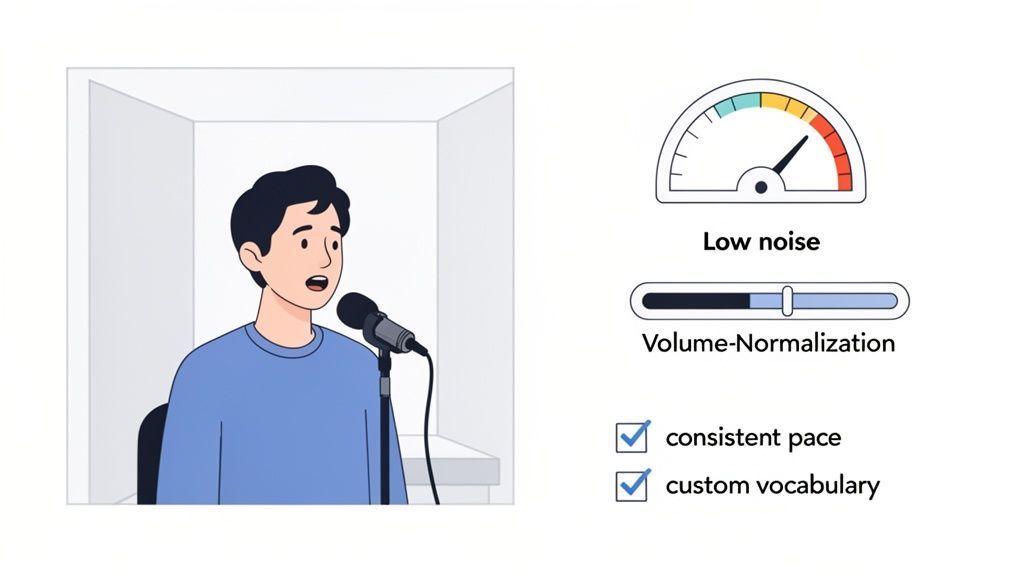
Aqui está uma verdade dura sobre transcrição: a qualidade da sua transcrição final é decidida muito antes de você clicar em "transcrever". Embora a IA de hoje seja incrivelmente poderosa, sua precisão está diretamente ligada à clareza do seu áudio M4A.
Pense nisso desta forma: a IA não consegue transcrever com precisão o que não consegue ouvir claramente.
Alguns hábitos simples antes mesmo de você apertar o botão de gravar podem fazer uma grande diferença, economizando muito tempo de edição no final. O objetivo é sempre fornecer à IA o áudio mais limpo possível. Prepare-a para o sucesso.
Prepare Seu Ambiente de Gravação
Sua primeira atitude deve ser controlar seu espaço de gravação. O ruído de fundo é o inimigo número um de uma transcrição precisa, pois força a IA a adivinhar quais sons são fala e quais são apenas distrações.
Mesmo ruídos que você pode ter ignorado, como o zumbido de um ar condicionado, o chiado de um ventilador de computador ou o tráfego distante, podem prejudicar o algoritmo. Felizmente, alguns pequenos ajustes podem ter um grande impacto:
- Encontre um cômodo silencioso. Espaços pequenos com móveis macios são seus amigos. Pense em carpetes, cortinas ou até mesmo um armário cheio de roupas – todos são ótimos para absorver ecos e sons perdidos.
- Use um microfone externo. O microfone embutido do seu telefone é conveniente, mas não é ideal. Mesmo um microfone de lapela barato preso à sua camisa capturará sua voz com muito mais clareza simplesmente por estar mais perto da fonte.
- Mantenha sua distância consistente. Tente falar em um volume estável e mantenha a mesma distância do microfone. Isso evita que os níveis de áudio aumentem ou diminuam, o que ajuda a manter a clareza.
O padrão ouro para transcrição de alta qualidade é uma Taxa de Erro de Palavra (WER) abaixo de 5%. Cada pequeno passo que você dá para limpar seu áudio – desde encontrar um cômodo silencioso até usar um microfone melhor – o aproxima de atingir esse benchmark profissional.
Se você já gravou em um ambiente menos que ideal, não entre em pânico. Você ainda pode aumentar significativamente a precisão da sua conversão de M4A para texto se souber como remover ruído de fundo do áudio com o software certo.
Use os Recursos Inteligentes da Sua Ferramenta
Além do áudio bruto, a maioria das ferramentas de transcrição modernas possui recursos criados especificamente para melhorar a precisão.
Uma das maiores mudanças é a criação de um vocabulário personalizado. Isso permite que você ensine à IA nomes específicos, acrônimos de empresas ou jargões de nicho da indústria que ela poderia errar de outra forma. Uma pequena configuração garante que termos como "Synergy Corp" ou "Q3 KPI" sejam registrados corretamente todas as vezes.
Embora uma boa ferramenta de IA possa atingir 95% de precisão por si só, os melhores serviços combinam IA com revisão humana para alcançar 99%-100% de precisão. Esses últimos poucos por cento são críticos em campos como medicina e direito, onde as taxas de erro precisam ser inferiores a 5%.
E, finalmente, nunca se esqueça que nenhuma IA é perfeita. Uma revisão final por um humano é absolutamente essencial. Esta é a sua chance de capturar erros sutis, corrigir pontuação estranha e garantir que o texto flua naturalmente. Dominar a arte de revisão de transcrição é o que transforma um bom rascunho de IA em um documento polido que você pode compartilhar com confiança.
Colocando Sua Nova Transcrição para Trabalhar
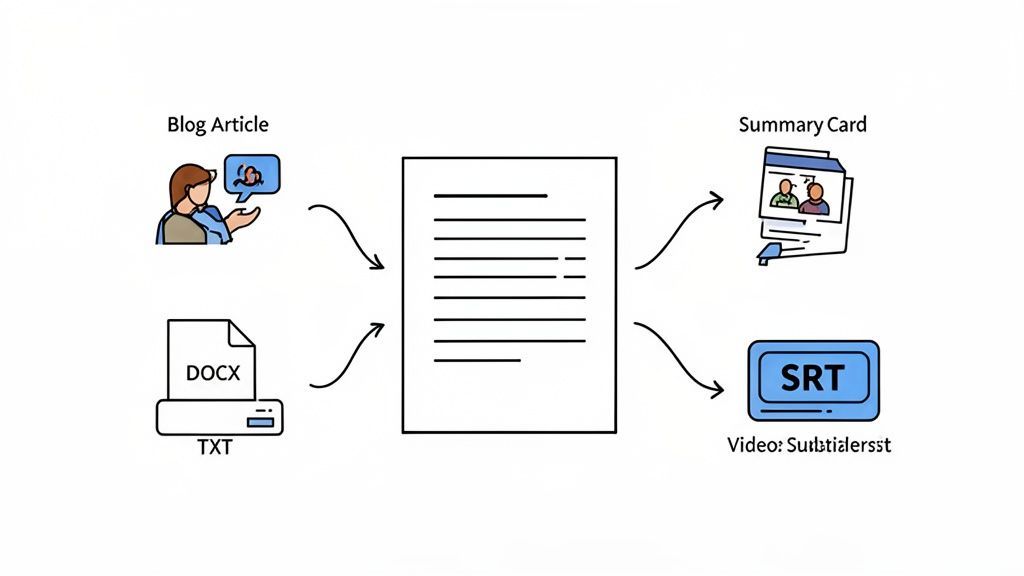
A verdadeira mágica de converter M4A para texto não é apenas obter as palavras – é o que você faz com elas em seguida. Pense em sua transcrição como um pedaço de argila, uma matéria-prima pronta para ser moldada em algo valioso que economiza tempo, aumenta a produtividade e expande massivamente o alcance do seu conteúdo.
What You Can Do Once Your M4A Is Converted to Text?
Create Instant Summaries
Turn long lectures, meetings, or interviews into short summaries that capture key points. This helps stakeholders, students, or clients understand outcomes without reading the full transcript.
Extract Action Items
AI-powered transcripts can automatically identify tasks, decisions, and follow-ups. This is especially useful for meetings where accountability and clarity matter.
Repurpose Content Faster
A single transcript can fuel blog posts, newsletters, social media captions, or video descriptions—saving hours of content creation time.
Improve Knowledge Retention
Searchable text allows you to quickly revisit ideas, quotes, or explanations later—making transcripts a long-term knowledge asset, not just documentation.
As ferramentas modernas de transcrição são mais do que apenas geradores de texto. Imagine pegar a transcrição de uma reunião densa de uma hora e obter um resumo limpo e em tópicos em apenas alguns segundos. É a maneira perfeita de dar uma visão geral clara para as partes interessadas que não puderam comparecer.
Essas plataformas também podem identificar e extrair itens de ação, transformando uma conversa sinuosa em uma lista de tarefas clara para sua equipe. Isso é fundamental para fazer os projetos avançarem e garantir que nada importante se perca.
Escolhendo o Formato de Exportação Correto
Como você exporta sua transcrição é uma decisão estratégica, não apenas técnica. Cada tipo de arquivo é feito para um trabalho específico, e escolher o certo desde o início economiza muitas dores de cabeça depois. Isso significa que o texto está pronto para ser usado imediatamente, sem etapas extras de conversão.
Aqui está um resumo rápido dos formatos mais comuns e quando eles se destacam:
- .TXT (Texto Simples): Sua ferramenta de trabalho sem frescuras. Isso é perfeito quando você precisa de texto sem formatação para análise de dados, colagem em código ou apenas um arquivo simples e universalmente compatível.
- .DOCX (Microsoft Word): Pegue este quando estiver criando documentos polidos. É ideal para transformar uma transcrição em um relatório, um rascunho de post de blog ou qualquer conteúdo que precise de formatação e edições.
- .SRT / .VTT (Legendas): Estes são os padrões da indústria para legendas de vídeo. Eles agrupam o texto com timecodes precisos, tornando seus vídeos mais acessíveis e amigáveis para mecanismos de busca.
- .PDF (Formato de Documento Portátil): Use PDF quando precisar de uma versão segura e não editável para compartilhamento. Pense em registros legais ou atas de reunião oficiais onde nada pode ser alterado.
Sua transcrição é mais do que um registro do que foi dito; é um trampolim para a produtividade e a criatividade. Ao escolher o formato certo e usar recursos inteligentes de IA, você transforma um simples arquivo de texto em uma ferramenta que trabalha ativamente para você.
Da Transcrição à Criação de Conteúdo
A coisa mais poderosa que você pode fazer com uma transcrição é reutilizá-la. Aquele webinar que você gravou na semana passada? Ele pode se tornar uma série de posts em mídias sociais, um artigo de blog detalhado ou os principais pontos de discussão para seu próximo boletim informativo. É assim que você multiplica o valor daquele arquivo M4A original.
Ao extrair citações-chave, temas e destaques, você pode gerar uma enorme quantidade de material de marketing a partir de apenas uma peça de áudio. Para um mergulho mais profundo, confira estas estratégias práticas de reutilização de conteúdo para aproveitar ao máximo cada transcrição. É esse tipo de pensamento que transforma a transcrição de uma tarefa árdua para o centro do seu motor de conteúdo.
Perguntas que Você Pode Ter Sobre a Conversão de M4A para Texto
Mesmo com uma ótima ferramenta, é inteligente fazer algumas perguntas antes de começar a enviar seus arquivos M4A. Vamos tirar as principais dúvidas para que você possa ter certeza de que está obtendo a qualidade e a segurança de que precisa.
Meus Arquivos de Áudio São Realmente Seguros?
Esta é geralmente a primeira pergunta que vem à mente de todos, e por um bom motivo. Você pode estar transcrevendo reuniões confidenciais, entrevistas privadas ou pesquisas valiosas, e precisa saber que os dados estão seguros.
A coisa mais importante a procurar é uma plataforma com uma política rigorosa de não treinamento. Esta é a sua garantia de que seus arquivos de áudio e transcrições nunca, jamais serão usados para treinar seus modelos de IA. Seus dados permanecem completamente privados para você.
Um serviço confiável de M4A para texto também usará criptografia forte para seus arquivos, tanto ao enviá-los (em trânsito) quanto enquanto eles estiverem armazenados em seus servidores (em repouso). Pense nisso como o mesmo nível de segurança que seu banco ou provedor principal de armazenamento em nuvem usa.
Além disso, fique atento a certificações como SOC 2 ou conformidade com o GDPR. Estes não são apenas acrônimos sofisticados; eles significam que a empresa passou por auditorias rigorosas e independentes de suas práticas de segurança. É um sinal claro de que seus arquivos estão em mãos profissionais.
Quanto Tempo Isso Vai Levar?
A velocidade da transcrição moderna por IA é uma de suas maiores vantagens. Os dias de esperar horas ou até dias para que um humano digite tudo acabaram.
Uma boa regra geral é que um arquivo M4A de uma hora será totalmente transcrito em aproximadamente 5 a 10 minutos.
Esse tipo de velocidade muda o jogo para os fluxos de trabalho. Você pode gravar uma reunião pela manhã e ter uma transcrição completa e pesquisável pronta para compartilhar com sua equipe bem antes do almoço. É projetado para acelerar você, não para desacelerar.
Ele Consegue Descobrir Quem Está Falando?
Claro. Este é um recurso essencial para quem lida com conversas, seja uma entrevista, um podcast com vários convidados ou um brainstorm em equipe. A tecnologia por trás disso é chamada de detecção de falante (ou às vezes "diarização").
Quando você ativa isso, a IA ouve as características vocais únicas de cada pessoa que fala. Em seguida, ela separa o diálogo de forma organizada e atribui um rótulo a cada falante.
Ficará algo assim:
- Falante 1: "Ok, vamos começar a sincronização semanal do projeto."
- Falante 2: "Parece bom. O primeiro item na agenda é o plano de lançamento do Q3."
A transcrição retorna perfeitamente organizada por quem disse o quê. Tudo o que você precisa fazer é entrar no editor e alterar os rótulos genéricos "Falante 1" e "Falante 2" para os nomes reais das pessoas envolvidas. Isso economiza uma quantidade enorme de tempo que você gastaria manualmente organizando a conversa.
Pronto para transformar seus arquivos M4A em texto preciso, seguro e perfeitamente formatado? Transcript.LOL combina IA de ponta com privacidade inabalável para fornecer transcrições em que você pode confiar, tudo em questão de minutos. Experimente e veja por si mesmo.