
Proofreading in transcription: Master flawless transcripts
Discover effective proofreading in transcription: blend AI tools with human checks to deliver accurate, flawless transcripts.
Kate, Praveen
December 11, 2024
Proofreading is that last, crucial step where a human reviewer puts a transcript up against the original audio to hunt down and fix every last error. It’s what turns a raw, often clunky AI-generated draft into a polished, reliable document.
This human touch is critical. It's the final quality check that guarantees the words on the page are a perfect match for what was actually said.
Why the Human Touch Still Dominates Transcription
AI transcription tools are getting shockingly good, but they just can't match the nuanced understanding of a human proofreader. This is where professional-grade accuracy is born—transforming a functional text into a document you can actually trust.
In high-stakes fields like medicine or law, one wrong word can have massive consequences. Of course, the best way to ensure accuracy is to start with great audio. Learning how to effectively remove background noise for clear audio can dramatically cut down on the kinds of errors that even the best human proofreader has to spend extra time fixing.
Smart Features That Strengthen Your Raw Transcript
State-of-the-art AI
Powered by OpenAI's Whisper for industry-leading accuracy. Support for custom vocabularies, up to 10 hours long files, and ultra fast results.

Import from multiple sources
Import audio and video files from various sources including direct upload, Google Drive, Dropbox, URLs, Zoom, and more.

Speaker detection
Automatically identify different speakers in your recordings and label them with their names.
The Real-World Impact of Flawless Transcripts
Think of proofreading less like a chore and more like the quality control that protects against confusing, and sometimes costly, mistakes. It goes way beyond a simple spell-check to catch the subtle, context-driven errors that algorithms trip over all the time.
A meticulous human review ensures:
- Contextual Accuracy: AI might spit out "I scream" when the speaker clearly said "ice cream." A human proofreader easily spots the difference because they understand the conversation.
- Speaker Nuance: Sarcasm, rhetorical questions, and emotional tone are completely lost on machines. A good proofreader uses punctuation to make sure the speaker's true intent comes through.
- Industry-Specific Jargon: Legal terms, medical acronyms, or unique company names will almost always confuse an automated system. A skilled human will catch, verify, and correct them every time.
This guide gives you a battle-tested workflow for bridging the gap between that rough AI draft and a final, polished transcript. The value of this human oversight is huge—the U.S. transcription market alone is valued at around USD 30.42 billion, an industry where meticulous proofreading is non-negotiable for quality and compliance.
The goal of proofreading in transcription isn't just to fix typos. It's to certify that the written word is a true and faithful representation of the spoken word, preserving meaning, intent, and integrity.
Ultimately, getting your proofreading process right builds trust with clients and solidifies your reputation for delivering impeccable work.
If you want to dial in your entire workflow from start to finish, our complete guide on how to transcribe audio files covers foundational techniques that perfectly complement a rigorous proofreading system.
Building Your Proofreading Power Station
A great workflow starts long before you ever press play. Setting up a dedicated "power station" for your proofreading work isn't just about staying organized—it's about creating an environment where you can focus deeply and catch every single detail.
The first move is to corral your materials. Create a clean project folder for each job that holds the audio file, the raw transcript, and any style guides or instructions from your client. This simple habit saves a ton of headaches and keeps everything you need just a click away.
Next, let's talk about gear. The right tools can completely transform your speed and accuracy. Sure, you can technically get by with basic earbuds, but they just don't cut it for professional-grade proofreading.
Essential Gear for Peak Performance
A few key investments make a world of difference:
Quick Note Before You Build Your Gear Setup
Before purchasing equipment, check your client requirements. Some industries—like legal and medical—mandate specific audio quality or timestamp precision. Aligning your tools early prevents costly rework and ensures the transcript meets compliance standards from the start.
- Noise-Canceling Headphones: These are non-negotiable. They block out distractions so you can hear faint whispers, overlapping speech, and other subtle audio cues that are so easy to miss.
- A Transcription Foot Pedal: This might seem a little old-school, but a simple USB foot pedal frees up your hands for typing. You can play, pause, and rewind the audio without constantly switching between windows, which is a massive boost to your words-per-minute.
- An Ergonomic Workspace: A good chair and a well-positioned monitor prevent physical strain during long sessions. This isn't just about comfort; it's about maintaining focus without being derailed by a sore back or neck.
This visual shows the typical journey from a machine's first draft to a polished, human-verified document.
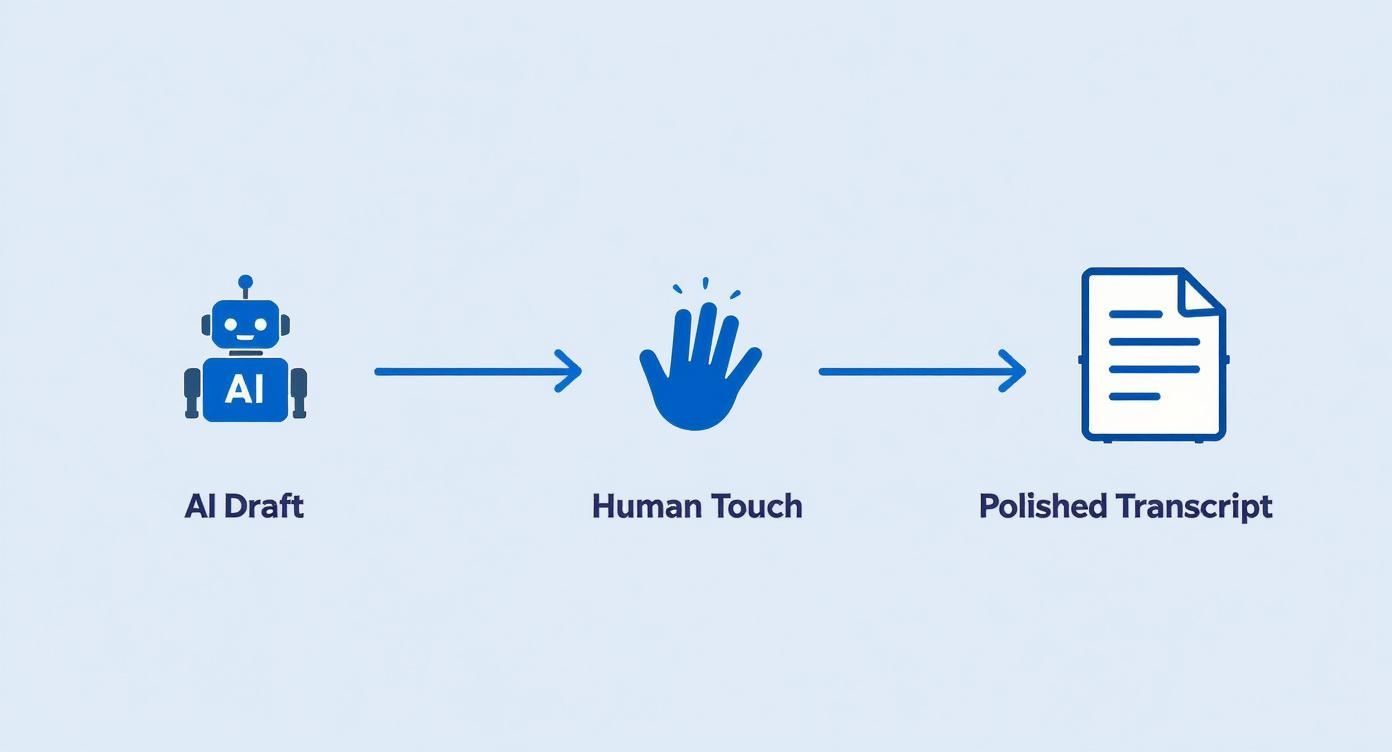
The process makes it clear: while AI does the initial heavy lifting, it's the human touch that refines the text into a final, reliable product.
As you build out your toolkit, remember that AI is a powerful starting point. Learning about the different types of AI-powered transcription software helps you understand the raw material you'll be working with, letting you anticipate common errors and sharpen your proofreading strategy.
Think of it like a professional chef's kitchen. Having your ingredients (files) prepped and your tools (headphones, pedal) ready means you can focus entirely on the craft of creating a perfect transcript. A well-organized station is the foundation of flawless work.
Your First Pass with Smart Automation
Think of your first pass as a high-level cleanup. This is where smart tools do the heavy lifting, but you stay in the driver's seat. The goal here is efficiency, not perfection. You’re just trying to catch the most obvious errors from the raw AI transcript so your real, manual review can focus on the tricky stuff.
I always start by running a comprehensive spell check and grammar tool over the entire document. These checkers are great for catching basic typos and simple grammatical mistakes that clutter up the text. But—and this is a big but—you have to approach their suggestions with a critical eye. They are far from perfect.
Know Where Automation Falls Short
Automated tools often get tripped up by the very things that make human speech so messy and interesting. They miss context-specific jargon, get confused by homophones (like ‘there’ vs. ‘their’), and can completely misunderstand a speaker's intent.
This is why the core of this first pass is what I call the "read-along" method.
Play the audio back—I find starting at 0.8x speed is the sweet spot—and follow along with the text. Your only mission is to spot and fix the most glaring AI blunders.
Look for things like:
- Completely nonsensical words or phrases
- Misheard names or company-specific terms
- Sentences that just cut off or get mashed together
Don't get bogged down obsessing over every single comma. This step is about getting a feel for the speaker's cadence and cleaning up the errors that practically jump off the page. You're just building a cleaner foundation for the detailed work that comes next.
If you're just starting out, it's worth exploring a few different kinds of free automatic transcription software to get a sense of the raw output you'll be working with.
To give you a better idea of what to look for, I've put together a quick table of common AI goofs and how a human proofreader should handle them.
Common AI Transcription Errors and Human Fixes
| AI Error Type | Example of Error | Human Correction Strategy |
|---|---|---|
| Homophones | "Eye need to go too the store for there project." | Listen carefully for context. Correct "too" to "to" and "there" to "their." |
| Misheard Names | "Our next speaker is Dr. On Yash Arma." | Research speaker lists or listen to introductions to confirm the correct spelling, "Dr. Anya Sharma." |
| Technical Jargon | "We need to optimize the API call back." | Check against industry glossaries or context clues. Correct to the proper term, like "API callback." |
| Incorrect Punctuation | "When do we start the project is the main question." | Add punctuation based on the speaker's pauses and intonation: "When do we start the project? That is the main question." |
| Run-on Sentences | "So we started the initiative and everyone was on board and the results were great and we moved on to the next phase." | Break up long, rambling sentences into shorter, clearer ones based on the speaker's natural pauses. |
This table isn't exhaustive, of course, but it covers the most frequent offenders you'll encounter during this initial sweep.
Advanced Skills Every Proofreader Should Master
Context Awareness
Great proofreaders listen for meaning, not just words. Understanding the speaker’s intent helps you avoid subtle misinterpretations that AI frequently misses.
Accent Adaptability
Clients come from everywhere. Training your ear to understand new accents dramatically increases your accuracy and reduces replays.
Style Guide Precision
Every client has unique formatting rules. Following them consistently builds trust and makes your transcript immediately usable.
Error Pattern Recognition
With experience, you begin to notice recurring AI mistakes. Spotting patterns speeds up your workflow and improves your correction accuracy.
Catching these early makes the next, more detailed passes a whole lot smoother.
Pro Tip: Use a text expander app to speed up repetitive corrections. If a speaker’s name, like "Dr. Anya Sharma," is consistently misspelled as "Dr. On Yash Arma," you can create a shortcut. Typing a simple code like "dras" could automatically insert the correct name, saving you dozens of manual fixes.
The Deep Dive for Flawless Accuracy
 Okay, you've done the quick first pass and caught the obvious stuff. Now it's time to slow down and really dig in. This is the part of the process where a decent transcript becomes an impeccable one.
You’re moving beyond just fixing typos. This stage is all about intentional listening—making sure the text perfectly reflects the rhythm, pauses, and intent of the actual conversation. Think of yourself less as an editor and more as a detective, scrutinizing every detail to get it right.
Polishing Punctuation and Speaker Labels
One of the surest signs of a rough transcript is clunky, unnatural punctuation. An AI might just drop a period at the end of every sentence, but a human ear knows better. A well-placed comma or an em dash can completely change the tone and make a speaker’s point land correctly.
Your goal here is to make the text flow like the person actually speaks.
- Em Dashes (—): Perfect for those moments when a speaker stops abruptly or pivots to a new thought.
- Ellipses (...): Use these to show a speaker trailing off or pausing to think.
- Commas and Periods: Listen for the natural cadence. A short pause is probably a comma, while a longer one that signals the end of a thought deserves a period.
Speaker labels are just as critical. Nothing confuses a reader more than inconsistent names. During this pass, make sure every speaker is identified correctly and consistently from start to finish. If you start with "Dr. Smith," don't suddenly switch to "Jane Smith" halfway through.
Verifying Terminology and Proper Nouns
This is where you might need to do a little research. Automated transcription often gets tripped up by industry jargon, company names, or specific proper nouns. Did the AI hear "Pfizer" as "fizer"? Or "Salesforce" as "sales force"? These small mistakes can instantly wreck a transcript's credibility.
When you hit a word or name you're unsure about, take a second to search for it. Confirm the spelling of companies, technical terms, and people mentioned in the audio. It’s this attention to detail that separates professional work from the rest.
This isn't just about looking good—in some fields, it's non-negotiable. For specialized sectors like healthcare or legal services, proofreading is absolutely essential. The legal transcription market alone is a $2.62 billion industry in the U.S., where accuracy is paramount to protecting the integrity of court documents.
Ensuring Timestamp Accuracy
If your transcript needs timestamps, now’s the time to double-check them. Timestamps are navigation tools, letting a reader jump to a specific moment in the audio or video. If they’re off, they’re useless.
As you listen, periodically spot-check that the timestamp in the text lines up perfectly with that moment in the audio. Pay close attention to the timestamps that mark a new speaker's entrance, as these are major reference points. A quick check here ensures your final document isn't just accurate in its content but also fully functional. Understanding the factors that impact speech-to-text accuracy can help you anticipate where these errors are most likely to pop up.

Editing tools
Edit transcripts with powerful tools including find & replace, speaker assignment, rich text formats, and highlighting.

Export in multiple formats
Export your transcripts in multiple formats including TXT, DOCX, PDF, SRT, and VTT with customizable formatting options.
Summaries and Chatbot
Generate summaries & other insights from your transcript, reusable custom prompts and chatbot for your content.
The Final Polish Before Delivery
You're in the home stretch. After that deep dive into the audio, your transcript is accurate, but it’s not quite ready to ship. Before you deliver that file, one last quality assurance check will make sure your work is absolutely flawless.
This crucial last step is what I call the "cold read," and it’s where you review the transcript one last time—without the audio playing.
This might feel a little weird after spending hours syncing text and sound, but detaching from the recording is the whole point. When you read the document on its own, your brain stops trying to listen. Instead, it’s free to spot awkward phrasing, weird formatting, and sneaky grammatical errors you might have missed while juggling both.
Your Final Quality Checklist
Think of this as your pre-flight check. A quick scan with these points in mind can catch those tiny issues that make a huge difference in the final product. Your goal is to deliver a document that’s not just accurate, but also clean, professional, and dead simple to read.
- Number Formatting: Are all numbers written the same way? Decide if you're using numerals (9) or words (nine) and stick to it, unless your client's style guide says otherwise.
- Paragraph Breaks: Does the text flow naturally? Hunt down long, dense blocks of text and break them up where you see a natural pause or a shift in topic. Readability goes way up.
- Overall Consistency: Give it one final scan for any lingering oddities in spelling (like color vs. colour), capitalization of key terms, or how you’ve formatted speaker labels.
This final, audio-free review is your last chance to see the transcript through your client's eyes. It’s where you catch the subtle stuff that separates a good transcript from a great one.
Exporting for Your Client
Once your cold read is done and you’re feeling good about the document, the last thing to do is export it in the right format.
Different clients have different needs, and delivering the file exactly how they asked for it is a hallmark of a pro. I always make it a point to clarify the required format upfront to avoid any last-minute scrambling.
Here are the most common formats people ask for:
- Word Document (.docx): This is the standard for most business, academic, and general use. It’s easy to edit and everyone can open it.
- Plain Text (.txt): A simple, no-frills format often requested for importing text into other software systems where formatting just gets in the way.
- SubRip Subtitle File (.srt): This one is specifically for video captions. It includes timestamps formatted precisely for on-screen text.
- Web Video Text Tracks File (.vtt): Another captioning format, a lot like SRT but with more advanced formatting options that work well for web videos.
Double-checking the file format and naming conventions before you hit 'send' is a small step that reinforces your reliability. It’s the final polish that ensures your client gets a perfect, ready-to-use document every single time.
Avoid the #1 Mistake: Delivering Without a Final Review
Never skip the cold read. Most client complaints come from small mistakes—wrong speaker tags, missing punctuation, or stray formatting issues. This last step protects your reputation and ensures every transcript you submit is client-ready.
Common Questions on Transcription Proofreading
As you get deeper into proofreading transcripts, you start running into the same questions time and again. Getting good answers to these can be the difference between a smooth workflow and a headache. Let's tackle some of the most common ones I hear.
One of the first things people ask is what the job really entails. It's more than just a quick spell-check; you're verifying the text against the original audio to guarantee accuracy. It's helpful to understand the nuances between proofreading and editing, because great transcription work often borrows from both disciplines to create a final product that's both accurate and easy to read.
How Long Should Proofreading a Transcript Take?
There's no single answer, but a solid rule of thumb is to budget 2-4 hours of proofreading for every one hour of audio.
A lot of things can shift that timeline. If you've got pristine audio with one clear speaker and no technical terms, you might breeze through it in two hours. But throw in heavy accents, background noise, or a bunch of people talking over each other, and you'll easily hit that four-hour mark—or even go beyond it.
Taking five minutes to spot-check the audio before you quote a deadline is a pro move. It sets realistic expectations for both you and your client right from the start.
What Are the Best Tools for Proofreading Transcripts?
A killer proofreading setup doesn't require a ton of gear, but the right combination of tools is a total game-changer for your speed and accuracy.
- Transcription Software: You absolutely need software that syncs audio playback with your text. There's a reason tools like oTranscribe (which is free!) and Express Scribe are industry standards—they just work.
- Grammar Checker: A tool like Grammarly Premium is worth its weight in gold. It goes way beyond a standard spell-check, catching subtle mistakes and helping you make the text more readable.
- Quality Hardware: Don't sleep on good hardware. A pair of noise-canceling headphones can help you pick out words you'd otherwise miss. And a USB foot pedal? It frees up your hands so you can type and control audio simultaneously, which seriously speeds things up.
How Do You Handle Inaudible or Unclear Words?
When you hit a patch of audio you just can't make out, your guiding principles should be honesty and clarity. Always make a real effort first—slow the audio down, loop the section a few times, maybe even get a second pair of ears on it if you can.
If you've tried everything and a word is still a mystery, never guess. Shoving in the wrong word can completely twist the meaning of a sentence and destroy the transcript's credibility.
The professional standard is to mark the spot with a timestamped placeholder. Something like [inaudible 00:21:14] or [unclear 00:21:14] does the trick perfectly. This flags the issue for your client, lets them jump right to that spot in the audio, and empowers them to make the final call. It shows you're a professional they can trust.
At Transcript.LOL, we turn your audio and video into highly accurate transcripts in seconds, giving you a powerful head start on your proofreading process. Our AI-driven platform, enhanced with speaker detection and custom vocabulary, handles the heavy lifting so you can focus on the final polish. Experience a faster, smarter transcription workflow today.