
How to Transcribe an Audio File The Right Way
Learn how to transcribe an audio file with our guide. We cover AI tools, manual editing, and pro tips to get accurate text from your audio effortlessly.
Kate, Praveen
May 15, 2024
Aprender a transcrever um arquivo de áudio costumava significar duas coisas: digitar manualmente ou usar um serviço com IA como o Transcript.LOL para fazer o trabalho pesado. Hoje em dia, a rota da IA é mais rápida, muito mais acessível e perfeita para quase tudo, desde notas de episódios de podcast até atas de reuniões.
Por que a Transcrição Precisa de Áudio é Importante Agora
Já se perguntou como seu podcast favorito consegue aquelas notas de episódio detalhadas? Ou como os pesquisadores conseguem analisar horas de filmagens de entrevistas em pouco tempo? O segredo é a transcrição de áudio. Transformar palavras faladas em texto pesquisável e editável não é mais uma tarefa de nicho — é essencial para quem cria ou documenta conteúdo.
Este guia não é sobre o 'porquê', no entanto. É tudo sobre o 'como'. Estamos mergulhando diretamente em um processo moderno e prático que troca o trabalho manual tedioso por ferramentas de IA rápidas e acessíveis.
A Demanda Crescente por Transcrição
A necessidade de transcrição precisa está explodindo em todos os lugares. Somente nos EUA, o mercado de serviços de transcrição está a caminho de ultrapassar US$ 32 bilhões até 2025. Isso não é apenas um pico aleatório; é impulsionado por uma onda massiva de áudio digital vindo dos setores de saúde, jurídico e corporativo, que precisam de documentação precisa.
Em sua essência, a transcrição transforma conteúdo de áudio passivo em um ativo ativo e valioso. Ela torna seu áudio pesquisável, acessível e reutilizável, desbloqueando todo o seu potencial.
Transcription is No Longer Optional
By 2025, transcription will be a $32B industry. From podcasts to research interviews, accurate transcripts are now a core part of content strategy.
From Manual Grind to AI Efficiency
Not long ago, transcribing audio was a slow, painful process. Today, AI has completely changed the game. Modern AI platforms can churn out highly accurate transcripts in a tiny fraction of the time.
This leap forward means anyone—from podcasters boosting their SEO to businesses documenting meetings—can get clean, reliable transcripts without the high cost or long waits. Want to get into the nitty-gritty of how this works? Check out our guide to speech-to-text accuracy.
Here’s a look at what a modern AI transcription tool's interface looks like—built for speed and simplicity.
The layout is designed to get you from file to transcript in just a few clicks, showing just how user-friendly today's technology has become.
Why AI Beats Manual Transcription
IA de última geração
Alimentado pelo Whisper da OpenAI para precisão líder na indústria. Suporte para vocabulários personalizados, arquivos de até 10 horas e resultados ultra rápidos.

Importar de múltiplas fontes
Importe arquivos de áudio e vídeo de várias fontes, incluindo upload direto, Google Drive, Dropbox, URLs, Zoom e mais.

Exportar em múltiplos formatos
Exporte suas transcrições em múltiplos formatos incluindo TXT, DOCX, PDF, SRT e VTT com opções de formatação personalizáveis.
Configurando Seu Áudio para uma Transcrição Impecável
Antes mesmo de pensar em clicar naquele botão de upload, vamos falar sobre o fator mais importante para obter uma ótima transcrição: a qualidade do seu áudio.
É uma regra simples que aprendi ao longo dos anos: lixo entra, lixo sai. A transcrição mais limpa e precisa começa com um áudio limpo e claro. É a sua base.
Mesmo as ferramentas de transcrição de IA mais inteligentes se atrapalham com vozes abafadas, ruído de fundo ou pessoas falando umas sobre as outras. Gastar apenas alguns minutos preparando seu arquivo de áudio pode economizar uma montanha de dores de cabeça de edição mais tarde. É a diferença entre uma revisão rápida de cinco minutos e uma sessão de limpeza de uma hora.
Sua Lista de Verificação de Preparação de Áudio
Para obter o melhor resultado possível de qualquer ferramenta de IA, revise esta lista rápida antes de fazer o upload. Esse pequeno esforço compensa muito.
- Elimine o Ruído de Fundo: Ouve aquele zumbido constante do ar condicionado, um latido de cachorro distante ou o tráfego da rua? Uma ferramenta gratuita como o Audacity possui um filtro de redução de ruído que pode fazer maravilhas. Apenas esta etapa pode melhorar massivamente a capacidade da IA de reconhecer palavras corretamente.
- Verifique a Clareza do Locutor: Você consegue ouvir todos claramente? Se um locutor soa como se estivesse em um cômodo diferente, use um editor de áudio para normalizar o volume. Você quer que todas as vozes estejam em um nível relativamente uniforme.
- Escolha o Formato Certo: A maioria das ferramentas é bastante flexível, mas se você tiver uma escolha, opte por um formato sem compressão como WAV ou um MP3 de alta taxa de bits. Esses arquivos contêm mais dados de áudio, o que dá à IA mais informações para trabalhar.
O objetivo não é produzir um podcast com qualidade de estúdio. Você só precisa de fala inteligível. Torne cada palavra o mais distinta e fácil de ouvir possível para o mecanismo de transcrição.
Se você está apenas começando, aprender a transcrever áudio para texto gratuitamente com um arquivo devidamente preparado mudará completamente sua experiência.
Uma última dica: crie o hábito de usar uma convenção de nomenclatura de arquivos inteligente, como NomeDoProjeto-Entrevista-Data.mp3. Parece pouco, mas o manterá muito mais organizado no futuro.
Usando IA para Transcrever Áudio em Minutos
Certo, com seu arquivo de áudio preparado e polido, é hora da parte divertida. É aqui que você deixa um mecanismo de transcrição de IA fazer o trabalho pesado, transformando horas de fala em texto em apenas alguns minutos. Vamos percorrer isso usando nossa própria ferramenta, Transcript.LOL, para mostrar o quão ridiculamente fácil é.
Todo o processo começa com um simples upload. Dentro da ferramenta, você encontrará um botão grande e óbvio como "Upload File" – você não pode errar. Clique nele e você terá algumas opções para inserir seu áudio no sistema. Você pode arrastar e soltar um arquivo diretamente do seu computador ou conectar-se ao armazenamento em nuvem como o Google Drive.
Este fluxo é bastante direto, de um arquivo de áudio limpo a uma transcrição pronta para uso.
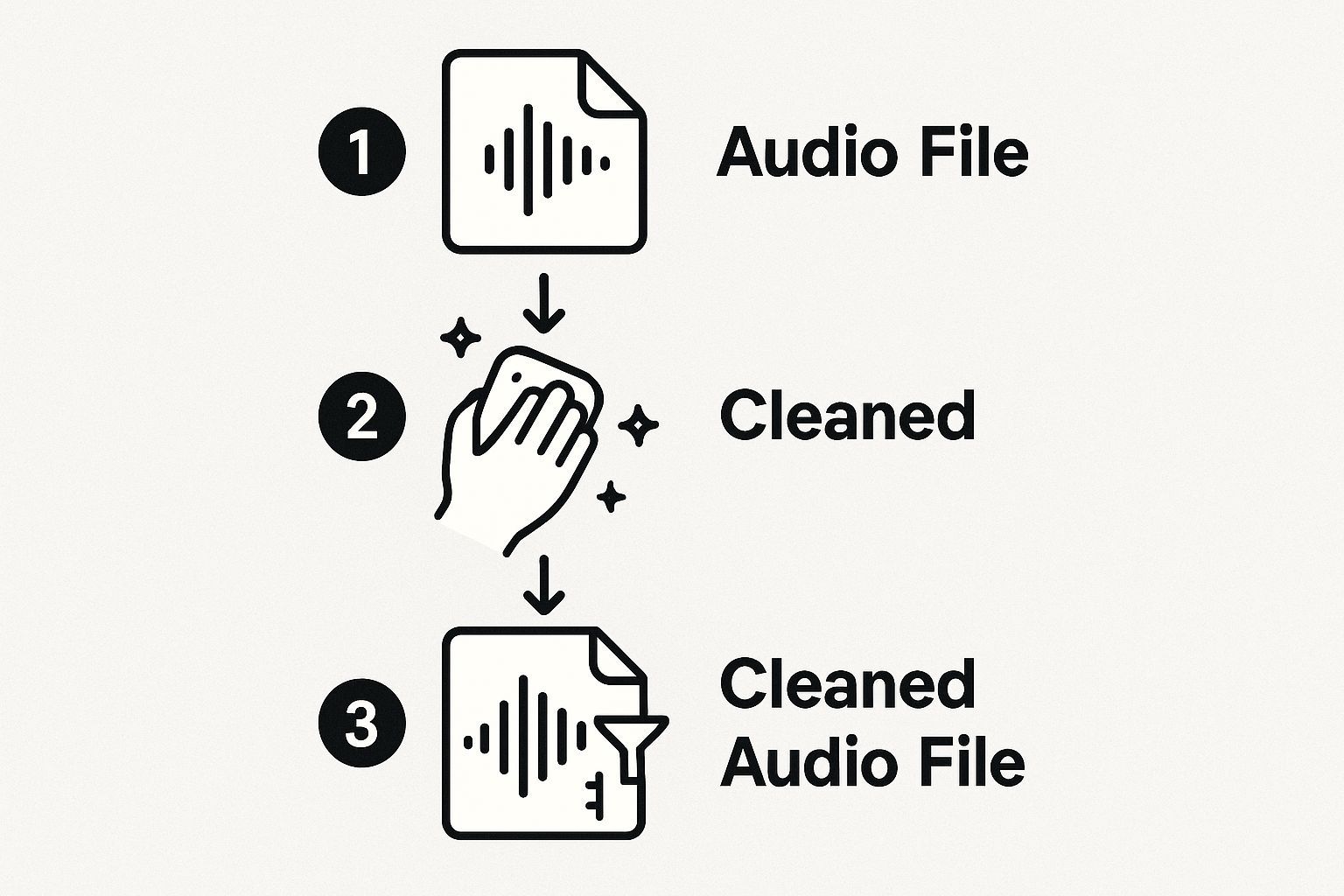
A imagem realmente reforça o quão crucial é a preparação inicial do áudio para obter uma transcrição automatizada de primeira linha.
Ajustando Suas Configurações de Transcrição
Depois que seu arquivo for carregado, você verá algumas configurações simples, mas poderosas. Não passe por elas rapidamente – cada uma ajuda a IA a fornecer um resultado muito mais preciso na primeira tentativa.
- Seleção de Idioma: Esta é uma escolha óbvia. Sempre diga à IA qual idioma está sendo falado. Faz uma diferença enorme se ela está ouvindo para inglês ou espanhol, melhorando dramaticamente o reconhecimento de palavras e sintaxe.
- Identificação de Locutor: Se houver mais de uma pessoa falando, esse recurso é uma mão na roda. A IA rotulará cada locutor (como Locutor 1, Locutor 2), tornando entrevistas, podcasts ou notas de reunião muito mais fáceis de editar.
- Vocabulário Personalizado: Algumas ferramentas, incluindo o Transcript.LOL, permitem que você adicione uma lista de palavras personalizadas. Isso é fundamental para jargões da indústria, nomes específicos de empresas ou substantivos próprios únicos que um dicionário padrão perderia completamente.
Pense nessas configurações como dar à IA uma pequena cola antes que ela comece a trabalhar. Alguns segundos de configuração inicial economizam muito trabalho de limpeza no final. É um pequeno investimento de tempo que compensa muito.
A tecnologia por trás de tudo isso ficou incrivelmente boa, rapidamente. Até 2025, espera-se que os melhores mecanismos de IA atinjam 95% de precisão ou mais em condições ideais, com alguns até atingindo 99%. É isso que torna a transcrição por IA um divisor de águas, entregando resultados quase instantâneos.
Smart Settings for Smarter Results
🌍 Language Selection
Tell the AI what language to expect for better accuracy.
🗣 Speaker Identification
Automatically separate speakers in interviews.
📖 Custom Vocabulary
Add industry jargon or names for precision.
⏱ Timestamps
⏱ Timestamps
Transcrição Manual vs. Transcrição por IA
Escolher entre a transcrição humana tradicional e as ferramentas baseadas em IA nem sempre é simples. Ambas têm o seu lugar, mas depende realmente das suas necessidades de velocidade, precisão e custo. Aqui está um resumo rápido para ajudá-lo a decidir.
| Característica | Transcrição Manual | Transcrição por IA (Transcript.LOL) |
|---|---|---|
| Tempo de Entrega | Horas a dias, dependendo da duração | Minutos, mesmo para gravações longas |
| Custo | Alto (tipicamente $1,00 a $2,50 por minuto) | Baixo (assinatura de taxa fixa ou centavos por minuto) |
| Precisão | Muito alta (99%+), especialmente com áudio difícil | Alta (95-99% em áudio claro), mas pode ter dificuldades com ruído |
| Identificação de Falante | Excelente, tratada por transcritores humanos | Boa, detecta e rotula falantes automaticamente |
| Escalabilidade | Limitada e cara para escalar | Altamente escalável; processa centenas de horas facilmente |
| Ideal para | Processos judiciais, registos médicos, conteúdo complexo | Entrevistas, reuniões, podcasts, criação de conteúdo |
Em última análise, ferramentas de IA como o Transcript.LOL oferecem uma combinação imbatível de velocidade e acessibilidade para a maioria dos usos diários, enquanto os serviços manuais ainda se destacam em cenários altamente especializados ou de áudio de baixa qualidade.
Se você está apenas começando e quer testar as águas, confira este ótimo guia sobre o melhor software de transcrição gratuito. Assim que suas configurações estiverem definidas, aperte o botão e deixe a IA fazer sua mágica. Em poucos instantes, você receberá uma notificação de que sua transcrição de rascunho está pronta para você revisar.
Transformando uma Boa Transcrição em uma Perfeita
Então, você tem sua transcrição gerada por IA. É rápida, é barata e provavelmente está a cerca de 95% do caminho. Essa passagem inicial da IA faz todo o trabalho pesado, economizando horas de trabalho tedioso. Mas esses últimos 5%? É aí que a mágica acontece. Um pouco de supervisão humana é o que transforma um rascunho decente em um documento polido e profissional que você pode realmente usar.
Esta fase final não se trata de começar do zero. Trata-se de refinamentos inteligentes e direcionados.
A maioria das ferramentas modernas, incluindo o Transcript.LOL, vem com um editor interativo que sincroniza a reprodução do seu áudio diretamente com o texto. Enquanto você ouve, a palavra correspondente acende, tornando incrivelmente simples capturar e corrigir qualquer frase estranha ou erro direto. Você pode simplesmente pausar, digitar uma correção rápida e voltar a reproduzir sem perder o seu lugar.
AI Accuracy is Closing the Gap
Top engines now hit 99% accuracy, cutting editing time to a fraction of what it used to be.
Aprimorando sua Transcrição para Legibilidade
À medida que você entra na edição, começará a notar os deslizes comuns que a IA comete. Ela frequentemente tropeça em coisas como nomes próprios, nomes de empresas exclusivas ou jargões de nicho da indústria nos quais não foi treinada. Por exemplo, uma IA pode gerar "transcrição lol" em vez de "Transcript.LOL" ou distorcer o nome de um convidado. Corrigir esses pequenos detalhes adiciona instantaneamente uma camada de profissionalismo.
Você também precisa decidir que tipo de transcrição você quer. Existem realmente duas maneiras de seguir:
- Literal: Esta é a abordagem hiper-literal. Ela captura cada som individual — cada "hum", "ah", gagueira e começo falso. Isso é inegociável para coisas como depoimentos legais ou pesquisas acadêmicas detalhadas, onde cada fala conta.
- Leitura Limpa: Isso é o que a maioria das pessoas precisa. Você revisa e remove todas as palavras de preenchimento, corrige quaisquer tropeços gramaticais e limpa frases longas. O resultado é um texto suave e fácil de ler, perfeito para posts de blog, notas de programa ou resumos de reuniões.
A fase de edição é sua chance de garantir que o texto final não apenas reflita o que foi dito, mas também esteja perfeitamente sintonizado para seu propósito e público final.
A tecnologia de transcrição está avançando incrivelmente rápido. As melhores ferramentas agora atingem taxas de precisão de até 99%, o que é um salto enorme em relação a onde estávamos há apenas alguns anos. Esse nível de precisão reduz drasticamente o tempo que você precisa gastar revisando, tornando tudo mais rápido para empresas e criadores.
Este polimento final é o que torna a transcrição verdadeiramente valiosa, especialmente se você planeja reutilizá-la. Uma transcrição limpa e precisa é a base para muitas outras coisas. Por exemplo, é o primeiro passo quando você quer aprender como criar legendas para vídeos, garantindo que suas legendas sejam precisas e legíveis.
Como Usar e Compartilhar sua Transcrição Final
Certo, sua transcrição está polida e pronta. Agora a parte divertida começa — tirá-la do editor e colocá-la em um formato que você possa realmente usar.
A maioria das ferramentas de transcrição oferece algumas opções de exportação, e a escolha certa realmente depende do que você está tentando realizar. Um arquivo de texto simples (.TXT) é ótimo se você precisar apenas copiar e colar algo em um e-mail, enquanto um documento do Word (.DOCX) é perfeito para quando você precisa manter sua formatação para um relatório ou artigo.
Escolhendo o Melhor Formato de Arquivo
Pense no seu objetivo final. O que você planeja fazer com a transcrição dita qual formato você precisará.
Aqui estão as opções mais comuns e minha opinião sobre quando usá-las:
- .TXT (Texto Puro): É o mais básico possível. Escolha .TXT quando você precisar apenas das palavras brutas sem nenhum estilo. É universalmente compatível e perfeito para anotações rápidas.
- .DOCX (Documento do Word): Se você está escrevendo um post de blog, criando um relatório de negócios ou precisa colaborar com outras pessoas, .DOCX é sua melhor opção. Ele permite que você adicione mais edições, acompanhe as alterações e aplique formatação complexa.
- .SRT (Arquivo de Legenda SubRip): Este é o padrão ouro para legendas de vídeo. Um arquivo .SRT inclui carimbos de data/hora que sincronizam perfeitamente seu texto com o vídeo, o que é essencial para acessibilidade em plataformas como YouTube ou Vimeo.
Sua transcrição não é apenas um registro de uma conversa. É uma mina de ouro de conteúdo esperando para ser reutilizado. Pense nisso como a matéria-prima para uma dúzia de novos ativos.
Turn One Transcript Into Many Assets
✍️ Blog Posts
Repurpose audio into written content.
📱 Social Media Clips
Share bite-sized insights.
🎥 Video Captions
Make content accessible and SEO-friendly.
📧 Email Summaries
Fast recaps for your audience.
Para aproveitar ao máximo seu áudio, crie uma estratégia sólida de reutilização de conteúdo. Esse episódio de podcast pode ser transformado em um post de blog detalhado, um punhado de citações para redes sociais, um roteiro para um vídeo curto e até mesmo um resumo para sua newsletter por e-mail. É a maneira mais inteligente de ampliar sua mensagem sem ter que criar constantemente algo novo do zero.
Suas Principais Perguntas sobre Transcrição de Áudio, Respondidas
Se você está começando na transcrição de áudio, provavelmente tem algumas perguntas. Isso é totalmente normal. Resolver o básico desde o início economizará muitas dores de cabeça mais tarde e o ajudará a obter os resultados que você procura.
Uma das primeiras coisas que todos querem saber é: "Quanto tempo isso vai levar?" Com uma ferramenta de IA moderna, uma hora de áudio claro é transformada em texto em apenas alguns minutos. Para colocar isso em perspectiva, um transcritor humano profissional geralmente precisa de 3 a 4 horas de trabalho focado para processar essa mesma hora de áudio. Quando se trata de velocidade pura, a IA está em uma categoria própria.
Lidando com Sotaques e Múltiplas Línguas
Mas e o áudio que não é perfeitamente nítido e claro? A IA de hoje se tornou surpreendentemente boa em decifrar sotaques pesados e diferentes idiomas. A maioria das ferramentas de qualidade permite que você especifique o idioma do áudio antes de clicar em "iniciar", o que faz uma enorme diferença na precisão.
E se sua gravação alternar entre idiomas? Procure uma ferramenta desenvolvida para transcrição multilíngue. Os resultados são frequentemente surpreendentemente limpos e fornecem um ponto de partida fantástico para suas edições.
A melhor maneira de pensar em uma transcrição de IA é como um primeiro rascunho muito, muito bom. Ela faz todo o trabalho pesado para você, transformando horas de digitação tediosa em um trabalho de edição simples.
Verbatim vs. Clean Read: Qual é a Diferença?
Outro ponto de confusão é o estilo da transcrição. Existem duas abordagens principais, e escolher a correta é fundamental para obter um documento que você possa realmente usar.
- Transcrição Verbatim: Este é o registro literal, palavra por palavra, de tudo o que foi dito. Ele captura todos os "ãh", "é", gaguejos e até mesmo sons não verbais como risadas. É a escolha ideal para depoimentos legais ou pesquisas acadêmicas aprofundadas, onde cada palavra falada importa.
- Transcrição Clean Read: Esta versão foca na legibilidade. Ela aprimora o texto removendo palavras de preenchimento, corrigindo pequenos deslizes gramaticais e fazendo as frases fluírem suavemente. É o que a maioria das pessoas precisa para reuniões de negócios, criação de conteúdo e anotações de propósito geral.
Depois de ter sua transcrição, especialmente para coisas como pesquisa qualitativa, o próximo passo é dar sentido a tudo. Para um mergulho profundo nesse processo, confira nosso guia sobre como analisar dados de entrevistas.
Pronto para transformar seu áudio em texto preciso e fácil de editar em minutos? Experimente o Transcript.LOL e veja como a transcrição pode ser simples. Comece gratuitamente em https://transcript.lol.