
Um Guia Moderno para Tirar Atas de Reuniões Como um Profissional
Domine a arte de tirar atas de reuniões. Aprenda preparação prática, captura em tempo real e como alavancar ferramentas de IA para registros perfeitos e acionáveis a cada vez.
Praveen
August 13, 2025
A ata de reunião é mais do que apenas rabiscar anotações durante uma chamada. É a arte de transformar uma conversa em um registro concreto e oficial do que foi discutido, do que foi decidido e quem fará o quê a seguir. Quando feito corretamente, essa prática simples garante que todos estejam alinhados e responsáveis, muito depois que a reunião terminar. O objetivo não é apenas uma transcrição; é criar um documento conciso e confiável que sirva como a única fonte de verdade para toda a equipe.
Por que Atas de Reunião Eficazes São um Superpoder Empresarial
Vamos ser sinceros: a maioria das anotações de reunião é arquivada em um cemitério digital, para nunca mais ser vista. Mas e se elas pudessem ser uma ferramenta poderosa para realmente realizar o trabalho? Na cultura de trabalho de hoje, a elaboração de atas mudou de uma tarefa administrativa mundana para uma função genuinamente estratégica.
O custo da má documentação é alto. Leva diretamente a projetos paralisados, equipes confusas e conversas que giram em círculos. Em contraste, atas bem elaboradas criam um caminho claro a seguir, impulsionando o progresso real.
O Custo Real da Documentação Deficiente
Quando não há um registro claro, a ambiguidade toma conta. As pessoas saem com ideias completamente diferentes sobre o que foi decidido. Itens de ação são perdidos porque ninguém foi realmente designado como responsável. Essa lacuna de comunicação força as equipes a perder tempo e energia voltando atrás para esclarecer decisões que supostamente foram tomadas semanas atrás. Sem um registro formal, a responsabilidade é apenas um jargão.
"As atas permitem que o conselho retome rapidamente de onde as discussões anteriores pararam... Ao revisar as ações do conselho em um formato breve, cada participante tem a capacidade de aprovar ou esclarecer o conteúdo, reduzindo o risco de mal-entendidos futuros."
Isso se tornou ainda mais crítico à medida que nossas vidas profissionais mudaram. A explosão do trabalho remoto e híbrido significa que as reuniões virtuais saltaram de 48% de todas as reuniões em 2020 para 77% em 2022. Com alguns executivos gastando quase 23 horas por semana em reuniões, temos que garantir que esse tempo não seja apenas conversa desperdiçada.
Os Benefícios de uma Única Fonte de Verdade
A diferença entre uma reunião que se esvai e uma que gera ação muitas vezes se resume à qualidade de suas atas. A tabela abaixo detalha o impacto no mundo real.
Confronto de Atas de Reunião: Eficaz vs. Ineficaz
| Atributo | Com Atas Eficazes | Sem Atas Eficazes |
|---|---|---|
| Clareza e Alinhamento | Todos compartilham um entendimento unificado de decisões e próximos passos. | Os membros da equipe saem com interpretações e suposições conflitantes. |
| Responsabilidade | Os itens de ação são claramente atribuídos com responsáveis e prazos. | Tarefas são esquecidas e ninguém assume a responsabilidade. |
| Produtividade | Projetos avançam eficientemente sem discussões repetitivas. | As equipes perdem tempo revisitando os mesmos tópicos em reuniões futuras. |
| Contexto Histórico | Novos membros da equipe podem se atualizar rapidamente sobre decisões passadas. | O conhecimento institucional valioso é perdido quando as pessoas saem. |
| Inclusão | Membros ausentes da equipe são mantidos informados e podem contribuir. | Pessoas que não puderam comparecer ficam para trás e desengajadas. |
Como você pode ver, os benefícios vão muito além do simples registro. Boas atas transformam conversas abstratas em um plano mensurável, transformando conversa em resultados tangíveis.
- Impulsiona a Responsabilidade: Quando os itens de ação são atribuídos com nomes e prazos, não há para onde fugir.
- Garante o Alinhamento: Todos — quer estivessem na sala ou não — estão trabalhando com o mesmo plano.
- Cria um Registro Histórico: Fornece contexto crucial para projetos futuros e evita que o conhecimento saia pela porta quando os membros da equipe mudam.
Em última análise, dominar as atas de reunião é uma parte fundamental do aprendizado de como melhorar a comunicação empresarial. Trata-se de construir uma cultura de clareza, propósito e acompanhamento.
Preparando o Terreno para Anotações Impecáveis
O segredo para ótimas atas de reunião não começa quando a chamada do Zoom começa. Começa muito antes de alguém dizer "olá".
Entrar em uma reunião despreparado é como tentar construir uma casa sem um projeto. Claro, você pode acabar com algo de pé, mas será caótico, estressante e você certamente perderá algumas vigas de suporte cruciais.
A preparação adequada muda seu papel de um agitador reativo para um documentarista proativo. Em vez de apenas tentar acompanhar a conversa, você está antecipando o fluxo, focando nos pontos de decisão e capturando o que realmente importa. É isso que separa um anotador básico de um contribuidor estratégico.
Desconstrua a Pauta
Primeiro de tudo: trate a pauta da reunião como seu roteiro, não apenas uma lista de tópicos. Para cada item, pergunte a si mesmo como seria um resultado bem-sucedido. O objetivo é chegar a uma decisão final? Brainstorm de uma lista de novas ideias? Ou é apenas uma atualização de status?
Saber o objetivo pretendido para cada ponto de discussão ajuda você a filtrar o ruído e a ouvir as informações mais importantes. É uma parte fundamental da anotação e se liga diretamente aos princípios que cobrimos em nosso guia sobre o que é escuta ativa.
Em seguida, analise a lista de convidados e identifique os principais participantes. Quem são os tomadores de decisão? Saber quem detém a autoridade ajuda você a prestar um pouco mais de atenção quando eles falam, garantindo que você capture sua decisão final sobre assuntos críticos.
Construa Seu Modelo Pré-Reunião
Nunca, jamais comece com uma página em branco. Um modelo pré-construído economiza tempo precioso durante a reunião e lhe dá uma estrutura sólida desde o início. Não precisa ser sofisticado — apenas funcional.
Aqui está uma lista de verificação rápida para criar um framework simples:
- Detalhes Essenciais: Liste o título da reunião, data, hora e pré-preencha a lista de participantes.
- Itens da Pauta: Copie e cole a pauta diretamente em seu documento. Deixe bastante espaço sob cada ponto para suas anotações.
- Tabela de Itens de Ação: Crie uma tabela simples com três colunas: Tarefa, Responsável e Data de Vencimento. Isso facilita a inserção de itens de ação à medida que são atribuídos.
Um modelo sólido é sua âncora durante a reunião. Ele mantém você organizado, garante que você capture tudo de forma consistente e elimina aquela sensação frenética de tentar estruturar suas anotações na hora.
Pense nisso: um modelo para uma sincronização semanal de projetos será completamente diferente de um para uma reunião formal do conselho. A sincronização do projeto será focada em obstáculos e próximos passos, enquanto o modelo de reunião do conselho precisará de seções dedicadas para moções, votações e resoluções formais. Adaptar seu modelo ao tipo de reunião o prepara para o sucesso sempre.
Capturando o Que Realmente Importa Durante a Reunião
Assim que uma reunião começa, a conversa avança rapidamente. O verdadeiro desafio não é apenas digitar rápido — é saber o que ignorar. Tentar capturar cada palavra é uma maneira infalível de acabar com o esgotamento e uma bagunça de anotações inúteis.
Seu trabalho é ser um filtro. Você está lá para identificar e documentar apenas as informações mais críticas, não para criar uma transcrição palavra por palavra. Mudar sua mentalidade de um simples escriba para um documentarista estratégico é a chave para produzir um registro que seja realmente valioso.
Recursos Que Transformam Transcrições em Ações

Detecção de falantes
Identifique automaticamente diferentes falantes nas suas gravações e rotule-os com seus nomes.

Ferramentas de edição
Edite transcrições com ferramentas poderosas incluindo buscar e substituir, atribuição de falantes, formatos de texto rico e destaque.
Resumos e Chatbot
Gere resumos e outros insights da sua transcrição, prompts personalizados reutilizáveis e chatbot para o seu conteúdo.
O fluxo acelerado de uma discussão ao vivo pode parecer avassalador, por isso ter um sistema é uma salvação. Uma das técnicas mais simples, porém mais poderosas, envolve o uso de tags de locutor e abreviações. Você não precisa de nada complexo; a consistência é o que realmente conta aqui.
Por exemplo, atribua iniciais simples a cada pessoa no início. Quando Jane Smith fala, basta prefixar o ponto dela com [JS]. Se David Lee adicionar algo, use [DL]. Esse pequeno hábito torna a atribuição de comentários e decisões incrivelmente fácil mais tarde, poupando-o de um mundo de confusão.
Você também deve desenvolver sua própria abreviação para termos comuns. Não precisa ser sofisticado.
- AI para Item de Ação (Action Item)
- DEC para uma decisão que foi tomada
- Q? para uma pergunta aberta que precisa de acompanhamento
- TBL para um tópico que foi "adiado" (tabled) para uma conversa futura
Isso não se trata de criar um código secreto. Trata-se de construir memória muscular para que você possa acompanhar a conversa sem sacrificar a precisão. Seu foco deve ser sempre em ouvir, não apenas em digitar freneticamente.
Ouça os Três Pilares do Progresso
Acredite ou não, a anotação eficaz é 90% escuta ativa e apenas 10% escrita. Treine seu ouvido para ficar atento quando ouvir conversas se concentrando em uma de três áreas-chave. Estas são as coisas inegociáveis que absolutamente devem constar em suas atas finais.
- Decisões Firmes: Ouça a linguagem definitiva. Frases como "Nós concordamos em", "A decisão é" ou "Ok, vamos seguir em frente com..." são seus sinais. Documente a decisão exata, de forma clara e concisa.
- Itens de Ação Atribuídos: Esta é a parte mais importante. Não apenas capture a tarefa — certifique-se de obter o quem e o quando. Um item de ação sem um responsável e um prazo é apenas uma sugestão vaga que quase certamente será esquecida.
- Mudanças Cruciais: Anote quaisquer grandes mudanças de direção, escopo ou prioridade. Se a equipe decidir de repente mudar da Estratégia A para a Estratégia B, essa é uma peça crítica de história que precisa ser registrada.
O objetivo é capturar o sinal, não o ruído. Suas atas finais devem refletir o ímpeto de avanço da reunião — decisões tomadas, tarefas atribuídas e mudanças estratégicas acordadas — não uma transcrição de cada pequena conversa paralela.
Ao se concentrar nesses três pilares, você garante que suas atas sirvam ao seu propósito principal: impulsionar a ação e manter todos alinhados. Essa abordagem ajuda você a transformar notas brutas em um documento que é tanto um registro do passado quanto um roteiro para o futuro.
Para um mergulho mais profundo, confira nosso guia sobre como resumir uma reunião. Ele ajudará você a transformar suas anotações em uma ferramenta poderosa que mantém toda a equipe na mesma página muito depois que a chamada terminar.
Transformando Notas Brutas em um Plano de Ação Claro
A reunião acabou, mas sejamos realistas — seu trabalho mais importante está apenas começando. Aquela coleção bagunçada de abreviações, frases incompletas e digitação frenética em sua tela não é o produto final. É apenas a matéria-prima.
A verdadeira habilidade é transformar essas anotações confusas em um documento limpo e conciso que realmente impulsiona a ação. Seu objetivo é refinar, não apenas regurgitar. É aqui que você limpa a linguagem, organiza pensamentos dispersos em resumos lógicos e garante que o documento final seja fácil de escanear por qualquer pessoa — especialmente aqueles que não puderam estar presentes.
Estruture Suas Atas para Clareza
Primeiro de tudo: dê às suas anotações uma estrutura consistente. Não faça seus colegas decifrarem um fluxo caótico de consciência. Um layout previsível faz com que a informação pareça profissional e fácil de digerir.
Cada conjunto sólido de atas deve incluir estas partes principais:
- O Essencial: Comece com o básico — título da reunião, data, hora e uma lista de quem estava presente e quem enviou desculpas.
- Aprovação das Atas Anteriores: Uma nota rápida sobre se as atas da última reunião foram revisadas e aprovadas.
- Resumos da Discussão: Para cada item da pauta, escreva um resumo breve e neutro dos pontos-chave, principais linhas de discussão e o resultado.
- Decisões Finais: Declare de forma clara e explícita quaisquer decisões formais que foram tomadas. Sem margem para ambiguidade aqui.
As melhores atas são registros objetivos de resultados, não um passo a passo da conversa. Concentre-se no que foi decidido, não em quem disse o quê durante um debate acalorado. Seu trabalho é documentar o destino, não cada reviravolta da jornada.
Essa abordagem disciplinada é o que transforma suas anotações pessoais em um registro oficial em que toda a equipe pode confiar.
O Poder da Linguagem Objetiva
Ao editar, sua missão é remover opiniões pessoais, linguagem emocional ou citações literais que não agregam valor. É uma mudança sutil, mas crítica.
Em vez de escrever: "John estava realmente preocupado com o orçamento", reformule com linguagem neutra e profissional: "Uma preocupação foi levantada em relação ao impacto do orçamento nas contratações do quarto trimestre."
Isso não é apenas sobre parecer profissional; trata-se de prevenir mal-entendidos e manter o foco nos resultados de negócios, não na política do escritório. Protege indivíduos e mantém o documento centrado no progresso, não no drama.
Torne os Itens de Ação Impossíveis de Ignorar
Esta é, sem dúvida, a parte mais crítica do seu trabalho pós-reunião. Um item de ação enterrado em um parágrafo denso é um item de ação que é esquecido. 100% das vezes.
Visibilidade Gera Responsabilidade
Se as tarefas não forem claramente destacadas com responsáveis e prazos, elas são efetivamente invisíveis. A falta de visibilidade é uma das principais razões pelas quais as reuniões não produzem resultados.
Seus minutos precisam de uma seção dedicada e altamente visível para criar responsabilidade instantânea.
Uma tabela simples é sua melhor amiga aqui. A separação visual torna impossível para os membros da equipe ignorarem suas responsabilidades. Para um guia detalhado e mais exemplos, confira nosso guia sobre como criar um poderoso modelo de ata de reunião com itens de ação. É uma pequena alteração que pode, sozinha, transformar suas atas de um registro passivo em uma ferramenta ativa de gerenciamento de projetos.
Veja como isso fica na prática:
| Item de Ação | Atribuído a | Data de Vencimento |
|---|---|---|
| Finalizar os gráficos do relatório de marketing do Q3. | Sarah Jones | 25 de outubro |
| Agendar reunião de acompanhamento com a equipe de vendas. | David Chen | 22 de outubro |
| Elaborar a proposta inicial do projeto "Projeto Phoenix". | Maria Garcia | 1º de novembro |
Ao destacar tarefas dessa forma, você cria um instantâneo de responsabilidade com um olhar. Qualquer pessoa pode escanear o documento e ver exatamente o que possui e quando vence. É assim que você garante que o ímpeto da reunião se traduza em progresso tangível.
Onde Atas de Reuniões Bem Elaboradas Causam o Maior Impacto
Reuniões de Liderança e Conselho
Atas claras documentam decisões, aprovações e resoluções, criando um registro oficial que protege as organizações e garante a continuidade da governança.
Revisões de Projetos e Sprints
Atas orientadas para a ação mantêm as equipes alinhadas em prioridades, impedimentos e prazos, reduzindo reuniões de acompanhamento e confusão.
Chamadas com Clientes e Stakeholders
Registros de reuniões garantem que compromissos, mudanças de escopo e próximos passos sejam claramente documentados, prevenindo disputas futuras.
Equipes Remotas e Híbridas
As atas atuam como a espinha dorsal da comunicação, mantendo os membros ausentes informados e alinhados entre diferentes fusos horários.
Usando IA para Automatizar Seu Fluxo de Trabalho de Tomada de Atas
Já esteve em uma reunião onde você está tão ocupado tentando digitar cada palavra que perde completamente a chance de contribuir? Todos nós já passamos por isso. A maneira clássica de tirar atas é um trabalho árduo – muitas vezes força o anotador a se tornar um estenógrafo em vez de um participante.
É exatamente aí que as ferramentas com IA estão mudando o jogo. Ao entregar o trabalho pesado de transcrição para a tecnologia, você pode mudar seu foco de capturar a conversa para moldá-la. Isso não é apenas uma ideia interessante; é um fluxo de trabalho prático que economiza muito tempo, melhora a precisão e lhe dá um registro perfeito e pesquisável de cada reunião.
Recursos Que Simplificam a Documentação de Reuniões
IA de última geração
Alimentado pelo Whisper da OpenAI para precisão líder na indústria. Suporte para vocabulários personalizados, arquivos de até 10 horas e resultados ultra rápidos.

Importar de múltiplas fontes
Importe arquivos de áudio e vídeo de várias fontes, incluindo upload direto, Google Drive, Dropbox, URLs, Zoom e mais.

Exportar em múltiplos formatos
Exporte suas transcrições em múltiplos formatos incluindo TXT, DOCX, PDF, SRT e VTT com opções de formatação personalizáveis.
Uma Maneira Mais Inteligente de Documentar Reuniões
O processo é surpreendentemente simples. Em vez de tentar ouvir e digitar ao mesmo tempo, basta gravar o áudio da sua reunião. Assim que terminar, carregue o arquivo para uma ferramenta como Transcript.LOL.
Em poucos momentos, a plataforma gera uma transcrição altamente precisa. Melhor ainda, ela detecta e rotula automaticamente cada participante, para que você nunca fique se perguntando quem disse o quê.
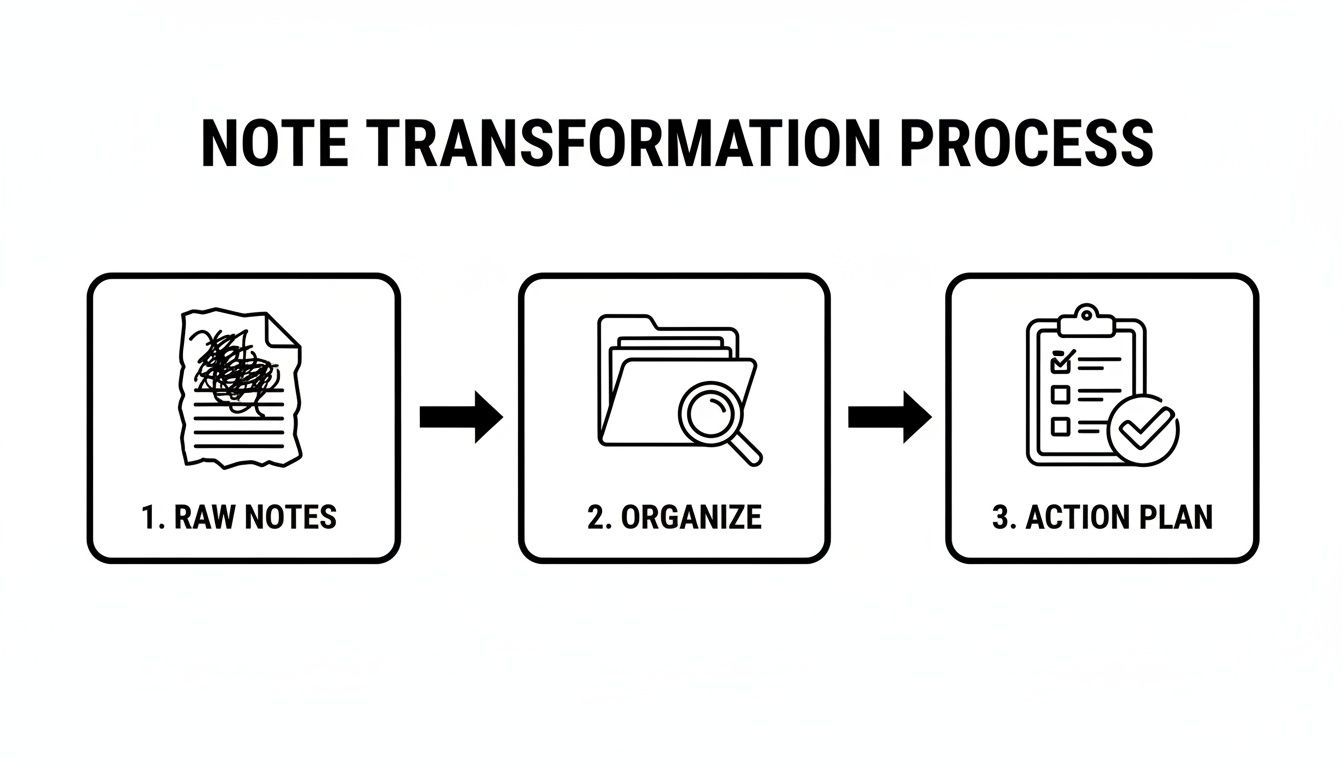
Esta jornada simples de notas brutas para um plano de ação organizado é onde a mágica acontece. Seu trabalho real começa com uma transcrição completa como ponto de partida, permitindo que você se concentre em refinar e esclarecer, em vez de apenas se apressar para acompanhar.
Da Transcrição à Inteligência Acionável
Com uma transcrição sólida em mãos, você pode usar recursos de IA integrados para extrair insights importantes quase instantaneamente. Esqueça passar uma hora relendo toda a discussão; agora você pode gerar um resumo executivo em segundos. É a maneira perfeita de dar a qualquer pessoa que perdeu a reunião uma visão geral rápida e de alto nível.
Você também pode pedir à IA para identificar todas as tarefas atribuídas e prazos, transformando uma conversa longa em um plano de ação claro e conciso. E como a transcrição é totalmente editável, você pode facilmente limpar qualquer jargão ou fazer correções rápidas para clareza.
Ao automatizar a captura e o resumo iniciais, você libera sua energia mental para um trabalho mais estratégico — como garantir que as atas finais sejam claras, objetivas e focadas em impulsionar o projeto.
Os ganhos de eficiência são reais. Quando as reuniões são documentadas adequadamente, as equipes podem recuperar horas valiosas a cada semana. De fato, alguns estudos mostram processo manual tradicional contra um fluxo de trabalho automatizado usando uma ferramenta como Transcript.LOL.
| Tarefa | Processo Manual | Processo com IA (Transcript.LOL) | Assistente de reunião com IA**. É hora de garantir que nada importante passe despercebido novamente.
Perguntas Comuns Sobre Como Tirar Atas de Reunião
Mesmo os melhores anotadores encontram situações complicadas. O que fazer quando um debate fica acalorado? O que é realmente importante incluir e o que é apenas ruído?
Vamos analisar algumas das áreas cinzentas mais comuns que você enfrentará. Pense nisso como seu guia de campo para lidar com essas decisões difíceis com confiança.
O Que Devo Deixar de Fora das Atas?
Esta é uma questão importante. Saber o que omitir é tão crucial quanto saber o que incluir. Seu objetivo não é criar um roteiro palavra por palavra; é construir um registro claro e objetivo do que aconteceu e do que vem a seguir.
Como regra geral, você pode deixar de fora com segurança:
- Opiniões Pessoais: Atenha-se aos fatos. Evite adicionar sua própria interpretação do tom de alguém ou fazer comentários subjetivos.
- Discussões Circulares: Se a equipe discutiu por dez minutos antes de chegar a uma decisão, apenas documente o resultado final. A jornada até lá não é necessária.
- Conversa Fiada: Conversas paralelas, piadas e outras conversas casuais que não levam a uma decisão ou item de ação podem ser ignoradas.
- Moções Retiradas: Em reuniões mais formais, se alguém fizer uma moção, mas a retirar antes de uma votação, geralmente não precisa estar no registro final.
Aqui está um bom filtro mental: "Esta informação será útil para entender uma decisão ou item de ação daqui a um mês?" Se a resposta for não, corte.
Como Devo Lidar com Desacordos ou Debates Acalorados?
As reuniões podem ficar apaixonadas, mas as atas precisam permanecer completamente neutras. Seu trabalho não é escolher um vencedor ou registrar quem fez os pontos mais persuasivos. É documentar a resolução.
As melhores atas são um registro objetivo de resultados, não um relato passo a passo da conversa. Concentre-se no que foi decidido, não em quem disse o quê durante um debate acalorado. Seu trabalho é documentar o destino, não cada reviravolta da jornada.
Vamos supor que a equipe debateu fortemente duas estratégias de marketing diferentes antes de escolher uma. Suas notas devem simplesmente refletir isso. Por exemplo: "Após discutir várias abordagens, a equipe decidiu prosseguir com a Opção A para a campanha de marketing do 4º trimestre."
Isso mantém o registro profissional, limpo e focado no progresso.
Quem É Responsável por Aprovar as Atas?
Isso quase sempre recai sobre os próprios participantes da reunião. É um esforço de grupo para garantir a precisão.
O processo padrão é bem simples: você distribui o rascunho das atas a todos os participantes para revisão logo após a reunião. Isso dá a todos a chance de identificar erros ou sugerir esclarecimentos.
Em seguida, as atas são formalmente aprovadas no início da próxima reunião, geralmente como o primeiro item da pauta. Uma vez aprovadas, elas se tornam o registro oficial. Este ciclo de revisão e aprovação é o que torna as atas uma fonte confiável de verdade para toda a equipe.
Pronto para parar de ser o anotador frenético e começar a ser um participante ativo? Transcript.LOL automatiza todo o processo de transcrição e resumo, para que você possa se concentrar na conversa enquanto a IA cuida da documentação. Obtenha transcrições precisas, rótulos de participantes e listas de itens de ação instantâneas em segundos. Experimente gratuitamente em https://transcript.lol.