
Top AI Powered Transcription Software for Accurate Results
Discover the best AI powered transcription software. Learn how it works, key features, and how to select the perfect tool for your needs.
Kate, Praveen
February 28, 2024
Remember the days of painstakingly typing out an interview, rewinding the tape over and over, only to find mistakes later? That whole tedious process is quickly becoming a thing of the past. AI powered transcription software is here, and it's turning what used to be hours of work into a task that takes just a few minutes.
AI transcription tools are not just about speed—they’re about opening up entire new workflows for creators, researchers, and businesses.
Do Trabalho Manual à Magia Automatizada
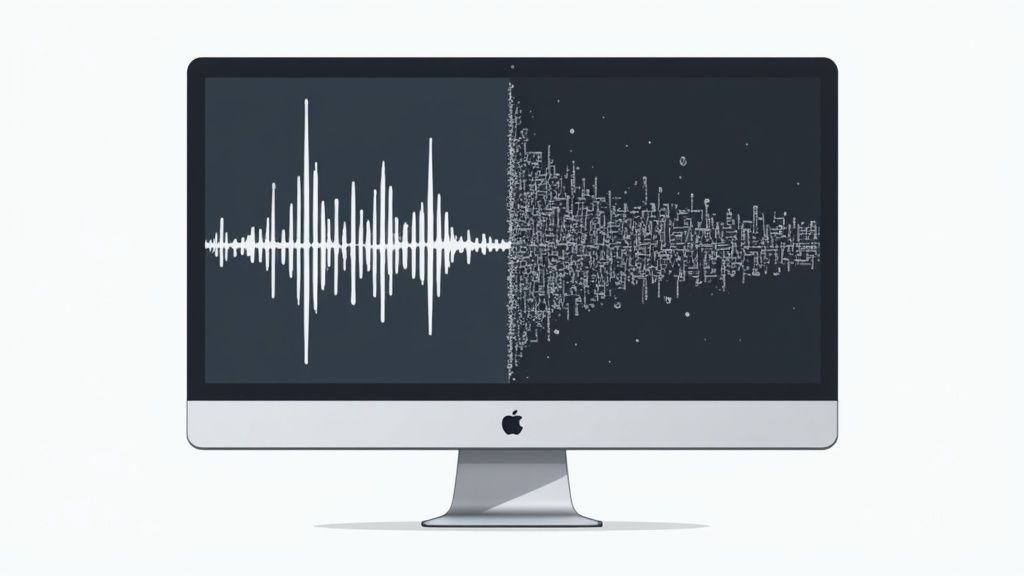
O salto da transcrição manual para os serviços de IA é um pouco como o salto de copiar livros à mão para usar uma prensa. É um ganho massivo tanto em velocidade quanto em acessibilidade. Durante décadas, transformar áudio em texto era uma tarefa lenta e entorpecedora que exigia foco intenso e ainda era propensa a erros humanos.
Essa antiga maneira de fazer as coisas era um grande gargalo para todos os tipos de profissionais. Jornalistas, pesquisadores, profissionais de marketing e especialistas jurídicos tinham que gastar um tempo valioso digitando tudo sozinhos ou desembolsar muito dinheiro para serviços de transcrição humana, que ainda levavam dias para serem entregues. O problema era simples: toda a informação valiosa em conteúdo falado estava trancada, impossível de pesquisar, analisar ou reutilizar sem um grande investimento.
A Ascensão da IA na Transcrição
O software de transcrição alimentado por IA aborda esses problemas de frente. Ao usar algoritmos sofisticados, essas ferramentas podem ouvir um arquivo de áudio e gerar um primeiro rascunho surpreendentemente preciso de uma transcrição em uma fração minúscula do tempo. Isso não apenas resolve o problema da velocidade; desbloqueia uma tonelada de valor mais profundo.
Isso não é apenas uma pequena atualização — é uma mudança fundamental na forma como trabalhamos com áudio e vídeo. O mercado global de transcrição de IA deve disparar de cerca de US$ 4,5 bilhões para cerca de US$ 19,2 bilhões até 2034, crescendo a uma taxa anual composta de 15,6%. Esse crescimento explosivo mostra quanta demanda existe por ferramentas que economizam tempo e abrem novas possibilidades.
Essa mudança em direção à automação não está acontecendo apenas na transcrição. Ferramentas como essa são uma parte fundamental da tendência maior de automatizar fluxos de trabalho de criação de conteúdo para ajudar os criadores a escalar seu trabalho de forma eficaz.
What Makes Transcript.LOL Stand Out?
IA de última geração
Alimentado pelo Whisper da OpenAI para precisão líder na indústria. Suporte para vocabulários personalizados, arquivos de até 10 horas e resultados ultra rápidos.

Importar de múltiplas fontes
Importe arquivos de áudio e vídeo de várias fontes, incluindo upload direto, Google Drive, Dropbox, URLs, Zoom e mais.

Exportar em múltiplos formatos
Exporte suas transcrições em múltiplos formatos incluindo TXT, DOCX, PDF, SRT e VTT com opções de formatação personalizáveis.
Pense desta forma: a IA fornece a matéria-prima — o texto — quase instantaneamente. Ela liberta-o do tedioso processo de "mineração", para que possa concentrar-se diretamente em refinar, analisar e, de facto, utilizar essa informação para realizar tarefas.
Em vez de apenas resolver um problema antigo, esta tecnologia cria oportunidades totalmente novas. De repente, pode:
- Reaproveitar Conteúdo: Divida facilmente um único podcast ou webinar em uma dúzia de posts de blog, atualizações de redes sociais e newsletters por e-mail.
- Analisar Dados: Pesquise rapidamente horas de entrevistas ou gravações de reuniões para encontrar temas-chave e extrair insights críticos.
- Melhorar a Acessibilidade: Gere legendas e transcrições para todo o seu conteúdo de vídeo, tornando-o disponível para um público muito mais amplo.
Como a IA Realmente Entende a Sua Voz
Então, o que está realmente a acontecer nos bastidores quando fala para o seu microfone e uma transcrição quase perfeita aparece no seu ecrã? Não é bem magia, mas está perto. Pense no software de transcrição com IA como um tradutor altamente qualificado que transforma som em texto através de uma jornada fascinante e em várias etapas.
Tudo começa com os fundamentos. A sua voz cria ondas sonoras, que um microfone capta. O primeiro trabalho do software é pegar nesse sinal analógico e transformá-lo num formato digital — uma sequência de números que um computador pode realmente ler. É como tirar uma fotografia digital de um som, criando a matéria-prima para a IA começar a trabalhar.
Este prático visual detalha a jornada principal da sua voz até ao texto final e polido.
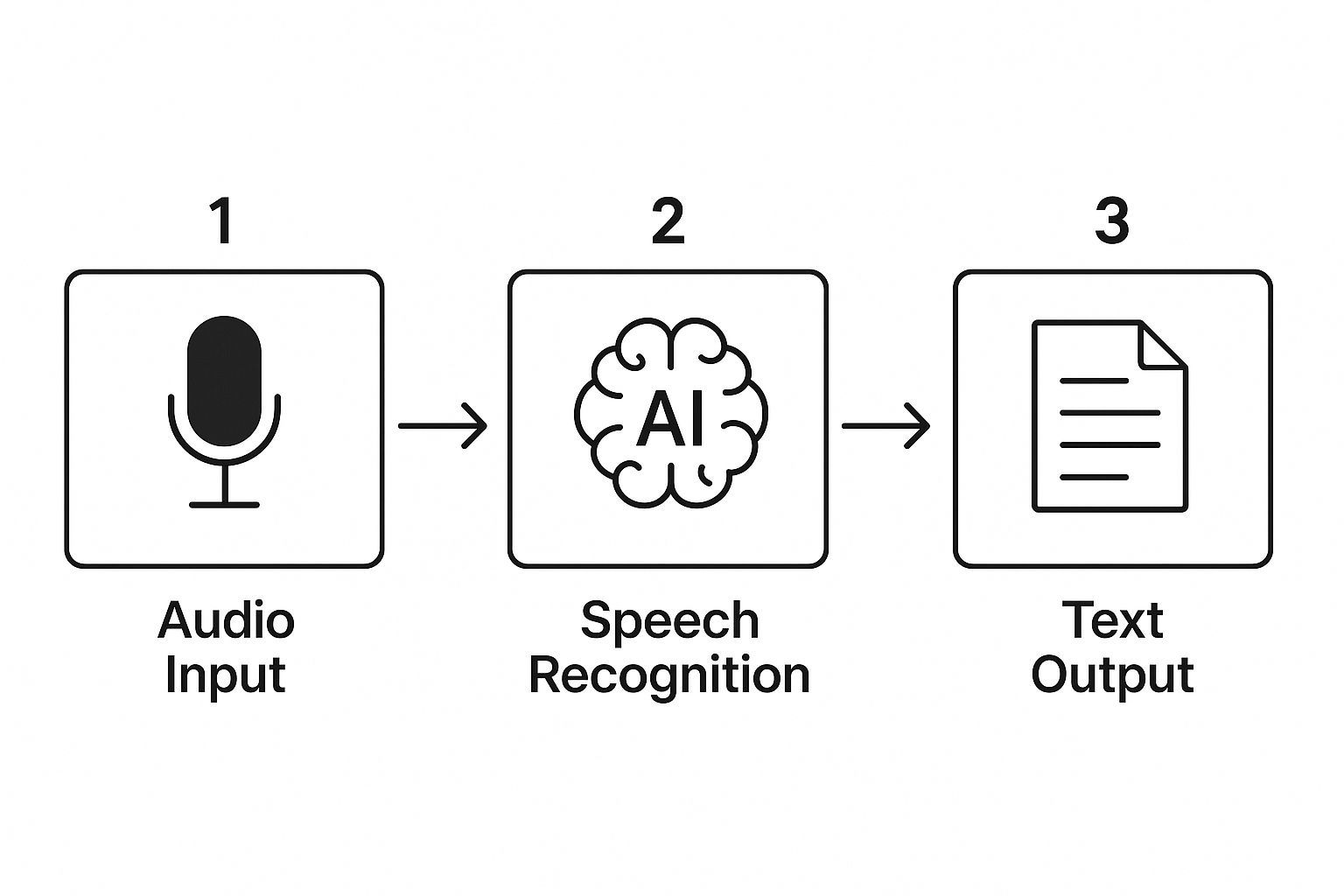
Como pode ver, é um fluxo lógico onde cada etapa se baseia na anterior, transformando áudio bruto em algo estruturado e significativo.
O Motor ASR: O Linguista Mestre
No coração de qualquer software de transcrição com IA está o seu motor de Reconhecimento Automático de Fala (ASR). Esta é a tecnologia que faz todo o trabalho pesado. Os sistemas ASR são treinados em centenas de milhares de horas de áudio incrivelmente diverso, aprendendo a conectar padrões sonoros específicos com os blocos de construção básicos da fala, conhecidos como fonemas.
O motor divide o seu áudio digitalizado em segmentos minúsculos, do tamanho de uma mordida, e analisa cada um para prever a sequência mais provável de sons. Isto é muito mais sofisticado do que apenas corresponder padrões. Os modelos ASR modernos usam aprendizagem profunda para ponderar probabilidades, considerando não apenas um único som, mas também os sons que vieram imediatamente antes e depois dele.
Este método probabilístico é um salto gigantesco em relação às ferramentas de ditado tradicionais. Em vez de depender de regras rígidas, a IA calcula a palavra mais provável com base em uma quantidade massiva de contexto. É assim que ela consegue lidar com diferentes sotaques, ruído de fundo e estilos de fala únicos de forma tão eficaz.
PNL: O Editor Inteligente
Depois que o motor ASR (Reconhecimento Automático de Fala) gera uma transcrição bruta e literal, outra camada de IA entra em ação para organizar as coisas. É aqui que o Processamento de Linguagem Natural (PNL) entra em cena. Se o ASR é o linguista que identifica as palavras, pense no PNL como o editor que garante que todas elas façam sentido juntas.
Algoritmos de PNL analisam o texto em busca de gramática, contexto e significado. É assim que o software realiza várias tarefas críticas que tornam a transcrição final realmente utilizável:
- Pontuação e Capitalização: Ele adiciona inteligentemente vírgulas, pontos e pontos de interrogação onde eles pertencem, para que você não precise dizer constrangedoramente "vírgula" ou "novo parágrafo".
- Correção Contextual: Já viu uma transcrição com "hear" (ouvir) em vez de "here" (aqui)? Os modelos de PNL analisam a frase circundante para capturar e corrigir essas confusões comuns.
- Diarização de Falantes: Em uma conversa com várias pessoas, o PNL ajuda a distinguir os falantes, rotulando corretamente quem disse o quê.
Esta fase de edição é o que transforma um fluxo desordenado de palavras em um documento coerente e útil. É o toque final que separa o reconhecimento de fala básico de uma transcrição verdadeiramente profissional. O processo de avaliar o quão bem esses sistemas funcionam é um campo em si; você pode se aprofundar aprendendo como medir a precisão do reconhecimento de fala.
Even the smartest AI will occasionally miss context. Always review transcripts before using them in official reports or publications
Essa combinação de ASR para reconhecimento e NLP para refinamento é o que torna o software de transcrição com IA moderno tão incrivelmente preciso e poderoso.
Principais Recursos do Melhor Software de Transcrição com IA
Então, você sabe como funciona a transcrição com IA. Mas o que realmente separa uma ferramenta decente de uma que você não consegue viver sem? Tudo se resume aos recursos que vão além da simples conversão de voz em texto.
Ao analisar software de transcrição com IA, você precisa olhar além do marketing chamativo e focar nas funções práticas que realmente facilitarão sua vida. Estas são as ferramentas que pegam uma transcrição bruta, bagunçada e gerada por máquina e ajudam você a transformá-la em um documento polido e utilizável em minutos.
A primeira coisa que todos perguntam é sobre precisão. Embora nenhuma ferramenta seja perfeita, as melhores estão chegando assustadoramente perto do desempenho em nível humano. As principais plataformas agora ostentam até 99% de precisão de transcrição, um enorme salto impulsionado pelo aprendizado de máquina constante. Empresas como a Verbit, por exemplo, usam reconhecimento de fala avançado e processamento de linguagem natural para chegar lá. Para um mergulho mais profundo nos números, você pode explorar estatísticas detalhadas de software de transcrição no llcbuddy.com.
Mas espere — uma taxa de precisão de 99% não é uma transcrição impecável. Para uma entrevista de 10.000 palavras, isso ainda são 100 erros. A verdadeira mágica acontece quando uma ferramenta identifica corretamente as coisas difíceis: jargões de nicho da indústria, nomes de empresas exclusivos e acrônimos específicos que confundem a maioria dos sistemas automatizados.
Antes de mergulharmos nos recursos específicos, vamos ver como a transcrição com IA se compara à abordagem manual antiga.
Software de Transcrição Manual vs. com IA: Uma Comparação Rápida
É uma coisa falar sobre recursos, mas outra é ver a diferença em ação. Esta tabela detalha as principais distinções entre ter um humano transcrevendo seu áudio e usar uma ferramenta de IA moderna.
| Recurso | Transcrição Manual | Transcrição com IA |
|---|---|---|
| Velocidade | Lenta; pode levar horas ou dias | Extremamente rápida; minutos para uma hora de áudio |
| Custo | Alto, geralmente por minuto ou por hora | Baixo, geralmente uma assinatura fixa ou taxa barata por minuto |
| Precisão | Muito alta (99%+), mas propensa a erros humanos | Alta (até 99%), mas pode ter dificuldades com sotaques/jargões |
| Tempo de Entrega | Dependente da disponibilidade humana | Disponível instantaneamente 24/7 |
| Escalabilidade | Limitada; difícil lidar com grandes volumes rapidamente | Altamente escalável; processa centenas de horas simultaneamente |
Como você pode ver, a IA muda dramaticamente os trade-offs. Enquanto um humano pode ainda ter uma pequena vantagem em conversas complexas e sutis, a IA vence de lavada em velocidade, custo e capacidade de lidar com enormes quantidades de conteúdo.
Agora, vamos aos recursos específicos que tornam isso possível.
Identificação e Diarização de Falantes
Já tentou ler um roteiro de podcast com três convidados, mas é apenas um grande bloco de texto? É um pesadelo. É aqui que a identificação de falantes (também conhecida como diarização) é um divisor de águas absoluto. É o recurso que descobre automaticamente quem está falando e quando, e depois o rotula para você.
Em vez de um bloco indecifrável, sua transcrição se torna um diálogo limpo e legível:
- Falante 1: "Então, quais foram os principais resultados do nosso relatório do terceiro trimestre?"
- Falante 2: "O principal resultado foi o crescimento inesperado no mercado europeu."
- Falante 1: "Interessante. Como isso impacta nossas projeções para o quarto trimestre?"
Este único recurso pode economizar horas de trabalho manual tedioso. Transcrições de reuniões, entrevistas ou grupos focais se tornam imediatamente úteis, permitindo que você veja exatamente quem disse o quê.
Carimbos de Data/Hora Automatizados e Vocabulário Personalizado
Outro recurso que parece pequeno, mas tem um grande impacto é o carimbo de data/hora automatizado. Uma ótima ferramenta não apenas fornece as palavras; ela vincula cada palavra ao momento exato em que foi dita. Isso é uma mão na roda para edição e verificação de fatos.
Se uma frase no texto parecer um pouco estranha, basta clicar nela. O software salta instantaneamente para aquele segundo preciso no áudio para que você possa ouvi-lo. Chega de voltar e avançar frustrantemente em uma gravação para encontrar uma pequena frase.
Vocabulário personalizado é como dar à IA um dicionário personalizado para seu campo específico. Você pode ensiná-la a grafia correta de nomes exclusivos, termos técnicos ou acrônimos específicos da indústria, melhorando drasticamente a precisão para seu conteúdo de nicho ao longo do tempo.
Por exemplo, um pesquisador médico pode adicionar termos como "farmacocinética" ou nomes de medicamentos específicos. Um podcaster de tecnologia poderia adicionar "Kubernetes" ou linguagens de programação. Esse "treinamento" garante que o software de transcrição com IA se torne mais inteligente e preciso para suas necessidades específicas a cada vez que você o usa.
Integrações e Opções de Exportação Perfeitas
O melhor software não vive isolado. Ele se conecta perfeitamente com as outras ferramentas em que você já confia, tornando todo o seu fluxo de trabalho conectado e sem esforço.
Procure por integrações essenciais que se encaixem em como você trabalha:
- Armazenamento em Nuvem: Conexões diretas com Google Drive, Dropbox ou OneDrive significam que seus arquivos podem ser carregados e sincronizados automaticamente.
- Plataformas de Vídeo: Integrações com YouTube, Vimeo e Wistia permitem que você importe vídeos para transcrição com apenas um link.
- Software de Reunião: Uma integração com o Zoom pode capturar automaticamente suas gravações de reunião e enviá-las para transcrição no momento em que uma chamada termina.
E depois que a transcrição estiver pronta? Você precisa ser capaz de obtê-la em um formato que seja realmente útil. As principais plataformas oferecem várias opções de exportação, como DOCX para relatórios, TXT para texto simples, ou arquivos SRT e VTT para criar legendas de vídeo. Se você quiser testar as águas, nosso guia sobre como transcrever áudio para texto gratuitamente é um ótimo lugar para começar. Ter essas opções garante que sua transcrição esteja pronta para o que você planeja fazer com ela a seguir.
Pro Features for Power Users

Detecção de falantes
Identifique automaticamente diferentes falantes nas suas gravações e rotule-os com seus nomes.

Ferramentas de edição
Edite transcrições com ferramentas poderosas incluindo buscar e substituir, atribuição de falantes, formatos de texto rico e destaque.
Resumos e Chatbot
Gere resumos e outros insights da sua transcrição, prompts personalizados reutilizáveis e chatbot para o seu conteúdo.
Integrações
Conecte-se com suas ferramentas e plataformas favoritas para otimizar seu fluxo de trabalho de transcrição.
Real-World Applications Across Industries
This is where the rubber meets the road. The true power of AI-powered transcription software isn't just theory; it's seeing how it solves real problems for real people every single day. Think of it less as a simple dictation tool and more as a productivity engine that’s changing how professionals work across dozens of fields.
Os números comprovam isso. Na América do Norte, o mercado de transcrição de IA atingiu um valor de cerca de US$ 1,26 bilhão, o que representa quase 40% de todo o mercado global. Essa é uma fatia enorme do bolo, e espera-se que continue crescendo 13,5% ao ano até 2030. As pessoas estão claramente vendo o valor.
Então, vamos mergulhar em alguns exemplos específicos de como essa tecnologia está fazendo uma diferença tangível no mundo real.
Revolucionando a Saúde e a Documentação Médica
Converse com qualquer médico, e ele lhe dirá sobre o esgotamento com o trabalho administrativo. Cada minuto gasto digitando notas clínicas é um minuto que eles não podem passar com um paciente. A transcrição por IA está mudando fundamentalmente essa dinâmica.
Imagine uma consulta típica de paciente:
- Um médico grava sua conversa e observações durante uma consulta.
- O software transcreve tudo em tempo quase real, muitas vezes usando um vocabulário personalizado repleto de termos médicos específicos.
- O texto fica pronto quase instantaneamente para ser revisado, editado e inserido diretamente no Registro Eletrônico de Saúde (EHR) do paciente.
Esse fluxo de trabalho simples reduz o trabalho administrativo árduo, permitindo que os médicos se concentrem em seus pacientes, ao mesmo tempo em que criam registros mais precisos e detalhados. Chega de tentar lembrar a frase exata de um detalhe crucial horas depois.
Acelerando o Jornalismo e a Pesquisa Acadêmica
Para jornalistas e pesquisadores, analisar horas de gravações de entrevistas costumava ser uma tarefa desanimadora. Transcrever manualmente esse material não era apenas lento, mas um grande obstáculo para a análise real dos dados. A IA transformou esse gargalo em uma autoestrada de informações.
Um pesquisador agora pode fazer o upload de gravações de um dia inteiro de grupos focais e obter transcrições pesquisáveis em menos de uma hora. Em vez de vasculhar oito horas de áudio para encontrar uma citação específica, eles podem simplesmente pressionar Ctrl+F. Essa velocidade permite que eles identifiquem temas, extraiam insights importantes e construam suas histórias mais rápido do que nunca.
Ao transformar áudio em texto pesquisável, a transcrição por IA permite que os pesquisadores gastem menos tempo em trabalhos braçais e mais tempo no que realmente importa: análise e descoberta.
Otimizando Fluxos de Trabalho Jurídicos e Corporativos
No campo jurídico, precisão e acessibilidade são tudo. Escritórios de advocacia estão usando software de transcrição com tecnologia de IA para processar depoimentos, reuniões com clientes e procedimentos judiciais. Ter um registro textual instantâneo e pesquisável desses eventos é uma vantagem enorme ao preparar um caso.
É a mesma história no mundo corporativo. As equipes estão documentando tudo, desde reuniões gerais até sessões de brainstorming. Uma transcrição cria um registro permanente, garante que todos estejam alinhados com os itens de ação e oferece às pessoas que não puderam comparecer uma maneira de se atualizarem.
Os benefícios são óbvios:
- Encontre qualquer coisa, rapidamente: Localize rapidamente decisões e discussões importantes.
- Mantenha todos informados: Compartilhe notas de reuniões com equipes globais em diferentes fusos horários.
- Mantenha a responsabilidade: Crie um registro claro de quem disse que faria o quê.
Potencializando a Criação de Conteúdo e Marketing
Para profissionais de marketing e criadores de conteúdo, qualquer peça de conteúdo falado é uma mina de ouro potencial. Um webinar de uma hora ou um episódio de podcast contém material suficiente para uma dúzia de posts de blog, atualizações de mídia social e newsletters por e-mail. A transcrição por IA é a chave que desbloqueia tudo isso.
Uma equipe de marketing pode transcrever um webinar e ter instantaneamente o material bruto para um artigo aprofundado. Eles podem extrair citações poderosas para gráficos de mídia social ou usar o segmento de perguntas e respostas para criar uma página de FAQ útil. Na verdade, exploramos essas estratégias em nosso guia sobre uso de transcrição para criação de conteúdo. Tudo isso se encaixa no quadro geral de tendências como integração de IA na publicação.
Ao automatizar a transcrição, as equipes podem escalar massivamente sua produção de conteúdo, garantindo que cada peça valiosa de áudio ou vídeo seja aproveitada ao máximo.
Escolhendo o Software de Transcrição de IA Certo
https://www.youtube.com/embed/Gq47TOGbxgA
Com um mar de opções no mercado, escolher o software de transcrição com tecnologia de IA certo pode parecer uma tarefa árdua. O segredo não é encontrar a única ferramenta "melhor", mas a melhor ferramenta para você. Pense nisso como comprar um carro: um carro esportivo elegante é fantástico, mas é a ferramenta errada se você precisar transportar madeira.
Para fazer uma escolha inteligente, você precisa de um plano de jogo. Comece fazendo algumas perguntas pontuais sobre como você realmente trabalha. Essa pequena autoavaliação servirá como sua bússola, apontando para uma solução que se encaixe perfeitamente em seu fluxo de trabalho em vez de forçá-lo a mudá-lo.
Defina Seus Requisitos Principais
Antes mesmo de olhar uma lista de recursos, você precisa ter clareza sobre seu próprio caso de uso. O software perfeito para um podcaster que aprimora episódios semanais está a um mundo de distância do que um pesquisador médico precisa para entrevistas com pacientes.
Comece com esses fatores-chave:
- Qualidade do Áudio: Você está lidando com gravações de estúdio cristalinas ou chamadas de conferência confusas cheias de ruído de fundo? Algumas ferramentas são feitas para áudio impecável, enquanto outras possuem tecnologia impressionante de filtragem de ruído.
- Tipo de Conteúdo: É apenas um único locutor ou você está desvendando conversas complexas com várias pessoas? Se for o último, uma ferramenta com excelente identificação de locutor (diarização) é essencial.
- Jargão Técnico: Você trabalha em um campo com sua própria linguagem, como direito, medicina ou engenharia? Se sim, a capacidade de construir um dicionário personalizado é inegociável para obter transcrições precisas.
Responder a essas perguntas primeiro reduzirá drasticamente o campo. Você eliminará imediatamente as opções que simplesmente não são feitas para o tipo de áudio que você lida dia após dia.
Avalie Precisão e Desempenho
A precisão é o grande número sobre o qual todos falam, mas pode ser seriamente enganosa. Uma ferramenta pode ostentar 98% de precisão em uma gravação de estúdio perfeita, mas cair para 80% em uma chamada Zoom do mundo real com pessoas falando umas sobre as outras.
Não aceite apenas o número anunciado ao pé da letra. Procure provas de desempenho no mundo real. Procure avaliações, estudos de caso ou depoimentos de usuários que reflitam situações como a sua. Ao ponderar suas opções, é útil conferir comparações abrangentes do melhor software para transcrever vídeo para ver como diferentes ferramentas se comparam em várias condições.
AI transcription accuracy has jumped dramatically in the past 3 years—tools now achieve 90–99% accuracy on clear audio.
A melhor maneira de testar a precisão é usar o teste gratuito. Carregue uma amostra real do seu áudio típico — uma que não seja perfeita — e veja como o software a lida. Essa experiência direta vale mais do que qualquer alegação de marketing.
Este teste prático também lhe dá uma ideia da velocidade da ferramenta. Quão rápido ela entrega uma transcrição? Para trabalhos urgentes, alguns minutos podem fazer toda a diferença.
Segurança e Integrações Importam
Para a maioria dos profissionais, o conteúdo do seu áudio é sensível. Isso significa que segurança e conformidade devem estar no topo da sua lista de verificação.
Procure por provedores que levam a segurança a sério:
- Criptografia de Dados: Certifique-se de que o serviço usa criptografia de ponta a ponta para proteger seus arquivos, tanto durante o upload quanto enquanto estão armazenados.
- Política de Privacidade: Um serviço confiável terá uma política clara declarando que não usará seus dados para treinar seus modelos de IA sem sua permissão explícita.
- Padrões de Conformidade: Se você atua em áreas como saúde ou direito, a conformidade com regulamentos como HIPAA ou GDPR não é um "extra" — é um requisito crítico.
Além da segurança, pense em como o software se encaixará na sua vida digital existente. O melhor software de transcrição com IA funciona bem com as plataformas em que você já confia. Procure por conexões com serviços como Zoom, Google Drive, Dropbox ou YouTube. Boas integrações economizam o incômodo de baixar e fazer upload de arquivos manualmente, criando um fluxo de trabalho muito mais tranquilo. Para pesquisadores qualitativos, descobrir como analisar dados de entrevistas é o próximo passo, e a ferramenta certa torna essa transição perfeita.
Entenda o Modelo de Preços
Finalmente, você precisa encontrar uma estrutura de preços que se ajuste ao seu orçamento e à frequência com que usará o serviço. A maioria das ferramentas se enquadra em um de dois grupos.
- Planos de Assinatura: Geralmente oferecem um número definido de horas de transcrição por mês por uma taxa fixa. Este é um ótimo modelo para quem tem necessidades consistentes e previsíveis, como podcasters ou profissionais de marketing que lançam vídeos semanais.
- Pague Conforme Usa: Esta opção permite que você pague por minuto ou por hora de áudio que transcreve. É perfeito para pessoas com necessidades ocasionais ou imprevisíveis, como um estudante que precisa transcrever algumas entrevistas para um único projeto.
Reserve um momento para estimar seu volume típico. Uma assinatura pode parecer mais cara à primeira vista, mas muitas vezes resulta em um custo por minuto muito menor se você tiver um fluxo constante de conteúdo para processar. Escolher o plano certo garante que você obtenha o máximo pelo seu dinheiro sem pagar por capacidade que nunca usará.
Melhores Práticas para Transcrições Impecáveis
Ter um poderoso software de transcrição com IA é uma coisa; tirar o máximo proveito dele é outra história completamente diferente. Embora a tecnologia seja incrivelmente inteligente, você pode aumentar seriamente sua precisão com alguns bons hábitos. Pense na IA como uma aluna brilhante — quanto mais clara você tornar a lição, melhor ela se sairá.
A qualidade da sua transcrição final é um reflexo direto do seu áudio de origem. A coisa mais importante que você pode fazer para obter melhores resultados é garantir que seu áudio esteja o mais limpo possível. Você não precisa de um estúdio profissional, apenas um pouco de planejamento.
Otimize sua Entrada de Áudio
Primeiro, use um microfone decente. O embutido no seu laptop serve em caso de necessidade, mas um microfone USB dedicado ou até mesmo o do fone de ouvido do seu smartphone pode fazer uma grande diferença. Aproxime o microfone da pessoa que está falando para capturar a voz dela de forma clara e direta.
Tão importante quanto é eliminar o ruído de fundo. Algumas ações simples podem ter um impacto enorme nos seus resultados:
- Escolha um local silencioso: Evite salas com muito eco, ruído da rua ou outras pessoas conversando.
- Silencie o zumbido: Desligue ventiladores, ar condicionado e quaisquer notificações barulhentas do computador antes de gravar.
- Fale claramente: Incentive os falantes a articular suas palavras e a tentar não falar um sobre o outro. É um clássico por um motivo.
Quick Audio Tips for Better Transcripts
🎙 Use a Quality Mic
Even budget USB mics beat laptop mics.
🔇 Control the Room
Choose a quiet space, reduce echo & noise.
🎚 Adjust Settings
Enable “Original Sound” or high-fidelity modes.
👥 Separate Tracks
Record each speaker on a separate channel.
Tudo se resume ao velho princípio "lixo entra, lixo sai". Alguns minutos gastos a melhorar a qualidade do áudio pouparão imenso tempo a editar a transcrição mais tarde, dando à IA o melhor material possível para trabalhar.
Refine a Transcrição Pós-Processamento
Mesmo com áudio perfeito, uma rápida revisão humana é essencial. Nenhuma IA é perfeita e, por vezes, pode tropeçar nas nuances ou no contexto específico de uma conversa. A sua melhor aposta é tratar a transcrição inicial da IA como um rascunho muito, muito bom, não como a versão final.
As melhores ferramentas facilitam esta parte. Procure funcionalidades como carimbos de data/hora clicáveis que sincronizam o texto com a reprodução do áudio. Isto permite-lhe saltar instantaneamente para qualquer parte da gravação que soe um pouco confusa e fazer correções com confiança. Uma rápida revisão de cinco minutos é muitas vezes tudo o que é necessário para apanhar esses pequenos deslizes.
Treine a Sua IA para Melhores Resultados
Finalmente, precisa de aproveitar as funcionalidades que lhe permitem ensinar o software. Muitas plataformas têm um dicionário personalizado ou funcionalidade de vocabulário, e esta é a sua oportunidade de dar à IA uma folha de cola personalizada para o seu trabalho específico.
Adicione quaisquer palavras que sejam exclusivas da sua indústria, empresa ou projeto:
- Nomes Próprios: Os nomes de pessoas, marcas e produtos.
- Jargão Técnico: Quaisquer termos especializados que a IA possa não reconhecer de imediato.
- Acrónimos: Defina os acrónimos específicos que você e a sua equipa usam constantemente.
Ao construir um vocabulário personalizado, está a treinar ativamente o software de transcrição com IA para se tornar mais inteligente e preciso para o seu conteúdo. É um passo proativo que transforma uma ótima ferramenta num assistente indispensável, perfeitamente sintonizado com o seu fluxo de trabalho.
Ainda Tem Dúvidas? Vamos Esclarecer.
À medida que se prepara para integrar a transcrição por IA no seu mundo, é natural ter algumas perguntas. É aqui que abordamos as mais importantes, dando-lhe as respostas claras e diretas de que precisa para se sentir confiante.
Pense nisto como a verificação final antes de mergulhar. Queremos ter a certeza de que tem todos os factos, para que possa tomar a melhor decisão para o seu trabalho.
Quick Answers to Common Questions
⏱ How Fast is It?
Get transcripts in minutes, not hours.
🔐 Is My Data Safe?
End-to-end encrypted, GDPR/HIPAA compliant.
🗣 Does It Detect Speakers?
Yes, automatic diarization included.
🌎 Languages Supported?
Covers 40+ global languages and accents.
A Transcrição por IA Pode Realmente Substituir um Humano?
Para muitos trabalhos do dia a dia, a resposta é um sonoro sim. O software de transcrição de ponta com IA de hoje pode atingir até 99% de precisão com áudio claro, o que está no mesmo nível do que uma pessoa pode fazer. É fantástico para produzir um rascunho inicial quase perfeito em minutos, não horas, tornando-o uma mudança de jogo para criadores de conteúdo, anotações de reuniões e manutenção geral de registros.
Mas sejamos honestos: um ouvido humano ainda é o padrão ouro para áudio complicado. Se você tem uma gravação com muito ruído de fundo, sotaques carregados ou pessoas falando umas sobre as outras, provavelmente desejará que uma pessoa a revise rapidamente. O fluxo de trabalho mais inteligente é frequentemente um esforço de equipe: deixe a IA fazer o trabalho pesado e, em seguida, peça a um humano para adicionar essa camada final de polimento.
Como Sei Que Meus Dados Estão Seguros?
Este é um grande problema, e qualquer serviço que valha a pena leva isso muito a sério. As principais plataformas de transcrição são construídas com segurança robusta para proteger seus arquivos desde o momento em que você os carrega. Seu áudio e texto são normalmente bloqueados com criptografia de ponta a ponta, tanto em trânsito quanto quando armazenados em seus servidores.
Muitos serviços também cumprem as principais leis de privacidade de dados, como o GDPR na Europa e a HIPAA para o manuseio de informações de saúde sensíveis nos EUA.
Antes de carregar qualquer coisa confidencial, sempre reserve um minuto para ler a política de privacidade de um serviço. Você quer ver uma promessa clara de que eles não usarão seus dados para treinar sua IA sem sua permissão direta. Alguns até oferecem opções on-premise se você precisar de controle máximo sobre seus arquivos.
A IA Consegue Identificar Quem Está Falando?
Absolutamente, e é um recurso do qual você vai se perguntar como viveu sem ele. Chama-se diarização de falante ou identificação de falante. A maioria das plataformas modernas consegue descobrir automaticamente quando uma nova pessoa começa a falar e rotulará a transcrição de acordo (como "Falante 1", "Falante 2" e assim por diante). A partir daí, você pode simplesmente inserir e substituir essas tags pelos nomes reais.
Isso economiza um tempo enorme para qualquer pessoa que lida com entrevistas, podcasts, grupos focais ou reuniões de equipe. Transforma o que poderia ser uma parede de texto confusa em uma conversa limpa e organizada, fácil de seguir e perfeita para extrair citações precisas.
Pronto para parar de digitar e começar a criar? Transcript.LOL usa a IA mais recente para fornecer transcrições incrivelmente precisas em segundos. Carregue seu áudio ou vídeo e veja-o se transformar em texto editável e pesquisável, completo com detecção de falante.
Experimente o Transcript.LOL gratuitamente e obtenha sua primeira transcrição hoje!