
Transcripción de Video de YouTube: Una Guía Completa
Aprende a transcribir contenido de video de YouTube con herramientas integradas y aplicaciones avanzadas. Convierte tus videos en potentes activos de SEO y marketing con esta guía.
Kate
February 5, 2025
Obtener una transcripción para un video de YouTube es más fácil de lo que piensas. Puedes obtener una directamente de YouTube, transcribirla tú mismo o usar una herramienta inteligente de IA para hacer el trabajo más rápido y con mayor precisión. Este simple paso puede cambiar por completo tu contenido, mejorando su SEO, haciéndolo más accesible y abriendo un mundo de posibilidades de reutilización.
Tus palabras habladas se convierten en un activo versátil y buscable.
Por qué deberías transcribir tus videos de YouTube
Solo mira la página de inicio de YouTube. Es una batalla por la atención. En un espacio tan abarrotado, una transcripción de video es una de las herramientas más poderosas, y más pasadas por alto, que tienes para destacar. Convierte tu video de una caja cerrada de medios a un documento basado en texto que los motores de búsqueda pueden leer, indexar y clasificar.
Piénsalo: Google no puede "ver" tu video para entender de qué trata, pero puede devorar cada palabra en una transcripción. Cada palabra que dices se convierte en una oportunidad para ser encontrado. Esto tiene un gran impacto en la descubribilidad de tu video, no solo en YouTube, sino en toda la web.
Mejora tu accesibilidad y mantén a los espectadores enganchados
Más allá de los motores de búsqueda, las transcripciones hacen que tu contenido esté disponible para una audiencia mucho mayor. No todos pueden o quieren escuchar.
¿Sabías que entre el 15% y el 20% de los espectadores dependen de subtítulos o transcripciones? Esto incluye a personas sordas o con problemas de audición, alguien que mira en un tren ruidoso, o incluso hablantes no nativos a quienes les resulta más fácil leer mientras ven. Al proporcionar una transcripción, estás haciendo que tu contenido sea más inclusivo.
Este compromiso con la accesibilidad también se refleja en tus métricas de YouTube. Los videos con subtítulos ven, en promedio, una tasa de visualización un 12% más alta. Simplemente tiene sentido: funcionan en más situaciones y hacen que el contenido sea más fácil de seguir.
Agregar transcripciones precisas no se trata solo de accesibilidad, sino que influye directamente en la satisfacción y retención del usuario. Cuando los espectadores entienden mejor el contenido, permanecen más tiempo, interactúan más y recomiendan videos con más frecuencia. Pequeñas mejoras en la claridad pueden generar aumentos significativos en el crecimiento del canal.
Al no transcribir, estás cerrando involuntariamente la puerta a una gran parte de tu audiencia potencial y perdiendo la oportunidad de una mayor interacción con los espectadores que ya tienes.
Desbloquea tus superpoderes de reutilización de contenido
Aquí es donde se pone realmente interesante. Una transcripción es una máquina de creación de contenido. Tu video ya no es solo un video; es la materia prima para una docena de otras piezas de contenido.
Con una transcripción limpia y precisa, puedes convertir rápidamente un video de 20 minutos en:
- Una publicación de blog con alto ranking: Pule el texto, agrega algunos encabezados y tendrás un artículo optimizado para palabras clave listo para usar.
- Fragmentos atractivos para redes sociales: Extrae las mejores citas, estadísticas o ideas clave para crear gráficos para Instagram o hilos para X.
- Un boletín por correo electrónico: Escribe un resumen rápido de los puntos principales del video y envíalo a tu lista, dirigiendo tráfico directamente al video original.
- Guiones para YouTube Shorts o Reels: Identifica fácilmente los momentos más convincentes para cortar en videos de formato corto que pueden atraer a una audiencia completamente nueva.
Este flujo de trabajo ahorra una cantidad de tiempo increíble y asegura que tu mensaje principal se escuche en cada plataforma, en cada formato.
Cómo las Transcripciones Multiplican el Poder de tu Contenido
Video → Publicación de Blog
Convierte videos largos en artículos ricos en palabras clave que mejoran el SEO y atraen tráfico orgánico. Una transcripción depurada crea la base perfecta para contenido escrito estructurado.
Video → Redes Sociales
Extrae citas, ideas y consejos directamente de tu transcripción. Estos fragmentos alimentan publicaciones de Instagram, hilos de X, actualizaciones de LinkedIn y guiones de videos cortos sin esfuerzo.
Video → Boletín de Correo Electrónico
Da forma a tu transcripción en resúmenes y actualizaciones digeribles. Envíalos para reenganchar a tu audiencia mientras los diriges de regreso a tu canal de YouTube.
Video → Imán de Leads
Convierte contenido destacado en listas de verificación descargables, hojas de trucos o guías. Esto ayuda a hacer crecer tu lista de correo electrónico mientras maximizas el valor de los videos existentes.
Si quieres profundizar, consulta nuestra guía sobre estrategias efectivas de reutilización de contenido.
Para concluir, repasemos rápidamente los beneficios clave de hacer de la transcripción una parte estándar de tu flujo de trabajo de video.
Beneficios Clave de la Transcripción de Videos de YouTube
La siguiente tabla desglosa las ventajas clave que obtienes al transcribir el contenido de tu video, mostrando cómo una simple transcripción puede tener un efecto dominó masivo en toda tu estrategia de contenido.
| Área de Beneficio | Impacto en tu Estrategia de Contenido |
|---|---|
| SEO y Descubrimiento | Hace que cada palabra hablada en tu video sea indexable por los motores de búsqueda, aumentando el tráfico orgánico de Google y YouTube. |
| Accesibilidad para la Audiencia | Abre tu contenido a espectadores sordos, con problemas de audición o en entornos sensibles al sonido, ampliando tu alcance. |
| Interacción del Espectador | Mejora la comprensión y el tiempo de visualización, ya que los espectadores pueden seguir el texto, lo que lleva a mejores métricas del canal. |
| Reutilización de Contenido | Proporciona el material bruto para crear rápidamente publicaciones de blog, contenido para redes sociales, boletines informativos y más, ahorrándote tiempo. |
En última instancia, la transcripción no es solo una tarea administrativa, es un movimiento estratégico que hace que tu contenido trabaje más para ti.
Uso de la Función de Transcripción Nativa de YouTube
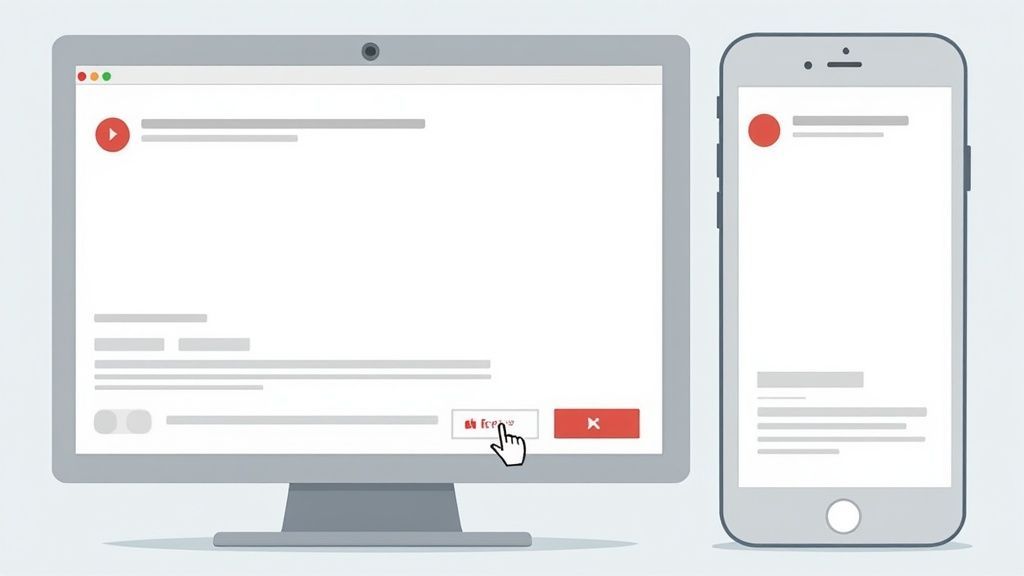
A veces, la forma más rápida de obtener una transcripción para un video de YouTube es utilizando la herramienta que ya está integrada en la plataforma. Es completamente gratuita, está disponible en casi todos los videos públicos y no necesitas instalar nada. Para necesidades simples y sobre la marcha, es un excelente punto de partida.
El proceso en una computadora de escritorio no podría ser más sencillo. Simplemente busca el botón "..." (Más) justo debajo del reproductor de video, haz clic en él y selecciona "Mostrar transcripción". Al instante, aparece un nuevo panel junto al video, mostrando todo el texto con marcas de tiempo interactivas.
Este acceso inmediato es fantástico cuando solo necesitas encontrar una cita específica o escanear rápidamente el contenido del video en formato de texto.
Acceso a la Transcripción
Una vez que el panel de transcripción está abierto, tienes un par de opciones útiles. Puedes leer mientras el video se reproduce y verás la línea actual resaltada en tiempo real. Esto es perfecto para estudiar o para cualquiera que encuentre más fácil seguir tanto el audio como el texto.
También puedes limpiar la vista haciendo clic en los tres puntos verticales dentro del panel para desactivar las marcas de tiempo. Esto te da un bloque de texto mucho más limpio si todo lo que quieres es el diálogo en bruto. A partir de ahí, simplemente resalta lo que necesitas, cópialo y pégalo donde quieras.
El problema es que la simplicidad de la herramienta nativa de YouTube viene con algunas desventajas bastante importantes. El formato es un desastre y la precisión puede ser un verdadero dolor de cabeza, especialmente con los subtítulos generados automáticamente.
Comprensión de las Limitaciones
La mayor decepción aquí es la precisión del reconocimiento automático de voz de YouTube. Si el video tiene un audio que no es perfecto, varias personas hablando al mismo tiempo o utiliza mucha jerga técnica, la transcripción que genera puede estar plagada de errores. Francamente, estos subtítulos generados automáticamente a menudo necesitan una gran cantidad de edición para ser utilizables.
Peor aún, cuando copias y pegas desde la ventana de transcripción, obtienes una pesadilla de formato. Es solo un bloque de texto con marcas de tiempo dispersas. Te quedas para agregar manualmente toda la puntuación, dividir párrafos y averiguar quién está hablando. Para cualquier tipo de uso profesional, esta limpieza puede llevar más tiempo del que vale la pena.
Si buscas mejores formas de descargar una transcripción de video de YouTube, existen herramientas especializadas que hacen que este proceso sea indoloro.
La función integrada de YouTube es excelente para una consulta rápida e informal. Pero si estás intentando crear un documento limpio y preciso para una publicación de blog o registros profesionales, a menudo crea más trabajo del que ahorra. Aquí es donde los servicios de transcripción dedicados realmente brillan.

Detección de hablantes
Identifica automáticamente diferentes hablantes en tus grabaciones y etiquétalos con sus nombres.

Herramientas de edición
Edita transcripciones con herramientas potentes como buscar y reemplazar, asignación de hablantes, formatos de texto enriquecido y resaltado.

Exportar en múltiples formatos
Exporta tus transcripciones en múltiples formatos incluyendo TXT, DOCX, PDF, SRT y VTT con opciones de formato personalizables.
Apoyándose en Herramientas de Transcripción de Terceros
Si bien la función integrada de YouTube es un buen punto de partida, a menudo se queda corta cuando necesita una transcripción limpia, precisa y con formato profesional. Aquí es donde las herramientas de transcripción dedicadas de terceros realmente brillan. Están construidas desde cero para resolver exactamente los problemas que plagan la experiencia nativa de YouTube, es decir, la precisión y el formato.
Estas plataformas ofrecen un flujo de trabajo mucho más pulido y eficiente. En lugar de copiar y pegar un texto desordenado, simplemente arrastra una URL de YouTube y obtendrás un documento estructurado y editable en minutos. Es un cambio de juego total para los creadores serios que necesitan un sistema confiable para transcribir contenido de video de YouTube para su reutilización.
Por qué una Herramienta Especializada Vale la Pena
La mayor ventaja que obtienes de un servicio dedicado es el salto inmediato en la calidad. Estas herramientas están impulsadas por modelos de IA avanzados entrenados específicamente para voz a texto, lo que significa que verás significativamente menos errores que con los subtítulos automáticos de YouTube. Para cualquiera que busque mayor precisión y funciones más robustas, vale la pena explorar herramientas avanzadas de IA para transcripción de YouTube para maximizar verdaderamente el potencial de tu video.
Además de eso, vienen equipadas con funciones diseñadas para hacerte la vida más fácil:
- Identificación de Orador: El software puede detectar y etiquetar automáticamente a diferentes oradores, ahorrándote el dolor de cabeza de averiguar quién dijo qué.
- Exportaciones Más Limpias: Puedes exportar transcripciones en formatos realmente útiles como SRT (para subtítulos), DOCX (para publicaciones de blog) o PDF (para registros) con un solo clic.
- Editores Interactivos: La mayoría de las herramientas tienen editores integrados que te permiten reproducir el audio y corregir cualquier error de IA sobre la marcha, asegurando una transcripción final impecable.
Esta captura de pantalla de una popular herramienta de transcripción, Otter.ai, muestra una interfaz limpia con etiquetas de orador y marcas de tiempo.
¿Ves cómo el texto ya está desglosado por orador y tiempo? Es infinitamente más fácil de editar y entender en comparación con el bloque de texto sin formato que obtienes de YouTube.
El mercado para estos servicios está en auge. La demanda de una transcripción de un video de YouTube de alta calidad ha llevado a potentes APIs y generadores que ahora admiten más de 50 idiomas e incluso se integran con YouTube Shorts. Los precios a menudo incluyen niveles gratuitos, con planes premium que promedian alrededor de $6-13 por cada 1,000 solicitudes, lo que hace que la transcripción de nivel profesional sea sorprendentemente asequible.
Usar una herramienta dedicada no se trata solo de obtener una mejor transcripción; se trata de recuperar tu tiempo. Las horas que podrías pasar limpiando manualmente una transcripción de YouTube se reducen a solo unos minutos de corrección.
Un Ejemplo de Flujo de Trabajo Práctico
Supongamos que acabas de publicar una entrevista de 30 minutos. En lugar de luchar con la interfaz de YouTube, tu proceso se vería algo así:
- Pega la URL: Copia el enlace del video y arrástralo a una herramienta como Transcript.LOL.
- Revisa y Edita: La IA genera la transcripción, completa con etiquetas de orador. Puedes escanear rápidamente, corregir cualquier error menor (como nombres de marcas o jerga) y reasignar etiquetas de orador si es necesario.
- Exporta tus Archivos: Con un solo clic, descargas un archivo DOCX perfectamente formateado, listo para convertirse en una publicación de blog, y un archivo SRT para subirlo como subtítulos precisos de vuelta a tu video.
Este simple proceso convierte la transcripción de una tarea tediosa a un paso rápido y repetible en tu canal de contenido. Para tener una mejor idea de cómo operan estas plataformas, puedes obtener más información sobre software de transcripción impulsado por IA y ver cómo puede encajar en tu flujo de trabajo. Es una pequeña inversión que se amortiza enormemente en calidad de contenido y productividad.
Comparando Métodos de Transcripción
Para que la elección sea más clara, aquí tienes un resumen rápido de cómo se compara la función nativa de YouTube con una herramienta dedicada.
| Característica | Transcripción Nativa de YouTube | Herramienta de Terceros (ej. Transcript.LOL) |
|---|---|---|
| Precisión | De regular a buena, pero a menudo tiene problemas con acentos y jerga. | Alta, con modelos de IA especializados para mejores resultados. |
| Formato | Básico, presenta el texto como un bloque grande y sin formato. | Estructurado limpiamente con párrafos y marcas de tiempo. |
| Etiquetado de Orador | Ninguno. Todo el texto se fusiona. | Automático, con opciones para editar y asignar nombres. |
| Opciones de Exportación | Limitado a copiar y pegar texto sin formato. | Múltiples formatos (SRT, DOCX, PDF, TXT, etc.). |
| Edición | No editable directamente; debe copiarse y editarse en otro lugar. | Editor interactivo sincronizado con la reproducción de audio/video. |
| Facilidad de Uso | Sencillo de acceder pero engorroso de trabajar. | Flujo de trabajo optimizado; solo pega una URL. |
Mientras que YouTube cumple su función para una transcripción rápida y aproximada, una herramienta de terceros es la clara ganadora para cualquiera que necesite producir contenido profesional y reutilizable de manera eficiente.
Dominando tu Flujo de Trabajo de Transcripción
https://www.youtube.com/embed/0OFWsEpcHe0
Tener una gran herramienta para transcribir contenido de video de YouTube cambia las reglas del juego, pero un flujo de trabajo eficiente es más que solo pegar un enlace. La calidad de tu transcripción depende casi por completo de una cosa: la calidad del audio original de tu video.
Un sonido limpio y nítido con un mínimo de ruido de fondo es el factor más importante para obtener una transcripción precisa de IA desde el principio.
La Calidad del Audio Determina la Precisión
El audio deficiente puede reducir drásticamente la precisión de la transcripción de IA. El ruido de fondo, el habla superpuesta y las grabaciones apagadas obligan a la IA a adivinar las palabras incorrectamente. Asegurar un audio limpio desde el principio ahorra más tiempo del que cualquier herramienta de edición puede.
Piensa en tu audio antes de siquiera pulsar grabar. Usar un micrófono decente, hablar con claridad y reducir el ruido ambiental como ventiladores o tráfico reducirá drásticamente tu tiempo de edición más adelante. Una pista de audio limpia permite que la IA haga su trabajo, entregando a menudo una transcripción que tiene más del 95 % de precisión desde el principio.
La Revisión de Corrección
Incluso con una grabación perfecta, ninguna IA es infalible. Siempre necesitarás darle a tu transcripción una revisión rápida para detectar cualquier error persistente. El truco es hacer que este proceso sea lo más indoloro posible.
En lugar de simplemente leer el texto por sí solo, utiliza un editor interactivo que sincronice las palabras con la reproducción de tu video. Esto te permite escuchar y leer al mismo tiempo, lo que facilita mucho la detección de errores en contexto.
Presta atención a estos errores comunes de la IA:
- Nombres Propios: La IA a menudo se tropieza con nombres únicos, marcas o lugares específicos.
- Jerga de la Industria: La terminología especializada puede malinterpretarse fácilmente.
- Homófonos: Las palabras que suenan igual pero significan cosas diferentes (por ejemplo, "their" vs. "there" en inglés) son un obstáculo clásico.
Esta infografía desglosa el simple proceso de tres etapas para convertir un video en bruto en una transcripción pulida.
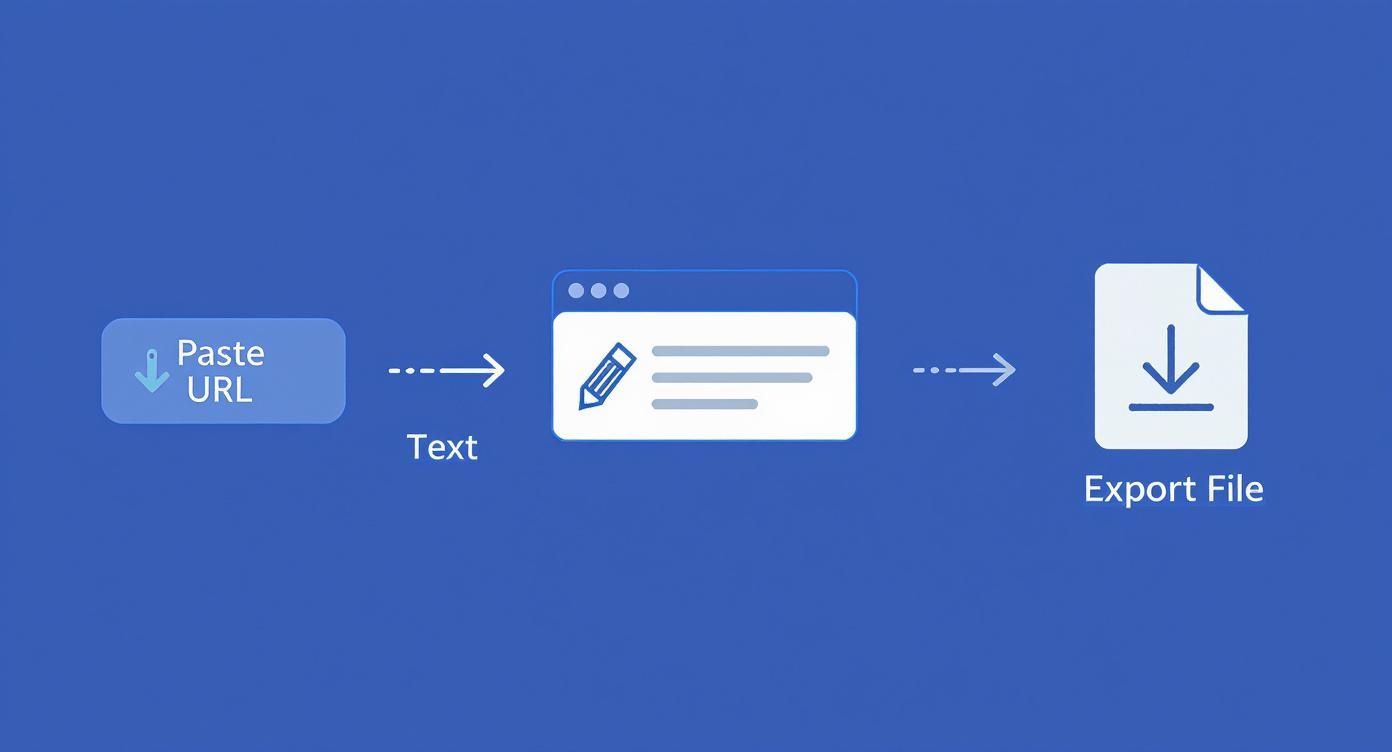
Como puedes ver, todo el sistema está diseñado para llevarte desde una URL de video a un archivo editable con la menor fricción posible.
Estrategias Avanzadas de Flujo de Trabajo
¿Listo para subir de nivel? Empieza a explorar las funciones avanzadas de tu herramienta de transcripción. Una de las más potentes es la capacidad de crear un diccionario personalizado o una lista de vocabulario.
Si te encuentras corrigiendo constantemente los mismos nombres de marca, términos técnicos o acrónimos, añadirlos a un diccionario personalizado le dice a la IA exactamente cómo escribirlos cada vez. Es un paso proactivo que puede ahorrarte incontables horas de ediciones manuales repetitivas a largo plazo. Básicamente, estás entrenando a la IA para que entienda tu jerga específica.
Para obtener más información sobre lo que realmente impulsa la calidad de la transcripción, consulta nuestro análisis en profundidad sobre qué influye en la precisión del habla a texto.
El mercado de generadores de transcripciones de YouTube en 2025 está repleto de opciones. Servicios de primer nivel como Otter.ai, Descript y Rev.com ofrecen de todo, desde IA totalmente automatizada hasta servicios impulsados por humanos para obtener resultados casi perfectos. Rev, por ejemplo, garantiza una precisión del 99 % o superior con sus transcriptores humanos, algo imprescindible para campos profesionales como el derecho o la medicina.
Recuerda, el objetivo de un gran flujo de trabajo no es solo obtener una transcripción, sino obtener una transcripción utilizable con el menor esfuerzo posible. Optimizar tu audio y utilizar funciones de edición inteligentes te llevará allí mucho más rápido.
Convirtiendo Transcripciones en una Mina de Oro de Contenido
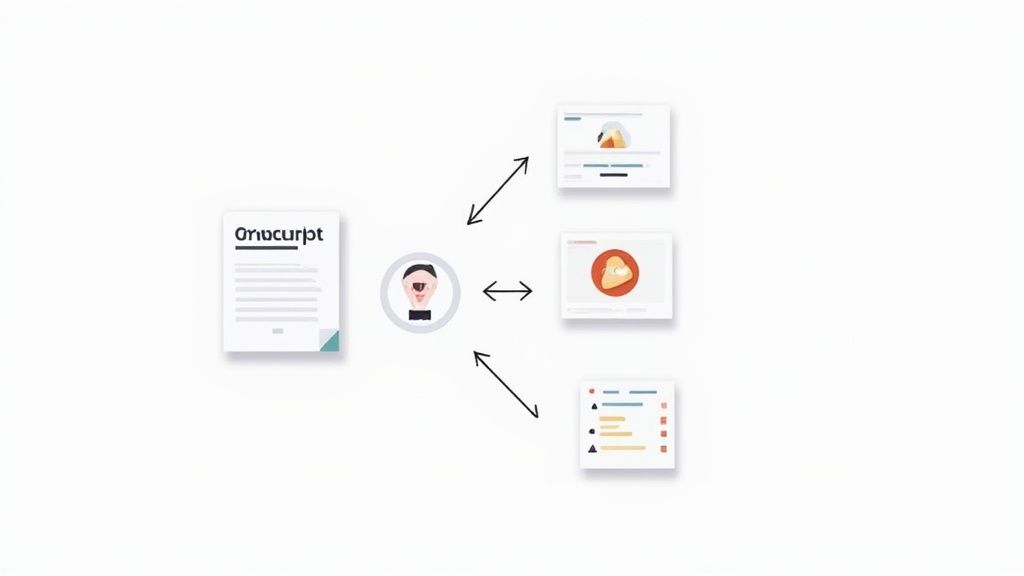
Una vez que tengas una transcripción limpia y precisa, comienza la verdadera diversión. Una transcripción pulida es mucho más que una versión en texto de tu video: es la materia prima para un potente motor de contenido. Cuando la tratas como un activo fundamental, puedes convertir un solo video en todo un ecosistema de contenido que atrae tráfico de todas partes.
Este enfoque ahorra una increíble cantidad de tiempo. En lugar de empezar desde cero para tu blog, redes sociales y boletín de correo electrónico, simplemente estás reformateando un mensaje que ya has creado y validado con tu audiencia.
Del Diálogo de Video a un Potenciador de SEO
La forma más directa e impactante de reutilizar una transcripción de un video de YouTube es convertirla en una publicación de blog de formato largo y optimizada para SEO. Piénsalo: tus palabras habladas a menudo son conversacionales y están repletas de las frases exactas que tu audiencia escribe en Google.
Así es como podría verse ese flujo de trabajo en la práctica:
- Estructura el Caos: Primero, divide esa masa de texto con subtítulos H2 y H3 para crear secciones lógicas. Esto no solo organiza el contenido para los lectores, sino que también ayuda a los motores de búsqueda a entender de qué trata tu artículo.
- Refina para la Legibilidad: A continuación, pule el diálogo conversacional en párrafos claros y concisos. Querrás eliminar palabras de relleno, corregir cualquier error gramatical y asegurarte de que el flujo tenga sentido para alguien que lee, no solo que escucha.
- Optimiza para Palabras Clave: Identifica la palabra clave principal que tu video tiene como objetivo e intégrala de forma natural en tus encabezados y texto del cuerpo. Si usas WordPress, herramientas como Yoast o RankMath pueden guiar este proceso directamente en tu editor.
Esta estrategia le da a tu video una segunda vida y crea un activo duradero que puede generar tráfico orgánico durante años. Los motores de búsqueda aman el contenido escrito bien estructurado, y un artículo basado en tu video puede clasificarse para docenas de palabras clave de cola larga que quizás ni siquiera hayas considerado.
La reutilización no se trata solo de ahorrar tiempo. Se trata de maximizar el valor de cada idea. Tu transcripción es el plano para crear publicaciones de blog con una vida útil más larga y un alcance mucho mayor del que el video podría lograr por sí solo.
Actualiza tu Flujo de Trabajo para Mejores Resultados
Las herramientas modernas de IA ahora pueden generar resúmenes, capítulos, marcas de tiempo y palabras clave SEO automáticamente a partir de tu transcripción. Estas actualizaciones te ayudan a escalar la producción de contenido sin aumentar la carga de trabajo.
Creación de Contenido Social "Snackable" y Lead Magnets
Más allá de una publicación de blog completa, tu transcripción es una mina de oro para contenido en pequeñas porciones, perfecto para las redes sociales. Simplemente escanea el texto y extrae citas convincentes, estadísticas sorprendentes o consejos prácticos. Estas pequeñas pepitas se pueden convertir rápidamente en gráficos llamativos para Instagram, publicaciones de texto cortas para X (anteriormente Twitter) o puntos de conversación perspicaces para un artículo de LinkedIn.
Por ejemplo, una sola transcripción de entrevista de 20 minutos podría proporcionarte fácilmente:
- 5 Gráficos de Citas: Aísla las frases más potentes para publicaciones visuales.
- 3 Consejos Prácticos: Convierte una sección de "cómo hacer" en un carrusel o un guion de video corto.
- 1 Destacado Estadístico: Crea una publicación centrada en un único dato impactante que mencionaste.
También puedes agrupar las secciones más valiosas en un lead magnet. Extrae un proceso paso a paso de tu transcripción y formátalo como una lista de verificación descargable en PDF. O bien, amplía un concepto clave para crear una miniguía que ofrezcas a cambio de una dirección de correo electrónico. Esta es una forma brillante de alimentar tu embudo de marketing, convirtiendo espectadores pasivos en suscriptores activos.
Para dominar realmente este proceso y transformar tus datos de video en bruto en una biblioteca de diversos formatos de contenido, consulta esta guía sobre cómo reutilizar contenido como un profesional. Adoptar esta mentalidad convierte cada video que produces en una plataforma de lanzamiento para una campaña de contenido multicanal.
Preguntas Que Siempre Surgen
Una vez que comiences a transcribir videos de YouTube regularmente, encontrarás que algunas preguntas surgen una y otra vez. Es posible que te preocupe la calidad, no estés seguro de qué videos puedes obtener una transcripción o simplemente estés tratando de averiguar el formato de archivo correcto para tu proyecto.
Te tenemos cubierto. Aquí tienes las respuestas directas para ayudarte a construir un flujo de trabajo fluido y eficiente desde el principio.
¿Qué Tan Precisas Son las Transcripciones de YouTube Generadas por IA?
Honestamente, la transcripción por IA ha mejorado sorprendentemente, a menudo alcanzando una precisión del 95% o incluso superior cuando las condiciones son las adecuadas. ¿El factor más importante? La calidad del audio del video original. El habla clara y nítida de una persona con un ruido de fondo mínimo siempre te dará el resultado más limpio.
Pero seamos realistas. Si tu video tiene varias personas hablando unas sobre otras, acentos marcados o mucha jerga de la industria, deberías planificar una corrección manual. Para cosas de misión crítica donde cada palabra tiene que ser perfecta, los servicios asistidos por humanos pueden ofrecer una precisión del 99% o superior. Sin embargo, para la mayoría de los creadores, un rápido pase de IA seguido de una revisión humana es el punto ideal entre velocidad y calidad.
¿Puedo Obtener una Transcripción de Cualquier Video en YouTube?
En su mayor parte, sí, puedes generar una transcripción para casi cualquier video público en YouTube. Si el creador ya subió sus propios subtítulos precisos, estás listo. Si no, las herramientas de IA aún pueden procesar el audio y crear una transcripción completamente nueva desde cero.
Los principales obstáculos que encontrarás son los videos privados o no listados a los que no tienes acceso. Algunos subidores también deshabilitan explícitamente los subtítulos, lo que puede bloquear ciertas herramientas. Pero para la gran mayoría del contenido disponible, obtener una transcripción no es ningún problema.
La conclusión es esta: si un video es público y su audio es lo suficientemente claro para que una IA lo procese, casi siempre puedes obtener una transcripción utilizable.
¿Cuál Es el Mejor Formato para Exportar Mi Transcripción?
No hay una única opción "mejor" aquí: el formato de exportación correcto depende completamente de lo que planees hacer con la transcripción a continuación. Piénsalo como elegir la herramienta adecuada para el trabajo.
Aquí tienes un resumen rápido de los formatos más comunes y cuándo usarlos:
- SRT (.srt): Este es el estándar de oro para subtítulos. Si estás volviendo a subir la transcripción a YouTube u otra plataforma de video, necesitas un archivo SRT. Contiene todos los datos cruciales de marca de tiempo que sincronizan el texto perfectamente con tu video.
- DOCX (.docx): Perfecto para convertir tu video en una publicación de blog, artículo o notas del programa. Este formato se abre directamente en Microsoft Word o Google Docs, lo que facilita la edición, el formato y la adición de encabezados.
- PDF (.pdf): Elige este cuando necesites una copia limpia y no editable de tu transcripción. Es ideal para compartir con un cliente, archivar para tus registros o simplemente para preservar el formato tal como está.
- TXT (.txt): Esta es tu opción de texto plano, sin adornos. Es un archivo súper ligero que es ideal si solo necesitas el texto sin formato para pegarlo en otra aplicación o para tus propias notas, sin que ningún formato se interponga.
¿Listo para crear transcripciones precisas y editables en segundos? Transcript.LOL utiliza IA avanzada para convertir tus videos de YouTube en documentos perfectamente formateados, resúmenes y contenido para redes sociales con solo un clic. ¡Pruébalo gratis hoy!