
Mastering the Timestamp for Video Your Guide to SEO and E...
Unlock video SEO and boost viewer engagement. Our guide shows you how to use a timestamp for video to improve navigation, accessibility, and discoverability.
Praveen
October 15, 2025
Think of a video timestamp as a digital bookmark. It’s a simple marker that points to a specific moment in your video, letting viewers skip right to the good parts without that annoying, endless scrubbing.
What Is a Timestamp for Video and Why It Matters
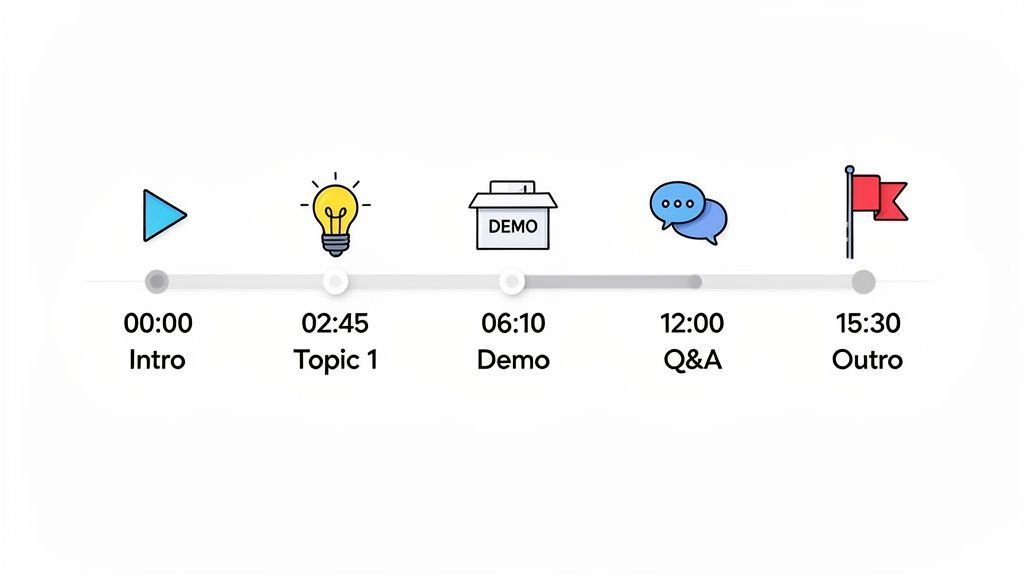
Ever tried to find a specific recipe in a cookbook with no table of contents? You’d be stuck flipping through every single page. That's exactly what a video without timestamps feels like to your audience. They add the essential structure needed to navigate content without the headache.
A timestamp for video turns a flat, linear viewing experience into an interactive one. It’s a small detail that acts as a powerful guide, breaking down your long-form content into easy-to-find chapters.
Why Video Timestamps Matter More Than You Think?
Timestamps transform videos from passive content into structured, searchable assets. They help viewers instantly find value without wasting time scrubbing. For creators, timestamps improve engagement, retention, and long-term usability of every video.
The Core Purpose of Video Timestamps
At its heart, a timestamp is all about improving the user experience. When a viewer sees a clear outline of what's in your video and can jump straight to what they care about, they’re far more likely to stick around. This is a game-changer for longer content like webinars, tutorials, interviews, and podcasts.
This simple feature solves a universal problem: people have short attention spans and even less time. Timestamps let them see if your video has what they need and get to it instantly. When you respect your viewer's time like that, you build trust and keep them coming back for more. If you're curious how timestamps and transcripts work together, you can learn more about transcription with timecodes in our detailed guide.
What Makes a Timestamp Truly Useful?
Clear Section Breaks
Effective timestamps divide videos into logical sections. They help viewers instantly understand the structure before committing time. This clarity reduces drop-offs in long-form content.
Descriptive Labels
A timestamp is only as good as its title. Clear, keyword-rich labels set accurate expectations. They guide viewers directly to relevant moments.
Viewer Control
Timestamps give viewers freedom to choose what matters most. This control increases satisfaction and trust. Audiences are more likely to return to content that respects their time.
Rewatch Value
Great timestamps make videos reusable. Viewers can revisit specific moments without friction. This dramatically extends the lifespan of your content.
Más allá de la navegación simple
Si bien hacer que los videos sean más fáciles de navegar es la ventaja obvia, el impacto de las marcas de tiempo va mucho más allá. No son solo un "extra agradable"; son un activo estratégico que hace que tu contenido sea más valioso. Piénsalos como un mapa tanto para tu audiencia como para los motores de búsqueda.
- Aumenta la retención de espectadores: Al permitir que las personas omitan las partes que no necesitan, los mantienes interesados en las secciones que más les importan. Eso significa que permanecen en tu video por más tiempo.
- Mejora la accesibilidad: Para los espectadores que usan lectores de pantalla, las marcas de tiempo crean una estructura clara que hace que tu contenido sea mucho más fácil de entender y navegar.
- Mejora el rendimiento SEO: Los motores de búsqueda como Google pueden indexar tus marcas de tiempo. Esto crea "Momentos Clave" en los resultados de búsqueda, dirigiendo a espectadores altamente motivados directamente a puntos específicos de tu video.
Explorando diferentes formatos de marcas de tiempo de video
No todas las marcas de tiempo son iguales. Piénsalas como diferentes tipos de mapas para tu contenido de video: algunas son guías simples dibujadas a mano, mientras que otras son estudios topográficos detallados. Comprender el formato de una marca de tiempo para video te ayuda a elegir la herramienta adecuada para el trabajo.
Features That Power Modern Video Timestamping
IA de última generación
Impulsado por Whisper de OpenAI para una precisión líder en la industria. Soporte para vocabularios personalizados, archivos de hasta 10 horas y resultados ultra rápidos.

Importar desde múltiples fuentes
Importa archivos de audio y video desde diversas fuentes, incluyendo carga directa, Google Drive, Dropbox, URLs, Zoom y más.

Detección de hablantes
Identifica automáticamente diferentes hablantes en tus grabaciones y etiquétalos con sus nombres.
El formato que elijas realmente se reduce a tu objetivo final. ¿Solo intentas crear una tabla de contenido rápida en la descripción de un video de YouTube? ¿O estás preparando subtítulos profesionales para una audiencia global? Cada escenario requiere una estructura totalmente diferente.
Marcas de tiempo simples HH:MM:SS
El formato más común que verás es la notación clásica de HH:MM:SS (Horas:Minutos:Segundos). Es un formato simple y legible por humanos que plataformas como YouTube utilizan para crear esos marcadores de capítulos enlazables que encuentras en las descripciones y comentarios de videos.
Una lista de capítulos típica en una descripción de YouTube se ve algo así:
- 00:00 - Introducción
- 01:23 - Concepto central explicado
- 03:45 - Demostración práctica
- 05:10 - Resumen final
La belleza de este formato es su simplicidad. Cualquiera puede crearlos simplemente viendo un video y anotando los tiempos de los momentos clave. No se necesita software especial, lo que lo hace súper accesible para creadores de cualquier nivel.
Formatos de archivo profesionales SRT y VTT
Cuando necesites ir más allá de los marcadores de capítulos básicos, querrás considerar formatos de archivo especializados como SRT (SubRip Subtitle) y VTT (Video Text Tracks). Estos no son solo marcadores de tiempo; son archivos de texto completos que emparejan líneas específicas de diálogo o subtítulos con tiempos de inicio y fin precisos, a menudo hasta la milésima de segundo. Este es el estándar de la industria para subtítulos y closed captions.
Una entrada SRT típica contiene un número de secuencia, un tiempo de inicio y fin usando el formato
horas:minutos:segundos,milisegundos, y el texto del subtítulo en sí. VTT es un formato más moderno que agrega soporte para formato de texto, posicionamiento y metadatos.
Estos archivos son absolutamente esenciales para la accesibilidad, la traducción y los flujos de trabajo de video profesionales. Para comprenderlos mejor, consulta nuestra guía detallada sobre cómo crear archivos SRT para tus videos.
Esta captura de pantalla muestra lo fácil que es exportar una transcripción a estos formatos de nivel profesional utilizando una herramienta como Transcript.LOL.
Como puedes ver, la interfaz te ofrece opciones claras para descargar tu transcripción como un archivo VTT o SRT, lo que hace que todo el proceso de subtitulado sea muy sencillo para cualquier proyecto de video.
Enlaces clickables específicos de la plataforma
Finalmente, muchas plataformas tienen sus propios códigos de tiempo nativos y clickables. En YouTube, por ejemplo, simplemente escribir 1:23 en un comentario crea automáticamente un hipervínculo que salta el video a ese momento exacto. Este formato se trata menos de una estructura rígida y más de crear referencias rápidas e interactivas dentro del ecosistema de la plataforma.
La demanda de este tipo de funciones está explotando a medida que el contenido de video continúa dominando Internet. Se proyecta que el mercado global de transmisión de video alcance la asombrosa cifra de USD 885.95 mil millones para 2036, todo impulsado por nuestro insaciable apetito por el contenido bajo demanda. Puedes encontrar más información sobre el crecimiento del mercado de transmisión de video en futuremarketinsights.com. Este increíble crecimiento simplemente resalta cuán críticos se han vuelto las herramientas de navegación efectivas como las marcas de tiempo para gestionar el gran volumen de video que existe.
Video Consumption Is Changing Fast
Audiences now expect instant access to specific information. Long, unstructured videos struggle to hold attention. Timestamps are becoming a standard requirement—not a bonus feature.
Comparación de formatos de marca de tiempo de video
Para ayudarte a decidir qué formato es el adecuado para ti, hemos desglosado los tipos más comunes en esta útil tabla. Compara su estructura, los mejores casos de uso y lo que hace que cada uno sea único.
| Tipo de formato | Estructura/Ejemplo | Caso de uso principal | Beneficio clave |
|---|---|---|---|
| HH:MM:SS | 01:23 - Punto principal | Descripciones de videos de YouTube, comentarios, marcadores de capítulos simples. | Simple, legible por humanos y no requiere herramientas especiales. |
| SRT (SubRip) | 1 00:00:20,500 --> 00:00:22,300 Hola mundo. | Subtítulos opcionales, subtítulos y edición de video profesional. | Amplia compatibilidad con la mayoría de los reproductores de video y software de edición. |
| VTT (Video Text Tracks) | 00:00:20.500 --> 00:00:22.300 - Hola mundo | Subtítulos de video basados en web, subtítulos de transmisión en vivo, texto interactivo. | Más avanzado; admite formato de texto (negrita, cursiva) y metadatos. |
Elegir el formato correcto, en última instancia, depende de lo que intentes lograr, ya sea una navegación simple para tus espectadores o una experiencia completa y accesible para una audiencia global.
Los beneficios estratégicos de agregar marcas de tiempo
Piensa en las marcas de tiempo como el índice de tu video. Al igual que en un libro, hacen que tu contenido sea instantáneamente más organizado, accesible y valioso para tu audiencia. Pueden parecer un pequeño detalle, pero las marcas de tiempo son un movimiento estratégico que ofrece grandes beneficios en la satisfacción del espectador y el rendimiento del contenido.
Esta simple función transforma una experiencia de visualización pasiva en una interactiva, lo que se traduce en beneficios en toda tu estrategia de contenido. Desde mantener a los espectadores enganchados hasta hacer que tus propios flujos de trabajo sean más eficientes, los beneficios son inmediatos y duraderos.
Una experiencia de usuario radicalmente mejorada
La ventaja más obvia de agregar marcas de tiempo es una experiencia de usuario mucho mejor. Tus espectadores son personas ocupadas. Las marcas de tiempo respetan su tiempo al permitirles saltar directamente a la información que realmente necesitan.
Imagina a un estudiante tratando de repasar una parte específica de una conferencia larga, o a un aficionado al bricolaje buscando un paso clave en un tutorial complejo. Las marcas de tiempo eliminan la frustrante búsqueda y los mantienen comprometidos.
Esto es más importante que nunca. Con el 91% de las empresas utilizando ahora el video como herramienta de marketing, la competencia por la atención es intensa. La navegación inteligente es imprescindible, especialmente dado que el 71% de los especialistas en marketing dice que los videos cortos (de 30 segundos a 2 minutos) funcionan mejor. Las marcas de tiempo dan a tus videos más largos esa misma sensación concisa y directa al grano.
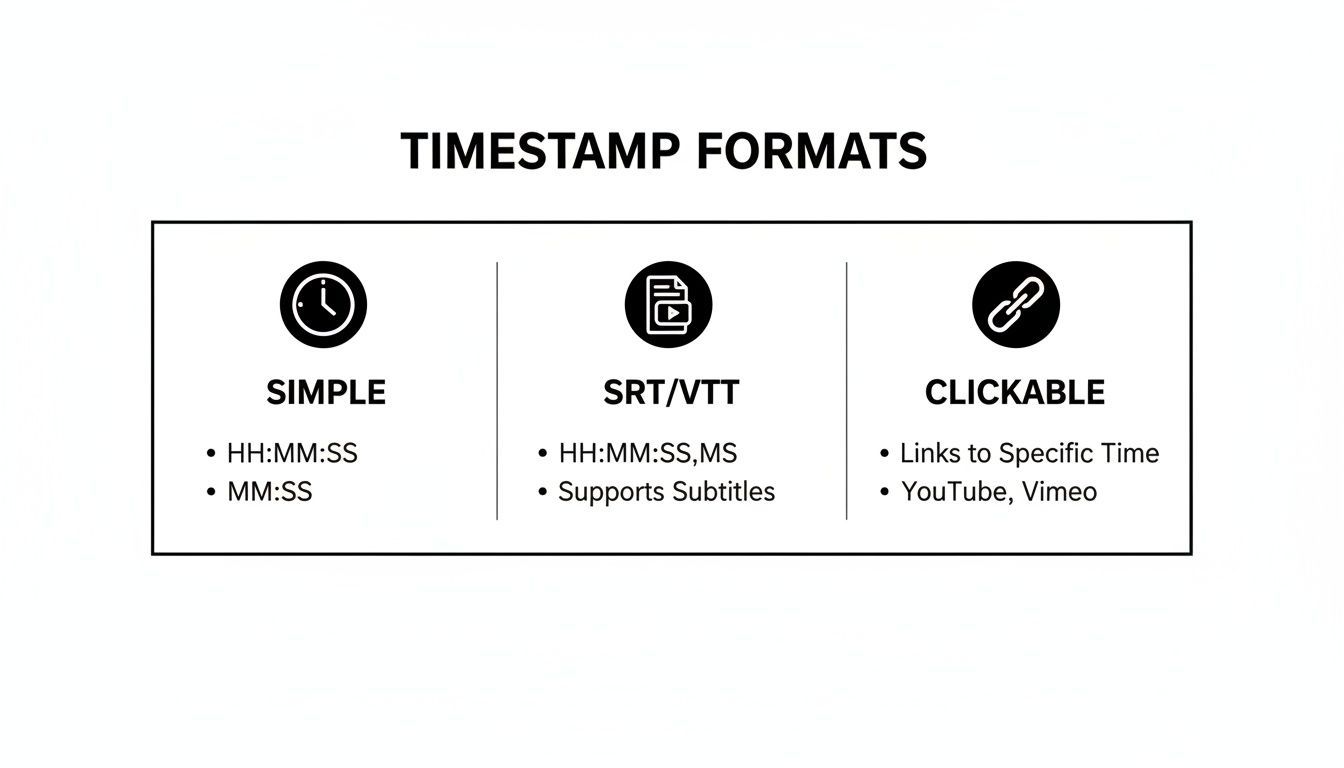
Ya sea que uses enlaces clickables simples o archivos SRT estructurados, el objetivo es el mismo: hacer que la navegación de tu video sea sin esfuerzo.
SEO y descubribilidad mejorados
No subestimes las marcas de tiempo como herramienta de SEO. Cuando agregas una lista de capítulos con marcas de tiempo a la descripción de tu YouTube, Google puede indexarlos como "Momentos Clave", que aparecen directamente en los resultados de búsqueda. Esto permite a alguien saltar desde una búsqueda de Google directamente al segmento exacto de tu video que responde a su pregunta.
Al dividir tu video en capítulos indexados, creas múltiples puntos de entrada a partir de una sola pieza de contenido. Esto aumenta significativamente la visibilidad de tu video y la tasa de clics desde la búsqueda orgánica.
Esto significa que una persona que busca una función específica en una reseña de software podría aterrizar exactamente en el minuto 5:32 donde comienzas a discutirla. Para aumentar aún más tu alcance, vale la pena explorar otras estrategias de SEO para YouTube que funcionan en conjunto con las marcas de tiempo.
Mayor accesibilidad e inclusión
El contenido bien estructurado es contenido accesible. Para los espectadores que utilizan lectores de pantalla u otras tecnologías de asistencia, las marcas de tiempo proporcionan un marco de navegación crítico. Un esquema claro facilita que todos los usuarios comprendan e interactúen con tu video.
Es por eso que tener una transcripción completa cambia las reglas del juego. Una vez que la tengas, extraer momentos clave para crear tus marcas de tiempo es pan comido. Consulta nuestra guía sobre cómo transcribir un video de YouTube a texto para ver lo simple que es. Cuando se combinan con subtítulos (a menudo generados a partir de los mismos archivos SRT o VTT), las marcas de tiempo garantizan que tu contenido esté abierto a todos.
Flujos de trabajo de contenido y equipo optimizados
Los beneficios no se detienen con tu audiencia; también facilitan la vida de tu equipo interno. Un video con marcas de tiempo hace que la reutilización de contenido sea increíblemente eficiente.
- Equipos de marketing: Pueden encontrar rápidamente fragmentos de audio potentes o estadísticas clave para dividirlos en clips para redes sociales, audiogramas o citas para publicaciones de blog. Se acabó la búsqueda interminable.
- Creadores de contenido: Pueden hacer referencia fácilmente a secciones específicas al crear videos de seguimiento o colaborar con otros.
- Equipos de soporte: Pueden dirigir a los clientes al momento exacto en un tutorial que resuelve su problema, reduciendo drásticamente los tiempos de respuesta.
Esta eficiencia interna ahorra innumerables horas, agilizando todo tu ciclo de producción de contenido de principio a fin.
Turning into usable transcripts

Herramientas de edición
Edita transcripciones con herramientas potentes como buscar y reemplazar, asignación de hablantes, formatos de texto enriquecido y resaltado.

Exportar en múltiples formatos
Exporta tus transcripciones en múltiples formatos incluyendo TXT, DOCX, PDF, SRT y VTT con opciones de formato personalizables.
Resúmenes y Chatbot
Genera resúmenes y otros análisis de tu transcripción, prompts personalizados reutilizables y chatbot para tu contenido.
Integraciones
Conecta con tus herramientas y plataformas favoritas para optimizar tu flujo de trabajo de transcripción.
Cómo Crear Marcas de Tiempo de Video: Manual vs. Automatizado
Cuando se trata de crear marcas de tiempo de video, realmente tienes dos caminos principales: la vieja escuela manual o el enfoque automatizado, mucho más rápido. Ambos te llevan al mismo destino, pero están a mundos de distancia en cuanto al tiempo, esfuerzo y precisión requeridos.
Tu elección a menudo se reduce al video en sí. ¿Un clip rápido de tres minutos? Claro, probablemente puedas hacerlo a mano. ¿Pero una entrevista de podcast de dos horas? Esa es una bestia completamente diferente.
El Método Manual: Una Guía Paso a Paso
El enfoque manual es exactamente lo que suena: directo, pero exige tu total atención y una buena dosis de paciencia. Es la forma clásica de hacer las cosas y te da control absoluto sobre cada marcador.
Así es como funciona:
- Mira tu Video: Inicia tu video en un reproductor que muestre claramente la hora en formato
HH:MM:SS. - Identifica Momentos Clave: Mientras miras, pausa cada vez que llegues a un nuevo tema, un punto culminante importante o incluso solo un cambio de orador. Estos son tus momentos de marca de tiempo.
- Anota la Hora: Escribe la hora exacta del reproductor para cada momento que hayas identificado. La precisión es tu amiga aquí.
- Agrega una Buena Etiqueta: Junto a cada hora, escribe una descripción corta y clara de lo que está sucediendo. Esto es lo que verán tus espectadores, así que haz que cuente.
- Formatea y Publica: Finalmente, organiza tu lista en el formato correcto (como
01:23 - Mi Primer Punto) y colócala en la descripción de tu video en YouTube o donde sea que estés publicando.
Este proceso práctico es excelente para videos cortos o para creadores que son perfeccionistas con sus capítulos. Pero para contenido más largo, el tiempo que invertirás en esto puede convertirse en un serio obstáculo para tu flujo de trabajo.
Manual Timestamping Doesn’t Scale
Human-created timestamps are slow and error-prone at scale. Long videos increase fatigue and missed moments. Automation is essential for accuracy, speed, and consistency.
El Método Automatizado: Usando Herramientas de IA
Para cualquiera que busque recuperar horas de su día, las herramientas automatizadas son la respuesta. Servicios como Transcript.LOL utilizan IA para generar una transcripción completa, palabra por palabra, con marcas de tiempo ya integradas. No solo es más rápido, sino que a menudo es más preciso que intentar captar cada palabra a mano.
La automatización convierte la marca de tiempo de una tarea manual a un proceso simple de un solo clic. Te permite concentrarte en crear contenido excelente en lugar de atascarte en tareas administrativas.
Con el 93% de las empresas utilizando video, trabajar de manera eficiente nunca ha sido más crítico. El mercado global de transmisión de video está en camino de alcanzar los 787 mil millones de dólares para 2035, lo que te dice una cosa: el volumen de contenido está explotando. Puedes descubrir información sobre el mercado de transmisión de video en Statista para ver cuán rápido está creciendo. En este entorno, las herramientas automatizadas no son solo un extra deseable; son esenciales.
Aquí tienes un vistazo rápido de cómo se ve un flujo de trabajo automatizado con una herramienta como Transcript.LOL:
Como puedes ver, la IA no solo transcribe lo que se dice; también identifica quién está hablando y asigna una marca de tiempo precisa a sus palabras. Esto te da una base perfecta para los capítulos de tu video. Nuestra guía sobre software de transcripción automatizada profundiza en cómo funciona esta tecnología. A partir de aquí, puedes exportarlo como un archivo SRT o VTT para subtítulos o simplemente copiar las marcas de tiempo clave para la descripción de tu video. Es así de simple.
Mejores Prácticas para Marcas de Tiempo de Video Efectivas
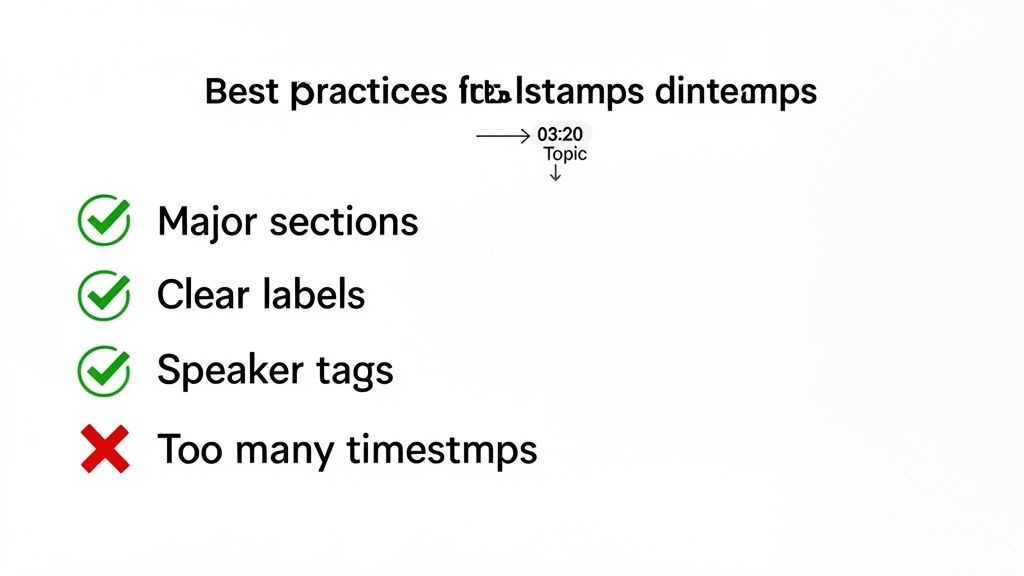
Crear marcas de tiempo es fácil. ¿Crear marcas de tiempo efectivas? Eso requiere un poco más de reflexión. Simplemente dejar caer una lista de marcadores de tiempo en la descripción de tu video no será suficiente. Deben ser claras, genuinamente útiles y construidas pensando en la experiencia de tu audiencia.
Piénsalo de esta manera: estás creando una tabla de contenido bien organizada para tu video. Cada título de capítulo debe ser preciso y lo suficientemente atractivo como para que alguien quiera hacer clic. Si haces esto bien, transformarás una simple lista en una poderosa herramienta de navegación que aumenta tanto la satisfacción del espectador como tu SEO.
Encuentra la Granularidad Adecuada
Una de las primeras decisiones que tendrás que tomar es cuán detallado ser. El truco está en encontrar ese punto óptimo. Muy pocas marcas de tiempo y no serán de gran ayuda para navegar por un video largo. Pero si te excedes, simplemente abrumarás a los espectadores con un muro de texto.
Una buena regla general es crear una marca de tiempo para cada tema principal o cambio de sección. Para un tutorial, eso podría ser una nueva marca de tiempo para cada paso. En una entrevista, podría ser para cada nueva pregunta formulada.
- Hazlo: Marca el comienzo de secciones distintas y separadas. Piensa en ellas como los capítulos principales.
- No lo hagas: Añadas una nueva marca de tiempo cada 30 segundos para subpuntos pequeños. Eso solo crea ruido y va en contra del propósito.
Escribe Etiquetas Claras y Descriptivas
Las etiquetas de tus marcas de tiempo son tu primera, y a veces única, oportunidad de enganchar a un espectador que solo está escaneando. Las etiquetas vagas como "Siguiente punto" o "Parte 2" son totalmente inútiles. Necesitas escribir etiquetas descriptivas y ricas en palabras clave que actúen como mini-titulares, diciéndole a la gente exactamente lo que están a punto de ver.
Una gran etiqueta de marca de tiempo es tanto una ayuda de navegación como una pieza de texto de marketing. Debe describir con precisión el contenido y tentar al espectador a hacer clic, aumentando la participación a lo largo de tu video.
Por ejemplo, en lugar de "03:15 - Demostración de Software", prueba algo mucho más efectivo como "03:15 - Cómo Usar el Editor Arrastrar y Soltar". Esta claridad es una victoria para tu audiencia y proporciona a los motores de búsqueda mucho más contexto sobre lo que hay dentro de tu video.
Usa Etiquetas de Hablante para Mayor Claridad
Si tu video tiene varios hablantes, como una entrevista, un podcast o una mesa redonda, puede volverse confuso rápidamente. ¿Quién está hablando ahora? Añadir etiquetas de hablante es una solución muy sencilla que marca una gran diferencia.
Por ejemplo, una marca de tiempo podría verse así:
- 12:45 - Sarah Explica los Resultados de Marketing del Q3
- 15:20 - John Pregunta Sobre Estrategias de Crecimiento Futuro
Esta pequeña adición hace que la conversación sea muy fácil de seguir y permite a los espectadores saltar directamente a lo que una persona específica tenía que decir. Para cualquier contenido con mucho diálogo, esto es absolutamente esencial. Solo asegúrate de mantener el formato consistente para que se vea limpio.
Algunas Preguntas Comunes Sobre Marcas de Tiempo de Video
A medida que comienzas a trabajar con marcas de tiempo, algunas preguntas siempre parecen surgir. Lo entendemos. Piensa en esto como tu guía de referencia rápida para aclarar cualquier detalle pendiente. Hemos reunido las consultas más comunes para darte respuestas directas que se basan en todo lo que has aprendido hasta ahora.
Estas respuestas deberían ayudarte a manejar el lado práctico de añadir marcas de tiempo, para que puedas usarlas con confianza en cualquier proyecto de video.
¿Puedo Añadir Marcas de Tiempo a Videos en Cualquier Plataforma?
Gran pregunta. La respuesta corta es: depende de la plataforma. YouTube es el campeón indiscutible aquí; reconoce automáticamente el formato HH:MM:SS en las descripciones y comentarios, convirtiéndolos instantáneamente en capítulos interactivos.
Otras plataformas lo manejan de manera un poco diferente:
- Vimeo: Te permite añadir capítulos directamente en la configuración del video, ofreciéndote una experiencia limpia e integrada que se parece mucho a la de YouTube.
- Facebook: No convierte automáticamente las marcas de tiempo de texto en enlaces interactivos. Aún puedes (y debes) listarlas en tu descripción como una guía manual para los espectadores.
- LinkedIn: Similar a Facebook, LinkedIn soporta video pero no tiene una función nativa de capítulos interactivos. Listar las marcas de tiempo aún añade un valor real como tabla de contenido.
Incluso en plataformas sin soporte integrado, dejar una lista con marcas de tiempo en la descripción es una excelente práctica. Simplemente hace que tu video sea más fácil de navegar.
¿Cómo Afectan las Marcas de Tiempo a Mi SEO en YouTube?
Las marcas de tiempo dan a tu SEO de YouTube y Google un impulso directo y positivo. Cuando Google indexa tu video, puede extraer los capítulos de tus marcas de tiempo directamente en los resultados de búsqueda como "Momentos Clave". Esta increíble función permite a las personas saltar desde una búsqueda de Google directamente al segmento exacto de tu video que responde a su pregunta.
Esto es increíblemente poderoso. Básicamente, estás dando a un solo video múltiples puntos de entrada desde los resultados de búsqueda. Aumenta drásticamente tu visibilidad y la posibilidad de que obtengas un clic de alguien con un problema muy específico que resolver.
Al crear capítulos bien etiquetados, estás proporcionando a los motores de búsqueda más contexto sobre lo que cubre tu video. Eso te ayuda a clasificar para una gama mucho más amplia de palabras clave de cola larga asociadas con cada sección específica.
Marcas de Tiempo vs. Capítulos de Video: ¿Cuál es la Diferencia?
Estos dos términos se usan indistintamente todo el tiempo, pero hay una pequeña diferencia. Piénsalo así:
Una marca de tiempo es el punto de datos crudo: el código de tiempo específico en sí, como 02:15. Un capítulo de video es lo que obtienes cuando usas una lista de marcas de tiempo con etiquetas descriptivas para dividir un video en secciones distintas y navegables.
Por lo tanto, la marca de tiempo es el marcador, y el capítulo es toda la sección marcada. En YouTube, necesitas añadir al menos tres marcas de tiempo (comenzando con 00:00) antes de que la plataforma genere oficialmente esas agradables divisiones visuales de capítulos en la barra de progreso del reproductor de video.
¿Hay un Límite en Cuántas Marcas de Tiempo Puedo Añadir?
No hay un límite estricto y oficial en la cantidad de marcas de tiempo que puedes añadir a una descripción de YouTube. Tus principales limitaciones son la practicidad y la experiencia del usuario. El cuadro de descripción en sí tiene un límite de 5,000 caracteres, que es mucho espacio.
Pero añadir una marca de tiempo cada pocos segundos solo crearía una lista desordenada y abrumadora que va en contra del propósito de una navegación fácil. El mejor enfoque es centrarse en marcar solo los cambios de tema importantes, las ideas clave o las secciones distintas. Encuentra un buen equilibrio que ofrezca a los espectadores un mapa claro sin crear un muro de texto.
¿Listo para crear marcas de tiempo perfectamente precisas en segundos? Transcript.LOL utiliza IA para generar transcripciones completas y etiquetadas por hablante que puedes usar para construir tus capítulos de video, archivos SRT y más. Deja de buscar y empieza a crear. Comienza gratis en transcript.lol.