
Convertir Audio a Texto Online Gratis Tu Guía Esencial
Descubre cómo convertir audio a texto online gratis con consejos prácticos y del mundo real. Saca el máximo provecho de las herramientas de transcripción gratuitas con nuestra guía paso a paso.
Kate, Praveen
November 29, 2023
¿Buscas la forma más rápida de convertir audio a texto en línea gratis?
Tu mejor opción es usar una herramienta impulsada por IA como Transcript.LOL. Es un proceso sencillo: sube tu archivo de audio, deja que la IA haga su magia y luego descarga el texto en el formato que necesites.
Tu Guía Rápida para la Conversión Gratuita de Audio a Texto
Este método es un cambio de juego absoluto para transcribir entrevistas, grabaciones de reuniones o conferencias de clase sin gastar un centavo. Te guiaremos a través de los pasos exactos y compartiremos algunos consejos de nuestra propia experiencia para ayudarte a obtener una transcripción sólida en solo unos minutos, incluso si es la primera vez. Piensa en esto como la sección "hazlo ahora" antes de profundizar en los detalles más adelante.
Hay muchas herramientas gratuitas disponibles, pero la mayoría sigue el mismo guion. Honestamente, tu mayor tarea es asegurarte de empezar con el audio más claro posible.
A partir de ahí, la tecnología se encarga, haciendo todo el trabajo pesado para convertir las palabras habladas en un documento editable que puedes usar para notas, contenido o cualquier otra cosa.
Por Qué la Transcripción Gratuita de Audio es un Cambio de Juego
El poder de convertir audio a texto en línea gratis no es solo un truco ingenioso; es un gran impulso de productividad. Lo he visto de primera mano con creadores de contenido. Pueden tomar un solo episodio de podcast de una hora y convertirlo en una publicación de blog completa, notas detalladas del programa y una docena de clips para redes sociales. Es una forma sencilla de multiplicar su alcance sin crear contenido nuevo desde cero.
Los estudiantes e investigadores están en el mismo barco. Piensa en intentar encontrar un punto específico en una conferencia de dos horas. Es una pesadilla. Pero con una transcripción, puedes buscar palabras clave y encontrar instantáneamente lo que necesitas. Convierte horas de audio en material de estudio organizado y buscable, ahorrando una increíble cantidad de tiempo.
Desbloqueando Eficiencia y Accesibilidad
Esto va mucho más allá de ayudar solo a individuos. A medida que la IA se vuelve más poderosa, estas herramientas gratuitas se vuelven sorprendentemente precisas y confiables. Para una mirada más profunda a cómo esta tecnología está remodelando industrias, esta guía sobre Aprovechamiento de la IA en Marketing es una lectura excelente.
Las empresas se están dando cuenta rápidamente. De hecho, más del 70% de las empresas ya están utilizando la transcripción de IA para optimizar su trabajo. Algunas incluso han informado una mejora del 35% en los tiempos de respuesta del servicio al cliente solo transcribiendo llamadas de soporte para analizarlas más tarde. Estas son victorias reales y medibles.
Al hacer que tu contenido de audio sea legible, no solo lo estás reutilizando. Lo estás haciendo accesible a una audiencia mucho más amplia, incluidas las personas sordas o con problemas de audición.
En última instancia, la transcripción gratuita abre el acceso a la información para todos. Ya seas un podcaster que busca un mejor SEO, un estudiante que revisa una conferencia o un equipo que necesita documentar reuniones, tener la herramienta adecuada es clave. Para los equipos corporativos, encontrar el mejor software de transcripción de reuniones suele ser el primer paso para una mejor colaboración y rendición de cuentas. Las herramientas gratuitas son el punto de partida perfecto para cualquiera que quiera que su contenido de audio haga más por ellos.
Eligiendo la Herramienta de Transcripción Gratuita Adecuada Para Ti
Las herramientas de transcripción gratuitas no son de talla única. Puede que encuentres que una sobresale en entrevistas de un solo hablante pero tiene problemas cuando hay ruido de fondo. Otra podría funcionar en segundos pero fallar con archivos de más de unos pocos minutos.
He probado varias herramientas, probando fragmentos de podcasts, grabaciones de conferencias, incluso conversaciones ruidosas en cafeterías. Y el ganador es siempre la herramienta que combina precisión con una interfaz que realmente disfrutas usar.
Factores Clave Para Tu Decisión
Antes de presionar subir, aclara lo que realmente importa. Estos son los elementos que pruebo cada vez:
- Precisión en Condiciones Reales: Introduce un clip con voces superpuestas o ruido ambiental y ve si la transcripción se mantiene.
- Facilidad de Uso: Un diseño sencillo, como en Transcript.LOL, significa que pasas menos tiempo haciendo clic y más tiempo editando.
- Privacidad y Seguridad de Datos: Escanea la política de privacidad. Los mejores servicios dejan claro que tus grabaciones no se retroalimentan a sus modelos de entrenamiento.
Si pasas más tiempo corrigiendo errores de los que ahorras en la transcripción, has elegido la herramienta equivocada.
Comparando Herramientas Gratuitas de Audio a Texto
Aquí tienes un vistazo rápido a las opciones gratuitas populares de transcripción, para que puedas sopesar la precisión, la velocidad y las limitaciones lado a lado:
| Herramienta | Precisión | Velocidad | Limitaciones |
|---|---|---|---|
| Transcript.LOL | 92% en promedio | Menos de 2 minutos por cada 10 minutos | Límite de archivo de 100 MB |
| Herramienta B | 88% en entornos silenciosos | Instantáneo para clips cortos | Dificultades con múltiples hablantes |
| Herramienta C | 85% con ruido | 3 minutos por cada 10 minutos | Requiere registro por correo electrónico |
Esta instantánea te ayuda a centrarte en qué servicio se alinea con las demandas de tu proyecto.
Si recién estás comenzando tu viaje de transcripción, profundiza aquí: https://transcript.lol/blog/transcribe-audio-to-text-free
De Sonido a Texto: Un Recorrido Práctico
La teoría es genial, pero veamos cómo funciona esto en la práctica. Te mostraré lo simple que es convertir audio a texto en línea gratis realizando un ejemplo del mundo real usando Transcript.LOL.
Para nuestro sujeto de prueba, tengo un clip de entrevista de 10 minutos. No es una calidad de estudio perfecta: hay un zumbido de fondo notable, que es un dolor de cabeza común con muchas grabaciones.
El objetivo aquí es simple: convertir este archivo MP3 en un documento limpio y editable. Este proceso es una demostración perfecta de lo rápido que puedes tener un borrador sólido listo, sin necesidad de conocimientos técnicos. Todo se reduce a una interfaz limpia con una IA realmente potente trabajando detrás de escena.
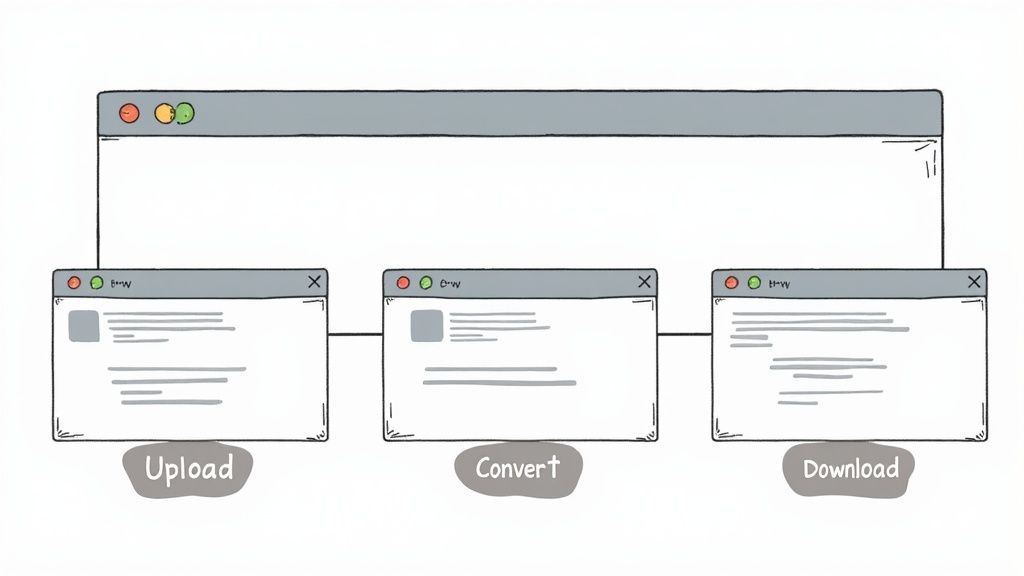
Este pequeño flujo de trabajo visualiza todo el proceso de convertir tu audio en un archivo de texto descargable.
Como puedes ver, tu trabajo está principalmente al principio y al final. La IA hace todo el trabajo pesado en el medio.
Navegando el Proceso de Carga
Tu viaje comienza directamente en el panel principal.
- Lo primero que verás es un área de carga grande y obvia, que me encanta: está diseñada para que comiences de inmediato sin tener que buscar en un laberinto de menús.
- Simplemente arrastra tu archivo de audio a la caja o haz clic para encontrarlo en tu computadora. Estoy subiendo mi MP3 de entrevista de 10 minutos ahora.
- La carga comienza automáticamente y una barra de progreso te informa exactamente lo que está sucediendo.
- Si tu carga se detiene, intenta borrar la caché de tu navegador, cambiar de navegador o reducir el tamaño del archivo.
Aquí tienes un vistazo a la interfaz limpia y sencilla que obtienes justo después de que tu archivo se carga.
El diseño realmente prioriza la claridad. Muestra el estado del procesamiento sin abarrotar la pantalla con un montón de opciones que no necesitas en esta etapa. Es un gran ahorro de tiempo.
Editando y Exportando Tu Transcripción
Después de solo uno o dos minutos, la IA ha terminado. La plataforma inserta el texto generado en un editor simple, completo con marcas de tiempo. Incluso agregó etiquetas de hablante ya que detectó múltiples voces en mi entrevista. La transcripción fue sorprendentemente buena, capturando la mayor parte del diálogo con precisión, aunque el ruido de fondo la hizo tropezar con algunas palabras menores.
Aquí es donde intervienes para unos últimos toques humanos. En mi caso, necesité:
- Corregir nombres: La IA se equivocó con un par de nombres de empresas únicos.
- Ajustar la puntuación: Modifiqué algunas colocaciones de comas para que las oraciones fluyeran mejor para mis necesidades.
- Aclarar etiquetas de hablante: La IA etiquetó mal a un hablante a mitad de oración, lo cual fue una corrección súper rápida.
En general, pasé unos tres minutos limpiando el clip de 10 minutos. Eso es una fracción minúscula del tiempo que me habría llevado escribirlo todo a mano.
Una vez que estuve satisfecho, exporté el texto final como un archivo DOCX con un solo clic. También puedes obtenerlo como archivo TXT o SRT. Todo el proceso, desde la carga del audio hasta tener un documento pulido listo, se completó en menos de cinco minutos.
Obteniendo Transcripciones Cristalinas de Tu Audio
¿Quieres saber el secreto de una transcripción sorprendentemente precisa? Todo comienza con un audio cristalino. Cuando grabas en un espacio tranquilo, eliminas inmediatamente el ruido de fondo que a menudo confunde a la IA de transcripción.
Aprendí esto de la manera difícil. Una vez intenté transcribir una entrevista a un cliente que se grabó en una cafetería bulliciosa. ¿El resultado? Un revoltijo de texto lleno de "ums", fragmentos de conversaciones de otras personas y grandes lagunas de lo que mi cliente realmente dijo. Fue entonces cuando me di cuenta de que preparar tu entorno de grabación no es solo una sugerencia, es innegociable.
Aquí hay algunas cosas simples que puedes hacer que marcan una gran diferencia:
- Las superficies blandas son tus amigas. Absorben los ecos antes de que lleguen al micrófono.
- El modo avión es un salvavidas. Silencia todos esos pitidos y notificaciones que pueden crear ruidos extraños en el audio.
- La distancia del micrófono es crucial. Para la captura más clara, intenta mantener el micrófono a unas 6 pulgadas de tu boca.
Estos pequeños ajustes toman menos de un minuto pero pueden disparar la precisión de tu texto.
Apunta a un Entorno de Grabación Silencioso
Una vez grabé una charla de una hora en una oficina vacía, y el audio era tan limpio que no necesitó filtros de ruido después. Esto le dio a la IA una forma de onda perfecta y limpia para trabajar de principio a fin, lo que significó menos errores y un procesamiento mucho más rápido.
Hablar directamente al micrófono a un volumen constante y uniforme también es clave. Gritos repentinos o susurros bajos pueden confundir a la IA, lo que lleva a una transcripción que está desordenada.
Si realmente quieres profundizar en la optimización de tus grabaciones, encontrarás excelentes consejos en nuestro artículo sobre precisión de voz a texto.
Buen audio de entrada significa menos edición. Ahorras mucho tiempo.
- Un filtro antipop barato puede reducir drásticamente esos sonidos duros de "p" y "b" (plosivas) y evita que tu aliento distorsione el audio.
- Tener un guion rápido o solo algunos puntos clave para seguir te ayuda a mantenerte encaminado y evitar palabras de relleno.
Al adoptar estos hábitos de costo cero y usar algunos accesorios simples, alimentarás herramientas gratuitas como Transcript.LOL con el tipo de audio de alta calidad que te brinda resultados casi perfectos.
Cada vez que conviertas audio a texto en línea gratis, estos pequeños pasos amplificarán tus resultados.
Solucionando Fallos Comunes de Transcripción
La tecnología no es perfecta; a veces, incluso las herramientas de transcripción gratuitas fallan. Si encuentras un error mientras conviertes audio a texto en línea gratis, no entres en pánico; la mayoría de los inconvenientes tienen una solución simple.
A menudo, el problema radica en el propio archivo. Antes de culpar a la plataforma, tómate un momento para inspeccionar el formato y el tamaño de tu audio. Muchos servicios limitan las cargas a 100 MB y solo aceptan MP3, M4A o WAV. Si estás trabajando con algo más exótico, un rápido reformateo puede ahorrarte muchos problemas.
Solucionando Errores de Carga y Formato
Cuando las cargas fallan repetidamente, generalmente se debe a peculiaridades de la conexión o a la configuración del navegador. Esto es lo que he descubierto que funciona en 9 de cada 10 casos:
-
Actualiza la Página Una recarga rápida a menudo soluciona conexiones estancadas o tiempos de espera de sesión.
-
Verifica el Tamaño del Archivo Grabaciones largas, digamos un podcast de 30 minutos en WAV, pueden superar los límites. Recorta o comprime para que quede por debajo del límite.
-
Prueba un Navegador Diferente Las extensiones o la configuración de privacidad pueden bloquear las cargas. Cambiar de Chrome a Firefox (o viceversa) puede identificar el problema.
"En mi experiencia, más del 90% de los dolores de cabeza de transcripción se remontan al archivo de audio o al navegador, rara vez a la herramienta en sí."
Tratando con Texto y Marcas de Tiempo Inexactas
Subir tu archivo es la mitad de la batalla. Si la transcripción todavía parece un galimatías, verifica la calidad de la grabación:
-
Voces Superpuestas Cuando dos o más hablantes hablan a la vez, la IA a menudo fusiona las líneas. Las secciones claras y de un solo hablante producen resultados más limpios.
-
Pausas Largas El silencio prolongado puede confundir la alineación de las marcas de tiempo. Un poco de ruido de fondo o un marcador breve ayuda al sistema a mantenerse en curso.
Si te quedas atascado con una grabación desordenada, enfoca tus ediciones en las partes más cruciales: titulares, citas clave o segmentos sensibles al tiempo. De esa manera, pasarás menos tiempo arreglando cada error tipográfico y más tiempo entregando resultados pulidos.
Preguntas Frecuentes
Cuando empiezas a buscar convertir audio a texto en línea gratis, surgen casi de inmediato un puñado de preguntas. He estado ahí. Así que, he reunido las más comunes que escuchamos de nuestros usuarios para darte respuestas directas y claras.
Piensa en esto como tu guía rápida para hacerlo bien, basada en la experiencia del mundo real.
¿Qué Tan Precisas Son las Herramientas de Transcripción en Línea Gratuitas?
Seamos realistas: la precisión puede variar. La mayoría de las herramientas gratuitas te darán entre un 80% y un 95%. ¿El factor más importante? La calidad de tu audio.
Si tienes una grabación limpia con una persona hablando claramente en una habitación silenciosa, probablemente alcanzarás ese 95% más alto. Pero la vida no siempre es tan simple. El ruido de fondo, las personas hablando unas sobre otras o los acentos marcados definitivamente reducirán la precisión. Esas transcripciones necesitarán una limpieza manual.
Esta es mi regla general: si a un humano le costara entender el audio, a una IA también le costará. Lo mejor que puedes hacer para la precisión es empezar con la grabación más limpia posible.
¿Es Seguro Subir Mis Archivos de Audio?
Este es un punto importante, y es inteligente que lo preguntes. Tu privacidad importa.
Servicios de buena reputación, incluido Transcript.LOL, se toman esto en serio y tienen políticas para eliminar tus archivos justo después del procesamiento. Pero siempre es un buen hábito revisar la política de privacidad de una plataforma tú mismo antes de subir nada. Solo tómate un minuto para leerla.
Para cosas realmente sensibles, como discusiones legales o reuniones de negocios confidenciales, debes tener mucho cuidado. Aconsejaría no subir audio con detalles financieros o información de salud privada a menos que el servicio garantice explícitamente el cifrado de extremo a extremo y una política estricta de eliminación de datos.
Si quieres profundizar en cómo manejamos los datos, puedes encontrar todos los detalles en nuestra sección de Preguntas Frecuentes.
¿Qué Formatos de Archivo de Audio Son Compatibles?
Buenas noticias aquí. La mayoría de las herramientas de transcripción gratuitas están diseñadas para funcionar con los tipos de archivo que usas todos los días. Puedes contar prácticamente con soporte para:
- MP3
- WAV
- M4A
Muchas plataformas también pueden extraer el audio directamente de archivos de video como MP4 y MOV. Para ahorrarte un dolor de cabeza, siempre es una buena idea verificar rápidamente los formatos compatibles de la herramienta antes de empezar. Es un pequeño paso que asegura que todo salga bien.
¿Listo para convertir tu audio en texto preciso y editable en segundos? Prueba Transcript.LOL y ve lo fácil que puede ser. https://transcript.lol
¿Por qué Transcript.LOL?
Rápido. Preciso. Gratis.
IA de última generación
Impulsado por Whisper de OpenAI para una precisión líder en la industria. Soporte para vocabularios personalizados, archivos de hasta 10 horas y resultados ultra rápidos.

Importar desde múltiples fuentes
Importa archivos de audio y video desde diversas fuentes, incluyendo carga directa, Google Drive, Dropbox, URLs, Zoom y más.

Detección de hablantes
Identifica automáticamente diferentes hablantes en tus grabaciones y etiquétalos con sus nombres.

Herramientas de edición
Edita transcripciones con herramientas potentes como buscar y reemplazar, asignación de hablantes, formatos de texto enriquecido y resaltado.

Exportar en múltiples formatos
Exporta tus transcripciones en múltiples formatos incluyendo TXT, DOCX, PDF, SRT y VTT con opciones de formato personalizables.
Resúmenes y Chatbot
Genera resúmenes y otros análisis de tu transcripción, prompts personalizados reutilizables y chatbot para tu contenido.
Integraciones
Conecta con tus herramientas y plataformas favoritas para optimizar tu flujo de trabajo de transcripción.