
Convert Audio to Text Free with These Simple Methods
Learn how to convert audio to text free using the best tools and workflows. Get clear, actionable tips for fast and accurate transcription on any device.
Kate
February 12, 2025
Yes, you can absolutely convert audio to text for free, and the tools available today are genuinely impressive. Whether you use a browser-based service or a dedicated app, AI-driven transcription has moved far beyond simple dictation. We're talking surprisingly high accuracy for everything from messy meeting notes to polished podcast interviews, and it’s completely changing how we work with audio.
Why AI Makes Free Transcription So Powerful
IA de última generación
Impulsado por Whisper de OpenAI para una precisión líder en la industria. Soporte para vocabularios personalizados, archivos de hasta 10 horas y resultados ultra rápidos.

Detección de hablantes
Identifica automáticamente diferentes hablantes en tus grabaciones y etiquétalos con sus nombres.
Resúmenes y Chatbot
Genera resúmenes y otros análisis de tu transcripción, prompts personalizados reutilizables y chatbot para tu contenido.
Why Free Transcription Tools Are a Game Changer
Let's be honest—manual transcription is a soul-crushing time sink. Anyone who's spent hours pausing, rewinding, and typing knows the pain. For years, this was the reality for students, journalists, and creators. But that’s all changed. Accessible AI has made high-quality, free transcription a reality for everyone, not just big companies with deep pockets.
This isn't the clunky, inaccurate software of the past. Modern tools can distinguish between different speakers, add precise timestamps, and even handle a variety of accents with impressive skill.
AI Handles Accents Better Than Ever
Older transcription tools struggled with diverse speech patterns, but modern AI models have been trained on global datasets. This means clearer recognition, better context matching, and far fewer misheard words — even with strong accents.
The Real-World Impact
The availability of these tools has completely transformed everyday workflows. Think about it:
- Students can record an entire lecture and get a searchable text document to study from almost instantly. No more frantic note-taking.
- Podcasters and YouTubers can generate transcripts to boost their SEO and make their content accessible to a wider audience. We have a whole guide on transcription for content creation that dives into this.
- Researchers can process hours of interview audio in minutes, letting them jump straight to analysis instead of getting bogged down in typing.
Where Free Transcription Tools Make the Biggest Impact
Faster Research Workflows
Get instant transcripts for interviews, experiments, and field conversations. Saves hours otherwise spent on manual typing.
Smarter Content Creation
Creators use transcripts to repurpose videos and podcasts into blogs, captions, and scripts effortlessly.
Better Accessibility
Providing transcripts helps make content accessible to wider audiences, including those with hearing impairments.
Easier Collaboration
Shared transcripts reduce miscommunication and keep teams on the same page without long replay sessions.
Este cambio está impulsando un enorme crecimiento. El mercado global de transcripción de IA se valoró en unos 4.500 millones de dólares en 2024 y se proyecta que alcance los 19.200 millones de dólares para 2034, en gran parte porque estos potentes servicios son ahora gratuitos y accesibles.
El mayor cambio no es solo la tecnología, es la mentalidad. Ya no vemos la transcripción como un obstáculo caro y que consume mucho tiempo. Ahora es una parte integrada e instantánea de la creación de contenido o la recopilación de información, desbloqueando valor del audio que antes permanecía atrapado.
Si tienes curiosidad por saber qué está pasando entre bastidores, puedes obtener una excelente visión general de la tecnología subyacente de transcripción de IA que hace posible todo esto.
Para ayudarte a decidir qué camino tomar, este diagrama de flujo lo desglosa según si la velocidad o la privacidad es tu principal preocupación.
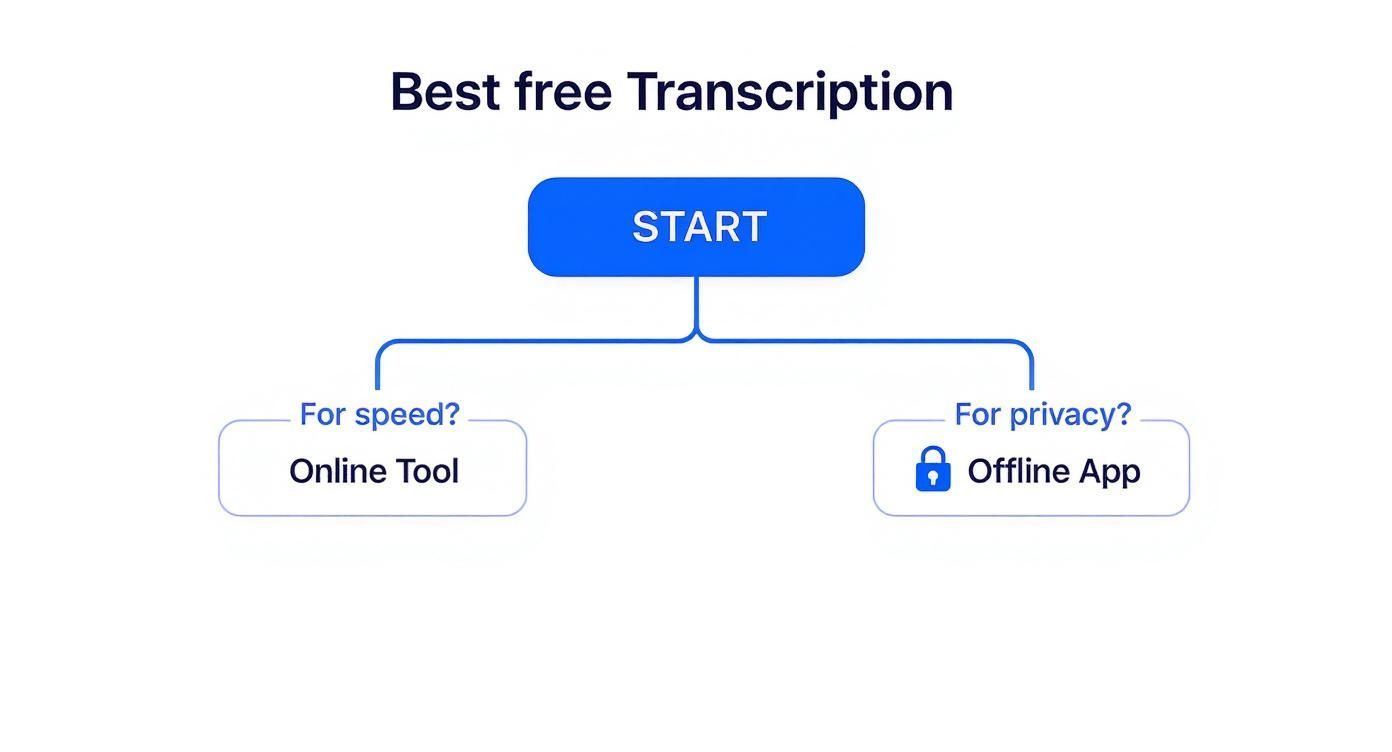
La conclusión es simple: para la mayoría de las tareas rápidas y no sensibles, las herramientas en línea son tu mejor opción. Si estás trabajando con audio privado o confidencial, una aplicación sin conexión es el camino a seguir.
Métodos de Transcripción Gratuitos Principales de un Vistazo
Navegar por las opciones puede ser complicado, así que aquí tienes una tabla de referencia rápida para ayudarte a elegir la mejor herramienta para tu trabajo.
| Método | Mejor para | Beneficio Clave |
|---|---|---|
| Herramientas en Línea | Tareas rápidas únicas y proyectos colaborativos | Velocidad y conveniencia; no requiere instalación |
| Aplicaciones de Escritorio | Archivos de audio sensibles o confidenciales | Privacidad mejorada y funcionalidad sin conexión |
| Aplicaciones Móviles | Grabaciones sobre la marcha y dictado en vivo | Portabilidad y transcripción instantánea de palabras habladas |
| Herramientas Integradas del SO | Dictado básico en documentos o correos electrónicos | Integración perfecta con tu flujo de trabajo existente |
Esto debería darte un punto de partida sólido para encontrar la solución gratuita perfecta sin tener que revisar docenas de opciones.
Uso de Herramientas en Línea para Transcripción Instantánea
Cuando necesitas una transcripción rápida y no quieres instalar ningún software, las herramientas basadas en navegador son tu mejor opción. Son la forma más rápida y sencilla de convertir audio a texto de forma gratuita. Simplemente abres un sitio web, subes tu archivo y obtienes una transcripción, a menudo en minutos.
Imagina esto: acabas de terminar una llamada de descubrimiento de 20 minutos con un nuevo cliente, guardada como MP3. En lugar de dedicar una hora a escribirlo todo, puedes arrastrar ese archivo a un convertidor en línea y tener un documento de texto completo y buscable listo antes de que termines tu café.
No es de extrañar que estos servicios hayan explotado en popularidad. El mercado global de Voz a Texto está en camino de alcanzar los 10.000 millones de dólares para 2025, creciendo a una asombrosa tasa de crecimiento anual compuesta (CAGR) del 20% hasta 2033. Esto ya no es solo una herramienta de nicho; se está volviendo esencial. Puedes obtener más información sobre el crecimiento de las plataformas de voz a texto y ver cuán grande es esta tendencia.
Qué Esperar de los Convertidores Gratuitos en Línea
La mayoría de las herramientas gratuitas funcionan con un modelo bastante simple. Encontrarás una interfaz limpia donde puedes subir tu archivo. Muchas ahora funcionan con IA potente, como Whisper de OpenAI, que ha mejorado drásticamente la precisión de la transcripción, incluso cuando se trata de diferentes acentos o un poco de ruido de fondo.
Entonces, si un podcaster sube una nueva entrevista, generalmente puede esperar algunas funciones útiles de inmediato:
- Etiquetas Automáticas de Orador: La IA es lo suficientemente inteligente como para detectar diferentes voces y etiquetarlas (como "Orador 1", "Orador 2"), lo que ahorra mucho tiempo en entrevistas y reuniones.
- Marcas de Tiempo: Las transcripciones a menudo vienen con marcas de tiempo, lo que te permite hacer clic en una oración y saltar directamente a ese momento en el audio original.
- Múltiples Formatos de Exportación: Una vez que termina, normalmente puedes descargar la transcripción como un archivo TXT, DOCX o incluso SRT si necesitas subtítulos para un video.
Aquí tienes un vistazo al tipo de interfaz simple que podrías usar para gestionar tus transcripciones.
Este tipo de diseño limpio facilita mantener todos tus proyectos organizados en un solo lugar.
Pero es importante recordar que "gratis" generalmente viene con algunas condiciones. Estos niveles gratuitos están diseñados para darte una gran muestra del servicio, esperando que actualices cuando necesites más potencia.
Conclusión clave: Las herramientas gratuitas en línea son perfectas para la velocidad y la conveniencia, ofreciendo funciones potentes para tareas cotidianas. Solo ten en cuenta las restricciones comunes en el tamaño de archivo y el tiempo de transcripción.
Navegando por los Límites Comunes de los Niveles Gratuitos
Antes de hacer clic en "subir", siempre es una buena idea revisar la letra pequeña. Los planes gratuitos suelen ser generosos, pero casi siempre tienen límites. Conocer estos límites de antemano puede ahorrarte mucha frustración.
Estas son las restricciones más comunes que encontrarás:
- Límites de Minutos: La mayoría de los servicios limitan el audio total que puedes procesar cada mes, generalmente entre 30 y 120 minutos.
- Restricciones de Tamaño de Archivo: Probablemente verás un límite en el tamaño de tu archivo de audio, algo como 25 MB o 100 MB es bastante estándar.
- Limitaciones de Funciones: Las funciones avanzadas, como la creación de un diccionario personalizado para ayudar a la IA a reconocer nombres específicos o jerga de la industria, casi siempre están reservadas para clientes de pago.
Para una mirada más profunda a lo que hay disponible, consulta nuestra guía sobre cómo encontrar el mejor convertidor gratuito de voz a texto en línea. Te ayudará a comparar las diferentes plataformas y encontrar una cuyo plan gratuito se adapte perfectamente a tus necesidades.
Manejo de la Transcripción sin Conexión con Aplicaciones
Si bien las herramientas en línea ofrecen una velocidad increíble, no siempre son la opción adecuada. Cuando la privacidad es la máxima prioridad o estás trabajando sin una conexión a Internet sólida, las aplicaciones sin conexión son el camino a seguir. Este enfoque te da el control total, asegurando que tus archivos de audio sensibles nunca toquen la nube.
Piensa en un periodista que transcribe una entrevista confidencial en un área remota. O un terapeuta que simplemente no puede subir grabaciones de sesiones privadas a un servidor de terceros. En estos escenarios, la seguridad de una herramienta sin conexión no es solo una conveniencia, es un requisito. Tus archivos se procesan directamente en tu propia máquina, lo que te da total tranquilidad.
Este método proporciona una excelente manera de convertir audio a texto de forma gratuita, sin los límites de uso que a menudo se encuentran en los servicios en línea.

Importar desde múltiples fuentes
Importa archivos de audio y video desde diversas fuentes, incluyendo carga directa, Google Drive, Dropbox, URLs, Zoom y más.

Herramientas de edición
Edita transcripciones con herramientas potentes como buscar y reemplazar, asignación de hablantes, formatos de texto enriquecido y resaltado.

Exportar en múltiples formatos
Exporta tus transcripciones en múltiples formatos incluyendo TXT, DOCX, PDF, SRT y VTT con opciones de formato personalizables.
Integraciones
Conecta con tus herramientas y plataformas favoritas para optimizar tu flujo de trabajo de transcripción.
Potenciando tu Escritorio con Herramientas de Código Abierto
Para aquellos dispuestos a realizar una configuración inicial, el software de código abierto ofrece una potencia y flexibilidad inigualables. Las herramientas construidas sobre modelos como Whisper de OpenAI se pueden instalar directamente en tu máquina, brindándote capacidades de transcripción ilimitadas y privadas. La configuración inicial puede llevar un poco más de tiempo que simplemente hacer clic en "subir" en un sitio web, pero la recompensa es enorme.
No es de extrañar que los motores de código abierto se hayan convertido en elementos básicos en la investigación y la academia. Modelos como Whisper, que pueden manejar la transcripción en tiempo real en más de 58 idiomas, permiten a los usuarios procesar grandes cantidades de audio sin acumular costos ni comprometer datos.
Una vez instalado, obtienes:
- Privacidad Completa: Tu audio se procesa localmente, sin salir nunca de tu dispositivo.
- Sin Límites de Uso: Transcribe tanto audio como quieras, durante el tiempo que quieras.
- Acceso sin Conexión: Trabaja desde cualquier lugar, con o sin conexión a Internet.
El verdadero beneficio de las aplicaciones sin conexión es la soberanía de los datos. Eres dueño de todo el proceso de principio a fin, lo cual es innegociable para audio sensible de índole legal, médica o de investigación.
Transcripción sobre la Marcha con Aplicaciones Móviles
No lo olvides, tu smartphone también es un potente dispositivo de transcripción sin conexión. Muchos teléfonos vienen con funciones integradas que pueden convertir palabras habladas en texto sin necesidad de conectarse a Internet. Estas son perfectas para capturar pensamientos rápidos, notas de reuniones o mensajes de voz sobre la marcha.
Por ejemplo, Live Transcribe de Android y las aplicaciones nativas de notas de voz en iOS proporcionan transcripción instantánea en el dispositivo. Estas herramientas están diseñadas para la comodidad y son sorprendentemente precisas para audio claro y de un solo hablante. Si necesitas convertir una grabación rápida en texto, nuestra guía sobre cómo transcribir una nota de voz en tu iPhone detalla todo el proceso.
¿La principal desventaja de los métodos sin conexión? La configuración inicial de las aplicaciones de escritorio puede ser un poco compleja, y las herramientas móviles pueden tener dificultades con audio complejo que involucre a varios hablantes o ruido de fondo. Aún así, para cualquiera que priorice la seguridad y el uso ilimitado, los beneficios son innegables.
Mi Flujo de Trabajo Preferido con Google Docs y Otter
Después de años de probar casi todas las herramientas gratuitas disponibles para convertir audio a texto gratis, he llegado a un sistema sólido de dos partes que hace el trabajo sin costar un centavo. Este es mi flujo de trabajo personal, probado en batalla, utilizando Google Docs para audio en vivo y Otter.ai para archivos grabados. Es un proceso completo y repetible que simplemente funciona.
https://www.youtube.com/embed/IBrxP7OH_Ao
Lo uso todo el tiempo para convertir reuniones de equipo en vivo, seminarios web o incluso conferencias universitarias en texto limpio y utilizable. Al aprovechar las fortaleques de cada plataforma, obtienes un borrador inicial de alta calidad que está listo para un pulido rápido en minutos.
Capturando Audio en Vivo con la Escritura por Voz de Google Docs
La primera mitad de mi configuración se centra en la transcripción en tiempo real y, sinceramente, la herramienta de Escritura por Voz integrada en Google Docs es sorprendentemente buena. Es mi opción principal cuando necesito una transcripción inmediata y continua mientras una conversación está ocurriendo. Por ejemplo, durante una llamada con un cliente, simplemente tengo un Documento abierto al lado, capturando todo en vivo.
Para obtener resultados limpios, un poco de preparación ayuda mucho:
- Consigue un micrófono decente. El micrófono integrado de tu portátil está bien en un apuro, pero incluso un micrófono USB externo barato marcará una gran diferencia en la precisión. Un audio más claro equivale a una mejor transcripción.
- Enruta el audio de tu ordenador correctamente. Necesitas asegurarte de que Google Docs pueda "escuchar" el audio de tus altavoces, no solo tu propia voz. En Mac, una herramienta gratuita como BlackHole es perfecta para esto. En Windows, normalmente puedes ajustar la configuración de tu "Mezcla estéreo".
- Elimina el ruido de fondo. Busca una habitación tranquila. Cuanto menos ruido tenga que procesar la IA, más limpia será tu transcripción. Es así de simple.
Este método produce un archivo de texto en bruto al instante. No, no será perfecto —no obtendrás etiquetas de hablante ni nada sofisticado— pero es una forma increíblemente rápida de plasmar el contenido principal.
Pulido de Archivos Grabados con Otter
Ahora, para cualquier audio pregrabado —como una entrevista de podcast guardada o una grabación de Zoom— cambio a Otter.ai. Su plan gratuito es sorprendentemente generoso y viene cargado de funciones inteligentes que hacen que el proceso de limpieza sea pan comido. Otter realmente brilla donde Google Docs se queda corto, especialmente con su análisis inteligente.
Subo un MP3 de una reunión de equipo y, en cuestión de minutos, la IA de Otter entrega una transcripción con algunas funciones geniales:
- Etiquetas de Hablante Automáticas: Identifica y separa diferentes voces, etiquetándolas como "Hablante 1", "Hablante 2", etc. Luego puedes intervenir y asignar nombres reales.
- Marcas de Tiempo: Cada fragmento de texto tiene una marca de tiempo. Si algo suena mal, simplemente puedes hacer clic para escuchar el audio original y comprobarlo tú mismo.
- Resúmenes de Palabras Clave: Otter extrae automáticamente las palabras clave más importantes, dándote un resumen rápido y de un vistazo de lo que se discutió.
Este enfoque de doble herramienta es mi arma secreta. Google Docs me proporciona esa captura instantánea en vivo, mientras que Otter interviene para añadir el contexto crucial —como nombres de hablantes y marcas de tiempo— que convierte una pared de texto en un documento estructurado y útil.
Una vez que Otter hace su trabajo, simplemente exporto el texto y lo pego de nuevo en un Documento de Google para el pulido final. Aquí es donde corregiré cualquier jerga de la industria que la IA haya metido la pata, limpiaré la puntuación y formatearé todo para que sea fácilmente legible.
Una vez que hayas dominado tu propio proceso de transcripción, pensar en cómo encaja en tu sistema de contenido más amplio es el siguiente paso lógico. Para un enfoque más completo en la gestión de tu flujo de trabajo de creación de contenido, esta guía es un recurso fantástico. Al combinar estas herramientas gratuitas, obtienes un resultado de nivel profesional sin el precio de nivel profesional.
A Smarter Workflow for Better Results
Using a combination of live transcription, AI post-processing, and quick manual cleanup gives you a polished transcript in a fraction of the time. This hybrid method is now the preferred workflow for creators, researchers, and professionals.
Formas prácticas de mejorar la precisión de la transcripción
Una transcripción automática es un excelente punto de partida, pero seamos realistas: rara vez es perfecta de inmediato. El viejo dicho de la tecnología "basura entra, basura sale" no podría ser más cierto para la transcripción de IA. Si le das a la máquina audio desordenado, obtendrás una transcripción desordenada.
¿La buena noticia? Puedes aumentar drásticamente la precisión final mejorando la calidad de tu audio antes de comenzar el proceso de conversión.
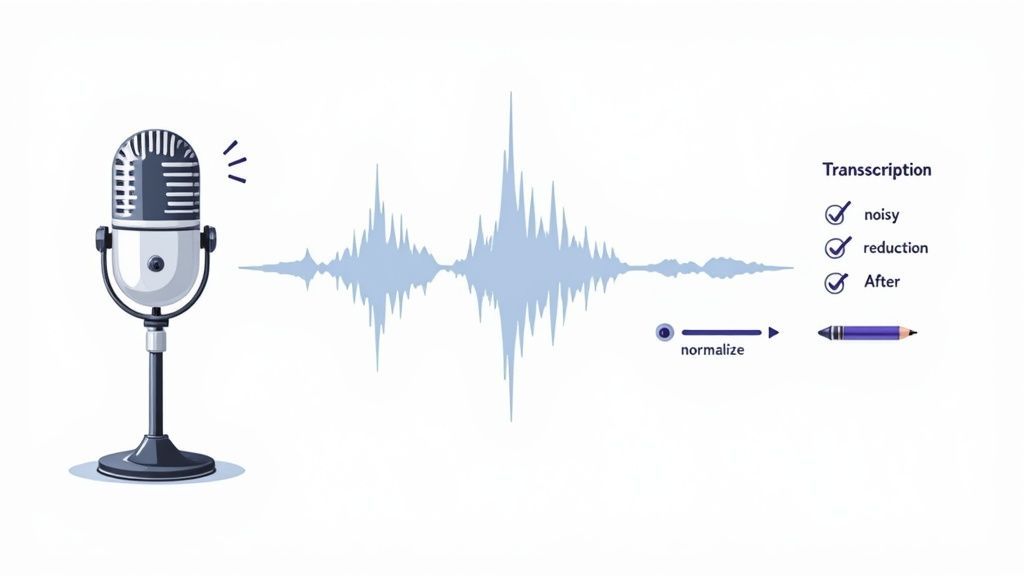
Unos pocos pasos pequeños e intencionales convertirán un borrador de IA confuso en un documento pulido y profesional. Todo comienza con el sonido en sí.
Preprocesamiento de tu audio para mayor claridad
Antes de siquiera pensar en subir tu archivo, un poco de limpieza de audio puede hacer maravillas. Piénsalo como preparar tus ingredientes antes de cocinar; simplemente hace que el resultado final sea mucho mejor. Puedes hacer todo esto con una herramienta gratuita y potente como Audacity.
Aquí hay algunas ediciones rápidas que siempre hago:
- Reducción de ruido: Usa el efecto incorporado para filtrar ese zumbido de fondo persistente de cosas como aires acondicionados o ventiladores de computadora. Esto cambia totalmente el juego.
- Normalización: Esta útil función lleva toda la pista de audio a un volumen constante. Ya no tendrás que preocuparte de que la IA se pierda frases porque alguien habló demasiado bajo.
- Truncamiento de silencio: ¿Tienes pausas largas e incómodas en tu grabación? Eliminarlas hace que el archivo sea un poco más pequeño e incluso puede acelerar el tiempo de transcripción.
Estos pasos solo toman unos minutos, pero pueden prevenir innumerables errores más adelante. Para una inmersión más profunda, consulta nuestra publicación sobre cómo mejorar la precisión del habla a texto.
La mejora más importante que puedes hacer es grabar con un micrófono decente. El micrófono de tu teléfono o portátil está bien para notas rápidas, pero un micrófono USB externo es una inversión que vale la pena para cualquiera que se tome en serio la calidad. Captura tu voz con mucha más claridad y mucho menos ruido ambiental.
Mi lista de verificación de edición posterior a la transcripción
Una vez que la IA ha hecho su parte, es hora de un toque humano. Nunca confío completamente en el primer borrador. En cambio, sigo una lista de verificación de edición rápida pero efectiva para detectar esos errores comunes de la máquina y mejorar la legibilidad.
Este pase final es lo que separa una transcripción simplemente utilizable de una excelente. Mi flujo de trabajo siempre incluye estas acciones clave:
- Buscar nombres propios: La IA casi siempre tropieza con nombres únicos, jerga específica de la empresa o términos técnicos. Una búsqueda y reemplazo rápida para errores recurrentes funciona de maravilla aquí.
- Verificar homófonos: Mantente atento a las palabras que suenan igual pero tienen diferentes significados y ortografías, como "their", "there" y "they're", o "to", "too" y "two".
- Formatear para la legibilidad: No dejes a tu lector con un gran bloque de texto. Divide los párrafos largos. Agrega encabezados, viñetas y texto en negrita para que el documento sea fácil de escanear y digerir.
- Escuchar de nuevo a 1.5x de velocidad: Mi truco favorito. Reproduce el audio original mientras lees la transcripción. La velocidad más rápida te ayuda a detectar errores evidentes sin tener que escuchar toda la grabación en tiempo real.
Errores comunes de transcripción y soluciones rápidas
Incluso con la mejor preparación, las herramientas automatizadas pueden cometer errores predecibles. Detectar estos errores comunes es la mitad de la batalla. Aquí tienes una guía rápida de solución de problemas para ayudarte a limpiar tu transcripción de manera eficiente.
| Tipo de error | Ejemplo | Método de solución rápida |
|---|---|---|
| Homófonos | "Their going to the store." (Ellos van a la tienda.) | Busca homófonos comunes (to/too, its/it's, their/there) y corrígelos según el contexto. |
| Nombres mal escritos | "Praveen" se convierte en " प्रवीण" o "Parvin" | Usa "Buscar y Reemplazar" (Ctrl/Cmd + H) para corregir todas las instancias de un nombre mal escrito a la vez. |
| Puntuación incorrecta | "When did you get here. I didn't see you." (¿Cuándo llegaste? No te vi.) | Lee las oraciones en voz alta para verificar el flujo. Agrega o elimina comas, puntos y signos de interrogación según sea necesario. |
| Jerga técnica | "API" se convierte en "A Pea Eye" | Crea un glosario personal de términos específicos de la industria y usa "Buscar y Reemplazar" para garantizar la coherencia. |
| Oraciones corridas | Un bloque de texto largo e ininterrumpido. | Divide los párrafos largos. Escucha las pausas naturales en el audio, que a menudo son buenos lugares para un punto. |
Tomarse unos minutos para revisar estos puntos garantiza que tu documento final sea preciso, profesional y fácil de leer para cualquier persona. Es una pequeña inversión de tiempo que se paga mucho en calidad.
Preguntas comunes sobre transcripción gratuita
Cuando empiezas a buscar una forma de convertir audio a texto gratis, es inevitable que tengas preguntas. El mundo de las herramientas gratuitas es grande, y descifrar la historia real sobre la privacidad, la precisión y todos los límites ocultos es clave para elegir la correcta.
Vamos a cortar el ruido y abordar las preocupaciones más comunes de frente. Estas son las respuestas directas que necesitas para empezar a transcribir con confianza.
¿Son seguros los convertidores gratuitos de audio a texto para archivos confidenciales?
Esta es una pregunta importante, y la respuesta honesta es: depende.
Los convertidores en línea que te piden que subas tu archivo a su servidor pueden ser una verdadera apuesta para cosas sensibles. Les estás confiando tus datos, así que tienes que leer la política de privacidad para ver cómo la manejan.
Para cualquier cosa verdaderamente confidencial (declaraciones legales, sesiones de terapia de clientes, reuniones de negocios privadas), tu mejor opción es una aplicación de escritorio sin conexión.
Dado que la transcripción se realiza directamente en tu computadora, tus archivos nunca abandonan tu dispositivo.
Important Reminder About Privacy
If your audio contains confidential names, medical details, or sensitive internal discussions, avoid uploading to online servers. Offline tools offer complete control and ensure no data is stored or analyzed externally.
Es la única manera de garantizar privacidad total.
¿Cuáles son los límites típicos de los servicios gratuitos?
"Gratis" casi nunca significa "ilimitado". La mayoría de los servicios gratuitos tienen restricciones para animarte a contratar un plan de pago. Saber qué esperar te evita encontrarte con un muro a mitad de un proyecto.
Ten en cuenta estas restricciones comunes:
- Límites de minutos mensuales: La mayoría de las plataformas te dan una cantidad determinada de audio que puedes procesar cada mes, generalmente entre 30 y 60 minutos.
- Restricciones de tamaño de archivo: Es probable que te encuentres con un tamaño máximo de archivo para cada carga, lo que puede ser un inconveniente para grabaciones más largas como conferencias o seminarios web.
- Funciones avanzadas limitadas: Cosas como crear un vocabulario personalizado para jerga de la industria u obtener una identificación perfecta del hablante casi siempre se reservan para los niveles de pago.
¿Qué tan precisas son las herramientas gratuitas en comparación con las de pago?
La diferencia de precisión entre las herramientas gratuitas y las de pago es menor de lo que podrías pensar.
Muchos servicios gratuitos, especialmente los que se basan en IA potentes como Whisper, pueden alcanzar más del 95% de precisión en audio claro. Eso es más que suficiente para la mayoría de las tareas diarias, como transcribir reuniones, entrevistas o notas de voz.
La verdadera diferencia se nota con audio problemático: archivos con mucho ruido de fondo, personas hablando unas sobre otras o hablantes con acentos marcados. Los servicios de pago a menudo incluyen una opción de revisión humana para obtener ese último porcentaje de precisión, algo que no encontrarás en una herramienta gratuita.
Y sí, puedes transcribir audio que no esté en inglés. La mayoría de las herramientas modernas manejan docenas de idiomas sin esfuerzo. Solo asegúrate de verificar la lista de idiomas compatibles de la herramienta antes de empezar.
¿Listo para probar una herramienta que equilibra las cosas correctamente? Transcript.LOL ofrece un potente plan gratuito que es perfecto para empezar. Comprueba por ti mismo lo fácil que es convertir tu audio en texto. Visítanos en https://transcript.lol para obtener más información.