
What Is Closed Captioning vs Subtitles A Complete Guide
What is closed captioning vs subtitles? This guide breaks down the key differences, use cases, and technical formats to help you choose the right one.
Praveen
February 13, 2026
It all boils down to one simple distinction: closed captions are built for accessibility, while subtitles are designed for language translation.
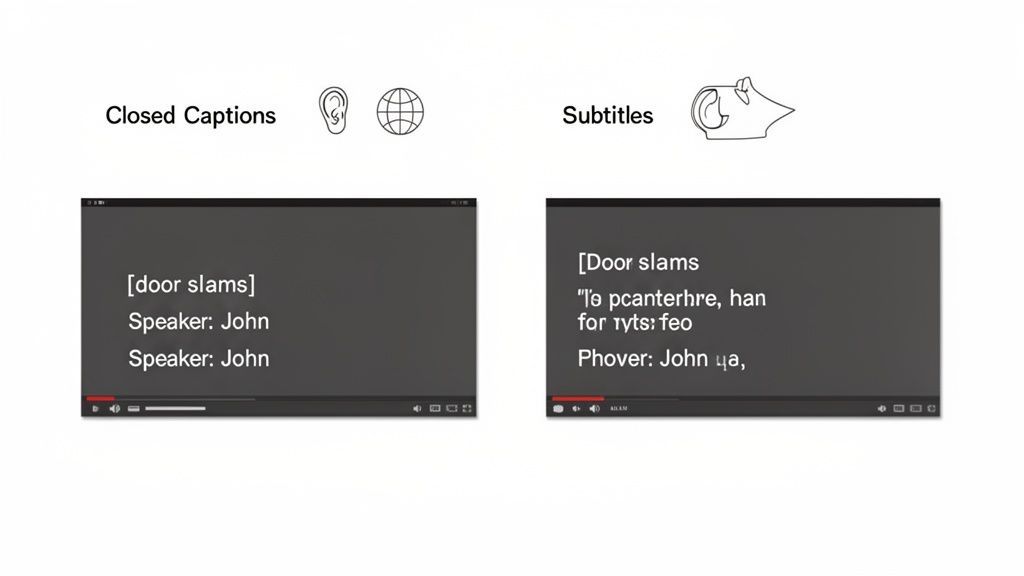
Think of it this way: Captions assume the viewer can't hear anything, so they include spoken dialogue plus all the crucial sound effects. Subtitles, on the other hand, assume the viewer can hear just fine but doesn't understand the language, so they only focus on translating the words being spoken.
Defining Closed Captions and Subtitles
People often use the terms interchangeably, but closed captions (CC) and subtitles serve two very different audiences and have entirely different goals. Getting this right is the first step to making your video content effective and truly accessible to everyone, everywhere.
The Role of Closed Captions
Closed captions provide a text-based version of all the audio in a video. They were originally created for viewers who are deaf or hard of hearing, which means they go way beyond just transcribing dialogue.
They also capture essential non-speech elements that a hearing person might take for granted, like:
- Sound Effects: Descriptive text such as
[door slams],[phone ringing], or[dramatic music]. - Speaker Identification: Cues like
(Sarah)or>> Announcer:to make it clear who is speaking, especially if they're off-screen.
Without these details, a viewer who can't hear the audio would miss out on vital context, emotional cues, and even key plot points.
The Purpose of Subtitles
Subtitles, however, are purely a translation of the spoken dialogue from one language to another. Their main job is localization—making your content understandable to viewers in different parts of the world.
Because they assume the viewer can hear everything perfectly, they leave out all the non-speech sounds. There's no need to describe a phone ringing when the viewer can already hear it.
The whole industry is shaped by this distinction, as you can see in this captioning and subtitling market report. It’s all about serving two completely different needs.
For a quick summary, here's a simple table breaking down the key differences.
Core Differences At A Glance: Closed Captions vs Subtitles
| Attribute | Closed Captions (CC) | Subtitles |
|---|---|---|
| Primary Audience | Deaf and hard of hearing viewers | Viewers who don't speak the audio language |
| Purpose | Accessibility | Translation and localization |
| Content Included | Dialogue, sound effects, speaker IDs, music cues | Dialogue only |
| Language | Same language as the video's audio | Different language from the video's audio |
Ultimately, choosing between the two comes down to who you're trying to reach and what you want them to experience.
Diving Into the Technical Formats and Standards
On the surface, captions and subtitles look similar, but the real magic—and the crucial differences—happen behind the scenes in their technical DNA. The file formats used to put that text on your screen control everything from how it looks to who can access it.
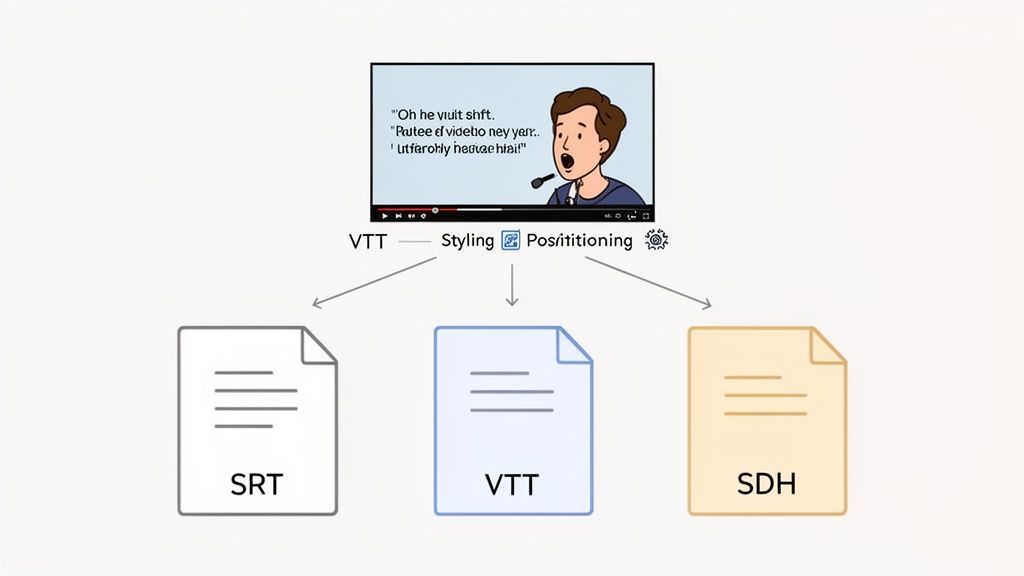
The two big players here are SRT and VTT. Think of SRT (SubRip Text) as the trusty, no-frills workhorse. It’s the most common and widely supported format out there, but all it contains is the text and basic timestamps. It gets the job done for simple subtitles, but that's about it.
Then you have VTT (WebVTT), the modern format built for today's web. VTT is far more powerful, supporting styling like bold and italics, colors, and—most importantly—text positioning. This is a game-changer for captions, as it lets you move text around to avoid covering up important visuals or place it next to a specific speaker for clarity.
Why File Format Choice Matters?
Not all caption files behave the same way. Choosing the right format affects styling, readability, and platform compatibility. Using modern formats like VTT ensures your captions stay clear, flexible, and accessible across devices.
How It All Plays Out in Practice
These technical differences have a direct impact on the viewing experience. Since standard subtitles are just for translating dialogue, a simple SRT file is usually all you need. The viewer can hear everything else, so fancy formatting isn't necessary.
Captions, on the other hand, absolutely rely on VTT’s advanced features to recreate the full audio experience for someone who can't hear. This includes things like:
- Speaker Identification: Cues like
(KATE)or>> ANNOUNCER:are a staple of good captioning. They make it crystal clear who is talking, which is vital in fast-paced scenes or when a character is off-screen. - Non-Speech Sound Descriptions: Captions must paint a picture with sound. Descriptors like
[dramatic music swells]or[door slams shut]are essential for conveying mood, tone, and key plot points that would otherwise be missed.
Here’s the bottom line: subtitles just give you the spoken words. Captions use more advanced formats to rebuild the entire soundscape for viewers who need it.
SDH: The Best of Both Worlds
This brings us to a super important third option: Subtitles for the Deaf and Hard-of-hearing (SDH). As the name suggests, SDH is a hybrid format. It's built like a subtitle file but packed with all the crucial accessibility details you find in captions.
SDH delivers both language translation and the non-speech audio cues. For example, if a deaf English-speaking person is watching a French movie, the SDH file would translate the dialogue into English and include descriptions like [tires screeching]. This makes SDH the ultimate all-in-one solution for global, accessible content.
If you’re a creator looking to produce these different formats, you can explore documentation for modern transcription tools that make exporting accurate SRT, VTT, and SDH files incredibly simple.
Features That Make Caption Creation Easy
State-of-the-art AI
Powered by OpenAI's Whisper for industry-leading accuracy. Support for custom vocabularies, up to 10 hours long files, and ultra fast results.

Import from multiple sources
Import audio and video files from various sources including direct upload, Google Drive, Dropbox, URLs, Zoom, and more.

Export in multiple formats
Export your transcripts in multiple formats including TXT, DOCX, PDF, SRT, and VTT with customizable formatting options.
Understanding Accessibility Laws and Compliance
Once we move past the technical side of things, the conversation about closed captions vs. subtitles enters a much more serious arena: legal and ethical responsibility. For a lot of organizations, providing accurate closed captions isn't just a nice-to-have feature—it’s a legal requirement.
Accessibility laws exist for a reason. They ensure people with disabilities get the same access to information as everyone else. When it comes to video, that means creating an experience for deaf and hard-of-hearing viewers that’s just as complete as it is for hearing viewers. Standard subtitles just don't cut it.
Risks of Improper Captioning
Using subtitles instead of proper captions can leave your content legally non-compliant. Missing sound cues or speaker labels creates an incomplete experience for deaf viewers. For regulated industries, this can lead to lawsuits, penalties, and accessibility complaints.
Key Legislation Driving Captioning Mandates
Several major laws now require closed captions for everything from broadcast TV to online videos and educational materials. The big one is the Americans with Disabilities Act (ADA), which flat-out prohibits discrimination based on disability.
Courts have repeatedly confirmed that the ADA applies to online businesses and digital content, too. That means your public-facing videos on websites, social media, and streaming platforms likely fall under its rules, making captions a non-negotiable part of your workflow.
This legal pressure is also a huge factor in the industry's growth. In fact, North America is expected to grab a 39.65% market share in the captioning and subtitling industry by 2025, largely thanks to strict laws like the ADA.
Non-compliance isn't just an ethical misstep; it opens you up to huge financial and reputational risks. Lawsuits over inaccessible video content have led to massive fines and court-ordered changes.
The Consequences of Non-Compliance
Ignoring accessibility laws can lead to some pretty serious headaches. The legal fees from a lawsuit are bad enough, but the damage to your brand's reputation can be even harder to fix.
A good first step is understanding the basics of ADA Compliance 508 for Your Website. But there are other key regulations to be aware of:
- The 21st Century Communications and Video Accessibility Act (CVAA): This law is straightforward—if a video was shown on TV with captions, it must also have captions when you put it online.
- Section 508 of the Rehabilitation Act: This one applies to all federal agencies and their contractors, mandating that all their digital technology is accessible to people with disabilities.
Ultimately, making your content accessible isn't just about dodging penalties. It's about building an inclusive brand that genuinely values every single person in your audience. As you map out your content strategy, taking the time to understanding the specific legal obligations for your industry is an essential move.
How Captions and Subtitles Actually Drive Viewer Engagement
It’s easy to think of captions and subtitles as just an accessibility feature or a legal checkbox. But that’s a huge miss. In reality, they’re one of the most powerful tools you have to boost viewer engagement and keep people watching. The way we all consume video has fundamentally changed, especially on social media, and on-screen text is no longer a "nice-to-have"—it's a must.
Think about how you scroll through your own feeds. You're on the bus, in a quiet office, or up late at night. The sound is off. Without captions, a video is just silent moving pictures. With them, you’re instantly pulled into the story.
Meeting Viewers Where They Are
This isn't some niche behavior; watching video on mute is the new normal. The data backs this up over and over again, showing that captions have a direct impact on the metrics that matter. It's a simple addition that respects how your audience actually uses different platforms.
Why On-Screen Text Improves Every Video?
Better Focus
Viewers process information faster when they can both see and hear it. Captions reinforce key ideas and reduce distractions. This leads to stronger message retention.
Higher Completion Rates
When people understand content instantly, they keep watching longer. Text keeps them engaged even in noisy or silent environments. More watch time means better platform performance.
Wider Reach
Captions make videos accessible to people with hearing loss, language barriers, or learning differences. Your audience naturally becomes larger. Inclusivity directly boosts visibility.
Searchable Content
Transcripts turn spoken words into indexable text. This improves SEO and discoverability across search engines. Your videos become long-term assets, not one-time posts.
A landmark study found that viewers are a whopping 80% more likely to watch a video all the way through if it has closed captions. Not only that, but captioned videos can pull in up to 40% more views overall. Facebook’s own internal data is even more telling: 85% of its videos are watched on mute, and just adding captions increases the average watch time by a crucial 12%. You can dig deeper into this trend in a detailed market analysis on captioning solutions.
The takeaway is simple: in a world where video is often consumed silently, captions aren't an afterthought. For a massive chunk of your audience, they are the main reason they'll stop scrolling and actually watch.
This habit is especially ingrained in younger audiences. A recent YouGov survey revealed that an incredible 63% of adults aged 18-29 regularly watch content with subtitles or captions turned on, even when it’s in their native language. It's a clear signal that on-screen text has become a preferred way to watch, helping with focus and comprehension.
Making Your Content Easier to Understand for Everyone
While the closed captioning vs. subtitles debate often focuses on accessibility, both tools make content easier to understand for all viewers, not just those with hearing loss or language differences.
Just think about these everyday situations:
- Noisy Places: Trying to watch a video in a busy coffee shop or an airport? Text is essential to follow along.
- Complex Topics: Content with technical jargon, thick accents, or people talking really fast becomes much easier to digest with text.
- Learning and Remembering: For any kind of educational or training video, text reinforces what's being said, helping people retain the information.
At the end of the day, investing in high-quality captions and subtitles is one of the smartest moves you can make to get the most out of your content. It ensures your message doesn't just get delivered—it gets understood by the widest possible audience, no matter how or where they’re watching.
Choosing The Right Solution For Your Content
Okay, let's get practical. The whole debate between closed captions and subtitles really boils down to one simple question: who are you making this for? Your audience, your content's goal, and the platform you're on will point you to the right answer every single time. Think of it as a strategic choice, not just a technical box to check.
This isn't a one-size-fits-all deal. If your choice doesn't line up with your goals, you could end up failing to meet legal requirements or, just as bad, completely missing a massive chunk of your audience.
A Practical Decision-Making Framework
To make this dead simple, let's walk through a few real-world scenarios. Each one has a clear, correct answer based on who's watching.
-
For Internal Training: An American company creates a mandatory HR video for its US-based employees. In this case, they must use closed captions. It’s not just a nice-to-have; it's an ADA compliance issue, making sure the content is fully accessible for any employee who is deaf or hard of hearing.
-
For Global Entertainment: A filmmaker is submitting their movie to international film festivals. They'll need subtitles in multiple languages. The goal here is pure localization—the audience can hear the original audio just fine but needs the dialogue translated to follow the story.
-
For Social Media Marketing: A brand is running a video ad campaign on Instagram or TikTok. They should use open captions (text burned directly into the video). Since a staggering 85% of social media videos are watched on mute, this guarantees the message gets across instantly, sound or no sound.
This decision tree helps visualize the core question you need to ask: Who is my primary audience?
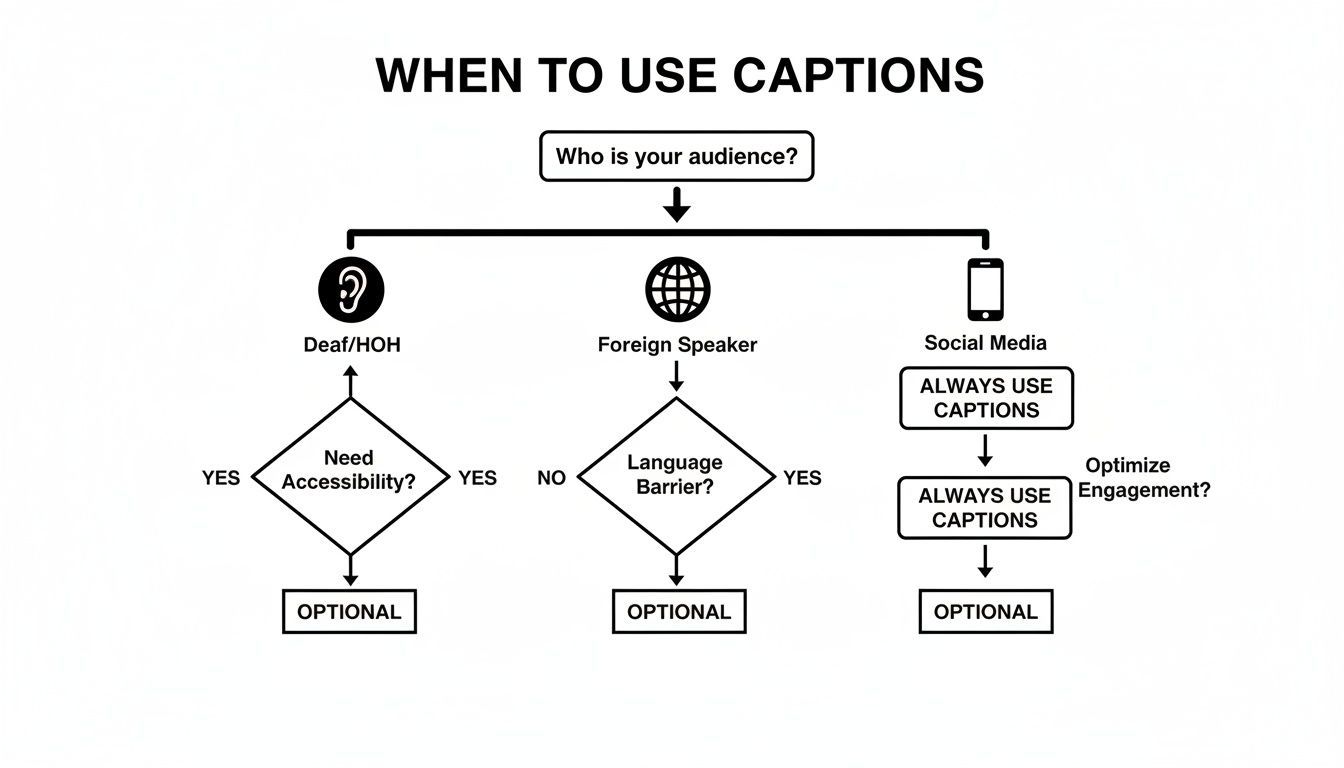
The flowchart makes it obvious. Your choice hangs entirely on whether you're serving deaf and hard-of-hearing viewers, foreign language speakers, or the general public scrolling on silent-autoplay platforms.
Ultimately, the distinction is crystal clear. If your goal is accessibility for those who cannot hear, captions are the only compliant and ethical option. If your goal is to cross language barriers for those who can, subtitles are your tool.
Creating Accurate Captions With A Modern Workflow
Thankfully, creating high-quality captions and subtitles doesn't mean chaining yourself to your keyboard for hours of manual typing anymore. A modern workflow blends the raw speed of AI with the essential nuance of a human touch.
Features for Professional Teams

Speaker detection
Automatically identify different speakers in your recordings and label them with their names.

Editing tools
Edit transcripts with powerful tools including find & replace, speaker assignment, rich text formats, and highlighting.
Summaries and Chatbot
Generate summaries & other insights from your transcript, reusable custom prompts and chatbot for your content.
This combo is the secret to getting a final product that’s not just accurate, but also fully accessible and legally compliant.
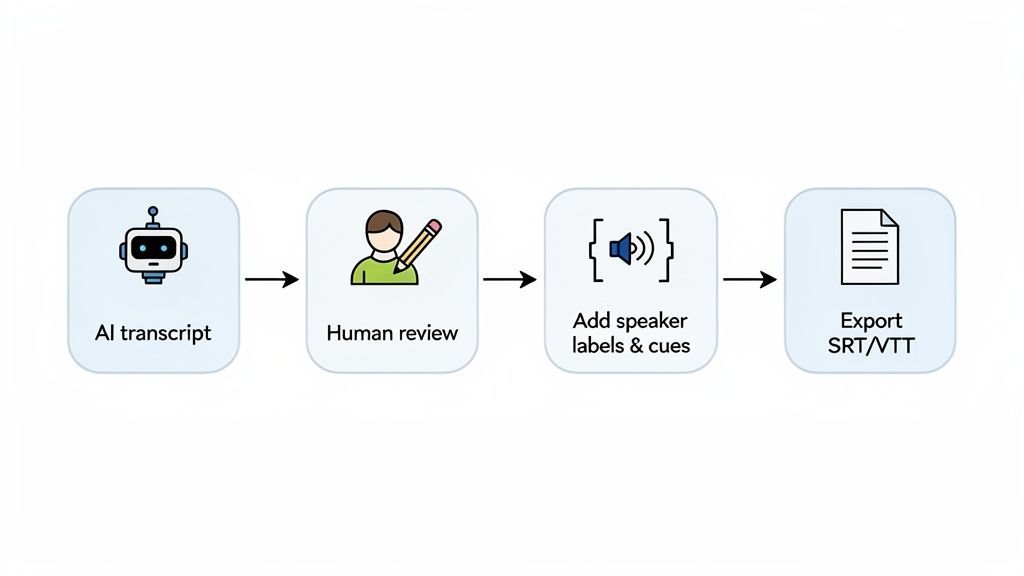
The whole process starts with a solid transcript. Modern AI transcription can get you a near-perfect text version of your audio in just a few minutes, handling the most tedious part of the job.
This AI-generated first draft gives you the raw text and rough timestamps, saving you a massive amount of time. And it's not just a niche tool; the market for AI subtitle generation hit $1.03 billion in 2023 and is on track to reach a staggering $7.42 billion by 2032. The momentum is undeniable.
The Rise of AI-Powered Captioning
AI captioning tools are rapidly becoming standard across media, education, and business teams. Manual typing workflows are being replaced by automated transcripts and instant exports. Fast, scalable captioning is now the default expectation, not a luxury.
The Critical Human Review Step
AI is fast, but it’s definitely not flawless. The next step—human review—is where the magic really happens. This is your chance to catch any awkward grammar, fix punctuation, and correct specialized terms or names the AI fumbled.
This is also where you add the details that elevate a simple subtitle file into true closed captions:
- Speaker Labels: Make it crystal clear who is talking, especially in conversations with multiple people or when a speaker is off-screen. Think
(MARIA)or>> NARRATOR:. - Non-Speech Audio Cues: Add descriptions for sounds that are critical to understanding the scene. This includes things like
[phone rings],[tense music playing], or[door slams].
This human touch is what makes your video truly accessible. It ensures the full emotional weight and context come through for deaf and hard-of-hearing viewers.
A common mistake is just grabbing the raw AI output and calling it a day. This often leads to confusing captions that don't meet accessibility standards and can make your content look unprofessional.
Exporting and Implementing Your File
Once your transcript is polished and properly formatted, the final step is exporting it in the right file format. The two most common options you'll see are SRT (SubRip Text) and VTT (WebVTT).
So, which one should you choose? It really depends on where you're posting your video.
Platform Support For Caption And Subtitle Files
This table breaks down which file formats are supported by major video platforms, helping you pick the right export option for your needs.
| Platform | Supports SRT | Supports VTT | Preferred Format |
|---|---|---|---|
| YouTube | Yes | Yes | SRT is a safe, universal choice. |
| Vimeo | Yes | Yes | VTT is preferred for advanced styling. |
| Yes | No | SRT is the required format. | |
| Yes | No | SRT is the only supported format. | |
| TikTok | Yes | Yes | Both are supported in Ads Manager. |
While most big platforms like YouTube and Vimeo handle both formats just fine, it's always a good idea to double-check the specific requirements for where you're publishing. When in doubt, SRT is almost always a safe bet.
After exporting, you just upload the file with your video. The platform handles the syncing, and viewers can toggle the captions on or off. By using powerful tools that simplify transcription and exporting, you can turn what used to be a frustrating chore into a quick, easy part of your production process.
Frequently Asked Questions
Even after you get the hang of the key differences, a few practical questions always seem to pop up. Let's clear up some of the most common ones.
Can I Use Subtitles Instead of Captions for Accessibility?
In short, no. Standard subtitles are not a legally compliant or acceptable replacement for closed captions when you're aiming for accessibility.
Subtitles are built for language translation, which means they completely ignore non-speech audio cues like [phone ringing] or [dramatic music]. Those sounds are crucial for a deaf or hard-of-hearing viewer to follow the story and feel the full emotional impact of a scene. Using subtitles instead of proper captions fails to provide an equivalent viewing experience, which is the whole point of accessibility laws like the Americans with Disabilities Act (ADA).
What Are Open Captions?
Think of open captions as text that’s permanently "burned" into the video itself. Unlike closed captions, which a viewer can turn on or off with the [CC] button, open captions are always visible. You can't disable them.
This makes them the perfect choice for platforms where videos often autoplay on mute, like Instagram or TikTok. By burning the text directly into the video, you guarantee every viewer sees your message, even without sound.
How Does AI Improve The Captioning Workflow?
AI-powered transcription has completely changed the game for captioning. These tools can automatically generate a highly accurate transcript of your video's audio in minutes—a task that used to take hours of painstaking manual labor. AI also handles the initial timestamping, syncing the text perfectly to the audio.
Of course, a human review is still essential to catch tricky names, add nuanced non-speech cues, and guarantee 100% accuracy. But AI automates the most grueling part of the process, freeing creators up to produce compliant, accessible content far more efficiently.
For a deeper dive, check out our complete list of Frequently Asked Questions about transcription.
Ready to create perfectly accurate captions and subtitles in minutes? Transcript.LOL uses advanced AI to transcribe your audio and video content, letting you export in SRT or VTT format with just a few clicks. Streamline your workflow and make your content accessible to everyone by visiting https://transcript.lol to get started for free.