
Como Transcrever Vídeo para Texto Online Como um Profissional
Descubra como transcrever vídeo para texto online com nosso guia. Compartilhamos dicas práticas para obter transcrições precisas de IA e reutilizá-las para crescimento.
Kate, Praveen
February 11, 2026
Sejamos honestos, em um mundo transbordando de vídeos, apenas ter um ótimo conteúdo visual não é mais suficiente. A verdadeira mágica acontece quando você consegue transformar esses vídeos em texto. Não é apenas um truque inteligente; é uma vantagem estratégica enorme. Ferramentas modernas de IA agora pegam o que costumava ser horas de digitação manual dolorosa e reduzem a poucos segundos de processamento. De repente, todo o seu conteúdo de vídeo se torna pesquisável, editável e pronto para ser reutilizado.
O Texto Transforma Vídeos em Ativos Pesquisáveis
Vídeos são poderosos, mas os motores de busca não podem "assistir" a eles. Transcrições desbloqueiam SEO, acessibilidade e oportunidades de reutilização instantaneamente. Uma gravação se torna conteúdo que você pode pesquisar, editar e reutilizar em qualquer lugar.
Por Que Transcrever Vídeos para Texto é um Superpoder de Conteúdo
Isso não é apenas para economizar um pouco de tempo. A transcrição online é uma estratégia fundamental para quem leva a sério seu conteúdo. Ela abre as portas para a acessibilidade, impulsiona significativamente seu SEO e cria uma plataforma de lançamento para uma tonelada de material novo. Uma tarefa que antes levava dias agora é um processo automatizado que termina em minutos.
E isso não é apenas uma tendência de nicho. É uma enorme mudança de mercado. O mercado global de transcrição por IA, o motor por trás desses serviços de vídeo para texto, explodiu. Ele saltou de US$ 4,5 bilhões em 2024 e está a caminho de atingir impressionantes US$ 19,2 bilhões até 2034. Esse crescimento insano mostra quanta demanda existe para tornar o conteúdo de vídeo pesquisável e acessível, especialmente quando se considera que o vídeo deve representar 82% de todo o tráfego da internet.
Mais do Que Apenas Palavras em uma Página
Uma transcrição é um ativo incrivelmente versátil. Pense nela como a matéria-prima que você pode transformar em inúmeras outras peças de conteúdo.
Vamos pegar um único webinar de uma hora como exemplo. Dessa única gravação, você pode facilmente criar:
- Um post de blog detalhado: Use a transcrição como o primeiro rascunho para um artigo abrangente.
- Trechos para redes sociais: Extraia as citações mais cativantes e os principais aprendizados para posts rápidos e envolventes.
- Um boletim informativo por e-mail: Resuma os pontos principais e envie-os diretamente para a caixa de entrada de seus assinantes.
- Legendas e Closed Captions: Este é um ponto importante. Torna seu conteúdo acessível e atrai espectadores em plataformas sociais onde os vídeos frequentemente são reproduzidos automaticamente sem som.
Essa abordagem economiza uma quantidade inacreditável de tempo e garante que sua mensagem principal realmente alcance as pessoas em suas plataformas preferidas.
"Eu apenas escaneio a transcrição toda vez. É mais fácil e rápido!!" - Guy Hickling, Consultor de Acessibilidade.
As Ferramentas Que Tornam Tudo Isso Possível
Para realmente aproveitar esse superpoder, você precisa das ferramentas certas. A transcrição básica é boa, mas é nas plataformas mais avançadas que você encontrará recursos que realmente amplificam seus esforços. Por exemplo, se você estiver trabalhando com conteúdo multilíngue, encontrar o melhor aplicativo de tradução de áudio pode ser um divisor de águas para seu fluxo de trabalho.
Os melhores serviços se integram perfeitamente, permitindo que você puxe vídeos diretamente de um URL, Google Drive ou até mesmo de uma gravação do Zoom e receba uma transcrição polida em pouco tempo. Este guia o guiará por como dominar essas ferramentas e desbloquear o potencial oculto em sua biblioteca de vídeos.
Carregue e Transcreva em Segundos
IA de última geração
Alimentado pelo Whisper da OpenAI para precisão líder na indústria. Suporte para vocabulários personalizados, arquivos de até 10 horas e resultados ultra rápidos.

Importar de múltiplas fontes
Importe arquivos de áudio e vídeo de várias fontes, incluindo upload direto, Google Drive, Dropbox, URLs, Zoom e mais.

Exportar em múltiplos formatos
Exporte suas transcrições em múltiplos formatos incluindo TXT, DOCX, PDF, SRT e VTT com opções de formatação personalizáveis.
Preparando Seu Vídeo para uma Transcrição Impecável
O segredo para uma ótima transcrição muitas vezes reside no que você faz antes mesmo de clicar no botão "transcrever". Como você prepara seu arquivo de vídeo e o insere no motor de transcrição é o primeiro, e possivelmente o mais importante, passo.
Se você acertar esta parte, gastará muito menos tempo corrigindo erros depois. Um pouco de atenção inicial economiza muito trabalho no final.
Como Você Quer Fazer o Upload?
Longe vão os dias de estar preso a um único botão "upload do computador". Ferramentas de transcrição modernas oferecem algumas maneiras diferentes de inserir seus arquivos, cada uma adequada a um tipo diferente de fluxo de trabalho.
Aqui estão as maneiras mais comuns de as pessoas nos enviarem seus vídeos:
- Upload Direto do Seu Dispositivo: Este é o método clássico e direto. Perfeito para quando você acabou de terminar de editar um vídeo e tem o arquivo final MP4 ou MOV em sua área de trabalho. Pense em entrevistas recém-editadas ou um episódio de podcast pronto para publicação.
- Integração de Armazenamento em Nuvem: Se você vive na nuvem, esta é para você. Conectar sua conta do Google Drive ou Dropbox é uma enorme economia de tempo para equipes ou qualquer pessoa com um fluxo de trabalho estabelecido. É uma salvação para pesquisadores que gerenciam dezenas de gravações de campo ou equipes de vídeo colaborando em um projeto.
- Importação Direta por URL: Esta é uma opção seriamente poderosa para conteúdo que já está disponível online. Um profissional de marketing pode obter um webinar de um concorrente a partir de um link do YouTube para análise rápida, ou um jornalista pode transcrever uma coletiva de imprensa simplesmente colando seu URL.
A verdadeira beleza aqui é a flexibilidade. Um podcaster pode configurar uma integração do Dropbox para processar novos episódios automaticamente. Enquanto isso, um gerente de mídia social pode obter vídeos de rivais diretamente de seus URLs. O objetivo é encontrar o método que remove o máximo de atrito do seu dia.
Por que Criadores Inteligentes Sempre Transcrevem?
Criação de Conteúdo Mais Rápida
Em vez de começar do zero, sua transcrição se torna o primeiro rascunho. Blogs, e-mails e posts ficam prontos em minutos, não em horas.
Acessibilidade Integrada
Legendas e legendas ocultas tornam seus vídeos utilizáveis para todos, incluindo espectadores que assistem sem som ou aqueles com deficiência auditiva.
Melhor Alcance de SEO
Motores de busca leem texto, não áudio. Adicionar transcrições ajuda seu conteúdo a classificar para palavras-chave e atrair tráfego orgânico consistentemente.
Reutilização Fácil
Um vídeo pode alimentar dezenas de ativos. Citações, resumos, clipes e documentos vêm da mesma transcrição sem esforço.
Se você quiser ver todas as diferentes maneiras de conectar seus arquivos, confira a documentação completa do Transcript.LOL.
Este gráfico rápido mostra o quão simples é todo o processo.
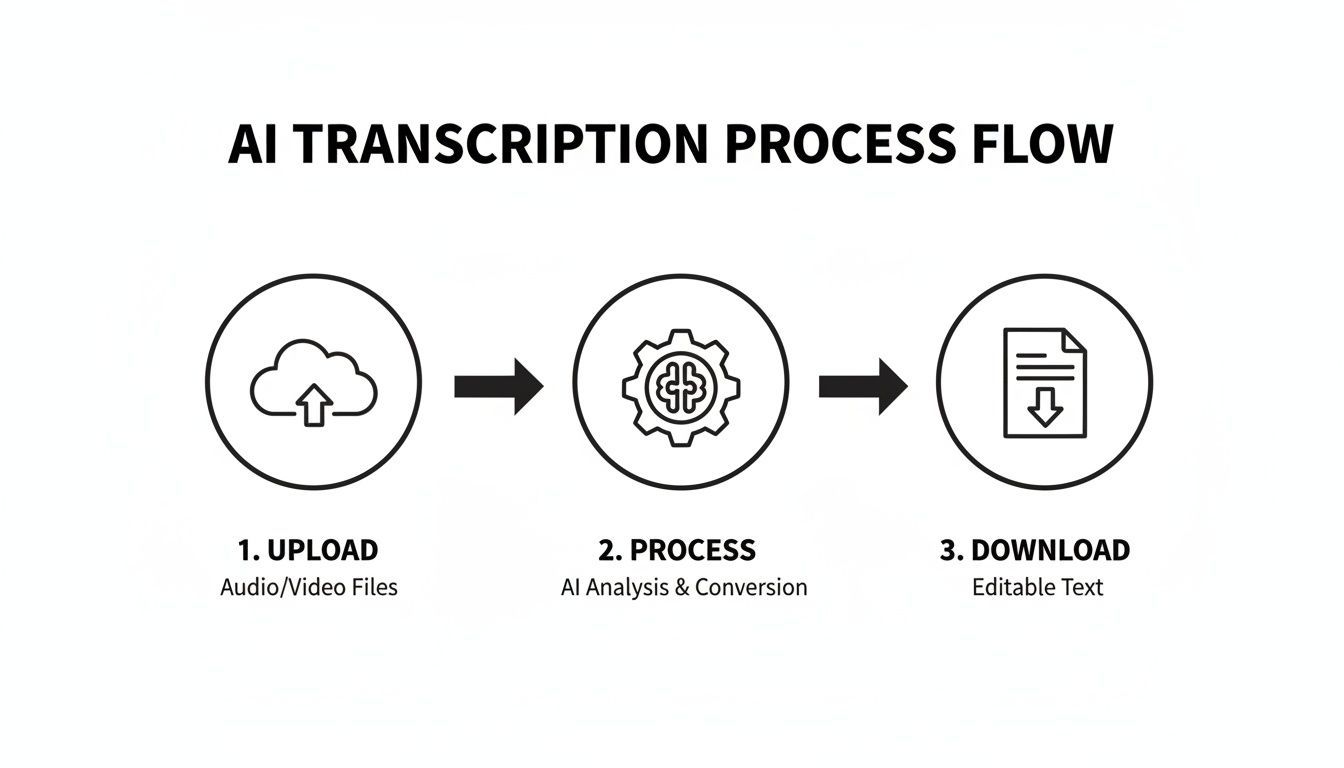
Como você pode ver, é um fluxo simplificado de três partes projetado para levá-lo do vídeo bruto ao texto pronto para uso o mais rápido possível.
Ajustando seu Arquivo de Vídeo para a IA
Além de apenas carregar o arquivo, a qualidade do próprio vídeo desempenha um papel importante na precisão da transcrição. Você nem sempre pode controlar a gravação original, mas alguns pequenos ajustes podem fazer uma grande diferença.
Áudio Ruim = Transcrições Ruins
Ruído de fundo, vozes sobrepostas ou baixo volume podem reduzir drasticamente a precisão. Mesmo a melhor IA tem dificuldades com áudio bagunçado. Gravações limpas economizam horas de edição depois.
Se o seu vídeo tiver faixas de áudio separadas — uma para o locutor e outra para a música de fundo — tente exportar uma versão com apenas a faixa de diálogo. Isso dá à IA um sinal limpo e desobstruído para trabalhar, o que pode reduzir drasticamente os erros.
Dê à IA o sinal de áudio mais claro possível. Pense nisso como tentar ter uma conversa. É muito mais fácil entender alguém em uma biblioteca silenciosa do que em um café barulhento. O mesmo princípio se aplica aqui.
Mesmo pequenos ajustes importam. Se o áudio do seu vídeo estiver muito baixo, aumentar um pouco o ganho antes de fazer o upload pode impedir que a IA perca palavras. Da mesma forma, se você estiver trabalhando com um formato de vídeo obscuro, convertê-lo para um padrão como MP4 primeiro garantirá que ele seja processado sem problemas.
Ao tomar essas poucas etapas extras, você não está apenas fazendo o upload de um arquivo. Você está preparando o palco para uma transcrição altamente precisa e genuinamente útil desde o início.
Edição e Refinamento da Sua Transcrição de IA
A passagem inicial da IA é impressionantemente rápida, mas a verdadeira mágica acontece na edição. É aqui que você entra para transformar um rascunho bruto gerado por máquina em um documento perfeitamente polido e verificado por humanos.
Edite, Resuma e Automatize seu Fluxo de Trabalho

Detecção de falantes
Identifique automaticamente diferentes falantes nas suas gravações e rotule-os com seus nomes.

Ferramentas de edição
Edite transcrições com ferramentas poderosas incluindo buscar e substituir, atribuição de falantes, formatos de texto rico e destaque.
Resumos e Chatbot
Gere resumos e outros insights da sua transcrição, prompts personalizados reutilizáveis e chatbot para o seu conteúdo.
Mesmo com uma precisão que chega a 98%, a melhor IA ocasionalmente tropeça. Ela pode ouvir mal uma palavra, ser confundida por um sotaque carregado ou se atrapalhar quando as pessoas falam umas sobre as outras. Seu cérebro é o ingrediente final e essencial.
Não se alarme se você notar pequenos erros ao abrir a transcrição pela primeira vez. A IA está ouvindo padrões fonéticos, então ela pode digitar "their" quando alguém disse "there" (em inglês), ou errar um nome de empresa único que nunca ouviu antes. Isso é totalmente normal e é a primeira coisa que você vai querer corrigir.
Navegando no Editor de Transcrição
Plataformas de transcrição modernas são construídas em torno de um editor interativo projetado para tornar esse processo de limpeza rápido e indolor. O objetivo não é reescrever tudo do zero. Trata-se de fazer correções inteligentes e direcionadas para que o texto atinja 100% de precisão.
A melhor parte? A interface geralmente sincroniza o texto diretamente com o áudio do vídeo. Você pode clicar em qualquer palavra e ouvir instantaneamente o momento exato em que ela foi dita. Essa reprodução sincronizada é um divisor de águas. Ela elimina o processo antigo e tedioso de avançar e retroceder em um player de vídeo separado. Você apenas lê, ouve e corrige em um movimento suave.
Aqui está uma amostra do que um editor de texto rico típico, como o do Transcript.LOL, oferece.
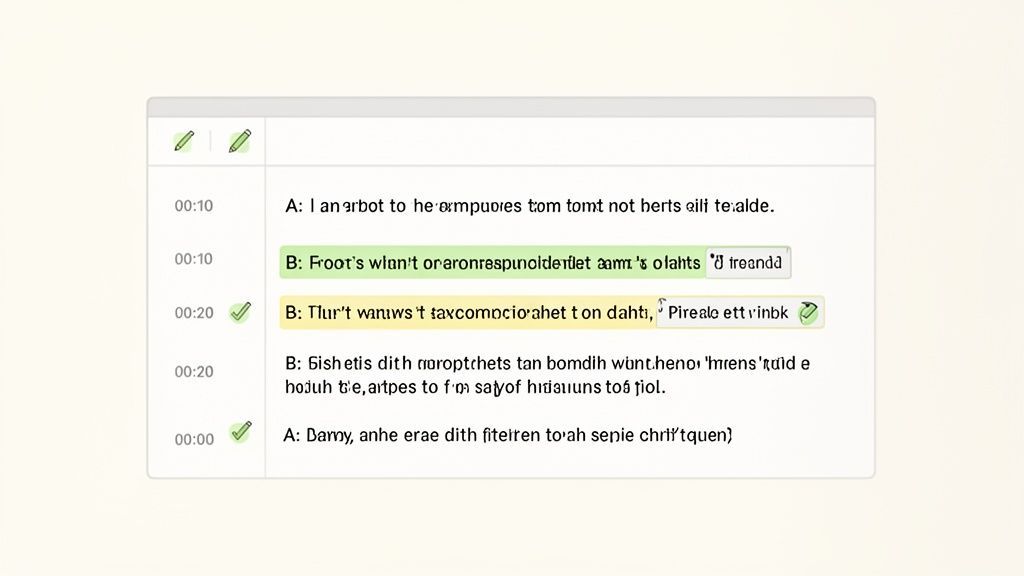
Como você pode ver, os carimbos de data/hora, os rótulos dos alto-falantes e o próprio texto estão todos integrados, criando um ambiente super eficiente para polir seu conteúdo.
Dominando a Detecção e Rotulagem de Alto-falantes
Quando você transcreve vídeo para texto online de uma mesa redonda ou uma reunião de equipe, saber quem disse o quê é inegociável. A detecção de alto-falantes por IA (às vezes chamada de diarização) faz o trabalho pesado inicial, atribuindo automaticamente rótulos genéricos como "Alto-falante 1" e "Alto-falante 2".
Essa primeira passagem é uma grande ajuda, mas você vai querer refiná-la. O processo geralmente é muito simples:
- Ouça as primeiras linhas do "Alto-falante 1".
- Descubra quem está realmente falando.
- Renomeie "Alto-falante 1" para o nome real dele, como "Sarah Chen".
Essa única alteração atualiza o nome do alto-falante em toda a transcrição. Basta repetir o processo para cada pessoa no vídeo. A rotulagem adequada torna sua transcrição infinitamente mais legível, quer você esteja criando notas de reunião ou extraindo citações para um artigo. É um pequeno toque que adiciona muito valor profissional.
Uma descoberta chave de pesquisa de usuário destaca que, para uma transcrição ser verdadeiramente útil, ela deve ser precisa e identificar claramente os alto-falantes. Se houver mais de uma pessoa no vídeo, seus nomes devem ser incluídos para que fique óbvio quem está "falando".
Ajustando Carimbos de Data/Hora para Legendas Perfeitas
Carimbos de data/hora são o esqueleto que mantém suas legendas e transcrições juntas. Eles são o que sincroniza as palavras na tela com o áudio do vídeo. A IA gera esses automaticamente, mas você pode precisar fazer pequenos ajustes para o ritmo ou ênfase.
Por exemplo, um alto-falante pode fazer uma pausa para efeito dramático. A IA pode agrupar as frases antes e depois da pausa em um único bloco de texto. Para legendas que pareçam mais naturais, você pode dividir esse bloco em dois e ajustar o carimbo de data/hora para corresponder ao momento exato em que o alto-falante começa a falar novamente. Um bom editor permite que você clique e arraste para ajustar os tempos de início e fim, dando a você controle total sobre o arquivo de legenda final.
Corrigindo Erros Comuns da IA
Embora a IA seja incrivelmente inteligente, ela ainda pensa como uma máquina, o que leva a alguns erros previsíveis. Saber o que procurar ajuda você a identificá-los e corrigi-los em tempo recorde.
Aqui estão alguns culpados comuns para ficar de olho:
- Homófonos: Palavras que soam semelhantes, mas significam coisas diferentes (por exemplo, "to", "too", e "two" em inglês).
- Nomes Próprios: Nomes únicos de pessoas, marcas ou lugares que não estão em um dicionário padrão.
- Jargões da Indústria: Acrônimos de nicho ou termos técnicos que a IA pode confundir com palavras do dia a dia.
- Interrupções: Quando os alto-falantes interrompem ou falam uns sobre os outros, a IA pode se confundir e misturar suas palavras.
Uma ótima dica profissional é usar "localizar e substituir" para quaisquer erros recorrentes. Se você notar que a IA está consistentemente soletrando mal um nome de projeto chave, você pode corrigir todas as instâncias de uma vez. Esta revisão final não é apenas sobre corrigir erros de digitação; trata-se de adicionar o contexto humano e a nuance que as máquinas ainda não conseguem replicar.
Transformando Sua Transcrição em Uma Mina de Ouro de Conteúdo
Obter seu vídeo transcrito não é a linha de chegada — é o bloco de partida. Uma transcrição bruta é muito mais do que um simples registro do que foi dito; é a matéria-prima para uma poderosa estratégia de multiplicação de conteúdo. Pense nisso como uma plataforma de lançamento, pronta para transformar um vídeo em uma dúzia de ativos diferentes.
Essa mentalidade muda a transcrição de uma tarefa administrativa chata para o primeiro e mais importante passo de um fluxo de trabalho criativo. Ela economiza incontáveis horas olhando para uma página em branco, garantindo que você extraia o máximo de valor do seu vídeo original.
A Transcrição por IA é Agora o Padrão
Criadores modernos não digitam notas manualmente mais. A transcrição automatizada se tornou padrão para publicação mais rápida, melhor SEO e produção consistente de conteúdo multicanal.
Além da Exportação Básica
Exportar seu texto final é tudo sobre escolher a ferramenta certa para o trabalho. Um arquivo .txt simples é bom, mas formatos estruturados como DOCX para relatórios ou SRT para legendas são frequentemente onde a mágica acontece. Sua escolha de exportação impacta diretamente a facilidade com que você pode reutilizar o conteúdo mais tarde.
Vamos analisar alguns cenários do mundo real:
- Um profissional de marketing transcreve uma entrevista com um cliente. Ele exporta como DOCX para extrair facilmente citações matadoras para um estudo de caso, depois pega um SRT para criar um clipe de mídia social legendado do melhor segmento.
- Um podcaster termina um episódio. Ele exporta um arquivo TXT para criar rapidamente notas detalhadas do show, e então usa isso como base para um post de blog completo resumindo a discussão.
- Um treinador corporativo grava um webinar. Ele exporta como PDF para criar um recurso para download para os participantes e como um arquivo VTT para adicionar legendas perfeitas ao vídeo sob demanda.
Isso não é apenas sobre salvar arquivos; é sobre ser estratégico. Quando você conhece o objetivo final desde o início, todo o processo se torna mais tranquilo. Você pode conferir todas as maneiras como os profissionais estão usando transcrições em https://transcript.lol/usecase para ter ideias para seu próprio fluxo de trabalho.
De Um Vídeo para Várias Peças de Conteúdo
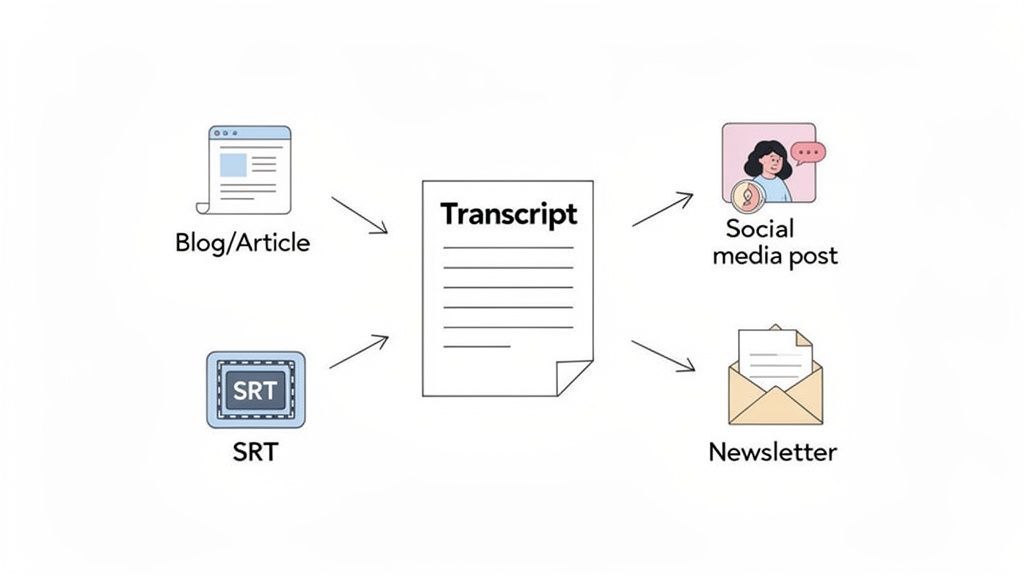
O verdadeiro poder de uma transcrição é como você pode dividi-la e reconstruí-la em algo novo. Um único webinar de uma hora pode ser metodicamente picotado para alimentar um calendário de conteúdo inteiro. Chega de bloqueio criativo.
Imagine que você acabou de transcrever uma ótima entrevista. Veja como esse único ativo pode se multiplicar:
- Crie um Post de Blog Pilar: A transcrição completa é seu primeiro rascunho. Basta organizar os principais pontos de discussão em seções com títulos, limpar a linguagem para legibilidade e você terá um artigo abrangente pronto para publicação.
- Gere Atualizações Engajadoras para Mídias Sociais: Percorra o texto em busca de citações impactantes, estatísticas surpreendentes ou dicas acionáveis. Cada um pode se tornar uma postagem independente para Twitter, LinkedIn ou Instagram.
- Elabore uma Newsletter Convincente: Extraia os temas principais e os insights mais valiosos para criar um resumo conciso para seus assinantes de e-mail, direcionando-os de volta para o vídeo completo ou postagem de blog.
- Desenvolva Documentos Internos Acionáveis: Para reuniões de equipe ou treinamento, você pode extrair decisões-chave, itens de ação e perguntas de acompanhamento diretamente da transcrição. Nada se perde.
Ao reutilizar uma única transcrição de vídeo, você não está apenas economizando tempo; você está criando um ecossistema de conteúdo coeso. Cada peça reforça as outras, fortalecendo sua mensagem central em todos os canais que você usa.
A Vantagem de SEO e Engajamento
Reutilizar sua transcrição não é apenas eficiente — é também um grande impulso para seu SEO e engajamento do público. Os motores de busca adoram conteúdo rico em texto. Fornecer uma transcrição ao lado do seu vídeo dá a eles exatamente o que precisam para rastrear, indexar e classificar sua página. Para um mergulho mais profundo, confira as 12 Melhores Ferramentas de SEO com IA que podem ajudar a transformar suas transcrições em ativos de busca poderosos.
Os números não mentem. Para criadores de vídeo, as transcrições comprovadamente funcionam. Páginas que as incluem veem 12% mais tempo de permanência e uma melhora de 20% nos rankings de SEO.
Este simples ato de adicionar texto transforma seu vídeo de uma caixa preta em um ativo transparente e pesquisável que tanto pessoas quanto motores de busca podem entender completamente. É um ganha-ganha que gera mais tráfego e mantém os visitantes em sua página por mais tempo.
Dicas Avançadas para Precisão e Segurança
Quando você está lidando com informações confidenciais ou precisa de precisão absoluta, o fluxo de trabalho básico de transcrição às vezes não é suficiente. É aqui que entram algumas estratégias de power-user, ajudando você a levar a precisão da IA aos seus limites, mantendo seus dados seguros.
Realmente se resume a um princípio simples: lixo entra, lixo sai. Quanto mais limpo o áudio que você fornecer à IA, melhor será a transcrição que você receberá. Algumas pequenas alterações antes de fazer o upload podem economizar uma montanha de tempo de edição mais tarde.
Aumentando a Precisão da IA Antes de Fazer o Upload
Pense na IA de transcrição como uma ouvinte altamente qualificada. Assim como uma pessoa, ela terá dificuldade em decifrar palavras murmuradas, conversas sobrepostas ou fala abafada por ruído de fundo alto. Seu primeiro trabalho é dar a ela o sinal mais claro possível.
Por exemplo, se o seu arquivo de vídeo tiver várias faixas de áudio — uma para o locutor e outra para música de fundo — tente exportar uma versão com apenas a faixa de diálogo. Este único passo elimina uma fonte massiva de potencial confusão para a IA. Da mesma forma, executar seu áudio através de um filtro básico de redução de ruído pode fazer maravilhas para gravações de cafés movimentados ou filmagens externas com vento.
Outra técnica que muda o jogo é ensinar à IA sua linguagem única. Quando você transcreve vídeo para texto online, modelos de IA padrão podem tropeçar em jargões específicos da indústria, nomes de empresas ou acrônimos internos. É aí que um recurso de vocabulário personalizado é inestimável.
Ao construir uma lista desses termos únicos com antecedência, você está essencialmente dando à IA uma cola.
- Nomes de Empresas e Produtos: "InnovateCorp", "Projeto Quimera"
- Jargão Técnico: "Emaranhamento quântico", "SaaS ARR"
- Nomes de Pessoas: "Siobhan O'Connell", "Dr. Anya Sharma"
Este passo proativo reduz drasticamente o número de termos de nicho que você terá que corrigir manualmente, tornando todo o processo mais rápido e preciso desde o início.
Priorizando Segurança e Privacidade de Dados
Para profissionais nas áreas jurídica, de saúde ou corporativa, a segurança de dados não é apenas um bônus; é um requisito fundamental. Ao fazer upload de entrevistas confidenciais com clientes, discussões com pacientes ou reuniões internas de estratégia, você precisa ter certeza absoluta de que seus dados permanecem privados.
A coisa mais importante a procurar é um serviço com uma política rigorosa de não treinamento em dados do usuário. Este é um compromisso da plataforma de que eles nunca usarão seus vídeos ou transcrições carregados para treinar seus modelos de IA. Suas informações são processadas para sua transcrição, e é só isso.
Escolher um serviço de transcrição sem uma política clara de não treinamento é como entregar os documentos privados da sua empresa sem um NDA. É um risco que simplesmente não vale a pena correr com informações confidenciais.
Sempre reserve um minuto para revisar a política de privacidade e os termos de um serviço. Procure por linguagem explícita sobre tratamento de dados, criptografia (tanto em trânsito quanto em repouso) e conformidade com regulamentos como GDPR ou HIPAA. Você pode aprender mais sobre nosso compromisso com a privacidade legal de dados aqui.
Otimizando a Colaboração em Equipe de Forma Segura
Em um ambiente profissional, a transcrição raramente é uma tarefa solitária. Uma equipe de marketing pode precisar colaborar em uma transcrição de webinar, ou uma equipe jurídica pode precisar revisar e anotar depoimentos de testemunhas. É aqui que uma ferramenta simples se torna uma plataforma pronta para empresas através de recursos de colaboração seguros.
Procure um serviço que ofereça espaços de trabalho compartilhados e gerenciamento granular de pastas. Isso permite que você organize projetos logicamente e controle exatamente quem pode acessar o quê. Você pode conceder acesso apenas para visualização a um stakeholder ou direitos de edição completos a um membro da equipe, tudo dentro de um hub central e seguro.
Aqui está uma rápida olhada em como uma equipe pode colocar isso em prática:
- Pastas Baseadas em Projetos: Crie pastas separadas para cada cliente ou campanha de marketing (por exemplo, "Série de Webinars Q4", "Caso Jurídico Johnson").
- Acesso Baseado em Papéis: Convide membros da equipe para pastas específicas com permissões definidas. Um editor júnior pode apenas corrigir transcrições, enquanto um gerente de projeto pode fazer upload de novos arquivos e gerenciar quem tem acesso.
- Repositório Centralizado: Todos trabalham a partir do mesmo conjunto de arquivos. Isso acaba com pesadelos de controle de versão e os riscos de segurança que vêm com o envio de documentos confidenciais por e-mail.
Ao usar esses recursos avançados, você pode transformar o processo de uma simples conversão de arquivos em um fluxo de trabalho seguro, eficiente e colaborativo para toda a sua organização.
Perguntas Comuns Sobre Transcrição de Vídeo Online
Quando você começa a procurar transcrever vídeo online, algumas perguntas sempre parecem surgir. É totalmente normal se perguntar sobre precisão, segurança e se a tecnologia pode lidar com seus arquivos específicos. Obter boas respostas ajuda você a seguir em frente com confiança.
Reunimos as perguntas mais comuns que recebemos dos usuários e as respondemos diretamente. Sem enrolação.
Quão Precisa é a Transcrição de Vídeo por IA, e Ela Pode Lidar com Diferentes Sotaques?
Esta é geralmente a primeira coisa que as pessoas perguntam, e a resposta é melhor do que você imagina. Motores de IA modernos, como o modelo OpenAI Whisper que usamos no Transcript.LOL, podem atingir até 98% de precisão sob as condições certas. "Condições certas" significa apenas que o áudio está claro e livre de muita conversa de fundo.
Esses modelos são treinados em centenas de milhares de horas de áudio de todo o mundo, cobrindo inúmeros sotaques e dialetos. Este treinamento massivo significa que eles são surpreendentemente bons em entender diferentes estilos de fala prontos para uso.
Se você estiver trabalhando com jargões super específicos ou técnicos, pode dar uma pequena ajuda à IA. Usar um recurso de "vocabulário personalizado" permite que você forneça palavras, nomes ou acrônimos exclusivos com antecedência para garantir que eles saiam perfeitamente.
Qual é o Melhor Formato de Vídeo para Fazer Upload para Transcrição?
Honestamente, embora a maioria das plataformas aceite praticamente qualquer formato comum — MP4, MOV, WMV, AVI — o tipo de arquivo de vídeo em si não importa tanto quanto a qualidade do áudio dentro dele. A clareza da fala é o que realmente impulsiona uma boa transcrição.
Para obter os melhores resultados, concentre-se em áudio limpo. Isso significa ruído de fundo mínimo e o mínimo possível de crosstalk (pessoas falando umas sobre as outras). Um fluxo de áudio de alta taxa de bits ou não comprimido é sempre um bônus. Às vezes, exportar seu áudio como um arquivo WAV ou FLAC separado pode dar uma pequena vantagem, mas as ferramentas modernas são fantásticas em extrair áudio de alta qualidade diretamente de arquivos de vídeo padrão.
O principal ponto é simples: Priorize áudio limpo em vez de um formato de vídeo específico. Uma voz clara em um MP4 básico sempre superará uma voz abafada em um arquivo de nível profissional.
É Seguro Fazer Upload de Vídeos Confidenciais para Transcrição Online?
A segurança é uma preocupação enorme — e completamente válida —, especialmente se você estiver nas áreas jurídica, de saúde ou corporativa. É absolutamente crucial escolher um serviço com uma política de privacidade sólida e transparente.
Plataformas respeitáveis como o Transcript.LOL operam com uma política rigorosa de não treinamento. Esta é a nossa promessa de que seus dados — seus vídeos e suas transcrições — nunca, jamais são usados para treinar modelos de IA. Seus arquivos são processados de forma segura apenas para você e só são acessíveis às pessoas que você convida especificamente para sua equipe.
Antes de fazer upload de qualquer coisa sensível, sempre leia os termos de privacidade. Procure por declarações claras sobre proteção de dados, criptografia e como eles mantêm suas informações confidenciais. Se um serviço for vago sobre como lida com seus dados, isso é um sinal de alerta.
Para um mergulho mais profundo em nossas próprias políticas, confira nossa seção abrangente de Perguntas Frequentes.
Posso Transcrever um Vídeo Que Não Está em Inglês?
Absolutamente. Esta é uma das características mais poderosas da IA moderna. Plataformas de ponta podem lidar com um grande número de idiomas, o que é um divisor de águas para equipes globais e criadores de conteúdo.
Por exemplo, o Transcript.LOL fornece transcrição precisa em 99 idiomas diferentes. O processo não poderia ser mais simples: ao fazer upload do seu arquivo, você apenas seleciona o idioma falado no vídeo. Isso informa à IA qual modelo usar, garantindo que você obtenha uma transcrição precisa no idioma original.
Este é um recurso obrigatório para:
- Empresas globais que precisam transcrever reuniões internacionais.
- Criadores multilíngues que fazem vídeos para públicos diversos.
- Pesquisadores que trabalham com material de origem de todo o mundo.
A capacidade de transformar vídeo em texto com precisão não é mais um jogo exclusivo para o inglês. Ele abre um mundo de possibilidades para o seu conteúdo.
Pronto para ver quão rápida e precisa pode ser a transcrição por IA? Experimente o Transcript.LOL hoje e transforme seu vídeo ou áudio em texto polido e editável em apenas alguns cliques. https://transcript.lol