
How to Transcribe Audio Files an Expert Guide
Discover how to transcribe audio files with our expert guide. Learn practical tips for AI and manual methods to get accurate transcripts quickly.
Kate
January 3, 2024
Learning how to transcribe audio is all about turning spoken words into written text. You can do this the old-fashioned way—typing it out manually—or you can use an AI tool to do the heavy lifting for you. Honestly, the best method is usually a mix of both: let the AI get you a fast first draft, then have a human clean it up for perfect accuracy.
Why Bother With an Accurate Transcript?
Before we get into the "how-to," let's talk about the "why." Getting this right is so much more than a simple convenience. A good transcript is the key to unlocking all the value trapped inside your audio files, making your content easy to find and use.
Think about it. Without a transcript, all those brilliant interviews, team meetings, and podcast episodes are essentially invisible to search engines and completely inaccessible to anyone who is deaf or hard of hearing. It’s like locking your best content in a soundproof box.
Transcripts Unlock Your Content
Without transcripts, your audio is invisible to search engines and inaccessible to millions. A single transcript turns a recording into a searchable, reusable asset.
The Demand for Transcription is Exploding
The need for high-quality transcription is growing like crazy across just about every industry you can imagine. The U.S. market for general transcription is on track to blow past $32 billion in 2025 and just keep climbing. This isn't a surprise when you see how much everyone from doctors to lawyers relies on precise written records to do their jobs.
This boom really drives home one simple truth: an audio file is only as useful as its transcript.
Here’s how that plays out in the real world:
- For Content Marketers: A podcaster can take a single one-hour interview and, with one transcript, spin it into a full blog post, a dozen social media snippets, and a newsletter.
- For Legal Professionals: A paralegal creates a perfect written record of a deposition, making sure every single word is captured for the legal team to review.
- For Academic Researchers: A researcher can sift through hours of interview recordings just by searching for keywords in the transcripts, saving days or even weeks of work.
Getting your transcription right is also a cornerstone of many podcast success factors, from boosting your SEO to making your show more accessible.
The real power of transcription is that it makes your audio discoverable, reusable, and accessible to everyone. It’s what turns a recording into a genuine asset.
At the end of the day, you're not just aiming for a wall of text. You need a clean, accurate document that you can actually use. Nailing speech-to-text accuracy is the most critical part of the whole process. Even tiny mistakes can twist the meaning of a sentence, leading to embarrassing misquotes or serious misunderstandings. This focus on getting it right is the foundation for everything we’ll cover next.
How Transcript.LOL Powers Every Industry
State-of-the-art AI
Powered by OpenAI's Whisper for industry-leading accuracy. Support for custom vocabularies, up to 10 hours long files, and ultra fast results.

Import from multiple sources
Import audio and video files from various sources including direct upload, Google Drive, Dropbox, URLs, Zoom, and more.

Export in multiple formats
Export your transcripts in multiple formats including TXT, DOCX, PDF, SRT, and VTT with customizable formatting options.
How to Prep Your Audio for a Perfect Transcript
Here’s a secret that experienced transcriptionists know well: the magic doesn't happen in the editing. It starts way before that, with the raw audio file.
Getting a clean, high-quality recording is hands-down the most important thing you can do for transcription accuracy. It doesn't matter if you're doing it by hand or letting an AI tool like Transcript.LOL handle it. Think of it like giving a builder a perfect blueprint versus a coffee-stained sketch.
When the audio is crisp, the AI can pick up on every word, every accent, and every speaker with incredible precision. But feed it a messy recording full of background noise, people talking over each other, or quiet voices, and you’re just asking the software to guess. Those guesses turn into errors, and those errors turn into hours of frustrating cleanup.
Trust me, a few minutes of prep work upfront will save you a world of pain later.
Nail Your Recording Environment
You don't need a fancy, sound-proofed studio to get great audio. The real goal is simple: kill any sound that isn't part of the actual conversation. A few small tweaks to your recording space can make a massive difference.
Here are a few practical things I always do:
- Find a quiet spot. This means getting away from humming refrigerators, street noise, or chatty colleagues in the next room. I've even recorded in a walk-in closet before—the clothes are amazing sound dampeners.
- Soften the room. Hard surfaces are your enemy. Bare walls and windows create echo, which muddies the sound. Carpets, curtains, sofas, and other soft furnishings absorb that echo and make voices sound much cleaner.
- Get the mic placement right. The sweet spot is usually about 6-12 inches from the speaker's mouth. This is close enough to capture their voice clearly without picking up every little breath sound or too much ambient noise.
Choosing the right gear is also a huge part of the equation. Investing in one of the best microphones for voice recording can dramatically boost your audio clarity from the get-go.
Pro Tips for Cleaner Audio
🎤 Mic Distance
Keep 6–12 inches from mouth for clarity.
🪟 Kill Echo
Use carpets, curtains, or even closets to reduce reverb.
🔇 Quiet Space
Avoid fans, AC hums, and street noise.
🎧 Test First
Always do a 10-second test recording before going live.
A Little Post-Production Goes a Long Way
Got your recording? Great. Before you upload it, a quick audio cleanup can take it from good to great. You don’t need to be an audio engineer, either. There are plenty of free tools out there with simple features that work wonders.
For example, a noise reduction filter is perfect for getting rid of that constant low hum from an air conditioner or a computer fan. Another lifesaver is normalization, which evens out the volume across the entire file. This is crucial when you have one soft-spoken person and another who booms, ensuring the AI can hear everyone equally.
A five-minute audio cleanup can be the difference between a 98% accurate AI transcript and one that's only 80% accurate. It’s a tiny time investment that always pays off.
Finally, let's talk file formats. Most services will take an MP3, but if you have the choice, go for an uncompressed format like WAV or FLAC. These formats hold onto much more audio data, giving the transcription software more information to work with. It's the best way to give your transcript the best possible start.
Small Tweaks, Big Accuracy Boost
A 5-minute noise cleanup can turn an 80% transcript into a 98% transcript—saving you hours of editing later.
Choosing the Right Transcription Method for You
So you need to get your audio into text. You’ve really got two main roads you can go down: the old-school manual transcription route or the fast lane with AI-powered transcription like Transcript.LOL.
There’s no single "best" choice here. The right path completely depends on what you're working on, what your budget is, and how quickly you need it done.
For some projects, you just can't beat the human touch. Think about a legal deposition where one wrong word could change everything, or a sensitive research interview where the subtle tone and pauses are just as important as the words themselves. A human transcriber gets that. They can navigate thick jargon, untangle a conversation with people talking over each other, and pick up on context that AI is still figuring out.
But when speed and cost are the name of the game, AI transcription completely changes the equation. It's often the smarter, more practical choice.
When AI Transcription Is the Smart Choice
For a whole host of everyday transcription needs, AI isn't just an option—it's a game-changer. Podcasters, journalists, students, and marketers can get a workable draft in minutes. A task that used to eat up an entire day now becomes a quick proofreading session.
And the cost savings are huge. It makes transcription a viable tool for almost any project, not just the ones with big budgets.
Let’s look at a few real-world examples:
- A student has a two-hour lecture to study from. An AI tool can spit out a searchable transcript in less than 20 minutes. No more scrubbing through the recording to find that one key point.
- A marketer just finished a webinar and wants to slice it into blog posts and social media content. AI gives them the raw text almost instantly, so they can jump straight to the creative work instead of getting bogged down in typing.
- A podcaster needs show notes and a transcript for their website to boost accessibility and SEO. Automated transcription gets it done fast and cheap, fitting right into their production workflow.
If you're trying to figure out which way to go, this decision tree can help you visualize the best path based on your specific needs.
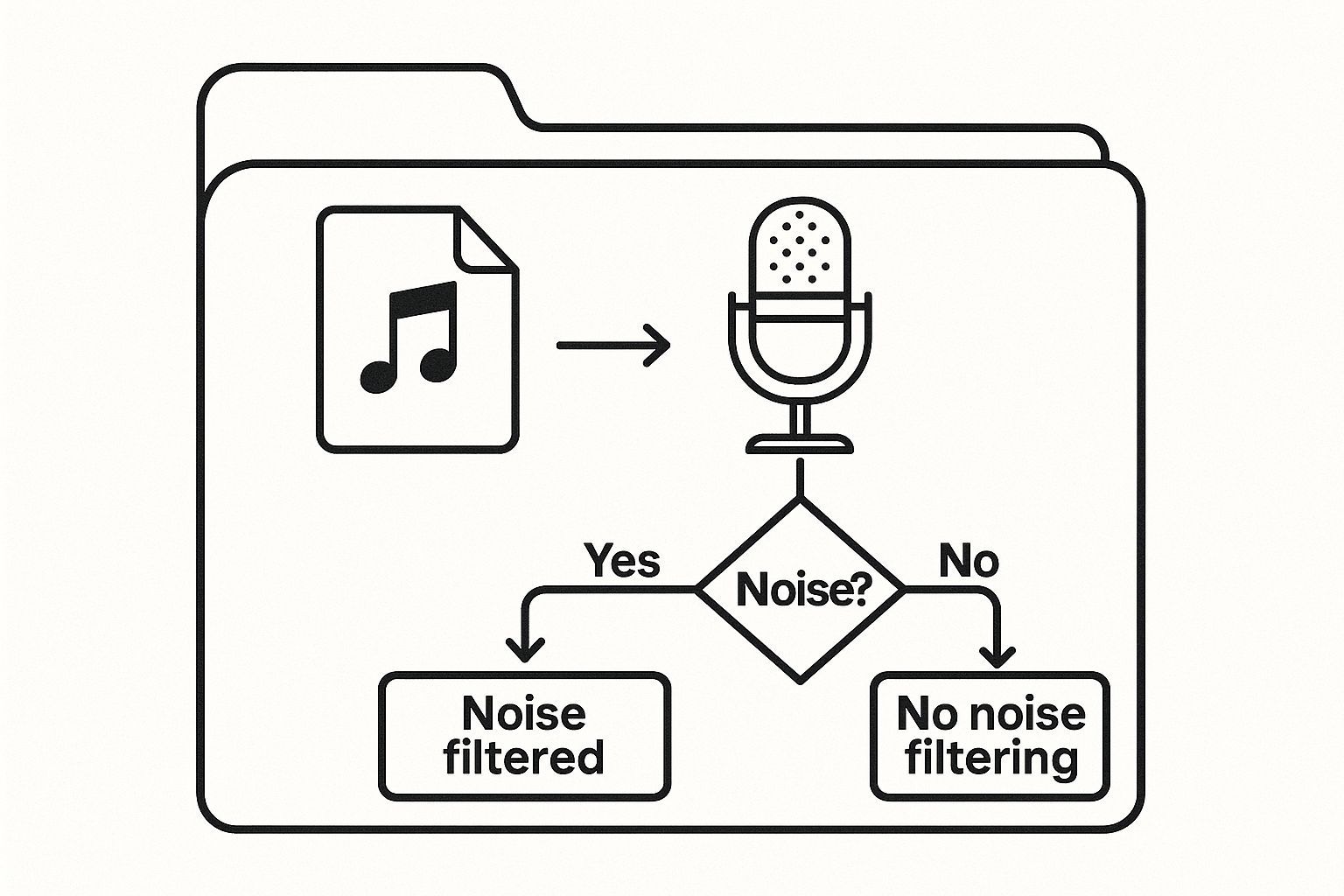
The main thing is to weigh your need for speed against your budget and the final level of accuracy you require.
To make this decision even clearer, here's a side-by-side look at how manual and AI transcription stack up.
Manual vs AI Transcription: A Quick Comparison
This table breaks down the key differences to help you choose the best option for your project.
| Feature | Manual Transcription | AI-Powered Transcription (e.g., Transcript.LOL) |
|---|---|---|
| Speed | Slow; hours or days | Extremely fast; minutes |
| Cost | High; typically per-minute | Low; often a flat or subscription fee |
| Accuracy | Very high (99%+), captures nuance | Good to great (85-95%), can struggle with accents or poor audio |
| Best For | Legal, medical, academic research | Podcasts, interviews, meetings, content creation |
| Scalability | Limited by human availability | Virtually unlimited |
Ultimately, the choice depends on your priorities. For flawless accuracy where every detail matters, manual is king. For speed, scale, and cost-effectiveness, AI is the clear winner.
Blending the Best of Both Worlds
Honestly, the most efficient strategy for most people is a hybrid one.
Start by running your audio through an AI tool to get a first draft that’s already 85-95% accurate. From there, a quick human review is all you need to catch any small errors, fix the punctuation, and polish it up.
This hybrid method gives you the best of both worlds: the near-instant turnaround of AI and the polished, reliable accuracy of a human review, all at a fraction of the cost of a fully manual service.
This is the sweet spot for most business and content needs. By playing to the strengths of both methods, you create a workflow that’s fast, affordable, and accurate. If you want to dive deeper into the AI side of things, we have a great guide on how to transcribe audio to text for free that can get you started.
A Practical Guide to Using AI Transcription Tools
https://www.youtube.com/embed/5aImmaTUgOA
Jumping into an AI transcription tool for the first time is a lot easier than you might think. These platforms are built to be intuitive, transforming a process that used to take hours of manual labor into something you can knock out in just a few clicks. The whole concept is beautifully simple: you give the AI your audio, and it hands you back a written transcript.
Modern tools like Transcript.LOL give you a bunch of ways to get your audio into the system. You can drag and drop a file from your desktop, pull it in from cloud storage like Google Drive or Dropbox, or even just paste a YouTube link. That kind of flexibility means you can get started right away, no matter where your audio is living.
The growth in this space has been explosive. The global audio transcription software market hit a valuation of around $2.5 billion in 2025 and is on track to grow by 15% every year. This isn't surprising when you consider the sheer volume of audio content being created daily. AI just makes it faster and cheaper to turn all that talk into text.
Configuring Your Transcription Settings
Okay, so your file is uploaded. Now what? Don't just slam that "Transcribe" button. Take a moment to look at the settings. This is your first and best chance to get a clean, accurate draft right out of the gate.
This quick demo from the Transcript.LOL homepage shows just how simple the upload process is.
You can see how the drag-and-drop feature makes getting started a total breeze.
Here are the settings you absolutely need to double-check:
- Language Selection: Seems basic, but it’s critical. Always specify the correct language. If you have the option for a dialect, use it. An AI trained on American English might get tripped up by a thick Scottish accent, so telling it what to expect makes a huge difference.
- Speaker Identification (Diarization): This is a lifesaver. If you have more than one person speaking, turn this on. The AI will automatically figure out who’s talking and label the transcript with "Speaker 1," "Speaker 2," and so on. It saves an incredible amount of time you'd otherwise spend trying to untangle the conversation.
- Custom Vocabulary: Got a lot of industry jargon, unique names, or acronyms in your audio? This is the feature for you. You can "teach" the AI these specific terms beforehand, which dramatically boosts its accuracy when it hears them.
Smart Settings = Better Results
🌐 Language Selection
Always set the right language/dialect.
👥 Speaker Identification
Label who’s speaking automatically.
📖 Custom Vocabulary
Pre-load jargon, acronyms, and names.
⚙️ Format Options
Export in TXT, DOCX, or SRT.
Generating and Reviewing Your First Draft
Once your settings are dialed in, it's time to let the AI do its thing. For a typical hour-long audio file, most tools will have a draft ready for you in under 15 minutes. Compare that to the four to six hours it would take a person to do the same job, and you can see why this is such a big deal.
What you get back is an editable document that's surprisingly close to perfect, especially if you prepped your audio and settings correctly. The next step is the most important one: reviewing and polishing that draft to get it to 100% accuracy. For anyone regularly transcribing team calls or interviews, it's also worth checking out the 12 best meeting transcription software to see which tools offer the most helpful features for your specific needs.
Remember, the goal of an AI tool isn't just to produce text; it's to give you a high-quality draft that you can finalize with minimal effort. Think of it as an expert assistant who does 95% of the work for you.
Editing and Polishing Your AI-Generated Transcript
Let’s be real: an AI-generated transcript is an absolute game-changer. It can spit out a draft that's over 90% accurate in a matter of minutes, saving you hours of tedious work. But that last 10%? That's where the magic happens. This is where a human touch turns a decent draft into a polished, professional document you can actually use.
Think of the AI as your super-fast, slightly clueless assistant. It's brilliant at capturing the raw words but often stumbles over the nuance, context, and specific terminology that a person would catch instantly. The polishing stage is your chance to add that critical layer of human intelligence.
Under ideal conditions, the best AI transcription tools can hit up to 99% accuracy. The tech is constantly getting better, but for now, it's a powerful partnership: AI provides the speed, and you provide the final verification.
Your Essential Editing Checklist
Don't just dive in and start reading. That’s a surefire way to miss things. I’ve learned to work through a specific checklist to make sure the process is efficient and thorough.
Here’s what I always look for first:
- Names and Proper Nouns: AI has a tough time with unique names, brands, or specific places. It might hear "Caitlin" and type out "Katelyn." Always have a reliable source on hand to double-check these.
- Industry Jargon and Acronyms: If your audio is full of specialized terms, the AI is bound to get some wrong. It might transcribe "SaaS" as "sass" or "fintech" as "fun tech," which can completely change the meaning.
- Homophones: These are the words that sound alike but have different spellings and meanings, like "their," "there," and "they're." AI gets these mixed up all the time, so a careful proofread is non-negotiable.
The editing process isn't just about fixing typos. It’s about ensuring the final text perfectly reflects the intent and meaning of the original conversation. This is what builds trust with your audience.
Once you’ve nailed the specific words, it's time to zoom out and look at the bigger picture. The whole document needs to flow naturally. This is about more than just spell-checking; it's about making the content clear and authentic. If you want to go deeper, there's some great advice on how to humanize AI text that can help you transform those robotic drafts.
Human + AI = 99% Accuracy
The fastest results come from AI-first transcription polished by a quick human review. It’s the sweet spot for businesses and creators alike.
Formatting for Ultimate Readability
Nobody wants to read a giant wall of text. It's intimidating and almost impossible to follow. Good formatting is what makes your transcript genuinely useful. Your goal is to break up the content into logical, easy-to-scan chunks that guide the reader.
Start by assigning correct speaker labels. If the AI didn't get them all right, go in and manually adjust them (e.g., "Interviewer," "Dr. Evans"). This is crucial for making the dialogue easy to follow.
Next, add logical paragraph breaks. My rule of thumb is to start a new paragraph whenever a speaker changes topics or introduces a new idea. This simple visual cue helps readers track the conversation without getting lost.
Finally, do one last pass while listening to the audio. This sync-read is your secret weapon for catching awkward phrasing and ensuring the punctuation—like commas and periods—mirrors the natural pauses in speech. This final step guarantees your transcript is not just accurate, but actually a pleasure to read.
Your Top Transcription Questions, Answered
Getting into transcription can feel like learning a new language, even when you have the best tools on your side. You’ll probably have a few questions pop up as you get started.
Let's walk through some of the most common things people ask when they're figuring out how to turn audio into text. It’ll help you set the right expectations from the get-go.
How Long Does This Actually Take?
This is the big one. Everyone wants to know how much time to block off, and the answer really depends on your approach.
If you’re typing it out by hand, even a pro needs about four hours to transcribe one hour of crystal-clear audio. If you’re dealing with a recording that has background noise, people talking over each other, or a lot of technical terms, that number can easily climb to six hours or more. It’s a real grind.
On the flip side, an AI tool like Transcript.LOL can whip through that same hour-long file and have a draft ready for you in about 10 to 15 minutes. You’ll still want to proofread it, of course. For a good recording, a quick editing pass might take another 30 to 60 minutes. The time savings are massive.
Verbatim vs. Clean Read: What’s the Difference?
You'll hear these terms thrown around a lot, and they're not interchangeable. The style you choose completely changes the final product.
- Verbatim Transcription: This is the "warts and all" version. It captures everything—every single "um," "uh," and "like." It also includes stutters, false starts, and even background sounds. This raw, unfiltered approach is crucial for things like legal depositions or in-depth research where every tiny detail counts.
- Clean Read Transcription: Think of this as the polished, edited version (sometimes called intelligent verbatim). It cuts out all the fluff—the filler words, accidental repeats, and stammers—to deliver a transcript that’s smooth and easy to read. This is what you want for turning a podcast into a blog post or creating clean meeting minutes.
Your end goal is what matters here. Need a legally precise record? Go verbatim. Need clear, readable content? A clean read is your best friend nearly every time.
Can AI Handle Accents and Different File Types?
It's a valid concern—how does AI cope with the way real people talk? Modern AI has been trained on a ton of global data, so it's gotten remarkably good at understanding a wide variety of accents. That said, accuracy can sometimes dip with a particularly thick accent. A good tip is to use a service that lets you specify the language, which gives the AI a helpful nudge in the right direction.
And what about file formats? While most services will take common files like MP3 or M4A, you’ll get the absolute best results from a lossless format like WAV or FLAC. Because these files are uncompressed, they feed the AI more raw audio data to analyze, which almost always leads to a more accurate transcript.
If you have more questions swimming around, we've probably answered them in our list of frequently asked questions.
Ready to transform your audio into accurate, usable text in minutes? Transcript.LOL uses advanced AI to deliver fast, affordable, and reliable transcripts. Try it for free today!

Speaker detection
Automatically identify different speakers in your recordings and label them with their names.

Editing tools
Edit transcripts with powerful tools including find & replace, speaker assignment, rich text formats, and highlighting.
Summaries and Chatbot
Generate summaries & other insights from your transcript, reusable custom prompts and chatbot for your content.