
Maestría en la Toma de Minutas en una Reunión
Una guía práctica para tomar minutas en una reunión. Aprenda estrategias probadas para la preparación, la toma de notas y la distribución para impulsar la alineación del equipo.
Kate, Praveen
January 15, 2025
Tomar minutas de una reunión es el arte de crear un registro formal y escrito de lo que realmente sucedió: las discusiones clave, las grandes decisiones y los elementos de acción que surgieron de ellas. Es el proceso que convierte una conversación fluida en una fuente de verdad concreta, asegurando que todos estén alineados y sean responsables mucho después de que termine la reunión. Un conjunto sólido de minutas evita que detalles cruciales se pierdan.
Funciones Inteligentes que Apoyan Mejores Reuniones
IA all'avanguardia
Alimentato da Whisper di OpenAI per una precisione leader nel settore. Supporto per vocabolari personalizzati, file fino a 10 ore e risultati ultra rapidi.

Importa da più fonti
Importa file audio e video da varie fonti tra cui caricamento diretto, Google Drive, Dropbox, URL, Zoom e altro.

Esporta in più formati
Esporta le tue trascrizioni in più formati tra cui TXT, DOCX, PDF, SRT e VTT con opzioni di formattazione personalizzabili.
Perché i verbali efficaci delle riunioni sono un superpotere
Siamo onesti, prendere appunti può sembrare un lavoro ingrato. Viene spesso liquidato come un compito puramente amministrativo, ma questa prospettiva perde completamente il quadro generale. Quando padroneggi l'arte di prendere appunti, non sei solo uno scrivano: stai svolgendo uno dei ruoli più influenti nella stanza, trasformando un compito di routine in un vantaggio strategico per tutto il tuo team.
Il posto di lavoro moderno sta praticamente affogando nelle riunioni. I professionisti ora trascorrono in media 14,8 ore a settimana in riunioni, un numero che continua a salire. Con così tanto tempo investito, la necessità di un registro chiaro e attuabile non è mai stata così importante.
Il vero scopo dei verbali delle riunioni
Molto più che creare un registro, i verbali efficaci svolgono diverse funzioni vitali che mantengono i progetti in movimento e i team in sincronia. Non sono solo appunti; sono il tessuto connettivo tra discussione ed esecuzione.
Ottimi verbali delle riunioni raggiungono effettivamente alcuni obiettivi critici:
- Promuovere la responsabilità: Quando documentate chiaramente gli elementi d'azione con i proprietari e le scadenze assegnate, create un impegno pubblico. Niente più: "Oh, pensavo che qualcun altro se ne stesse occupando".
- Prevenire la cattiva comunicazione: Forniscono un'unica fonte di verità che chiarisce qualsiasi confusione su ciò che è stato deciso. Questo è particolarmente vitale nei team remoti o ibridi dove i dettagli importanti possono facilmente andare persi nella traduzione.
- Garantire la continuità: Per i membri del team che non hanno potuto partecipare, i verbali offrono un riassunto conciso di ciò che si sono persi. Possono recuperare rapidamente senza dover ascoltare una registrazione completa.
- Offrire protezione legale: In contesti formali come le riunioni del consiglio di amministrazione, i verbali servono come registro legale ufficiale delle decisioni dell'organizzazione e dimostrano che sono state seguite le procedure corrette.
Trasformando conversazioni astratte in compiti tangibili, i verbali delle riunioni diventano il progetto per il progresso. Garantiscono che il prezioso tempo trascorso in una riunione si traduca direttamente in slancio in avanti e risultati misurabili.
Per sbloccare veramente questo superpotere, devi vedere la presa di appunti come parte di una strategia più ampia per come condurre riunioni efficaci. Se fatto bene, questo semplice documento potenzia tutti i soggetti coinvolti.
Per strategie più pratiche, assicurati di consultare la nostra guida completa su https://transcript.lol/blog/taking-minutes-at-meetings.
Il tuo playbook di preparazione pre-riunione
Ottimi verbali delle riunioni non accadono per caso. Sono il risultato di un lavoro di preparazione intelligente fatto prima ancora che la riunione inizi.
Entrare a freddo è una ricetta per il disastro. Finisci per affrettarti a catturare nomi, decifrare acronimi e capire il contesto al volo. Un po' di pianificazione in anticipo cambia completamente il gioco, permettendoti di concentrarti sulla cattura di ciò che conta davvero: le decisioni, i disaccordi e gli elementi d'azione.
Pensala come la tua arma segreta.
Por Qué la Preparación Importa
Estar preparado no se trata de pensar demasiado, sino de prepararse para capturar el valor real de la reunión. Una agenda clara y un contexto adecuado reducen la confusión y hacen que sus minutas sean más precisas. La preparación multiplica la calidad de todo lo que viene después.
Collaborare su un'Agenda Chiara
L'agenda è la tua tabella di marcia ed è il documento più importante che avrai. Non accettare semplicemente ciò che viene inviato: collabora con l'organizzatore della riunione per assicurarti che sia effettivamente utile.
Una solida agenda non è solo un elenco di argomenti. Dovrebbe includere:
- Punti di discussione specifici, non idee vaghe.
- Stime di tempo per ogni elemento per mantenere il ritmo.
- Un obiettivo chiaro per ogni argomento (ad esempio, "Decisione", "Brainstorming", "Per tua informazione").
È scioccante quanto spesso questo venga trascurato. La ricerca mostra che un enorme 64% delle riunioni ricorrenti e il 60% delle riunioni una tantum non hanno un'agenda. Questo è un motivo enorme per cui così tante riunioni sembrano una perdita di tempo. Un'agenda con tempistiche ti fornisce una struttura su cui basare i tuoi appunti.
Il mio consiglio da professionista? Dai un'occhiata all'agenda tu stesso e chiedi all'organizzatore chiarimenti su qualsiasi cosa sembri vaga. Conoscere il perché dietro ogni punto è fondamentale per prendere appunti che abbiano senso in seguito.
Raccogliere Informazioni di Base Essenziali
Con l'agenda in mano, è ora di fare un po' di compiti a casa. Il tuo obiettivo è raccogliere tutti i documenti pertinenti in modo da non porre domande basilari che interrompano il flusso della conversazione.
Ecco una rapida checklist di cose da avere pronte:
- Un elenco confermato dei partecipanti. Sapere chi è presente (e il loro ruolo) è vitale per attribuire accuratamente commenti e azioni.
- I verbali dell'ultima riunione. La prima cosa all'ordine del giorno è spesso la revisione di ciò che è stato deciso e quali compiti sono ancora in sospeso.
- Qualsiasi documento di supporto. Potrebbero essere rapporti, presentazioni o schede dati che verranno discussi. Scorrili in anticipo per familiarizzare con i concetti chiave.
Per rendere questo processo infallibile, potresti persino utilizzare qualcosa come un modello di preparazione per riunioni giornaliere. È un modo semplice per organizzarsi e assicurarsi che nulla di critico vada perso.
Impostare il Tuo Sistema di Presa Appunti
Ultimo ma non meno importante, prepara i tuoi strumenti. Che tu sia un sostenitore del laptop, del tablet o del taccuino vecchio stile, tieni aperto e pronto il tuo sistema.
Mi piace creare il mio documento in anticipo e pre-compilarlo con tutto ciò che so già: il titolo della riunione, la data, l'elenco dei partecipanti e gli elementi dell'agenda come intestazioni principali.
Questo piccolo sforzo di preparazione ti fa risparmiare un sacco di digitazione frenetica una volta che la riunione inizia. E se hai intenzione di registrare la sessione (cosa che consiglio vivamente per l'accuratezza), avvia il tuo software. Sapere come trascrivere una riunione Zoom ti offre una rete di sicurezza incredibile, liberandoti per concentrarti sulla cattura di decisioni di alto livello invece di cercare di scrivere ogni singola parola.
Catturare Ciò che Conta Davvero Durante la Riunione
Bene, la riunione è iniziata, tutti stanno guardando l'agenda ed è ora di agire. Il tuo compito non è essere uno stenografo di tribunale, digitando freneticamente ogni "ehm" e "ah". Pensati come il filtro esperto della riunione. Sei lì per separare i segnali cruciali dal rumore della conversazione.
Prendere appunti eccellenti si basa sull'ascolto concentrato e sulla sintesi strategica. L'obiettivo è distillare quella che potrebbe essere una discussione di un'ora in un resoconto chiaro e prezioso di ciò che è stato effettivamente fatto. Ciò significa allenare il tuo orecchio a cogliere le cose importanti: una decisione finale, un compito assegnato o un punto di disaccordo importante che deve essere rivisto. Dimentica il "play-by-play"; sei solo lì per registrare il punteggio finale.
L'albero decisionale qui sotto è un ottimo piccolo flusso di lavoro da tenere a portata di mano. È un solido promemoria che avere il giusto contesto prima ancora di entrare nella stanza è metà della battaglia.
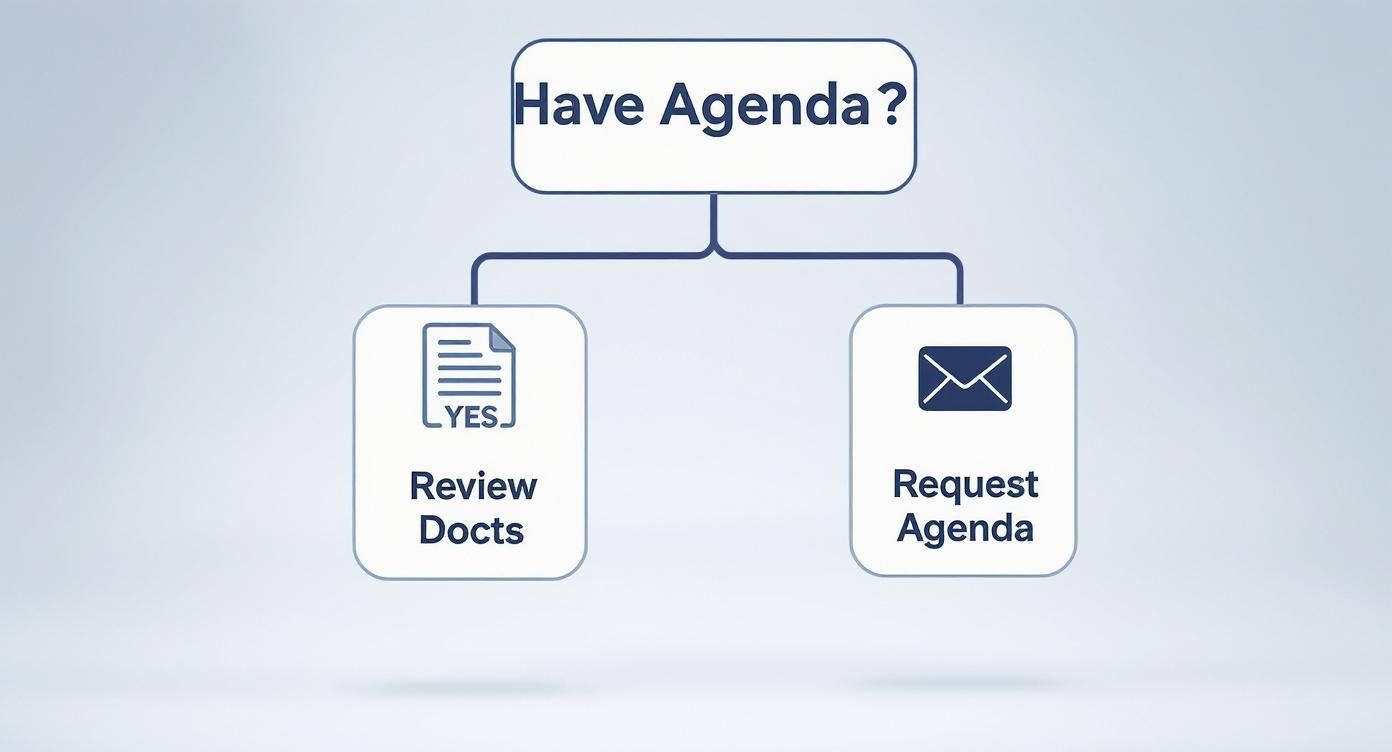
Come puoi vedere, ottenere quell'agenda in anticipo è la base per tutto ciò che segue.
Más Funciones Útiles para Minutas Más Fluidas

Rilevamento dei parlanti
Identifica automaticamente diversi parlanti nelle tue registrazioni e etichettali con i loro nomi.

Strumenti di modifica
Modifica le trascrizioni con strumenti potenti tra cui trova e sostituisci, assegnazione dei parlanti, formati di testo arricchito ed evidenziazione.
Riassunti e Chatbot
Genera riassunti e altri approfondimenti dalla tua trascrizione, prompt personalizzati riutilizzabili e chatbot per i tuoi contenuti.
L'arte della chiarificazione
L'ambiguità è il nemico assoluto di buoni verbali. Se una discussione si esaurisce senza un chiaro risultato, spetta a te spingere gentilmente il gruppo verso una decisione. Questo non significa che devi interrompere continuamente, ma devi trovare i momenti giusti per assicurarti che tutti siano effettivamente sulla stessa lunghezza d'onda.
Non aver paura di intervenire educatamente. Una rapida domanda chiarificatrice non solo ti aiuta a ottenere una nota accurata, ma spesso salva l'intero team da future confusioni.
Ecco alcune frasi che ho trovato funzionare a meraviglia:
- "Solo per confermare per i verbali, David ha l'incarico di far circolare la bozza della proposta entro venerdì?"
- "Quindi, siamo tutti d'accordo che la scadenza del progetto viene posticipata al 15 ottobre?"
- "Per riassumere questo punto, sembra che abbiamo deciso di optare per l'Opzione B. È corretto?"
Porre domande dirette e semplici come queste trasforma un vago cenno verbale in un fatto concreto che puoi annotare. È un'abilità sottile, ma è ciò che separa verbali decenti da quelli ottimi.
I migliori verbalizzatori agiscono come uno specchio per il gruppo, riflettendo le decisioni e gli incarichi per garantire che siano chiari e universalmente compresi prima che il momento passi.
Mantenere l'obiettività e catturare il consenso
Questo è fondamentale: le tue opinioni personali non hanno posto nei verbali della riunione. Il tuo ruolo è quello di essere un giornalista imparziale per il team. Stai riportando i fatti di ciò che è stato discusso e deciso, non la tua interpretazione. Questo può diventare complicato, specialmente quando i dibattiti si accendono, ma l'obiettività è non negoziabile.
Il tuo obiettivo dovrebbe essere sempre quello di catturare il consenso del gruppo. Ad esempio, invece di scrivere: "John ha fatto un ottimo punto sul budget", scriveresti qualcosa come: "Il team ha discusso i vincoli di budget. John ha proposto di riallocare i fondi dal budget di marketing del Q4, e il gruppo ha concordato questo approccio." Vedi la differenza?
Tieni a mente queste semplici regole per rimanere obiettivo:
- Attribuisci idee, non emozioni. Annota chi ha suggerito qualcosa o sollevato una preoccupazione specifica.
- Registra mozioni e votazioni con precisione. Per riunioni più formali, devi documentare chi ha fatto la mozione, chi l'ha secondata e il conteggio finale dei voti.
- Riassumi, non commentare. Attieniti all'essenza della discussione e a ciò che è stato infine deciso.
Rimanendo neutrale, ti assicuri che i verbali diventino un documento fidato su cui tutti possono fare affidamento.
Un Pequeño Hábito que Marca una Gran Diferencia
Revisar y confirmar las decisiones durante la reunión evita confusiones posteriores. Una simple aclaración puede ahorrar horas de retroceso y reescrituras. Nunca dude en verificar lo que el grupo realmente acordó.
Ciò crea fiducia nel processo e, altrettanto importante, nel tuo ruolo di responsabile della creazione di quel verbale.
Utilizzare la tecnologia a tuo vantaggio
Siamo onesti. In un'era di riunioni virtuali una dopo l'altra, cercare di prendere appunti manualmente mentre si partecipa attivamente è una ricetta per il disastro. È come cercare di grattarsi la testa e strofinarsi la pancia contemporaneamente: puoi provarci, ma probabilmente non stai facendo bene nessuna delle due cose.
È qui che puoi iniziare a lavorare in modo più intelligente, non più duramente. L'idea non è di lasciare che la tecnologia prenda il sopravvento, ma di renderla il tuo assistente. Lascia che si occupi del lavoro noioso in modo che tu possa concentrarti su ciò che conta davvero: la parte strategica della conversazione.
Le riunioni virtuali hanno preso il sopravvento completamente. Tra il 2020 e il 2022, la quota di riunioni virtuali è passata dal 48% a uno sbalorditivo 77% di tutti gli incontri professionali, secondo una ricerca di Notta.ai. Sono qui per restare.
Lascia che l'IA gestisca la trascrizione
Immagina questo: finisci una riunione e, in pochi minuti, hai a disposizione una trascrizione completa, parola per parola. Non è più un sogno futuristico; è quello che fanno gli strumenti di trascrizione basati sull'IA. Invece di digitare freneticamente per stare al passo, registri semplicemente la riunione e lasci che il software faccia il lavoro pesante.
Questo approccio ti offre due enormi vantaggi:
- Puoi essere veramente presente. Il tuo cervello passa da "devo scrivere tutto" a "qual è il punto chiave qui?". Catcherai le sfumature e contribuirai in modo più efficace.
- Ottieni un verbale perfetto. La trascrizione diventa la tua fonte di verità. Nulla viene perso, dimenticato o ricordato male.
Il grafico sottostante dimostra davvero quanto il mondo si sia spostato verso la collaborazione virtuale, rendendo questi strumenti più essenziali che mai.
Questo non è un intoppo temporaneo; è un cambiamento fondamentale nel modo in cui lavoriamo.
La vera magia di questo metodo ibrido è combinare la potenza grezza dell'IA con la tua intuizione umana. L'IA ti fornisce i dati completi; tu fornisci il contesto e la chiarezza.
Redigere verbali da una trascrizione
Con una trascrizione completa a portata di mano, il tuo ruolo si trasforma da scrivano a stratega. Non stai più fissando una pagina del tuo stenografo criptico, cercando di ricordare chi ha detto cosa. Stai lavorando da un documento sorgente perfetto.
Il tuo flusso di lavoro diventa improvvisamente incredibilmente efficiente:
- Scansiona rapidamente la trascrizione per trovare le parti salienti della conversazione.
- Individua le decisioni chiave, le azioni da intraprendere e le scadenze menzionate.
- Copia e incolla questi frammenti critici direttamente nel tuo modello di verbale della riunione.
- Rifinisci e perfeziona il testo per chiarezza e concisione.
Questo cambia completamente il gioco.
Cómo las Transcripciones de IA Mejoran Sus Minutas
Material de Origen Preciso
Ya no adivinará lo que se dijo. Trabaja a partir de un registro completo y con marca de tiempo que captura cada detalle con claridad.
Extracción Más Rápida de Puntos Clave
Escanee la transcripción para extraer rápidamente decisiones, tareas y plazos sin tener que volver a escuchar las grabaciones.
Menos Carga Mental Durante las Reuniones
Puede concentrarse en pensar y participar en lugar de escribir sin parar y arriesgarse a cometer errores.
Seguimiento y Responsabilidad Confiables
Los resúmenes claros creados a partir de transcripciones aseguran que las tareas no se olviden y que el progreso avance más rápido.
Reduce drásticamente su carga de trabajo posterior a la reunión, eliminando las conjeturas y la frenética carrera para llenar los vacíos de memoria. Al utilizar una de las mejores opciones de software de transcripción de reuniones, puede convertir una tarea tediosa en un proceso rápido y optimizado y producir minutas sólidas cada vez.
Elaboración y Distribución de Minutas Pulidas
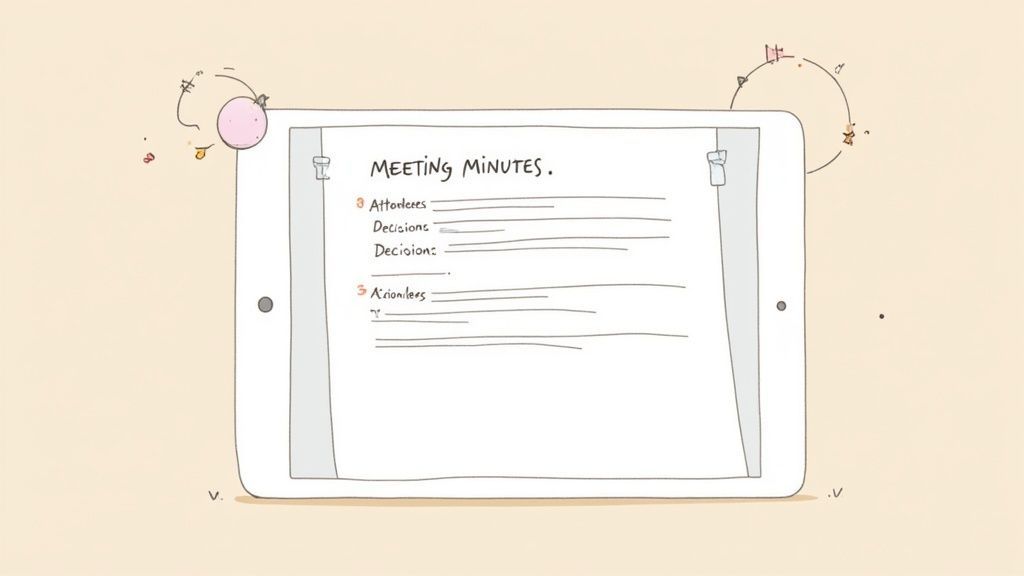
La reunión ha terminado, pero su trabajo más importante apenas comienza. Aquí es donde transforma sus notas en bruto en un documento pulido y profesional que realmente hace que las cosas se hagan. La claridad y la velocidad son sus mejores aliadas aquí.
¿Mi consejo número uno? Limpie sus notas de inmediato mientras la conversación aún está fresca.
Non rimandare. Una rapida revisione di 15 minuti subito dopo la riunione può facilmente farti risparmiare un'ora di decifrazione di scarabocchi criptici il giorno dopo.
Struttura per Chiarezza e Azione
Un documento ben strutturato è uno che le persone leggeranno effettivamente. Dimentica lunghi paragrafi narrativi. Il tuo obiettivo è rendere i verbali scansionabili e digeribili, e un formato semplice e coerente è il modo migliore per farlo.
Organizza i tuoi verbali con sezioni chiare e distinte che guidano il lettore direttamente a ciò di cui ha bisogno. Un flusso logico aiuta tutti, dal CEO a un nuovo assunto, a comprendere i risultati a colpo d'occhio.
Ogni modello dovrebbe avere questi componenti fondamentali:
- Essenziali della Riunione: La data, l'ora e il titolo della riunione.
- Elenco dei Partecipanti: Un semplice riepilogo di chi era presente e chi era assente.
- Decisioni Chiave Presa: Un elenco puntato che riassume ogni decisione importante.
- Azioni da Intraprendere: Questa è la sezione più critica. Dettaglia il compito, assegna un responsabile e stabilisce una scadenza.
Questa struttura trasforma i tuoi appunti da un registro passivo a uno strumento potente per la responsabilità. Per un approfondimento, l'utilizzo di una guida dedicata può aiutarti a padroneggiare le specificità di un ottimo modello di verbali di riunione con azioni da intraprendere.
Un errore comune è quello di trascrivere semplicemente l'intera conversazione. Il tuo compito è estrarre il segnale dal rumore. Il documento finale dovrebbe essere un riassunto conciso dei risultati, non un resoconto parola per parola della discussione.
Modifica per Brevità e Impatto
Ora è il momento di essere spietati. La brevità dimostra rispetto per il tempo dei tuoi colleghi. Elimina le chiacchiere conversazionali, i punti ripetitivi e qualsiasi dettaglio che non supporti direttamente una decisione chiave o un'azione da intraprendere.
Concentrati su un linguaggio chiaro e semplice. Evita gergo e acronimi se puoi, o almeno definiscili. L'obiettivo è che chiunque, anche chi ha perso la riunione, possa capire cosa è successo senza bisogno di contesto aggiuntivo.
Pensala in questo modo: se una frase non dichiara una decisione o un'azione, ha davvero bisogno di essere lì?
Finalizzazione e Distribuzione dei Verbali
Prima di inviare, fai un ultimo controllo. Invia una bozza al presidente o al facilitatore della riunione per una rapida revisione. Questo semplice passaggio garantisce accuratezza e allineamento, prevenendo potenziali malintesi prima che inizino.
Una volta ottenuta la loro approvazione, invia i verbali prontamente, idealmente entro 24 ore. La rapida distribuzione mantiene lo slancio e rafforza l'importanza delle azioni da intraprendere. Segnala che la riunione è stata produttiva e che il follow-up è importante quanto la discussione stessa. Questo è il passo finale che chiude il cerchio e pone le basi per un progresso reale.
Domande Comuni sulla Presa di Verbali
Anche il più esperto dei verbalizzatori viene a volte colto alla sprovvista. Le riunioni sono caotiche, le conversazioni vanno fuori tema e ti ritrovi a pensare: "Come diavolo dovrei scrivere quello?"
Esaminiamo alcuni dei problemi più comuni che incontrerai. Questi non sono solo ipotetici; sono i pasticci del mondo reale che possono ostacolare chiunque cerchi di mantenere un registro accurato. Sapere come gestirli è ciò che separa un buon verbalizzatore da uno eccezionale.
Cosa Succede Se la Riunione Va Fuori Tema?
Succede. Sempre. Un elemento dell'ordine del giorno perfettamente buono si trasforma improvvisamente in una sessione di brainstorming su qualcosa di completamente diverso.
Ecco la cosa: il tuo compito non è trascrivere quella deviazione.
La tua mossa migliore è semplicemente riconoscerla e annotare qualsiasi risultato reale. Una nota rapida è tutto ciò di cui hai bisogno.
- Ad esempio: "La discussione è virata sulla campagna di marketing del Q4. Concordato di aggiungere questo come punto all'ordine del giorno per la prossima sincronizzazione del progetto."
Questo dimostra che stavi prestando attenzione, ma mantiene i verbali ufficiali legati all'ordine del giorno. Stai rispettando la conversazione laterale senza permetterle di dirottare il registro di ciò che la riunione doveva realizzare.
La tua lealtà primaria è verso l'ordine del giorno. Annota le discussioni laterali preziose, ma non lasciare che prendano il sopravvento sui verbali. Il registro ufficiale deve riflettere lo scopo previsto della riunione.
Come Registro un Disaccordo?
Quando le persone non sono d'accordo, il tuo compito è catturare la situazione senza prendere le parti. Questo è fondamentale. Evita un linguaggio drammatico o una formulazione che favorisca una persona rispetto a un'altra. Stai documentando il risultato, non il conflitto.
Concentrati sulla sostanza del disaccordo e, soprattutto, sulla risoluzione. Se non è stata raggiunta, è quello che scrivi.
Ecco un esempio reale di come gestirlo:
"Il team ha discusso due potenziali fornitori di software. Sarah ha sostenuto il Fornitore A, citando le sue capacità di integrazione superiori, mentre Mark ha sollevato preoccupazioni sul costo più elevato del Fornitore A, preferendo il Fornitore B. Non è stata presa alcuna decisione finale. L'azione da intraprendere è che Michael prepari un'analisi dettagliata costi-benefici di entrambe le opzioni per la revisione entro le 17:00 di venerdì."
Vedi? Sono solo i fatti. È obiettivo, chiaro e punta al passo successivo.
Dovrei Nominare le Persone Specificamente?
Assolutamente, ma strategicamente. Quando prendi appunti, i nomi sono essenziali per la responsabilità.
No Confíe en la Memoria, Confíe en la Precisión
La toma de notas manual por sí sola puede llevar a la omisión de detalles, tareas olvidadas y decisiones poco claras. El uso de transcripciones respaldadas por IA garantiza que sus minutas sean precisas, confiables y estén listas para compartir al instante. Ahorre tiempo y evite malentendidos costosos.
👉 Prova Transcript.LOL gratuitamente e trasforma il modo in cui catturi le riunioni: https://transcript.lol
Note vaghe come "qualcuno darà seguito" sono completamente inutili e una perdita di tempo per tutti.
Allega sempre un nome a un'attività o a una decisione chiave.
- Azioni da intraprendere: "AZIONE: Priya finalizzerà la presentazione e la invierà al cliente entro la fine della giornata."
- Decisioni chiave: "MOZIONE: Su proposta di James, il comitato ha votato per approvare il budget rivisto."
Per i punti di discussione generali, puoi spesso riassumere il sentimento del gruppo ("Il team ha espresso preoccupazione per...") a meno che il punto di vista di una persona non sia veramente critico per comprendere l'esito. Usare i nomi dove contano è ciò che rende i verbali attuabili.
Pronto a rendere la tua verbalizzazione più veloce e accurata che mai? Transcript.LOL utilizza l'IA per creare trascrizioni, riassunti e azioni da intraprendere perfetti dalle registrazioni delle tue riunioni. Smetti di affannarti per stare al passo e inizia a concentrarti su ciò che conta davvero. Provalo gratuitamente su https://transcript.lol e scopri la differenza.