
Come trascrivere le conversazioni: come trascrivere le conversazioni...
Scopri come trascrivere le conversazioni con consigli esperti su preparazione, strumenti e editing per trascrizioni veloci e accurate che puoi utilizzare oggi stesso.
Praveen
November 6, 2024
Al suo nucleo, trascrivere una conversazione significa semplicemente trasformare le parole pronunciate da un file audio o video in testo. Potresti farlo manualmente, il che richiede un'eternità, oppure puoi utilizzare un servizio basato sull'intelligenza artificiale per ottenere una bozza solida in pochi minuti. Da lì, si tratta solo di una rapida revisione e rifinitura.
Perché una Trascrizione Accurata Cambia le Regole del Gioco
Una trascrizione è molto più di un muro di parole. È una chiave che sblocca il valore nascosto nel tuo audio e video.
Pensaci. Per un giornalista, quella trascrizione precisa è la spina dorsale di una storia credibile, catturando ogni ultimo dettaglio da un'intervista critica. Per un ricercatore di mercato, sono i dati grezzi di un focus group che rivelano cosa pensano veramente i clienti.
La posta in gioco può essere sorprendentemente alta. Un team legale dipende da una registrazione perfetta e verbatim, dove una singola parola sentita male potrebbe cambiare l'esito di un caso. E un creatore di contenuti intelligente può prendere una trascrizione dettagliata di un'intervista e trasformarla in una dozzina di post sul blog, aggiornamenti sui social media e clip video, spremendo ogni goccia di valore dal loro sforzo originale.
L'Impatto Reale della Precisione
Trascrizioni errate causano problemi reali. Immagina uno studente di medicina che cerca di imparare da una lezione registrata dove termini complessi sono storpiati. Ciò porta a confusione e tempo perso. Oppure immagina un team aziendale che lavora su appunti di riunioni in cui le azioni vengono assegnate alla persona sbagliata a causa di un errore nell'identificazione dell'oratore.
Questi non sono solo piccoli intoppi; sono errori costosi che uccidono la produttività e danneggiano la credibilità.
Al contrario, una trascrizione pulita e accurata crea chiarezza e apre nuove possibilità. Diventa una risorsa ricercabile, condivisibile e riutilizzabile che dà alla tua conversazione una seconda vita.
Una trascrizione accurata trasforma parole pronunciate fugacemente in una risorsa permanente, ricercabile e analizzabile. È così che sblocchi il pieno potenziale dei tuoi contenuti audio e video.
Una Competenza per un Mondo Guidato dai Dati
Sapere come creare trascrizioni accurate in modo efficiente non è più solo una competenza di nicchia. Il mercato globale della trascrizione valeva già circa 21 miliardi di dollari nel 2022 ed è sulla buona strada per superare i 35 miliardi di dollari entro il 2032, spinto dall'esplosione del lavoro da remoto e da strumenti di intelligenza artificiale più intelligenti.
Imparare le basi è un must per chiunque lavori con contenuti audio o video. Per capire veramente cosa distingue una trascrizione decente da una ottima, è utile approfondire i fattori che influenzano l'accuratezza del riconoscimento vocale e vedere come influenzano il risultato finale.
Preparare il Terreno per una Trascrizione Perfetta
Prima ancora di pensare a caricare un file audio, dobbiamo parlare del fattore più importante per una trascrizione eccellente: la qualità audio.
Funzionalità principali per un migliore input audio grezzo
IA all'avanguardia
Alimentato da Whisper di OpenAI per una precisione leader nel settore. Supporto per vocabolari personalizzati, file fino a 10 ore e risultati ultra rapidi.

Importa da più fonti
Importa file audio e video da varie fonti tra cui caricamento diretto, Google Drive, Dropbox, URL, Zoom e altro.

Esporta in più formati
Esporta le tue trascrizioni in più formati tra cui TXT, DOCX, PDF, SRT e VTT con opzioni di formattazione personalizzabili.
Uno strumento di trascrizione AI può sembrare un po' magico, ma non può decifrare ciò che non riesce a sentire chiaramente. Dedicare solo pochi minuti alla preparazione iniziale ti farà risparmiare letteralmente ore di frustrante editing alla fine. Fidati di me.
Pensala in questo modo: fornire audio pulito a un servizio di trascrizione è come dare a uno chef ingredienti freschi e di alta qualità. Stai impostando l'intero processo per il successo fin dall'inizio.
Padroneggiare il Tuo Ambiente di Registrazione
Non hai bisogno di uno studio di registrazione professionale per ottenere risultati fantastici. L'obiettivo reale è semplice: ridurre al minimo il rumore di fondo e assicurarsi che ogni oratore sia udibile e chiaro. Anche piccoli aggiustamenti possono fare una grande differenza.
Una volta ho dovuto trascrivere un'intervista di gruppo di discussione registrata in un caffè incredibilmente affollato. La trascrizione AI iniziale era un disastro: era piena di piatti che tintinnavano e chiacchiere ambientali. Mi ci sono volute ore di correzione manuale per salvarla, un mal di testa che avrebbe potuto essere completamente evitato se si fossero semplicemente spostati in un angolo più tranquillo.
Ecco alcuni suggerimenti pratici per migliorare il tuo audio alla fonte:
- Scegli il Tuo Spazio con Saggezza: Una stanza piccola e tappezzata con arredi morbidi è la tua migliore amica perché assorbe l'eco. Stai lontano da stanze grandi e vuote con superfici dure che rimbalzano il suono ovunque.
- Il Posizionamento del Microfono è Fondamentale: Avvicina il microfono alla bocca di ogni oratore, ma non così vicino da captare ogni respiro. Se hai più oratori, usare microfoni separati per ogni persona è lo standard d'oro.
- Elimina le Distrazioni: Questo sembra ovvio, ma viene così spesso trascurato. Spegni ventole, condizionatori d'aria e silenzia le notifiche sui telefoni e sui computer prima di premere registra.
La regola generale è semplice: se riesci a malapena a sentire un oratore sopra il rumore di fondo con le tue orecchie, l'AI farà ancora più fatica. Un rapido "test, 1, 2, 3" può salvarti da una registrazione rovinata.
L'audio scadente distrugge l'accuratezza
Registrazioni di bassa qualità possono aumentare gli errori fino al 50% nell'output da voce a testo. Assicurati sempre che il tuo ambiente sia silenzioso, che gli altoparlanti siano vicini al microfono ed evita formati con compressione elevata. La tua trascrizione finale dipende interamente dalla chiarezza dell'audio sorgente.
L'attrezzatura e i formati di file giusti
All'occorrenza, il tuo smartphone può essere un discreto dispositivo di registrazione. Ma per un audio costantemente nitido, investire in un microfono esterno dedicato è una mossa intelligente.
Per chiunque voglia fare sul serio, la nostra guida sui migliori registratori vocali con funzionalità di trascrizione può aiutarti a trovare l'attrezzatura giusta per le tue esigenze specifiche.
Quando si tratta di formati di file, vedrai principalmente MP3 e WAV. Mentre gli MP3 sono più piccoli e più convenienti da condividere, i file WAV non sono compressi. Ciò significa che conservano tutti i dati audio originali, fornendo all'IA la massima quantità di informazioni su cui lavorare.
Se hai spazio di archiviazione, prova sempre a registrare e caricare in formato WAV. È uno di quei piccoli passi che portano a un risultato molto più accurato e rendono la creazione di quella trascrizione impeccabile molto più semplice.
Scegliere il tuo kit di strumenti per la trascrizione
Capire come trascrivere una conversazione al giorno d'oggi sembra un po' come decidere tra una vecchia mappa cartacea e un GPS. Certo, potresti farlo alla vecchia maniera, ma gli strumenti moderni hanno completamente cambiato le carte in tavola. La tua scelta si riduce davvero a ciò di cui hai bisogno: accuratezza, velocità o budget.
Per quelle conversazioni rare e altamente sensibili in cui la privacy dei dati è tutto, la trascrizione manuale ti dà il controllo totale. Sei l'unico a gestire il file e a digitare le parole, quindi nulla raggiunge mai un server di terze parti. Ma siamo onesti: è un enorme dispendio di tempo. Un dattilografo professionista potrebbe impiegare quattro ore per trascrivere solo un'ora di audio pulito. Per il resto di noi? Il doppio, facilmente.
Questo è esattamente il motivo per cui i servizi basati sull'IA sono diventati il nuovo standard. Possono trasformare una registrazione di un'ora in una trascrizione completa in pochi minuti, non ore. È un cambiamento fondamentale ed è cruciale capire il ruolo dell'IA nella trascrizione per capire perché è così dominante.
Funzionalità avanzate per una trascrizione più intelligente

Rilevamento dei parlanti
Identifica automaticamente diversi parlanti nelle tue registrazioni e etichettali con i loro nomi.

Strumenti di modifica
Modifica le trascrizioni con strumenti potenti tra cui trova e sostituisci, assegnazione dei parlanti, formati di testo arricchito ed evidenziazione.
Riassunti e Chatbot
Genera riassunti e altri approfondimenti dalla tua trascrizione, prompt personalizzati riutilizzabili e chatbot per i tuoi contenuti.
Integrazioni
Collegati con i tuoi strumenti e piattaforme preferiti per ottimizzare il tuo flusso di lavoro di trascrizione.
Servizi AI Dedicati vs. Funzionalità Integrate
Tuttavia, non tutte le trascrizioni AI sono uguali. Fondamentalmente hai due opzioni: piattaforme specializzate costruite per questo scopo o funzionalità integrate nel software che già utilizzi.
- Piattaforme AI Dedicate: Pensa a servizi come Sonix o Otter.ai. Sono costruiti da zero per la trascrizione, offrendo maggiore accuratezza, un'ottima identificazione degli speaker (diarizzazione), vocabolari personalizzati e una miriade di opzioni di esportazione. Questi sono i cavalli di battaglia per giornalisti, ricercatori e chiunque crei contenuti che necessita di una trascrizione affidabile e di livello professionale.
- Funzionalità Integrate: Strumenti come Zoom e Google Meet hanno iniziato a includere le proprie funzionalità di trascrizione. Sono incredibilmente utili per ottenere una registrazione rapida e informale di una riunione. Ma di solito non possono eguagliare l'accuratezza o la potenza di editing di un servizio dedicato. Sono ottimi per appunti interni, ma spesso necessitano di molta pulizia prima di poter utilizzare il testo per qualsiasi cosa pubblica.
Questa esplosione di strumenti AI è il motivo per cui il mercato della trascrizione è in pieno boom. Nel 2024, il settore della trascrizione AI è stato valutato circa 4,5 miliardi di dollari, e le previsioni mostrano che salirà a 19,2 miliardi di dollari entro il 2034. Una crescita del genere ti dice tutto ciò che devi sapere: le persone si stanno allontanando dal lavoro manuale perché l'AI offre velocità e scalabilità che in precedenza erano inimmaginabili.
Fare la Scelta Giusta per il Tuo Progetto
Quindi, come scegli? Dipende davvero da su cosa stai lavorando. Pensa alle tue esigenze in termini di accuratezza, tempi di consegna, sicurezza e, naturalmente, costi. Un rapido aggiornamento del team? La trascrizione gratuita di Zoom probabilmente va bene. Una deposizione legale critica? Vorrai la precisione di un servizio AI dedicato, magari seguito da una revisione umana.
Prima ancora di scegliere uno strumento, però, il primo passo è sempre controllare la qualità del tuo audio. Questo semplice albero decisionale ti mostra perché.
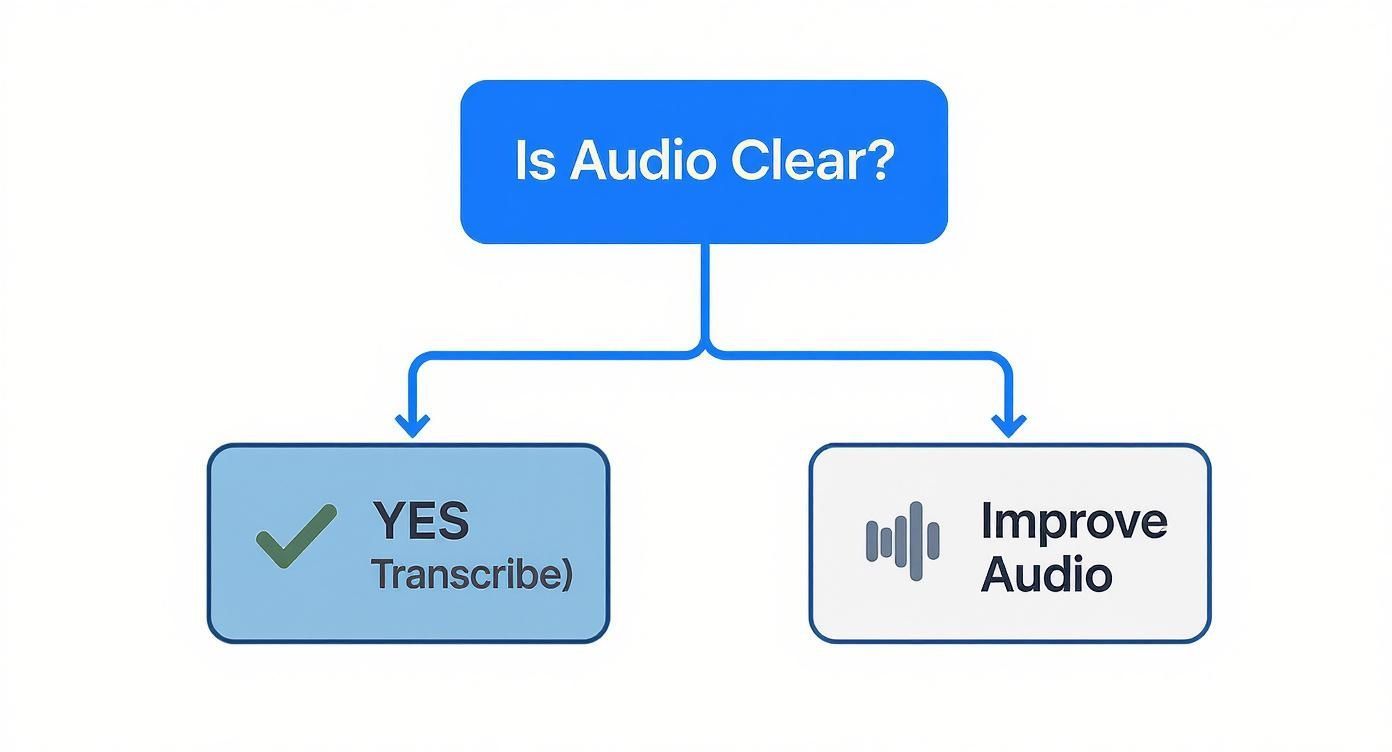
È un punto semplice ma potente: spazzatura in ingresso, spazzatura in uscita. Non importa quanto sia sofisticato il tuo strumento, un audio scadente ti darà sempre una trascrizione scadente.
Per aiutarti a valutare le opzioni, ecco un rapido confronto dei diversi approcci.
Confronto dei Metodi di Trascrizione
| Fattore | Trascrizione Manuale | Servizio di Trascrizione AI | Ibrido (AI + Revisione Umana) |
|---|---|---|---|
| Velocità | Estremamente lenta (4-8 ore per ora di audio) | Estremamente veloce (minuti per ora di audio) | Moderata (più lenta dell'AI pura, più veloce della manuale) |
| Costo | Alto (le tariffe professionali possono essere elevate) | Basso (abbonamenti convenienti o pagamento per utilizzo) | Il più alto (combina costi AI e manodopera umana) |
| Accuratezza | Potenzialmente molto alta (99%+) ma dipende dall'abilità del dattilografo | Alta (85-98%) ma fatica con accenti, gergo e audio scadente | La più alta (99%+) con revisione professionale |
| Scalabilità | Molto bassa; difficile gestire grandi volumi | Molto alta; può elaborare centinaia di ore facilmente | Moderata; dipende dalla disponibilità del revisore umano |
| Ideale per | Dati altamente sensibili, audio complesso che l'AI non può gestire | La maggior parte degli usi aziendali: riunioni, interviste, creazione di contenuti | Deposizioni legali, cartelle cliniche, contenuti di qualità broadcast |
In definitiva, ogni metodo ha il suo posto, ma il punto ideale per la maggior parte delle persone risiede nei servizi AI dedicati.
Per la maggior parte delle situazioni professionali, un servizio AI dedicato offre il miglior mix di velocità, costo e accuratezza. Il tempo che risparmi rispetto a farlo manualmente è enorme, e la qualità è un grande passo avanti rispetto alle funzionalità di base del software di riunione.
Se vuoi approfondire i principali attori, consulta la nostra guida sul miglior software di trascrizione audio. Analizza le funzionalità e i prezzi per aiutarti a trovare la soluzione perfetta. Avere il giusto set di strumenti fin dall'inizio rende l'intero processo molto più agevole.
Trasformare una Buona Trascrizione in una Grande
Pensa a una trascrizione generata dall'AI come a una fantastica prima bozza. Non è il prodotto finito. Sebbene l'AI moderna abbia fatto enormi progressi, non è perfetta, e la vera magia avviene quando ti rimbocchi le maniche per trasformare quel testo grezzo in un documento raffinato e professionale.
L'AI è diventata incredibilmente brava a trascrivere conversazioni. Le piattaforme popolari possono raggiungere livelli di accuratezza fino al 90%, e alcune analisi mostrano che gli strumenti AI possono aumentare il riconoscimento fino al 30%, specialmente con accenti diversi.
Ma anche con questa impressionante performance, un tasso di errore del 10% è significativo. Per una trascrizione di 1.000 parole, ciò potrebbe significare 100 errori. È qui che il tuo tocco umano diventa inestimabile.
Un Flusso di Lavoro di Editing Più Intelligente
Non tuffarti e iniziare a correggere gli errori a caso. Un approccio strutturato fa risparmiare tempo e garantisce che tu catturi tutto. L'obiettivo è passare dalle correzioni di alto livello alla messa a punto dei dettagli, rendendo l'intero processo molto più efficiente.
Inizia con le etichette degli speaker. L'AI fa un buon lavoro nel indovinare chi sta parlando, ma si confonde abbastanza facilmente, specialmente quando le voci si sovrappongono. Il tuo primo passaggio dovrebbe essere dedicato interamente a garantire che ogni battuta di dialogo sia attribuita alla persona giusta. Questo singolo passaggio fa una differenza enorme nella leggibilità.
Successivamente, è il momento di una lettura completa mentre ascolti l'audio. La maggior parte delle piattaforme di trascrizione dispone di un editor interattivo che evidenzia le parole mentre vengono pronunciate. Questa funzionalità è il tuo migliore amico per individuare e correggere rapidamente le parole fraintese.
Gli errori più comuni dell'AI sono gli omòfoni (come 'loro' vs. 'lì'), i nomi propri e il gergo di nicchia del settore. Suggerimento pro: Creare un elenco di vocabolario personalizzato nel tuo strumento di trascrizione può ridurre drasticamente questi errori fin dall'inizio.
Dopo aver pulito gli errori evidenti di parole, sposta la tua attenzione sulla punteggiatura e sulla formattazione. L'AI spesso fatica con le pause naturali e il flusso del parlato umano, il che può portare a interruzioni di frase davvero imbarazzanti e una punteggiatura incoerente.
Rifinire per la Leggibilità
Una volta che le parole e gli speaker sono corretti, l'ultimo passaggio riguarda il rendere la trascrizione facile da leggere. Si tratta meno di accuratezza tecnica e più dell'esperienza dell'utente. Nessuno vuole fissare un enorme blocco di testo.
Ecco alcuni rapidi miglioramenti di formattazione:
- Dividi i Paragrafi Lunghi: Se uno speaker parla a lungo, dividi il suo monologo in paragrafi più piccoli e digeribili. Una buona regola generale è iniziare un nuovo paragrafo per ogni nuova idea.
- Gestisci le Sezioni Illeggibili: Se incontri una parola o una frase completamente incomprensibile, non indovinare. Usa un segnaposto chiaro come [illeggibile 00:15:32] per segnalare il problema e il suo timestamp.
- Mantieni la Punteggiatura Coerente: Decidi uno stile e attieniti ad esso. Stai usando trattini lunghi (—) per le interruzioni? Scrivi i numeri per esteso o usi le cifre? La coerenza è ciò che conta di più.
Questa fase finale di correzione di bozze è ciò che separa una trascrizione amatoriale da una professionale. Per uno sguardo più approfondito, la nostra guida sulla correzione di bozze nella trascrizione offre una checklist attuabile per garantire che il tuo documento finale sia impeccabile. Seguire questo processo sistematico trasformerà quella buona bozza AI in un asset eccezionale e condivisibile ogni volta.
Miglioramento della trascrizione a livello professionale
Formattazione pulita
Una formattazione ben strutturata aumenta la leggibilità e rende la tua trascrizione più utilizzabile. Paragrafi puliti, interruzioni coerenti e spaziatura corretta migliorano la comprensione.
Precisione dei timestamp
L'aggiunta di timestamp accurati aiuta gli utenti a navigare rapidamente in audio lunghi. Questo è particolarmente utile per la ricerca, le interviste e i flussi di lavoro di editing.
Etichette chiare degli oratori
Identificare correttamente gli oratori conferisce chiarezza alla tua trascrizione e previene la confusione. Questo è essenziale per riunioni, podcast e focus group.
Punteggiatura coerente
Una punteggiatura coerente migliora il flusso ed elimina le interpretazioni errate. Questo passaggio di rifinitura finale trasforma il tuo testo in un documento curato.
Mettere al Lavoro la Tua Trascrizione Finale
Con una trascrizione lucida e accurata a portata di mano, inizia il vero lavoro, e il vero valore. Una trascrizione non è solo un resoconto di una conversazione; è la materia prima per una vasta gamma di contenuti. La chiave è esportarla nel formato giusto per il lavoro.
Pensala come scegliere lo strumento giusto. La scelta del formato di esportazione influisce direttamente su ciò che puoi fare in seguito, e non si tratta tanto di quale formato sia "migliore", quanto di quale sia giusto per il tuo obiettivo specifico.
Selezionare il Formato Giusto
La destinazione del tuo progetto detta il formato di cui avrai bisogno. Un creatore di video che edita un breve video per YouTube, un ricercatore che analizza dati di interviste e un content marketer che scrive un post per un blog avranno tutti requisiti diversi per la stessa identica conversazione.
Ecco i formati più comuni e per cosa sono effettivamente utili:
- DOCX (.docx): Questo è il tuo formato di riferimento per tutto ciò che richiede una formattazione professionale. È perfetto per creare riassunti di riunioni, articoli di ricerca o per trasformare un'intervista in un articolo completo.
- Testo Semplice (.txt): Privo di ogni formattazione, un file TXT è ideale per l'analisi dei dati. Puoi importarlo facilmente in software di analisi qualitativa o usarlo come fonte pulita da fornire ad altri strumenti AI per ulteriori elaborazioni.
- Sottotitoli SubRip (.srt): Questo è essenziale per chiunque lavori con i video. Un file SRT contiene non solo il testo, ma anche i timestamp precisi necessari per visualizzare i sottotitoli in sincronia con il tuo video su piattaforme come YouTube o Vimeo. È la chiave per rendere accessibili i tuoi contenuti.
Il formato che scegli è il primo passo nella tua strategia di contenuti. Esportare in formato
.docxprepara il tuo testo per i lettori umani, mentre un file.srtlo prepara per gli spettatori video.
Dalla Trascrizione al Motore di Contenuti
Una singola conversazione può essere il seme per un'intera campagna di contenuti. Invece di vedere la tua trascrizione come il prodotto finale, pensala come una miniera d'oro di contenuti in attesa di essere scavata. È così che otterrai un enorme ritorno sull'impegno profuso nella conversazione originale.
Lo sapevi?
Una trascrizione può essere riutilizzata in un massimo di 20 diversi formati di contenuto, tra cui blog, reel, didascalie, thread e newsletter. Questo moltiplica la tua produzione di contenuti senza aumentare il tempo di registrazione.
Un podcast di un'ora può essere rielaborato in:
- Un post di blog completo utilizzando il file .docx.
- Una serie di 10-15 post sui social media estraendo citazioni chiave.
- Un coinvolgente thread di Twitter che riassume i principali takeaway.
- Brevi clip video per TikTok o Instagram Reels utilizzando il file .srt per le didascalie.
- Una guida o una checklist scaricabile in PDF per il tuo pubblico.
Questo approccio trasforma un'opera in settimane di contenuti, garantendo che la tua preziosa conversazione raggiunga le persone su diverse piattaforme e nei formati che preferiscono. La tua trascrizione non è più solo un registro; è una risorsa potente e versatile che alimenta la tua intera macchina di contenuti.
Le tue principali domande sulla trascrizione, risolte
Anche con i migliori strumenti, ti imbatterai inevitabilmente in domande quando inizi a trascrivere conversazioni. Risolvere questi dubbi in anticipo ti risparmia un sacco di frustrazione e ti aiuta a costruire un flusso di lavoro che funziona alla perfezione.
Affrontiamo alcune delle domande più comuni che sento.
Qual è il miglior software per trascrivere una conversazione?
Il software "migliore" dipende davvero da ciò che stai cercando di fare. Non esiste uno strumento perfetto per tutti, ma possiamo sicuramente suddividerlo in base ad alcuni scenari comuni.
Se hai bisogno di risultati di livello professionale in cui accuratezza e velocità sono tutto, i servizi dedicati basati sull'intelligenza artificiale sono i campioni indiscussi. Sono dotati di funzionalità come l'identificazione automatica degli altoparlanti e timestamp precisi, rendendoli una scelta obbligata per giornalisti, ricercatori e creatori di contenuti.
D'altra parte, per cose più casual o interne, le funzionalità di trascrizione integrate in piattaforme come Zoom o Google Meet sono sorprendentemente decenti. Sono ottimi per ottenere una rapida registrazione di un incontro di squadra senza aggiungere un altro strumento al tuo stack. E se stai lavorando con dati altamente sensibili e hai molto tempo, la trascrizione manuale è ancora l'opzione più sicura poiché nulla lascia mai la tua macchina locale.
La mia opinione? Inizia con una prova gratuita di un servizio AI dedicato. È il modo migliore per vedere come gestisce la qualità del tuo audio specifico e se le funzionalità ti semplificano davvero la vita prima di spendere un centesimo.
Come si trascrive accuratamente una conversazione con più interlocutori?
Gestire più interlocutori è probabilmente il problema più grande nella trascrizione. La cosa più importante che puoi fare è iniziare con una registrazione di alta qualità in cui ogni voce sia chiara. Questo dà a qualsiasi strumento, AI o umano, una possibilità di successo.
Quando utilizzi un servizio AI, cerca uno che sia bravo nella diarizzazione degli altoparlanti. Questo è il termine elegante per capire automaticamente chi sta parlando e quando. La maggior parte degli strumenti moderni fornirà etichette generiche come "Altoparlante 1" e "Altoparlante 2".
Il tuo primo compito durante la fase di modifica dovrebbe essere quello di esaminare e sostituire queste etichette generiche con i nomi effettivi degli interlocutori. Questo singolo passaggio rende la trascrizione finale infinitamente più leggibile.
- Suggerimento Pro: Se l'AI sembra confusa, ascolta semplicemente i primi minuti dell'audio e prendi nota rapida di chi è chi. Avere quel semplice punto di riferimento rende la correzione delle etichette degli altoparlanti per il resto del file un gioco da ragazzi.
Quanto tempo ci vuole per trascrivere un'ora di audio?
Il tempo necessario per trascrivere qualcosa varia enormemente a seconda del metodo. Onestamente, la differenza tra farlo manualmente e usare l'AI è abissale.
Un trascrittore professionista esperto lavora tipicamente con un rapporto di 4:1. Ciò significa che impiega circa quattro ore di lavoro per trascrivere accuratamente un'ora di audio chiaro. Se sei nuovo, quel rapporto può facilmente salire a 6:1 o addirittura 8:1.
Al contrario, un potente servizio AI può elaborare lo stesso file di un'ora in circa 10-20 minuti. Ma il lavoro non è del tutto finito. Devi comunque prevedere tempo di editing umano per renderlo perfetto. Per una registrazione pulita, prevedi di dedicare altri 30-60 minuti alla revisione e alla formattazione del lavoro dell'AI per portarlo a quella precisione finale del 99-100%.
Pronto a trasformare le tue conversazioni in testo accurato e attuabile in pochi minuti? Transcript.LOL utilizza un'intelligenza artificiale avanzata per fornire trascrizioni veloci, sicure e altamente precise. Smetti di perdere ore in lavori manuali e scopri quanto può essere facile la trascrizione. Inizia a trascrivere gratuitamente oggi stesso!