
Top 12 outils de transcription vidéo vers texte gratuits en 2026
Découvrez les 12 meilleurs outils de transcription vidéo vers texte gratuits. Notre guide couvre les applications web, les outils DIY, les avantages, les inconvénients et la confidentialité pour tous vos besoins.
Kate, Praveen
January 29, 2026
Dans un monde axé sur le contenu, la vidéo est essentielle. Mais les mots parlés dans cette vidéo ? C'est là que réside la vraie valeur. La transcription de votre contenu vidéo le rend consultable pour le SEO, accessible à un public plus large et facilement réutilisable en articles, publications sur les réseaux sociaux ou matériel de formation. Le principal obstacle a toujours été le coût associé et le temps nécessaire. Ce guide est conçu pour résoudre ce problème en offrant un aperçu complet des meilleures options de transcription vidéo vers texte gratuite.
Ce qu'il faut savoir sur les outils de transcription gratuits
Les outils de transcription gratuits sont puissants, mais la plupart ont des limites en termes de minutes, de longueur de fichier ou de formats d'exportation. Comprendre ces contraintes à l'avance vous aide à éviter les interruptions de flux de travail et à choisir le bon outil pour votre volume et vos besoins en matière de précision.
Nous explorerons une sélection d'outils, chacun avec ses propres forces. Cette liste couvre tout, des plateformes web puissantes basées sur l'IA et des applications de bureau open-source, aux méthodes astucieuses et gratuites utilisant des outils que vous possédez peut-être déjà, comme YouTube et Google Docs. Chaque entrée comprend un aperçu pratique, des avantages et des inconvénients, ainsi que des instructions étape par étape pour vous aider à démarrer immédiatement. Notre objectif est de vous aider à trouver la solution parfaite pour vos besoins spécifiques, que vous soyez un podcasteur ayant besoin de notes d'émission, un marketeur créant du contenu de blog, ou un étudiant transcrivant des conférences. En explorant ces outils pour maximiser le potentiel de votre vidéo, n'oubliez pas que des plateformes comme shortgenius peuvent également offrir des services complémentaires pour le traitement ou la réutilisation de votre contenu vidéo après la transcription.
Cette ressource est votre chemin direct pour transformer le contenu parlé en texte précieux et utilisable sans dépenser un centime. Nous avons fait les recherches pour que vous puissiez éviter les essais et erreurs et passer directement à la transcription. Plongeons dans les meilleurs outils gratuits qui peuvent libérer tout le potentiel de votre bibliothèque vidéo.
1. Transcript.LOL
Transcript.LOL s'impose comme un choix de premier ordre pour les utilisateurs recherchant un outil puissant, privé et polyvalent pour la transcription vidéo vers texte gratuitement. Il exploite le modèle Whisper avancé d'OpenAI, enrichi d'un support de vocabulaire personnalisé, pour offrir une précision de pointe (revendiquée à ~99,8 %) et un traitement remarquablement rapide. Cela en fait un outil exceptionnel et polyvalent pour tous, des podcasteurs et marketeurs aux chercheurs universitaires et aux équipes d'entreprise.
Capacités d'IA fondamentales qui font gagner des heures
IA de pointe
Alimenté par Whisper d'OpenAI pour une précision de premier plan. Prise en charge des vocabulaires personnalisés, des fichiers jusqu'à 10 heures et des résultats ultra rapides.

Outils d'édition
Modifiez les transcriptions avec des outils puissants incluant rechercher et remplacer, attribution des intervenants, formats de texte enrichi et surlignage.
Résumés et Chatbot
Générez des résumés et d'autres analyses de votre transcription, des prompts personnalisés réutilisables et un chatbot pour votre contenu.
La plateforme se distingue non seulement par la transcription de contenu, mais par sa transformation. Au-delà d'un simple fichier texte, Transcript.LOL génère automatiquement des dérivés exploitables comme des résumés, des chapitres, des points d'action et même des publications sur les réseaux sociaux. Cette suite d'outils alimentés par l'IA accélère le réemploi et l'analyse de contenu, transformant un seul fichier vidéo en une multitude d'actifs prêts à l'emploi.
Caractéristiques Clés et Expérience Utilisateur
Transcript.LOL offre un flux de travail rationalisé avec de nombreuses options d'importation, y compris des téléchargements directs, des services cloud (Google Drive, Dropbox), Zoom et des URL de plateformes comme YouTube et Vimeo. Les capacités d'intégration robustes, avec une extension Chrome, Zapier et un accès API, lui permettent de s'intégrer parfaitement aux processus existants. L'interface est épurée, facilitant l'édition des transcriptions avec identification des intervenants et formatage en texte enrichi.
Tarifs et Accès
La plateforme propose un niveau Gratuit très accessible qui comprend deux transcriptions par jour avec une durée maximale de téléchargement de 20 minutes. Pour les utilisateurs à gros volume, le plan Illimité (120 $/an) offre des transcriptions illimitées pour des fichiers allant jusqu'à 10 heures, un traitement prioritaire et l'accès à tous les outils de génération de contenu par IA. Un plan Équipe est également disponible, ajoutant des espaces de travail collaboratifs pour une archive centralisée des transcriptions.
- Idéal pour : Créateurs de contenu, spécialistes du marketing, chercheurs et équipes ayant besoin d'un outil de transcription rapide, précis et multifonctionnel.
- Avantages :
- Précision et Vitesse Exceptionnelles : Alimenté par un modèle Whisper amélioré pour des résultats précis, même avec des fichiers longs.
- Politique axée sur la Confidentialité : Garantit que les données des clients ne sont jamais utilisées pour l'entraînement de l'IA.
- Sorties IA Polyvalentes : Automatise la création de résumés, de publications sociales, de cartes mentales, etc.
- Intégrations Étendues : Se connecte à de nombreuses plateformes cloud, sociales et d'automatisation.
- Inconvénients :
- Plan Gratuit Limité : Le plafond de 20 minutes et le traitement à faible priorité peuvent ne pas convenir aux utilisateurs ayant des vidéos plus longues ou des besoins urgents.
- Vérification de Conformité : Manque d'affichage proéminent de certifications de conformité spécifiques comme HIPAA ou SOC 2.
Site Web : https://transcript.lol
Pour une analyse plus approfondie de ses capacités, vous pouvez trouver un guide complet sur la transcription de vidéo en texte avec leur outil en ligne.
2. Otter.ai
Otter.ai est un nom familier dans la transcription par IA, surtout connu pour son intégration transparente avec les plateformes de réunion comme Zoom, Google Meet et Microsoft Teams. Bien que son objectif principal soit la transcription et la résumé de réunions en direct, son plan de base (gratuit) offre un point d'entrée précieux pour les utilisateurs cherchant à expérimenter la transcription vidéo vers texte gratuitement, en particulier pour ceux qui enregistrent fréquemment des réunions ou des interviews.
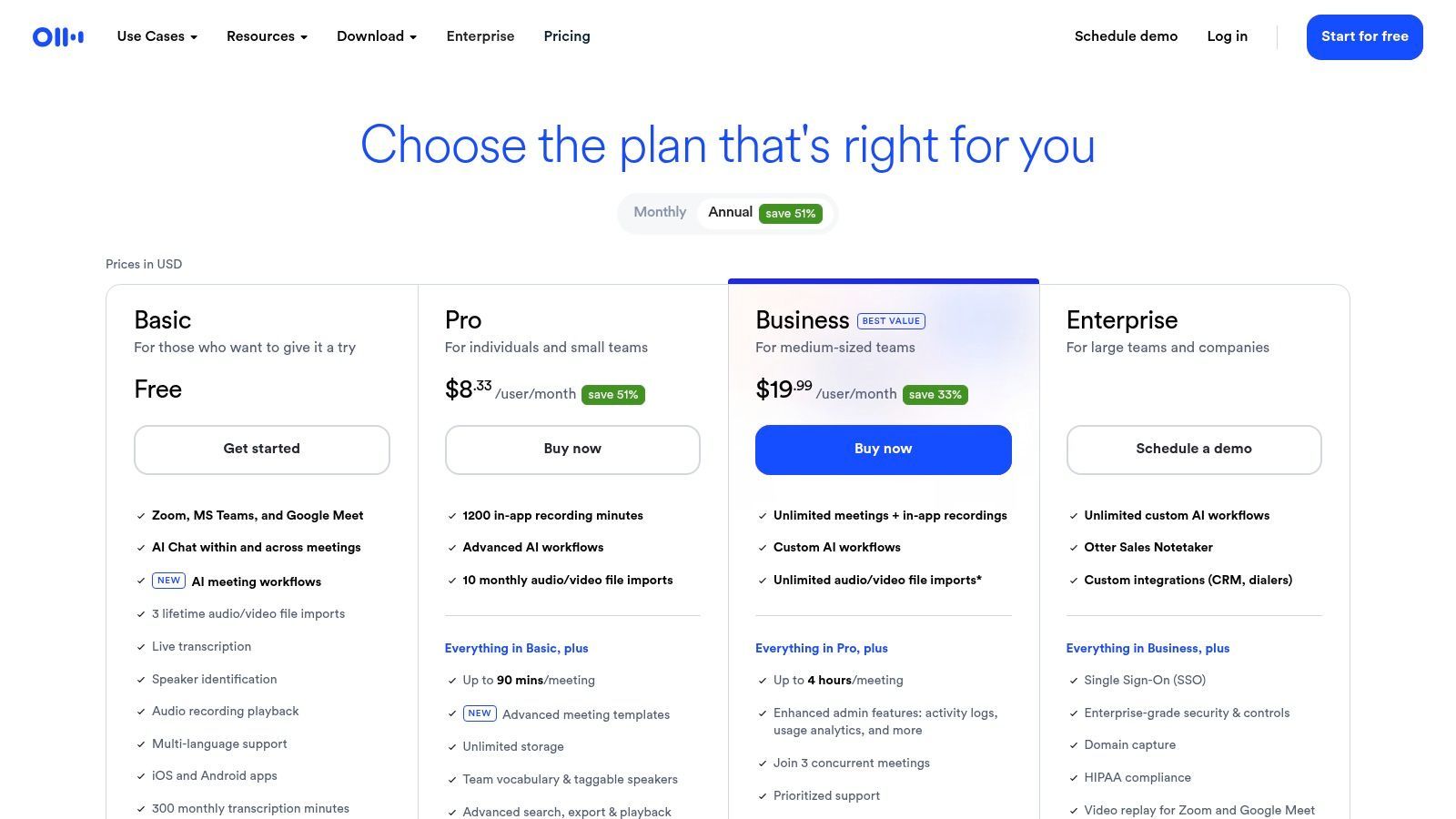
Ce qui distingue Otter.ai, c'est son ensemble de fonctionnalités robustes, même dans le niveau gratuit. Il offre l'identification des intervenants, qui étiquette automatiquement les différentes voix dans la vidéo, et génère des transcriptions consultables et horodatées. Cela permet de localiser facilement des citations ou des moments spécifiques dans un long enregistrement. Bien que le plan gratuit ait des limitations, son interface utilisateur de haute qualité et ses performances fiables en font un choix de premier ordre pour les travailleurs du savoir, les étudiants et les journalistes. Pour une analyse plus approfondie de ses capacités, vous pouvez trouver plus d'informations sur ses fonctionnalités audio vers texte.
Caractéristiques Clés et Limitations
| Caractéristique/Limitation | Otter.ai (Plan de base) |
|---|---|
| Accès au niveau gratuit | Oui, le plan "Basic" est gratuit. |
| Limite de transcription | 300 minutes de transcription par mois ; 30 minutes par conversation. |
| Limite d'importation de fichiers | Jusqu'à 3 fichiers vidéo/audio au total (limite à vie). |
| Identification des intervenants | Oui, avec étiquetage automatique. |
| Formats d'exportation | TXT, avec PDF et DOCX disponibles sur les plans payants. |
| Idéal pour | La transcription de réunions enregistrées, d'interviews et de conférences où l'identification des intervenants est cruciale. |
| Site Web | otter.ai/pricing |
3. Rev
Rev est un acteur majeur de l'industrie de la transcription, connu pour son modèle hybride qui combine une IA puissante avec des services humains pour une précision quasi parfaite. Bien que sa transcription professionnelle humaine soit un service payant, Rev offre aux utilisateurs la possibilité de tester ses capacités d'IA, ce qui en fait une option précieuse pour ceux qui ont besoin d'un brouillon gratuit avant d'investir potentiellement dans une précision accrue. Cela en fait un excellent outil pour les professionnels qui ont besoin d'un passage automatisé rapide d'un fichier avant de décider s'il justifie le coût d'une révision humaine.
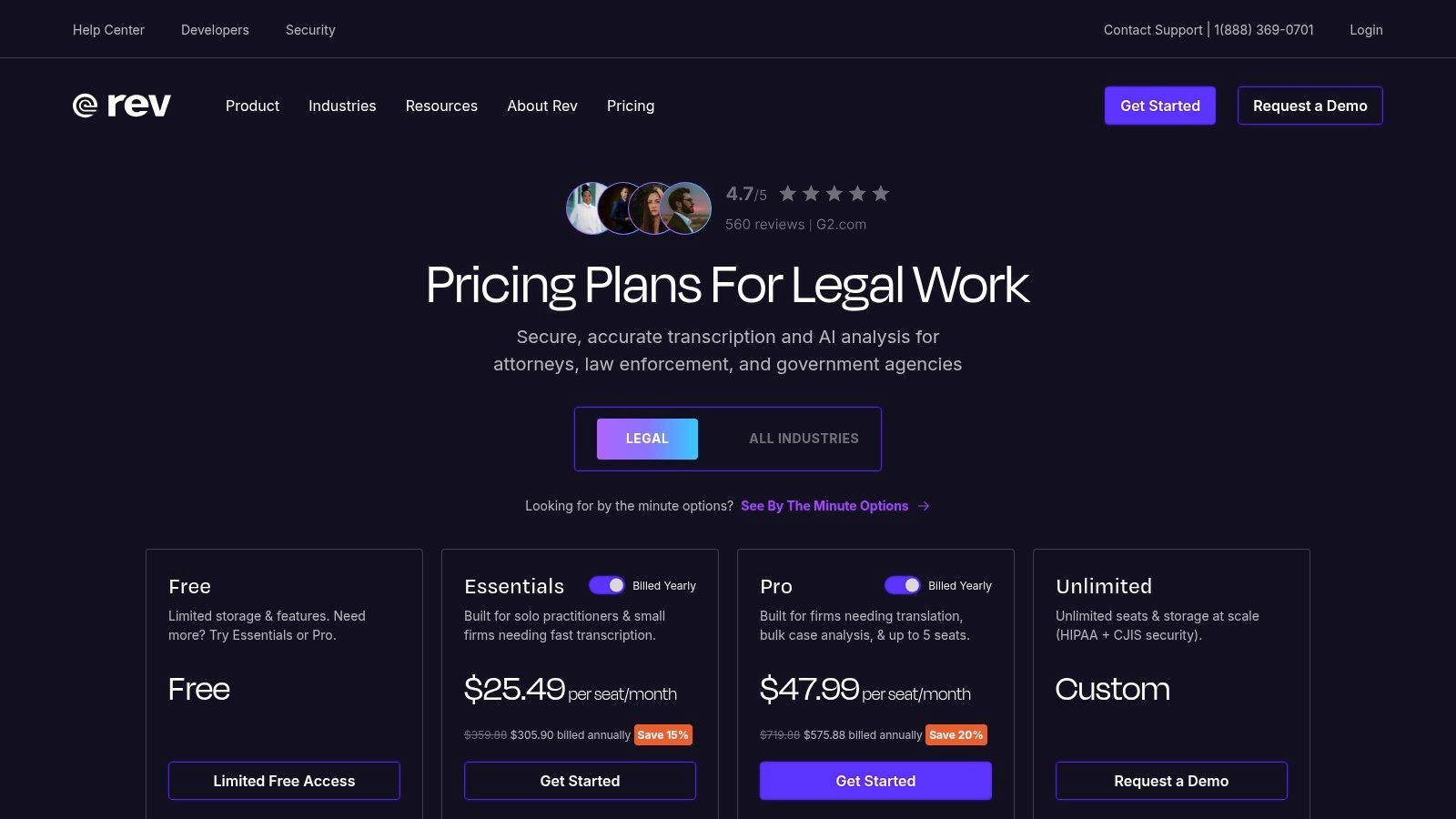
Ce qui distingue Rev, c'est le chemin de mise à niveau transparent de sa transcription IA automatisée vers une version vérifiée par un humain avec une précision de 99 %. Les utilisateurs peuvent commencer par un brouillon IA de transcription vidéo vers texte gratuite pour saisir l'essentiel du contenu, puis, en un seul clic, l'envoyer à un professionnel pour une finition. Ce flux de travail est idéal pour les projets juridiques, médicaux ou académiques où la transcription IA initiale peut faire gagner du temps, mais où la précision finale est non négociable. La plateforme dispose également d'un éditeur interactif pour nettoyer vous-même la transcription IA.
Caractéristiques Clés et Limitations
| Caractéristique/Limitation | Rev (Transcription IA) |
|---|---|
| Accès au niveau gratuit | Oui, des minutes d'essai gratuites limitées sont disponibles. |
| Limite de transcription | Minutes d'essai limitées (par exemple, ~45 minutes), qui peuvent varier. |
| Limite d'importation de fichiers | Aucune limite stricte sur le nombre de fichiers pendant l'essai, juste un plafond de minutes total. |
| Identification des intervenants | Oui, l'IA tente d'identifier différents intervenants. |
| Formats d'exportation | TXT, DOCX, PDF et SRT sont disponibles. |
| Idéal pour | Les professionnels qui ont besoin d'un brouillon IA rapide avec un chemin clair et facile pour passer à une transcription perfectionnée par un humain. |
| Site Web | rev.com/pricing |
4. Descript
Descript révolutionne le processus de transcription en le traitant comme la base de l'édition vidéo et audio. Au lieu de simplement fournir une transcription, Descript vous permet de modifier votre média en éditant simplement le texte, une approche qu'il appelle "édition basée sur des documents". Cela en fait un outil incroyablement puissant pour les créateurs de contenu qui ont besoin de plus qu'un simple service de transcription vidéo vers texte gratuite ; ils ont besoin d'un flux de travail rationalisé pour créer du contenu soigné. Le plan gratuit offre un excellent moyen d'expérimenter ce paradigme d'édition unique.
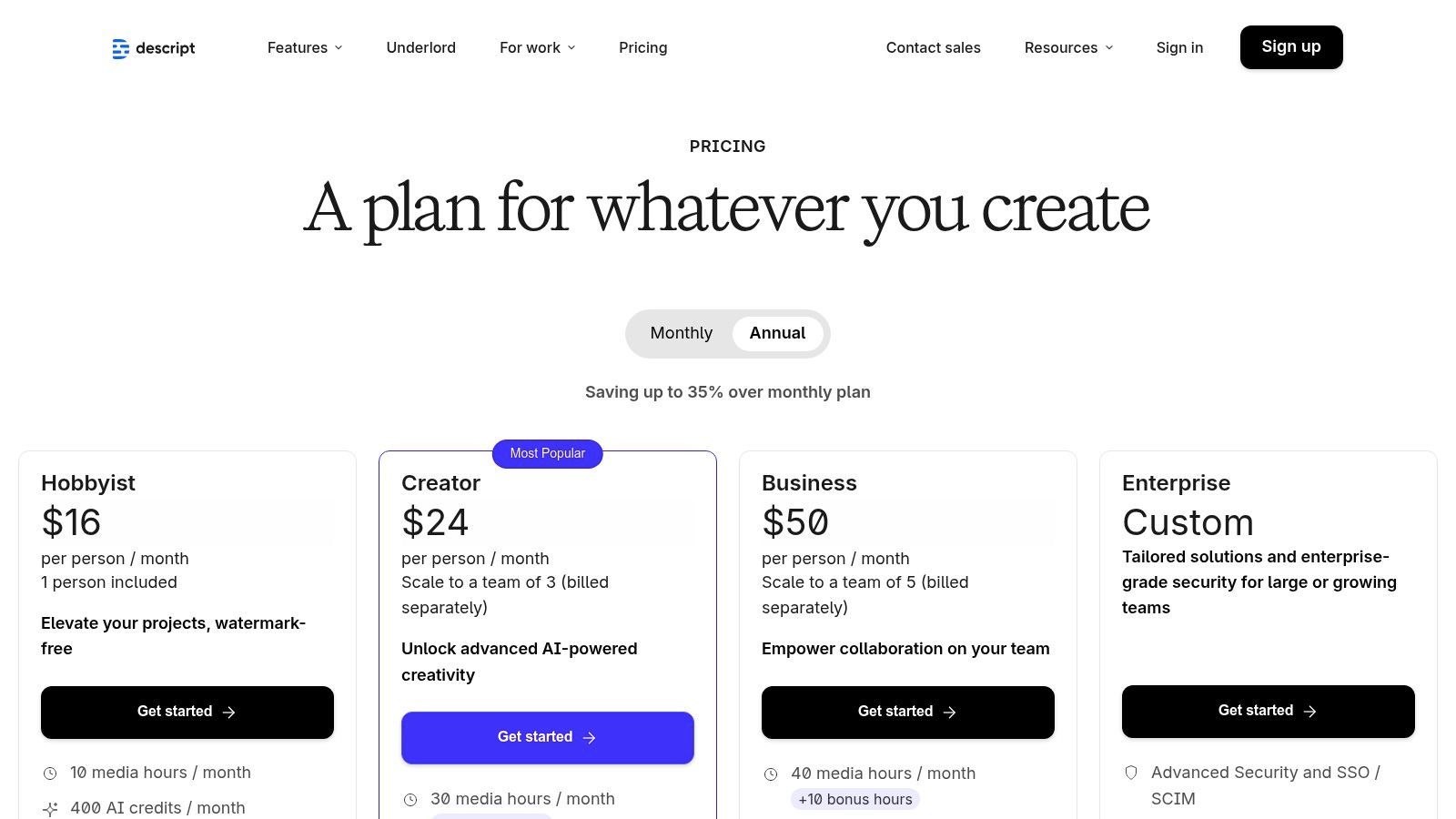
Ce qui distingue vraiment Descript, c'est sa fonctionnalité tout-en-un. La plateforme combine de manière transparente la transcription, un éditeur puissant, un enregistreur d'écran et des outils alimentés par l'IA comme la suppression des mots de remplissage ("euh", "hmm") et Studio Sound pour améliorer la qualité audio. Bien que les limites du niveau gratuit soient assez restrictives, il est parfait pour les créateurs travaillant sur du contenu court ou ceux qui souhaitent tester le flux de travail avant de s'engager. Pour ceux qui s'intéressent à la façon dont Descript s'intègre dans l'écosystème plus large, vous pouvez en savoir plus sur ce type de convertisseur vidéo vers texte.
Caractéristiques Clés et Limitations
| Caractéristique/Limitation | Descript (Plan gratuit) |
|---|---|
| Accès au niveau gratuit | Oui, le plan "Gratuit" est disponible. |
| Limite de transcription | 1 heure de transcription par mois. |
| Limite d'importation de fichiers | Aucune limite explicite sur le nombre de fichiers, limitée par les heures de transcription mensuelles. |
| Identification des intervenants | Oui, avec détection automatique des intervenants. |
| Formats d'exportation | TXT, SRT, VTT. Exportation vidéo avec filigrane (jusqu'à 720p). |
| Idéal pour | Les podcasteurs et les créateurs vidéo qui souhaitent éditer leur contenu en éditant la transcription. |
| Site Web | www.descript.com/pricing |
5. VEED
VEED est une suite complète d'édition vidéo basée sur navigateur qui s'est taillé une niche avec ses outils de sous-titrage automatique puissants et intuitifs. Bien qu'il fonctionne comme un éditeur complet, sa force pour les utilisateurs recherchant une transcription vidéo vers texte gratuite réside dans sa capacité à générer, styliser et intégrer rapidement des légendes directement sur les vidéos. Cela en fait une plateforme de choix pour les créateurs de médias sociaux, les spécialistes du marketing et toute personne ayant besoin de sous-titres visuellement attrayants sans logiciel de bureau complexe.
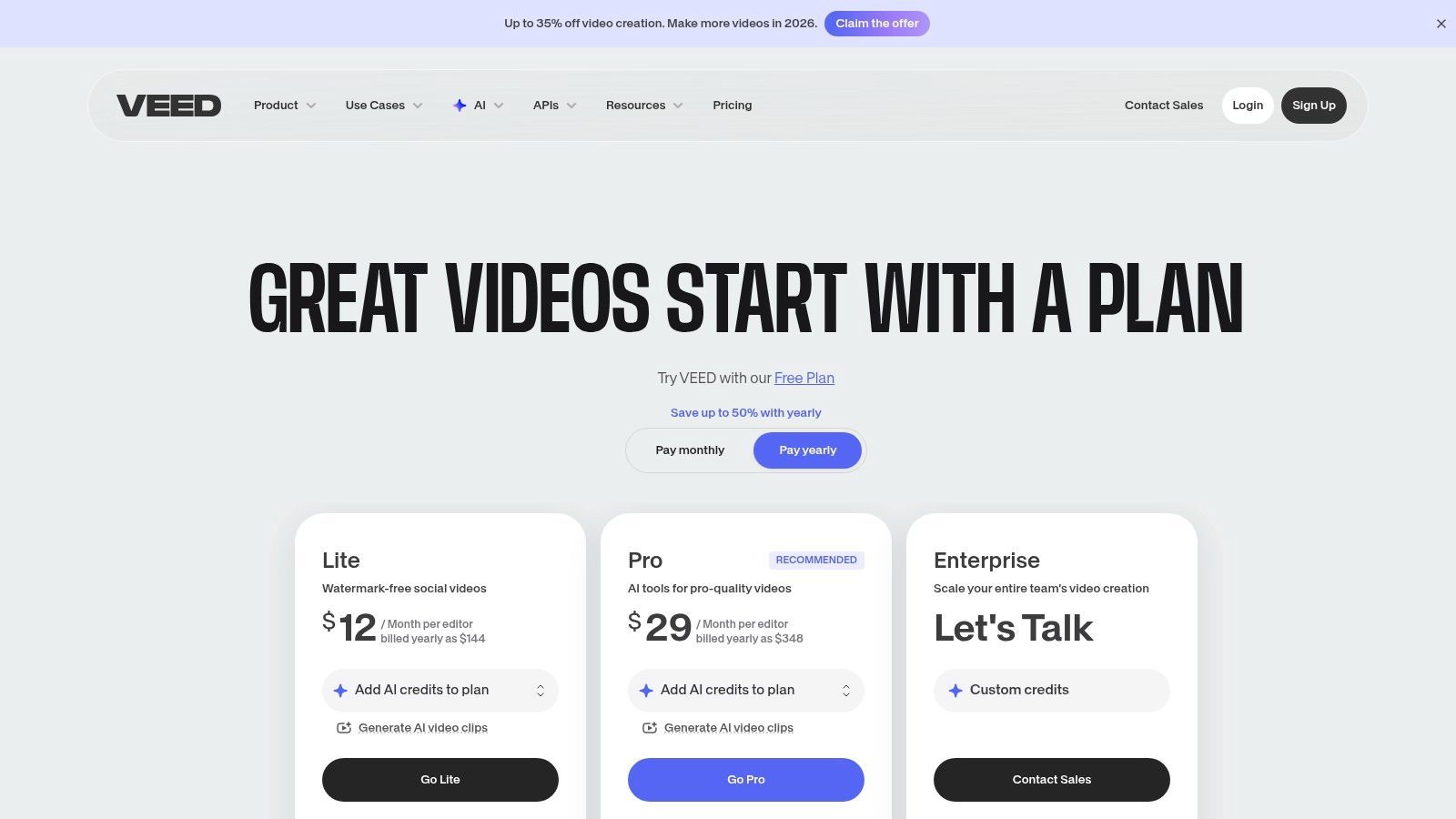
Ce qui distingue VEED, c'est son orientation vers le flux de travail de sous-titrage de bout en bout. Vous pouvez télécharger une vidéo, générer automatiquement une transcription, modifier le texte pour en assurer l'exactitude, puis styliser les légendes avec des polices, des couleurs et des animations personnalisées. Le niveau gratuit est excellent pour tester le service sur de courts extraits, mais il est important de noter qu'il inclut un filigrane sur les exportations vidéo. Pour ceux qui privilégient le contrôle esthétique par rapport à la sortie texte brute, VEED offre une solution rationalisée qui intègre la transcription directement dans le processus de création vidéo.
Caractéristiques Clés et Limitations
| Caractéristique/Limitation | VEED (Plan gratuit) |
|---|---|
| Accès au niveau gratuit | Oui, le plan "Gratuit" est disponible. |
| Limite de transcription | 10 minutes de sous-titres par mois. |
| Limite d'importation de fichiers | Taille de fichier jusqu'à 1 Go ; limite de taille d'exportation de 250 Mo. |
| Filigrane vidéo | Oui, toutes les exportations du plan gratuit incluent un filigrane VEED. |
| Formats d'exportation | Vidéo MP4 avec légendes incrustées. Le téléchargement SRT est une fonctionnalité payante. |
| Idéal pour | Les créateurs de médias sociaux et les spécialistes du marketing qui ont besoin d'ajouter rapidement des légendes stylisées et incrustées à de courtes vidéos. |
| Site Web | veed.io/pricing |
6. Kapwing
Kapwing est un éditeur vidéo en ligne populaire conçu pour les créateurs modernes, mais il propose également un outil puissant pour la transcription vidéo vers texte gratuitement grâce à son générateur de sous-titres automatiques. Bien qu'il fonctionne principalement comme une suite créative, sa fonctionnalité de sous-titrage intuitive permet aux utilisateurs de générer rapidement une transcription textuelle à partir de leur contenu vidéo. Cela en fait un excellent choix pour les gestionnaires de médias sociaux, les spécialistes du marketing et les créateurs de contenu qui ont besoin à la fois de transcrire et d'éditer leur vidéo dans un flux de travail unique et rationalisé.
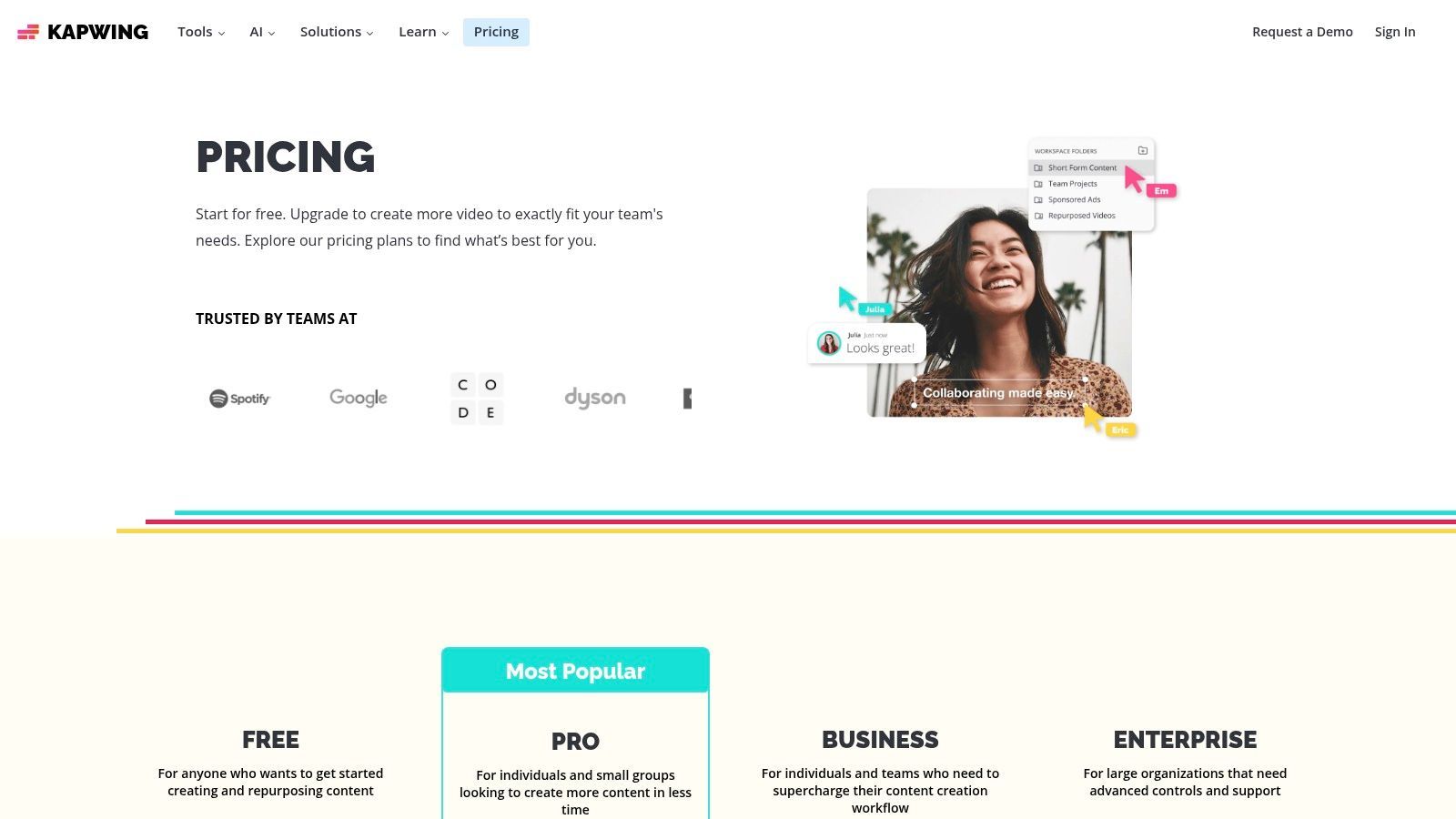
Ce qui distingue Kapwing, c'est son système basé sur des crédits, qui est transparent et facile à comprendre. Le plan gratuit fournit une allocation mensuelle de crédits qui peuvent être utilisés pour la transcription automatique, ce qui le rend adapté aux utilisateurs ayant des besoins modestes et récurrents. La plateforme est entièrement basée sur le navigateur, ne nécessitant aucune installation de logiciel, et son interface utilisateur est conçue pour la vitesse et la simplicité. Bien que la version gratuite inclue des filigranes et ait des limitations d'exportation, elle offre un moyen fantastique de gérer simultanément les tâches de transcription et d'édition vidéo, en particulier pour le contenu destiné à des plateformes comme TikTok, Instagram ou YouTube Shorts.
Caractéristiques Clés et Limitations
| Caractéristique/Limitation | Kapwing (Plan gratuit) |
|---|---|
| Accès au niveau gratuit | Oui, le plan "Gratuit" est disponible. |
| Limite de transcription | 10 minutes de sous-titrage automatique par mois (utilise des crédits). |
| Limite d'importation de fichiers | Fichiers à télécharger jusqu'à 250 Mo. |
| Filigrane | Oui, les vidéos exportées avec le plan gratuit ont un filigrane. |
| Formats d'exportation | SRT pour les sous-titres ; MP4 pour la vidéo (limité à 720p). |
| Idéal pour | Les créateurs de médias sociaux qui ont besoin d'ajouter rapidement des sous-titres et d'obtenir une transcription dans leur flux de travail d'édition vidéo. |
| Site Web | www.kapwing.com/pricing |
7. Notta
Notta est un service de transcription polyvalent basé sur le cloud qui excelle à la fois dans l'enregistrement de réunions en direct et la transcription de fichiers, ce qui en fait un concurrent sérieux pour les utilisateurs recherchant une solution complète de transcription vidéo vers texte gratuite. Son plan gratuit est particulièrement pratique, offrant une allocation mensuelle décente qui se réinitialise, ce qui est un avantage clé par rapport aux services ayant une limite à vie unique. Cela en fait une option durable pour les utilisateurs ayant des besoins récurrents et de faible volume.
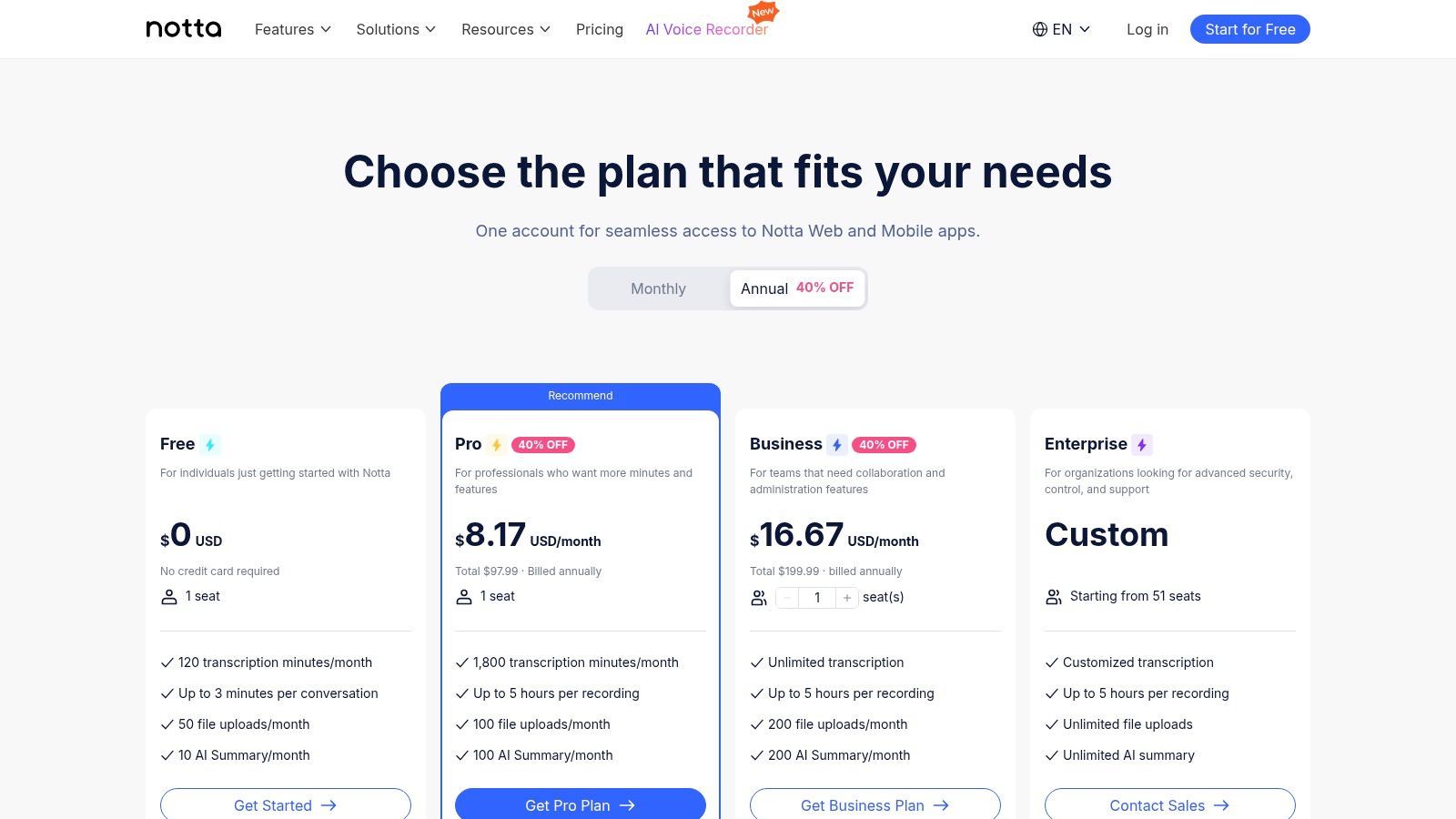
Ce qui distingue Notta, c'est la combinaison de ses fonctionnalités dans le niveau gratuit, y compris l'identification des intervenants, les résumés alimentés par l'IA et une extension de navigateur pratique pour capturer l'audio directement à partir de pages Web. La plateforme prend en charge un large éventail de formats de fichiers et offre même une transcription en temps réel pour les réunions ou événements en cours. Bien que les fonctionnalités avancées comme le vocabulaire personnalisé et les intégrations étendues soient réservées aux niveaux payants, l'offre gratuite est suffisamment robuste pour les étudiants, les créateurs de contenu et les professionnels qui ont besoin d'une transcription fiable pour les réunions, les interviews ou le contenu en ligne.
Caractéristiques Clés et Limitations
| Caractéristique/Limitation | Notta (Plan gratuit) |
|---|---|
| Accès au niveau gratuit | Oui, le plan "Gratuit" est disponible. |
| Limite de transcription | 120 minutes par mois ; 5 minutes par conversation/fichier. |
| Limite d'importation de fichiers | Prend en charge les téléchargements de fichiers vidéo/audio dans la limite de minutes mensuelle. |
| Identification des intervenants | Oui, avec étiquetage automatique. |
| Formats d'exportation | TXT, avec DOCX, SRT et PDF sur les plans payants. |
| Idéal pour | Les utilisateurs ayant besoin d'une allocation mensuelle récurrente pour transcrire de courtes réunions, des interviews et de l'audio Web. |
| Site Web | www.notta.ai/en/pricing |
8. Sonix
Sonix se positionne comme un service de transcription IA premium en libre-service, distingué par son puissant éditeur Web et ses modèles de tarification flexibles. Bien qu'il ne s'agisse pas d'un service perpétuellement gratuit, il offre un modèle d'essai avant achat crucial, offrant à chaque nouvel utilisateur un essai gratuit de 30 minutes. Cela en fait une excellente option pour ceux qui recherchent une transcription vidéo vers texte gratuite de haute qualité pour une seule fois, ou pour les professionnels souhaitant tester un outil robuste avant de s'engager dans un plan payant pour des projets plus importants.
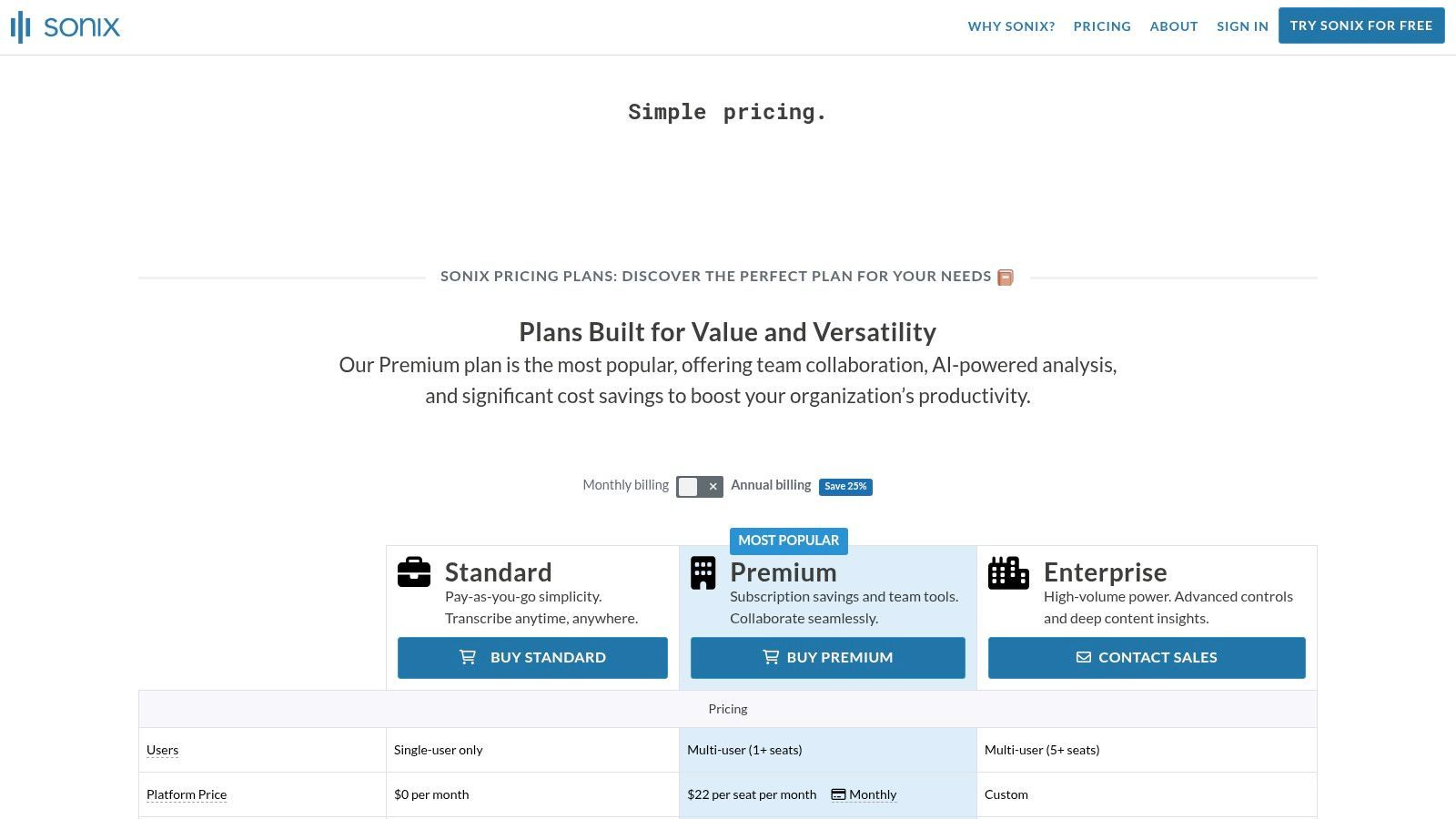
Ce qui distingue Sonix, c'est son accent sur l'édition post-transcription et la flexibilité d'exportation. La plateforme fournit un éditeur interactif épuré où les utilisateurs peuvent facilement corriger la transcription pendant que l'audio est lu en synchronisation. Il prend également en charge de nombreux formats d'exportation de sous-titres comme SRT et VTT, ce qui constitue un avantage significatif pour les créateurs vidéo et les spécialistes du marketing. La combinaison d'un essai généreux, d'une prise en charge multilingue et d'un éditeur de qualité professionnelle en fait un choix de premier ordre pour les utilisateurs qui prévoient d'avoir besoin de plus qu'un simple fichier texte.
Caractéristiques Clés et Limitations
| Caractéristique/Limitation | Sonix (Essai gratuit) |
|---|---|
| Accès au niveau gratuit | Oui, un essai gratuit unique de 30 minutes pour les nouveaux utilisateurs. |
| Limite de transcription | 30 minutes au total (une seule fois). |
| Limite d'importation de fichiers | Aucune limite spécifique dans l'allocation d'essai de 30 minutes. |
| Identification des intervenants | Oui, avec diarisation des intervenants. |
| Formats d'exportation | TXT, DOCX, PDF, SRT, VTT. |
| Idéal pour | Les créateurs vidéo et les podcasteurs ayant besoin de transcriptions précises et de fichiers de sous-titres pour un projet unique ou pour tester un outil premium. |
| Site Web | sonix.ai/pricing |
9. Happy Scribe
Happy Scribe est une plateforme complète de transcription et de sous-titrage qui comble le fossé entre l'IA automatisée et les services professionnels humains. Bien qu'il ne s'agisse pas d'un outil permanent gratuit, son essai gratuit offre une opportunité précieuse aux utilisateurs de tester une transcription vidéo vers texte gratuite de haute qualité. Il est particulièrement adapté aux créateurs et aux équipes qui pourraient commencer par l'IA et avoir plus tard besoin d'une précision perfectionnée par un humain pour le même projet.
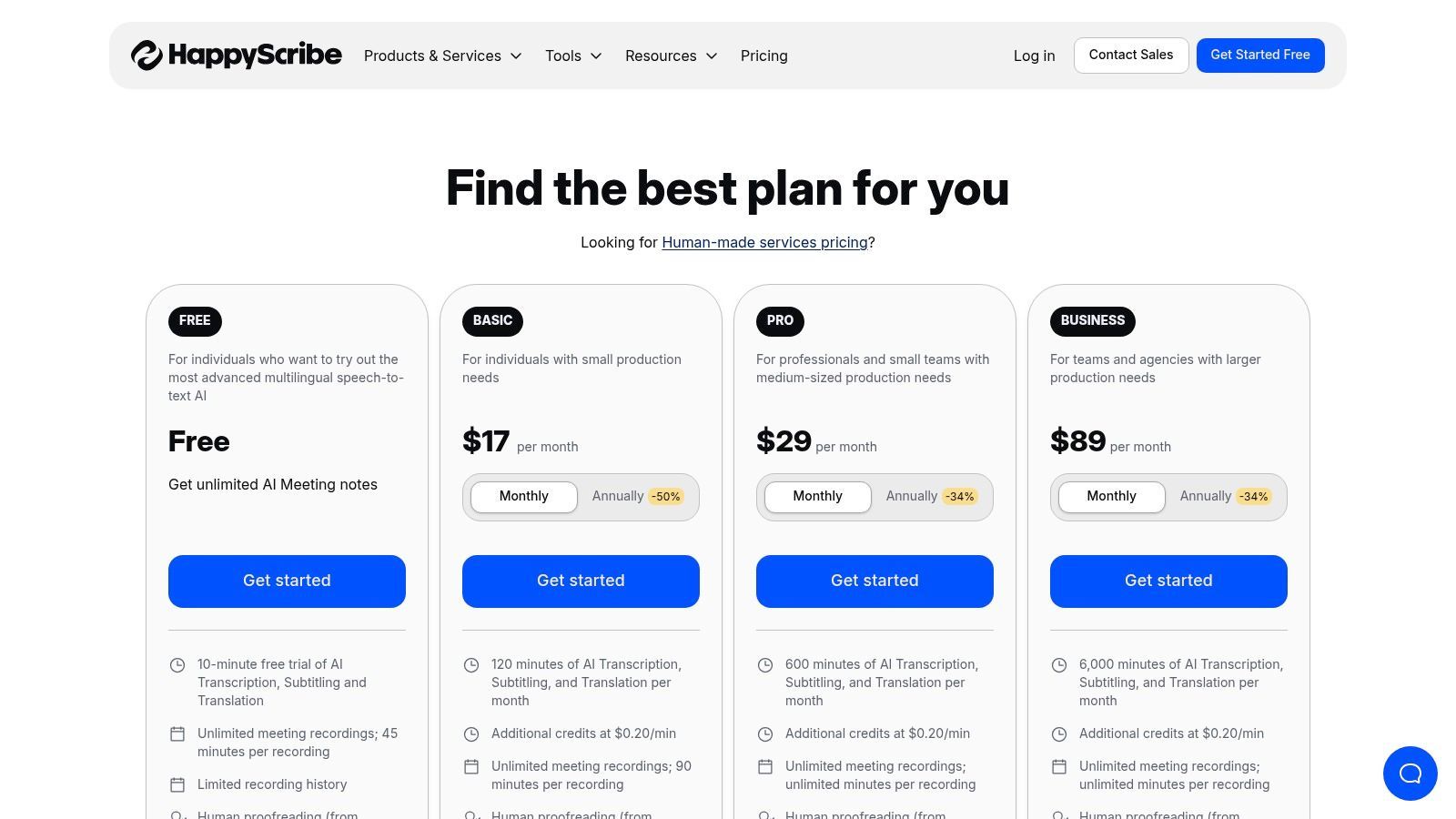
Ce qui distingue Happy Scribe, c'est son flux de travail transparent de l'IA à la révision humaine et ses capacités d'intégration étendues. Les utilisateurs peuvent connecter leurs comptes YouTube, Vimeo ou de stockage cloud (comme Google Drive et Dropbox) pour des importations de fichiers faciles. La plateforme prend également en charge un large éventail de formats d'exportation pour les transcriptions et les sous-titres, ce qui en fait un choix flexible pour les professionnels du contenu qui ont besoin de réutiliser leur contenu vidéo sur différents supports. Cela en fait un excellent guichet unique pour les besoins de transcription, de sous-titrage et de traduction.
Caractéristiques Clés et Limitations
| Caractéristique/Limitation | Happy Scribe (Essai gratuit) |
|---|---|
| Accès au niveau gratuit | Oui, un essai gratuit est disponible lors de l'inscription. |
| Limite de transcription | Un nombre limité de minutes gratuites (généralement moins de 10) pour tester le service. |
| Limite d'importation de fichiers | Aucune limite spécifique sur le nombre de fichiers pendant l'essai, juste un plafond de minutes. |
| Identification des intervenants | Oui, avec horodatage et étiquettes d'intervenants. |
| Formats d'exportation | Étendus, y compris TXT, DOCX, PDF, SRT, VTT, et plus encore. |
| Idéal pour | Les créateurs et les équipes ayant besoin d'un chemin flexible de transcription IA rapide à une précision payante et perfectionnée par un humain. |
| Site Web | happyscribe.com/pricing |
10. YouTube Studio (Légendes automatiques)
Pour les créateurs de contenu qui publient déjà sur YouTube, la fonctionnalité de légendes automatiques intégrée de la plateforme offre une méthode native et entièrement gratuite pour la transcription vidéo. Bien qu'il ne s'agisse pas d'un service de transcription dédié, c'est un outil puissant intégré directement dans le flux de travail du créateur. En téléchargeant une vidéo (même en mode privé ou non répertorié), les créateurs peuvent exploiter la technologie de reconnaissance vocale de Google pour générer une transcription horodatée gratuitement, ce qui en fait une option très pratique pour la transcription vidéo vers texte gratuite.
Avertissement de précision pour les légendes générées automatiquement
Les légendes automatiques doivent être considérées comme un point de départ. Le bruit de fond, les accents et les termes techniques peuvent réduire considérablement la précision, une révision manuelle ou un affinement par IA est donc fortement recommandé avant la publication ou la réutilisation.
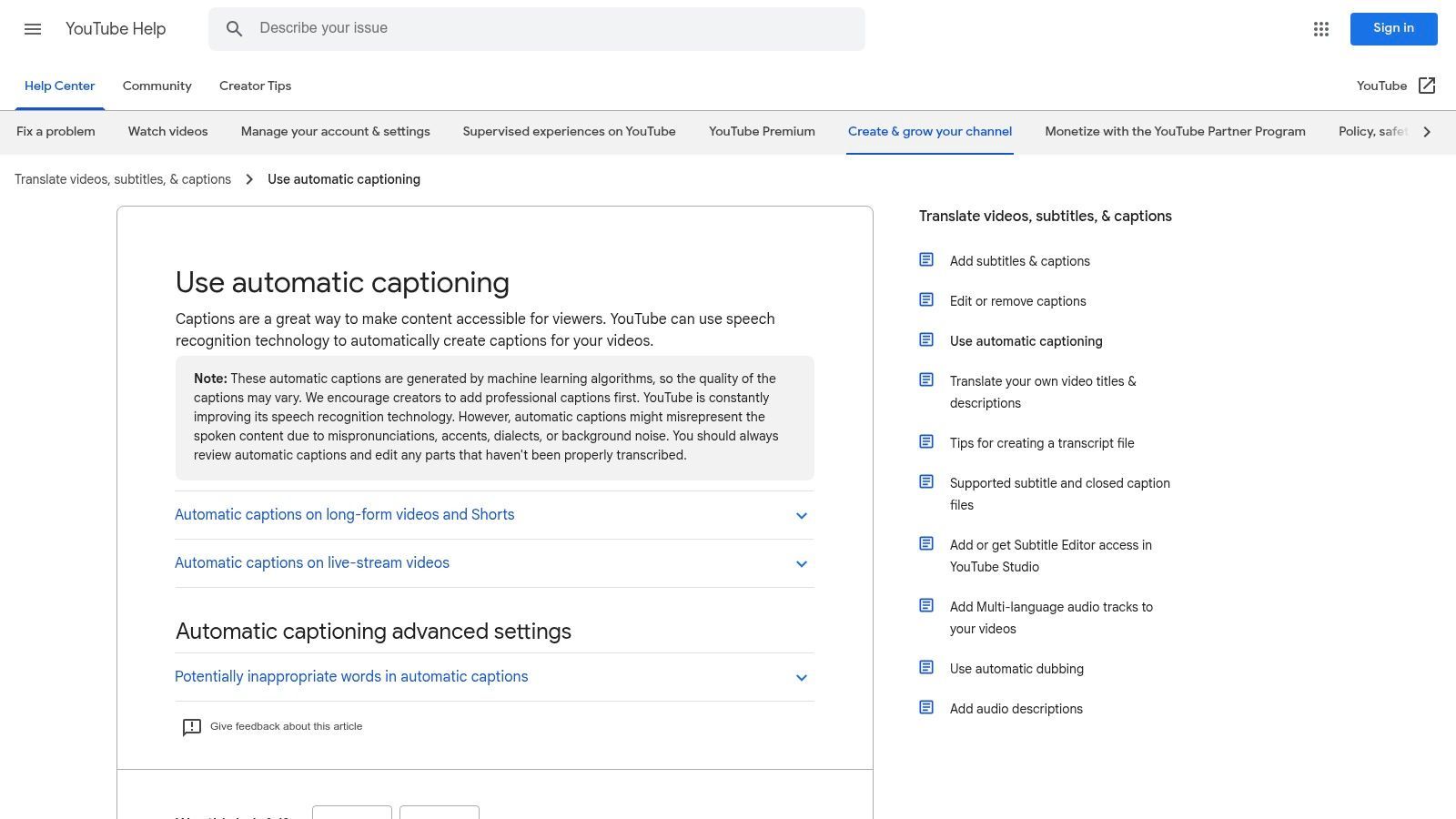
Ce qui distingue YouTube Studio, c'est sa commodité et son accessibilité. Le processus est simple : téléchargez votre vidéo, et YouTube la traite et génère automatiquement des sous-titres. Vous pouvez ensuite accéder à la transcription complète, la modifier pour en assurer l'exactitude dans l'éditeur Studio, et exporter le fichier. Cela en fait une excellente base pour créer des sous-titres, des brouillons d'articles de blog ou des notes d'émission. Bien que les sous-titres améliorent l'accessibilité, il est également crucial d'apprendre comment trouver et corriger les sous-titres vidéo qui nuisent à l'engagement pour maximiser leur impact. Pour un guide plus détaillé, vous pouvez en apprendre davantage sur la façon de transcrire des vidéos YouTube en texte.
Caractéristiques clés et limitations
| Caractéristique/Limitation | YouTube Studio (Sous-titres automatiques) |
|---|---|
| Accès au niveau gratuit | Oui, entièrement gratuit avec un compte YouTube. |
| Limite de transcription | Aucune limite explicite ; liée aux téléchargements de vidéos. |
| Limite d'importation de fichiers | Basée sur les limites standard de téléchargement de vidéos de YouTube. |
| Identification du locuteur | Non, ne différencie pas les locuteurs. |
| Formats d'exportation | SRT (SubRip Subtitle), VTT (WebVTT), SBV (SubViewer). |
| Idéal pour | Les créateurs de contenu ayant besoin d'un moyen gratuit et intégré pour générer des sous-titres et une transcription de base à partir de leurs vidéos téléchargées. |
| Site Web | support.google.com/youtube/answer/6373554 |
11. Google Cloud Speech-to-Text
Google Cloud Speech-to-Text n'est pas une application destinée au grand public, mais une API puissante de niveau développeur qui sous-tend de nombreux services de transcription. Bien qu'elle nécessite des connaissances techniques pour être utilisée, c'est une option fantastique pour ceux qui ont besoin d'intégrer des capacités de transcription vidéo vers texte gratuite dans leurs propres applications ou flux de travail. Son principal attrait est son généreux niveau gratuit, qui offre une allocation mensuelle de minutes de transcription, ce qui le rend très rentable pour les développeurs et les projets à petite échelle.
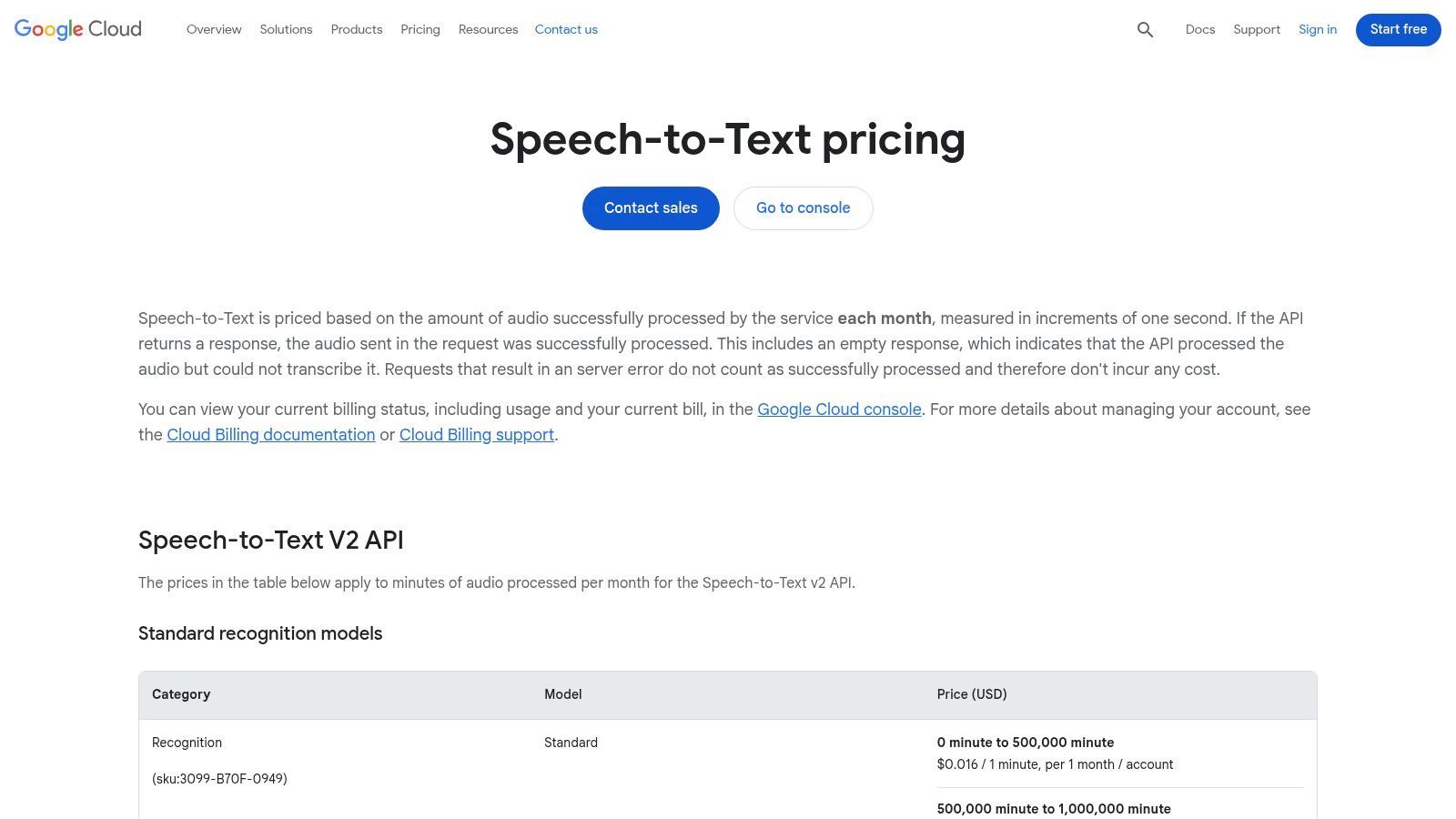
Ce qui distingue vraiment l'API de Google, c'est sa variété de modèles et son évolutivité. Les utilisateurs peuvent choisir parmi des modèles spécialisés optimisés pour différents types d'audio, y compris un modèle "vidéo" conçu pour le contenu multi-locuteurs. Cette précision et cette flexibilité de niveau entreprise, combinées à sa tarification à l'utilisation après le niveau gratuit, en font un moteur incroyablement puissant pour quiconque est à l'aise avec les API. Il permet le traitement par lots de fichiers volumineux stockés dans Google Cloud Storage et prend en charge un grand nombre de langues.
Caractéristiques clés et limitations
| Caractéristique/Limitation | Google Cloud Speech-to-Text |
|---|---|
| Accès au niveau gratuit | Oui, 60 minutes gratuites par mois pour les modèles standard. |
| Limite de transcription | 60 minutes/mois gratuites ; facturation détaillée à la minute après cela. |
| Limite d'importation de fichiers | Aucune limite stricte, mais dépend de votre configuration Google Cloud Storage. |
| Identification du locuteur | Oui, disponible via la fonctionnalité de diarisation des locuteurs. |
| Formats d'exportation | L'API renvoie les données au format JSON pour que les développeurs les traitent. |
| Idéal pour | Les développeurs, les entreprises et les utilisateurs technophiles intégrant la transcription dans des applications ou des flux de travail personnalisés. |
| Site Web | cloud.google.com/speech-to-text/pricing |
12. Amazon Transcribe (AWS)
Amazon Transcribe est un service entièrement géré de niveau entreprise d'Amazon Web Services (AWS) qui offre une transcription par lots et en flux puissant. Bien qu'il s'agisse principalement d'un outil payant pour les développeurs et les entreprises, il comprend un niveau gratuit AWS, ce qui en fait une option viable pour ceux qui ont besoin d'une transcription vidéo vers texte gratuite de haute qualité et occasionnelle. Il est idéal pour les utilisateurs déjà dans l'écosystème AWS ou ceux qui ont besoin de fonctionnalités avancées pour des projets spécifiques.
Ce qui distingue Amazon Transcribe, c'est son intégration profonde avec d'autres services AWS et son orientation vers des fonctionnalités de niveau production. Le service offre des capacités avancées telles que la suppression des informations personnellement identifiables (PII), la diarisation des locuteurs (identification des canaux) et la possibilité de créer des modèles linguistiques personnalisés pour améliorer la précision pour des vocabulaires spécifiques. Cela en fait un choix puissant, bien que complexe, pour les utilisateurs techniques qui ont besoin de plus qu'un simple convertisseur basé sur le Web et qui sont à l'aise pour naviguer dans la console AWS et la gestion de la facturation.
Caractéristiques clés et limitations
| Caractéristique/Limitation | Amazon Transcribe (Niveau gratuit AWS) |
|---|---|
| Accès au niveau gratuit | Oui, inclus dans le niveau gratuit AWS. |
| Limite de transcription | 60 minutes par mois pendant les 12 premiers mois. |
| Limite d'importation de fichiers | Aucune limite de fichier spécifique, mais liée au plafond mensuel de 60 minutes. |
| Identification du locuteur | Oui, prend en charge la diarisation des locuteurs. |
| Formats d'exportation | JSON est la sortie standard, qui peut être analysée dans d'autres formats. |
| Idéal pour | Les développeurs, les entreprises et les utilisateurs techniques ayant besoin de fonctionnalités avancées telles que la suppression des PII et les vocabulaires personnalisés. |
| Site Web | aws.amazon.com/transcribe/pricing/ |
Comparaison des 12 outils gratuits de transcription vidéo vers texte
| Produit | Fonctionnalités principales | Qualité (★) | Valeur / Prix (💰) | Public cible (👥) | Points de vente uniques (✨) |
|---|---|---|---|---|---|
| Transcript.LOL 🏆 | IA basée sur Whisper, 10h/5Go de téléchargements, importation multi-sources, étiquetage des locuteurs, exportation multi-formats | ★4.8/5 (revendiqué 99.8% sur le site) | 💰 Niveau gratuit ; Illimité 120 $/an ; Équipe 240 $/an (2 utilisateurs) | 👥 Podcasteurs, créateurs, spécialistes du marketing, équipes, chercheurs, juristes/professionnels de la santé | ✨ Confidentialité avant tout (pas d'entraînement), résumés/quiz/cartes mentales automatiques, larges intégrations |
| Otter.ai | Enregistreur de réunion en direct, identification du locuteur, applications mobiles et Chrome, transcriptions consultables | ★4.4/5 | 💰 Minutes gratuites généreuses ; plans payants pour les fonctionnalités avancées | 👥 Travailleurs du savoir, équipes axées sur les réunions | ✨ Intégrations fluides avec le calendrier/les réunions, sous-titres en direct |
| Rev | IA + option de mise à niveau vers la transcription humaine, éditeur de sous-titres, SLA clairs | ★4.3/5 (humain 99%) | 💰 Minutes IA gratuites ; paiement à la minute pour l'humain (premium) | 👥 Utilisateurs ayant besoin d'une précision quasi parfaite, équipes médias | ✨ Escalade transparente IA→humain, tarification transparente |
| Descript | Édition audio/vidéo basée sur le texte, détection des locuteurs, suppression des mots de remplissage, sous-titres | ★4.5/5 | 💰 Minutes limitées gratuites ; niveaux Creator/Pro avec plus de minutes médias | 👥 Créateurs, podcasteurs, monteurs vidéo | ✨ Éditer la vidéo en éditant le texte, outils audio/vidéo intégrés |
| VEED | Éditeur dans le navigateur, sous-titres/traductions automatiques, style de sous-titres, modèles sociaux | ★4.1/5 | 💰 Gratuit pour les clips courts ; payant supprime le filigrane et augmente les limites | 👥 Créateurs de vidéos sociales, spécialistes du marketing | ✨ Style rapide des sous-titres, modèles sociaux dans le navigateur |
| Kapwing | Sous-titres et traduction automatiques, utilisation basée sur des crédits, outils de collaboration | ★4.0/5 | 💰 Basé sur des crédits ; plan gratuit avec filigrane, Pro pour plus de crédits | 👥 Créateurs axés sur les réseaux sociaux, petites équipes | ✨ Modèle minutes→crédits prévisible, flux de travail sociaux faciles |
| Notta | Transcription de fichiers et de réunions en direct, identification du locuteur, résumés, traductions | ★4.2/5 | 💰 Environ 120 minutes/mois gratuites ; niveaux payants pour des limites plus élevées et un vocabulaire personnalisé | 👥 Utilisateurs de capture de réunions, équipes bilingues | ✨ Allocation gratuite généreuse, extensions de navigateur |
| Sonix | Éditeur web avec horodatages, diarisation, exportations de sous-titres, accès API | ★4.3/5 | 💰 Essai gratuit de 30 minutes ; paiement à l'utilisation ou abonnements | 👥 Utilisateurs de transcription en masse, équipes de localisation | ✨ Essai avant achat, tarification flexible pour le volume |
| Happy Scribe | IA + relecture humaine, nombreux formats d'exportation, intégrations cloud | ★4.2/5 | 💰 Minutes d'essai gratuites ; paiement à la minute par la suite ; humain en supplément | 👥 Créateurs et équipes ayant besoin d'une précision flexible | ✨ Chemin facile IA→relecture humaine, larges intégrations |
| YouTube Studio (Sous-titres automatiques) | Sous-titres automatiques sur les téléchargements, édition dans Studio, options d'exportation | ★3.8/5 | 💰 💰 Gratuit (nécessite le téléchargement sur YouTube) | 👥 Créateurs publiant déjà sur YouTube | ✨ Base de référence sans coût pour les sous-titres, intégré au flux de travail du créateur |
| Google Cloud Speech-to-Text | API développeur, plusieurs modèles (vidéo/téléphone/long), par lots et en flux | ★4.4/5 | 💰 API à l'utilisation ; allocations mensuelles gratuites sur certains modèles | 👥 Développeurs, entreprises construisant des pipelines personnalisés | ✨ API évolutive, plusieurs modèles spécialisés, facturation détaillée |
| Amazon Transcribe (AWS) | Par lots et en flux, suppression des PII, identification des canaux, modèles personnalisés | ★4.4/5 | 💰 Paiement à l'utilisation ; tarification d'entreprise via AWS | 👥 Entreprises, pipelines de production axés sur la conformité | ✨ Fonctionnalités d'entreprise (suppression des PII), intégration AWS approfondie |
| VEED (doublon) | Sous-titres automatiques, traductions, style de sous-titres | ★4.1/5 | 💰 Clips gratuits ; payant pour supprimer le filigrane | 👥 Créateurs sociaux | ✨ Style rapide dans le navigateur |
Choisir le bon outil de transcription gratuit pour vos besoins
Naviguer dans le paysage des outils de transcription vidéo vers texte gratuits révèle une vérité puissante : il n'existe pas une seule option "meilleure", mais seulement la meilleure option pour votre tâche spécifique. Comme nous l'avons exploré, le bon choix dépend entièrement de vos priorités, de votre flux de travail et de la nature de votre contenu.
La transcription par IA s'améliore rapidement
Les modèles d'IA modernes évoluent rapidement, avec une meilleure détection des locuteurs, une ponctuation et une prise en charge linguistique ajoutées régulièrement. Les outils qui mettent fréquemment à jour leurs modèles donnent des résultats nettement meilleurs au fil du temps.
Le passage d'un fichier vidéo brut à une transcription soignée et utilisable n'est plus une entreprise coûteuse ou longue, grâce à la diversité des solutions disponibles.
L'essentiel est d'aligner les forces de l'outil avec votre objectif principal. Les besoins d'un podcasteur sont fondamentalement différents de ceux d'un étudiant, tout comme les exigences d'un marketeur divergent de celles d'un chercheur. Votre décision doit être calculée, basée sur une compréhension claire de ce que vous devez accomplir.
Cas d'utilisation courants des outils gratuits de transcription vidéo vers texte
Podcasteurs et YouTubers
Transformez de longs enregistrements en notes d'émission, légendes et articles de blog optimisés pour le SEO sans transcription manuelle.
Marketeurs et équipes de contenu
Réutilisez une vidéo en plusieurs formats de contenu tels que des newsletters, des publications LinkedIn et des lead magnets.
Étudiants et éducateurs
Convertissez les conférences et les leçons en notes consultables qui améliorent la révision, la compréhension et l'accessibilité.
Chercheurs et professionnels
Extrayez rapidement des citations, des idées et des éléments d'action d'entretiens, de webinaires et de réunions.
Un bref récapitulatif : choisir l'outil adapté à la tâche
Distillons nos conclusions dans un cadre de prise de décision simple. Considérez ceci comme une liste de contrôle finale pour vous guider dans votre sélection :
- Pour des résumés instantanés et une réponse rapide : Si votre objectif principal est d'extraire les points clés, d'obtenir un aperçu général ou de transcrire un court extrait avec une vitesse maximale, un outil comme l'offre gratuite de Transcript.LOL est idéal. Son orientation vers la synthèse alimentée par l'IA le rend parfait pour digérer rapidement le contenu.
- Pour les réunions collaboratives et la transcription en direct : Les professionnels qui passent leurs journées en réunions Zoom ou Teams trouveront une immense valeur dans Otter.ai. Sa transcription en temps réel et l'identification des intervenants sont spécifiquement conçues pour les environnements collaboratifs.
- Pour le montage vidéo et le réutilisation de contenu : Les créateurs qui souhaitent monter leurs vidéos simplement en éditant le texte trouveront que Descript change la donne. Il réinvente fondamentalement le flux de travail de montage vidéo, le rendant aussi intuitif que l'édition d'un document.
- Pour le contenu YouTube existant : Si vos vidéos sont déjà sur YouTube, l'utilisation des Sous-titres automatiques natifs de la plateforme est la méthode la plus efficace et gratuite. Elle ne nécessite aucun nouveau logiciel et s'intègre parfaitement à votre flux de travail existant.
- Pour les utilisateurs techniques et un contrôle maximal : Les développeurs ou les utilisateurs à l'aise avec une configuration plus technique peuvent obtenir une précision et un contrôle inégalés en exécutant Whisper d'OpenAI localement. Cette approche offre la meilleure confidentialité mais nécessite une courbe d'apprentissage technique significative.
Flux de travail flexibles pour chaque type de contenu

Importer depuis plusieurs sources
Importez des fichiers audio et vidéo depuis diverses sources, y compris le téléchargement direct, Google Drive, Dropbox, les URL, Zoom et plus encore.

Détection des intervenants
Identifiez automatiquement les différents intervenants dans vos enregistrements et étiquetez-les avec leurs noms.

Exporter en plusieurs formats
Exportez vos transcriptions en plusieurs formats dont TXT, DOCX, PDF, SRT et VTT avec des options de formatage personnalisables.
Facteurs Clés à Considérer dans Votre Décision
Au-delà des cas d'utilisation spécifiques, plusieurs facteurs universels devraient influencer votre choix final lorsque vous recherchez une solution de transcription vidéo vers texte gratuite. L'étiquette "gratuit" s'accompagne souvent de compromis, et en être conscient est crucial pour une expérience fluide.
- Précision vs. Vitesse : Certains outils privilégient un traitement rapide, tandis que d'autres prennent plus de temps pour fournir une transcription plus précise. Testez la qualité audio typique de votre contenu sur quelques plateformes pour voir quel moteur gère le mieux vos fichiers.
- Confidentialité et Sécurité des Données : Lors de la transcription d'informations sensibles, la confidentialité est primordiale. Un modèle exécuté localement comme Whisper offre une sécurité complète des données, tandis que les services basés sur le cloud fonctionnent selon leurs propres politiques de confidentialité. Examinez toujours ces politiques avant de télécharger du matériel confidentiel.
- Limitations de Temps et de Minutes : Presque tous les niveaux gratuits imposent des limites, qu'il s'agisse du nombre de minutes que vous pouvez transcrire par mois ou de la durée maximale d'un seul fichier. Évaluez votre volume mensuel pour vous assurer que le plan gratuit est suffisant pour vos besoins continus.
- Formats d'Exportation et Intégrations : Le meilleur outil pour vous est celui qui s'intègre à votre flux de travail existant. Vérifiez si la plateforme peut exporter dans le format dont vous avez besoin (.txt, .srt, .vtt) et si elle s'intègre à d'autres logiciels que vous utilisez régulièrement.
En fin de compte, le pouvoir du choix est entre vos mains. En utilisant ce guide, vous pouvez expérimenter en toute confiance les niveaux gratuits et les essais des outils que nous avons couverts. Testez-les avec vos propres fichiers vidéo, comparez les résultats et découvrez leurs interfaces utilisateur de première main. Cette approche pratique est le moyen le plus efficace de découvrir l'outil parfait qui non seulement convertit votre vidéo en texte gratuitement, mais améliore également votre productivité et libère la valeur cachée de votre contenu.
Prêt à découvrir le moyen le plus rapide et le plus intelligent de transcrire et de résumer votre contenu ? Transcript.LOL offre un puissant niveau gratuit qui transforme vos vidéos en texte précis et en résumés concis alimentés par l'IA en quelques secondes. Arrêtez de parcourir des heures de vidéo et commencez à obtenir les informations dont vous avez besoin instantanément en visitant Transcript.LOL dès aujourd'hui.