
Un guide moderne pour la prise de notes de réunion
Découvrez comment maîtriser la prise de notes de réunion. Notre guide détaille la préparation avant la réunion, la capture en temps réel, les outils d'IA et la transformation des notes en résultats exploitables.
Kate, Praveen
February 7, 2026
Prendre de bonnes notes de réunion ne consiste pas à taper furieusement tout ce que vous entendez. Il s'agit de créer un enregistrement officiel de ce qui a été discuté, de ce qui a été décidé et de qui est responsable des prochaines étapes. Réussir cela transforme une simple tâche administrative en un outil puissant d'alignement et de responsabilisation.
Préparation pour des notes de réunion efficaces
Le secret de la prise de notes de réunion exceptionnelles ? Elles sont préparées bien avant le début de la réunion. Une préparation solide est l'étape la plus importante. C'est ce qui fait la différence entre capturer un compte rendu clair et précis et se retrouver avec un fouillis de notes désordonnées.
Avant toute chose : discutez brièvement avec l'organisateur de la réunion pour clarifier votre rôle. Cherche-t-il un résumé général des décisions clés ? Ou a-t-il besoin d'une transcription détaillée, presque mot pour mot, pour des raisons juridiques ou de conformité ? Connaître les attentes à l'avance déterminera exactement comment vous prendrez des notes.
Obtenez l'ordre du jour et définissez la portée
Votre meilleur allié dans ce processus est l'ordre du jour de la réunion. Un bon ordre du jour est une feuille de route, vous montrant les sujets à venir et vous aidant à structurer vos notes à l'avance. Il vous permet d'anticiper le déroulement de la conversation et de savoir où concentrer votre attention.
Soyons honnêtes : les réunions non préparées sont un tueur de productivité massif. Nous y avons tous participé. Il n'est pas surprenant que 79 % des travailleurs s'accordent à dire qu'un ordre du jour clair rend les réunions plus productives, alors que 64 % des réunions se déroulent sans. Le coût est stupéfiant, entraînant une perte de 399 milliards de dollars aux États-Unis chaque année en temps perdu.
Ce flux de travail simple montre à quel point ces étapes initiales sont critiques.
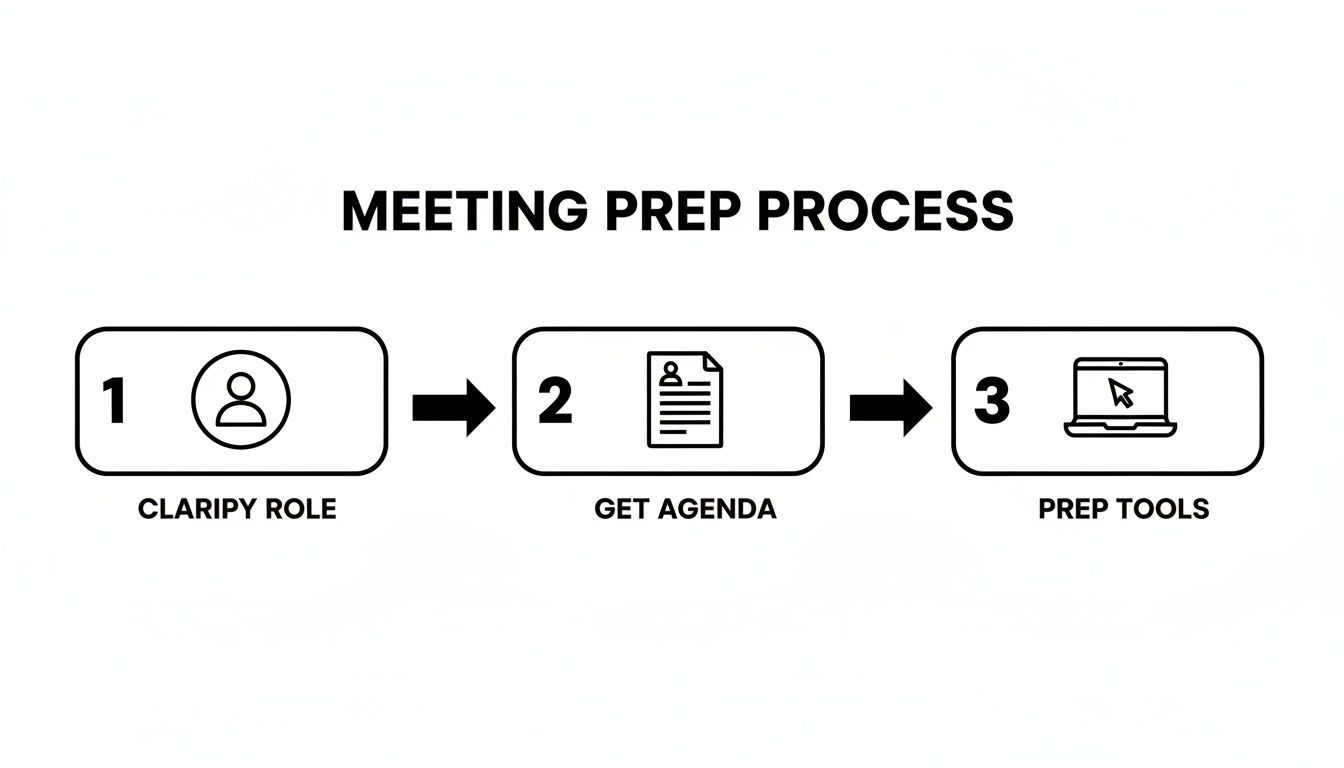
Cela se résume à trois piliers : connaître votre rôle, obtenir l'ordre du jour et avoir vos outils prêts.
Pour vous assurer d'être pleinement préparé, parcourez cette courte liste de contrôle avant chaque réunion.
Liste de contrôle de préparation essentielle avant de prendre des notes
Ce tableau détaille les étapes essentielles avant la réunion qui vous préparent au succès.
| Étape de préparation | Pourquoi c'est important | Astuce pro |
|---|---|---|
| Clarifiez votre rôle | Détermine le niveau de détail requis (résumé vs. verbatim). | Demandez à l'organisateur : "Quel est l'objectif principal de ces notes ? Responsabilisation, archivage ou information générale ?" |
| Obtenez l'ordre du jour | Fournit une structure prête à l'emploi pour vos notes et vous aide à anticiper les sujets. | Si vous ne recevez pas d'ordre du jour au moins 24 heures à l'avance, demandez-le poliment. |
| Préparez votre modèle | Vous évite de vous précipiter pour formater les notes pendant la réunion. | Créez un modèle de base avec des champs pour les participants, la date et les points de l'ordre du jour. Restez simple. |
| Testez vos outils | Garantit que votre technologie (logiciel d'enregistrement, ordinateur portable) fonctionne parfaitement, évitant ainsi les problèmes techniques. | Faites un test d'enregistrement rapide de 30 secondes pour vérifier la qualité audio et la fonctionnalité du logiciel. |
Suivre ces étapes simples élimine les conjectures et vous permet de vous concentrer entièrement sur la conversation.
La préparation multiplie la précision
La plupart des erreurs dans les comptes rendus de réunion ne se produisent pas pendant la réunion – elles sont dues à une mauvaise préparation. Un rôle clair, un ordre du jour et un modèle éliminent 80 % de la confusion avant même que quiconque ne parle. Lorsque la configuration est correcte, la prise de notes devient facile.
Choisissez judicieusement vos outils
Une fois votre rôle et votre ordre du jour réglés, le dernier élément du puzzle est votre boîte à outils. Il peut s'agir d'un stylo et d'un carnet classiques, d'un ordinateur portable avec un modèle pré-établi ou d'un outil moderne de transcription par IA. De nombreuses équipes cherchent maintenant comment utiliser l'IA pour aider à transcrire les réunions, ce qui permet au preneur de notes de se concentrer sur la capture du contexte et des nuances au lieu des simples mots.
Le véritable objectif de la préparation est d'éliminer les frictions pendant la réunion. Lorsque votre modèle est ouvert, votre enregistreur est testé et l'ordre du jour est devant vous, vous pouvez passer de la frappe frénétique à l'écoute active.
🎯 Capacités de transcription de base
IA de pointe
Alimenté par Whisper d'OpenAI pour une précision de premier plan. Prise en charge des vocabulaires personnalisés, des fichiers jusqu'à 10 heures et des résultats ultra rapides.

Importer depuis plusieurs sources
Importez des fichiers audio et vidéo depuis diverses sources, y compris le téléchargement direct, Google Drive, Dropbox, les URL, Zoom et plus encore.

Exporter en plusieurs formats
Exportez vos transcriptions en plusieurs formats dont TXT, DOCX, PDF, SRT et VTT avec des options de formatage personnalisables.
Ce niveau de préparation vous assure d'être non seulement un scribe, mais un atout stratégique pour le succès de la réunion. Pour une plongée plus approfondie dans les mécanismes, ce guide pratique pour maîtriser les comptes rendus de réunion est une ressource fantastique.
Capturer les informations clés pendant la réunion
Une fois la réunion commencée, votre état d'esprit doit passer du mode préparation à la capture active. Votre rôle n'est pas d'écrire chaque mot, c'est le rôle de l'enregistrement et de la transcription. Votre vraie valeur réside dans votre capacité à filtrer le bruit et à identifier ce qui compte vraiment.
C'est là que l'écoute active devient votre superpouvoir. Vous n'entendez pas seulement des mots ; vous écoutez l'intention, les conclusions. Entraînez votre oreille à reconnaître les phrases clés qui signalent un passage de la discussion à la décision, comme « Donc, nous avons convenu que… » ou « L'élément d'action ici est… ». Ce sont vos signaux pour commencer à taper.
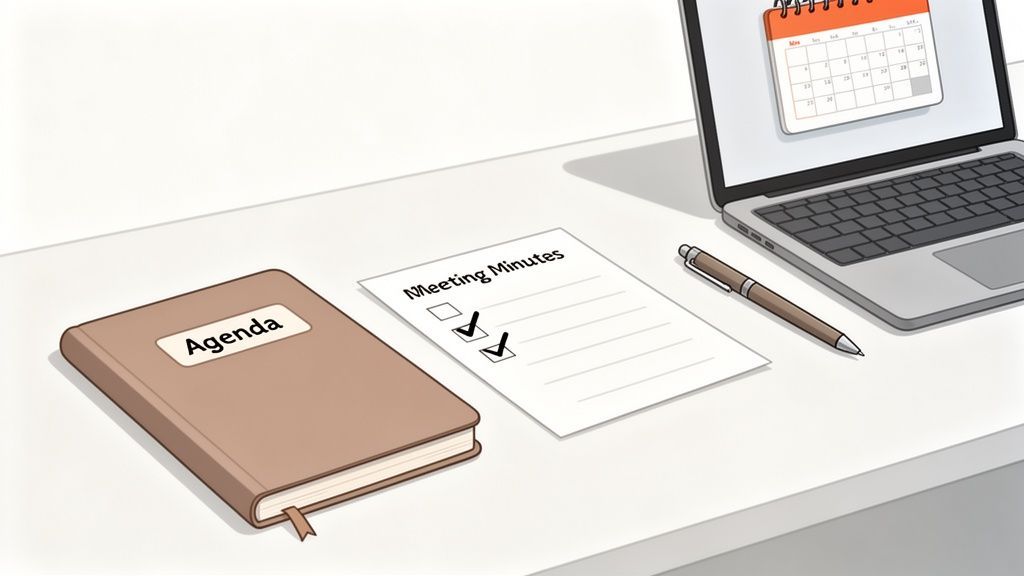
Pensez à un long débat sur le calendrier d'un projet. Votre rôle n'est pas de documenter chaque argument échangé. Au lieu de cela, vous notez le résultat final : « Décision : Le délai du projet est prolongé jusqu'au 31 octobre pour permettre davantage de tests d'assurance qualité. » Vous avez capturé le quoi et le pourquoi, ce qui est tout ce dont quiconque a besoin.
Un cadre pratique pour la prise de notes
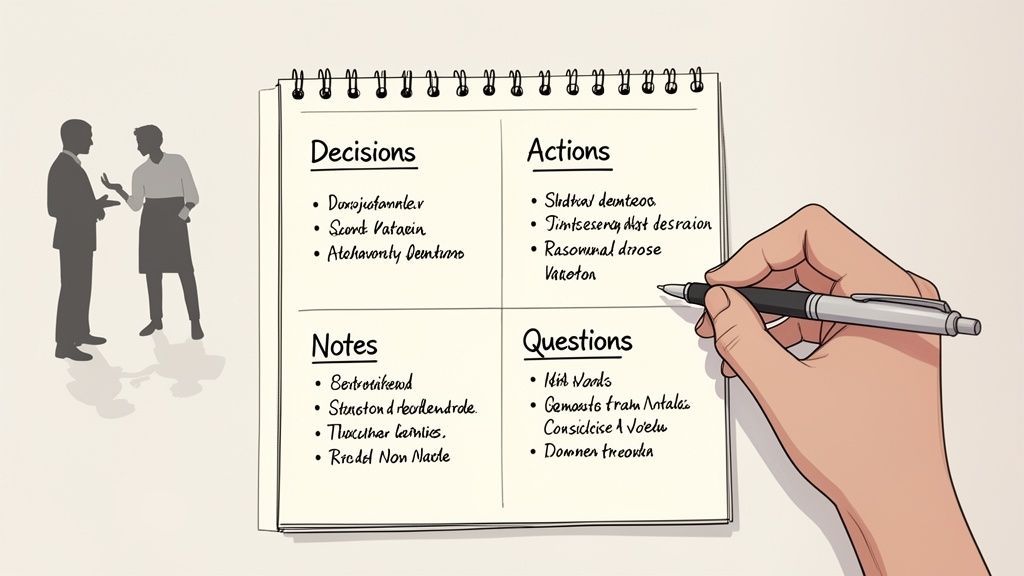
Se lancer sans système est une recette pour un document chaotique et inutilisable. L'une des méthodes les plus efficaces que j'ai trouvées est la Technique des Quadrants. C'est simple : il suffit de diviser votre page ou votre document en quatre sections.
Cette petite astuce vous oblige à catégoriser les informations au fur et à mesure que vous les entendez, ce qui rend le nettoyage de vos notes beaucoup plus facile par la suite. Cela transforme un flux de conscience désordonné en données organisées et utiles.
- Décisions : Ceci est pour les accords finaux et les résolutions. Soyez précis.
- Éléments d'action : Qui fait quoi et quand ? C'est votre suivi de responsabilité.
- Notes générales : Capturez les points de discussion clés, le contexte important ou les statistiques qui ont éclairé une décision.
- Questions : Notez tous les problèmes non résolus ou les sujets qui nécessitent un suivi ultérieur.
Cette structure change la donne. Par exemple, le responsable marketing dit : « Je vous enverrai la copie finale de la publicité d'ici vendredi. » Cela va directement dans le quadrant « Éléments d'action » : EA : Sarah fournira la copie finale de la publicité d'ici vendredi soir. Le tri à la volée permet de gagner énormément de temps.
Pourquoi la plupart des comptes rendus échouent ?
Écrire tout
Essayer de capturer chaque mot vous ralentit et noie les décisions importantes dans le bruit.
Pas de responsables clairs
Les tâches sans nom attaché disparaissent silencieusement après la fin de la réunion.
Distribution tardive
Envoyer les notes des jours plus tard tue l'élan et réduit la responsabilité.
Mise en forme désordonnée
Les paragraphes denses rendent les comptes rendus illisibles, de sorte que les coéquipiers les ignorent simplement.
Une erreur classique est d'essayer de tout capturer. De bonnes minutes sont un résumé des résultats, pas un roman sur la conversation. Votre objectif est un compte rendu qui soit facile à parcourir, utile et qui suscite l'action.
Suivre le rythme de la conversation
Les réunions peuvent se dérouler à un rythme effréné, et il est étonnamment facile de prendre du retard. Un système de sténographie personnel est votre meilleur allié pour suivre sans perdre en précision. Il n'a pas besoin d'être compliqué : la cohérence est ce qui compte vraiment.
Voici quelques symboles simples que vous pouvez commencer à utiliser immédiatement :
- [ ] - Une boîte vide pour un élément d'action.
- D : - Une étiquette rapide pour une décision finale.
- ? - Marque une question ou un point non résolu.
- @ - Utilisez-le avant un nom pour attribuer une responsabilité (@Sarah).
La combinaison de ces techniques est là où la magie opère. La méthode des quadrants vous donne une structure, l'écoute active vous indique quoi écrire, et la sténographie vous donne la vitesse nécessaire pour tout noter. Cette approche triple menace garantit que vos notes brutes sont claires, organisées et prêtes à être peaufinées en un compte rendu officiel que les gens utiliseront réellement.
Utiliser l'IA pour des minutes plus rapides et plus précises
Soyons honnêtes, prendre des minutes de réunion peut sembler une tâche ingrate et stressante. Vous essayez d'écouter, de taper et de comprendre une conversation rapide en même temps. Mais que se passerait-il si vous pouviez obtenir une transcription parfaite, mot pour mot, créée automatiquement pour vous ?
C'est là qu'interviennent les outils d'IA, transformant un processus manuel frénétique en un flux de travail étonnamment simple.
La façon dont les équipes prennent des notes a changé
La saisie manuelle est rapidement remplacée par la transcription automatisée. Les équipes modernes attendent des enregistrements consultables et une documentation instantanée. L'IA devient la norme, pas une amélioration.
Le besoin d'un meilleur système est évident lorsque l'on regarde les chiffres. Les cadres passent désormais près de 23 heures par semaine en réunions, un bond énorme par rapport aux 10 heures des années 1960. Avec 36 à 56 millions de réunions organisées quotidiennement aux États-Unis, les inefficacités s'accumulent pour atteindre des pertes stupéfiantes de 37 milliards de dollars. L'IA est l'un des moyens les plus directs de récupérer cette productivité.
Comment l'IA transforme le processus de prise de notes
La transcription moderne par IA n'est pas juste un mur de texte. C'est un document intelligent et structuré qui résout les plus grands casse-têtes de la prise de notes dès le départ. Pensez aux étiquettes de locuteurs, aux horodatages et à une précision quasi parfaite.
Imaginez un lancement de projet mouvementé avec des designers, des ingénieurs et un client qui interviennent tous. Une transcription par IA donne un sens au chaos :
- Précision mot à mot : Chaque idée, objection et décision est capturée avec précision. Rien ne se perd dans la traduction.
- Identification des locuteurs : La transcription étiquette automatiquement qui a dit quoi, il n'y a donc aucune confusion quant à l'origine d'un commentaire spécifique.
- Enregistrements horodatés : Besoin de vérifier le ton ou le contexte d'une remarque ? Les horodatages vous permettent de cliquer et de sauter directement à ce moment de l'enregistrement.
Ce journal détaillé devient la matière première pour la rédaction de procès-verbaux parfaits. C'est particulièrement puissant lorsque vous maîtrisez la configuration initiale, comme la configuration de la reconnaissance vocale pour gérer l'audio spécifique de vos réunions.
La vraie magie de l'IA n'est pas seulement la transcription. C'est la transformation d'une conversation longue et sinueuse en un compte rendu concis et exploitable. Vous cessez d'être un simple enregistreur et devenez un stratège.
Avec une transcription claire organisée par locuteur et par heure, extraire les informations clés devient presque sans effort.
⚡ Fonctionnalités de productivité

Détection des intervenants
Identifiez automatiquement les différents intervenants dans vos enregistrements et étiquetez-les avec leurs noms.

Outils d'édition
Modifiez les transcriptions avec des outils puissants incluant rechercher et remplacer, attribution des intervenants, formats de texte enrichi et surlignage.
Résumés et Chatbot
Générez des résumés et d'autres analyses de votre transcription, des prompts personnalisés réutilisables et un chatbot pour votre contenu.
De la transcription aux informations exploitables
La transcription brute n'est que votre point de départ. Le véritable gain de temps réside dans ce que vous pouvez en faire. Après avoir téléchargé l'enregistrement de votre réunion, l'IA peut analyser l'intégralité de la conversation et en extraire les éléments les plus importants pour vous.
Ce qui prenait auparavant une heure de relecture et d'organisation prend maintenant quelques secondes. Au lieu de parcourir des pages de notes, vous pouvez laisser l'IA automatiquement :
- Générer un résumé concis : Obtenez un aperçu rapide et général des objectifs et des principaux résultats de la réunion.
- Extraire les points d'action clés : L'IA identifie qui est responsable de quoi, suggérant souvent des délais basés sur ce qui a été dit.
- Créer des cartes mentales thématiques : Obtenez une décomposition visuelle des principaux sujets et de leurs interconnexions.
Cela vous libère pour vous concentrer sur ce que les humains font le mieux : vous assurer que le compte rendu final reflète fidèlement l'esprit et l'intention de la discussion. Vous pouvez explorer comment utiliser ces fonctionnalités dans notre documentation officielle Transcript.LOL. En laissant l'IA gérer la transcription et le résumé, vous obtenez de la précision et récupérez votre temps.
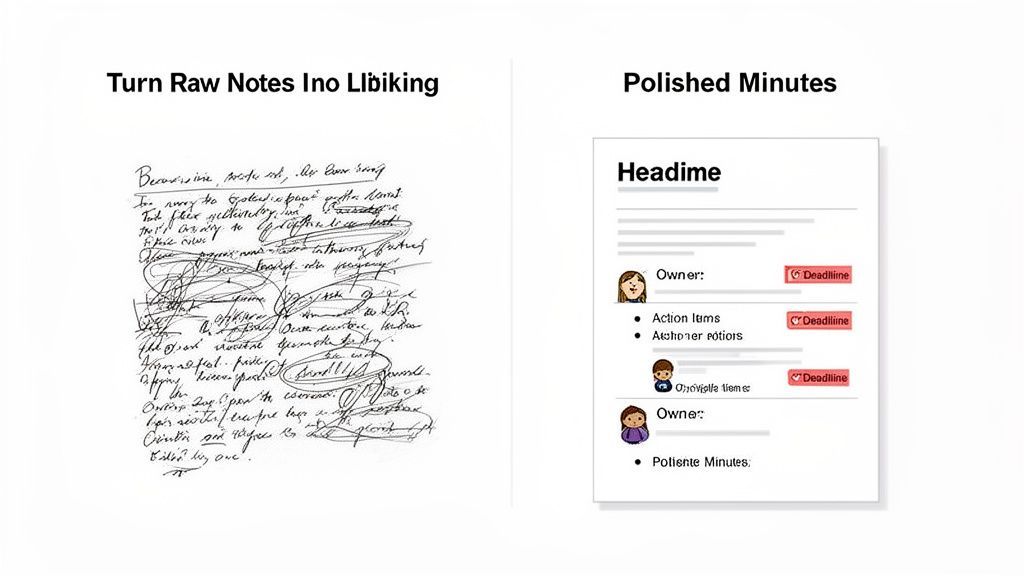
Une fois la réunion terminée, le vrai travail commence. C'est là que vos brouillons désordonnés ou une transcription IA propre sont transformés en un document soigné qui fait réellement avancer les choses. Mon meilleur conseil ? Agissez immédiatement pendant que la conversation est encore fraîche.
L'objectif n'est pas d'écrire un roman. Il s'agit de réduire ce qui aurait pu être une discussion longue et sinueuse en un résumé concis qui respecte le temps de chacun. Considérez le document final comme un outil d'action, et non comme un artefact historique destiné à être enfoui dans un lecteur partagé.
Avec l'explosion du travail à distance, cette compétence n'a jamais été aussi cruciale. Entre 2020 et 2022, les réunions virtuelles sont passées de 48 % à 77 % de toutes les réunions professionnelles. Rien qu'en 2023, Zoom a hébergé un nombre stupéfiant de 3,3 billions de minutes de réunion. Pour les équipes distribuées d'aujourd'hui, un compte rendu clair et concis est le ciment qui maintient le tout ensemble. Vous pouvez approfondir d'autres tendances comme celles-ci dans ce rapport détaillé sur les habitudes de réunion.
Structurer votre compte rendu pour plus de clarté
La première chose que je fais lors de la modification est de donner aux notes une structure claire et facile à parcourir. Abandonnez les paragraphes denses. Utilisez la mise en forme pour que les points clés soient impossibles à manquer. Votre futur vous, et toute votre équipe, vous remercieront.
Ne compliquez pas trop le document
Les longs paragraphes et les détails inutiles rendent les comptes rendus plus difficiles à utiliser. Si quelqu'un ne peut pas le parcourir en moins d'une minute, c'est trop long. La clarté l'emporte toujours sur l'exhaustivité.
J'aime utiliser des titres simples et descriptifs pour chaque point de l'ordre du jour. En dessous, je m'appuie fortement sur des puces et du texte en gras pour attirer l'œil directement sur ce qui compte.
Cette approche signifie que n'importe qui peut saisir l'essentiel de la réunion en moins de deux minutes. L'ensemble de la structure doit être construit autour de trois éléments :
- Décisions prises : Sur quoi avons-nous convenu ?
- Actions assignées : Qui fait quoi, et pour quand ?
- Points de discussion clés : Quel était le contexte essentiel derrière les décisions ?
La marque de fabrique d'un excellent compte rendu de réunion est la clarté et la concision. Si un acteur ne peut pas saisir les principaux résultats en 60 secondes, le document a échoué. Votre travail consiste à traduire la conversation en action, pas seulement à l'enregistrer.
Distiller les notes en éléments d'action
C'est la partie qui crée une réelle responsabilité. Je parcours mes notes ou la transcription avec un seul objectif : trouver chaque tâche qui a été assignée. Pour chacune d'elles, vous devez verrouiller trois informations clés.
Par exemple, une note brute comme "Frank va examiner les chiffres du budget du T3" est beaucoup trop vague. Elle laisse trop de place à l'interprétation.
Un élément d'action correctement peaufiné est une bête tout à fait différente :
- Élément d'action : Frank doit analyser le rapport préliminaire du budget du T3 et identifier les écarts clés.
- Responsable : Frank Miller
- Date limite : Fin de journée, vendredi 25 octobre
Voyez la différence ? Ce niveau de détail élimine toute ambiguïté. Il crée un enregistrement concret qui peut être directement intégré dans un outil de gestion de projet comme Asana ou Trello, garantissant que les décisions que nous avons prises en réunion se traduisent réellement par des progrès. C'est ainsi que vous transformez un simple enregistrement en un moteur de productivité d'équipe.
Diffusion des comptes rendus pour favoriser la responsabilité
Soyons honnêtes : même les comptes rendus de réunion parfaitement rédigés sont inutiles s'ils ne font que prendre la poussière numérique dans un dossier oublié. La vraie magie opère après que vous ayez fini d'écrire. La dernière étape consiste à s'assurer que ces notes suscitent réellement l'action. C'est là que votre documentation soignée se transforme en un outil puissant de responsabilité.
Si vous retenez une chose, faites-en celle-ci : la vitesse est primordiale. Vous devez faire sortir ces comptes rendus dans les 24 heures suivant la fin de la réunion. Cette fenêtre est critique. Le contexte est encore frais dans l'esprit de chacun, et vous n'avez pas perdu l'élan de la discussion.
Choisir les bons canaux de distribution
La manière dont vous partagez les comptes rendus est tout aussi importante que le moment. Bien sûr, vous pouvez simplement envoyer un document par e-mail et considérer que c'est fait, mais c'est une occasion manquée. Intégrer les comptes rendus directement dans le flux de travail de votre équipe est une démarche beaucoup plus intelligente. Lorsque vous les stockez dans un endroit central et consultable, ils deviennent une base de connaissances vivante pour toute l'entreprise.
Pensez au-delà de l'e-mail. Voici quelques canaux qui fonctionnent réellement :
- Outils de gestion de projet : Déposez les comptes rendus directement dans le canal de projet pertinent sur Slack, Asana ou Trello. Cela place l'information exactement là où le travail se déroule.
- Disques partagés : Enregistrez le document final dans un dossier clairement étiqueté sur Google Drive ou OneDrive. Une convention de nommage cohérente comme "NomProjet_ComptesRendus_AAAA-MM-JJ" facilite leur recherche ultérieure.
- Wikis d'équipe : Pour les décisions importantes ou les changements de processus, ajoutez les points clés à Confluence ou Notion de votre entreprise. Cela les solidifie en tant que partie intégrante du dossier officiel.
Votre objectif n'est pas seulement d'informer. Il est de bâtir la responsabilité directement dans la culture de l'équipe. Stocker les comptes rendus là où ils peuvent être facilement consultés envoie un message clair : ce sur quoi nous nous mettons d'accord en réunion est censé être fait.
Ce que de bons comptes rendus apportent réellement
Suivis plus rapides
Les membres de l'équipe commencent les tâches immédiatement car les attentes sont cristallines.
Moins de réunions répétées
Les décisions sont documentées, vous ne perdez donc pas de temps à rediscuter des mêmes sujets.
Responsabilité renforcée
Tout le monde sait exactement ce qu'il possède et quand c'est dû.
Connaissances consultables
Les réunions passées deviennent une bibliothèque de référence au lieu de conversations oubliées.
C'est un problème étonnamment courant. Une enquête récente a révélé que si 86 % des personnes reçoivent des comptes rendus de réunion, seulement 54 % estiment que les actions à entreprendre sont réellement suivies. Combler cet écart, c'est savoir que vous faites les choses correctement. Pour voir comment d'autres équipes s'y prennent, vous pouvez trouver une tonne d'idées dans ces avis clients sur les outils de transcription.
Créer un suivi qui suscite l'action
La dernière pièce du puzzle est le message que vous envoyez avec les comptes rendus. S'il vous plaît, ne vous contentez pas de joindre un fichier et d'appuyer sur envoyer. C'est une recette pour l'inaction. Vous devez mettre en avant les informations les plus critiques : les actions à entreprendre.
Voici un format simple mais incroyablement efficace pour votre e-mail de suivi :
- Résumé rapide : Commencez par une ou deux phrases qui vont droit au but du résultat principal de la réunion.
- Lien vers l'histoire complète : Fournissez un lien clair vers le document complet à son emplacement partagé.
- Mise en avant des actions à entreprendre : C'est la partie la plus importante. Créez un tableau clair ou une liste à puces qui répertorie chaque action à entreprendre, qui en est responsable et quand elle est due.
Cette approche rend impossible pour quiconque de prétendre avoir manqué à ses responsabilités. Elle clôt officiellement la boucle et transforme votre réunion d'une simple discussion en un véritable catalyseur de progrès.
Questions fréquentes sur la prise de notes de réunion
Même les preneurs de notes les plus expérimentés rencontrent des situations délicates. Lorsque vous êtes sous pression, quelques questions courantes semblent toujours surgir. Obtenir des réponses claires à l'avance peut faire la différence entre un compte rendu clair et utile et un document qui ne fait qu'engendrer plus de confusion.
Abordons certaines des questions les plus fréquentes.
Quelle quantité de détails dois-je inclure ?
C'est la question à un million de dollars, et la réponse honnête est : cela dépend entièrement de l'objectif de la réunion. Il n'y a pas de solution unique.
Pour une réunion formelle du conseil d'administration ou tout ce qui a des implications juridiques, vous aurez besoin d'un compte rendu très détaillé qui capture les motions, les secondes et les votes finaux. D'un autre côté, une réunion quotidienne rapide a probablement juste besoin d'une liste à puces rapide des décisions et des actions à entreprendre.
La meilleure chose à faire est toujours de clarifier les attentes avec l'organisateur de la réunion au préalable. Une simple question comme : « Cherchez-vous un résumé de haut niveau ou quelque chose de plus granulaire ? » vous mettra sur la bonne voie.
En règle générale, notez toujours chaque décision finale, chaque action à entreprendre (avec le qui, le quoi et le quand), et les principaux sujets abordés. Vous pouvez omettre en toute sécurité les bavardages conversationnels, les blagues internes ou les digressions qui n'ont pas abouti à un résultat.
Comment gérer les désaccords ou les sujets confidentiels ?
Naviguer dans des territoires sensibles, c'est là qu'un bon preneur de notes brille vraiment. Lorsque des désaccords surviennent, votre travail est de rester complètement objectif. Concentrez-vous sur les faits des différents points de vue, pas sur le langage émotionnel ou les piques personnelles.
Par exemple, au lieu d'écrire : « L'équipe A s'est vraiment échauffée et a rejeté l'idée de l'équipe B », vous énonceriez simplement les faits : « La discussion comprenait deux propositions pour la campagne marketing du T4. La proposition A s'est concentrée sur les publicités numériques, tandis que la proposition B a priorisé la sensibilisation des influenceurs. Le conseil a approuvé la proposition A. »
Pour les sujets confidentiels, la politique de votre entreprise est votre étoile polaire. Parfois, cela signifie simplement noter qu'un problème sensible a été discuté et qu'une décision a été prise, sans entrer dans les détails dans les comptes rendus généraux. Un addendum séparé et confidentiel peut être nécessaire dans certains cas.
En cas de doute, demandez toujours conseil au président de la réunion. Vous trouverez des réponses plus détaillées pour des scénarios spécifiques dans ces FAQ sur la prise de notes.
L'IA peut-elle remplacer complètement un preneur de notes humain ?
C'est la grande question que tout le monde se pose, et la réponse est un retentissant « non ». Les outils d'IA sont brillants pour créer un enregistrement parfait, mot pour mot, de qui a dit quoi, une tâche presque impossible pour un humain en temps réel. Ils gèrent parfaitement le travail fastidieux de transcription.
Mais un humain est toujours essentiel pour comprendre le contexte que l'IA manque. Nous excellons à repérer l'accord tacite, à interpréter l'intention stratégique derrière une décision et à filtrer le bruit pour trouver le véritable signal.
L'approche la plus puissante est un partenariat :
- Laissez l'IA gérer la transcription. Cela garantit une précision de 100 % et libère l'humain de la tâche de taper furieusement chaque mot.
- Laissez l'humain gérer le contexte. Le preneur de notes peut alors se concentrer sur l'observation, l'identification des points clés et s'assurer que les notes finales reflètent l'esprit et l'intention de la réunion, pas seulement les mots prononcés.
Prêt à dynamiser votre prise de notes avec la puissance de l'IA ? Transcript.LOL crée des transcriptions parfaites, avec indication des intervenants, en quelques secondes, afin que vous puissiez vous concentrer sur ce qui compte vraiment. Essayez Transcript.LOL gratuitement dès aujourd'hui !