
Libérez l'assistant de réunion IA pour améliorer vos réunions
Découvrez comment l'assistant de réunion IA stimule la productivité en automatisant les notes, les résumés et les éléments d'action. Apprenez son fonctionnement et choisissez le meilleur.
Praveen
July 9, 2025
Soyons honnêtes, combien de fois êtes-vous sorti d'une réunion pour réaliser que vous étiez tellement occupé à prendre des notes que vous avez manqué une partie essentielle de la conversation ? Ou pire, vous êtes parti avec une idée vague de ce qu'il fallait faire ensuite, mais sans éléments d'action clairs. C'est un problème universel. C'est là qu'intervient un assistant de réunion IA.
Alors, qu'est-ce qu'un assistant de réunion IA, vraiment ?
Considérez-le comme un assistant numérique dédié qui rejoint vos appels sur Zoom ou Google Meet avec une seule mission : gérer tout le travail administratif fastidieux afin que vous puissiez réellement participer à la réunion. Ce n'est pas juste un enregistreur ; c'est un outil intelligent conçu pour capturer, organiser et donner un sens à tout ce qui est dit.
Nous savons tous que les réunions sont essentielles à la collaboration, mais le suivi manuel — déchiffrer des notes griffonnées, essayer de se souvenir qui a accepté quoi, puis tout taper — est un tueur de productivité massif. Un assistant IA vous décharge de tout ce fardeau.
Il écoute toute la conversation et, plus important encore, la comprend.
Capacités fondamentales qui alimentent les assistants de réunion IA
IA de pointe
Alimenté par Whisper d'OpenAI pour une précision de premier plan. Prise en charge des vocabulaires personnalisés, des fichiers jusqu'à 10 heures et des résultats ultra rapides.

Détection des intervenants
Identifiez automatiquement les différents intervenants dans vos enregistrements et étiquetez-les avec leurs noms.
Résumés et Chatbot
Générez des résumés et d'autres analyses de votre transcription, des prompts personnalisés réutilisables et un chatbot pour votre contenu.
C'est plus que de la simple prise de notes
C'est là que les choses deviennent intéressantes. La vraie magie ne réside pas seulement dans l'enregistrement ; elle réside dans la capacité de l'IA à transformer une conversation fluide et désordonnée en informations structurées et exploitables. Elle fait ce qu'aucun preneur de notes humain ne pourrait jamais faire en temps réel.
Voici ce que vous obtenez :
- Transcriptions verbatim : Un enregistrement textuel complet, mot pour mot, de la réunion. Fini le "Je pense qu'elle a dit..."
- Identification des intervenants : La transcription indique clairement qui a dit quoi, ajoutant un contexte crucial.
- Résumés automatisés : Un aperçu rapide et digestible des points clés, des décisions et des résultats.
- Détection des éléments d'action : Une liste claire des tâches, automatiquement identifiées et attribuées à la bonne personne.
Ce n'est pas une petite modification de votre flux de travail ; c'est une refonte totale. Le marché de ces outils a explosé, atteignant une valeur de 2,76 milliards de dollars américains au niveau mondial, selon Intel Market Research. C'est un signe clair que les équipes distantes et hybrides en ont assez du travail fastidieux des réunions.
Pour voir à quel point cela fait une différence, comparons l'ancienne méthode et la nouvelle.
Prise de notes manuelle vs Assistant de réunion IA
Ce tableau détaille la perte de temps de la documentation traditionnelle des réunions par rapport à l'efficacité de laisser une IA s'en charger. Les chiffres parlent d'eux-mêmes.
| Tâche | Processus manuel (Temps moyen) | Avec un assistant IA (Temps moyen) | Bénéfice clé |
|---|---|---|---|
| Pendant la réunion | Prise de notes constante et attention divisée | 0 minute (concentration totale sur la conversation) | Engagement accru et meilleure participation |
| Transcription post-réunion | 30-60 minutes par heure de réunion | 2-5 minutes (automatisé et instantané) | Énormes gains de temps et enregistrement immédiat |
| Résumé et éléments d'action | 15-30 minutes (relecture des notes) | 1 minute (généré par l'IA) | Suivi plus rapide et responsabilité claire |
| Partage et suivi | 10-15 minutes (saisie et envoi d'e-mails) | 1 minute (partage de lien ou envoi automatique) | Distribution rapide des informations |
Le contraste est frappant. Vous ne gagnez pas seulement une heure ou deux ; vous changez fondamentalement la façon dont vous opérez après un appel, éliminant les frictions et les retards.
Récupérez votre temps et votre concentration
En fin de compte, un assistant de réunion IA ne concerne qu'une seule chose : vous libérer de la routine administrative. Il garantit qu'aucun détail crucial n'est perdu et que chaque décision est clairement documentée et consultable.
En prenant en charge la tâche ardue de capturer et d'organiser les informations, ces outils permettent aux équipes de concentrer leur énergie mentale sur la résolution créative de problèmes et les discussions stratégiques plutôt que sur la prise de notes frénétique.
Cela ne vous fait pas seulement gagner des heures ; cela conduit à des réunions plus efficaces et améliore la productivité de l'équipe dans son ensemble. En adoptant cette technologie, vous transformez chaque réunion d'un moment fugace en un atout permanent et précieux pour l'ensemble de votre organisation.
Comment fonctionnent réellement les assistants de réunion IA
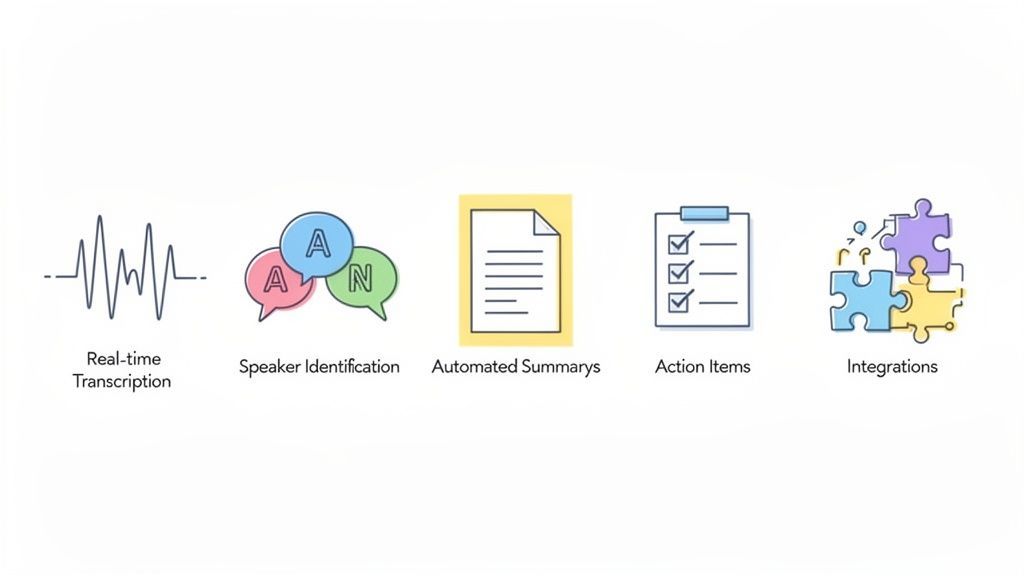
Un assistant de réunion IA peut sembler magique, mais il s'agit en réalité d'une combinaison intelligente de technologies qui fonctionnent ensemble en coulisses. Pensez-y comme à un orchestre très compétent, où chaque composant joue un rôle essentiel pour transformer une conversation désordonnée en un enregistrement parfaitement organisé.
Au cœur du système se trouvent des algorithmes avancés entraînés sur d'énormes quantités de données linguistiques. Cet entraînement lui permet de faire plus que simplement "entendre" des mots : il comprend le contexte, repère les modèles et peut même identifier qui parle.
Levons le voile et voyons comment chaque pièce du puzzle fonctionne.
Transcription en temps réel
Le fondement absolu de tout assistant de réunion IA est sa capacité à transformer les mots parlés en texte écrit au fur et à mesure que la conversation se déroule. Cette conversion parole-texte s'apparente à avoir un sténographe dans votre réunion, capturant chaque mot en temps réel.
Mais ce n'est pas juste un fichier audio basique. C'est une transcription verbatim entièrement consultable de toute la discussion. La précision est primordiale ici, car toutes les autres fonctionnalités en dépendent. Heureusement, les outils modernes sont incroyablement précis. Si vous êtes curieux de savoir ce qui distingue le bon du très bon, vous pouvez approfondir les détails de ce qui rend la précision de la parole au texte exceptionnelle.
Ce texte brut devient la base de toutes les informations puissantes que l'IA génère par la suite.
Identification des intervenants
Une transcription sans savoir qui a dit quoi n'est qu'un mur de texte. C'est là qu'intervient l'identification des intervenants, et c'est un atout majeur. L'IA écoute les caractéristiques vocales uniques – hauteur, ton et rythme – pour créer une "empreinte vocale" distincte pour chaque personne présente à l'appel.
Une fois qu'elle a déterminé qui est qui, elle peut étiqueter proprement toute la conversation.
- Chef de produit : "Quel a été le retour des clients sur la nouvelle fonctionnalité ?"
- Ingénieur principal : "Les utilisateurs signalent une augmentation de 15 % de la vitesse, mais certains sont confus par l'interface utilisateur."
- Designer UX : "Je peux créer une nouvelle maquette pour résoudre le problème de l'interface utilisateur d'ici vendredi."
Soudain, il n'y a plus de devinettes sur qui s'est engagé à quoi. L'enregistrement est limpide.
Résumés automatisés et informations clés
Personne ne veut lire une transcription d'une heure juste pour trouver les points principaux. C'est là que la véritable intelligence de l'IA brille. En utilisant le traitement du langage naturel (NLP), l'assistant analyse la transcription complète pour extraire les thèmes, les décisions et les résultats les plus importants.
Il condense ensuite toutes ces informations en un résumé court et facile à digérer.
L'IA ne se contente pas de saisir des phrases aléatoires. Elle est entraînée à reconnaître les indices conversationnels qui signalent l'importance – des choses comme les sujets répétés, les phrases concluant une décision ("Donc, nous avons convenu de...") ou les questions qui mènent directement à des décisions.
Cela signifie qu'un manager occupé peut avoir l'essentiel d'une réunion entière en deux minutes chrono, sans jamais toucher à la transcription complète. C'est le gain de temps ultime.
Détection des éléments d'action et des décisions
Au-delà d'un simple résumé, un excellent assistant de réunion IA est un maître dans la détection des engagements spécifiques. L'IA est entraînée à repérer les modèles linguistiques qui signifient clairement "tâche" ou "décision".
Elle écoute activement les phrases comme :
- "Je vais donner suite à cela..."
- "La prochaine étape est de..."
- "Pouvez-vous envoyer le rapport avant..."
- "Nous avons décidé d'aller de l'avant avec..."
L'outil extrait ensuite ces phrases, les attribue à la personne qui les a dites et organise le tout en une liste de tâches claire. Cette étape simple et automatisée résout complètement le problème ancestral des éléments d'action qui se perdent dans des notes désordonnées.
Conçu pour les flux de travail d'équipe du monde réel

Importer depuis plusieurs sources
Importez des fichiers audio et vidéo depuis diverses sources, y compris le téléchargement direct, Google Drive, Dropbox, les URL, Zoom et plus encore.

Outils d'édition
Modifiez les transcriptions avec des outils puissants incluant rechercher et remplacer, attribution des intervenants, formats de texte enrichi et surlignage.

Exporter en plusieurs formats
Exportez vos transcriptions en plusieurs formats dont TXT, DOCX, PDF, SRT et VTT avec des options de formatage personnalisables.
Intégrations
Connectez-vous à vos outils et plateformes préférés pour optimiser votre flux de travail de transcription.
Intégrations transparentes de plateformes
Enfin, un assistant de réunion IA ne devrait pas être un silo. Sa véritable valeur est débloquée lorsqu'il se connecte aux autres outils sur lesquels votre équipe s'appuie chaque jour. Les intégrations avec des plateformes comme Slack, Zapier ou le CRM de votre entreprise sont essentielles.
Cette connectivité transforme les informations de vos réunions en actions immédiates. Par exemple, un élément d'action d'un appel Zoom peut apparaître instantanément comme une nouvelle tâche dans votre logiciel de gestion de projet. Un excellent exemple de ceci dans la pratique peut être vu dans ce guide de Microsoft AI Copilot, qui montre comment un assistant IA peut s'intégrer à vos outils quotidiens.
Ces connexions garantissent que le résultat précieux de vos réunions ne reste pas inactif, mais s'intègre directement dans le flux de travail de votre équipe.
Utilisations concrètes pour différents professionnels
Un assistant de réunion IA n'est pas un outil universel. Son véritable pouvoir prend vie lorsque vous voyez comment il s'adapte aux besoins spécifiques de différents rôles. C'est un peu comme un caméléon, changeant sa fonction pour résoudre les maux de tête uniques auxquels divers professionnels sont confrontés chaque jour.
Comment différentes équipes utilisent les assistants de réunion IA
Direction & Cadres
Obtenez des résumés instantanés des décisions clés sans assister à chaque réunion. Restez informé tout en protégeant votre temps pour la réflexion stratégique.
Équipes Produit & Ingénierie
Suivez clairement les discussions sur les fonctionnalités, les décisions techniques et les responsabilités lors des réunions et des revues de sprint.
Équipes Ventes & Succès Client
Capturez automatiquement les points sensibles des clients, les objections et les prochaines étapes – aucune note CRM oubliée après les appels.
Équipes RH & Recrutement
Maintenez des enregistrements d'entretiens précis, des retours de panel et des décisions d'embauche avec une attribution claire des intervenants.
Pour certains, c'est un moteur de création de contenu. Pour d'autres, il s'agit de précision et de responsabilité. Examinons comment cette technologie transforme réellement le quotidien des personnes dans des domaines complètement différents.
Pour les créateurs de contenu et les podcasteurs
Si vous créez du contenu à partir de conversations, vous savez que le vrai travail commence après avoir arrêté l'enregistrement. Un podcasteur ou un YouTuber peut facilement passer des heures à parcourir l'audio pour trouver cette citation parfaite ou à taper manuellement un épisode entier pour les notes d'émission et les légendes. C'est une corvée.
Un assistant de réunion IA renverse complètement ce scénario. Au lieu d'une tâche manuelle fastidieuse, les créateurs obtiennent une boîte à outils instantanée et puissante dès le départ.
- Notes d'émission instantanées : Le résumé généré par l'IA vous donne un excellent point de départ pour les descriptions d'épisodes ou les articles de blog, décrivant clairement les principaux sujets que vous avez abordés.
- Moments citables pour les réseaux sociaux : L'IA peut signaler les déclarations percutantes ou les questions intéressantes, ce qui rend incroyablement facile de récupérer des clips courts et partageables ou des citations textuelles pour des plateformes comme X (anciennement Twitter) ou LinkedIn.
- Légendes vidéo sans effort : Avec une transcription complète et horodatée prête en quelques secondes, la création de fichiers SRT ou VTT précis pour vos vidéos devient une simple exportation. Cette seule fonctionnalité augmente considérablement l'accessibilité et l'engagement de votre contenu.
Tout cela signifie que les créateurs peuvent passer beaucoup moins de temps sur l'administration et plus de temps à réfléchir à leur prochaine grande idée ou à interagir avec leur public.
Pour les équipes d'entreprise et les professionnels de la vente
Dans un contexte professionnel, la clarté est primordiale. Une demande client mal mémorisée ou un élément d'action oublié lors d'une session de stratégie peuvent dégénérer en problèmes majeurs par la suite. L'assistant de réunion IA agit comme un témoin impartial et toujours présent de chaque conversation importante.
Pensez à un appel de découverte client. Un professionnel de la vente peut accorder toute son attention à l'établissement de relations et à la compréhension réelle des besoins du client, sachant que chaque détail est parfaitement capturé en arrière-plan.
Après l'appel, l'IA fournit un résumé clair des points sensibles du client, un enregistrement mot à mot de ses demandes de fonctionnalités et une liste des tâches de suivi. Cela met toute l'équipe, de la vente au produit, sur la même longueur d'onde concernant ce qui doit être livré.
Cela renforce également la responsabilité lors des réunions internes. Lorsque l'IA identifie et attribue automatiquement des éléments d'action en fonction de ce qui a été dit, il n'y a plus de confusion quant à qui est responsable de quoi. Cela élimine complètement le problème "Je pensais que tu faisais ça" et maintient les projets sur la bonne voie.
Pour les chercheurs et les universitaires
Les chercheurs qui mènent des entretiens ou des groupes de discussion font face à une montagne de données qualitatives. Le simple processus de transcription manuelle peut représenter un énorme fardeau pour les budgets et le temps, retardant souvent l'analyse réelle pendant des semaines.
Un assistant de réunion IA élimine instantanément ce goulot d'étranglement.
- Collecte de données rapide : Les entretiens menés sur des plateformes comme Zoom sont transcrits quasi en temps réel. Les données sont prêtes à être examinées presque immédiatement.
- Analyse thématique : Le résumé de l'IA peut aider à repérer les thèmes récurrents et les sujets clés dans plusieurs entretiens, donnant aux chercheurs une vue d'ensemble avant qu'ils ne plongent en profondeur.
- Citations précises : Avec l'identification des intervenants, les chercheurs peuvent extraire en toute confiance des citations directes des participants, sachant qu'elles sont attribuées à la bonne personne. La transcription consultable leur permet de trouver des mots-clés spécifiques dans l'ensemble de leurs données en quelques secondes.
Cela permet aux chercheurs de se concentrer sur le véritable travail intellectuel d'interprétation des données, et non sur la tâche mécanique de tout taper.
Pour les consultants et les chefs de projet
Les consultants et les chefs de projet vivent et meurent par les détails. Leur succès dépend de la capture de chaque exigence client, de chaque préoccupation des parties prenantes et de chaque engagement d'équipe. Mais essayer de prendre des notes complètes tout en animant un atelier rapide est presque impossible.
L'assistant de réunion IA devient leur mémoire parfaite. Il capte chaque nuance, s'assurant qu'aucune exigence n'est manquée et que chaque décision est documentée. Cela crée une source unique de vérité pour l'ensemble du projet, ce qui est inestimable pour prévenir l'expansion du périmètre et satisfaire les clients.
Comment intégrer un assistant IA dans votre flux de travail quotidien
Adopter une nouvelle technologie peut sembler une tâche de plus sur une liste de choses à faire interminable. Mais commencer avec un assistant de réunion IA est étonnamment facile. Il s'agit moins d'apprendre un nouveau système compliqué que de le laisser travailler tranquillement pour vous en arrière-plan. L'ensemble du processus suit simplement le flux naturel d'une réunion.
Ce flux de travail simple montre comment tout le monde, des créateurs solo aux équipes d'entreprise entières, peut tirer parti d'un assistant IA.
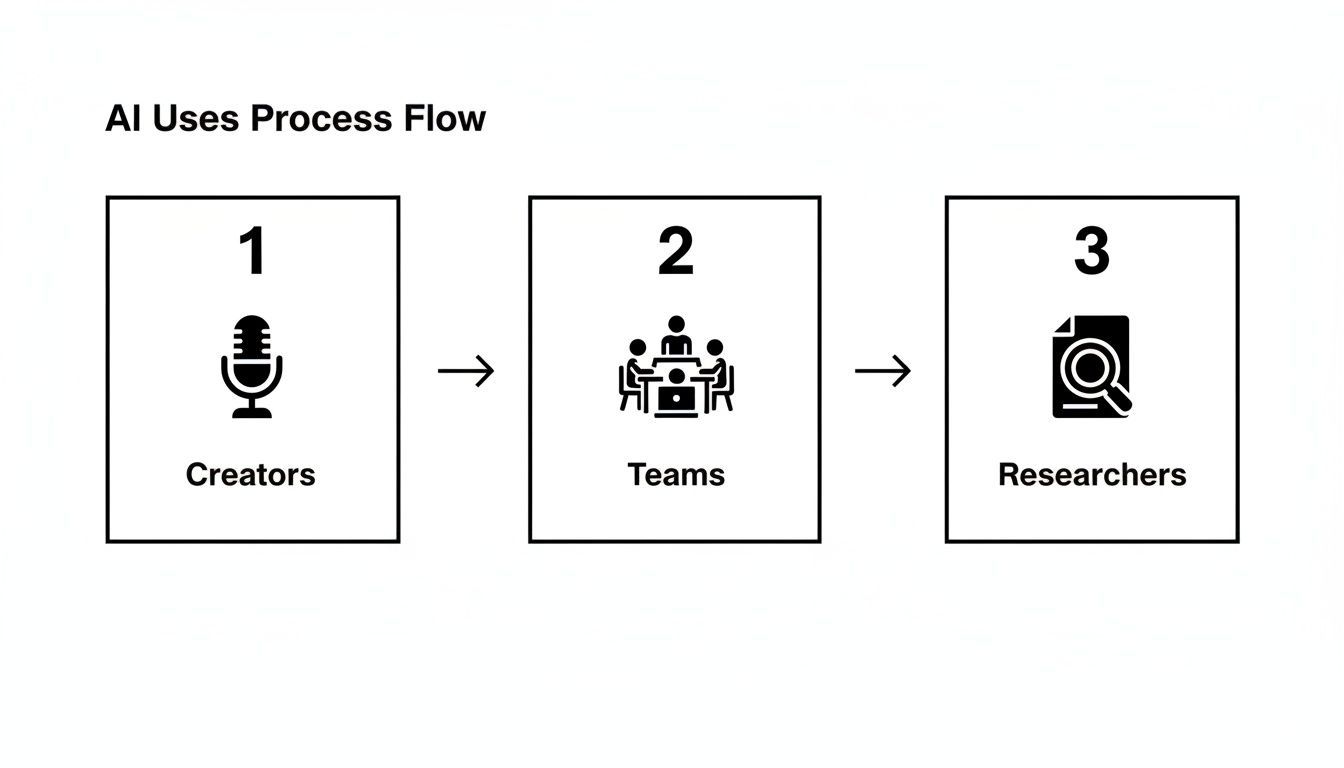
Comme vous pouvez le constater, votre rôle n'a pas d'importance. Le véritable avantage réside dans la transformation d'une conversation fluide en quelque chose d'organisé et de véritablement utile. Tous les gains de productivité se produisent en trois étapes simples : avant, pendant et après votre réunion.
Avant le début de la réunion
La configuration initiale est une tâche unique qui rapporte à chaque appel que vous passez. La plupart des assistants de réunion IA se connectent directement à votre calendrier numérique, que vous utilisiez Google Calendar ou Microsoft Outlook.
Une fois connecté, l'assistant voit automatiquement vos réunions à venir. Il vous suffit de lui indiquer quels appels rejoindre. Pour les réunions récurrentes, comme une synchronisation d'équipe hebdomadaire, vous pouvez le configurer pour qu'il y participe automatiquement à chaque fois sans que vous ayez à lever le petit doigt. Cette étape rapide avant la réunion garantit que votre assistant est toujours prêt lorsque vous l'êtes.
Pendant la réunion elle-même
Lorsque la réunion commence, l'assistant IA rejoint comme n'importe quel autre participant. Il apparaîtra dans la liste des participants sur des plateformes comme Zoom ou Google Meet, généralement avec une étiquette claire comme "Transcript.LOL Note Taker". Sa présence est totalement transparente pour tous les participants à l'appel, et il fonctionne silencieusement en arrière-plan.
C'est la partie la plus passive — et la plus puissante — de tout cela.
Votre seul travail est de vous concentrer entièrement sur la conversation. Vous n'avez pas à partager votre attention entre écouter attentivement et taper frénétiquement des notes. L'IA gère la capture complète de la discussion, mot pour mot.
Vous pouvez vous engager pleinement, poser de meilleures questions et contribuer réellement, tout en sachant que rien n'est manqué. Pour un aperçu plus approfondi du fonctionnement sur des plateformes spécifiques, notre guide sur l'utilisation d'un prise de notes IA pour Zoom détaille les étapes.
Après la fin de la réunion
C'est là que la magie opère vraiment. Quelques minutes seulement après la fin de l'appel, l'assistant IA vous livre un ensemble complet d'informations organisées directement dans votre boîte de réception ou votre tableau de bord. Fini la chasse aux notes ou les heures passées à nettoyer un document désordonné.
Au lieu de cela, vous recevez instantanément :
- Une transcription intégrale : L'intégralité de la conversation, transcrite avec précision, chaque intervenant étant clairement identifié.
- Un résumé généré par l'IA : Un aperçu rapide et concis des principaux sujets, décisions et points à retenir. Parfait pour une révision rapide.
- Une liste d'éléments d'action : Toutes les tâches et les suivis qui ont été discutés, soigneusement extraits et prêts à être attribués.
À partir de là, le partage est un jeu d'enfant. Vous pouvez envoyer un lien vers le résumé aux parties prenantes qui n'ont pas pu y assister, exporter la transcription dans des formats comme DOCX ou PDF, ou envoyer les éléments d'action directement dans vos outils de gestion de projet. Ce type d'efficacité explique pourquoi le marché des assistants IA devrait atteindre 34,28 milliards de dollars américains d'ici 2035. Les données de l'industrie montrent même que ces outils peuvent réduire le travail administratif post-réunion de 30 à 40 %.
Ce suivi immédiat et organisé boucle la boucle de chaque réunion, garantissant que les bonnes conversations se transforment directement en actions significatives avec presque aucun effort supplémentaire.
Les assistants de réunion IA évoluent rapidement
Les modèles d'IA plus récents offrent désormais de meilleurs résumés, une détection d'actions plus intelligente et une précision améliorée sur les accents et les industries. Les outils qui sont fréquemment mis à jour continuent de surpasser les solutions plus anciennes.
Choisir le bon assistant IA pour les réunions
Avec autant d'assistants IA pour les réunions sur le marché, choisir le bon peut sembler décourageant. Mais cela ne doit pas l'être.
Au lieu de vous perdre dans une mer de fonctionnalités, vous pouvez cibler l'outil parfait en vous concentrant sur quelques critères clés. Pensez-y moins comme une recherche compliquée et plus comme une simple liste de contrôle. L'objectif est de trouver un outil qui non seulement maîtrise les bases, mais s'intègre également parfaitement à votre flux de travail existant sans créer de friction. Un bon assistant devrait donner l'impression de faire partie de l'équipe, et non d'un autre logiciel avec lequel vous devez lutter.
Examinons ce qui compte vraiment lorsque vous faites votre choix.
Évaluer la précision des fonctionnalités de base
Avant toute chose : un assistant IA pour les réunions n'est aussi bon que sa capacité à comprendre ce qui est dit. Si les fonctionnalités de base sont fragiles, tout le reste construit sur elles le sera aussi. La précision n'est pas un "plus" apprécié, c'est l'essentiel.
Ne négligez pas la confidentialité des données
Les enregistrements de réunions contiennent souvent des informations commerciales et client sensibles. Choisissez toujours des outils avec une politique stricte de non-formation sur les données utilisateur et une conformité de sécurité claire pour protéger la confidentialité.
- Précision de la transcription : C'est votre fondation. Recherchez des outils qui promettent une grande précision, idéalement plus de 95 % pour les réunions avec un son clair. Ne vous contentez pas de les croire sur parole ; testez-les vous-même avec vos propres enregistrements. Voyez comment ils gèrent le jargon de votre secteur, les différents accents, ou ces moments où tout le monde se met à parler en même temps.
- Identification des intervenants : Un mur de texte est difficile à suivre. Une transcription qui vous dit qui a dit quoi est infiniment plus utile. Vérifiez si l'outil peut distinguer et étiqueter correctement les intervenants du début à la fin.
- Support linguistique : Si vous travaillez avec des équipes ou des clients internationaux, le support multilingue est indispensable. Assurez-vous que l'assistant peut transcrire avec précision toutes les langues parlées lors de vos réunions.
Ces fondamentaux dictent la qualité de tout ce qui suit. Pour une analyse plus approfondie, consultez notre guide sur les meilleurs logiciels de transcription de réunions pour voir ce qui distingue les bons des excellents.
Prioriser la sécurité et la confidentialité des données
Vous confiez essentiellement des enregistrements de conversations sensibles, vous devez donc pouvoir faire entièrement confiance au service. La sécurité des données n'est pas quelque chose sur quoi il faut faire de compromis. Il est facile de survoler les petits caractères, mais il est essentiel de savoir exactement comment une entreprise gère vos informations.
Recherchez un engagement clair et direct en matière de confidentialité.
La norme d'or est une politique de "pas d'entraînement sur les données utilisateur". C'est votre garantie que vos sessions stratégiques privées, vos appels clients et vos discussions internes ne seront jamais intégrés dans un modèle d'IA. Cela garantit que vos données restent les vôtres, point final.
Au-delà de cela, vérifiez la conformité aux normes telles que le RGPD et les mesures de sécurité comme le chiffrement de bout en bout. Une politique de confidentialité transparente n'est pas seulement un document juridique, c'est un signe que l'entreprise respecte ses utilisateurs.
Vérifier les intégrations transparentes
Le véritable pouvoir d'un assistant IA est libéré lorsqu'il communique avec les autres applications que vous utilisez quotidiennement. S'il ne peut pas se connecter à vos outils, tous ces précieux éléments d'action et résumés restent isolés. Cela crée le travail manuel que vous essayiez d'éliminer en premier lieu.
Avant de vous engager, cartographiez le flux de travail de votre équipe et listez vos outils essentiels.
- Plateformes de communication : Se connecte-t-il à Slack ou à Microsoft Teams ? Le partage de résumés et de moments clés devrait être sans effort.
- Outils de gestion de projet : Pouvez-vous envoyer des éléments d'action directement vers Asana, Trello ou Jira ? Cela transforme les conversations en tâches automatiquement.
- Systèmes CRM : Pour les équipes de vente, l'enregistrement des notes de réunion directement dans un CRM comme HubSpot ou Salesforce est un avantage considérable.
- Plateformes d'automatisation : Une intégration avec Zapier change la donne, ouvrant des milliers de flux de travail personnalisés pour répondre à vos besoins exacts.
Pour les équipes qui envisagent comment une IA spécialisée peut s'intégrer dans leur pile technologique, des outils comme SupportGPT montrent comment l'IA peut gérer des fonctions spécifiques comme le service client. Les bonnes intégrations garantissent que les informations de vos réunions circulent de manière fluide dans toute votre organisation, transformant les conversations en actions sans perdre une seule étape.
Pour vous aider dans votre évaluation, voici une simple liste de contrôle pour comparer différents outils.
Liste de contrôle des fonctionnalités pour la sélection d'un assistant IA pour les réunions
Utilisez ce tableau pour évaluer et comparer rapidement les assistants IA potentiels pour les réunions. Il couvre les éléments non négociables, de la précision de base à la sécurité des données, vous aidant à prendre une décision éclairée.
| Fonctionnalité/Critère | Ce qu'il faut rechercher | Pourquoi c'est important |
|---|---|---|
| Précision de la transcription | Taux de précision élevé (95%+), gère le jargon et les accents | La qualité de toutes les autres fonctionnalités (résumés, éléments d'action) dépend d'une transcription précise. |
| Identification des intervenants | Distingue et étiquette de manière fiable les différents intervenants | Fournit un contexte clair sur qui a dit quoi, rendant la transcription facile à suivre et à comprendre. |
| Politique de confidentialité des données | Une politique claire de "pas d'entraînement sur les données utilisateur" | Garantit que vos conversations confidentielles ne sont pas utilisées pour entraîner des modèles d'IA tiers. |
| Conformité de sécurité | RGPD, SOC 2 ou autres certifications pertinentes | Démontre l'engagement du fournisseur à protéger vos données conformément aux normes de l'industrie. |
| Intégrations clés | Connexions à votre CRM, votre gestion de projet et votre messagerie d'équipe | Automatise votre flux de travail en envoyant les résultats des réunions directement aux outils que vous utilisez déjà. |
| Facilité d'utilisation | Interface intuitive, configuration minimale requise | Un outil doit vous faire gagner du temps, pas ajouter un autre système complexe que votre équipe doit apprendre. |
| Support linguistique | Transcription précise pour toutes les langues utilisées par votre équipe | Crucial pour les équipes mondiales ou celles qui travaillent avec des clients internationaux afin de garantir que tout le monde est compris. |
En parcourant systématiquement ces points, vous pourrez voir quelle plateforme correspond réellement aux besoins de votre équipe, en vous assurant que l'outil que vous choisissez est un atout puissant, et pas seulement un abonnement supplémentaire.
Questions fréquentes sur les assistants IA pour les réunions
Se lancer dans le monde des assistants IA pour les réunions peut soulever quelques questions, surtout lorsqu'il s'agit de vos réunions privées. C'est une bonne chose. Obtenir des réponses claires et directes est le meilleur moyen d'être sûr d'ajouter un outil qui aide réellement, sans créer de nouveaux problèmes.
Passons en revue certaines des questions les plus courantes. Comprendre ces points pratiques et de sécurité vous aidera à voir comment cette technologie peut s'intégrer en toute sécurité et efficacement dans votre travail.
Quelle est la sécurité de mes données de réunion avec un assistant IA ?
C'est souvent la préoccupation numéro un, et à juste titre. La sécurité de vos conversations dépend du fournisseur que vous choisissez. Les plateformes de premier plan en font leur priorité absolue.
La chose la plus importante à rechercher est une politique stricte de "pas d'entraînement sur les données utilisateur". C'est une promesse non négociable que vos appels clients confidentiels, vos sessions stratégiques internes et vos discussions d'équipe ne seront jamais utilisés pour entraîner leurs modèles d'IA. Vos données vous appartiennent, point final.
Choisissez toujours un service transparent sur ses pratiques de sécurité. Ce n'est pas seulement une fonctionnalité, c'est le fondement de la confiance.
Au-delà de cela, recherchez ces indicateurs de sécurité clés :
- Chiffrement de bout en bout : Cela protège vos données en transit et au repos.
- Conformité aux normes : Recherchez la conformité aux réglementations telles que le RGPD, qui démontre un engagement envers les normes mondiales de protection des données.
- Conditions claires de propriété des données : La politique de confidentialité doit indiquer en langage clair que vous êtes propriétaire de vos données, pas eux.
Prenez toujours quelques minutes pour examiner la politique de confidentialité avant de vous inscrire. C'est le meilleur moyen de vous assurer que vos informations seront traitées correctement.
Quelle est la précision des transcriptions et des résumés ?
La qualité des transcriptions générées par l'IA s'est considérablement améliorée. Pour les réunions avec un son clair, les meilleurs services peuvent atteindre plus de 95 % de précision de transcription, ce qui est comparable aux services de transcription humaine, mais livré en une fraction du temps.
Bien sûr, quelques éléments peuvent affecter les résultats. Un bruit de fond important, des personnes qui se parlent par-dessus, et des accents très forts peuvent parfois réduire la précision. Cependant, de nombreux outils avancés vous permettent maintenant de télécharger un vocabulaire personnalisé, afin que l'IA puisse apprendre le jargon spécifique de votre secteur, les acronymes et les noms uniques.
Les résumés sont également remarquablement bons. L'IA ne se contente pas de tirer des phrases aléatoires. Elle utilise des modèles sophistiqués pour identifier les thèmes clés, les décisions et les éléments d'action, en reconnaissant les modèles conversationnels qui signalent l'importance.
Un assistant IA peut-il gérer plusieurs langues et accents ?
Absolument. Les assistants IA modernes pour les réunions sont conçus pour un monde mondialisé et axé sur le travail à distance. La plupart des plateformes leaders sont conçues pour prendre en charge des dizaines de langues différentes, ce qui les rend incroyablement utiles pour les équipes internationales.
Ils s'améliorent également considérablement dans la compréhension d'une grande variété d'accents au sein d'une même langue, comme l'anglais. Les modèles d'IA sont entraînés sur de vastes et divers ensembles de données de langage parlé, ce qui les aide à reconnaître différentes prononciations et modèles de parole.
Avant de vous engager avec un outil, il est toujours judicieux de vérifier sa liste de langues prises en charge pour vous assurer qu'elle correspond aux besoins de votre équipe.
L'assistant IA doit-il rejoindre ma réunion ?
Dans la plupart des cas, oui. Pour que l'IA fasse son travail, elle doit "entendre" la conversation. L'assistant rejoint généralement votre réunion virtuelle sur des plateformes comme Zoom, Google Meet ou Microsoft Teams en tant que bot ou participant silencieux.
Vous le verrez dans la liste des participants, généralement avec un nom clair comme "AI Note Taker", donc sa présence est totalement transparente pour tous les participants à l'appel. C'est une pratique courante et permet à l'outil de capturer directement le flux audio pour une transcription aussi précise que possible.
Il est toujours bon d'en informer les participants au début. Une simple phrase comme : "Juste pour que tout le monde soit au courant, nous avons un assistant IA à l'appel pour prendre des notes pour nous", est un excellent moyen de maintenir la transparence et de renforcer la confiance.
Prêt à transformer vos réunions de conversations temporaires en ressources consultables et exploitables ? Découvrez comment Transcript.LOL peut vous fournir des transcriptions et des résumés instantanés, précis et sécurisés. Essayez-le gratuitement dès aujourd'hui !