
Cómo Transcribir Audio a Texto Como un Profesional
Aprende a transcribir audio a texto con nuestra guía completa. Descubre las mejores herramientas de IA, consejos de preparación de audio y flujos de trabajo avanzados para transcripciones perfectas.
Kate, Praveen
November 1, 2023
horas. Todo eso ha cambiado. Hoy, el proceso se basa en herramientas inteligentes impulsadas por IA que se encargan del trabajo pesado, dejándote a ti el toque final humano. Es un cambio total de guion.
¿Por qué molestarse en transcribir audio hoy en día?
Descubrir cómo convertir audio a texto solía significar atarse a un escritorio y escribir durante
Seamos claros: los días de volver a escuchar laboriosamente y escribir cada palabra han terminado oficialmente. El enfoque moderno se centra en la eficiencia: la IA genera el borrador y tú actúas como editor. Esta habilidad ya no es solo para periodistas o paralegales. Es imprescindible para podcasters, especialistas en marketing, investigadores académicos y, francamente, cualquiera que quiera hacer que su contenido hablado sea buscable, compartible y mucho más accesible.
Esto no es solo una tendencia de nicho. El mercado global de software de transcripción de audio ya estaba valorado en alrededor de 2.500 millones de dólares en 2025 y solo sigue creciendo. Puedes profundizar en más datos de crecimiento del mercado en archivemarketresearch.com. Este crecimiento explosivo demuestra cuán esencial se ha vuelto la transcripción en los medios, la educación y los negocios.
Un Mercado que Está Explotando
Se proyecta que la industria del software de transcripción crecerá de 2.500 millones de dólares en 2025 a más de 19.000 millones de dólares para 2034. Eso es prueba de que esto no es solo una tendencia, se está convirtiendo en una parte central de la creación de contenido.
La Nueva Forma de Trabajar con Audio
La idea central es simple: deja que la máquina cree un primer borrador sorprendentemente bueno. Tu trabajo es guiarlo a la perfección, no empezar desde cero. Esto convierte una tarea que antes consumía todo tu tiempo en algo que puedes hacer en una fracción del tiempo.
Para darte una mejor idea de cómo funciona esto en la práctica, aquí tienes un resumen rápido del flujo de trabajo moderno.
| Flujo de Trabajo de Transcripción de Audio de Hoy |
|---|
| Un resumen rápido de las etapas principales involucradas en la transcripción de audio utilizando herramientas modernas de IA. |
| Etapa |
| Qué Implica |
| Objetivo Clave |
| Cargar y Procesar |
| Arrastrar tu archivo de audio o video a un servicio de IA. La herramienta se pone a trabajar, identificando hablantes y convirtiendo todo a texto. |
| Obtener un primer borrador de alta calidad sin ninguna escritura manual. |
| Revisar y Refinar |
| Usar un editor integrado para corregir errores, ajustar nombres de hablantes y modificar la puntuación. |
| Asegurar que la transcripción final sea 100% precisa y pulida. |
| Exportar y Usar |
| Descargar la transcripción terminada en el formato que necesites, como DOCX para un informe o SRT para subtítulos de video. |
| Tener tu contenido listo para su destino final. |
Esta tabla realmente solo rasca la superficie. La verdadera magia ocurre cuando te das cuenta de lo que desbloquea una transcripción terminada.
Una de las mayores ventajas de este nuevo flujo de trabajo es cómo impulsa estrategias de reutilización de contenido potentes. Esa única entrevista de podcast puede convertirse de repente en una serie de publicaciones de blog, docenas de fragmentos para redes sociales e incluso un imán de prospectos.
En última instancia, dominar este proceso no solo te ahorra una tonelada de tiempo. Desbloquea el verdadero valor oculto en tu audio, haciéndolo buscable, citable y disponible para una audiencia mucho más amplia.
Cómo Elegir la Herramienta de Transcripción Adecuada
Elegir la herramienta adecuada puede marcar la diferencia entre una victoria rápida y un dolor de cabeza que ponga fin al proyecto. Con tantas opciones disponibles, es fácil perderse. Pero ir más allá de las simples comparaciones de precios es clave para encontrar una plataforma que realmente te ahorre tiempo en lugar de simplemente crear más trabajo.
El espacio de la transcripción con IA está en auge. Valorado en 4.500 millones de dólares en 2024, se proyecta que alcance la asombrosa cifra de 19.200 millones de dólares para 2034. Puedes obtener una visión más profunda de este crecimiento en el informe completo del mercado de transcripción con IA. Todo este crecimiento significa más opciones para nosotros, pero también significa mucho más ruido que hay que filtrar.
Entonces, ¿qué separa a una herramienta decente de una excelente? Realmente se reduce a algunas características clave que impactan directamente en la calidad de tu transcripción final y, lo que es más importante, en el tiempo que pasarás en la silla de edición.
La Precisión y la Identificación del Hablante son lo Más Importante
La precisión bruta es la característica principal de cualquier servicio, pero no tomes las tasas anunciadas al pie de la letra. Esas cifras a menudo provienen de audio perfecto y de calidad de estudio. ¿La prueba real? Qué tan bien maneja la herramienta tus archivos específicos, ya sea un podcast limpio con un solo hablante o una reunión de equipo caótica con acentos marcados y ruido de fondo.
Igual de crítico es la identificación del hablante (a veces llamada diarización). Una herramienta sólida no solo adivina quién está hablando; te permite etiquetar fácilmente a cada persona (por ejemplo, "Anfitrión", "Invitado") y aplica ese nombre en toda la transcripción. Esto ahorra mucho tiempo en entrevistas, paneles y grupos focales.
Tu objetivo es encontrar una herramienta que se encargue de las tareas tediosas automáticamente. Si pasas más de unos pocos segundos arreglando cada etiqueta de hablante, el software no está haciendo su trabajo.
No Confíes Solo en los Porcentajes de Precisión
La precisión real depende de la calidad de tu audio, no de las condiciones de laboratorio. Siempre prueba con un archivo difícil antes de comprometerte con una herramienta.
Comprueba la Compatibilidad de Archivos e Integraciones Inteligentes
Antes de comprometerte, asegúrate de que la herramienta funcione bien con tus archivos. La mayoría de los servicios manejan lo básico como MP3, WAV y MP4, pero si trabajas regularmente con formatos menos comunes, este es un punto de control no negociable.
A continuación, piensa en cómo encaja la herramienta en tu flujo de trabajo.
- Cargas directas: ¿Puedes arrastrar y soltar archivos directamente desde tu escritorio?
- Conexiones en la nube: ¿Se vincula a Google Drive, Dropbox u otro almacenamiento en la nube que usas a diario?
- Soporte de enlaces: ¿Puedes simplemente pegar una URL de YouTube o Vimeo y dejar que haga su magia?
Estas integraciones pueden parecer menores, pero eliminan la fricción y hacen que todo el proceso se sienta fluido. Para cualquiera que esté dando sus primeros pasos, existen excelentes maneras de transcribir audio a texto gratis que te permiten probar estas funciones.
Comparación de características clave en herramientas de transcripción de IA
Para ayudarte a decidir, aquí tienes un análisis característica por característica de lo que separa las herramientas básicas de los servicios premium para que puedas elegir sabiamente.
| Característica | Lo que ofrecen las herramientas básicas | Lo que proporcionan los servicios premium | Por qué es importante para ti |
|---|---|---|---|
| Precisión | Precisión general, problemas con acentos y ruido. | Alta precisión con modelos especializados para diferentes acentos, industrias y condiciones de audio. | Una mayor precisión significa drásticamente menos tiempo dedicado a editar manualmente la transcripción final. |
| Identificación de hablantes | Separación básica de hablantes, a menudo con errores. | Etiquetado preciso de hablantes (diarización) que puedes nombrar y corregir fácilmente de forma global. | Te ahorra tener que asignar hablantes manualmente línea por línea en entrevistas o reuniones. |
| Vocabulario personalizado | Sin opción para añadir palabras personalizadas. | Te permite añadir un diccionario personalizado para jerga, nombres o términos específicos de la industria. | Evita errores tipográficos constantes en términos clave, nombres de marcas y nombres de personas. |
| Soporte de archivos | Limitado a formatos comunes como MP3 y MP4. | Amplio soporte para docenas de tipos de archivos de audio y video, además de importaciones directas de URL. | Asegura que puedes transcribir cualquier archivo que tengas sin tener que convertirlo primero. |
| Opciones de exportación | Texto plano (.txt) o quizás un documento de Word (.docx). | Una amplia gama de formatos como SRT, VTT, JSON y PDF, con opciones de marca de tiempo y hablante. | Te da la flexibilidad de usar tu transcripción para cualquier cosa, desde publicaciones de blog hasta subtítulos de video. |
En última instancia, la mejor manera de elegir es usar la herramienta. Casi todas las plataformas ofrecen una prueba gratuita o algunos créditos para empezar. No la desperdicies en un archivo de audio limpio y perfecto.
Ponle a prueba. Usa una grabación de una llamada de conferencia ruidosa o una entrevista con un invitado de voz suave. Esta prueba en el mundo real es la única forma de saber con certeza si una herramienta realmente te facilitará la vida.
Preparación de tu audio para una precisión máxima

La precisión de tu transcripción se decide prácticamente antes de pulsar el botón "cargar". Cuando se trata de transcripción de IA, el viejo dicho "basura entra, basura sale" es la verdad absoluta. Un archivo de audio limpio y de alta calidad te dará una transcripción casi perfecta, mientras que una grabación desordenada creará horas de frustrante limpieza.
Piénsalo de esta manera: si tú no puedes entender claramente lo que alguien dice, ¿cómo puedes esperar que lo haga un algoritmo? Dedicar solo unos minutos a preparar tu audio es lo mejor que puedes hacer para obtener un mejor resultado y ahorrarte mucho tiempo al final.
Mejores prácticas para grabar audio limpio
Tu primera y mejor oportunidad de obtener una transcripción precisa ocurre durante la grabación misma. Incluso pequeños ajustes en esta etapa pueden marcar una gran diferencia en la calidad con la que la IA transcribe tu audio a texto.
- Usa un micrófono externo: El micrófono incorporado de tu portátil o teléfono está diseñado para captar todo: clics del teclado, eco de la habitación, el perro ladrando en el pasillo. Un simple micrófono USB o de solapa cambia las reglas del juego porque se enfoca solo en la voz del hablante.
- Minimiza el ruido de fondo: Busca un lugar tranquilo. Grabar lejos del tráfico de la calle, aires acondicionados zumbando o el parloteo general de la oficina es crucial. Esos sonidos aparentemente menores pueden confundir fácilmente a la IA.
- Reduce el cruce de palabras: Si tienes varios hablantes, intenta que eviten hablar unos sobre otros. El habla superpuesta es uno de los mayores obstáculos para cualquier herramienta de transcripción.
Todo comienza con material fuente claro. Por ejemplo, conocer los conceptos básicos de grabar audio de alta calidad para entrevistas en video puede garantizar una precisión de primer nivel desde el principio.
Limpieza sencilla para archivos de audio existentes
¿Qué pasa si la grabación ya está hecha? No te preocupes, aún puedes hacer mejoras significativas con herramientas gratuitas. Soy un gran fanático de software como Audacity para una limpieza de audio rápida y básica.
En la captura de pantalla anterior, puedes ver la interfaz de Audacity. Te permite ver visualmente la forma de onda del audio y aplicar efectos simples como la reducción de ruido. Todo lo que tienes que hacer es resaltar una sección de ruido de fondo puro, y puedes enseñar al software qué sonido eliminar de toda la pista.
Unos pocos clics rápidos en una herramienta como esta pueden marcar una gran diferencia.
Conclusión clave: Unos minutos de preparación de audio pueden ahorrarte literalmente horas de edición manual. Normalizar el volumen y reducir el silbido de fondo son dos de las correcciones de mayor impacto que puedes hacer.
También puedes recortar cualquier silencio o parloteo irrelevante del principio y el final del archivo. Esto no solo reduce el tamaño del archivo, sino que también ayuda a la IA a centrarse solo en el contenido que realmente importa.
El vínculo entre la claridad del audio y tu transcripción final es directo. Si quieres profundizar, puedes aprender más sobre todos los factores que afectan la precisión del habla a texto en nuestra guía detallada. Tomar estas medidas proporciona a la IA el mejor material fuente posible para trabajar.
Tu flujo de trabajo de transcripción práctico
Bien, basta de teoría. Aquí es donde te arremangas y te pones a trabajar. Has elegido una herramienta y preparado tu audio; ahora veamos cómo convertir esa grabación en texto limpio y editable sin volverte loco. El flujo de trabajo moderno se trata menos de escribir tediosamente y más de editar de forma inteligente y enfocada.
Olvida los viejos tiempos de pausar constantemente, rebobinar y escribir cada palabra. La IA se encarga de ese trabajo inicial pesado por ti, arrojando un primer borrador sólido en solo unos minutos. Tu nuevo trabajo es el de editor, enfocado en pulir y perfeccionar el resultado.
Esta imagen realmente subraya la diferencia entre la forma antigua y la nueva.
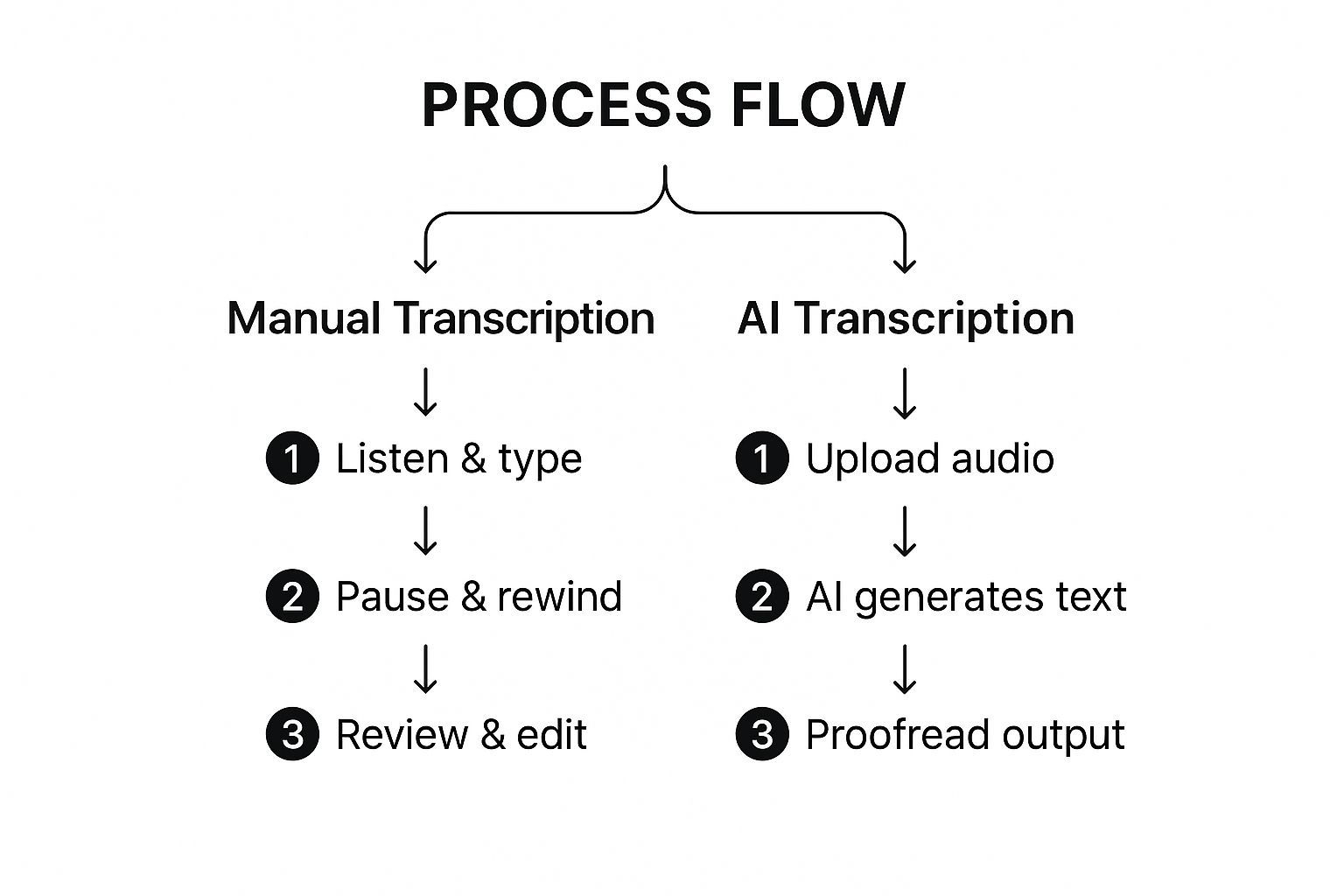
Como puedes ver, el enfoque de IA primero obtiene el texto en bruto. Esto cambia completamente el juego, convirtiéndote de un mecanógrafo a un corrector de pruebas, un uso mucho mejor de tu tiempo.
Configuración de tu proyecto de transcripción
Una vez que tu archivo esté cargado, lo primero que debes hacer es configurar los ajustes del proyecto. No te limites a hacer clic en esta pantalla. Unos segundos aquí te ahorrarán muchos dolores de cabeza más adelante.
- Idioma y dialecto: Sé específico. Si tu hablante tiene acento australiano, no elijas solo "Inglés". Selecciona "Inglés (Australia)". Esto ayuda a la IA a sintonizar las pronunciaciones y el vocabulario correctos.
- Número de hablantes: Si sabes que había tres personas en la llamada, díselo a la herramienta. Esto le da a la identificación de hablantes (también conocida como diarización) una gran ventaja para averiguar quién dijo qué.
- Vocabulario personalizado: ¿Tu audio está lleno de jerga de la industria, nombres de empresas extraños o acrónimos únicos? Añádelos a un glosario personalizado. Esto entrena a la IA para que no arruine esos términos críticos.
Dominar estos ajustes iniciales puede prevenir docenas, quizás cientos, de correcciones repetitivas en el futuro. Es una pequeña inversión de tiempo con una gran recompensa.
El arte de la edición interactiva
Después de que la IA haga su magia y genere el primer borrador, aterrizarás en el editor interactivo. Aquí es donde la mayoría de las plataformas modernas realmente brillan. El texto está sincronizado con el audio, por lo que puedes hacer clic en cualquier palabra y escuchar instantáneamente el momento exacto en que se pronunció.
Tu objetivo aquí es ser rápido y preciso. ¿La mejor manera de lograrlo? Aprende los atajos de teclado. Jugar con el ratón es un gran obstáculo para la productividad.
Consejo profesional: Siempre mantengo una mano en los atajos de reproducción (como reproducir/pausar y rebobinar) y la otra lista para escribir. Este enfoque de dos manos te permite recorrer el texto sin romper tu flujo.
Principalmente harás tres cosas:
- Corregir palabras mal escuchadas: La IA podría confundir "their" y "they're" o malinterpretar un término técnico. Una corrección rápida es todo lo que se necesita.
- Asignar etiquetas de hablante: La IA probablemente etiquetará a todos como "Hablante 1", "Hablante 2", etc. Tu trabajo es cambiar esas etiquetas genéricas por nombres reales como "Sarah" o "John".
- Limpiar la puntuación: La IA es buena, pero no siempre puede acertar las pausas naturales y el flujo de una conversación real. Necesitarás añadir comas, dividir frases largas y crear nuevos párrafos para que el texto sea fácil de leer.
Para una mirada más profunda a cómo sacar más provecho de tu transcripción, consulta nuestra guía sobre cómo usar insights para analizar tu contenido.
Exportación para diferentes casos de uso
Una vez que hayas revisado toda la transcripción y estés satisfecho con su precisión, es hora de exportar. El formato que elijas realmente depende de lo que planees hacer con el texto a continuación.
Aquí tienes un resumen rápido de los formatos más comunes y para qué sirven:
| Formato de archivo | Mejor para | Por qué funciona |
|---|---|---|
| .DOCX | Publicaciones de blog, informes, artículos y documentación. | Es fácil de editar en Microsoft Word o Google Docs y conserva todo tu formato. |
| .TXT | Texto sin formato para pegar en otras aplicaciones. | Este es un formato súper simple, sin adornos, limpio y fácil de copiar en cualquier lugar. |
| .SRT | Subtítulos y leyendas de video para YouTube o Vimeo. | Incluye marcas de tiempo que sincronizan el texto directamente con tu video para accesibilidad. |
| Documentos finales no editables que necesitas compartir. | Este es un formato seguro y de solo lectura que garantiza que la transcripción se vea igual en todas partes. |
Elegir el formato correcto desde el principio te ahorra la molestia de convertir el archivo más tarde. Con tu transcripción pulida lista, ahora puedes reutilizar ese contenido de audio para cualquier plataforma que desees.

Importar desde múltiples fuentes
Importa archivos de audio y video desde diversas fuentes, incluyendo carga directa, Google Drive, Dropbox, URLs, Zoom y más.

Herramientas de edición
Edita transcripciones con herramientas potentes como buscar y reemplazar, asignación de hablantes, formatos de texto enriquecido y resaltado.

Exportar en múltiples formatos
Exporta tus transcripciones en múltiples formatos incluyendo TXT, DOCX, PDF, SRT y VTT con opciones de formato personalizables.
Consejos Avanzados para una Transcripción de Grado Profesional
Bien, ya dominas lo básico. Puedes obtener una transcripción sólida y mayormente precisa de un archivo de audio. Pero ahora es hora de subir de nivel.
La diferencia entre una transcripción decente y una profesional reside en los detalles. Se trata de ir más allá de simplemente corregir errores tipográficos y tomar decisiones deliberadas que convierten un muro de texto en un documento valioso y útil.
El objetivo no es solo la precisión; es crear una transcripción que esté perfectamente adaptada a su propósito final.
¿Verbatim o Lectura Limpia?
Una de las primeras decisiones que tendrás que tomar es elegir un estilo de transcripción. Esta elección dicta la sensación general del texto final, y todo se reduce a para qué lo necesitas.
Una transcripción estrictamente verbatim es lo más literal que puedes obtener. Captura todo: cada "eh", "ah", inicio en falso ("Estaba pensando... espera, no") y tic nervioso. Esto es absolutamente esencial para cosas como deposiciones legales o investigación clínica, donde cómo se dijo algo es tan importante como qué se dijo.
Luego tienes la transcripción de lectura limpia, a veces llamada "verbatim inteligente". Este estilo pule el texto editando todos esos pequeños tropiezos conversacionales. El resultado es una transcripción mucho más legible que mantiene intacto el significado del hablante sin todas las distracciones. Esto es lo que querrás para la mayoría del contenido empresarial, de marketing o educativo.
Elegir el estilo correcto es fundamental. Una deposición legal requiere precisión verbatim, mientras que una lectura limpia hace que la transcripción de un podcast sea mucho más agradable para un lector de blogs. Siempre considera primero a tu audiencia final.
Dale Estructura a tu Transcripción con Marcas de Tiempo y Formato
Una transcripción en bruto es solo texto. Es la estructura que añades lo que la hace verdaderamente útil. Las marcas de tiempo son tu mejor amiga aquí. Son pequeñas marcas que sincronizan un punto específico en el texto con la hora exacta en el audio o video.
Son un salvavidas para cualquiera que necesite saltar a un momento específico: piensa en editores de video que buscan un fragmento de sonido o un investigador que verifica una cita.
El formato inteligente es igual de importante. Usa etiquetas de hablante claras para mostrar quién está hablando. Divide los monólogos largos y divagantes en párrafos más cortos y escaneables. Usa encabezados para marcar diferentes temas en la conversación. Este tipo de formato reflexivo también desbloquea funciones potentes como hacer que los videos sean buscables con transcripciones.
Si quieres adentrarte en los detalles técnicos, cubrimos esto en nuestra guía completa de transcripción con marcas de tiempo.
Crea un Glosario para una Consistencia Imbatible
¿Trabajando en un proyecto con mucha jerga, nombres específicos o términos técnicos? Un glosario es innegociable. Es realmente solo una lista simple de términos clave con su ortografía correcta, pero marca la diferencia en el mantenimiento de la consistencia.
- Nombres de Empresas: Asegúrate de que "TechSolutions Inc." no se convierta en "Tech Solutions, Ink.".
- Jerga Técnica: Fija términos como "SaaS" o "API" para que se escriban correctamente cada vez.
- Nombres de Hablantes: Enumera el nombre de todos con la ortografía correcta. Se acabaron las conjeturas.
Este nivel de detalle es exactamente por lo que la transcripción especializada es tan importante. Se proyectaba que el mercado de transcripción de EE. UU. alcanzaría unos enormes 32.6 mil millones de dólares para finales de 2025, con la transcripción legal y médica liderando la carga.
Finalmente, nunca, nunca te saltes la corrección final. Una vez que creas que has terminado de editar, aléjate por un tiempo. Vuelve con ojos frescos y lee toda la transcripción en voz alta; te sorprenderá la cantidad de frases incómodas o errores de puntuación que detectas. Un último repaso con un corrector gramatical siempre es una buena idea, también.
Respondiendo a tus Preguntas Más Frecuentes sobre Transcripción
Incluso con las mejores herramientas en mano, tendrás preguntas cuando empieces a transcribir audio. Obtener respuestas directas y prácticas puede marcar la diferencia entre un flujo de trabajo fluido y un día lleno de dolores de cabeza. Así que, abordemos algunas de las preguntas más comunes que escuchamos de los usuarios.
Profundizaremos en los plazos realistas, los límites reales de la IA y si realmente puedes confiar en las herramientas automatizadas para industrias de alto riesgo como la legal y la médica. Piensa en estos como los obstáculos del mundo real que enfrentarás, respondidos directamente para ayudarte a hacer las cosas bien.
¿Cuánto Tarda Realmente en Transcribir 1 Hora de Audio?
Esta es la gran pregunta, y la respuesta honesta es: depende. El pase inicial de IA para una hora de audio es sorprendentemente rápido: generalmente solo 10 a 20 minutos para que la máquina genere el primer borrador.
Pero el trabajo real, la parte que requiere tu experiencia, está en la edición.
- Para audio limpio con un solo hablante claro y sin jerga compleja, es posible que solo dediques 30 a 60 minutos a revisar y pulir el texto. Es una limpieza rápida y fácil.
- Para audio desafiante, piensa en múltiples hablantes hablando uno encima del otro, ruido de fondo o acentos marcados, ese tiempo de edición puede fácilmente dispararse a 2-4 horas.
La IA hace el trabajo pesado, pero un toque humano es lo que te lleva a ese documento final y pulido.
¿Puede la IA Manejar Acentos Fuertes o Ruido de Fondo?
La IA moderna es impresionante, pero no es magia. Tiene sus límites. El ruido de fondo significativo de una cafetería bulliciosa o una calle de la ciudad afectará absolutamente la precisión de la transcripción. Lo mismo ocurre con la superposición de voces, donde varias personas hablan a la vez. La IA simplemente se confunde al intentar separar las voces.
Los acentos fuertes también ponen a prueba los modelos de IA estándar. Aún obtendrás una transcripción con la que puedes trabajar, pero deberías esperar ver más errores que necesiten corrección manual.
Esto es exactamente por lo que preparar tu audio de antemano es tan importante. Unos minutos de limpieza pueden ahorrarte mucho tiempo de edición más tarde. Para audio verdaderamente desordenado, tu mejor opción suele ser un servicio híbrido que utiliza tanto IA como un revisor humano.
¿Es la IA lo Suficientemente Precisa para Trabajos Legales o Médicos?
Para documentos oficiales en campos críticos como la ley o la medicina, siempre debes tratar una transcripción generada por IA como un primer borrador. Punto.
Aunque la IA puede alcanzar una precisión del 98% en condiciones perfectas, ese último 2% es donde residen los errores que importan. Una sola palabra incorrecta puede cambiar completamente el significado del testimonio legal o el diagnóstico de un médico.
En estos campos, la práctica estándar es usar la IA para la velocidad, pero la transcripción final debe ser meticulosamente revisada y certificada por un profesional humano capacitado. El riesgo de incluso un pequeño error es simplemente demasiado alto para dejarlo todo a la automatización.
¿Listo para dejar de adivinar y empezar a transcribir con velocidad y precisión? Transcript.LOL utiliza IA avanzada para darte un primer borrador altamente preciso en minutos. Sube tu audio, edita con facilidad y exporta en cualquier formato que necesites. Pruébalo ahora y ve cuánto tiempo puedes ahorrar.
Integraciones
Conecta con tus herramientas y plataformas favoritas para optimizar tu flujo de trabajo de transcripción.