
Kostenlose Audio-zu-Text-Transkription, die wirklich funktioniert
Ein praktischer Leitfaden zur kostenlosen Audio-zu-Text-Transkription. Erfahren Sie, wie Sie Audio vorbereiten, die besten KI-Tools verwenden und Ihr Transkript für professionelle Ergebnisse bearbeiten.
Kate, Praveen
November 22, 2023
Ja, Sie können absolut eine kostenlose Audio-zu-Text-Transkription erhalten, die sowohl schnell als auch überraschend genau ist, mit modernen KI-Tools. Die Technologie hat sich so weit und so schnell entwickelt. Was früher teure Dienstleistungen oder stundenlange manuelle Arbeit erforderte, kann jetzt in Sekundenschnelle direkt aus Ihrem Webbrowser erledigt werden.
Es ist ein absoluter Game-Changer und macht leistungsstarke Transkription für jedermann zugänglich.
Warum genaue Transkription eine moderne Superkraft ist
Mal ehrlich – gesprochene Worte in Text umzuwandeln ist keine Nischenfähigkeit mehr nur für Journalisten oder Rechtsassistenten. Wir ertrinken alle in einem Meer von Zoom-Anrufen, Podcasts und Videovorträgen. Die Fähigkeit, sofort eine schriftliche Aufzeichnung dieses Audios zu erhalten, ist ein enormer Schub für Produktivität und Content-Erstellung.
Die Möglichkeit, eine kostenlose Audio-zu-Text-Transkription zu erhalten, hat die Spielregeln verändert. Was einst ein kostspieliger, zeitraubender manueller Prozess war, wird nun von hochentwickelter KI übernommen, die jeder nutzen kann.
Dieser Wandel hat unglaubliche Möglichkeiten in unzähligen Bereichen geschaffen. Betrachten Sie nur den globalen Transkriptionsmarkt – er boomt aufgrund der riesigen Nachfrage nach der Umwandlung von Sprache in nutzbare Daten. Tatsächlich wird der US-Markt für allgemeine Transkriptionsdienste voraussichtlich über 32,6 Milliarden US-Dollar im Jahr 2025 wert sein und bis 2035 voraussichtlich über 50 Milliarden US-Dollar erreichen.
Hauptvorteile der Nutzung kostenloser Transkriptionstools
Hier ist ein kurzer Überblick, warum die Integration dieser Tools in Ihren Workflow eine kluge Entscheidung ist, egal ob Sie ein Profi, ein Student oder ein Forscher sind.
| Vorteil | Auswirkung für Profis | Auswirkung für Studenten & Forscher |
|---|---|---|
| Gesteigerte Produktivität | Erstellen Sie sofort Besprechungszusammenfassungen und Aktionspunkte und sparen Sie Stunden manueller Notizen und Überprüfung. | Konzentrieren Sie sich auf das Verständnis von Vorlesungen, anstatt hektisch Notizen zu machen. Überprüfen Sie Schlüsselkonzepte später einfach. |
| Content-Wiederverwendung | Wandeln Sie ein einzelnes Webinar oder einen Podcast in Blogbeiträge, Social-Media-Updates und E-Mail-Newsletter um. | Extrahieren Sie Schlüsselzitate und Datenpunkte aus Interviews oder Vorlesungen für Arbeiten und Präsentationen. |
| Verbesserte Zugänglichkeit | Stellen Sie schriftliche Transkripte für Video- und Audioinhalte bereit, um sie einem breiteren Publikum zugänglich zu machen. | Erstellen Sie durchsuchbare Lernhilfen und teilen Sie Notizen mit Kommilitonen, die eine Vorlesung verpasst haben. |
| Verbesserte Suchbarkeit | Finden Sie schnell spezifische Informationen in langen Aufzeichnungen, ohne die gesamte Datei erneut anhören zu müssen. | Lokalisieren Sie exakte Momente in Forschungsinterviews oder akademischen Seminaren für genaue Zitate. |
Letztendlich geht es bei kostenlosen Transkriptionstools darum, intelligenter zu arbeiten, nicht härter. Sie erschließen den Wert, der in Ihren Audiodateien verborgen ist.
Warum Transcript.LOL mehr als nur ein kostenloses Transkriptionstool ist?
Modernste KI
Angetrieben von OpenAIs Whisper für branchenführende Genauigkeit. Unterstützung für benutzerdefinierte Vokabulare, bis zu 10 Stunden lange Dateien und ultraschnelle Ergebnisse.

Sprechererkennung
Identifiziere automatisch verschiedene Sprecher in deinen Aufnahmen und beschrifte sie mit ihren Namen.

In mehreren Formaten exportieren
Exportiere deine Transkripte in mehreren Formaten, einschließlich TXT, DOCX, PDF, SRT und VTT mit anpassbaren Formatierungsoptionen.
Effizienz im Alltag freischalten
Was bedeutet das nun in der Praxis? Es geht um weit mehr als nur um eine Textdatei einer Konversation. Es geht darum, dieses Audio von einer passiven Datei in einen aktiven, nutzbaren Vermögenswert zu verwandeln.
Hier sind einige reale Szenarien:
- Für Content-Marketer: Das einstündige Webinar, das Sie gerade veranstaltet haben? Sein Transkript kann sofort in einen detaillierten Blogbeitrag, ein Dutzend Social-Media-Schnipsel und eine Zusammenfassung für Ihre E-Mail-Liste umgewandelt werden. Sie maximieren Ihren Content-ROI mit fast null zusätzlichem Aufwand.
- Für Studenten: Anstatt zu versuchen, jedes Wort während einer dichten Vorlesung mitzuschreiben, drücken Sie einfach auf Aufnahme. Später erhalten Sie ein durchsuchbares Transkript, sodass Sie sich in dem Moment auf das tatsächliche Verständnis des Materials konzentrieren können.
- Für Berufstätige: Das Erstellen von Besprechungsprotokollen wird zum Kinderspiel. Aktionspunkte und wichtige Entscheidungen werden perfekt erfasst, sodass nichts verloren geht. Müssen Sie einen bestimmten Kommentar vom Anruf der letzten Woche finden? Eine schnelle Suche genügt.
Ein hochwertiges Transkript ist ein durchsuchbarer, übersichtlicher und teilbarer Vermögenswert. Es verwandelt Ihre Audioinhalte in ein dynamisches Werkzeug für Kommunikation, Forschung und Aufzeichnungen und spart Ihnen unzählige Stunden.
Auch wenn die heutige KI unglaubliche Geschwindigkeiten liefert, ist das Verständnis dessen, was das Endergebnis beeinflusst, entscheidend für die besten Ergebnisse. Wenn Sie auf höchste Qualität abzielen, lesen Sie unseren ausführlichen Artikel darüber, wie Sie die Genauigkeit von Sprache zu Text verbessern. Die Beherrschung der Transkription ist keine "nette Zusatzfähigkeit" mehr – sie ist ein wesentlicher Bestandteil jedes modernen Arbeitsablaufs.
Audio für fehlerfreie Transkription vorbereiten
Eine harte Wahrheit: Das beste KI-Transkriptionstool der Welt kann kein schreckliches Audio entschlüsseln.
Ich habe es hundertmal gesehen. Der wichtigste Schritt, um ein genaues Transkript zu erhalten, findet statt, bevor Sie überhaupt auf Hochladen klicken. "Garbage in, garbage out" ist die goldene Regel für jeden kostenlosen Audio-zu-Text-Transkriptionsdienst.
Stellen Sie es sich vor, als würden Sie jemandem den Weg beschreiben. Wenn Sie murmeln, zu schnell sprechen und einen lauten Fernseher hinter sich haben, wird niemand verstehen, wohin er gehen soll. KI-Modelle sind nicht anders. Sie benötigen klares, sauberes Audio, um ihre Magie zu entfalten.
Dies sind keine komplizierten technischen Schritte. Es sind nur kleine, vorausschauende Maßnahmen, die Ihnen Stunden mühsamer Bearbeitung im Nachhinein ersparen.
Wünschen Sie die höchstmögliche Genauigkeit?
Laden Sie Ihre erste Audiodatei auf Transcript.LOL hoch und lassen Sie unsere KI die schwere Arbeit erledigen. Unsere Modelle umfassen Sprechererkennung und exportbereite Untertitel, sodass Sie in wenigen Minuten ein poliertes Transkript erhalten, das zum Bearbeiten, Teilen oder Wiederverwenden bereit ist. Starten Sie noch heute kostenlos und erleben Sie, wie einfach Transkription sein kann. 👉 Kostenlos starten
Erstellen Sie eine bessere Aufnahmeumgebung
Ihre Umgebung hat einen enormen Einfluss auf die Audioqualität. Eine hallende Küche mit laufendem Geschirrspüler ist der Albtraum einer KI.
Das habe ich auf die harte Tour gelernt. Früher habe ich Interviews in einem großen, leeren Konferenzraum aufgenommen, und die KI hatte ständig Probleme mit dem Hall. In dem Moment, als ich in ein kleineres Büro mit Teppich und Vorhängen umzog, stieg die Genauigkeit meiner Transkripte sprunghaft an. Es war ein Unterschied wie Tag und Nacht.
Hier sind ein paar einfache Anpassungen, die enorm helfen:
- Wählen Sie einen ruhigen Ort: Das ist nicht verhandelbar. Schließen Sie die Fenster, um Verkehrslärm auszublenden, schalten Sie Lüfter aus und deaktivieren Sie die Benachrichtigungen Ihres Telefons. Jedes noch so kleine Geräusch konkurriert mit der Stimme des Sprechers.
- Nutzen Sie weiche Oberflächen: Harte Oberflächen wie Holzböden, Glas und kahle Wände reflektieren Schall und erzeugen diesen unangenehmen Hall. Wenn Sie in einem Raum mit einem Teppich, Vorhängen oder sogar einem Bücherregal voller Bücher aufnehmen, wird der Schall absorbiert und Sie erhalten eine deutlich sauberere Aufnahme.
Beherrschen Sie Ihre Mikrofontechnik
Sie brauchen kein professionelles Studio-Mikrofon, aber wie Sie das vorhandene nutzen, ist wichtig. Sehr wichtig. Das Ziel ist einfach: die Stimme klar aufnehmen und alles andere minimieren.
Der Abstand zwischen dem Mund des Sprechers und dem Mikrofon ist die kritischste Variable, die Sie kontrollieren können. Zu weit entfernt nehmen Sie alle Raumgeräusche auf. Zu nah dran erhalten Sie verzerrte, harsche "Plosivlaute". Zielen Sie bei den meisten Standardmikrofonen auf einen Abstand von etwa 6-8 Zoll (ca. 15-20 cm).
Wenn Sie ein Interview oder einen Podcast mit mehreren Personen aufnehmen, stecken Sie bitte nicht nur ein Mikrofon in die Mitte eines Tisches. Das ist ein Rezept für Übersprechen und ungleichmäßige Lautstärkepegel. Geben Sie, wann immer möglich, jedem Sprecher sein eigenes Mikrofon – auch wenn es nur die Sprachrekorder-App seines Smartphones ist.
Schnelle Audiobereinigung durchführen
Bevor Sie hochladen, kann eine schnelle "Bereinigung" Wunder wirken. Sie müssen dafür kein Audioingenieur sein. Kostenlose Software wie Audacity bietet einfache Werkzeuge, die Ihre Ergebnisse dramatisch verbessern können.
Viele Aufnahmen haben zum Beispiel dieses leise elektronische "Summen" von einem Computerlüfter oder einer Klimaanlage. Mit dem Effekt Rauschunterdrückung von Audacity können Sie dies mit nur wenigen Klicks isolieren und entfernen, wodurch die Stimmen für die KI viel klarer werden.
Erwägen Sie diese einfachen Nachbearbeitungsschritte:
- Hintergrundgeräusche entfernen: Verwenden Sie ein Werkzeug, um konstante Hintergrundgeräusche wie Summen oder Rauschen herauszufiltern.
- Audiopegel normalisieren: Diese Funktion sorgt für eine gleichmäßige Lautstärke der gesamten Spur, sodass die KI nicht mit zu leisen oder zu lauten Teilen kämpft.
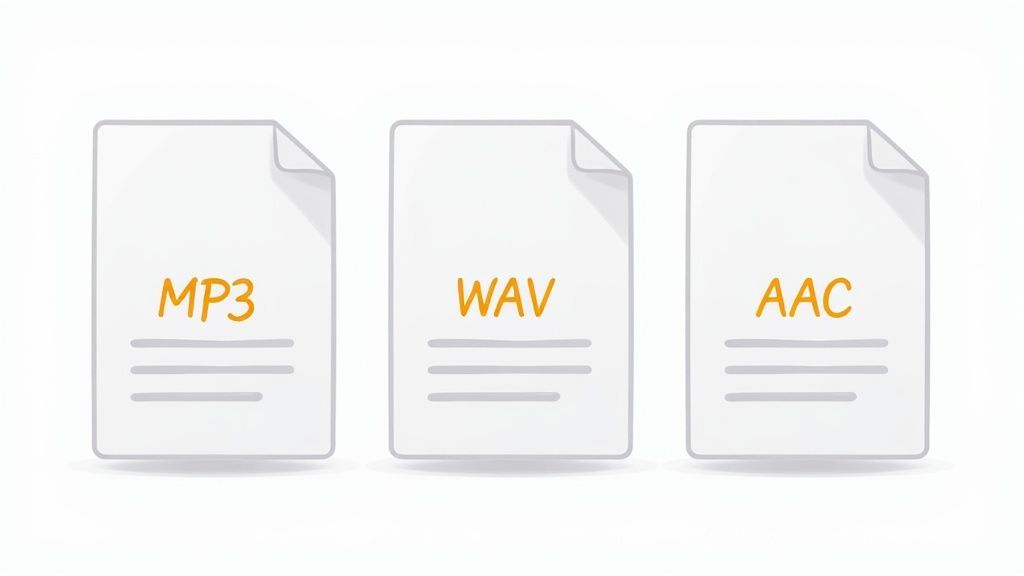
- In einem hochwertigen Format exportieren: Während MP3 üblich ist, bewahrt der Export in einem Format wie FLAC oder WAV (wenn der Dienst dies unterstützt) mehr Audio-Details. Dies gibt der KI mehr Daten zur Verarbeitung.
Wenn Sie ein paar Minuten für diese Vorbereitungsschritte aufwenden, stellen Sie sicher, dass Ihr Audio KI-freundlich ist, was Ihnen eine schnelle, genaue und wirklich nützliche Transkription ermöglicht.
Ihre erste Transkription mit einem kostenlosen KI-Tool erhalten
Über Transkription zu sprechen ist eine Sache, aber zu sehen, wie sie ihre Magie entfaltet, ist eine ganz andere. Lassen Sie uns die Theorie beiseitelegen und direkt zur Praxis übergehen. Ich führe Sie durch den Prozess der kostenlosen Audio-zu-Text-Transkription mit einem Tool wie Transcript.LOL.
Um dies greifbar zu machen, verwenden wir ein gängiges Szenario: einen kurzen, fünfminütigen Audioclip aus einer Team-Brainstorming-Sitzung. Wir gehen von einer rohen Audiodatei zu einem sauberen, nutzbaren Textdokument in nur wenigen Klicks.
Hochladen Ihrer Audiodatei
Die meisten modernen Transkriptionstools sind auf Geschwindigkeit und Einfachheit ausgelegt. Wenn Sie auf der Homepage landen, finden Sie keine komplizierte Software zur Installation oder eine verwirrende Einrichtung. Stattdessen sehen Sie eine klare, einfache Aufforderung zum Hochladen Ihrer Datei.
Das Ziel ist es, Sie mit möglichst geringem Aufwand von Punkt A nach Punkt B zu bringen.
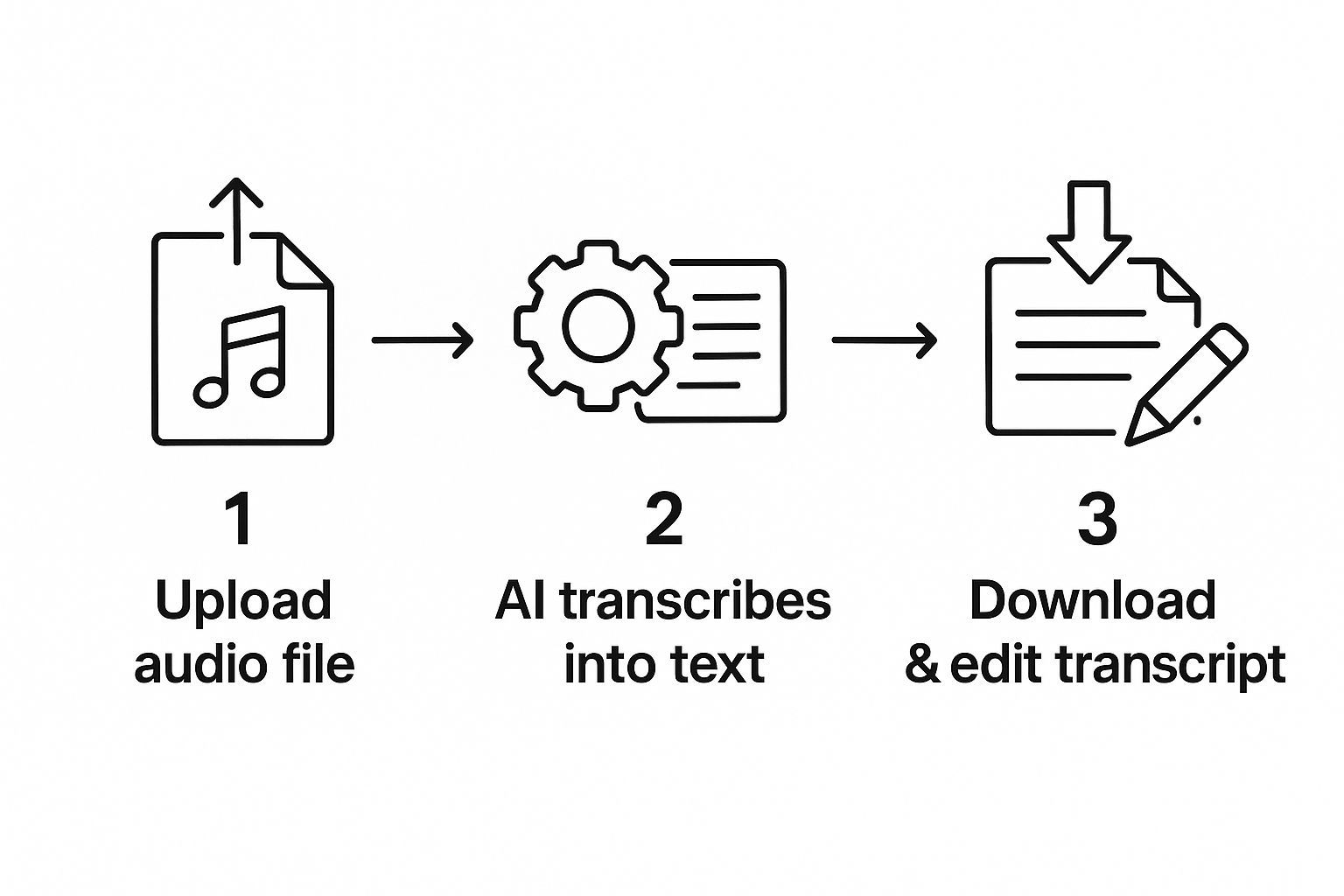
Die Benutzeroberfläche ist in der Regel sauber und intuitiv, mit einem großen Bereich zum Ziehen und Ablegen Ihrer Datei. Für unseren Brainstorming-Clip würden wir die MP3 einfach in dieses Feld ziehen.
Bevor die KI an die Arbeit geht, müssen Sie ein paar wichtige Details angeben, die einen großen Einfluss auf die Genauigkeit haben.
- Wählen Sie die richtige Sprache: KI-Modelle sind sprachspezifisch. Wenn Ihr Audio auf Englisch mit amerikanischem Akzent ist, erhalten Sie mit der Auswahl von "Englisch (US)" deutlich bessere Ergebnisse als mit einer generischen Option "Englisch".
- Sprecher zählen: Wenn das Tool eine Sprechererkennung hat (ein fantastisches Feature), teilen Sie ihm mit, wie viele Personen sprechen. Für unseren Meeting-Clip mit drei Teammitgliedern würden wir "3" auswählen. Dies hilft der KI, korrekt zu kennzeichnen, wer was gesagt hat.
Sobald das erledigt ist, beginnt die Magie. Und sie ist schnell. Seien Sie nicht überrascht, wenn unser fünfminütiger Clip in weniger als einer Minute vollständig transkribiert ist.
Verständnis der Grenzen der kostenlosen Version
Hier müssen wir realistisch sein. Kostenlose Pläne sind erstaunlich, aber sie haben fast immer einige Einschränkungen. Wenn Sie diese im Voraus kennen, können Sie das Beste aus dem Angebot herausholen.
Sie stoßen typischerweise auf einige häufige Einschränkungen:
- Dateigrößen- oder Längenbeschränkungen: Viele kostenlose Pläne beschränken Uploads auf eine bestimmte Größe (wie 100 MB) oder Länge (wie 30 Minuten). Haben Sie eine zweistündige Vorlesung? Kein Problem. Verwenden Sie einfach einen kostenlosen Audio-Editor wie Audacity, um sie zuerst in kleinere Abschnitte zu teilen.
- Tägliche oder monatliche Kontingente: Sie erhalten möglicherweise eine bestimmte Anzahl von kostenlosen Transkriptionsminuten pro Tag oder Monat. Das ist perfekt für den gelegentlichen Gebrauch, aber Sie werden wahrscheinlich nicht in der Lage sein, einen ganzen Podcast-Backlog in einem Durchgang zu transkribieren.
Profi-Tipp: Wenn Sie eine lange Audiodatei aufteilen müssen, schneiden Sie sie nicht einfach zufällig. Versuchen Sie, Ihre Schnitte während natürlicher Pausen in der Konversation oder zwischen Themen zu setzen. Das erleichtert das Zusammenfügen der endgültigen Transkripte erheblich.
Überprüfung Ihrer endgültigen Transkription
Nach ein oder zwei Minuten präsentiert Ihnen die KI den fertigen Text. Für unser Team-Meeting-Beispiel würde die Ausgabe sauber und organisiert aussehen, etwa so:
Sprecher 1: Okay, für den Q3-Launch sollten wir uns meiner Meinung nach auf Social Media konzentrieren.
Sprecher 2: Ich stimme zu. Insbesondere auf Videoinhalte auf Instagram und TikTok.
Sprecher 3: Wie sieht es mit dem Budget dafür aus? Wir müssen realistisch sein.
Von hier aus können Sie sie überprüfen, kleinere Bearbeitungen vornehmen und sie in Formaten wie TXT, DOCX oder sogar SRT für Video-Untertitel exportieren. Für eine tiefere Auseinandersetzung mit den Details können Sie mehr darüber erfahren, wie Sie Audio kostenlos in Text transkribieren und einige fortgeschrittenere Techniken erlernen.
Jetzt haben Sie eine polierte Transkription, die Sie verwenden können. So einfach ist das.

Aus mehreren Quellen importieren
Importiere Audio- und Videodateien aus verschiedenen Quellen, einschließlich direktem Upload, Google Drive, Dropbox, URLs, Zoom und mehr.

Bearbeitungswerkzeuge
Bearbeite Transkripte mit leistungsstarken Werkzeugen wie Suchen und Ersetzen, Sprecherzuordnung, Rich-Text-Formate und Hervorhebungen.
Zusammenfassungen und Chatbot
Erstelle Zusammenfassungen und andere Erkenntnisse aus deinem Transkript, wiederverwendbare benutzerdefinierte Prompts und Chatbot für deine Inhalte.
Wie KI das Transkriptionsspiel verändert
Haben Sie sich jemals gefragt, wie Ihre Audiodatei in nur wenigen Minuten zu einer Textwand wird? Es ist kein geheimes Team von blitzschnellen Schreibkräften, das hinter den Kulissen arbeitet. Es ist künstliche Intelligenz. Die modernen Tools, die kostenlose Audio-zu-Text-Transkription anbieten, werden von hochentwickelter KI angetrieben, die das Spiel komplett verändert hat.
Diese KI-Systeme lernen aus riesigen Datensätzen – wir sprechen von Millionen von Stunden menschlicher Sprache aus allen erdenklichen Hintergründen. Dieses Training hilft der KI, Muster zu erkennen, Akzente zu unterscheiden und sogar das nächste Wort in einem Satz vorherzusagen, ähnlich wie unser eigenes Gehirn funktioniert. Diese Vorhersagekraft ist das Geheimnis hinter ihrer unglaublichen Geschwindigkeit.
Die finanziellen Zahlen erzählen die gleiche Geschichte. Der Markt für KI-Transkriptionen explodiert und wird von 4,5 Milliarden US-Dollar im Jahr 2024 auf beeindruckende 19,2 Milliarden US-Dollar bis 2034 ansteigen. Dies ist nicht nur Wachstum; es ist ein grundlegender Wandel von langsamer, teurer manueller Transkription hin zu sofortigen, KI-gestützten Ergebnissen.
Warum KI (noch) nicht perfekt ist
Ein wenig Wissen über die Technologie hilft Ihnen, ihre Eigenheiten zu verstehen. So leistungsfähig KI auch ist, sie ist kein Gedankenleser, und ihre Leistung ist nur so gut wie die Daten, auf denen sie trainiert wurde.
Deshalb wird sie gelegentlich bei bestimmten Wörtern stolpern:
- Eigennamen: Eindeutige Firmennamen oder weniger gebräuchliche Nachnamen können falsch geschrieben werden, wenn die KI sie nicht oft genug gesehen hat. Denken Sie an "Siobhan", transkribiert als "Sha-von".
- Nischenjargon: Wenn Ihre Audioaufnahme voller Fachbegriffe aus Medizin oder Ingenieurwesen ist, kann die KI einige Fehler machen, wenn diese Sprache in ihren Trainingsdaten nicht stark vertreten war.
- Starke Akzente: Moderne KI wird immer besser, aber sehr starke oder ungewöhnliche Akzente können sie immer noch durcheinanderbringen und einige Fehler einführen.
Ein KI-Transkript ist ein fantastischer erster Entwurf, der unter idealen Bedingungen oft bis zu 99 % Genauigkeit erreicht. Ihre Aufgabe ist es, der menschliche Redakteur zu sein, der die letzten 1 % poliert – und die spezifischen Namen und Nischenbegriffe erfasst, die die KI möglicherweise übersehen hat.
Dieser gesamte Prozess ist Teil der breiteren KI-Revolution und des Anbruchs des intelligenten Internets, einer Bewegung, die weit mehr als nur die Transkription neu gestaltet.
Indem Sie verstehen, wo KI glänzt und wo sie ein wenig Hilfe benötigt, können Sie diese kostenlosen Tools viel effektiver nutzen. Für Besprechungsnotizen, bei denen Sie nur das Wesentliche benötigen, ist ein rohes KI-Transkript oft alles, was Sie brauchen. Wenn Sie nach dem richtigen Tool für Ihr Team suchen, ist unser Leitfaden zur https://transcript.lol/blog/best-meeting-transkription-software ein guter Ausgangspunkt.
Bearbeiten Sie Ihr KI-Transkript wie ein Profi
Ein KI-generiertes Transkript ist ein riesiger Vorsprung, aber es ist die letzte menschliche Note, die es wirklich professionell macht. Selbst die besten kostenlosen Audio-zu-Text-Transkriptionstools können die subtilen Eigenheiten menschlicher Sprache übersehen. Betrachten Sie die KI-Ausgabe einfach als einen wirklich soliden ersten Entwurf – Ihre Aufgabe ist es, den Schliff hinzuzufügen, der ihn zum Glänzen bringt.
Dabei geht es nicht nur darum, Tippfehler zu beheben. Eine gute Bearbeitung verwandelt eine rohe Textdatei in ein Dokument, das klar, lesbar und wirklich nützlich ist. Die gute Nachricht? Die letzten 10 % der Arbeit sind viel schneller und einfacher, als Sie vielleicht denken, besonders wenn Sie erst einmal einen Arbeitsablauf haben.
Ihre Checkliste nach der Transkription
Bevor Sie überhaupt mit der Bearbeitung beginnen, fragen Sie sich: Was ist hier das Endziel? Erstellen Sie Besprechungsprotokolle, einen Blogbeitrag oder Untertitel für Videos? Der endgültige Anwendungsfall bestimmt, wie tief Ihre Bearbeitungen gehen müssen. Untertitel erfordern beispielsweise ein Maß an Präzision, das sich völlig von der Zusammenfassung eines schnellen Teamgesprächs unterscheidet.
Hier ist ein praktischer Arbeitsablauf, um Ihnen den Einstieg zu erleichtern:
- Sprecherbeschriftungen korrigieren: KI ist ziemlich gut darin, Stimmen auseinanderzuhalten, aber sie weiß nicht, wer wer ist. Ihr erster Durchgang sollte ein schneller sein: Ersetzen Sie generische Beschriftungen wie "Sprecher 1" und "Sprecher 2" durch tatsächliche Namen wie "Maria" oder "David".
- Eigennamen und Fachbegriffe korrigieren: Scannen Sie als Nächstes nach Firmennamen, branchenspezifischen Begriffen oder einzigartigen Namen, mit denen die KI möglicherweise Schwierigkeiten hatte. Es ist üblich, Dinge wie "Transcript LOL" anstelle des korrekten "Transcript.LOL" zu sehen.
- Satzzeichen standardisieren: KI kann manchmal ein wenig kreativ mit Kommas und Punkten umgehen. Lesen Sie alles durch, um sicherzustellen, dass die Satzzeichen tatsächlich zur Lesbarkeit beitragen, und scheuen Sie sich nicht, lange, ausschweifende Sätze zu unterteilen.
- "Unverständlich"-Momente behandeln: Gelegentlich wird die KI einen Abschnitt als
[unverständlich]markieren, wenn der Ton gedämpft war. Springen Sie zu diesem Zeitstempel und hören Sie ihn sich an. Wenn Sie ihn verstehen können, großartig! Wenn nicht, ist es viel besser, das[unverständlich]-Tag beizubehalten, als zu raten und Gefahr zu laufen, falsche Informationen einzufügen.
Zeitsparende Bearbeitungshacks
Niemand möchte jeden kleinen Fehler manuell korrigieren – das ist einfach mühsam. Der Trick besteht darin, intelligenter und nicht härter zu arbeiten, indem Sie die integrierten Funktionen Ihres Textverarbeitungsprogramms nutzen. Die Funktion "Suchen und Ersetzen" wird Ihr neuer bester Freund.
Nehmen wir an, der Name eines Sprechers, "Siobhan", wurde durchweg als "Sha-von" transkribiert. Anstatt ihn zehnmal zu korrigieren, können Sie Suchen und Ersetzen (normalerweise Strg+H oder Cmd+Umschalt+H) verwenden, um jede einzelne Instanz in Sekundenschnelle zu korrigieren. Dies ist ein echter Wendepunkt für wiederkehrende Fehler.
Profi-Tipp: Löschen Sie Füllwörter wie "ähm", "äh" und "wie" nicht einfach blindlings. Für ein Interviewtranskript, bei dem Sie die authentische Stimme einer Person festhalten möchten, kann es gut sein, einige davon beizubehalten. Für klare, professionelle Besprechungsnotizen sollten Sie sie jedoch zur besseren Lesbarkeit entfernen.
Sobald Ihr Text bereinigt ist, wird er zu einem vielseitigen Vermögenswert, den Sie für alle möglichen Zwecke wiederverwenden können. Ein poliertes Transkript ist das perfekte Rohmaterial für neue Inhalte. Sie könnten ganz einfach wichtige Zitate für soziale Medien extrahieren oder sogar die gesamte Aufnahme in einen Blogbeitrag verwandeln.
Und wenn Ihr Ziel Video ist, ist ein sauberer Transkript der wesentliche erste Schritt. Sie können mehr darüber erfahren, wie Sie Untertitel für Videos erstellen direkt aus Ihrem bearbeiteten Text. Diese letzte Bearbeitungsphase ist es, in der Sie den eigentlichen Mehrwert hinzufügen und sicherstellen, dass die Ausgabe nicht nur genau, sondern auch perfekt auf ihren Zweck zugeschnitten ist.
Kostenlose Transkriptionstools sind für viele Aufgaben eine Rettung. Ich benutze sie ständig, um schnelle Notizen aus Besprechungen zu machen oder erste Ideen aus einer Sprachnotiz zu entwerfen. Aber seien wir ehrlich – sie haben ihre Grenzen. Zu wissen, wann man bei einem kostenlosen Dienst bleiben und wann man in einen kostenpflichtigen investieren sollte, kann Ihnen auf lange Sicht viel Kopfzerbrechen ersparen.
Das sagen nicht nur wir; der gesamte Transkriptionsmarkt boomt. Mit einem Wert von rund 10,5 Milliarden US-Dollar im Jahr 2024 wird er voraussichtlich 27,97 Milliarden US-Dollar bis 2033 erreichen. Dieses Wachstum betrifft nicht nur große Unternehmen; es wird von allen angetrieben, von Studenten bis hin zu Kreativen, die Audio in Text umwandeln müssen. Sie können die Daten zu dieser Branchenexpansion einsehen, um zu sehen, wie sich die Dinge entwickeln.
Anzeichen dafür, dass es Zeit für ein Upgrade ist
Stellen Sie es sich so vor, als würden Sie einen kostenlosen Bildbearbeitungsprogramm im Vergleich zu Adobe Photoshop verwenden. Das kostenlose Tool ist perfekt zum Zuschneiden eines Familienfotos, aber Sie würden es nicht zum Entwerfen einer Plakatwand verwenden. Die gleiche Logik gilt hier. Sie sollten ernsthaft einen kostenpflichtigen Dienst in Betracht ziehen, wenn Sie sich in einer der folgenden Situationen wiederfinden:
- Wenn absolute Genauigkeit nicht verhandelbar ist: Bei Dingen wie juristischen Aussagen, Patientenakten oder kritischer akademischer Forschung reicht "meistens genau" einfach nicht aus. Ein einziges falsch platziertes Wort kann riesige Folgen haben. Kostenpflichtige Dienste beinhalten oft eine menschliche Überprüfungsschicht, um die Genauigkeit über die 99 % hinaus zu steigern und Ihnen Sicherheit zu geben.
- Wenn Vertraulichkeit entscheidend ist: Transkribieren Sie sensible Kundendaten, eine nichtöffentliche Vorstandssitzung oder proprietäre F&E-Diskussionen? Wenn ja, benötigen Sie eine narrensichere Sicherheit. Kostenpflichtige Pläne beinhalten fast immer strengere Datenschutzrichtlinien und Datenschutzgarantien, die kostenlose Tarife einfach nicht bieten können.
- Wenn Sie spezielle Funktionen benötigen: Manchmal benötigen Sie mehr als nur eine Textwand. Erweiterte Tools wie das Erstellen eines benutzerdefinierten Vokabulars für Branchenjargon, das Erhalten von Echtzeit-Untertiteln für eine Live-Veranstaltung oder das Hinzufügen mehrerer Teammitglieder zu einem Projekt finden Sie fast ausschließlich in Premium-Plänen.
Der Kompromiss ist ziemlich einfach: Kostenlose Dienste bieten Ihnen unglaublichen Komfort für alltägliche Aufgaben, während kostenpflichtige Dienste die Zuverlässigkeit, Sicherheit und erweiterten Funktionen liefern, die für professionelle, risikoreiche Arbeiten erforderlich sind.
Ein Podcaster könnte beispielsweise ein kostenloses Tool verwenden, um einen groben Entwurf seiner Show-Notizen zu erhalten. Aber wenn es darum geht, perfekt zeitgestempelte SRT-Dateien für seine YouTube-Videos zu erstellen, um die Zugänglichkeit und SEO zu maximieren, wird er in einen kostenpflichtigen Dienst investieren. Eine Anwaltskanzlei würde nicht einmal daran denken, ein kostenloses Tool zum Transkribieren von Beweismitteln zu verwenden.
Die richtige Wahl von Anfang an stellt sicher, dass Sie ein qualitativ hochwertiges Ergebnis erhalten, wenn es wirklich darauf ankommt, ohne Zeit mit einem Tool zu verschwenden, das nicht für die Aufgabe geeignet ist.
Bereit zu sehen, was ein professionelles Transkriptionstool für Sie tun kann? Transcript.LOL kombiniert leistungsstarke KI mit einer intuitiven Plattform, die sowohl einfache Aufgaben als auch komplexe Projekte mühelos bewältigt. 👉 Starten Sie noch heute kostenlos und erleben Sie den Unterschied.