
A Practical Guide to Taking Minutes of Meeting
Master the art of taking minutes of meeting with this practical guide. Learn how to prepare, capture key details, and create records that drive action.
Kate, Praveen
September 10, 2025
Taking minutes isn't just about jotting down notes. It’s about creating an official, super-clear record of what was talked about, what was decided, and who's doing what next. Think of it less as note-taking and more as a strategic process to lock in key decisions, action items, and outcomes.
This simple act is what keeps everyone on the team aligned and accountable.
Why Nailing Meeting Minutes Is a Superpower
In a world filled with back-to-back meetings, being the person who can produce killer minutes is a genuine superpower. It's the one skill that separates a meeting that builds momentum from one that just disappears into the ether. We’ve all been in disorganized meetings that lead to wasted time, blown deadlines, and endless miscommunications.
Well-crafted minutes are the antidote. They become the single source of truth that gets everyone—attendees and absentees alike—on the same page.
Why Meeting Minutes Matter?
Meeting minutes serve as an official record of decisions and responsibilities. They ensure alignment, reduce misunderstandings, and help teams move forward with clarity — even when members miss the meeting.
Smart Meeting Capture Features
State-of-the-art AI
Powered by OpenAI's Whisper for industry-leading accuracy. Support for custom vocabularies, up to 10 hours long files, and ultra fast results.

Import from multiple sources
Import audio and video files from various sources including direct upload, Google Drive, Dropbox, URLs, Zoom, and more.

Speaker detection
Automatically identify different speakers in your recordings and label them with their names.
Let’s take a quick look at how things have changed. Minute-taking isn’t what it used to be, thanks to some pretty handy tools that have popped up.
The Evolution of Taking Meeting Minutes
| Aspect | Traditional Method | Modern Method (with Tools) |
|---|---|---|
| Focus | Frantically trying to write everything down | Capturing key decisions, outcomes, and nuances |
| Tools | Pen, paper, maybe a laptop | AI transcription tools, audio recorders |
| Speed | Slow, manual, and often a bottleneck | Near-instant, with automated transcription |
| Accuracy | Prone to human error and personal bias | Highly accurate, verbatim record |
| Effort | High-effort during the meeting, tedious after | Low-effort; focus on listening, not typing |
This shift from a manual chore to a tech-assisted workflow is a game-changer, especially given how modern meetings actually run.
Modern Minute-Taking Has Evolved
Today’s teams rely on AI transcription and automation to capture meetings faster and more accurately. This evolution allows minute-takers to focus on outcomes rather than frantic typing.
The Shift to Shorter, Faster Meetings
Workplace meetings have gotten shorter but far more frequent. This isn’t just a feeling; the data backs it up. An analysis of over 1.3 million meetings found the median duration was just 35 minutes, and only 12% lasted more than an hour.
With 94% of meetings now scheduled for 60 minutes or less, there's zero time for ambiguity. You have to capture every crucial decision accurately before everyone jumps to their next call.
This breakneck pace is exactly why solid minute-taking is so vital. Without a clean record, important details and action items get lost in the shuffle, creating a headache for everyone later.
A meeting without minutes is just a conversation. An effective meeting, documented with clear minutes, is a catalyst for action and a blueprint for accountability.
From Administrative Chore to Strategic Asset
If you still see taking minutes of meeting as just a boring administrative task, you’re missing the point. You're actually creating a valuable company asset. These records give historical context for future projects, save the team from "he said, she said" arguments, and drive real accountability by spelling out who owns what.
When you get it right, the benefits are huge:
- Ensures Accountability: Clear action items with owners and deadlines mean there’s no confusion about what comes next.
- Maintains Momentum: A quick summary keeps the project moving and reminds everyone of their commitments.
- Creates a Single Source of Truth: It’s the definitive record for anyone who missed the meeting or needs a refresher.
Mastering this skill makes a direct impact on your team’s efficiency. Better yet, tools like Transcript.LOL can completely change the game by automating the painful transcription part. This frees you up to focus on listening and capturing the strategic insights that really matter.
You can dive deeper into these ideas in our guide on how to improve team productivity.
How to Prepare Before the Meeting Starts
The secret to taking flawless meeting minutes starts long before anyone even joins the call. A bit of prep work transforms you from a passive note-taker into a strategic participant who knows exactly what to listen for.
Honestly, just 15 minutes of thoughtful preparation can save you hours of guesswork and confusion later on.
First things first: connect with the meeting organizer. This isn't just a courtesy—it’s your chance to get on the same page about the meeting's real objectives. What are they actually trying to achieve? Understanding the "why" behind the meeting is crucial for anticipating the most important discussions and decisions.
Review the Agenda Thoroughly
Once you know the goals, the agenda becomes your roadmap. It tells you the key topics and how the conversation is expected to flow. A huge part of effective minute-taking is knowing how to prepare an effective meeting agenda in the first place, as it directly impacts your work.
When you analyze the agenda, you can start to predict where the big decisions will happen and where action items are most likely to pop up. This foresight is gold once the meeting kicks off and things start moving fast.
Preparation is the key to clarity. When you know the meeting's goals and agenda, you can focus on capturing the substance of the discussion, not just the words being spoken.
This pre-meeting review is more important than ever. While meeting times have dropped by 20% since 2020, a wild 64% of recurring meetings still don't have a clear agenda. In those cases, your chat with the organizer becomes the only thing standing between a useful record and a page of random notes.
Create Your Minutes Template
Whatever you do, don't start with a blank page. Set up a structured template in your favorite note-taking app before the meeting begins. This simple step creates a framework that keeps you organized when you're typing away in real-time.
Your template should have clear sections for the essentials:
- Meeting Title: The official name of the meeting.
- Date and Time: A clear timestamp for the record.
- Attendees and Absentees: Who was there, and who couldn't make it.
- Agenda Items: Pre-populate these to structure your notes.
- Decisions Made: A dedicated spot to log key outcomes as they happen.
- Action Items: A simple table with columns for the task, the owner, and the deadline.
Select the Right Tools for the Job
Finally, get your toolkit ready. This means having your note-taking app open and any recording or transcription services ready to go.
If you’re using a tool like Transcript.LOL, make sure it’s configured for the right platform ahead of time. For example, knowing how to record a meeting in Teams beforehand will save you from fumbling with settings at the last minute. Getting your tech sorted out means you can focus 100% on the conversation once it starts.
Capturing What Actually Matters During the Meeting
Alright, the meeting's started, people are talking, and this is where all that prep work really shines. Your goal here isn't to become a human stenographer—trying to write down every single word is a fast track to a headache and a document nobody will ever read.
Think of yourself as a strategic filter. Your mission is to listen for just three things: key decisions, specific action items, and major conclusions. That’s it. Everything else is just the conversation that gets you there, and while it might be interesting, it usually doesn't need to live on in the final notes.
Core Responsibilities of a Minute-Taker
Capture Decisions Clearly
Every finalized decision must be recorded without ambiguity. Clear documentation prevents rework, disputes, and misalignment across the team.
Track Action Ownership
Minutes should clearly assign who is responsible for each task. Ownership ensures accountability and keeps work moving forward.
Document Deadlines
Action items without deadlines lose urgency. Recording due dates ensures follow-through and measurable progress.
Stay Objective
Minute-takers must remain neutral. Document outcomes and discussion points without bias or emotional language.
Tune Your Ears for Outcomes
This all comes down to active listening. You’re not just passively hearing the words; you're hunting for intent and outcomes. When the team lead says, "Okay, so we're all aligned on moving forward with the Q4 marketing plan," that's a key decision. Your job is to nail that down, clean and simple.
It's all about mentally flagging the important signals as they happen. If you want to get better at this, we've got a great primer on what is active listening and how to put it into practice.
This simple preparation flow is what frees you up to focus during the actual meeting.
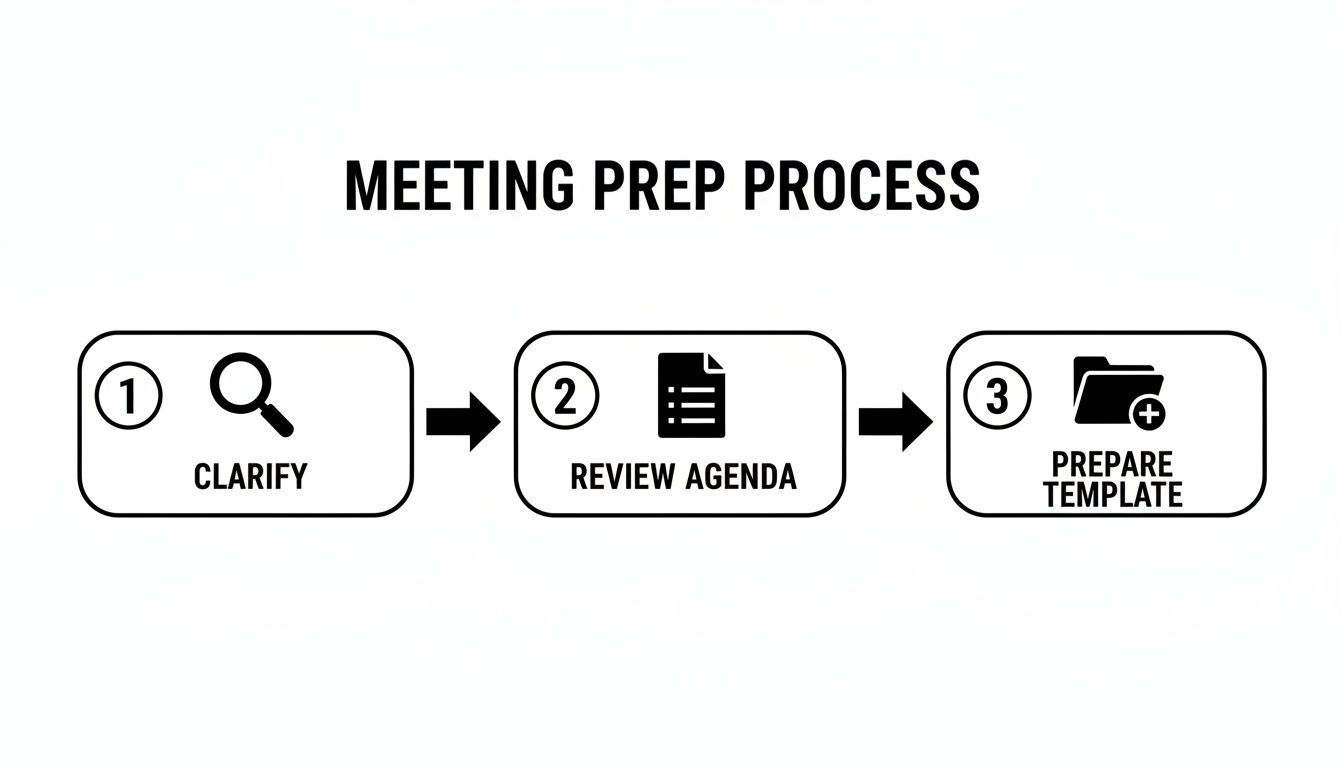
When you’ve clarified goals, reviewed the agenda, and have your template ready, you can stop frantically typing and start synthesizing what’s actually happening.
Focus on Action, Not Just Talk
A classic mistake is trying to document the entire debate that leads to a decision. Unless you need that context for legal or compliance reasons, it's usually just noise. Cut to the chase: what was the final resolution? And more importantly, what happens next?
Every single action item needs three core components to be useful:
- The specific task: What, exactly, needs to be done?
- The owner: Who is on the hook for getting it done?
- The deadline: When does it need to be finished?
A meeting's true value is measured by its outcomes. If your minutes don't clearly state what was decided and what happens next, the meeting might as well have been a casual chat.
The context of the meeting changes what you listen for. In a project kickoff, you’re capturing roles and immediate next steps. In a quarterly review, it's all about performance metrics, strategic shifts, and high-level goals for the next 90 days.
Let Technology Handle the Heavy Lifting
This is where things get so much easier today. Instead of splitting your focus between listening, understanding, and typing, you can let an AI tool handle the word-for-word grunt work.
Services like Transcript.LOL will create a perfect record of the entire conversation. This frees you up to actually be present in the meeting, listen for those key outcomes, and jot down high-level notes in your template. No more worrying about missing a critical quote or fumbling a technical term.
Some professionals also use specific voice charting software to streamline how spoken contributions are recorded. The big idea is the same: use technology as a safety net. It captures everything, which allows your human brain to focus on synthesis and clarity.
After the meeting, you can dip back into the perfect transcript to confirm details, pull exact quotes, and make sure your summary is 100% accurate. This blend of AI precision and human insight is, hands down, the most effective way to take minutes today.

Editing tools
Edit transcripts with powerful tools including find & replace, speaker assignment, rich text formats, and highlighting.

Export in multiple formats
Export your transcripts in multiple formats including TXT, DOCX, PDF, SRT, and VTT with customizable formatting options.
Summaries and Chatbot
Generate summaries & other insights from your transcript, reusable custom prompts and chatbot for your content.
Turning Raw Notes Into a Polished Record
The meeting might be over, but your job isn’t. In fact, this is where the real value gets created. The next step is transforming your messy notes and raw transcript into a polished, professional record that people will actually use. This is the moment you shift from just capturing what was said to creating clarity around what was decided.
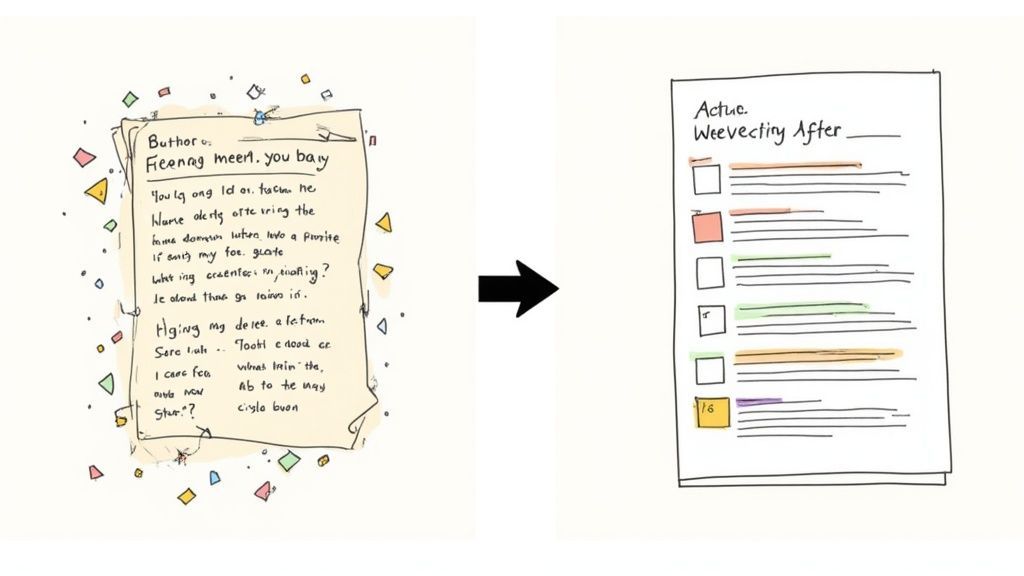
Starting with a word-for-word transcript from a tool like Transcript.LOL gives you an incredible head start. You know you haven't missed a single detail. Your first task is a quick read-through to clean things up—correct any funky spellings of names, technical jargon, or acronyms the AI might have misinterpreted.
Structuring Your Minutes for Clarity
Once the transcript is accurate, it's time to bring some order to the chaos. A wall of text is useless to a busy colleague. Instead, use clear headings that match the meeting agenda items.
Under each heading, your job is to distill the conversation down to its most critical parts:
- Key Decisions: What did the team agree to do? State it clearly and without waffle.
- Main Discussion Points: Briefly summarize the core arguments or context that led to that decision. Just the highlights.
- Action Items: This is the most important part. Who is doing what, and by when? Be explicit.
This structure turns a long, winding conversation into a document that’s easy to scan and respects everyone’s time. For a deeper dive, check out our guide on how to summarize a meeting effectively.
The point of meeting minutes isn't to prove the meeting happened. It's to make the outcomes useful and actionable for everyone, especially those who couldn't be there.
Essential Components of Professional Meeting Minutes
To make sure your minutes are always complete and professional, it helps to have a checklist of the non-negotiables. Think of these as the fundamental building blocks of any effective meeting record.
| Component | What to Include | Why It's Important |
|---|---|---|
| Basic Information | Meeting Title, Date, Time, Location | Provides immediate context and makes the document easy to find later. |
| Attendees & Absentees | List of all invited participants, noting who was present and who was not. | Creates a clear record of who was involved in the decision-making process. |
| Agenda Items | A clear heading for each topic discussed, mirroring the original agenda. | Organizes the flow of the minutes and makes specific topics easy to locate. |
| Key Decisions | A concise statement for each decision made under the relevant agenda item. | This is the "so what?" of the meeting—the concrete outcomes. |
| Action Items | Specific tasks assigned, including the owner (who is responsible) and the deadline. | Drives accountability and ensures that conversation translates into progress. |
| Next Meeting Details | Date, time, and location for the follow-up meeting, if scheduled. | Keeps momentum going and sets expectations for the next steps. |
Following this structure consistently turns your notes from a simple transcript into a powerful tool for project management and team alignment.
From Raw Transcript to Polished Summary
Let’s see this in action. Imagine your raw transcript from Transcript.LOL has a section that reads like this:
Before: "Okay, so, um, I was thinking about the Q4 launch... Alex, you mentioned we're maybe behind on the creative assets? I think we should probably, you know, get those locked in soon. Maybe by, like, the end of next week? Jen, can your team handle that?"
It’s accurate, sure, but it’s not helpful. Your job is to translate this conversational clutter into clarity.
After: Decision: The creative asset production for the Q4 launch will be expedited. Action Item:
- Task: Finalize all creative assets for the Q4 launch.
- Owner: Jen's team.
- Deadline: Friday, October 28th.
See the difference? The "after" version is unambiguous. It cuts right through the fluff to deliver a clear directive. This is the core skill of taking great minutes. By using simple formatting like bold text for owners and deadlines, you make the crucial information jump off the page. This is what turns your minutes into an indispensable tool for driving real progress.
Don't Let Your Minutes Die in a Draft Folder
You've put in the work to create a great set of minutes, but their value evaporates if they just sit in your drafts. The final steps—distribution and archival—are what lock in accountability and turn a simple document into a lasting company asset.
The first rule here is simple: move fast. Aim to send out the minutes within 24 hours of the meeting. This keeps the discussion, decisions, and action items fresh in everyone’s mind, which is absolutely vital for maintaining momentum. Wait any longer, and the urgency starts to fade.
Delayed Minutes Kill Momentum
Waiting too long to share meeting minutes reduces accountability and causes confusion. Delayed documentation often leads to forgotten decisions and missed action items.
Before you hit send on that group email, run it by the meeting chair or organizer for a quick sign-off. This is a simple quality check that confirms your record is accurate and aligns with their understanding of the outcomes. It’s a small step that prevents a ton of confusion later and adds authority to the document.
Create a Central Hub for Your Team's Memory
Once they’re approved, your minutes need a permanent home—and a random email attachment that gets buried in a crowded inbox doesn't count. The goal is to build a centralized, searchable archive where anyone on the team can find the "why" behind past decisions.
You don't need a fancy new tool for this. Just use what your team already relies on every day:
- A Shared Drive: Set up a dedicated folder (like "Project Phoenix Meeting Minutes") and use a clean, consistent naming convention like "YYYY-MM-DD - Meeting Topic."
- Project Management Boards: Attach the minutes directly to the relevant card or task in tools like Trello, Asana, or Jira. This puts the record right where the work actually happens.
- A Company Wiki: Platforms like Confluence or Notion are perfect for creating a living library of meeting outcomes, making past decisions easy for anyone to find.
This shift to a digital, central record is more critical than ever. The explosion in virtual meetings has turned minute-taking into a high-tech necessity for global teams. In fact, virtual meetings shot up from 48% to 77% of all meetings between 2020 and 2022, with Zoom alone hosting a staggering 3.3 trillion meeting minutes each year.
With nearly a third of all meetings now spanning multiple time zones, a rock-solid digital archive is the only way to keep everyone aligned. You can dig into more of the data on how work has changed in these meeting statistics.
Think of your archive as your organization's memory, not a dusty file cabinet. It's a strategic resource that informs future projects, stops teams from solving the same problems twice, and gets new hires up to speed in record time.
By building a consistent process for sharing and archiving, you transform your minutes from a disposable summary into a valuable, long-term asset. It’s the final move that ensures all the effort you put into capturing the meeting pays off long after the call has ended.
Common Questions About Taking Meeting Minutes
Even the best minute-takers run into tricky situations. Knowing how to handle the common curveballs is what separates a good record-keeper from a great one. Let’s tackle some of the questions that pop up most often.
How Detailed Should My Meeting Minutes Be?
This is the classic question, and the answer is simpler than you think: aim for clarity, not volume. Your goal is to create a guide that someone who missed the meeting can read and know exactly what was decided and what happens next. You're not writing a novel or a word-for-word court transcript.
Focus on capturing these three things religiously:
- Key Decisions: Every final decision needs to be stated in plain, unmistakable language.
- Action Items: Each task gets documented with a clear owner and a firm deadline. No exceptions.
- Important Outcomes: Summarize the main conclusions reached for each agenda item.
Think of it as the executive summary of the meeting. The most valuable minutes are scannable, concise, and laser-focused on the results that actually push work forward.
Here's the ultimate test: Can someone who wasn't there read your minutes and understand all the commitments made? If the answer is yes, you’ve nailed it.
How Should I Handle Disagreements in the Minutes?
When discussions get heated, your job is to stay completely neutral. You're a journalist, not a judge. The goal is to document the substance of the conversation, not the emotion behind it. That means avoiding any biased language or taking sides.
For example, instead of writing, "Sarah argued against Mark's unrealistic proposal," try something like this: "Two potential strategies were discussed for the Q4 launch. The first proposed an accelerated timeline, while the second suggested a phased rollout to mitigate risks."
See the difference? The second version captures the core disagreement without making anyone the villain. It's objective and professional. If you're ever on the fence about how to phrase a sensitive point, it’s always a smart move to run it by the meeting chair before sending the minutes out.
Can AI Tools Completely Automate This Job?
AI transcription tools like Transcript.LOL are absolute game-changers for creating a perfect, verbatim record of who said what. This gives you an incredible foundation to work from, saving you from the frantic, real-time typing that guarantees you'll miss something important. It basically perfects the "capture" part of the process.
But—and this is a big but—great minutes require human judgment. An AI can't (yet) perfectly synthesize a complex back-and-forth, pinpoint the subtle but critical nuances, or structure the information in a way that's strategically useful for your team.
The most effective workflow today is a hybrid one. Use an AI tool as your flawless scribe to get the raw recording down on paper. Then, use your brain to edit, structure, and polish that transcript into a record that’s not just accurate, but truly actionable.
Ready to transform your minute-taking process? With Transcript.LOL, you can get an instant, accurate transcript of any meeting, freeing you to focus on capturing what truly matters. Try Transcript.LOL for free and see the difference it makes.