
How to Get a Spotify Podcast Transcript The Easy Way
Learn how to get a Spotify podcast transcript using native features and AI tools. Turn your audio into a valuable asset for SEO and content repurposing.
Praveen
February 22, 2026
Getting a transcript for a Spotify podcast is pretty simple. You can check if the episode has Spotify's built-in transcript, use an AI service like Transcript.LOL by just pasting the episode link, or even try a browser extension.
While Spotify's native feature is handy when it's there, it’s not available for every show and you can't export the text. That’s why most creators who need an actual document to work with end up using a dedicated AI tool.
⚡ Features That Make Transcription Effortless
State-of-the-art AI
Powered by OpenAI's Whisper for industry-leading accuracy. Support for custom vocabularies, up to 10 hours long files, and ultra fast results.

Import from multiple sources
Import audio and video files from various sources including direct upload, Google Drive, Dropbox, URLs, Zoom, and more.

Export in multiple formats
Export your transcripts in multiple formats including TXT, DOCX, PDF, SRT, and VTT with customizable formatting options.
Why Your Podcast Needs a Spotify Transcript
With over 4.5 million podcasts out there, just hitting publish on your audio isn't enough to get noticed. A Spotify podcast transcript isn't just a simple text version of your show—it's your secret weapon for getting discovered, making your content accessible, and creating a ton of extra content without extra work.
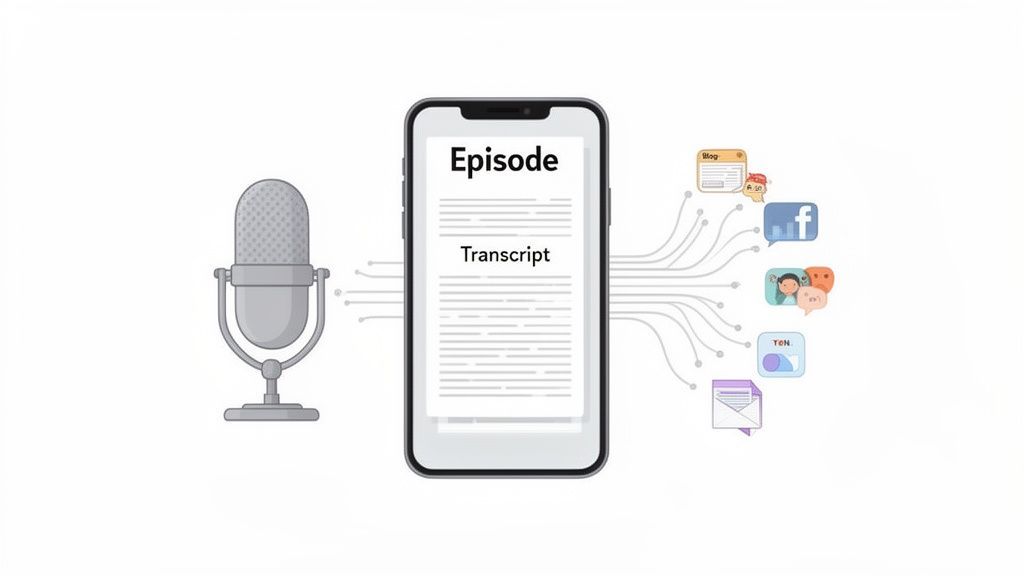
Here's the thing: search engines like Google can't listen to audio. Your amazing content is basically invisible to them. A transcript changes all that by turning your spoken words into indexable text, packed with all the keywords and topics people are actively searching for.
Audio Alone Can’t Rank
Search engines can’t actually listen to podcasts, which means audio content alone can’t rank in search results. Without text, your episodes remain invisible to Google and miss out on valuable organic traffic. By adding a transcript, you convert every spoken word into searchable content, making your podcast discoverable and significantly improving its chances of driving traffic and reaching a wider audience.
Expand Your Reach and Audience
One of the biggest wins you get from transcripts is the SEO boost. It works the same way as learning about how captions improve video SEO—the text makes your content discoverable. When someone googles a niche topic you covered in an episode, your transcript can pop up in the search results, bringing new, highly interested listeners right to your doorstep.
This isn't just a guess. Spotify's own research found that searchable transcripts can increase discoverability by up to 50%. Think about that. With global podcast listening expected to reach 45 billion hours a year, not using a transcript is like leaving a huge chunk of your potential audience behind.
Unlock Effortless Content Creation
Beyond just getting found, a transcript is the perfect starting point for repurposing your content. Stop thinking of an episode as a one-and-done deal. Instead, see it as a goldmine for all your marketing efforts.
- Create SEO-Friendly Blog Posts: The full transcript can be quickly turned into a detailed article that pulls in organic traffic.
- Generate Social Media Snippets: Grab the best quotes, stats, or takeaways to make eye-catching graphics and posts for X, Instagram, and LinkedIn.
- Build Detailed Show Notes: Give your audience a rich summary with all the links and resources you mentioned, which makes for a much better listener experience.
- Produce Captioned Video Clips: Use the SRT file from your transcript to create audiograms or video clips for social media, which are far more engaging than static images.
With a single transcript, you can fuel an entire week's worth of marketing content. This workflow transforms podcasting from a simple broadcast into a sustainable content engine, maximizing the return on every episode you record.
What a Podcast Transcript Really Gives You?
Discoverability
Every word in your transcript becomes searchable on Google, allowing your episodes to rank for niche keywords automatically. This increases your visibility and helps new listeners discover your content organically—without relying on paid ads.
Faster Content Creation
Transcripts make content repurposing effortless. You can quickly turn them into blog posts, show notes, and email newsletters without rewriting from scratch, helping you publish more content in less time.
Accessibility
Adding transcripts and captions supports hearing-impaired listeners and people who prefer watching without sound. It improves the overall user experience across platforms and makes your show inclusive for everyone.
Long-Term Value
Transcripts ensure your old episodes remain valuable over time. Past conversations become reusable content assets, allowing your episodes to continue driving engagement and traffic long after they’re released.
Tools like Transcript.LOL are designed to make this incredibly easy. You just paste a Spotify link and get a clean, speaker-labeled document ready for any of these uses. You can see how this fits into a modern creator's workflow by checking out the various use cases for AI transcription.
Before you even think about third-party tools, your first stop should always be the Spotify app itself. In a big push for accessibility, Spotify has started rolling out native transcripts for some podcasts, and finding them is super easy.
When you're listening to an episode, just glance below the episode artwork and play controls. If the feature is available, you’ll see a card or section labeled "Read along" or "Transcript." Tap that, and you'll get a real-time, auto-scrolling transcript that highlights words as they're spoken.
Checking for Availability
This is awesome for quickly finding a specific quote without having to scrub back and forth through the audio. But here's the catch: it's far from universal.
Whether you see that transcript card depends on a few things:
- Creator Opt-In: The podcaster usually has to turn it on for their show.
- Originals and Exclusives: It's way more common to see it on Spotify Originals or other high-profile, exclusive shows.
- Your Location: The rollout is still in progress and isn't available in every country yet.
- Language: For now, it's pretty much an English-only feature.
So, if you check an episode and don't see the transcript option, it just means it hasn't been enabled for that show or in your region.
The biggest downside to Spotify's built-in transcript is that it's a closed book. You can read it, but you can't copy, export, or do anything else with the text. It's great for listeners but a dead end for creators who need that text for show notes, blog posts, or social media content.
This is exactly why dedicated transcription services are still essential. Spotify gives you a great viewing experience, but it doesn't give you a usable document to work with. If you're curious about how different transcription methods stack up, our FAQs on podcast transcription break it all down.
Choosing Your Transcription Method
So you need a transcript for a Spotify podcast. Easy enough, right? Well, it depends. The best way to get one really boils down to what you need it for and what you value most. Are you chasing speed, demanding perfect accuracy, or just trying to keep costs down?
Your options range from slightly janky workarounds to incredibly slick AI-powered services. If you just need to find a specific quote you half-remember, a quick and dirty method might do. But if you’re pulling text for an article or repurposing content, you'll need something much more reliable.
This flowchart breaks down the initial steps you should take when hunting for a transcript.
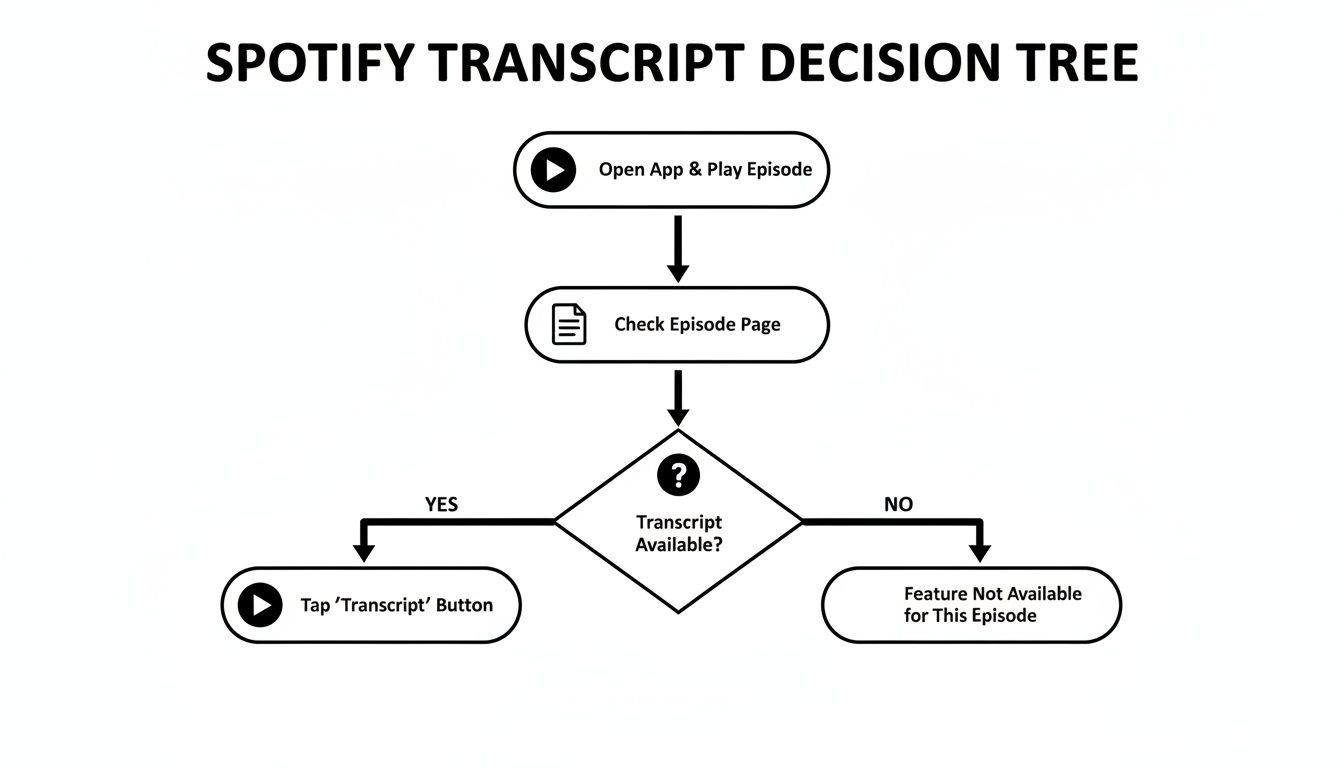
As you can see, your journey starts inside the Spotify app itself. But more often than not, you'll hit a dead end and need a better tool when a native transcript isn't there or can't be easily exported.
Comparing Spotify Transcription Methods
To give you a clearer picture, we've put together a quick comparison of the most common ways people get transcripts from Spotify. This table breaks down the pros and cons of each approach.
| Method | Best For | Speed | Accuracy | Ease of Use |
|---|---|---|---|---|
| Browser Extensions | Quick, casual checks or grabbing small text snippets. | Fast | Low to Medium | Simple |
| Manual Audio Capture | Creators on a tight budget who have time to spare. | Very Slow | Medium | Complicated |
| AI Transcription Service | Creators needing high-quality, editable documents quickly. | Very Fast | High | Very Simple |
There’s a clear trade-off here. What you might save in money with manual methods, you absolutely pay for in time and frustration. Let’s dig into what each of these experiences actually feels like.
A Closer Look at Each Method
Browser extensions are usually the first thing people try. They promise a simple, one-click solution, but the reality is often a mess. These tools tend to fall apart with real-world audio—struggling with crosstalk, different accents, or any hint of background music. They're okay for a rough draft, but definitely not for professional use.
Then there's the manual route. This involves using software to record your computer's audio while the podcast plays, saving that file, and then uploading it somewhere for transcription. It works, but it's a clunky, multi-step process that feels like a workaround from a decade ago. You have to let the entire episode play out in real-time, deal with massive audio files, and then wait all over again for the transcription to process.
This is where a dedicated AI service like Transcript.LOL completely changes the game. Instead of juggling audio files or fighting with buggy browser tools, you just paste the Spotify episode link. That's it. The platform does the rest, delivering a highly accurate, speaker-labeled transcript in just a few minutes.
This link-based approach is, by far, the most efficient way to work. It cuts out all the tedious intermediate steps, saving you a ton of time and sparing you the technical headaches. You're not just getting a transcript; you're getting a smarter, faster workflow.
If you want to get into the weeds on what makes a good transcription service, you can explore the features of different AI transcription tools on our site. This direct method is a perfect example of how modern AI can make a once-complex task feel almost effortless.
How to Use an AI Transcription Service
When Spotify’s native transcript isn't available or you need a document you can actually work with, a dedicated AI transcription service is the fastest path forward. Forget those clumsy workarounds that make you manually record and upload audio. Modern tools like Transcript.LOL have made getting a Spotify podcast transcript incredibly simple—all you need is the episode link.
This approach completely bypasses all the frustrating intermediate steps, turning what used to be a multi-stage chore into a quick, two-minute task.
The demand for transcripts is soaring, with global podcast listeners projected to hit 619 million. For creators, AI services are a true game-changer, slashing costs by up to 70% compared to traditional manual services. Check out more insights on how podcast transcription is fueling growth for creators worldwide.
Your Simple Transcription Workflow
The entire process is built for speed and simplicity. The goal is to get from a Spotify episode to a polished, editable document as quickly as possible, without needing any technical skills.
Here’s what this link-based workflow looks like in practice:
- Find Your Podcast on Spotify: Open the Spotify app or website and navigate to the specific episode you want to transcribe.
- Copy the Episode Link: Click the three-dot menu (...) on the episode, hit "Share," and then "Copy Episode Link."
- Paste the Link into the AI Tool: Head over to an AI service like Transcript.LOL and pop the URL into the field.
The interface is usually clean and focused on this single action.
Once you paste the link and hit go, the platform gets to work behind the scenes. You don’t need to download anything or leave the episode playing; the tool handles everything directly from the link.
Refining and Exporting Your Transcript
In just a few minutes, you'll have a complete draft of your podcast transcript. Today's AI is remarkably good, often exceeding 95% accuracy for clear audio, but there’s always room for a quick human touch-up to make it perfect.
This is where the built-in editor becomes invaluable. You can easily play the audio, which stays synced with the text, to make corrections, fix any misidentified words, or tweak punctuation.
Features for Faster Workflow

Speaker detection
Automatically identify different speakers in your recordings and label them with their names.

Editing tools
Edit transcripts with powerful tools including find & replace, speaker assignment, rich text formats, and highlighting.
Summaries and Chatbot
Generate summaries & other insights from your transcript, reusable custom prompts and chatbot for your content.
A key feature is speaker labeling. The AI automatically detects different voices and assigns them labels like "Speaker 1" and "Speaker 2." From there, you can rename the speakers to create a clean, professional-looking script.
After a quick review, your transcript is ready for action. The real power comes from the flexible export options. You're not stuck with just one format; you can download the perfect file for whatever you need.
- DOCX: Ideal for turning your episode into a blog post, article, or detailed show notes.
- SRT/VTT: The standard formats for creating captions for video clips or audiograms to share on social media.
- TXT: A simple plain-text file that's perfect for pasting into other applications or just keeping for your records.
This efficient workflow—paste, edit, and export—makes generating a Spotify podcast transcript a repeatable and scalable part of your content strategy. For those looking to get the most out of their transcribed content, you can find a wealth of information in our documentation on advanced transcript features.
Putting Your New Transcript to Work
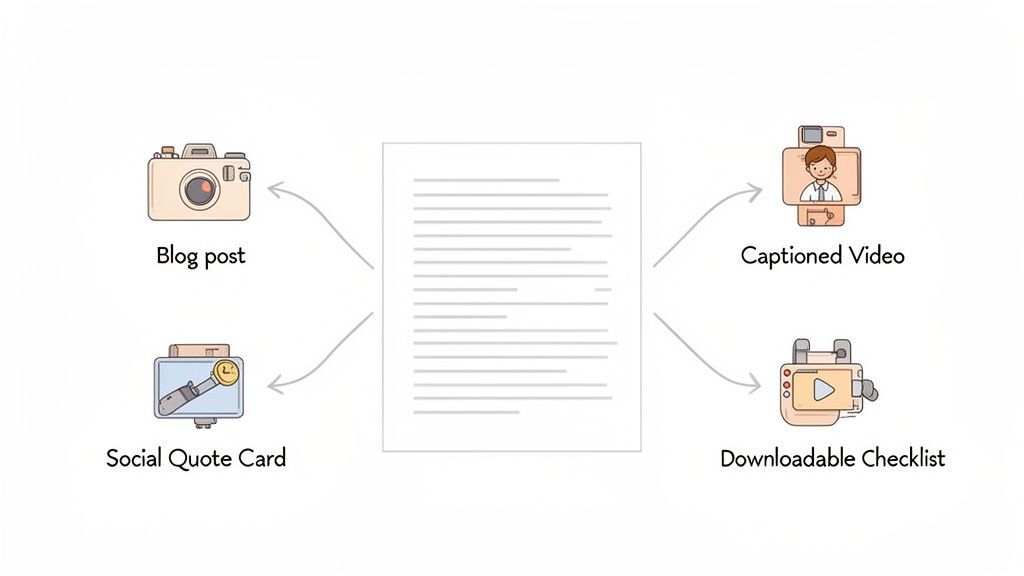
Getting your hands on a finished Spotify podcast transcript isn't the finish line—it’s the starting block. That text file is a goldmine just waiting to be excavated.
Instead of seeing it as just a record of your conversation, think of it as the raw material for an entire week's worth of marketing assets. All from one single recording session. That shift in mindset is the key to squeezing every drop of value out of the content you worked so hard to produce.
The most direct and powerful use? Turning your transcript into a full-fledged, SEO-friendly blog post. It's a no-brainer. Search engines can’t listen to your audio, but they absolutely devour text. By publishing the transcript as an article, every word you and your guest spoke becomes an opportunity to rank for the exact keywords your audience is searching for.
From Text to Engaging Social Content
Beyond the blog post, your transcript is practically begging to be chopped up into bite-sized social media content. A quick scan of the text lets you pull out the most powerful quotes, surprising stats, or actionable tips shared during the episode.
These snippets are perfect for creating:
- Quote Graphics: Design some visually sharp images with a key insight from your guest. They look great on Instagram and LinkedIn.
- Text-Based Posts: Grab a compelling tip and share it on X (formerly Twitter) with a link back to the full episode. Easy.
- Captioned Audiograms: Use that SRT file you exported to create short, engaging video clips with animated captions. These almost always perform better than a static image.
Every transcript has at least five to ten shareable moments hidden inside. Your job is to find those golden nuggets and polish them for your social channels. It’s a simple way to reach people who prefer reading or watching over listening.
Building Deeper Audience Connection
A transcript also lets you create more substantial resources that serve your audience and help build your email list. You can easily flesh out the main topics into detailed show notes that Google loves, complete with timestamps and links to all the resources you mentioned. This adds a ton of value for listeners who want to dig deeper.
For instance, if your episode was a step-by-step guide, you could distill the core instructions from the transcript into a downloadable PDF checklist. This makes for a fantastic lead magnet to grow your subscriber list, turning casual listeners into a real community.
Once you have your Spotify podcast transcript, there are so many ways to maximize its impact. For more great ideas on turning one asset into multiple high-impact formats, check out these content repurposing strategies.
Got Questions About Spotify Transcripts?
Even with a solid game plan, it's totally normal to have a few questions before you dive headfirst into a new transcription workflow. Creating a Spotify podcast transcript is a big step, and you want to make sure you're doing it right. Let's tackle some of the most common uncertainties we hear from podcasters, from accuracy worries to the legal stuff.
Think of this as your final sanity check. Getting these questions answered will help you move forward with confidence and make transcripts a core part of your podcasting strategy.
Just How Accurate Are AI Transcripts?
This is usually the biggest hang-up, and for good reason. A transcript full of mistakes is more of a problem than a solution. The good news? Modern AI transcription engines have gotten scarily good.
For a podcast with clear audio, one person speaking at a time, and no super-heavy accents, you can realistically expect accuracy rates of 95-98%. Sometimes even higher. At that level of quality, your editing process will be a breeze—mostly just fixing a bit of punctuation or correcting some niche jargon, not rewriting entire paragraphs.
A quick heads-up: Audio quality is everything. A recording filled with background noise, crosstalk, or someone speaking into a laptop mic from across the room is going to give you a messy transcript. That’s true no matter what tool you use.
Can I Just Transcribe Any Podcast I See?
Technically, sure, you can run any public Spotify podcast through a transcriber. But this is where ethics and legalities kick in. If it’s your own podcast, you're golden. It’s your content, your intellectual property—repurpose it however you like.
But what about transcribing someone else's show?
- For your own personal use: You're generally fine. If you’re just pulling a transcript to find a specific quote, for your own research, or for study notes, there's no issue.
- If you plan to publish it: This is a different story. If you want to post the transcript on your blog, use it in a newsletter, or include it in any public-facing work, you must get permission from the creator first. Publishing someone else’s work without their consent is a fast-track to copyright infringement.
Don't sweat it, though. A quick, friendly email to the podcast host is usually all it takes. Most creators are happy to see their work shared, especially if you give them proper credit and a link back to their show.
What’s the Best Format to Export My Transcript In?
The "best" format really just depends on what you want to do with the transcript. There's no one-size-fits-all answer, just the right tool for the job.
Any decent transcription service will give you a few key options:
- .DOCX: The go-to for turning your episode into a blog post, an article, or detailed show notes for your website. It’s perfect for easy editing in Word or Google Docs.
- .SRT / .VTT: These are your caption files. Use them to create slick audiograms or video clips with burned-in captions for social media like Instagram, TikTok, and LinkedIn.
- .TXT: A simple, no-frills plain text file. It's universally compatible and great for archiving, pasting into other apps, or when you just need the raw text without any formatting getting in the way.
Ready to turn your podcast episodes into powerful marketing assets? Transcript.LOL makes it effortless. Just paste your Spotify episode link and get a highly accurate, speaker-labeled transcript in minutes. Start creating blog posts, social media content, and detailed show notes today. Try it for free at https://transcript.lol.