
Maîtriser la transcription MP3 vers texte : un guide pratique
Découvrez comment maîtriser la transcription MP3 vers texte. Ce guide pratique fournit des étapes concrètes pour une conversion audio rapide et précise et la réutilisation du contenu.
Kate, Praveen
June 19, 2024
Vous êtes-vous déjà retrouvé à devoir extraire une citation spécifique d'une longue interview ou à trouver un point clé dans l'enregistrement d'une réunion de deux heures ? Nous y sommes tous passés, à parcourir sans fin les fichiers audio. Et si vous pouviez transformer tout ce contenu parlé en un document consultable et modifiable en quelques minutes seulement ?
C'est exactement ce que fait la transcription MP3 vers texte moderne. C'est la magie de convertir des fichiers audio en texte précis, une tâche qui était autrefois un énorme casse-tête, mais qui est maintenant incroyablement simple grâce à l'IA.
Pourquoi la transcription MP3 vers texte change la donne
Dans un monde débordant de podcasts, de réunions virtuelles et de notes vocales, se contenter d'écouter l'audio ne suffit plus. Le véritable pouvoir réside dans la transformation de cet audio en texte. Cela rend votre contenu consultable, accessible et prêt à être réutilisé d'innombrables façons. Ce n'est pas juste un plus, c'est un indispensable pour quiconque souhaite tirer le meilleur parti de son contenu.
Des heures de travail manuel à quelques minutes grâce à l'IA
Vous souvenez-vous de l'ancienne méthode ? Vous engagiez un transcripteur qui passait des heures au casque, à taper. Il fallait généralement quatre à cinq heures pour transcrire une seule heure d'audio. L'ensemble du processus était lent, coûteux, et vous vous retrouviez toujours avec des erreurs humaines. Ce n'était tout simplement pas pratique pour un usage quotidien.
Avance rapide jusqu'à aujourd'hui. L'IA sophistiquée, y compris les modèles d'IA multimodaux avancés qui entendent l'audio, a complètement changé la donne. Ces outils peuvent traiter une heure d'MP3 en quelques minutes avec une précision étonnante, transformant les flux de travail des professionnels du monde entier.
Le grand changement est que la transcription est passée d'une tâche coûteuse et occasionnelle à un outil de productivité quotidien. Elle donne à chacun le pouvoir de trouver et d'utiliser instantanément les informations précieuses enfermées dans leurs fichiers audio.
Fonctionnalités de transcription IA essentielles qui vous font gagner des heures
IA de pointe
Alimenté par Whisper d'OpenAI pour une précision de premier plan. Prise en charge des vocabulaires personnalisés, des fichiers jusqu'à 10 heures et des résultats ultra rapides.

Importer depuis plusieurs sources
Importez des fichiers audio et vidéo depuis diverses sources, y compris le téléchargement direct, Google Drive, Dropbox, les URL, Zoom et plus encore.

Exporter en plusieurs formats
Exportez vos transcriptions en plusieurs formats dont TXT, DOCX, PDF, SRT et VTT avec des options de formatage personnalisables.
Impact concret que vous pouvez constater
Les applications sont partout et font une énorme différence. Pour toute personne créant ou travaillant avec du contenu parlé, cette technologie change radicalement la donne.
Voici comment elle aide les gens à accomplir davantage :
- Journalistes : Au lieu de réécouter des heures d'interviews, ils peuvent désormais simplement rechercher dans la transcription la citation parfaite et la trouver en quelques secondes.
- Marketeurs de contenu : Ils peuvent optimiser le référencement de leurs podcasts en publiant des transcriptions complètes. Soudain, chaque mot qu'ils prononcent est indexable par Google, générant ainsi plus de trafic.
- Chercheurs : L'analyse de groupes de discussion ou d'entretiens était autrefois un cauchemar. Désormais, ils peuvent rechercher des mots-clés dans le texte au lieu de parcourir manuellement l'audio, rendant leur travail beaucoup plus efficace.
Ce changement est si important qu'il se reflète sur le marché. Le marché mondial de la transcription par IA était évalué à 4,5 milliards de dollars en 2024 et devrait atteindre 19,2 milliards de dollars d'ici 2034. Une telle croissance témoigne d'un passage massif des méthodes manuelles à l'ancienne vers des solutions instantanées pilotées par l'IA.
Pourquoi la transcription devient un outil quotidien ?
La transcription par IA n'est plus un service de niche. Elle est devenue un outil de productivité quotidien utilisé dans le journalisme, le marketing, l'éducation et la recherche. Des délais plus courts et des coûts réduits ont rendu la transcription accessible aux particuliers comme aux équipes.
Pour un aperçu plus approfondi de la façon dont cela peut révolutionner votre flux de travail, consultez notre guide sur l'utilisation de la transcription pour la création de contenu.
Obtenir votre premier fichier MP3 transcrit
Se lancer dans votre premier projet de transcription peut sembler un peu intimidant, mais les outils modernes l'ont rendu incroyablement simple. Il ne s'agit pas seulement d'appuyer sur un bouton « télécharger » ; il s'agit d'obtenir le meilleur résultat possible dès le départ.
Tâches quotidiennes simplifiées grâce aux transcriptions
Notes de réunion sans écriture manuelle
Au lieu de taper des notes pendant les réunions, vous pouvez rester concentré sur la discussion. La transcription capture tout, vous permettant de revoir et de résumer plus tard.
Revues d'interviews plus rapides
Les interviews deviennent plus faciles à analyser une fois converties en texte. Vous pouvez parcourir, surligner les réponses clés et extraire des citations sans réécouter l'audio.
Collaboration d'équipe facilitée
Les transcriptions sont faciles à partager entre les équipes. Tout le monde peut se référer au même document, laisser des commentaires et rester aligné sans écouter de longs enregistrements.
Meilleure documentation
Les conversations importantes, les sessions de formation et les discussions sont stockées en toute sécurité sous forme de textes. Cela aide à la conformité, aux audits et aux références futures.
Passons en revue un scénario réel : je dois transformer un entretien marketing de 10 minutes (au format MP3) en un article de blog.
Avant toute chose, la qualité de votre audio est primordiale. Vous avez probablement entendu le vieil adage : « des déchets à l'entrée, des déchets à la sortie », et il n'a jamais été aussi vrai qu'avec la transcription par IA. Avant même de penser à télécharger, assurez-vous que votre audio est dans un format bon et compatible. Si vous avez besoin d'aide pour cela, il existe de nombreux excellents guides sur la façon de convertir des fichiers audio sans perte de qualité.
Préparation et téléchargement de votre audio
Bien, commençons avec mon fichier d'entretien de 10 minutes. L'audio est assez propre, avec un bruit de fond minimal et seulement deux intervenants. C'est un point de départ parfait. Si votre enregistrement comporte beaucoup de sons distrayants, vous pourriez vouloir le nettoyer d'abord, mais pour ce tutoriel, nous sommes prêts.
La première étape consiste à intégrer le fichier dans le système. Avec une plateforme comme Transcript.LOL, vous avez quelques options simples.
Voici l'interface propre et simple que vous verrez immédiatement.
Vous pouvez faire glisser et déposer votre fichier, le tirer depuis une URL, ou même vous connecter à un service cloud comme Google Drive. C'est un énorme gain de temps : plus besoin de télécharger des fichiers volumineux sur votre ordinateur juste pour les re-télécharger.
Pour mon entretien marketing, je vais simplement télécharger le fichier directement. La plateforme commence à le traiter presque instantanément. D'après mon expérience, un fichier de 10 minutes est généralement traité en moins d'une minute.
Réglage de vos paramètres de transcription
Cette prochaine étape est celle où vous donnez à l'IA un contexte crucial pour s'assurer qu'elle fait les choses correctement. C'est une petite étape qui fait une énorme différence dans la transcription finale. Le système vous demandera quelques détails clés.
- Sélectionnez la langue : C'est facile. Mon entretien est en anglais, mais ces plateformes peuvent gérer des dizaines de langues.
- Identifiez le nombre d'intervenants : C'est essentiel. En indiquant à l'IA qu'il y a deux intervenants, vous activez la diarisation des intervenants. Cela signifie qu'elle étiquettera automatiquement qui parle (par exemple, « Intervenant 1 », « Intervenant 2 »).
- Ajoutez un vocabulaire personnalisé : Vos intervenants mentionnent-ils des noms de marque spécifiques, des termes techniques ou des acronymes étranges ? J'ajoute toujours des termes comme « Transcript.LOL » ou « SERP » à la liste de vocabulaire personnalisé. Cela aide l'IA à reconnaître ces mots correctement au lieu de faire une supposition hasardeuse.
Une fois que vous avez configuré cela, il vous suffit de lancer la transcription. L'IA prend le relais, convertissant l'audio en texte structuré, complet avec des horodatages et des étiquettes d'intervenants.
Outils avancés pour des transcriptions précises et utilisables

Détection des intervenants
Identifiez automatiquement les différents intervenants dans vos enregistrements et étiquetez-les avec leurs noms.

Outils d'édition
Modifiez les transcriptions avec des outils puissants incluant rechercher et remplacer, attribution des intervenants, formats de texte enrichi et surlignage.
Résumés et Chatbot
Générez des résumés et d'autres analyses de votre transcription, des prompts personnalisés réutilisables et un chatbot pour votre contenu.
Astuce Pro : Fournir du contexte est votre arme secrète. Lorsque je transcris les interviews de mon podcast, j'ajoute toujours le nom de mon invité, mon nom et tout jargon spécifique à l'industrie à mon vocabulaire personnalisé. Cette simple habitude réduit mon temps de post-édition d'au moins 20 %.
À partir de là, le processus est pratiquement autonome. Vous recevrez une notification lorsque votre fichier sera prêt, et vous y trouverez une transcription entièrement modifiable. Cette première ébauche est généralement incroyablement précise, capturant souvent 95 % ou plus du dialogue correctement. Elle vous donne une base solide prête pour la phase de polissage final.
Polir votre transcription pour un usage professionnel
L'IA a fait le gros du travail, vous fournissant une transcription probablement précise à plus de 95 %. Mais ces derniers 5 % ? C'est là que la magie opère. C'est la touche humaine qui transforme une ébauche solide en un document professionnel impeccable, prêt pour tout : publication, revue client ou citation académique.
Considérez la sortie de l'IA comme une très bonne première ébauche. Votre travail consiste à la peaufiner jusqu'à ce qu'elle brille. C'est là que vous repérerez les erreurs subtiles, corrigerez la ponctuation pour améliorer la lisibilité et vous assurerez que le texte capture fidèlement l'essence de la conversation originale.
Le processus d'édition de votre transcription mp3 en texte n'est pas compliqué, mais il est crucial. Ce flux de travail simple montre exactement où s'intègre la modification finale.
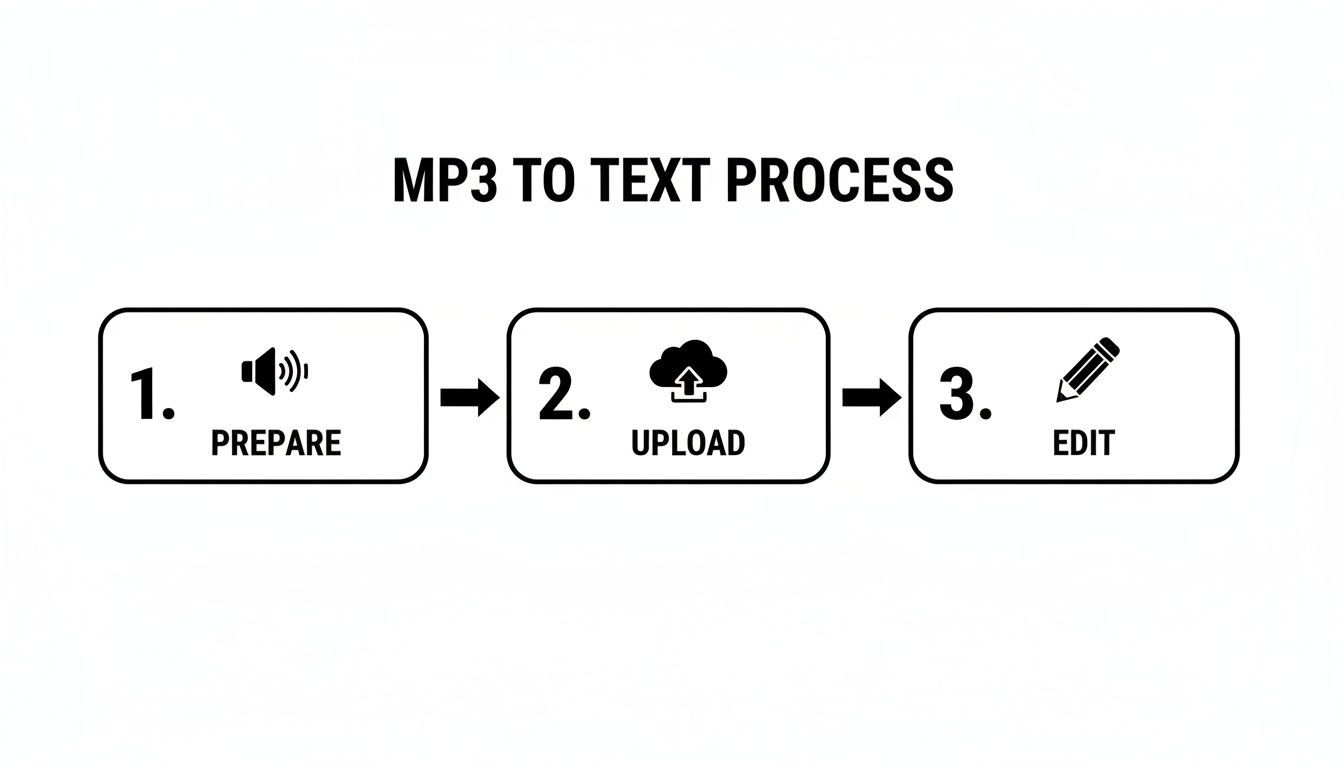
Ce flux Préparer, Télécharger et Éditer est clair : la révision finale est aussi importante que la qualité audio initiale.
Affiner les noms des intervenants et le jargon
Votre première passe doit se concentrer sur les éléments importants. L'IA est douée pour distinguer les intervenants, mais elle ne sait pas qui ils sont. Commencez par remplacer les étiquettes génériques "Intervenant 1" et "Intervenant 2" par les noms réels des personnes impliquées.
Ensuite, recherchez tout jargon spécifique à l'industrie ou noms uniques que l'IA aurait pu mal interpréter. Par exemple, elle aurait pu transcrire "SERP" comme "serp" ou mal orthographier le nom d'une entreprise. L'utilisation d'une simple fonction "rechercher et remplacer" peut éliminer ces erreurs récurrentes en quelques secondes. Si le nom d'un invité comme "Siobhan" a été systématiquement transcrit comme "Shaun", vous pouvez corriger chaque occurrence en une seule fois.
Perfectionner la ponctuation et le flux
Une fois les noms et les termes clés triés, il est temps de vous concentrer sur la lisibilité de la transcription. La ponctuation générée par l'IA est généralement correcte, mais elle ne capture pas toujours le rythme naturel de la parole humaine.
Voici ce qu'il faut rechercher :
- Ajuster les virgules et les points : Séparez les phrases longues et continues là où les intervenants ont naturellement pris une pause. Ce petit changement rend le texte beaucoup plus facile à suivre.
- Vérifier les points d'interrogation : Écoutez une intonation montante à la fin d'une phrase et assurez-vous qu'elle est marquée d'un point d'interrogation.
- Ajouter des sauts de paragraphe : Divisez les longs monologues en paragraphes plus courts et plus digestes. C'est indispensable pour les articles de blog ou les articles où d'énormes blocs de texte peuvent effrayer les lecteurs.
L'objectif ici n'est pas seulement la correction ; il s'agit de la clarté. Vous façonnez le texte brut pour qu'il reflète parfaitement l'intention de l'orateur et qu'il soit facile à lire pour votre public.
Ce niveau de détail fait une énorme différence dans la qualité finale. Si vous souhaitez vous améliorer encore davantage, consultez notre guide sur les fondamentaux de la relecture de transcription pour plus d'astuces professionnelles.
Les plateformes les plus performantes d'aujourd'hui traitent des millions de minutes de MP3 chaque jour, avec une précision de l'IA atteignant jusqu'à 98 %. Cette innovation dirigée par les États-Unis établit une nouvelle norme mondiale, faisant de la transcription mp3 en texte rapide et fiable un outil essentiel pour tout, de la conformité à la création de contenu. Lorsque vous combinez cette technologie puissante avec votre propre examen attentif, vous obtenez une précision quasi parfaite à chaque fois.
Libérer la valeur de votre transcription
Obtenir ce fichier texte à partir de votre transcription mp3 en texte n'est vraiment que le point de départ. La vraie magie opère avec ce que vous faites ensuite. Une transcription n'est pas seulement un enregistrement d'une conversation ; c'est une mine d'or de matière première prête à alimenter votre stratégie de contenu pendant des semaines.
Pensez à un seul épisode de podcast de 30 minutes. La transcription brute est votre fondation. À partir de ce seul fichier audio, vous pouvez extraire suffisamment de matériel pour un article de blog massif, une douzaine de snippets pour les réseaux sociaux, une newsletter par e-mail détaillée, et même un guide PDF pour capturer de nouveaux prospects. C'est là que vous voyez un retour sur investissement énorme de l'effort de transcription initial.
Choisir le bon format d'exportation
Avant de vous lancer dans le recyclage, vous devez obtenir la transcription dans le bon format pour le travail. Différentes tâches nécessitent différents types de fichiers, et choisir le bon dès le départ vous évite bien des maux de tête plus tard.
Voici les formats les plus courants et leurs avantages :
- .txt (Texte brut) : C'est le plus basique. Il est parfait lorsque vous avez juste besoin du texte brut sans aucun formatage spécial, ce qui le rend très facile à copier-coller dans pratiquement n'importe quelle application.
- .docx (Document Word) : Choisissez ce format lorsque vous prévoyez d'éditer, de formater ou de collaborer sur le texte. Il conserve les étiquettes des intervenants et les horodatages, ce qui le rend idéal pour transformer votre transcription en articles, rapports ou notes d'émission détaillées.
- .srt (Fichier de sous-titres SubRip) : C'est la norme de l'industrie pour les légendes vidéo, point final. Un fichier SRT contient non seulement les mots, mais aussi les heures de début et de fin précises pour chaque ligne. Cela garantit que vos sous-titres sont parfaitement synchronisés avec votre vidéo sur des plateformes comme YouTube ou Vimeo.
Choisir le bon format dès le départ rationalise l'ensemble de votre flux de travail, vous permettant de passer directement de la transcription à la création sans vous embêter avec des étapes de conversion maladroites.
De la transcription au moteur de contenu
Bien, maintenant le plaisir commence. Votre transcription est un atout incroyablement flexible que vous pouvez découper, hacher et remodeler pour l'adapter à n'importe quelle plateforme imaginable. Cette interview de podcast de 30 minutes, par exemple, peut devenir un écosystème de contenu complet.
Premièrement, la transcription complète peut être peaufinée en un article de blog principal, ce qui rend immédiatement votre contenu audio découvrable par les moteurs de recherche. Ensuite, extrayez cinq des citations ou idées clés les plus convaincantes. Boom, chacune d'elles est un post séparé et engageant pour les réseaux sociaux sur X ou LinkedIn.
Une transcription vous permet de rencontrer votre public là où il se trouve. Certains préfèrent écouter, d'autres regarder, et beaucoup préfèrent encore lire. Le recyclage de votre audio en texte rend votre contenu accessible à tous.
Après cela, vous pouvez regrouper les principaux points à retenir dans une newsletter par e-mail pleine de valeur pour vos abonnés. Pour aller plus loin, développez un sujet clé abordé dans l'interview, ajoutez quelques informations supplémentaires et packagez-le sous forme de guide PDF téléchargeable pour capturer de nouveaux prospects. Soudain, un seul fichier MP3 a généré une campagne entière d'actifs marketing.
Ce tableau donne un aperçu rapide de la façon dont ce processus fonctionne.
Recycler votre transcription pour un impact maximal
| Source de transcription (MP3) | Format de contenu recyclé | Objectif/Avantage principal |
|---|---|---|
| Interview de podcast de 30 minutes | Article de blog complet | Améliorer le SEO et atteindre les lecteurs |
| Interview de podcast de 30 minutes | 5-10 Posts sur les réseaux sociaux | Augmenter l'engagement et générer du trafic |
| Interview de podcast de 30 minutes | Résumé de newsletter par e-mail | Nourrir votre public existant |
| Interview de podcast de 30 minutes | Guide PDF téléchargeable | Générer de nouveaux prospects et capturer des e-mails |
Voyez comment cela fonctionne ? C'est une approche stratégique qui transforme une simple transcription en un puissant moteur de création de contenu. Pour aller plus loin, consultez notre guide détaillé sur les stratégies de recyclage de contenu qui peuvent vous aider à extraire le maximum de valeur de votre audio.
Dépannage des problèmes de transcription courants
Soyons honnêtes : même l'IA la plus avancée peut être déstabilisée par un fichier audio imparfait. Un enregistrement propre est le facteur le plus important pour obtenir une transcription mp3 en texte précise, mais le monde réel est rarement aussi coopératif.
Ne vous inquiétez pas cependant. La plupart des problèmes audio courants sont gérables avec quelques astuces simples, à la fois avant d'appuyer sur enregistrer et après coup.
Lorsque l'IA a du mal, c'est généralement à cause d'une poignée de coupables familiers. Si vous les connaissez, vous pouvez être proactif pour améliorer vos enregistrements ou savoir comment récupérer des fichiers que vous ne pouvez pas réenregistrer. L'objectif est simple : donner au moteur de transcription le signal le plus clair possible pour qu'il fasse son travail.
Identifier et corriger les défauts audio
Le bruit de fond important est le méchant classique. Un climatiseur qui bourdonne, le brouhaha d'un café ou le bruit de la circulation peuvent facilement masquer la parole et confondre l'IA. Si vous enregistrez, essayez de trouver un endroit calme. Si vous êtes coincé avec un fichier bruyant, un logiciel gratuit comme Audacity dispose d'un filtre de réduction du bruit que vous pouvez appliquer avant de télécharger.
Un autre casse-tête courant est le "bavardage", où plusieurs personnes se parlent par-dessus. C'est incroyablement difficile à démêler pour n'importe quelle IA. S'il s'agit d'un enregistrement en direct, encouragez simplement gentiment les intervenants à parler à tour de rôle. Pour un fichier existant, c'est beaucoup plus difficile à corriger, mais l'édition manuelle de la transcription et l'utilisation d'horodatages sont votre meilleure option.
Enfin, pensez à la source audio elle-même. Un microphone intégré bon marché ou un intervenant trop éloigné produira toujours un signal faible et étouffé. Sérieusement, investir dans un micro externe décent est l'un des moyens les plus simples d'améliorer considérablement la qualité de votre transcription.
Étapes proactives pour des enregistrements plus propres
Le meilleur dépannage se fait avant même d'appuyer sur enregistrer. Quelques petites modifications à vos habitudes d'enregistrement peuvent vous faire économiser une montagne de temps d'édition plus tard.
- Attention au placement du micro : Essayez de maintenir le microphone à une distance constante de la bouche de l'orateur. Une bonne règle générale est d'environ six à douze pouces.
- Faites toujours un contrôle du son : Enregistrez quelques phrases de test et réécoutez avec un casque. C'est votre chance de repérer des problèmes comme le clipping (lorsque l'audio est trop fort et déformé) ou un volume beaucoup trop bas.
- Contrôlez votre environnement : Ce sont les petites choses. Fermez les fenêtres, éteignez les ventilateurs et faites taire les notifications de votre téléphone. Chaque bruit que vous éliminez aide.
N'oubliez pas que l'IA est un outil puissant, mais ce n'est pas une magicienne. Lui fournir un fichier audio clair et net est le moyen le plus efficace de garantir une transcription très précise dès le départ.
En abordant ces problèmes courants, vous pouvez considérablement améliorer vos résultats. Pour une analyse plus approfondie, consultez notre article sur ce qui influence réellement la précision de la parole au texte. Alors que le marché mondial des logiciels de transcription audio connaît une croissance – il devrait atteindre 2,5 milliards de dollars d'ici 2025 – le besoin d'audio de haute qualité est plus important que jamais. Vous pouvez en savoir plus sur cette tendance dans ce rapport détaillé.
La transcription par IA s'améliore rapidement
Les modèles de reconnaissance vocale deviennent plus précis chaque année, avec une meilleure gestion des accents, une réduction du bruit et une reconnaissance des locuteurs. Les mises à jour régulières signifient que les utilisateurs bénéficient d'améliorations continues sans modifier leurs flux de travail.
Questions fréquentes sur la transcription de MP3 en texte
Une fois que vous commencez à utiliser la transcription par IA, quelques questions reviennent toujours. Obtenir des réponses directes sur des sujets tels que la précision, la sécurité et le coût vous aide à savoir si vous utilisez le bon outil pour la tâche. Voici les réponses aux questions les plus fréquentes que nous entendons sur la transcription de mp3 en texte.
Quelle est la précision de la transcription par IA ?
La qualité de la transcription par IA a beaucoup évolué, atteignant souvent 98 % de précision pour un audio clair. Si vous avez un enregistrement avec un seul locuteur et aucun bruit de fond, la transcription sera probablement presque parfaite dès le départ.
Mais soyons réalistes : la plupart des audios ne sont pas enregistrés dans un studio parfait. Plusieurs facteurs peuvent perturber l'IA :
- Bruits de fond importants : Le brouhaha d'un café, le bruit de la rue ou même une pièce avec de l'écho peuvent rendre difficile pour l'IA d'entendre clairement chaque mot.
- Personnes qui se parlent par-dessus : Lorsque les conversations se chevauchent, l'IA peut avoir du mal à démêler qui a dit quoi.
- Accents prononcés : Bien que l'IA moderne soit entraînée sur une grande variété d'accents, des accents très forts ou uniques peuvent encore causer quelques erreurs.
- Jargon spécifique : Les termes techniques propres à un secteur ou les acronymes internes à une entreprise peuvent ne pas figurer dans le dictionnaire de l'IA.
C'est précisément pourquoi de bonnes plateformes comme Transcript.LOL ne se contentent pas de vous fournir un fichier texte et de considérer que c'est fini. Nous proposons un éditeur interactif qui synchronise l'audio avec le texte, afin que vous puissiez écouter et corriger les passages difficiles en quelques secondes.
Est-il sûr de télécharger mes fichiers audio ?
C'est une question importante, surtout si vous traitez des conversations sensibles. Tout service réputé prend la sécurité au sérieux, et nous ne faisons pas exception.
Une sécurité standard comme le chiffrement SSL est indispensable : elle protège vos fichiers pendant leur téléchargement et une fois qu'ils sont sur le serveur. Si votre travail implique des informations privées d'ordre juridique, médical ou commercial, vous devriez toujours consulter la politique de confidentialité de l'entreprise. De nombreuses plateformes, y compris Transcript.LOL, ont une politique stricte de ne jamais utiliser les données des clients pour entraîner leurs modèles d'IA. Votre contenu vous appartient, point final.
Ces outils peuvent-ils différencier les différents locuteurs ?
Absolument. C'est une fonctionnalité révolutionnaire souvent appelée "diarisation des locuteurs" ou "identification des locuteurs". Elle est conçue pour reconnaître différents schémas vocaux et séparer automatiquement le dialogue.
Lorsque vous téléchargez un fichier audio avec plusieurs personnes, la plateforme les étiquette (par exemple, Locuteur 1, Locuteur 2, etc.). Le meilleur dans tout ça ? L'éditeur rend incroyablement simple de cliquer sur ces étiquettes et de taper les noms réels des locuteurs. C'est essentiel pour créer des transcriptions claires et faciles à lire pour les interviews, les réunions et les podcasts.
Quel est le coût moyen de la transcription ?
C'est là que l'IA brille vraiment. La transcription manuelle à l'ancienne, effectuée par des humains, peut facilement vous coûter 1,50 $ par minute d'audio ou plus. Cela s'accumule rapidement, surtout pour les enregistrements longs.
Les services automatisés ont rendu la transcription accessible à tous. Le coût est passé de plusieurs dollars par minute à quelques centimes seulement, transformant un service de luxe en un outil de productivité quotidien.
Les plateformes basées sur l'IA ont réduit ce coût à quelques centimes par minute. Beaucoup, comme la nôtre, proposent des plans flexibles tels que des abonnements mensuels avec un grand nombre d'heures de transcription incluses. Cela fait de la transcription de mp3 en texte de haute qualité un outil pratique pour tous, des étudiants et créateurs aux entreprises entières.
Prêt à transformer votre audio en texte précis et éditable en quelques secondes ? Transcript.LOL offre une transcription IA puissante avec détection des locuteurs, un éditeur convivial et une sécurité des données de premier ordre. Essayez-le gratuitement et découvrez à quel point il est facile de libérer la valeur de vos fichiers audio. Commencez dès maintenant sur https://transcript.lol.