
How to Transcribe Audio to Text Free in Minutes
Learn how to transcribe audio to text free with our expert guide. Discover the best tools and practical tips for fast, accurate transcriptions.
Kate, Praveen
April 17, 2024
The quickest way to transcribe audio to text free is to let an AI-powered tool do the heavy lifting. You just upload your audio or video file, and the software spits out a surprisingly accurate transcript in minutes.
The Rise of Free AI Transcription
We're all swimming in a sea of audio content these days—team meetings, university lectures, podcasts, you name it. The need for written versions of this content has never been greater.
Not too long ago, turning speech into text was a slow, expensive process handled by professional services. Today, artificial intelligence has completely flipped the script.
Free AI transcription tools have exploded in popularity, thanks to huge leaps in speech recognition tech. Modern deep learning models can now listen to spoken language and turn it into text almost instantly. For example, tools like NoteGPT and Whisper now have free plans that can hit 90–95% accuracy on clear audio. A task that used to take hours is now done in a few minutes.
Transcription Reinvented
"AI has transformed transcription from a slow, manual task into an instant, accessible tool for everyone. What once took hours now takes only minutes with tools like Transcript.LOL."
Why This Matters for You
This shift from manual to automated transcription is about more than just speed—it’s about making your audio content more useful and accessible.
- Saves Countless Hours: Imagine getting a full meeting transcript right after the call ends instead of blocking off your afternoon to type it up yourself.
- Improves Accessibility: Transcripts open up your content to a much wider audience, including people who are deaf or hard of hearing.
- Boosts Content Repurposing: A single podcast episode can instantly become the raw material for a blog post, a dozen social media updates, or a newsletter. Dive deeper into these strategies in our complete guide on how to transcribe audio to text free.
The real magic of free AI transcription is how it turns passive audio into active, searchable knowledge. It gives students, creators, and professionals the power to find key moments, grab quotes, and share information easier than ever before.
Why Users Love Transcript.LOL
“Transcript.LOL is designed to take the hassle out of transcription. From accurate speech recognition to export-ready formats, here are the core features that make it stand out.”

Import from multiple sources
Import audio and video files from various sources including direct upload, Google Drive, Dropbox, URLs, Zoom, and more.

Speaker detection
Automatically identify different speakers in your recordings and label them with their names.

Export in multiple formats
Export your transcripts in multiple formats including TXT, DOCX, PDF, SRT, and VTT with customizable formatting options.
A Practical Walkthrough of Transcript.LOL
Alright, let's get our hands dirty and walk through how to actually use Transcript.LOL. Forget the theory—this is a real-world guide showing you exactly how to take an audio file and turn it into a clean, usable transcript.
The first thing you’ll notice is the refreshingly simple homepage. There are no confusing menus to navigate or sign-up walls just to test the waters. Everything you need is front and center, designed to get you from file to transcript as quickly as possible.
Uploading Your Audio File
So, your first move is to get your audio file into the system. Let’s say you just wrapped up a 15-minute podcast interview and need the text to write up some show notes. You’d just find that MP3 on your computer and get it ready.
The platform handles a ton of common audio and video formats—MP3, WAV, MP4, you name it—so you probably won't have to waste time converting anything. The upload limit is also surprisingly generous for a free service, easily handling files that are several hours long.
Here's what you'll see on the homepage. No frills, just function.
As you can see, it's dead simple: a clear "Upload your file" button and a drag-and-drop area. It completely removes the guesswork. One click and you're off.
Once your file is uploaded, the AI gets to work. A progress bar will pop up, but you won't be watching it for long. I've found that a 10-20 minute audio file is often done in less than a minute. Behind the scenes, the AI is churning through the audio, figuring out who is speaking, and turning it all into a structured document with timestamps.
One of the best parts is the automatic speaker detection. Instead of getting a giant, messy wall of text, the tool neatly separates the dialogue by speaker. This makes reading and editing so much easier down the line.
From AI Draft to Final Document
The second the processing finishes, you're dropped right into the editor. This is where the magic happens. You can hit play on your audio, and the transcript will highlight the words in real-time as they're spoken. This sync is a lifesaver for proofreading and catching any little mistakes the AI might have made.
For example, the AI might trip over a unique company name or a bit of industry jargon. No problem. You just click on the word, type the correction, and it's fixed instantly. This intuitive editing flow is what turns a rough AI draft into a polished, accurate document you can actually rely on. You have total control to tweak it until it’s perfect.
Refining and Exporting Your Transcript

An AI-generated transcript is a fantastic running start, but it's rarely the finish line. Even with accuracy rates pushing 95% on clear audio, you'll still find little errors can slip through, especially with tricky content. This is where a quick, focused review turns a good draft into a great, reliable document.
I've seen it all. The most common mistakes are with names, industry-specific jargon, or homophones—words that sound the same but mean different things (like "their" vs. "there"). For instance, an AI might hear "FinTech" but write "fin-tech," or mistake a guest's name, "Kaleigh," for "Kaylee." These are the details that need a human touch to get just right.
Making Quick Edits and Corrections
Most modern transcription tools, including Transcript.LOL, have a built-in interactive editor that makes this process incredibly simple. As the audio plays, the corresponding text is highlighted in real-time. Spot a mistake? Just pause, click the word, and type the correction.
This synchronized playback is the real time-saver. It gets rid of that tedious back-and-forth of listening in one app while typing in another, which can easily cut your editing time in half. You can also quickly adjust speaker labels if the AI gets confused about who was talking during a fast-paced conversation.
Think of the AI transcript as your highly efficient but slightly naive assistant. It does 90% of the grueling work, and your job is to provide that final layer of context and polish that only a human can.
Choosing the Right Export Format
Once you're happy with the transcript, the last step is getting it out of the tool. The format you choose really depends on what you plan to do with the text next. Knowing your options will save you a ton of headaches later on.
Here are the most common formats and what they're best for:
- Plain Text (.txt): This is as basic as it gets. It’s perfect if you just need the raw text to copy and paste into a blog post, email, or another document without any special formatting attached.
- SubRip Subtitle (.srt): This format is the industry standard for video captions. It doesn't just contain the text; it also includes the precise timestamps needed to sync the words with your video. If you're creating content for YouTube or Vimeo, this is the file you want.
- Word Document (.docx): Choose this if you need to do more editing, add comments, or share the transcript in a universally recognized format with colleagues.
Knowing the difference between a .txt and an .srt file is crucial when you want to transcribe audio to text free for content creation, as it ensures your final product is ready to use right away.
Comparing the Top Free Transcription Tools
While we think Transcript.LOL hits a fantastic sweet spot between speed and features, the truth is, the "best" tool often comes down to the job at hand. It's smart to have a few options in your back pocket so you know how to transcribe audio to text free in different situations. Some services might offer a more generous free plan, while others are dialed in for specific accents or offer unique integrations.
This gives you a quick visual on the typical accuracy you can expect from the leading free tools when you feed them a clear audio file.
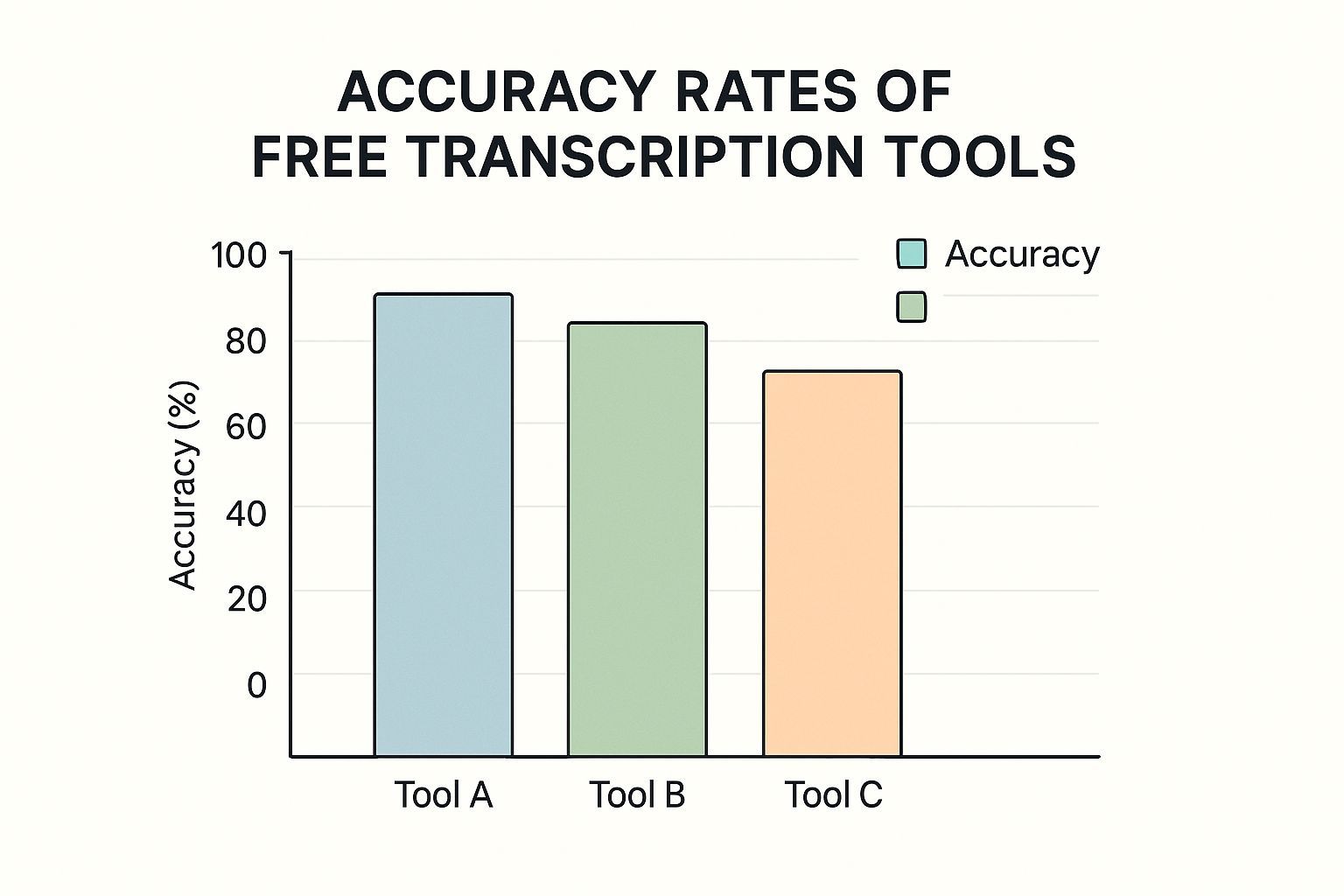
As you can see, most quality services hang around the 85% accuracy mark on their free tiers. That’s a solid starting point for pretty much any project.
When to Look Beyond a Single Tool
Choosing the right platform really depends on the nitty-gritty of your task. Are you transcribing a one-off interview, or are you managing something ongoing, like a weekly podcast? If you're a creator churning out regular content, it’s worth exploring tools built specifically for podcast and YouTube transcription. You can find them at https://transcript.lol/usecases/podcast-youtube-transcription.
Different tools have different strengths. For instance, AI transcription has been a massive game-changer for productivity, shrinking turnaround times from hours down to just minutes. Tools like MeetGeek offer free plans that handle various formats (mp3, mp4, wav) and throw in handy features like speaker identification and timestamps, often delivering a full transcript in just 10-15 minutes.
The key is to match the tool's features to your workflow. If you primarily work with live meetings, a tool with Zoom integration is invaluable. If you’re a content creator, one with easy SRT export for captions is a must-have.
Comparison of Top Free Transcription Tools
To help you navigate the options, I’ve put together a quick comparison of some of the top free transcription services out there. This table breaks down what each tool does best, what their free plans include, and a few standout features to help you pick the right one for your specific needs.
| Tool Name | Best For | Free Tier Limit | Key Features |
|---|---|---|---|
| Transcript.LOL | Quick turnarounds & clean transcripts | 30 minutes of free credit | High accuracy, multiple export formats (TXT, SRT, VTT), simple UI |
| Otter.ai | Live meetings & team collaboration | 300 minutes/month (30 min/convo) | Real-time transcription, Zoom/Google Meet integration, speaker ID |
| Descript | Podcasters & video editors | 1 hour of transcription/month | Overdub (AI voice cloning), screen recording, video editing |
| Happy Scribe | Multilingual content creators | 10 minutes of free credit | Supports 120+ languages, collaborative editor, human review options |
Ultimately, the best tool is the one that slots seamlessly into your existing process. Don't be afraid to try a few—most offer free trials or credits, so you can test them out with a real-world file before committing. This little bit of homework upfront can save you a ton of time and headaches down the road.
How to Improve Your Transcription Accuracy
Ever wonder why some transcripts come out nearly perfect while others are a mess? The final quality of your transcript is directly tied to the quality of your audio. It’s the old "garbage in, garbage out" principle, and taking a few minutes to prep your recording can save you a ton of editing time later.
Think of it like this: AI transcription is incredibly powerful, but it isn't magic. If the software can't clearly distinguish the words being spoken, its accuracy will inevitably drop.
Start with Clear Audio
The single most impactful factor for getting a great transcript is audio clarity. A clean recording is the foundation for everything else.
- Minimize Background Noise: Try to record in a quiet space, away from humming fans, street traffic, or office chatter. Even a simple external microphone can drastically outperform your laptop's built-in mic.
- Speak Clearly: If you're in an interview or meeting, encourage everyone to speak at a moderate pace and try not to talk over one another. Crisp enunciation makes a huge difference for the AI.
Your goal is to give the AI the best possible source material. A pristine recording allows the algorithms to reach their full potential, turning a good transcript into a nearly perfect one.
Modern AI tools are constantly pushing the boundaries of what's possible. The best platforms can now reach up to 99% accuracy on high-quality audio by using advanced tech to better understand context.
Ultimately, a better audio file means a more reliable transcript when you transcribe audio to text free. For a deeper dive, check out our guide on improving speech to text accuracy.
Improve Audio Quality for Better Accuracy
Clearer audio means fewer errors. Follow these quick tips before uploading your file.
🎤Clear recording environment
Record in a quiet room with minimal distractions to help the AI pick up speech more accurately.
🔇 Reduce Background Noise
Turn off fans, close windows, and minimize outside sounds for the cleanest audio.
🧹 Quick Audio Cleanup
Trim long silences, boost low volume, or remove distortions before uploading.
🎧 Use a Quality Microphone
Even a basic external mic can drastically improve clarity compared to built-in laptop or phone mics.
Common Questions About Free Transcription
When you start exploring free transcription, a few questions always pop up. It’s smart to wonder about the quality and security you get when a service doesn't cost anything.
Most people’s first question is about accuracy. How good is it, really? Free AI tools can be surprisingly effective, often reaching 90-95% accuracy on clear audio. But that number can take a hit if you're dealing with heavy background noise, strong accents, or a room full of people talking over each other.
That's exactly why a quick final review by a human is always a good idea.
Privacy and Service Limitations
The next big one is privacy. What happens to my files after I upload them? Reputable services have clear privacy policies that explain they don't hold onto your files long-term or use them for anything besides the transcription itself. It’s always worth taking a minute to check those policies before uploading anything sensitive.
You also need to know what the typical limits are on free plans.
Most free services have some restrictions in place to encourage users to upgrade. This isn't a bait-and-switch; it’s the standard business model that lets them offer a genuinely useful tool for free.
Here are the common limits you'll run into:
- A cap on the total number of minutes you can transcribe each month.
- Fewer file export options (for example, no SRT format for video captions).
- Limited access to advanced features like automatic speaker identification.
For more detailed answers, feel free to dig into the most frequently asked questions about our service at https://transcript.lol/faqs.
Want the highest accuracy possible?
Upload your first audio file to Transcript.LOL and let our AI do the heavy lifting.