
A Modern System for How to Organize Research Notes
Tired of scattered notes? Learn how to organize research notes with a modern system for capturing, structuring, and connecting ideas from any source.
Kate, Praveen
February 14, 2026
Organizing your research isn't just about being tidy. It's about building a central, searchable brain for all the information you collect—whether it's from articles, podcasts, or video interviews. It’s a shift from scattered files to a smart, digital system that turns raw data into connected ideas, saving you from the black hole of lost thoughts.
Why Your Current Note-Taking Method Isn't Working
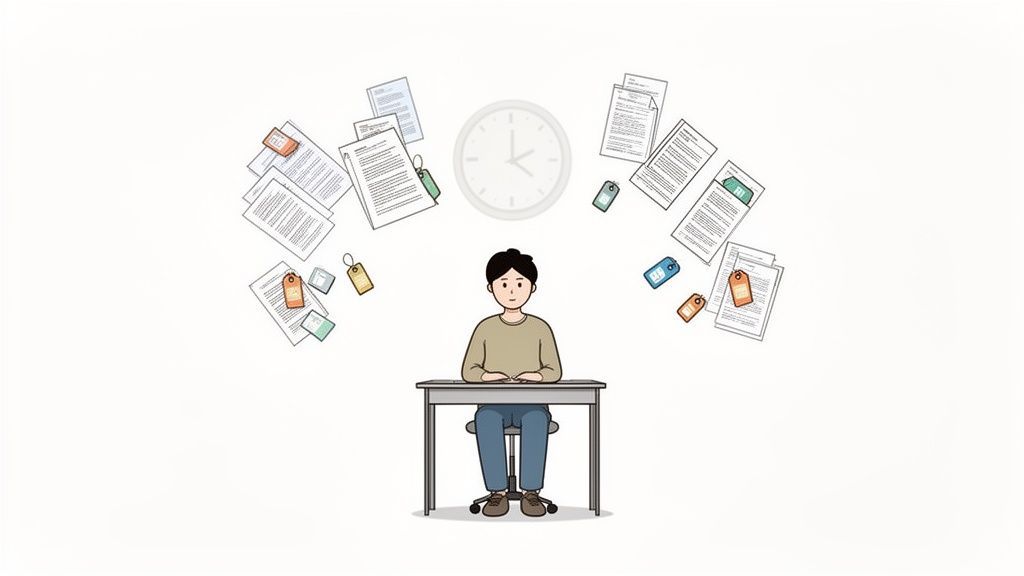
If you’re swimming in a sea of random documents, half-forgotten bookmarks, and untitled text files, you’re not alone. The old ways of jotting things down just don’t work anymore. We're all dealing with information from a dozen different sources, and our old habits can't keep up.
This isn’t just about a messy desktop. It’s a fundamental breakdown between outdated methods and the sheer volume of information we face today.
The real cost of a chaotic system is immense. Brilliant ideas get buried, projects grind to a halt, and you waste hours digging for that one perfect quote you know you saved somewhere. It’s a constant drag on your productivity and kills creative momentum.
The Hidden Costs of Disorganization
A messy system does more than just frustrate you; it actively sabotages the quality of your work by adding friction where there shouldn't be any.
Sound familiar?
- Wasted Time: How many times have you spent 20 minutes looking for a file? Every minute spent searching is a minute you're not actually thinking or creating.
- Lost Connections: When notes are siloed—a thought in a Word doc, a transcript in another folder—it’s impossible to see the bigger picture and connect the dots between ideas.
- Duplicated Effort: You end up re-reading articles or re-watching videos because you can't find your original notes. It’s a cycle of inefficiency.
- Project Paralysis: The feeling of being completely overwhelmed by your own research can make you want to give up before you even start.
This problem is so universal that the note-taking app market is on track to more than double, hitting USD 23.79 billion by 2029. People are desperate for a better way. A 2024 survey revealed that 71% of users lose 15-20 hours every month to bad note-taking habits, and a shocking 45% have abandoned projects entirely because of the chaos.
The goal isn't just to be tidy. It's to build a system that works for you—one that surfaces relevant information, helps you think more clearly, and makes the creative process feel effortless.
Moving Beyond Traditional Tools
Most of us stick with the tools we know, not because they’re the best, but because they’re familiar. A simple text file or a linear document just can't handle the mix of audio clips, video snippets, web clippings, and personal thoughts that make up modern research.
If you’re questioning your current setup, looking at a comparison of modern tools like Notion vs Evernote can be a real eye-opener. It shows you what’s possible when you move beyond basic text editors.
Ultimately, the aim is to build a unified system that brings clarity to the chaos. The rest of this guide will walk you through creating a practical framework to make your research more efficient and insightful, so you can produce better work with far less frustration.
Building a Frictionless Capture System
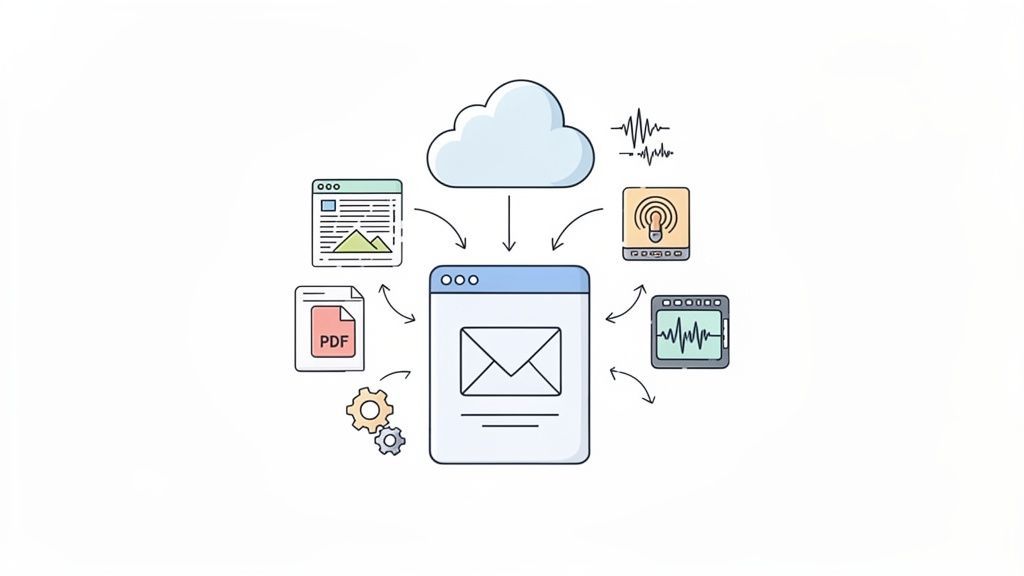
The best way to organize your research has nothing to do with sorting notes. It starts way earlier, with how you get information into your system in the first place. You need a simple, almost invisible way to funnel everything into one spot. This is your "capture engine"—a central inbox built to grab anything and everything without making you stop and think.
The main goal here is to reduce friction. If saving a thought, an article, or a video clip takes more than a couple of clicks, you just won't do it consistently. A great capture system makes saving information second nature, so no valuable insight ever slips through the cracks.
Think of it like a digital version of that old-school inbox tray on your desk. Everything goes in—web clippings, transcribed interviews, random thoughts—and you process it later. Separating "capturing" from "organizing" is the real secret to staying in the flow.
Automating Your Information Intake
Manually downloading files and copy-pasting text is a guaranteed way to kill your momentum. Instead, you can set up simple automations to do the heavy lifting for you. This creates a smooth pipeline of information flowing from the outside world directly into your digital inbox.
A solid capture system should handle different formats without a fuss. You need tools that are there when you need them, whether you're browsing the web, scrolling on your phone, or listening to a podcast.
Here are a few practical tools and tricks to build your engine:
- Web Clippers: Browser extensions from tools like Notion or Evernote are non-negotiable. They let you save articles, bookmarks, or just snippets of text with one click, preserving the content without the ads and broken links.
- Email Forwarding: Most modern note-taking apps give you a unique email address. You can forward insightful newsletters, email chains, or even voice memos from your phone straight into your research hub.
- Cloud Syncing: Connect your main note-taking app to a cloud service like Google Drive or Dropbox. Any PDFs, images, or documents you drop into a designated "inbox" folder will pop up automatically in your system, ready to be processed.
To get the most out of this, it also helps to refine how you gather information from the start. For example, learning how to take notes from books for maximum retention turns passive reading into active research right from the get-go.
The Power of AI Transcription for Audio and Video
One of the biggest headaches in modern research is dealing with non-text stuff like podcasts, interviews, and video lectures. Hours of incredibly valuable content can get locked away, impossible to search or quote easily. This is where AI transcription becomes an essential part of your capture system.
Features for Capturing Research Effortlessly
State-of-the-art AI
Powered by OpenAI's Whisper for industry-leading accuracy. Support for custom vocabularies, up to 10 hours long files, and ultra fast results.

Import from multiple sources
Import audio and video files from various sources including direct upload, Google Drive, Dropbox, URLs, Zoom, and more.

Export in multiple formats
Export your transcripts in multiple formats including TXT, DOCX, PDF, SRT, and VTT with customizable formatting options.
Instead of spending hours manually typing out quotes, you can automatically turn audio or video into searchable text in just a few minutes. This simple step transforms passive listening into an active research goldmine.
By transcribing everything, you create a searchable database of every spoken word. That key phrase from a two-hour interview becomes as easy to find as a sentence in a book.
Why Transcription Changes Everything?
Once your audio becomes text, it stops being passive media and becomes searchable knowledge. Quotes, ideas, and insights are instantly findable. This single step dramatically reduces research time and prevents valuable thoughts from getting lost.
Getting everything transcribed is the key to unlocking the value trapped in your multimedia files. Integrating platforms that can pull from multiple sources—like YouTube, Vimeo, or your cloud drives—ensures no format gets left behind.
Creating Your Central Inbox
Once your automations are humming along, all your captured information needs to land in one single destination. This "inbox" can be a specific folder in your note-taking app, a dedicated tag, or a top-level page. The tool you use matters far less than the consistency of your process.
Remember, this inbox is just a temporary holding area, not a permanent home. Its only job is to hold raw, unprocessed material until you have the time and mental space to review it. Keep it simple and fight the urge to organize things as they come in.
By putting a frictionless capture system in place, you shift your energy away from boring admin tasks and toward what actually matters—thinking about the information itself. You can explore a variety of AI-powered transcription tools to see how they might fit into your workflow. The easier you make it to get ideas into your system, the smarter and more valuable your knowledge base will become.
Designing a Scalable Digital Filing System
Capturing notes is just the start. Without a logical home for everything, your brilliant insights quickly turn into a digital junk drawer. The real trick to organizing research notes is building a system that just makes sense to you—one that's structured enough to keep chaos at bay but flexible enough to grow with your projects.
This isn't about chasing some mythical "perfect" system. It's about creating a framework so intuitive that finding information feels like second nature. The goal is simple: spend your time thinking about your research, not digging for it.
Folders vs. Tags: The Great Debate
When it comes to digital organization, you'll hear two main arguments: rigid folder hierarchies versus fluid, tag-based systems. Think of folders like a physical filing cabinet—each note can only live in one specific place. Tags, on the other hand, are like sticky notes you can attach to a document. A single note can have multiple tags, letting it pop up in all sorts of different contexts.
Each approach has its moments to shine.
- Folder-Based Systems: These give you a clear, top-down structure. They’re fantastic for projects with clear boundaries, like a university course or a specific client engagement. A classic example is the PARA Method (Projects, Areas, Resources, Archives), which sorts information based on how actionable it is.
- Tag-Based Systems: Tags offer incredible freedom. A single note about a marketing study could be tagged with
#market_research,#customer_psychology, and#Q3_report, making it discoverable from multiple angles. This is a huge win for creative work where ideas constantly overlap and intersect.
But going all-in on just one method can backfire. A pure folder system can feel like a straitjacket, forcing you to decide where a multi-faceted note belongs. And pure tag systems? Without discipline, they can dissolve into a mess of hundreds of misspelled or one-off tags, making the whole system useless.
The most robust filing system isn't about choosing between folders and tags—it's about using both in a hybrid model that provides structure and encourages discovery.
Building a Hybrid System That Works
The sweet spot is a hybrid approach. Use folders for your big, stable categories and tags for the specific, dynamic topics that cut across them. Think of folders as the sturdy shelves in your library and tags as the detailed index pointing you to the exact information you need, no matter which shelf it's on.
How an Organized System Changes Your Work?
Faster Thinking
Ideas surface instantly instead of hiding in folders. Less time searching means more time creating and analyzing.
Better Connections
Linked notes reveal patterns you wouldn’t normally notice. Insights form naturally as related ideas cluster together.
Less Cognitive Load
You stop trying to remember where things are stored. Your system becomes a trusted external brain.
Confident Execution
When everything is structured and searchable, projects move forward smoothly without hesitation or overwhelm.
This model gives you the best of both worlds. For a podcaster, the folder structure might be organized by season or show. Inside, each episode gets its own folder containing research notes, transcripts, and audio files. Then, tags like #guest_name, #sponsorship_deal, or #AI_trends can connect related ideas across completely different episodes and seasons.
A student could use folders for each course (BIOL-101, HIST-250). Within those, notes are filed by lecture or assignment. Tags like #exam_topic, #lab_report_data, or #essay_source then create a web of connections that are an absolute lifesaver during finals week. Check out our documentation for more ideas on structuring your knowledge base.
To help you decide what might work best for your own workflow, here’s a quick comparison of the most common organizational methods.
Comparison of Note Organization Methods
| Method | Best For | Pros | Cons |
|---|---|---|---|
| Folder Hierarchy | Projects with clear, defined boundaries (e.g., client work, academic courses). | - Intuitive and easy to understand. - Clean, top-down structure. - Works well in any file system. | - Rigid; notes can only live in one place. - Can become complex and deep. - Difficult for cross-topic discovery. |
| Tag-Based System | Creative work, research, and personal knowledge management where ideas intersect. | - Highly flexible and adaptable. - Allows for multi-faceted categorization. - Excellent for discovering connections. | - Can become chaotic without strict discipline. - Prone to tag duplication and misspellings. - Relies on software that supports tagging. |
| Hybrid System | Most users, from researchers to content teams, who need both structure and flexibility. | - Combines the stability of folders with the flexibility of tags. - Scalable for both small and large projects. - Best of both worlds. | - Requires a bit more initial setup. - Need to be consistent with both folder and tag usage. |
Ultimately, the hybrid model offers the most resilient and scalable solution for nearly any project, giving you a solid foundation that can adapt as your needs change.
The Power of a Consistent Naming Convention
No matter which system you land on, a standardized naming convention is the glue that holds it all together. It's a non-negotiable. A good naming convention makes your files sort logically and tells you what’s inside at a glance, even outside your main note-taking app.
A simple yet incredibly effective format is YYYY-MM-DD-Topic-Keyword.
Here’s how that looks in the real world:
- Academic Researcher:
2024-10-26-QuantumEntanglement-BellTestResults.pdf - Content Marketer:
2024-11-05-BlogPost-SEO-Trends-Analysis.docx - Podcaster:
2024-11-15-Ep102-Interview-JaneDoe-Transcript.txt
This structure automatically sorts your files by date, giving you a clear timeline of your work. The descriptive keywords mean you know exactly what a file contains without having to open it. It’s a small habit that saves you from the nightmare of deciphering names like Document_final_v3_copy.docx and pays off massively in clarity and speed.
How to Connect Ideas and Build Your Knowledge Graph
A perfectly filed note is still just a static piece of information. The real magic happens when you stop treating your notes like library books and start treating them like nodes in a network. This is where you transform a simple collection of facts into a dynamic knowledge graph—a thinking partner that helps you uncover connections you didn't even know existed.
The core idea is to move away from long, rambling notes that cover multiple topics. Instead, you create atomic notes, where each note contains just one single, core idea. This forces clarity and makes each piece of information a reusable building block for bigger concepts.
This approach, inspired by the classic Zettelkasten method, isn’t about hoarding information. It’s about actively linking your thoughts together to build a web of knowledge that gets smarter over time.
Embracing Bidirectional Linking
Traditional notes are a one-way street. You might link from Note A to Note B, but when you're looking at Note B, there's no sign that Note A ever pointed to it. This is where bidirectional linking completely changes the game.
With bidirectional links, connecting Note A to Note B automatically creates a return link. Now, both notes are aware of each other. This simple shift creates a powerful network effect within your research.
Every new link you create strengthens the context around an idea. A single note from a customer interview might link to:
- A specific product feature request.
- A broader market trend.
- A competitor's weakness.
- A great quote for a future blog post.
Suddenly, that one isolated data point becomes part of a much larger, interconnected story. It's the foundation for building a true personal knowledge graph. You can find excellent use cases for organizing transcribed content that benefit directly from this networked approach.
From Atomic Notes to Maps of Content
As your web of notes grows, you need a way to see the forest for the trees. This is where Maps of Content (MOCs) come in. An MOC is simply a note that serves as a high-level index or dashboard for a specific topic. Think of it not as a folder, but as a curated collection of links to your best atomic notes on a subject.
For instance, a content creator might have an MOC titled "AI in Marketing." This note wouldn't contain long paragraphs. Instead, it would be a structured list of links to atomic notes like:
[[AI for SEO Content Briefs]][[Personalization Algorithms in Email Marketing]][[Case Study - HubSpot's AI Tools]][[Ethical Concerns of AI Advertising]]
An MOC is a living document. It's your personal syllabus for a topic, evolving as you add new notes and discover new connections. It turns a chaotic collection of thoughts into a structured, navigable outline.
This diagram gives a great high-level view of how different digital filing elements, like folders and tags, can come together in a hybrid system.
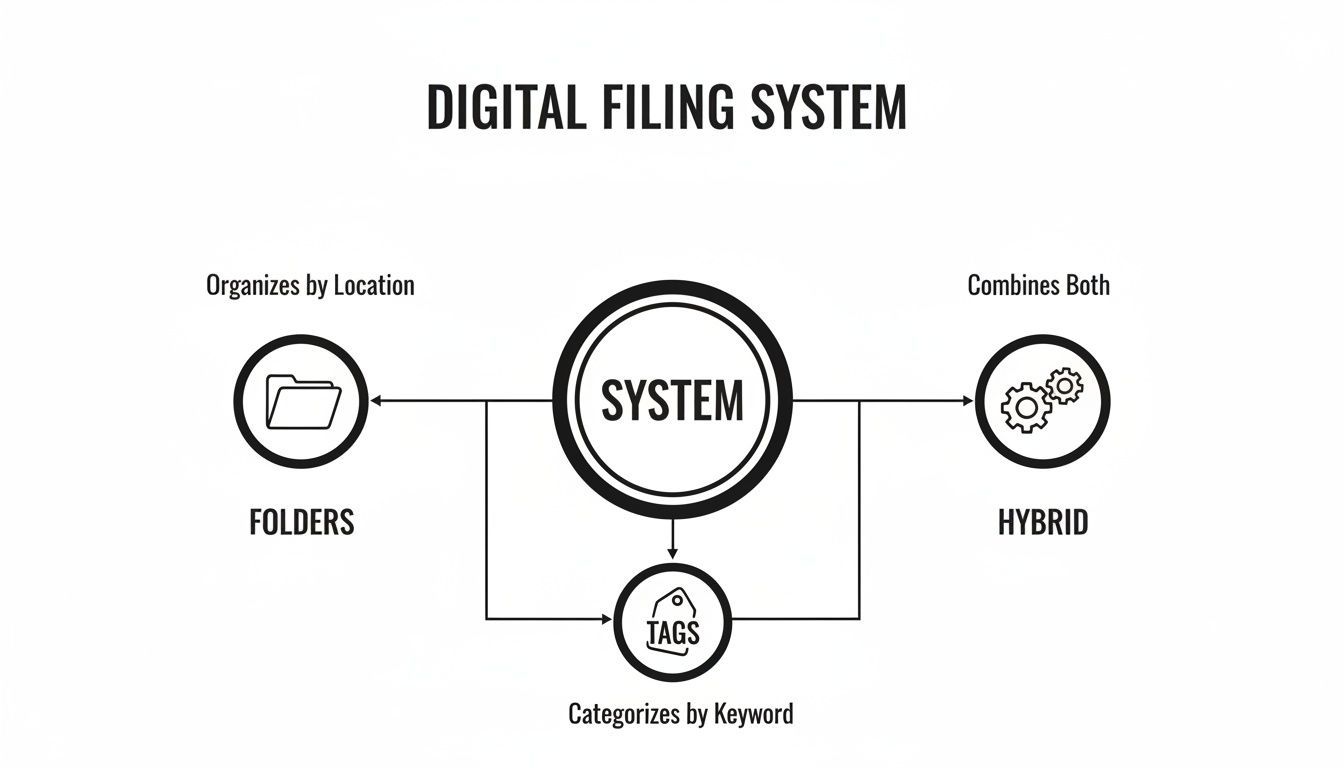
As you can see, the most effective systems often combine the solid structure of folders with the flexibility of tags to create a really robust framework for your notes.
This shift toward networked thinking isn't just a niche trend. The AI note-taking market is projected to expand by USD 821 million by 2029 for a reason.
Knowledge workers are struggling. A recent poll found that 82% of professionals see note overload as their single biggest organizational challenge. Building a connected knowledge graph is a direct response to this problem—studies even show that organized digital notes can improve citation accuracy by 28% and reduce project rework by an impressive 42%.
By actively connecting your research notes, you’re doing more than just organizing them. You are building a second brain—a system that doesn't just store information but helps you generate new, original ideas from the raw material you feed it.
Finding Anything Instantly and Collaborating with Teams
All the meticulous filing and linking in the world won't matter if you can't find what you need, the moment you need it. An organization system is only as good as its retrieval speed. The real test is building absolute trust that any piece of information—a quote, a statistic, a transcribed comment—is just a few keystrokes away.
This is where you shift from just storing information to actually using it. Mastering your tool's search function is the final piece of the puzzle, turning your organized notes into a responsive, reliable external brain.
Features That Speed Up Research Workflows

Speaker detection
Automatically identify different speakers in your recordings and label them with their names.

Editing tools
Edit transcripts with powerful tools including find & replace, speaker assignment, rich text formats, and highlighting.
Summaries and Chatbot
Generate summaries & other insights from your transcript, reusable custom prompts and chatbot for your content.
Mastering the Art of Retrieval
Modern note-taking apps have powerful search capabilities that most people barely scratch the surface of. Going beyond simple keyword searches can cut your retrieval time down dramatically. Learning just a few advanced tricks will help you pinpoint the exact note you're looking for, even in a database with thousands of entries.
Think of it like being a detective. You wouldn't just search for "clue"—you'd look for a specific type of evidence related to a certain person at a specific time.
Here are a few powerful search tactics to master:
- Boolean Operators: Use
AND,OR, andNOTto zero in on what you need. A search like“customer feedback” AND #Q3_Report NOT #internalfinds notes tagged for the quarterly report but filters out internal team chatter. - Phrase Searching: Wrap your search term in quotation marks (
"like this") to find that exact phrase. This is a lifesaver for locating specific quotes from transcripts or articles. - Tag Filtering: Don't just search—filter. Look for the term "market growth" and then filter the results to only show notes tagged with
#2024_Data.
The goal isn't just to find notes; it's to find the right notes with surgical precision. A well-executed search should feel less like a hopeful guess and more like a direct query to your personal database.
The demand for these efficient systems is exploding. In 2023, the global note-taking app market hit around USD 7.79 billion and is on track to reach USD 22.57 billion by 2030. This growth is fueled by the need for better organization, as one survey found that smart note management can slash information retrieval time by 40%.
Streamlining Team Collaboration
Organizing research becomes even more critical when you're working with a team. A shared, chaotic folder is a recipe for duplicated work, missed insights, and endless confusion. What you need is a centralized, collaborative workspace where everyone is operating from the same source of truth.
When setting up a system for your team, a few key practices are non-negotiable for keeping everyone aligned and productive.
Key Elements of a Collaborative System:
| Feature | Why It Matters | Best Practice |
|---|---|---|
| Shared Workspaces | Provides a single, centralized hub for all project-related notes and research. | Create a main project workspace, then use sub-folders or pages for specific initiatives. |
| Clear Access Roles | Prevents accidental edits or deletions and keeps sensitive information protected. | Assign roles like "Admin," "Editor," and "Viewer" based on each person's responsibilities. |
| Version History | Lets you track changes, see who contributed what, and revert if something goes wrong. | Periodically review the version history on key documents to see how an idea or report evolved. |
| Commenting & Tagging | Facilitates clear communication right inside the notes, killing long email chains. | Use @-mentions to tag specific team members with questions or feedback directly on a note. |
These features do more than just keep things tidy; they actively boost team performance. Research shows that teams using shared digital workspaces see a 35% increase in collaboration—a huge advantage for both in-person and remote teams.
If you have questions about setting up collaborative features, check out our guide on frequently asked questions about transcription tools.
Protecting Your Knowledge Base
Finally, you have to protect all this hard-earned knowledge. Losing your research archive to a technical glitch, an accidental deletion, or a security breach is a nightmare scenario. A robust backup and security strategy is your insurance policy.
Most reputable note-taking apps offer cloud-based syncing, which is a great first line of defense. But you should also have your own backup routine. Regularly export your entire note database in a common format like Markdown or PDF and store it in a separate cloud service or on a physical external drive.
Your system should be a fortress of knowledge—accessible to you and your team, but secure from everything else. This combination of powerful search, seamless collaboration, and strong security is what transforms a simple collection of notes into an invaluable asset.
Frequently Asked Questions About Organizing Notes
Even with a perfect system, questions are going to pop up. Let's be real—building a great method for organizing your research is less of a one-time setup and more of an ongoing project. It evolves as you do.
To help you out, I’ve put together some straightforward answers to the questions I hear all the time. Think of this as a quick-start guide to fine-tuning your workflow.
What Is the Best App for Organizing Research Notes
The honest answer? It’s the one you actually stick with. There's no magic "best" app, because the right tool is deeply personal and depends on how your brain works and what you're researching.
Some people need the highly structured, database-driven power of a tool like Notion. It’s like a box of digital LEGOs—you can build anything. Others, myself included, often lean into the networked, "second brain" approach of apps like Obsidian or Roam Research, which are fantastic for connecting ideas with bidirectional links.
And for plenty of folks, simplicity wins. Something like Evernote or even just Apple Notes is more than enough for quick capture without the fuss.
Don’t get bogged down by feature lists. The real metric is friction. Your best app is the one that makes getting thoughts out of your head and into your system feel completely natural. My advice? Pick two or three that look promising, give each one a solid week, and see which one just clicks.
Should I Transcribe All My Audio and Video Content
Yes. Absolutely, yes. If you want to get every drop of value out of them, that is.
An untranscribed audio or video file is basically a black box. You might remember an amazing point from a two-hour interview, but good luck finding that exact quote again without a searchable text document. It’s a nightmare.
Transcribing everything flips the switch, turning your media from passive files into active, searchable knowledge. Every word becomes as findable as a sentence in an article. This isn't just about making life easier; it’s about making your research better. You can scan for keywords, pull perfect quotes in seconds, and see patterns across dozens of recordings.
Automating transcription is a non-negotiable step in a modern research system. It guarantees no insight stays locked away in an unsearchable format, making your entire knowledge base smarter and more powerful.
How Often Should I Review and Process My Notes
It really depends on how much you're capturing, but here’s the key: a consistent routine beats a perfect frequency every time. For most people, a weekly review is the sweet spot. I block out 30-60 minutes every Friday afternoon to clear out my "inbox" of notes from the week.
Here’s what that processing session looks like:
- Give it a clear title. No more "Note from Tuesday." Make it descriptive so your future self knows what it is.
- Tag it and link it. Add a few relevant tags and connect it to other notes that already exist in your system.
- File it. Move the note out of your inbox and into its final home, whether that's a specific folder or a Map of Content (MOC).
If you let notes pile up, you’ll end up with a huge backlog you'll never want to tackle. A simple, regular review habit keeps your system clean and ensures you're actually thinking about the stuff you save. It’s a small time investment that stops your digital brain from turning into a digital junk drawer.
What If My System Feels Too Complicated
If your system feels like a chore, you’ve over-engineered it. Period. The whole point of organization is to reduce cognitive load, not create more of it. If you’re drowning in a sea of a hundred tags, a folder structure that’s ten levels deep, or a bunch of complex rules you can’t even remember, it's time to hit the reset button.
Keep It Simple
Too many folders, tags, or rules create friction instead of clarity. Complexity slows capture and breaks consistency. Start minimal and expand only when truly necessary.
Strip it back to the absolute basics. What's the minimum you need to feel organized?
Often, that’s just a simple PARA (Projects, Areas, Resources, Archives) folder setup and maybe 5-10 core tags. You can always add more layers later, but only when you feel a real need for them. Don't build a system for some imaginary, hyper-organized future version of yourself. Build it for the work you have to do right now.
Your note-taking system should serve you, not the other way around.
Ready to turn your scattered audio and video files into a searchable knowledge base? Transcript.LOL uses powerful AI to deliver fast, accurate transcriptions in just minutes. Stop wasting time manually typing notes and start unlocking the insights hidden in your content. Try Transcript.LOL for free today and see how effortless capturing research can be.