
Can ChatGPT Transcribe audio? A Practical Guide
Find out how ChatGPT handles audio transcription, accuracy, limits, and when to choose it for professional tasks.
Kate
February 23, 2026
So, can you use ChatGPT to transcribe audio? The short answer is yes, but it's probably not in the way you're thinking.
The magic behind ChatGPT's audio skills isn't the chatbot itself—it's OpenAI's powerful Whisper model, a dedicated speech-to-text engine that does all the heavy lifting in the background. Think of ChatGPT as the language genius and Whisper as the expert listener. They work together, but they have different jobs.
The Short Answer: Yes, but It's Complicated
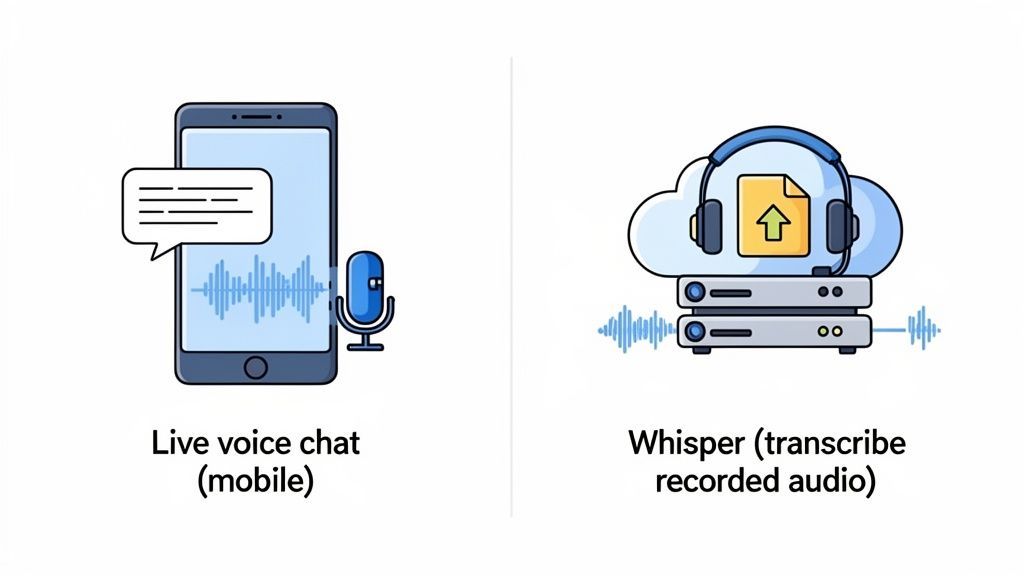
When people ask if ChatGPT can transcribe audio, the answer really depends on what they want to accomplish. There's a huge difference between talking to the app on your phone and getting it to process a pre-recorded audio file. Understanding this distinction is the key.
To help clear things up, here’s a quick breakdown of how OpenAI’s audio tech works in different scenarios.
ChatGPT Audio Methods at a Glance
| Method | Primary Use Case | Best For | Key Limitation |
|---|---|---|---|
| ChatGPT Mobile App Voice Input | Live conversation & dictation | Hands-free chatting, brainstorming, quick notes | Cannot process existing audio files |
| Whisper API | Transcribing recorded audio files | Interviews, meetings, podcasts, lectures | Requires some technical setup or a third-party tool |
This table shows the fundamental split: the app is for talking to the AI, while Whisper is for converting audio files into text.
Live Voice vs. Recorded Files
The voice feature in the ChatGPT mobile app is fantastic for real-time conversations. You speak, it turns your words into text, and you get a response. It’s perfect for capturing a thought on the go or asking a question without typing.
But if you have a recorded interview, a college lecture, or a podcast episode you need transcribed, that voice feature won't help. It’s simply not built for that. For existing audio files, you need to tap into the Whisper technology directly.
Features That Make Transcription Simple
State-of-the-art AI
Powered by OpenAI's Whisper for industry-leading accuracy. Support for custom vocabularies, up to 10 hours long files, and ultra fast results.

Import from multiple sources
Import audio and video files from various sources including direct upload, Google Drive, Dropbox, URLs, Zoom, and more.

Export in multiple formats
Export your transcripts in multiple formats including TXT, DOCX, PDF, SRT, and VTT with customizable formatting options.
The Role of Whisper AI
At its core, ChatGPT is a large language model—it's a master of text, not sound waves. To handle audio, it relies on OpenAI's Whisper API, which became widely known when the mobile app introduced its voice chat feature.
Whisper is incredibly accurate, often hitting over 90% on clear audio. This capability is a big reason why ChatGPT can handle a staggering 1 billion daily requests from its 300 million weekly active users. You can dig into a deeper analysis of these usage statistics and transcription benchmarks.
Once you see this two-part system—Whisper for listening and ChatGPT for understanding—it all starts to make sense. It explains why you can't just upload an MP3 to the chat window and why a different approach is needed to turn your audio files into clean, usable text.
To figure out if ChatGPT can transcribe audio, it helps to stop thinking of it as a single tool. It's more like a two-person team working in perfect sync. You're not dealing with one AI; you're using two specialized models, and understanding that relationship is the key to getting great results.
Think of it this way: Whisper, OpenAI's speech-to-text model, is the world-class interpreter. Its only job is to listen to an audio file and turn every spoken word into raw text. And it's ridiculously good at it.
The Power Behind Whisper's Ears
Whisper’s talent comes from its massive and incredibly diverse training. It learned its craft by processing 680,000 hours of multilingual and multitask audio scraped from the web. This colossal dataset taught it how to handle the messiness of real-world sound.
It was exposed to a huge variety of:
- Accents and Dialects: From a thick Texas drawl to various forms of global English, it’s heard it all.
- Background Noise: It learned to pick out voices from the chaos of street traffic, café chatter, and office hum.
- Specialized Terminology: It can recognize industry-specific jargon that would make other models stumble.
This tough training makes Whisper incredibly resilient. It can handle audio that isn't studio-perfect, delivering a much cleaner starting point than older transcription software ever could. Whisper is the ears of the operation, capturing the raw material for the next step.
By processing such a vast library of audio, Whisper built a deep, intuitive sense of human speech patterns. That's why it can hit near-human levels of accuracy on clear recordings, setting a new bar for AI transcription.
ChatGPT's Role: The Master Editor
Once Whisper lays down the raw transcript, ChatGPT steps in as the brilliant editor. The text from Whisper might just be a long, unbroken block of words. ChatGPT is what you use to make it useful.
You can hand that raw text to ChatGPT and ask it to:
- Summarize Key Points: Boil down a 30-minute meeting into a few crucial bullet points.
- Find Action Items: Pull out every task assigned during a project update call.
- Repurpose Content: Turn a rambling monologue into a structured outline for a blog post.
- Analyze the Vibe: Figure out the sentiment or recurring themes in an interview.
This division of labor is what makes the whole system work. Whisper handles the transcription—turning sound waves into words. ChatGPT then handles the comprehension and manipulation of those words. Once you get this partnership, you can start using OpenAI's tools for your audio in a much smarter way.
Alright, so you want to put OpenAI’s tech to work and get some audio transcribed. How do you actually do it?
It’s not quite as simple as finding a single "transcribe" button. Depending on what you're trying to accomplish, there are really two different paths you can take. One is quick and easy, built for in-the-moment thoughts, while the other is far more powerful but definitely requires a more technical touch.
Getting a handle on the difference between them is the key to getting what you need without pulling your hair out.
Method 1: The Simple Path for Live Dictation
The most straightforward way to turn your voice into text using OpenAI's tools is right in the ChatGPT mobile app. This feature is designed for real-time dictation—perfect for capturing ideas as they pop into your head.
Think of it like a voice-activated notepad on steroids. You talk, it types. It’s a fantastic workflow for a few specific situations:
- Brainstorming on the Go: Got an idea while you're out for a walk? Just talk it out. No need to be chained to a keyboard.
- Drafting Quick Content: You can verbally sketch out a blog post, dictate a quick email, or even rattle off a few social media updates.
- Taking Personal Notes: It's a great hands-free way to make a quick reminder or a journal entry.
The beauty of this method is its simplicity. You tap the little microphone icon, start talking, and that’s it. But here’s the catch: its biggest limitation is that it cannot process pre-recorded audio files. It’s strictly for live input. If you have an MP3 of a meeting you want transcribed, this method won't help you.
Method 2: The Advanced Path for Recorded Files
Now, if you want to transcribe an existing audio file—like a podcast, an interview, or a lecture recording—you need to go straight to the source: the Whisper API. This is the heavy-duty engine that powers professional transcription services.
This chart gives you a bird's-eye view of how audio becomes intelligent, usable text.
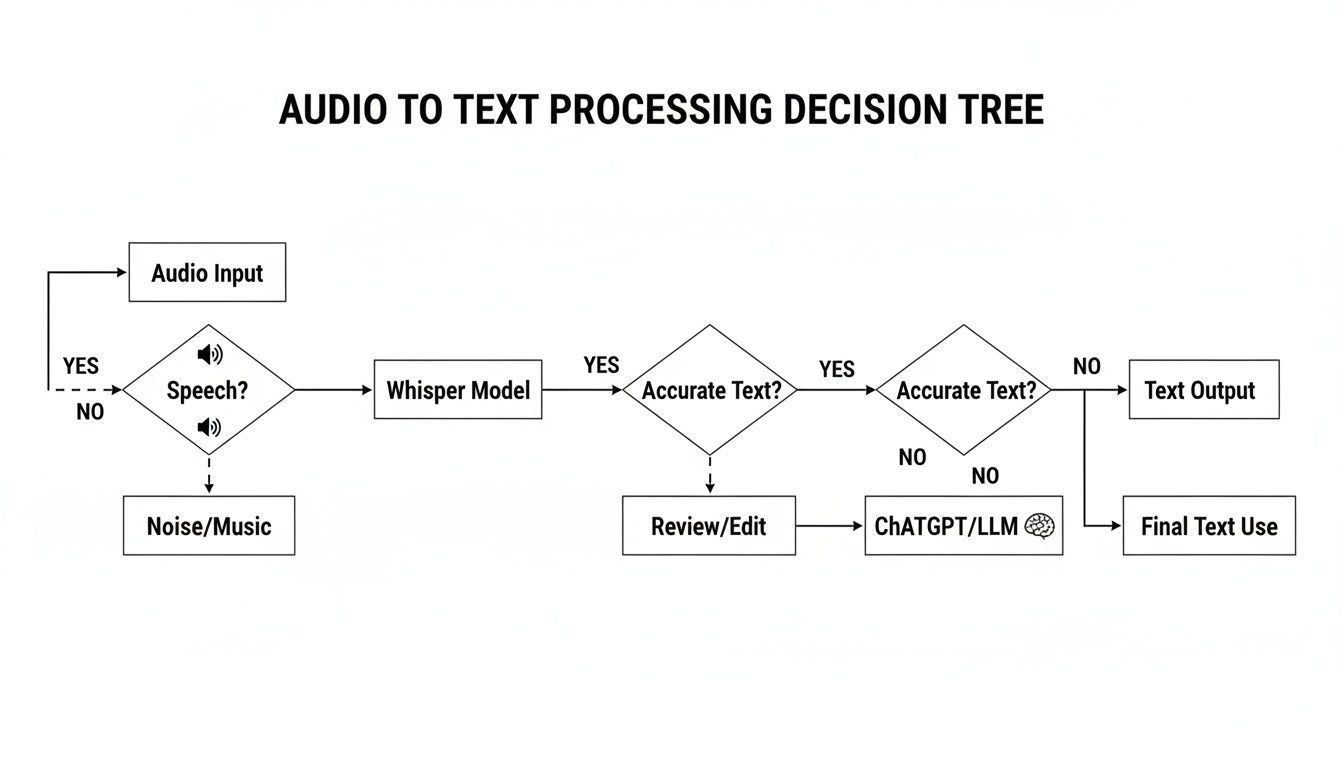
As you can see, Whisper is the first step, turning the raw sound into a basic transcript. From there, a large language model like ChatGPT can step in to summarize or analyze it.
But using the Whisper API directly isn't a simple "upload and go" affair for most people. It means writing code to send your audio file to OpenAI's servers and then handle the text that comes back. It's incredibly powerful, but it’s more of a building block for a developer than a finished tool for the average user.
If you want to see how pros use these models, check out this practical guide for turning podcasts into transcripts, which breaks down workflows often built on top of AI engines just like Whisper.
This technical hurdle is exactly why specialized transcription tools exist. They build a clean, user-friendly interface right on top of the Whisper API, taking care of all the complicated code for you. You get the simple drag-and-drop experience you'd expect, plus all the must-have features like speaker labels and different export options. You can see how these features work in the Transcript.LOL documentation.
At the end of the day, OpenAI provides the raw horsepower, but a dedicated platform is what makes that power accessible and genuinely useful for real transcription work.
Transcription Accuracy and Real World Limitations
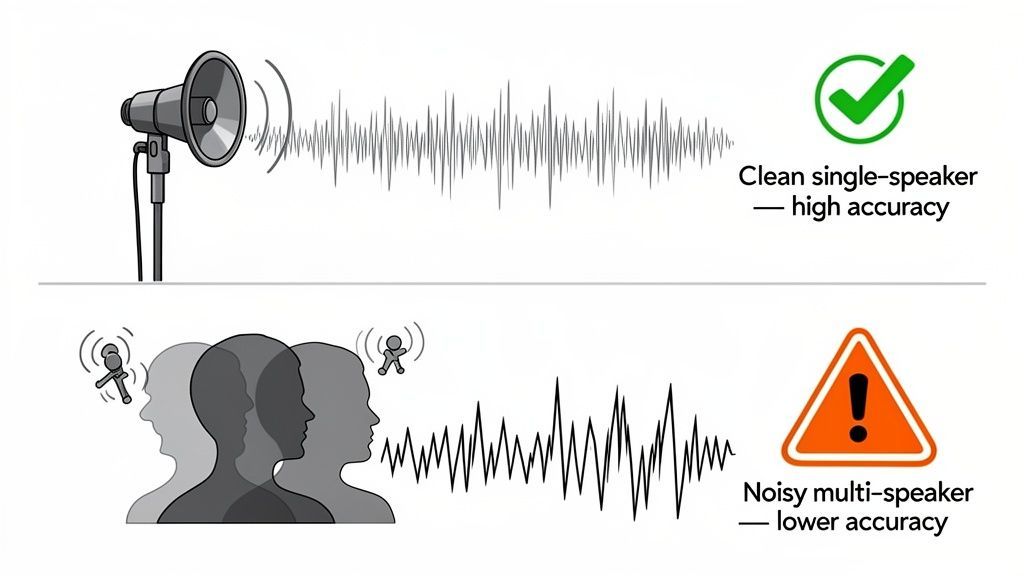
When people ask if ChatGPT can transcribe audio, what they’re really asking is, “How accurate is it?” OpenAI's Whisper model can be shockingly precise on clean audio, but real life is messy. Understanding its limits is the key to getting good results.
In a perfect world—one person speaking clearly into a good mic with zero background noise—Whisper’s accuracy is incredible. But the second you step into the real world, things get complicated.
Key Factors That Wreck Accuracy
The quality of your audio file is, without a doubt, the biggest factor. Even the smartest AI stumbles when it can't hear properly.
- Background Noise: A humming air conditioner, cafe chatter, or passing sirens can easily confuse the AI, making it hard to separate speech from noise.
- Multiple Overlapping Speakers: When people talk over each other, the AI just hears a jumble of words and struggles to untangle who said what.
- Industry-Specific Jargon: Whisper knows a lot, but it can get tripped up by highly technical or niche terms it hasn't encountered often.
- Strong Accents: While it's pretty good with accents, particularly thick or less common ones can sometimes lead to mistakes.
This is why a quiet, professionally recorded podcast will always get a better transcript than a chaotic team meeting recorded on a laptop mic. The AI is only as good as the audio you feed it.
Start with Clean Audio
Poor microphones, background noise, and overlapping speakers can quickly reduce transcription accuracy. Even advanced AI struggles to produce clean results from messy recordings. When your audio quality is clear and well-recorded, you save hours of editing and correction later, making the entire process faster and more efficient.
What AI Transcription Often Misses
Getting the words right is only half the battle. The basic Whisper model has a few structural blind spots that can make transcripts a pain to use, especially for conversations.
The biggest one is speaker diarization—the fancy term for identifying who is speaking and when. Without it, you just get a giant wall of text. For interviews or meetings, that’s almost useless because you have no idea who said what.
A recent hands-on test drove this point home. Even in a noisy environment, ChatGPT’s voice-to-text hit an impressive 92% accuracy. But it still fell short on identifying multiple speakers, where the error rate is way higher than a human would produce. You can read more about how ChatGPT's transcription compares to other tools.
On top of that, dealing with really long files—like multi-hour webinars or legal depositions—can be a real headache without software built to handle it. This is why so many professionals turn to dedicated platforms for more demanding jobs. You can explore a variety of these professional transcription use cases to see where specialized tools truly shine.
A Better Transcription Workflow with Specialized Tools
While you can technically transcribe audio using OpenAI's raw technology, the whole process is clunky and riddled with frustrating limitations. It’s like having a powerful car engine but no chassis, wheels, or steering. To actually get anywhere, you need the complete vehicle.
This is exactly where specialized transcription platforms come in. They take the raw power of models like Whisper and build a seamless, user-friendly experience around it, solving the very pain points that make the DIY approach so impractical for any serious work.
Moving Beyond the Technical Hurdles
Let’s be honest: using the Whisper API directly requires you to code, and the ChatGPT mobile app is only good for live dictation. Specialized tools completely demolish these barriers, offering a straightforward workflow anyone can master in minutes.
Here’s where they really shine:
- Effortless Uploads: Forget wrestling with code. You just drag and drop your file. Most services even let you pull files from Google Drive, Dropbox, or paste a link from platforms like YouTube.
- Support for Long Files: No more splitting that two-hour interview into tiny, manageable chunks. Professional tools are built to handle multi-hour recordings without breaking a sweat, saving you a massive amount of time and hassle.
- Multiple Export Options: A raw transcript is often just the starting point. These platforms let you export in formats like SRT and VTT for video captions or DOCX for easy editing.
Getting AI transcription to fit into a broader strategy often means refining your entire content creation workflow, which almost always begins with turning raw audio into clean, usable text.
The Critical Features Raw AI Lacks
Beyond basic convenience, dedicated platforms pack in essential features that are non-negotiable for professional use. The most important one? Automatic speaker identification.
Without it, a conversation between two or more people turns into an unreadable wall of text. A professional tool, on the other hand, automatically detects and labels each speaker, transforming a confusing mess into a clear, easy-to-follow dialogue. This one feature is often the difference between a useless text file and a valuable asset.
Features for Professional Workflows

Speaker detection
Automatically identify different speakers in your recordings and label them with their names.

Editing tools
Edit transcripts with powerful tools including find & replace, speaker assignment, rich text formats, and highlighting.
Summaries and Chatbot
Generate summaries & other insights from your transcript, reusable custom prompts and chatbot for your content.
For anyone transcribing meetings, interviews, or podcasts, speaker labeling isn't a luxury—it's a fundamental requirement. It's the primary reason professionals choose dedicated transcription services.
Privacy: The Non-Negotiable Priority
Perhaps the biggest advantage of using a specialized service is data privacy. When you feed your audio into general AI tools, your conversations can be used to train their models. For any content that's sensitive, confidential, or proprietary, this is an unacceptable risk.
Reputable transcription platforms operate under a strict "no-training on your data" policy. This is a contractual guarantee that your private conversations, business strategies, and personal notes remain just that—private. This level of security is essential for anyone in the legal, medical, or corporate world.
You can learn more by exploring different AI-powered transcription tools and comparing their privacy policies side-by-side. For professional work, privacy isn't just a feature; it's the foundation of trust.
Common Questions About ChatGPT Audio Transcription
Even when you know how ChatGPT and its underlying Whisper model work, a lot of practical questions pop up. Let's run through some of the most common ones so you know exactly what to expect when you're trying to get a transcript from OpenAI's tech.
Getting these things straight from the start can save you a ton of time and frustration. It helps you pick the right tool for the job.
Can I Upload an MP3 File Directly to ChatGPT?
Nope. This is probably the biggest point of confusion. You can't upload an MP3, WAV, or any other pre-recorded audio file directly to the standard ChatGPT interface on the web or in the mobile app.
The voice feature you see in the app is designed for a live, real-time conversation—think of it as a dictation tool, not a file processor. To get a transcript from an existing audio file, you have to use a tool built to work with the Whisper API, which is the part of the system that actually handles file-based transcription.
Is It Safe to Transcribe Sensitive Conversations?
Using the public version of ChatGPT for sensitive or confidential material comes with some pretty big privacy risks. By default, OpenAI can use your conversations to train its models unless you go out of your way to opt out.
For business meetings, legal notes, patient information, or any kind of proprietary data, that’s a dealbreaker.
The safest bet for any confidential content is to use a dedicated transcription service that gives you a strict, contractual "no-training on your data" policy. That's the only way to be sure your information stays completely private and isn't used for anything else.
How Does ChatGPT Handle Multiple Speakers?
This is one of the most significant limitations of the raw Whisper model. It doesn't do speaker diarization, which is the fancy term for identifying and labeling who is talking and when.
What you get instead is one long, continuous block of text. If you're transcribing an interview or a team meeting, this makes the transcript almost impossible to follow. You have no idea who said what. Professional platforms solve this by adding a speaker identification layer on top of the raw transcription.
For more on common transcription headaches and how to solve them, check out this list of frequently asked questions about transcription services.
What Is the Real Difference Between ChatGPT and a Professional Service?
The core difference boils down to workflow, features, and privacy. Using OpenAI's technology directly is a DIY approach. It’s powerful, but it’s missing all the tools you need for a smooth, professional process.
A specialized service wraps everything up into a polished solution. Here’s a quick comparison:
| Feature | Direct OpenAI Tools | Specialized Service (e.g., Transcript.LOL) |
|---|---|---|
| File Uploads | Not supported (API requires code) | Simple drag-and-drop, URL/cloud import |
| Speaker Labels | Not included | Automatic speaker detection & labeling |
| Export Formats | Raw text only | Multiple options (SRT, VTT, DOCX, etc.) |
| Privacy | Data may be used for training | Strict no-training policy for user data |
Ultimately, a dedicated platform just streamlines the whole process. It takes the powerful but raw AI engine and packages it into a tool that saves you a ton of time, effort, and potential security headaches.
The Modern Workflow Standard
AI transcription is no longer a niche feature; it has become a core part of modern content workflows. Today, teams expect automatic transcripts, summaries, and captions as a default, not an add-on. As a result, manual note-taking is rapidly becoming outdated, replaced by faster and more efficient AI-powered processes.
For a solution that combines the power of Whisper with essential professional features like speaker detection, multiple export formats, and a strict privacy guarantee, check out Transcript.LOL. It provides an easy, secure, and feature-rich workflow for all your transcription needs. Find out more at https://transcript.lol.