
Prendere appunti per riunioni che guidano effettivamente all'azione
Padroneggia l'arte di prendere appunti per le riunioni. Scopri come prepararti, prendere appunti efficaci e utilizzare l'IA per creare registri che garantiscano responsabilità e progressi.
Kate, Praveen
March 5, 2025
Prendere appunti per le riunioni significa creare un registro semplice e ufficiale di ciò che è stato discusso, di ciò che è stato deciso e di chi farà cosa dopo. È il processo di trasformare una conversazione in un'unica fonte di verità che mantiene tutti responsabili e allineati molto tempo dopo la fine della riunione.
Non si tratta di scrivere ogni singola parola. Si tratta di catturare i risultati critici che fanno effettivamente progredire il lavoro.
Funzionalità principali che semplificano la presa di appunti per le riunioni
IA all'avanguardia
Alimentato da Whisper di OpenAI per una precisione leader nel settore. Supporto per vocabolari personalizzati, file fino a 10 ore e risultati ultra rapidi.

Importa da più fonti
Importa file audio e video da varie fonti tra cui caricamento diretto, Google Drive, Dropbox, URL, Zoom e altro.

Rilevamento dei parlanti
Identifica automaticamente diversi parlanti nelle tue registrazioni e etichettali con i loro nomi.
Perché appunti di riunione efficaci sono la tua arma segreta
Appunti di riunione ben strutturati fungono da unica fonte di verità, riducendo le incomprensioni, risolvendo rapidamente i conflitti e garantendo che le decisioni non vadano perse nel tempo.
Siamo onesti: prendere appunti durante le riunioni ha spesso una cattiva reputazione. Può sembrare un compito ingrato, solo un'altra casella da spuntare. Ma se quel semplice compito fosse in realtà uno degli strumenti più potenti nell'arsenale del tuo team?
Il primo passo è smettere di considerarlo solo una registrazione e iniziare a vederlo come una funzione aziendale critica. È allora che ne sblocchi il vero valore.
Un ottimo set di verbali crea una registrazione inconfutabile di ciò che è accaduto. Immagina due dipartimenti in disaccordo su una decisione chiave presa settimane fa. Senza appunti chiari, la situazione degenera rapidamente in un pasticcio di "lui ha detto, lei ha detto", sprecando il tempo di tutti e minando la fiducia. Una rapida occhiata ai verbali risolve il problema istantaneamente: ecco cosa abbiamo deciso, perché lo abbiamo deciso e chi era presente.
Promuovere la Responsabilità tra i Team
Nel mondo frenetico e spesso remoto di oggi, la responsabilità può essere sfuggente. Buone idee e promesse verbali tendono a svanire nell'etere non appena una chiamata Zoom termina. Verbali ben fatti fermano questo "amnesia da discussione" sul nascere. Agiscono come un registro pubblico degli impegni e un gentile promemoria su chi possiede cosa.
Quando delinei chiaramente le azioni da intraprendere, assegni i responsabili e stabilisci le scadenze, crei un vero quadro per il follow-up. Questo cambia le regole del gioco per i team ibridi, dove non puoi semplicemente fare un controllo informale alla scrivania di qualcuno. È molto più difficile che un compito cada nel dimenticatoio quando il nome di qualcuno è proprio lì accanto con una data di scadenza.
I verbali di riunione sono più di un semplice registro; sono un progetto per l'azione. Trasformano conversazioni astratte in passi concreti, assicurando che lo slancio non venga perso una volta che tutti lasciano la stanza.
Mitigare i Rischi e Preservare la Conoscenza
Oltre a tenere traccia delle attività, verbali solidi offrono alcuni seri vantaggi organizzativi. Costruiscono una cronologia che è incredibilmente utile per mettere al passo i nuovi membri del team senza dover ripercorrere ogni vecchia conversazione. Questo tipo di conoscenza istituzionale è un enorme vantaggio che troppe aziende lasciano sfuggire.
Inoltre, i verbali possono anche essere un registro legale formale. Per consigli di amministrazione o comitati ufficiali, i verbali approvati sono prova di conformità e diligenza, proteggendo l'organizzazione da future controversie. Dimostrano che le decisioni sono state prese in modo ponderato e a norma di legge.
In definitiva, padroneggiare l'arte di prendere appunti non è un onere amministrativo, ma un investimento in chiarezza, produttività e integrità dell'intero team.
La Tua Preparazione Pre-Riunione per Appunti Impeccabili
Una grande presa di appunti non inizia quando la riunione ha inizio; inizia molto prima con una preparazione intelligente. Entrare in una riunione impreparati è una ricetta per il disastro. Finisci per affannarti, stressato e perdendo le cose importanti. Un po' di lavoro di preparazione ti trasforma da un prendi-appunti reattivo a un facilitatore proattivo.
Funzionalità che trasformano gli appunti in azioni

Strumenti di modifica
Modifica le trascrizioni con strumenti potenti tra cui trova e sostituisci, assegnazione dei parlanti, formati di testo arricchito ed evidenziazione.

Esporta in più formati
Esporta le tue trascrizioni in più formati tra cui TXT, DOCX, PDF, SRT e VTT con opzioni di formattazione personalizzabili.
Riassunti e Chatbot
Genera riassunti e altri approfondimenti dalla tua trascrizione, prompt personalizzati riutilizzabili e chatbot per i tuoi contenuti.
Lo strumento più potente che hai prima di qualsiasi riunione è l'ordine del giorno. Un ordine del giorno solido non è solo un elenco di argomenti; è il progetto per i tuoi verbali. Ti fornisce la struttura, il contesto e il flusso necessari per catturare tutto in modo logico.
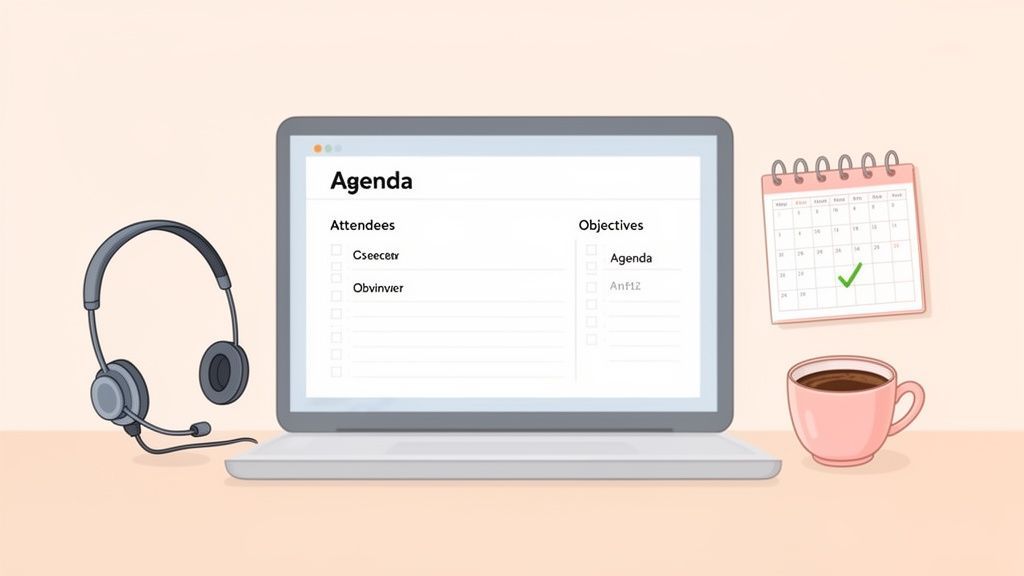
Prima di fare qualsiasi altra cosa, mettiti in contatto con l'organizzatore della riunione. Assicurati che ogni punto all'ordine del giorno sia chiaro e punti a un risultato specifico. Ogni punto dovrebbe essere una discussione che richiede una decisione o un'azione, non solo un'idea vaga. Fare questo bene rende il lavoro effettivo di prendere appunti per le riunioni molto più facile.
Creare il tuo modello per prendere appunti
Una volta bloccato l'ordine del giorno, usalo per creare il tuo modello per prendere appunti. Questo è il tuo quadro personale, pronto per essere utilizzato prima che chiunque si unisca alla chiamata. Seriamente, non iniziare mai con una pagina bianca: è solo chiedere il caos.
Il tuo modello dovrebbe sempre includere alcune sezioni chiave in alto:
- Essenziali della riunione: Le basi: titolo della riunione, data, ora e luogo fisico o link virtuale.
- Elenco dei partecipanti: Un semplice elenco di tutti gli invitati. Puoi controllare rapidamente chi è presente, assente o ha inviato le proprie scuse.
- Obiettivi della riunione: Solo una o due frasi che riassumono cosa la riunione dovrebbe raggiungere. Mantiene gli occhi di tutti sul premio.
Una volta che le basi sono state affrontate, puoi costruire il nucleo del tuo modello utilizzando i punti all'ordine del giorno.
Strutturare il tuo modello per il successo
Per ogni punto all'ordine del giorno, crea la sua sezione dedicata nel tuo documento. Questo semplice trucco mantiene i tuoi appunti organizzati e ti consente di concentrarti sull'argomento corrente mentre la conversazione si sposta, evitando un unico, confuso muro di testo. Se hai bisogno di una mano per iniziare, usare un generatore di ordini del giorno per riunioni può davvero accelerare il tuo lavoro di preparazione.
Sotto ogni intestazione dell'ordine del giorno, mi piace lasciare spazio per alcune cose chiave:
- Punti chiave della discussione: Brevi note puntate sui principali argomenti o idee emerse.
- Decisioni prese: La risoluzione finale per quell'argomento. Sii esplicito e scrivilo chiaramente.
- Azioni da intraprendere: Questa è la parte più critica. Annota il compito, il responsabile (chi è responsabile) e la scadenza.
Questa struttura garantisce che tu stia catturando non solo ciò che è stato detto, ma ciò che è stato deciso e cosa succede dopo. È la differenza tra registrare una conversazione e creare un documento utile.
L'obiettivo della preparazione pre-riunione è ridurre al minimo gli attriti durante la riunione stessa. Un modello strutturato libera la tua larghezza di banda mentale per ascoltare attivamente e identificare ciò che conta veramente, piuttosto che affannarsi per organizzare i tuoi pensieri al volo.
Impostare il tuo spazio di lavoro digitale
La tua configurazione digitale è importante quanto il tuo modello. Decidi in anticipo i tuoi strumenti. Andrai con un semplice Word o Google Doc? O forse qualcosa di un po' più avanzato?
Ho avuto molto successo impostando una registrazione come backup. Questo ti salva la vita per discussioni tecniche complesse o riunioni del consiglio di amministrazione critiche in cui ogni dettaglio conta. Ad esempio, sapere come registrare una riunione in Teams e lasciarla in esecuzione in background offre un enorme senso di sollievo. Puoi concentrarti sui risultati di alto livello invece di cercare di catturare ogni singola parola.
Mentre ci sei, pensa all'integrazione degli strumenti AI fin dall'inizio. Un servizio come Transcript.LOL può prendere quella registrazione della riunione ed estrarre una trascrizione completa e identificata dall'oratore in pochi minuti. Sapere di avere quella rete di sicurezza ti permette di essere più presente e meno frenetico, che è l'obiettivo finale di tutto questo lavoro di preparazione.
Padroneggiare l'arte di prendere appunti durante la riunione
È qui che avviene il vero lavoro: durante la riunione dal vivo. Diciamo una cosa chiara: il tuo obiettivo non è scrivere ogni singola parola. Dimentica di cercare di creare una trascrizione perfetta al volo. Sei lì per catturare l'essenza della discussione, le decisioni critiche e il chiaro percorso da seguire.
Prendere appunti in modo efficace è una danza costante tra ascoltare, elaborare ciò che viene detto e annotare ciò che conta davvero. È il tuo compito filtrare il segnale dal rumore.
Concentrati sui risultati, non sulle conversazioni
L'errore più grande che vedo fare alle persone è cercare di documentare l'intera conversazione. Non è solo impossibile; crea verbali gonfi e illeggibili che nessuno vuole guardare in seguito.
Invece, devi addestrare il tuo orecchio ad ascoltare specifici trigger. Questi sono i momenti che contano davvero. Quando li senti, la tua penna dovrebbe iniziare a muoversi (o le tue dita dovrebbero iniziare a digitare).
Quindi, cosa stai ascoltando?
- Decisioni prese: Nel momento in cui il gruppo raggiunge un consenso o una persona chiave prende una decisione finale, scrivilo. Sii specifico.
- Azioni da intraprendere: Sintonizzati su frasi come "Me ne occuperò io...", "Dobbiamo..." o "Il prossimo passo è...". Annota il compito, chi ne è responsabile e la scadenza.
- Scadenze importanti: Qualsiasi menzione di una data di scadenza, un traguardo o una tempistica è un must.
- Ostacoli principali: Annota eventuali grandi ostacoli o domande irrisolte che richiederanno un follow-up.
Questo approccio selettivo è in realtà solo una forma di ascolto attivo. Concentrandoti su questi output chiave, garantisci che i verbali siano concisi e, soprattutto, attuabili. Se vuoi davvero affinare questa abilità, approfondire i principi di cos'è l'ascolto attivo può fare una grande differenza.
Adottare un metodo orientato all'azione
Una mentalità orientata all'azione sposta la tua attenzione da "chi ha detto cosa" a "cosa è stato deciso e cosa succede dopo". È un punto di svolta per semplificare l'intero processo.
Invece di scrivere una lunga storia narrativa della riunione, puoi strutturare i tuoi appunti direttamente sotto ogni punto all'ordine del giorno. Questo mantiene tutto pulito e facile da scansionare in seguito.
Pensa a te stesso come a un giornalista che riporta le conclusioni della riunione. Il tuo pubblico non ha bisogno di un resoconto dettagliato; ha bisogno dei titoli: le decisioni, i responsabili e le scadenze. Questa mentalità è la chiave per creare verbali che le persone trovano effettivamente preziosi.
Un piccolo trucco fantastico per stare al passo durante una discussione frenetica è usare il tuo linguaggio in codice. Non hai bisogno di imparare un sistema completamente nuovo, basta inventare alcune abbreviazioni coerenti.
Ad esempio:
- AI: Azione da intraprendere
- DEC: Decisione
- D/L: Scadenza
- Q: Domanda per follow-up
Questa semplice abitudine può farti risparmiare secondi preziosi, aiutandoti a stare al passo con la conversazione senza rimanere indietro.
Appunti manuali vs Trascrizione AI per verbali di riunione
Oggi hai una scelta potente: prendere appunti nel vecchio modo o utilizzare uno strumento AI per generare una trascrizione completa. Nessuno dei due è universalmente "migliore": la scelta giusta dipende davvero dal tipo di riunione in cui ti trovi. Capire dove ognuno eccelle ti aiuta a scegliere lo strumento migliore per il lavoro.
Analizziamo come si confrontano.
| Caratteristica | Appunti manuali | Trascrizione AI (es. Transcript.LOL) |
|---|---|---|
| Ideale per | Discussioni strategiche, sessioni di brainstorming, check-in di piccoli team. | Riunioni tecniche, deposizioni legali, interviste, revisioni dettagliate di progetti. |
| Focus principale | Catturare decisioni di alto livello, azioni da intraprendere e punti chiave da ricordare. | Creare un record completo, parola per parola, dell'intera conversazione. |
| Sforzo umano | Alto durante la riunione (richiede ascolto attivo e sintesi). | Basso durante la riunione (basta premere registrare); più alto dopo la riunione per la revisione. |
| Precisione | Soggetto a errori umani o a interpretazioni errate di argomenti complessi. | Precisione letterale estremamente elevata, cattura ogni dettaglio con precisione. |
| Velocità | Gli appunti sono istantanei, ma è difficile stare al passo con chi parla velocemente. | Trascrizione quasi istantanea dopo la riunione, indipendentemente dal ritmo. |
| Caso d'uso | Ideale quando l'esito è più importante delle parole esatte. | Essenziale quando le parole esatte sono critiche per la conformità o il riferimento. |
Pensala in questo modo: per una sincronizzazione settimanale di progetto in cui devi solo monitorare i progressi e i nuovi compiti, gli appunti manuali sono perfetti. È veloce, efficiente e ti costringe a sintetizzare le informazioni in tempo reale.
Ma cosa succede se sei in una chiamata di scoperta con un cliente? Ogni singola richiesta di funzionalità e dettaglio tecnico menzionato è oro. Cercare di catturare tutto manualmente è un rischio enorme. In questo scenario, registrare la chiamata e utilizzare uno strumento AI come Transcript.LOL per una trascrizione completa è una scommessa molto più sicura. Ottieni un record perfetto a cui puoi sempre tornare.
Onestamente, l'approccio più efficace è spesso un approccio ibrido. Utilizza uno strumento AI per registrare e trascrivere tutto in modo da avere una rete di sicurezza completa. Allo stesso tempo, puoi concentrarti sulla presa di appunti di alto livello sulle decisioni e azioni chiave. Questa combinazione ti offre il meglio dei due mondi: un record dettagliato e un riassunto conciso e attuabile.
Trasformare appunti grezzi in un registro di verità raffinato
La riunione è finita, ma il tuo lavoro non è terminato. Infatti, parte del lavoro più importante sta appena iniziando. Al momento, hai un mucchio di appunti grezzi, disordinati e abbreviati: una bozza che ha potenziale ma non è pronta per il tuo team.
Il passo successivo è trasformare quel miscuglio di pensieri in un registro chiaro, professionale e attuabile che le persone utilizzeranno effettivamente. Questo processo post-riunione riguarda la creazione della fonte di verità finale. Richiede un po' di editing, una certa organizzazione logica e un impegno per l'obiettività per creare un documento che guidi tutti avanti.
Come appunti di riunione eccellenti guidano risultati reali?
Allineamento più rapido
Appunti chiari assicurano che tutti comprendano le decisioni e i prossimi passi senza riunioni di follow-up o messaggi di chiarimento.
Maggiore responsabilità
Documentando la proprietà dei compiti e le scadenze, gli appunti creano una responsabilità visibile che mantiene i progetti in movimento.
Conservazione della conoscenza
I registri delle riunioni diventano un archivio ricercabile che aiuta nell'onboarding di nuovi membri del team e nella conservazione della conoscenza istituzionale.
Protezione da rischi e conformità
Appunti approvati fungono da documentazione ufficiale, supportando audit, revisioni legali e conformità normativa.
Durante la riunione stessa, il processo è piuttosto semplice. Si riduce essenzialmente a tre azioni fondamentali.
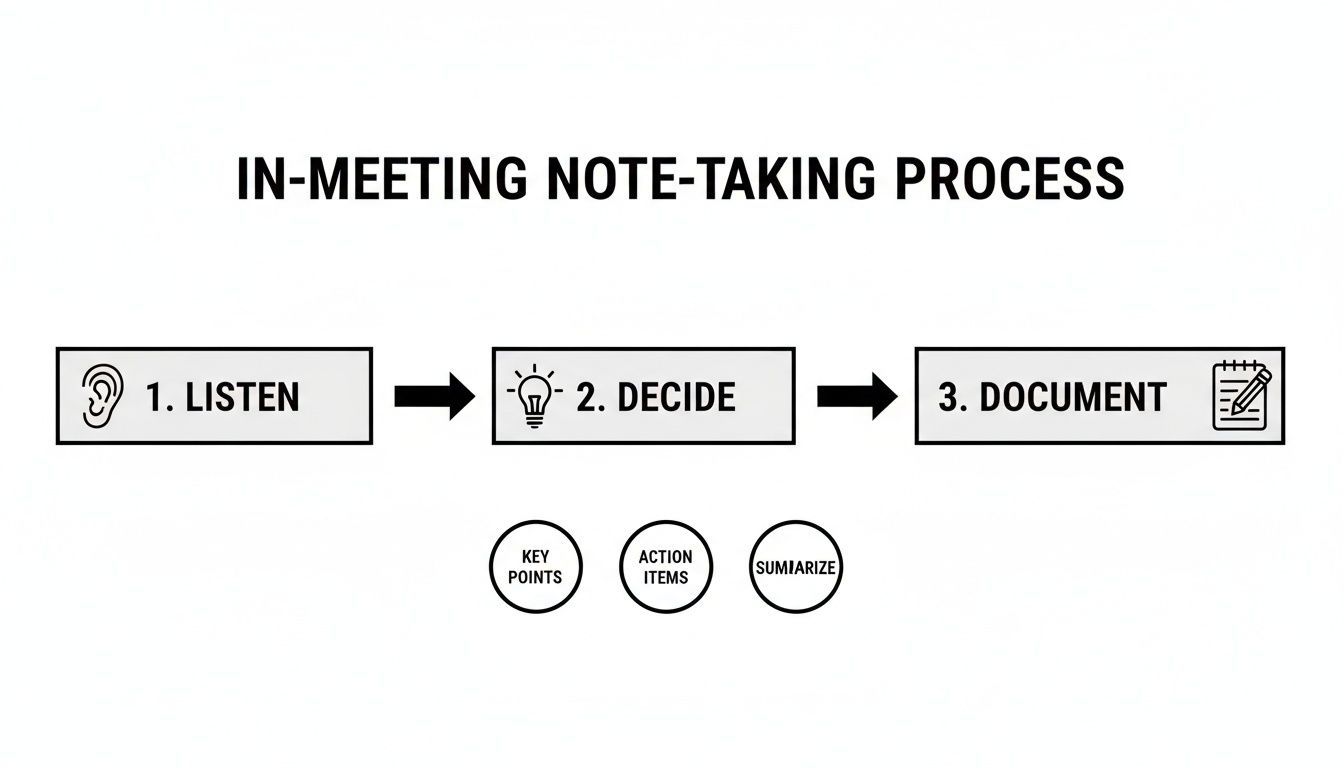
Questo flusso di lavoro è fondamentale: ascolti attivamente, decidi cosa è abbastanza importante da annotare e poi lo documenti in modo conciso. Ora, ripuliamolo.
La Prima Passata: Revisione per Chiarezza
Il momento migliore in assoluto per rivedere i tuoi appunti è subito dopo la fine della riunione. Intendo dire: fallo immediatamente mentre il contesto e le sfumature sono ancora freschi. Se aspetti anche solo un giorno, farai fatica a ricordare cosa significava la tua abbreviazione o a richiamare il tono sottile di una conversazione specifica.
Inizia leggendo tutto ciò che hai annotato. Il tuo obiettivo principale qui è trasformare quelle frasi criptiche in frasi complete e comprensibili.
- Espandi le abbreviazioni: "AI per Mark - EOD Ven" deve diventare "Azione: Mark Smith completerà il report di analisi della concorrenza entro la fine della giornata di venerdì."
- Chiarisci i punti ambigui: Se hai scritto "il team concorda sul nuovo software", sii specifico. Quale software era e qual era il motivo principale della decisione?
- Correggi errori di battitura e grammatica: Un documento curato crea fiducia. Semplici errori possono far sembrare l'intero resoconto approssimativo e poco professionale.
Questa prima passata non riguarda ancora la riorganizzazione di nulla. Si tratta solo di assicurarsi che ogni punto che hai catturato sia chiaro, accurato e abbia senso per qualcuno che non era nemmeno nella stanza.
Strutturare per Scansionabilità e Logica
Ok, ora che i tuoi appunti sono chiari, è ora di portare un po' d'ordine. Un'enorme parete di testo è il modo più veloce per assicurarsi che nessuno legga il tuo duro lavoro. La struttura è tutto.
Ricordi quell'ordine del giorno della riunione che avevi preparato? È di nuovo il tuo migliore amico. Scorri e organizza tutti i tuoi appunti rivisti sotto le voci corrispondenti dell'ordine del giorno. Questo crea un flusso logico che rispecchia la conversazione effettiva, rendendo un gioco da ragazzi per i partecipanti trovare dettagli specifici in seguito.
Ad esempio, tutto ciò che riguarda la "Revisione del Budget del Q3"—punti di discussione, decisioni finali e azioni—dovrebbe essere ordinatamente raggruppato sotto quella intestazione.
Un documento ben strutturato rispetta il tempo del lettore. Organizzando i verbali in modo che siano facilmente scansionabili, aumenti la probabilità che i tuoi colleghi interagiscano con il contenuto e agiscano sui loro impegni.
Questo semplice passaggio trasforma un elenco continuo di eventi in uno strumento di riferimento veramente utile.
Mantenere un Tono Oggettivo e Neutro
Questo è fondamentale: i verbali della riunione sono un registro ufficiale, non il tuo diario personale. È assolutamente essenziale mantenere un tono oggettivo e imparziale in tutto il documento. Le tue opinioni, interpretazioni o sentimenti sulla discussione non hanno posto qui.
Attieniti ai fatti. I verbali dovrebbero riportare cosa è stato discusso e deciso, non chi ha "vinto" un dibattito o chi sembrava frustrato.
| Fai Questo | Non Fare Questo |
|---|---|
| Riporta fatti e decisioni. | Aggiungi osservazioni o opinioni personali. |
| Usa un linguaggio neutro e professionale. | Usa un linguaggio emotivo o di parte. |
| Attribuisci mozioni o decisioni chiave, se richiesto. | Descrivi il tono o l'atteggiamento di un partecipante. |
| Concentrati su "cosa" è stato deciso. | Concentrati su "chi" ha dominato la conversazione. |
Essere obiettivi garantisce che i verbali siano un registro fidato per tutti, privo di qualsiasi accenno di pregiudizio.
Evidenziare le Azioni per la Responsabilità
Questa è probabilmente la parte più importante dei tuoi verbali finali. Le decisioni sono ottime, ma è l'azione che guida il progresso. Le azioni devono essere estratte dal corpo dei tuoi appunti e ricevere una sezione propria, prominente e dedicata.
Questa sezione deve essere impossibile da perdere. Di solito la metto in cima al documento per la massima visibilità. Ogni azione deve essere cristallina e contenere tre informazioni chiave:
- Il Compito Specifico: Cosa esattamente deve essere fatto?
- Il Responsabile: Chi è l'unica persona responsabile di portarlo a termine?
- La Scadenza: Quando è dovuto?
Questo semplice formato Compito-Responsabile-Scadenza crea una matrice di responsabilità istantanea che chiunque può capire a colpo d'occhio. Rimuove ogni ambiguità e serve come impegno pubblico che mantiene i progetti in movimento. Per riunioni più complesse, puoi imparare come riassumere una riunione ed estrarre questi elementi chiave in modo più efficace.
Il cambiamento globale verso il lavoro da remoto ha reso questo livello di precisione più critico che mai. Le riunioni virtuali sono aumentate dal 48% al 77% di tutte le riunioni tra il 2020 e il 2022. Con piattaforme come Zoom che registrano oltre 3,3 trilioni di minuti di riunione annuali, la necessità di un'elaborazione post-riunione efficiente è enorme. Puoi approfondire altri dati sulle abitudini di riunione moderne su MyHours.com.
Come Potenziare il Tuo Flusso di Lavoro con Strumenti AI
Cercare di catturare manualmente ogni parola in una riunione è un esercizio di futilità. La tua attenzione è divisa ed è quasi garantito che perderai un dettaglio critico.
Non fare sempre affidamento sugli appunti manuali
Fare affidamento solo sugli appunti manuali aumenta il rischio di decisioni mancate, dettagli errati e proprietà poco chiara, specialmente in riunioni frenetiche o tecniche.
È qui che entrano in gioco gli strumenti di IA, non per sostituirti, ma per agire come un assistente incredibilmente potente. Gestiscono le cose noiose e dispendiose in termini di tempo, liberandoti per concentrarti su ciò che la conversazione significa realmente.
Al centro di questo nuovo flusso di lavoro c'è la trascrizione automatizzata. Dimentica di scarabocchiare furiosamente: registra semplicemente la riunione. Una volta terminata, consegni il file audio o video a un servizio che si occupa del lavoro pesante.
Dall'audio grezzo alla trascrizione attuabile
Le piattaforme di trascrizione AI come Transcript.LOL possono prendere una registrazione e produrre una trascrizione completa, etichettata per relatore, in pochi minuti. Questo semplice passaggio crea un record perfetto, parola per parola, dell'intera discussione. Non dovrai più cercare di decifrare la tua frenetica calligrafia o indovinare cosa qualcuno abbia veramente detto.
Questo record completo è la tua rete di sicurezza. Puoi finalmente smettere di preoccuparti di catturare ogni singolo dettaglio e partecipare attivamente alla riunione, sapendo che l'IA ti copre le spalle.
Il vero potere dell'IA nella verbalizzazione non è solo la velocità, ma ottenere un'accuratezza quasi perfetta senza sacrificare la tua presenza nella stanza. Passi da uno scrivano frenetico a un contributore concentrato.
Questo tipo di tecnologia è più importante che mai. Le riunioni stanno diventando più brevi e più mirate. Dati recenti mostrano che la durata media delle riunioni a livello globale è scesa a soli 35 minuti. Ciò esercita un'enorme pressione sui verbalizzatori affinché siano veloci e precisi, ed è esattamente qui che l'IA eccelle. Puoi approfondire queste tendenze in questo rapporto completo.
Perché la trascrizione AI non è più opzionale
Man mano che la durata delle riunioni si riduce e la densità delle decisioni aumenta, gli strumenti di trascrizione basati sull'intelligenza artificiale stanno diventando essenziali per catturare l'accuratezza senza rallentare i team.
Queste sessioni condensate e ad alta intensità sono perfette per la trascrizione automatizzata, poiché l'IA può elaborarle in un lampo.
Sbloccare le intuizioni con l'analisi AI
Una trascrizione grezza è ottima, ma la vera magia avviene quando si lascia che l'IA la analizzi per voi. Invece di setacciare manualmente pagine di testo per trovare i punti chiave, potete far fare il lavoro a uno strumento intelligente in automatico. Molti strumenti moderni, in particolare quelli che sfruttano una chiave API di ChatGPT, possono ridurre notevolmente lo sforzo manuale richiesto.
Questi sistemi sono progettati per trovare il segnale nel rumore.
- Riassunti automatici: Avete bisogno di fornire uno sguardo d'insieme rapido a uno stakeholder? Ottenete una panoramica concisa dell'intera riunione in pochi secondi.
- Rilevamento dei punti d'azione: L'IA cerca frasi che segnalano compiti, responsabilità e scadenze, quindi le compila ordinatamente in un elenco attuabile.
- Identificazione degli argomenti chiave: Vedete i temi principali che hanno dominato la discussione a colpo d'occhio, aiutandovi a strutturare i vostri verbali finali in modo logico.
Per un project manager, questo potrebbe significare verificare istantaneamente l'ambito esatto concordato da un cliente. Per un fondatore, significa trasformare una sessione di brainstorming disordinata in una roadmap di prodotto pulita con responsabili chiari. Un prendi appunti AI per Zoom può cambiare le regole del gioco per rendere l'intero processo fluido.
Un approccio ibrido per i migliori risultati
Ecco un consiglio da professionista: usare l'IA non significa che dovresti smettere completamente di prendere appunti. L'approccio migliore è ibrido. Lasciate che l'IA gestisca la trascrizione parola per parola mentre voi vi concentrate sulla cattura degli aspetti strategici di alto livello.
Durante la riunione, potete annotare le decisioni principali, le vostre osservazioni e l'atmosfera generale nella stanza. Successivamente, incrociate i vostri appunti con la trascrizione e il riassunto generati dall'IA. Questa combinazione di sfumature umane e precisione della macchina è imbattibile.
Questa partnership vi consente di produrre verbali che non sono solo completi e precisi, ma anche ricchi di contesto strategico. Risparmiate ore di lavoro noioso e consegnate un documento finale più prezioso e affidabile che mai. È semplicemente il modo più intelligente per prendere appunti sulle riunioni oggi.
Domande comuni sulla redazione dei verbali delle riunioni
Anche i redattori di verbali più esperti si imbattono in situazioni difficili. Quando vi viene affidato il compito di documentare una riunione, alcune domande comuni sembrano sempre emergere.
Ottenere risposte chiare e dirette a questi punti critici è la chiave per sentirsi più sicuri e perfezionare il proprio processo. Affrontiamo alcune delle domande più frequenti che sentiamo.
Quanto dettagliati dovrebbero essere i miei verbali?
Questo è il dilemma classico. Andate troppo nei dettagli e nessuno li legge. Manteneteli troppo brevi e perdono il loro valore. La risposta giusta dipende davvero dallo scopo della riunione.
- Per riunioni strategiche o del consiglio di amministrazione: Dovrete essere più approfonditi. L'obiettivo qui è catturare il perché dietro le decisioni importanti, quindi un riassunto degli argomenti chiave a favore e contro una mozione è essenziale.
- Per i controlli di routine del progetto: Manteneteli snelli e concisi. Concentratevi quasi esclusivamente sulle decisioni prese, sugli ostacoli emersi e sui punti d'azione con responsabili e scadenze chiare.
In caso di dubbio, ricordate la regola d'oro: documentate i risultati, non l'intera conversazione. Se siete ancora incerti, chiedete semplicemente al presidente della riunione le sue preferenze in anticipo.
Il vostro compito è creare un registro di ciò che è stato deciso, non una trascrizione di ciò che è stato detto. Chiarezza e attuabilità dovrebbero essere le vostre stelle polari. Un riassunto di una pagina scansionabile batterà sempre un resoconto dettagliato di cinque pagine.
Devo scrivere chi ha detto cosa?
Generalmente, no. I verbali dovrebbero essere un resoconto oggettivo del progresso del gruppo. Attribuire ogni singolo commento può rendere il documento politico e potrebbe persino rendere le persone esitanti a parlare apertamente nelle riunioni future.
L'eccezione principale è per i procedimenti formali in cui sono coinvolte mozioni. In questi casi, è prassi standard annotare chi ha presentato una mozione e chi l'ha secondata. Altrimenti, attenetevi alla documentazione delle decisioni collettive del team.
E se non riesco a stare al passo con la conversazione?
Questa è una paura totalmente normale, soprattutto quando la discussione si scalda o si muove rapidamente. Ecco un consiglio da professionista: cercare di scrivere tutto parola per parola è una battaglia persa. Se vi sentite indietro, fermatevi e riconcentratevi sul vostro vero lavoro: l'ascolto attivo.
Invece di scarabocchiare furiosamente, aspettate che emerga una decisione o un punto d'azione. Quindi, catturate quel singolo punto. È molto meglio ottenere accuratamente i cinque risultati più importanti piuttosto che avere un resoconto disordinato e incompleto dell'intera conversazione.
È anche qui che la tecnologia diventa il vostro migliore amico. Il semplice fatto di premere "registra" su una riunione crea una rete di sicurezza istantanea. Potete rilassarvi e concentrarvi sugli appunti di alto livello, sapendo che uno strumento di trascrizione AI può colmare eventuali lacune in seguito.
I verbali delle riunioni devono essere approvati?
Sì, per qualsiasi riunione formale o ufficiale, ottenere l'approvazione dei verbali è un obbligo. Questo processo trasforma la vostra bozza in un resoconto accurato e concordato di ciò che è realmente accaduto.
In genere, distribuirete la bozza dei verbali ai partecipanti prima della riunione successiva. Il primo punto all'ordine del giorno sarà quindi la revisione e l'approvazione dei verbali della riunione precedente. Una volta approvati, diventano parte del registro ufficiale dell'organizzazione, un passo cruciale per la responsabilità.
Pronti a eliminare lo stress di stare al passo e creare ogni volta registrazioni perfette e ricercabili? Transcript.LOL utilizza un'IA potente per trascrivere le vostre riunioni con incredibile precisione, completa di etichette degli oratori e riassunti attuabili. Smettete di affannarvi per prendere appunti e iniziate a concentrarvi sulla conversazione. Prova Transcript.LOL gratuitamente e potenzia il tuo flusso di lavoro oggi stesso!