
Come Registrare i Verbali delle Riunioni Un Approccio Moderno
Scopri come registrare i verbali delle riunioni in modo efficace con la nostra guida moderna. Scopri consigli pratici, preparazione e strumenti di IA per appunti accurati e attuabili.
Kate, Praveen
July 10, 2024
Siamo onesti, prendere appunti alle riunioni spesso sembra un compito ingrato, un'attività amministrativa che nessuno vuole davvero fare. Ma in un mondo di chiamate virtuali una dopo l'altra, padroneggiare questa abilità è diventato un superpotere.
Prendere buoni appunti non significa solo scarabocchiare note. Si tratta di creare chiarezza, promuovere la responsabilità e prevenire l'enorme calo di produttività che deriva da riunioni mal documentate.
Perché Padroneggiare gli Appunti delle Riunioni è Più Importante che Mai
Il passaggio al lavoro da remoto e ibrido ha reso questa abilità ancora più critica. Tra il 2020 e il 2022, la percentuale di riunioni virtuali è schizzata dal 48% al 77%, cambiando completamente il modo in cui tutti collaboriamo.
Questo aumento delle riunioni online significa che abbiamo un disperato bisogno di registri accurati per mantenere i team dispersi sulla stessa lunghezza d'onda. Senza di essi, stiamo solo parlando nel vuoto.

Il Vero Costo della Documentazione Scarsa
Quando non c'è un registro chiaro, le conversazioni svaniscono nel nulla. Le decisioni diventano sfocate e le azioni da intraprendere si perdono nel caos. Ciò porta a tempo sprecato, sforzi duplicati e progetti bloccati, un vero killer per lo slancio.
Questo problema è ancora più grande nell'attuale ambiente di lavoro distribuito. Per saperne di più su come mantenere il tuo team allineato, consulta queste migliori pratiche per la gestione dei team da remoto.
Un ottimo set di appunti delle riunioni funge da memoria collettiva del team. Non è solo un registro di ciò che è stato detto, ma una tabella di marcia per ciò che deve essere fatto. Trasforma una conversazione fugace in un bene permanente e attuabile.
Perché i Verbali Efficaci Sono Potenti?
Una documentazione chiara evita malintesi, rafforza la responsabilità e accelera il processo decisionale. Verbali solidi servono come "memoria" del tuo team, mantenendo tutti allineati anche dopo discussioni complesse.
Questa guida ti accompagnerà attraverso un approccio moderno che unisce strategie di presa di appunti intramontabili con potenti strumenti di intelligenza artificiale come Transcript.LOL. Pensala come una roadmap per far contare ogni riunione, trasformando le discussioni in risultati chiari che fanno progredire realmente la tua attività.
Strumenti di Efficienza Potenziati dall'IA
IA all'avanguardia
Alimentato da Whisper di OpenAI per una precisione leader nel settore. Supporto per vocabolari personalizzati, file fino a 10 ore e risultati ultra rapidi.

Importa da più fonti
Importa file audio e video da varie fonti tra cui caricamento diretto, Google Drive, Dropbox, URL, Zoom e altro.

Esporta in più formati
Esporta le tue trascrizioni in più formati tra cui TXT, DOCX, PDF, SRT e VTT con opzioni di formattazione personalizzabili.
Risolvendo questo unico processo, puoi dare una seria spinta all'efficienza del tuo team. Per ulteriori strategie, potresti trovare utile la nostra guida su come migliorare la produttività del team.
Non si tratta solo di imparare a verbalizzare una riunione, ma di rendere questi verbali una pietra angolare del successo del tuo team.
Preparare il Terreno Prima dell'Inizio della Riunione
Verbali di riunione eccezionali non vengono quasi mai creati al momento. I resoconti più accurati e preziosi derivano da una preparazione ponderata ben prima che qualcuno faccia clic su 'Partecipa'. Non si tratta solo di trascrivere ciò che viene detto; si tratta di documentare strategicamente ciò che conta davvero.
Pensa all'ordine del giorno della riunione come alla tua stella polare. Prima che le cose inizino, mettiti in contatto con l'organizzatore per comprendere appieno gli obiettivi. Quali decisioni sono sul tavolo? Quali problemi stiamo cercando di risolvere qui? Un ordine del giorno solido con argomenti chiari, relatori e fasce orarie sarà il tuo migliore amico.
Creare un Semplice Modello per Prendere Appunti
Lavorando su quell'ordine del giorno, prepara un documento rapido da utilizzare come modello per prendere appunti. Non deve essere complicato: è sufficiente una struttura di base in un editor di testo o nella tua app di note preferita.
Essenziali Pre-Riunione
Agenda Prima di Tutto
Un'agenda ben pianificata previene la confusione e ti aiuta a seguire le discussioni con facilità.
Conosci l'Obiettivo
Identifica lo scopo della riunione in modo da catturare solo ciò che conta veramente.
Prepara le Risorse
Tieni pronti verbali precedenti, report o schemi per una comprensione più rapida.
Organizza il Modello
Un modello strutturato ti consente di concentrarti sulle decisioni invece che sulla formattazione.
Assicurati che il tuo modello pre-riunione includa questi elementi di base:
- Titolo, Data e Ora della Riunione: I non negoziabili. Ti ringrazierai più tardi quando cercherai queste informazioni.
- Elenco dei Partecipanti: È saggio annotare chi è stato invitato e chi si è effettivamente presentato. Questo è molto utile per tenere traccia di chi era presente quando sono state prese decisioni importanti.
- Elementi dell'Ordine del Giorno come Titoli: Trasforma ogni argomento dell'ordine del giorno in un titolo nel tuo documento. Lascia solo un po' di spazio sotto per inserire i dettagli man mano che la conversazione si sviluppa.
Questa semplice struttura ti evita di dover organizzarti freneticamente durante una discussione in rapido movimento. Ti offre un flusso logico in modo che tu possa concentrarti sulla conversazione, non sulla formattazione.
Raccogli le Tue Risorse in Anticipo
Non entrare in riunione impreparato. Dedica cinque minuti a raccogliere tutti i documenti che ti daranno contesto. Questo può essere qualsiasi cosa, dai verbali della riunione precedente ai brief di progetto o ai report di dati che sono all'ordine del giorno per la discussione. Avere questi file pronti ti aiuta a seguire e a prendere appunti molto più approfonditi.
Il gran numero di riunioni a cui tutti partecipiamo rende questo lavoro di preparazione un obbligo. Solo negli Stati Uniti, si stima che ogni giorno si svolgano da 36 a 56 milioni di riunioni. Quando queste riunioni sono inefficaci, costano all'economia statunitense circa 37 miliardi di dollari all'anno. Ciò rende una buona documentazione più di un semplice compito amministrativo: è una funzione aziendale critica.
Questa preparazione è ancora più importante per le riunioni virtuali. Se stai utilizzando una piattaforma come Microsoft Teams, sapere come utilizzare le funzionalità di registrazione integrate può salvarti la vita. La nostra guida su come registrare una riunione in Teams illustra i passaggi per assicurarti di catturare tutto.
Solo 15 minuti di preparazione possono trasformare il tuo ruolo da segretario passivo a partecipante attivo e informato. Questa piccola lungimiranza ti permette di anticipare dove sta andando la discussione e di essere pronto a documentare le decisioni con totale chiarezza.
Catturare Ciò Che Conta Davvero Durante la Riunione
Quando una discussione si muove velocemente, cercare di separare le intuizioni preziose dal "rumore" conversazionale può sembrare come bere da un idrante. Il segreto per ottimi verbali di riunione non è trascrivere ogni singola parola, ma imparare a cogliere il segnale e ignorare il rumore. Ciò significa spostare la tua mentalità da stenografo passivo ad ascoltatore attivo, concentrato sui risultati, non solo sul dialogo.
Dimentica di cercare di scrivere ogni citazione. A meno che tu non sia in una deposizione legale, questo è un modo sicuro per essere sopraffatto e perdere ciò che conta davvero. Invece, inventa la tua stenografia. Mi piace usare simboli per segnalare informazioni chiave: un asterisco (*) per un'attività, un segno del dollaro ($) per le discussioni sul budget o un punto interrogativo (?) per qualcosa che richiede un follow-up. Rende i miei appunti immediatamente scansionabili in seguito.
Un po' di preparazione fa molta strada. Questo semplice flusso mostra come prepararsi prima che inizi la riunione, in modo da essere pronti a catturare ciò che è importante.
Pro Tip: Usa Scorciatoie Visive
Simboli, codici colore e codici brevi ti aiutano a scansionare gli appunti più velocemente. Piccole abitudini come queste rendono la tua documentazione più nitida e organizzata.
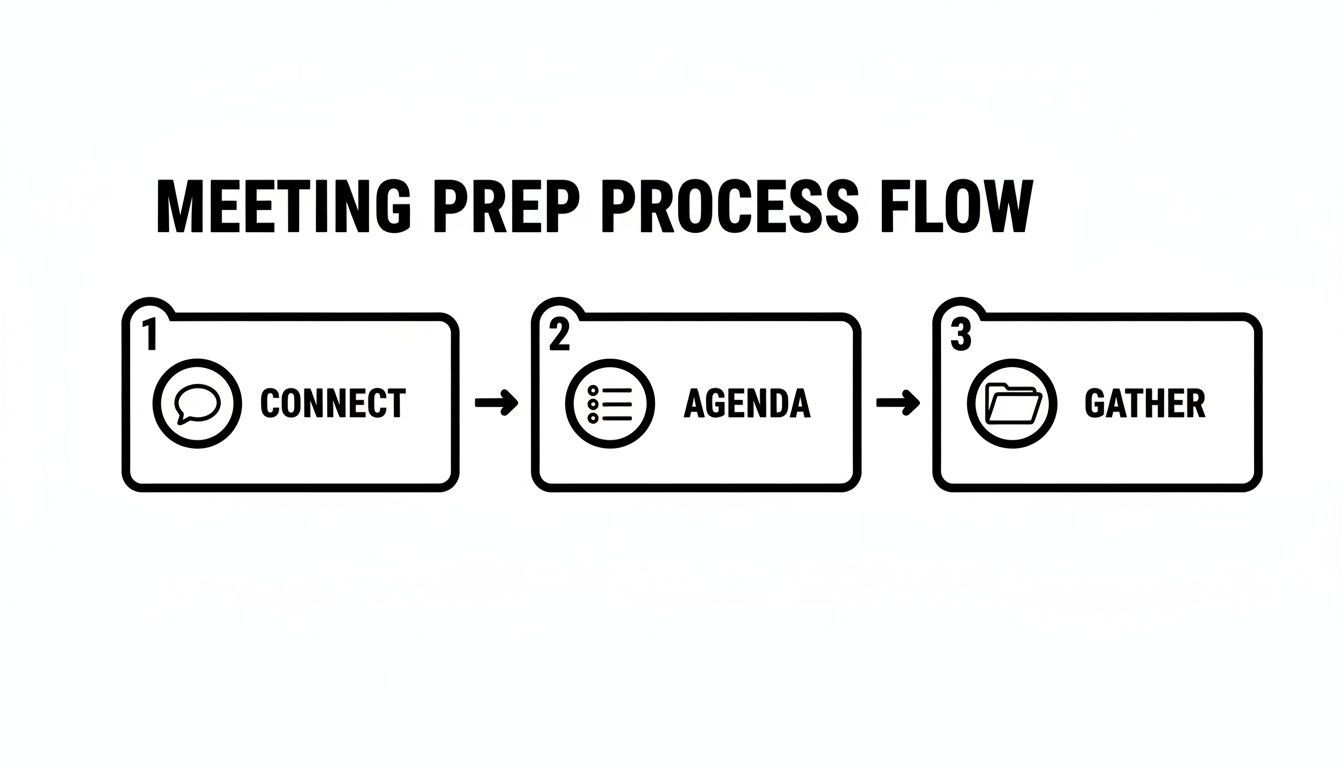
En vous connectant avec l'organisateur, en comprenant l'ordre du jour et en obtenant les bons documents à l'avance, vous construisez une base pour une prise de notes ciblée et efficace.
Maîtriser la prise de notes sélective
Votre véritable travail est de repérer les moments qui mènent à l'action. Mes oreilles se dressent toujours lorsque j'entends des phrases qui signalent qu'une décision est prise. Des expressions comme "Donc, nous avons convenu de..." ou "La prochaine étape est..." sont de l'or. C'est votre signal pour commencer à écrire, car ce sont les éléments à retenir qui font avancer les choses.
Une erreur classique est de se perdre dans les détails d'un débat au lieu de se concentrer sur le résultat. Un échange de dix minutes peut se résumer à une seule décision critique. Votre travail est de capturer cette décision, clairement et de manière concise, et non pas tout le cheminement que l'équipe a emprunté pour y parvenir.
Pour enregistrer efficacement les procès-verbaux d'une réunion, concentrez-vous sur trois éléments clés : les décisions prises, les actions assignées (qui, quoi, quand) et les principales conclusions atteintes. Tout le reste est secondaire. Cette concentration laser garantit que votre document final est un outil d'action, et non une transcription de bavardages.
Se familiariser avec les meilleures pratiques générales de gestion de réunion peut également faire une énorme différence. Lorsque vous comprenez ce qui rend une réunion productive, vous devenez meilleur pour repérer les résultats clés qui doivent être documentés au fur et à mesure qu'ils se produisent.
Choisir votre boîte à outils de prise de notes
Le bon outil peut faire ou défaire votre capacité à suivre. Bien qu'un stylo et du papier classiques soient parfaits pour rester présent, les outils numériques offrent des avantages considérables en termes de vitesse et d'organisation. Cela dépend vraiment de la réunion.
- Stylo et papier : Parfait pour les réunions plus petites et ciblées où vous voulez éviter la tentation des notifications. Cela vous oblige à être concis.
- Traitement de texte ou application de notes : Une excellente option pour les dactylographes rapides. Vous pouvez déposer vos notes directement dans un modèle et les nettoyer facilement par la suite.
- Outils de transcription IA : C'est la réponse moderne pour tout capturer sans sacrifier votre capacité à participer. Un outil comme Transcript.LOL crée une transcription complète et précise à laquelle vous pouvez vous référer plus tard. Cela vous libère pour vous engager dans la conversation, sachant que vous avez un enregistrement parfait pour en extraire les décisions clés et les actions à la fin de la réunion.
Funzionalità Intelligenti che Migliorano i Verbali

Rilevamento dei parlanti
Identifica automaticamente diversi parlanti nelle tue registrazioni e etichettali con i loro nomi.

Strumenti di modifica
Modifica le trascrizioni con strumenti potenti tra cui trova e sostituisci, assegnazione dei parlanti, formati di testo arricchito ed evidenziazione.
Riassunti e Chatbot
Genera riassunti e altri approfondimenti dalla tua trascrizione, prompt personalizzati riutilizzabili e chatbot per i tuoi contenuti.
La tabella seguente illustra i pro e i contro dell'approccio tradizionale rispetto all'utilizzo di un approccio basato sull'intelligenza artificiale.
Confronto tra metodi per la registrazione dei verbali delle riunioni
| Caratteristica | Presa di appunti manuale (es. Penna e carta, documento Word) | Strumenti di trascrizione AI (es. Transcript.LOL) |
|---|---|---|
| Precisione | Soggetta a errori umani, interpretazione e velocità. | Registrazione quasi al 100% accurata e verbatim della conversazione. |
| Partecipazione | Divide l'attenzione tra ascolto e scrittura. | Consente la piena partecipazione e il coinvolgimento nella discussione. |
| Completezza | Cattura i punti chiave ma perde sfumature e dettagli. | Crea una trascrizione completa e ricercabile dell'intera riunione. |
| Efficienza | Richiede uno sforzo immediato e concentrato durante la riunione. | Automatizza l'intero processo di acquisizione; il lavoro avviene dopo la riunione. |
| Azioni da intraprendere | Si basa sul relatore per identificare e tracciare manualmente. | Può identificare e elencare automaticamente le azioni da intraprendere e gli oratori. |
| Lavoro post-riunione | Coinvolge la pulizia, l'organizzazione e la strutturazione degli appunti. | Fornisce una trascrizione pronta all'uso per un rapido riassunto e revisione. |
In definitiva, il metodo migliore è quello che ti permette di essere sia un partecipante attento che un registratore accurato. Per molti, un approccio ibrido funziona meglio: partecipare pienamente mentre uno strumento AI si occupa del lavoro pesante della trascrizione.
Dagli appunti grezzi al verbale raffinato
La riunione è finita, ma è qui che inizia il vero lavoro. Ora devi trasformare quel pasticcio di stenografia e pensieri confusi in una risorsa raffinata e preziosa per tutto il team. L'obiettivo è creare un'unica fonte di verità che sia chiara, obiettiva e che porti effettivamente all'azione.
Il mio consiglio? Occupatene immediatamente dopo la conclusione della riunione. Aspettare anche solo un giorno può rendere molto più difficile ricordare i piccoli dettagli e le sfumature di una discussione complessa. Il tuo primo passaggio riguarda l'ottenimento della struttura corretta.
Struttura i tuoi verbali per la massima chiarezza
Un documento ben strutturato è un documento che le persone leggeranno effettivamente. Vuoi suddividere i tuoi verbali finali in sezioni logiche in modo che le persone possano trovare esattamente ciò di cui hanno bisogno senza dover leggere un muro di testo.
Una struttura semplice ed efficace è simile a questa:
- L'essenziale: Inizia con le basi: titolo della riunione, data, ora e un elenco di chi era presente. Mi piace anche annotare chi è stato invitato ma non ha potuto partecipare.
- Decisioni prese: Questa sezione necessita di una propria sezione. Elenca ogni singola decisione raggiunta, in modo chiaro e conciso. L'ambiguità è il tuo nemico qui.
- Punti chiave della discussione: Riassumi brevemente gli argomenti principali che hanno portato a tali decisioni. Non si tratta di una trascrizione parola per parola, solo di un contesto sufficiente affinché qualcuno possa comprendere il perché.
- Azioni da intraprendere: Questa è la parte più importante, senza dubbio. Isola ogni compito, assegna un proprietario chiaro e dagli una scadenza precisa.
Per un approfondimento, la nostra guida su un formato professionale per i verbali delle riunioni con azioni da intraprendere fornisce un modello completo che puoi utilizzare. Questo approccio trasforma i tuoi verbali da un semplice registro a un vero strumento di gestione dei progetti.
Modifica per obiettività e brevità
Il tuo prossimo passaggio riguarda la rifinitura del linguaggio. I migliori verbali sono completamente neutrali e privi di opinioni personali. Sei un reporter, non un commentatore. Il tuo compito è catturare ciò che è successo, non ciò che pensi di ciò che è successo.
Elimina il linguaggio vago. Invece di scrivere "dovremmo probabilmente indagare su...", trasformalo in un compito concreto: "Azione da intraprendere: Maria deve ricercare un nuovo software di marketing entro venerdì 25 ottobre." Questo semplice cambiamento crea una reale responsabilità.
È anche qui che avere uno strumento di trascrizione AI a portata di mano cambia le carte in tavola. Invece di fare affidamento solo sulla memoria, una piattaforma come Transcript.LOL può fornirti una trascrizione perfetta e verbatim su cui lavorare.
Con un registro accurato a portata di mano, puoi smettere di preoccuparti di citare male qualcuno o di dimenticare un dettaglio chiave. Il tuo ruolo passa da quello di uno scribacchino frenetico a quello di un editor strategico, permettendoti di concentrarti esclusivamente sul riassunto dei punti chiave. È così che crei verbali che le persone utilizzeranno effettivamente.
Lascia che l'AI gestisca la documentazione delle tue riunioni
E se potessi uscire da una riunione con un registro perfetto e dettagliato senza dover digitare una sola parola durante la chiamata? Non è un sogno futuristico; i moderni strumenti basati sull'intelligenza artificiale lo stanno rendendo una realtà quotidiana. Questo cambia completamente il modo in cui affrontiamo i verbali delle riunioni, trasformandoli da un compito manuale e distraente in un processo automatizzato che semplicemente accade.
Non si tratta solo di ottenere una trascrizione. Si tratta di liberarti dalla frenetica corsa per catturare ogni dettaglio. Invece di cercare di tenere il passo con una discussione veloce, puoi semplicemente caricare una registrazione in seguito e ottenere un documento strutturato e ricercabile in pochi minuti. Il tuo ruolo passa dall'essere un semplice prendi-appunti a un partecipante strategico che può effettivamente concentrarsi sulla conversazione.
Non Fare Affidamento Solo sulla Memoria
Saltare la documentazione porta a compiti persi, decisioni dimenticate e progressi bloccati. Cattura sempre i risultati chiave per evitare disallineamenti nel team.
Gli assistenti automatici sono la nuova normalità
Il passaggio al software per riunioni basato sull'IA non è solo una tendenza di nicchia, sta esplodendo. Si prevede che il mercato passerà da 1,42 milioni di dollari nel 2024 a ben 7,47 miliardi di dollari entro il 2033. Ciò segnala un enorme cambiamento nel modo in cui operano le aziende.
Stiamo già assistendo a questo cambiamento. Un solido 33% dei lavoratori della conoscenza americani utilizza ora l'IA per registrare gli appunti delle riunioni e tre quarti di loro si affidano agli strumenti di IA per essere più produttivi. Come sottolinea Azeus Convene, questa tendenza sta guidando decisioni più rapide e mantenendo i team allineati.
Affidarsi all'IA ti fornisce un resoconto imparziale e completo, riducendo il rischio di errori umani o conversazioni dimenticate. È un modo semplice per creare un archivio standardizzato e facilmente accessibile delle discussioni più importanti del tuo team.
Come funzionano gli strumenti di trascrizione IA
Piattaforme come Transcript.LOL rendono questo processo incredibilmente semplice. Tutto ciò che devi fare è caricare il file audio o video della tua riunione e l'IA se ne occuperà.
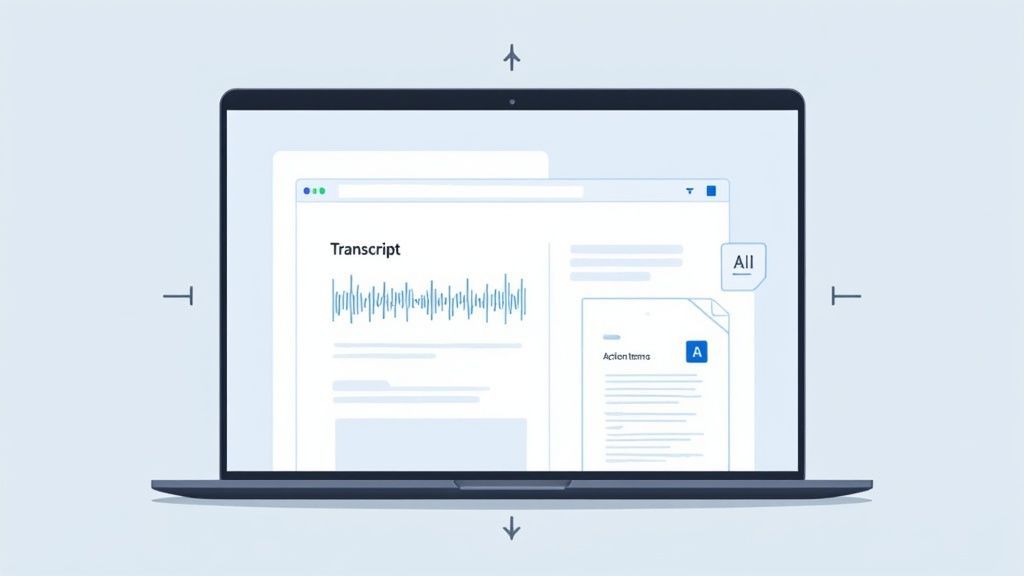
Lo screenshot qui sopra ti offre uno scorcio di come appare in pratica. Ottieni la trascrizione completa, sincronizzata con l'audio, più un riepilogo organizzato. L'intera interfaccia è progettata per rendere la ricerca di ciò di cui hai bisogno estremamente semplice.
Ma ciò che ottieni è molto più di un muro di testo. I migliori strumenti possono:
- Creare una trascrizione istantanea: Ottieni un resoconto accurato, parola per parola, dell'intera conversazione.
- Identificare gli oratori: L'IA capisce automaticamente chi ha detto cosa, fornendoti un contesto cruciale senza alcuna etichettatura manuale.
- Individuare le azioni da intraprendere: Molte piattaforme possono persino rilevare frasi che segnalano un compito, generando un elenco provvisorio di azioni da rivedere e assegnare.
Quando scarichi la trascrizione su un'IA, recuperi la tua capacità cerebrale. Puoi effettivamente partecipare alla discussione, porre domande di follow-up e contribuire con idee, sapendo che nel frattempo viene creato un resoconto perfetto.
Questo approccio ribalta la prospettiva sulla redazione dei verbali. Invece di essere un collo di bottiglia, la documentazione diventa uno strumento per aumentare la produttività. Se stai valutando le tue opzioni, la nostra guida al miglior software di trascrizione per riunioni può aiutarti a trovare lo strumento giusto per il tuo team. Il futuro delle riunioni efficaci è qui: lascia che la tecnologia si occupi della meccanica in modo che tu possa concentrarti su ciò che conta davvero.
Hai domande sui verbali delle riunioni?
Anche con il miglior piano d'azione, le cose possono diventare un po' complicate una volta che inizi a prendere appunti. Affrontiamo alcune delle domande più comuni che emergono nel mondo reale.
Quanto dettaglio è troppo?
Onestamente, tutto dipende dallo scopo della riunione. Per una riunione formale del consiglio di amministrazione, probabilmente dovrai essere piuttosto approfondito per soddisfare gli standard legali o di conformità. Ma per la riunione quotidiana del tuo team? Un rapido elenco di decisioni e azioni è tutto ciò di cui hai bisogno.
Una buona regola generale è quella di catturare informazioni sufficienti in modo che qualcuno che ha perso la riunione possa capire cosa è stato deciso e perché. Concentrati sui risultati, non su ogni singola parola della conversazione.
L'obiettivo non è una trascrizione parola per parola; è un resoconto utile di ciò che è accaduto. A meno che gli avvocati non dicano diversamente, opta sempre per la chiarezza e l'azione piuttosto che per dettagli esaustivi. Questo è ciò che rende prezioso il documento.
Devo registrare chi ha votato cosa?
Per la maggior parte delle riunioni quotidiane, è sufficiente annotare la decisione finale. Ma quando le cose diventano più formali, come in una riunione del consiglio di amministrazione o in un voto di comitato, spesso è necessario essere specifici. Ciò significa registrare la mozione, chi l'ha fatta, chi l'ha secondata e il conteggio finale dei voti.
Ecco come appare in pratica:
- Riunioni informali: "Il team ha concordato di procedere con la nuova campagna di marketing."
- Riunioni formali: "Una mozione per approvare il budget del quarto trimestre è stata presentata da Jane Doe, secondata da John Smith. La mozione è passata con 5 voti a favore e 2 contrari."
In caso di dubbio, controlla sempre le regole di governance della tua organizzazione.
Quanto velocemente dovrei inviare i verbali?
I verbali delle riunioni sono come il pane fresco: si raffreddano velocemente. Cerco sempre di riordinare i miei appunti e di inviarli all'inbox di tutti entro 24 ore.
Perché la fretta? La conversazione è ancora fresca nella mente di tutti, quindi è il momento perfetto per chiedere chiarimenti o individuare eventuali errori.
Inviarli rapidamente mantiene anche lo slancio e assicura che tutti siano perfettamente chiari sui loro prossimi passi e sulle scadenze. Aspettare una settimana può rallentare un progetto mentre le persone aspettano indicazioni. Questa semplice abitudine può fare una grande differenza nel trasformare le parole in azioni.
Pronto a smettere di preoccuparti della presa di appunti manuale e iniziare ad avere riunioni migliori? Transcript.LOL utilizza l'IA per trascrivere automaticamente le tue discussioni, identificare chi ha detto cosa ed estrarre azioni chiare. Puoi concentrarti sulla conversazione, non sulla tastiera.
👉 Inizia gratuitamente su Transcript.LOL e scopri quanto può essere semplice la documentazione delle riunioni.