
Dominando la Transcripción de Reuniones de Zoom
Desbloquea información procesable de cada llamada. Nuestra guía sobre la transcripción de reuniones de Zoom cubre herramientas nativas, soluciones de IA y consejos profesionales para una precisión perfecta.
Kate, Praveen
October 18, 2023
¿Alguna vez has terminado una llamada crítica de Zoom solo para darte cuenta de que los detalles importantes ya se están volviendo confusos? No eres el único. Una transcripción de reuniones de Zoom es simplemente el proceso de convertir el audio de tus reuniones virtuales en un archivo de texto escrito.
Crea un registro permanente y buscable de cada conversación.
Por qué la transcripción precisa es tu arma secreta

Los valiosos conocimientos, las decisiones clave y los elementos de acción cruciales a menudo desaparecen en el momento en que finaliza una reunión. Confiar solo en la memoria es un juego arriesgado, especialmente cuando están en juego los detalles del proyecto y los comentarios del cliente. Aquí es donde una buena transcripción pasa de ser un simple registro a un activo estratégico real.
Piénsalo como convertir esas conversaciones fugaces en una base de conocimiento permanente que puedes buscar en cualquier momento. De repente, puedes encontrar el momento exacto en que un cliente mencionó un nuevo requisito o verificar la fecha límite acordada por un interesado, sin tener que volver a ver una grabación de una hora. Es un gran impulso para la productividad y pone a todo el equipo en la misma página.
Desbloqueando inteligencia empresarial a partir de conversaciones
Una transcripción sólida hace más que simplemente documentar lo que se dijo. Desbloquea el oro estratégico oculto en las discusiones de tu equipo. Cuando tienes una versión textual confiable de una llamada, puedes comenzar a analizar el lenguaje, detectar temas recurrentes y extraer inteligencia empresarial crítica. Por ejemplo, un equipo de ventas podría revisar las transcripciones para identificar objeciones comunes de los clientes y refinar sus presentaciones.
Este simple proceso convierte las reuniones diarias en una fuente de datos duros.
✨ Funciones Clave de IA para Transcripciones Más Inteligentes
IA de última generación
Impulsado por Whisper de OpenAI para una precisión líder en la industria. Soporte para vocabularios personalizados, archivos de hasta 10 horas y resultados ultra rápidos.

Importar desde múltiples fuentes
Importa archivos de audio y video desde diversas fuentes, incluyendo carga directa, Google Drive, Dropbox, URLs, Zoom y más.

Exportar en múltiples formatos
Exporta tus transcripciones en múltiples formatos incluyendo TXT, DOCX, PDF, SRT y VTT con opciones de formato personalizables.
Algunos de los mayores beneficios incluyen:
- Mejora de la Responsabilidad: Un registro escrito deja muy claro quién se comprometió a qué. No más ambigüedades sobre los puntos de acción o las responsabilidades.
- Mayor Accesibilidad: Las transcripciones abren el contenido de sus reuniones a miembros del equipo que son sordos o tienen problemas de audición, sin mencionar a aquellos que simplemente prefieren leer a ver.
- Mayor Retención de Conocimientos: Los nuevos empleados pueden ponerse al día sobre las decisiones pasadas de los proyectos leyendo transcripciones clave de reuniones en lugar de depender del resumen de segunda mano de alguien.
Al convertir las palabras habladas en datos estructurados, le das a tu equipo el poder de tomar decisiones más inteligentes, todo respaldado por las conversaciones reales que impulsan tu negocio.
En última instancia, dominar https://transcript.lol/usecases/online-meeting-transcription significa que dejas de permitir que la información valiosa se escape. Asegura que cada decisión, idea y compromiso se capture, catalogue y esté listo para usar cuando más lo necesites.
Uso de las Funciones de Transcripción Integradas de Zoom
Antes de recurrir a software especializado, siempre es inteligente ver qué pueden hacer las herramientas que ya tienes. Zoom en realidad incluye una función de transcripción nativa sorprendentemente sólida, y para muchos equipos, es el punto de partida perfecto para crear un registro de sus conversaciones que se pueda buscar.
Esta transcripción de reuniones de Zoom integrada a menudo es más que suficiente para reuniones internas, stand-ups diarios o sesiones de lluvia de ideas informales donde no necesitas una precisión impecable. ¿La mayor ventaja? Está perfectamente integrada: sin instalaciones adicionales, sin costos adicionales. Simplemente funciona.
Cómo Hacerlo Funcionar
Primero lo primero, necesitas asegurarte de que tu plan lo incluya. La transcripción en vivo está disponible en cuentas Zoom Pro, Business, Business Plus, Education y Enterprise. Si tienes una de esas, un administrador de cuenta solo necesita activar el interruptor en la configuración.
Aquí está la ruta que deberán seguir:
- Inicia sesión en el portal web de Zoom como un administrador que puede editar la configuración de la cuenta.
- Dirígete al menú "Configuración" a la izquierda.
- Haz clic en la pestaña "Grabación" y busca la sección "Grabación en la nube".
- Simplemente marca la casilla "Transcripción de audio", y Zoom creará automáticamente un archivo de transcripción junto con tus grabaciones en la nube.
Una vez que eso se haya hecho a nivel de cuenta, cualquiera que organice una reunión puede activarla. Como anfitrión, verás un botón "Mostrar subtítulos" en la barra de herramientas de tu reunión. Haz clic en él y comenzarás a generar una transcripción en vivo para que todos la vean.
Encontrar y Corregir tu Transcripción
Cuando tu reunión haya terminado y la grabación en la nube haya terminado de procesarse, Zoom te enviará un correo electrónico. Tu transcripción se guarda junto con los archivos de video y audio como un archivo .vtt separado.
Puedes acceder a ella navegando a la sección "Grabaciones" de tu portal de Zoom. Desde allí, puedes ver la transcripción, que está bien marcada con marcas de tiempo e incluso identifica a los diferentes oradores. Zoom también tiene un editor integrado simple, que te permite hacer clic en cualquier frase para corregir errores tipográficos o limpiar la puntuación antes de compartirla.
Consejo Pro: Si necesitas importar esta transcripción a otra herramienta, consulta nuestra guía sobre importar grabaciones de Zoom. Esto cambia las reglas del juego cuando deseas realizar un análisis más profundo o generar resúmenes con una plataforma de IA dedicada.
Obtener la Mejor Precisión Posible
Si bien la función nativa de Zoom es conveniente, la calidad realmente depende de cuán claro sea tu audio. Para ser justos, Zoom es impresionantemente preciso, con una tasa de error de palabras (WER) de solo 7.40%. Eso es mucho mejor que algunas otras plataformas, pero algunos buenos hábitos pueden aumentar aún más esa precisión.
Para obtener los resultados más limpios:
- Cíñete a un orador a la vez. Las personas que hablan unas sobre otras es el principal destructor de transcripciones precisas.
- Usa un micrófono externo. Incluso un micrófono de auriculares básico te dará un audio más limpio que el micrófono incorporado de una computadora portátil al reducir el ruido de fondo.
- Habla con claridad y no te apresures. Murmurar o hablar demasiado rápido puede fácilmente confundir al motor de transcripción.
Al tomarte un minuto para optimizar tu configuración y etiqueta de reunión, puedes mejorar realmente la calidad de tu transcripción de reuniones de Zoom nativa. Así es como conviertes una función "suficientemente buena" en un activo genuinamente útil para tu equipo.
¿Sabías que?
Incluso pequeños cambios, como usar un micrófono externo o pedir a los oradores que no se interrumpan, pueden mejorar la precisión de la transcripción hasta en un 20%. Mejor audio equivale a transcripciones más nítidas, sin importar la herramienta que utilices.
Mejora tus Transcripciones con Herramientas de IA
La transcripción integrada de Zoom es un buen punto de partida para charlas informales, pero seamos sinceros, tiene sus límites. Cuando necesitas que una transcripción sea algo más que un archivo de texto rudimentario para llamadas de descubrimiento de clientes, investigación de usuarios o deposiciones legales, "suficientemente bueno" simplemente no lo es.
Aquí es donde entran las herramientas dedicadas de IA, que convierten una transcripción básica de reuniones de Zoom en algo mucho más potente.
Estas plataformas van mucho más allá de la simple conversión de voz a texto. Hablamos de una precisión superior, etiquetas automáticas de hablantes que no se mezclan y análisis que la función nativa de Zoom ni siquiera puede soñar. Es la diferencia entre obtener un volcado de datos en bruto y recibir un informe de inteligencia pulido.
Como puedes ver, una herramienta diseñada específicamente como Transcript.LOL está pensada para la acción. Puedes importar grabaciones de cualquier lugar y convertirlas en activos utilizables, rápidamente.
De Texto en Bruto a Información Accionable
Pintemos un cuadro. Acabas de terminar una reunión de inicio de proyecto de una hora. ¿La forma antigua? Pasarías el día siguiente volviendo a ver la grabación, transcribiendo laboriosamente las notas.
¿La nueva forma? Subes el archivo a un servicio de transcripción de IA.
En cuestión de minutos, obtienes un paquete completo de información útil:
- Una transcripción de alta precisión: Limpia, formateada correctamente, con cada hablante claramente etiquetado.
- Un resumen ejecutivo: Un párrafo conciso perfecto para poner al día a los interesados que no necesitan leerlo todo.
- Una lista de elementos de acción: La IA ya ha extraído cada tarea, la ha asignado a la persona correcta y ha anotado la fecha límite.
- Un análisis de sentimiento: Una rápida comprobación del ambiente de la reunión, destacando momentos de entusiasmo o preocupación.
Esto no es solo un ahorro de tiempo; es una mejora completa del flujo de trabajo. Para 2025, el mercado de análisis de reuniones impulsado por IA se ha vuelto esencial para las empresas que desean obtener un valor real de sus reuniones virtuales. Estas herramientas convierten el audio en bruto en inteligencia accionable en una fracción del tiempo.
Construyendo una Base de Conocimiento Buscable
La verdadera magia ocurre con el tiempo. Cada reunión transcrita se convierte en otra entrada buscable en la memoria institucional de tu empresa.
¿Necesitas encontrar esa característica específica que un cliente mencionó hace tres meses? Simplemente escríbela en la barra de búsqueda. Listo. Estás en el momento exacto en que se discutió. Esto crea un recurso perenne construido a partir de las conversaciones reales de tu equipo.
El objetivo es dejar de tratar las reuniones como eventos únicos y empezar a tratarlas como activos ricos en datos. Una herramienta de IA es el puente que hace esto posible, proporcionando un retorno de la inversión claro y medible al ahorrar cientos de horas y evitar que se pierda información crítica.
Estos son los tipos de capacidades avanzadas que diferencian a las plataformas dedicadas. Si estás listo para explorar tus opciones, hemos preparado una comparación detallada del https://transcript.lol/blog/best-meeting-transcription-software para ayudarte a encontrar la herramienta adecuada para tu equipo.
Y no lo olvides, puedes ir aún más allá. Muchas de las mejores herramientas de IA para la creación de contenido pueden ayudarte a reutilizar esas transcripciones en materiales de marketing o documentos de formación. Cuando eliges la herramienta adecuada, desbloqueas un nivel completamente nuevo de productividad.
Elegir el Método de Transcripción Adecuado
¿Cómo decides entre gratuito, rápido y perfecto? Elegir el método de transcripción de reuniones de Zoom adecuado no se trata de encontrar una herramienta perfecta. Se trata de adaptar el enfoque correcto a la situación correcta.
Tu elección se reduce realmente a tres cosas: tu presupuesto, la rapidez con la que necesitas la transcripción y cuán perfecta debe ser.
Para una sincronización interna informal o una rápida reunión diaria, la transcripción integrada de Zoom suele ser la opción más sensata. Es gratuita con los planes elegibles, es instantánea y ya forma parte de la plataforma. La precisión suele ser suficiente para captar elementos de acción y puntos clave de conversación sin complicaciones adicionales.
Pero cuando las apuestas aumentan, las grietas de una herramienta básica comienzan a mostrarse.
Evaluación de tus Necesidades
Piensa en una llamada crítica de descubrimiento de clientes o una sesión formal de investigación de usuarios. Para cualquier reunión en la que cada palabra tenga peso, invertir en un servicio de IA de terceros de alta precisión es una medida mucho más inteligente. Estas herramientas ofrecen una precisión mucho mayor, además de funciones como la identificación precisa de hablantes y resúmenes automatizados que pueden ahorrarte horas de trabajo de limpieza.
La clave es considerar el uso final de tu transcripción. ¿Es solo para notas internas o la compartirás externamente?
Funciones Avanzadas de Productividad

Detección de hablantes
Identifica automáticamente diferentes hablantes en tus grabaciones y etiquétalos con sus nombres.

Herramientas de edición
Edita transcripciones con herramientas potentes como buscar y reemplazar, asignación de hablantes, formatos de texto enriquecido y resaltado.
Resúmenes y Chatbot
Genera resúmenes y otros análisis de tu transcripción, prompts personalizados reutilizables y chatbot para tu contenido.
¿Es para un registro legal o solo una revisión rápida? Responder a estas preguntas primero guiará tu decisión, ayudándote a evitar gastar de más o terminar con una transcripción que no cumpla el propósito. Si recién estás comenzando y no tienes un presupuesto, hay varias maneras en que puedes transcribir audio a texto gratis.
El mejor método de transcripción es aquel que se alinea con el valor de la conversación. Una reunión de bajo riesgo necesita una solución de baja fricción, mientras que una reunión de alto riesgo exige un resultado de alta fidelidad.
Finalmente, tienes la transcripción manual. Esta es la ruta más cara y que consume más tiempo, pero ofrece el mayor nivel de precisión, a menudo alcanzando el 99% o más. Es mejor reservarla para situaciones en las que la precisión absoluta es innegociable: piensa en procedimientos legales o contenido destinado a publicación.
El siguiente gráfico te da una idea de las tasas de precisión que puedes esperar de las herramientas avanzadas de transcripción de IA en diferentes idiomas.
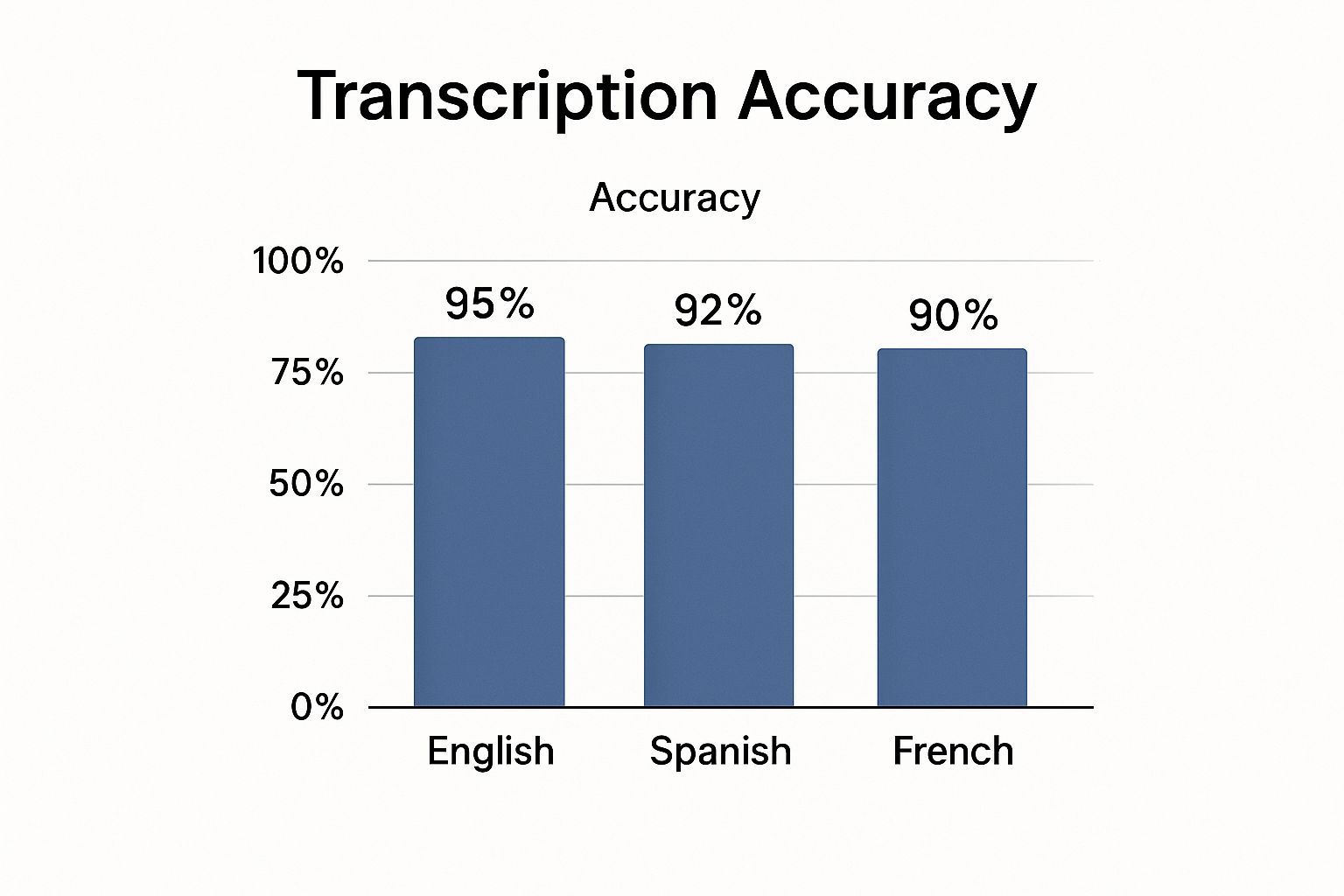
Estos datos muestran cuán confiable se ha vuelto la IA moderna, convirtiéndola en una opción sólida para equipos multilingües.
Métodos de Transcripción de Zoom de un Vistazo
Para ayudarte a sopesar las compensaciones, aquí tienes una comparación rápida de los tres enfoques principales.
| Característica | Transcripción Nativa de Zoom | Herramientas de IA de Terceros | Servicio de Transcripción Manual |
|---|---|---|---|
| Costo | Gratis (con planes de pago) | Tarifa de suscripción baja a moderada | Tarifa alta por minuto |
| Velocidad | Instantánea / casi instantánea | Minutos | Horas a días |
| Precisión | Buena (~90%) | Muy Alta (95%+) | Casi Perfecta (99%+) |
| Características | Texto básico, marcas de tiempo | Identificación de hablante, resúmenes, análisis | Verificado por humanos, opciones literales |
En última instancia, la herramienta adecuada es la que logra el mejor equilibrio para tus necesidades específicas, brindándote la combinación correcta de costo, velocidad y calidad para el trabajo en cuestión.
Clava tu Audio para Transcripciones Cristalinas
Mira, la IA de transcripción más sofisticada del planeta solo es tan buena como el audio que le proporcionas. Si le das una grabación confusa y ruidosa, obtendrás una transcripción confusa y desordenada. Es así de simple.
Pero aquí está la buena noticia: algunos pequeños hábitos pueden marcar una gran diferencia en la calidad de tu audio. Piensa en esto: tu micrófono es el oído de la IA. Si no puede oír con claridad, no puede entender lo que se dice. Tener una buena higiene de audio es la mejor manera de obtener una transcripción limpia y utilizable siempre.
Prepárate para el Éxito Antes de la Llamada
La forma más fácil de solucionar problemas de audio es evitar que ocurran en primer lugar. Un poco de trabajo de preparación es muy útil. La base absoluta para un audio claro es una conexión a Internet sólida como una roca. Invertir en un servicio confiable como banda ancha de fibra para empresas puede reducir drásticamente el tartamudeo digital y el retraso que arruinan las grabaciones.
Antes de hacer clic en "Iniciar reunión", repasa esta rápida lista mental:
- Prioriza los Micrófonos Externos: Pide amablemente a tus participantes que usen auriculares o un micrófono USB externo. Incluso uno barato es un mundo de diferencia en comparación con el micrófono integrado del portátil que le encanta captar el tecleo y el eco de la habitación.
- Busca un Lugar Tranquilo: Este es obvio pero a menudo se ignora. Cierra la puerta, las ventanas y aléjate de habitaciones con muchas superficies duras y reflectantes como azulejos o vidrio.
- Haz una Prueba de Micrófono de 30 Segundos: Ve a la configuración de audio de Zoom y haz una prueba rápida. Es la forma más rápida de asegurarte de que se selecciona el micrófono correcto y que tus niveles no están demasiado altos ni demasiado bajos.
Un enfoque proactivo del audio es innegociable para reuniones de alto riesgo. Al establecer expectativas claras para los participantes, creas un entorno donde cada palabra puede ser capturada con precisión.
Hábitos Durante la Reunión para Mejores Transcripciones
Una vez que la reunión está en marcha, la etiqueta básica se convierte en tu mejor amiga para una grabación limpia. Estos ajustes simples, en el momento, marcarán una gran diferencia para cualquier herramienta de transcripción que utilices, ya sea la función integrada de Zoom o un servicio dedicado.
Intenta incorporar estos hábitos en tus llamadas:
- Di tu Nombre: Especialmente en reuniones más grandes, anima a todos a decir su nombre antes de hablar. Esto es de gran ayuda para la detección de hablantes por IA y hace que cualquier corrección manual sea mucho más rápida.
- Elimina las Interrupciones: Este es el punto clave. Haz un esfuerzo consciente para dejar que una persona termine antes de que comience la siguiente. Las voces superpuestas son la principal causa de frases confusas y sin sentido en una transcripción final.
- Siempre Usa la Grabación en la Nube: Cuando grabes, elige la grabación en la nube de Zoom en lugar de guardarla localmente en tu computadora. Captura inteligentemente un flujo de audio separado para cada persona, lo que le da a la IA una fuente de archivo mucho más limpia para trabajar.
Estos pequeños cambios requieren casi ningún esfuerzo, pero se pagan con creces en la calidad de tu transcripción final.
💡 Formas Prácticas de Usar tu Transcripción
Listo para Blog
Convierte conversaciones en publicaciones de blog ricas en palabras clave con una edición mínima.
Social en Pequeñas Porciones
Extrae citas y estadísticas para actualizaciones instantáneas en LinkedIn o Twitter.
Material de Capacitación
Crea guías de incorporación y bases de conocimiento internas más rápido.
Perspectivas del Cliente
Detecta temas recurrentes en las llamadas para refinar tu estrategia de ventas o de producto.
Preguntas Frecuentes Sobre la Transcripción de Zoom
Una vez que comiences a usar la transcripción de reuniones de Zoom regularmente, siempre surgen algunas preguntas. Tener esas respuestas por adelantado marca la diferencia, ayudándote a evitar problemas comunes y a usar las herramientas con confianza.
Profundicemos en las más importantes, desde la privacidad hasta el manejo de toda esa jerga técnica que a tu equipo le encanta usar.
¿Quién Ve Mis Transcripciones?
Esta suele ser la primera pregunta, y con razón. ¿Quién puede ver tus conversaciones transcritas? Tanto con las funciones propias de Zoom como con herramientas reputadas como Transcript.LOL, la respuesta es simple: tus datos son tuyos.
El contenido de tus reuniones no se utiliza para entrenar modelos de IA sin tu consentimiento explícito. Siempre es una buena idea revisar la política de privacidad de cualquier herramienta que estés considerando, pero el estándar de la industria es tratar tus conversaciones como completamente confidenciales.
¿Qué Pasa con Múltiples Idiomas?
¿Pueden estas herramientas seguir el ritmo de un equipo global? Absolutamente. La mayoría de los servicios modernos de transcripción de IA manejan docenas de idiomas sin despeinarse.
A menudo pueden detectar automáticamente el idioma principal hablado, o puedes configurarlo de antemano. Para reuniones donde las personas cambian de idioma, algunas herramientas avanzadas incluso pueden seguir el ritmo, aunque la precisión puede disminuir un poco.
¿Qué Tan Preciso Es, Realmente?
Esta es la pregunta del millón. Si bien la precisión ha aumentado en los últimos años, no siempre es 100% perfecta. Cosas como audio deficiente, acentos marcados, ruido de fondo y terminología súper específica pueden afectar la transcripción final.
Para la mayoría de las reuniones internas del día a día, una tasa de precisión del 90-95% es más que suficiente para captar las decisiones importantes y los puntos de acción. Pero si necesitas una transcripción impecable, digamos, para una deposición legal o un informe de cliente, planea dedicar unos minutos a una rápida revisión humana.
El truco está en igualar tus necesidades de precisión con la importancia de la reunión. Una reunión informal de equipo no necesita el mismo nivel de perfección que una entrevista formal que planeas publicar.
¿Cómo Manejo el Vocabulario Técnico o de Nicho?
¿Qué sucede cuando tu equipo comienza a usar jerga muy específica o acrónimos internos? Aquí es donde muchos sistemas automatizados pueden fallar. Los modelos de IA estándar se entrenan con lenguaje general y a menudo malinterpretan los términos específicos de la industria.
¿La solución? Busca una herramienta que ofrezca una función de vocabulario personalizado.
Esto te permite "enseñar" a la IA una lista de nombres únicos, características de productos o términos técnicos que tu equipo usa todo el tiempo. Agregar estas palabras de antemano marca una gran diferencia en la precisión de tu transcripción de reuniones de Zoom, asegurando que tu terminología clave siempre se capture correctamente. Es un pequeño paso que puede convertir una transcripción decente en una fantástica.
Esta demanda de funciones más inteligentes es parte de una tendencia mucho mayor. Con el cambio masivo al trabajo remoto, la industria de la transcripción está en auge. Las proyecciones muestran que el mercado crecerá de 21 mil millones de dólares en 2022 a un estimado de 35 mil millones de dólares para 2032. Puedes leer más sobre las tendencias de transcripción de reuniones de IA en superagi.com. Este crecimiento es lo que está impulsando a las herramientas a mejorar cada vez más en la resolución de problemas empresariales del mundo real.
¿Listo para convertir tus llamadas de Zoom en texto que realmente puedas usar?
No te lo Pierdas
¿Quieres que también te muestre una versión del blog con estas secciones insertadas visualmente (para que veas el flujo exacto), o solo mantenerlas como "instrucciones + contenido de la sección" como arriba?
Con Transcript.LOL, puedes subir tus grabaciones y obtener una transcripción limpia y con etiquetas de orador en minutos. Comprueba por ti mismo lo fácil que es crear una biblioteca de búsqueda del conocimiento de tu equipo. Obtén tu transcripción gratuita en Transcript.LOL