
Tomar notas en reuniones que la gente realmente lee
¿Cansado de tomar notas en reuniones que son ignoradas? Aprende un enfoque moderno para capturar decisiones, asignar acciones y crear registros que impulsen resultados.
Praveen
January 24, 2024
Tomar notas de reuniones puede parecer una tarea ingrata. Pero es secretamente una de las cosas más estratégicas que puedes hacer por tu equipo. Esto no se trata solo de trabajo administrativo; es una forma poderosa de crear claridad, impulsar la responsabilidad y evitar que los proyectos se estanquen.
Un enfoque moderno combina las mejores prácticas atemporales con tecnología inteligente para convertir esas notas en un impulso real.
Por qué las Mejores Notas Crean Mejores Equipos
Todos hemos estado ahí. Sales de una reunión entusiasmado con el plan, solo para ver que esa energía se desvanece unos días después porque nadie está seguro de quién acordó qué. Las notas vagas y los recuerdos confusos son asesinos de proyectos. Crean cuellos de botella, generan frustración y te obligan a tener la misma conversación una y otra vez la próxima semana.
Esto no es solo una molestia; es un drenaje masivo de productividad. Piénsalo: los empleados ahora pasan un promedio de 11.3 horas semanales en reuniones. Ese número se ha triplicado desde 2020. Con tanto tiempo en juego, el costo de un seguimiento deficiente es asombroso.
El Verdadero Propósito de las Notas de Reunión
Aquí es donde la toma de notas efectiva cambia completamente el juego. Establece una única fuente de verdad que pone a todo el equipo en la misma página. Las grandes notas no son solo un registro retrospectivo de lo que se dijo. Son una herramienta prospectiva que responde claramente a tres preguntas críticas:
- ¿Qué decidimos?
- ¿Quién es responsable de los próximos pasos?
- ¿Cuáles son los plazos?
El objetivo no es transcribir cada palabra, sino capturar cada compromiso. Este simple cambio de mentalidad convierte un registro pasivo en un motor activo de progreso y responsabilidad.
Para los equipos técnicos, este nivel de claridad es innegociable. Una decisión mal interpretada puede llevar a los desarrolladores por el camino equivocado, desperdiciando un sprint completo. Documentar las discusiones y decisiones con precisión es una parte fundamental del flujo de trabajo, lo que hace que un proceso sólido para notas de reuniones de ingeniería sea absolutamente esencial.
Para asegurarte de que tus notas realmente aumenten la productividad, es útil apoyarse en algunas mejores prácticas probadas para tomar notas de reuniones.
Preparando el Escenario Antes de que Comience la Reunión
 Las grandes notas no nacen de escribir frenéticamente durante una reunión. Son el resultado de un trabajo de preparación inteligente hecho antes de que alguien se una a la llamada.
Entrar en frío es una receta para el desastre. Es como intentar navegar por una ciudad nueva sin un mapa: te perderás en las conversaciones secundarias y te perderás las decisiones críticas. El objetivo real no es solo escribir lo que la gente dice, sino capturar con precisión lo que se decide.
Todo esto comienza mucho antes de que se mencione el primer punto de la agenda. Un poco de planificación proactiva puede cambiarte de un escriba reactivo a alguien que realmente comprende el propósito de la reunión.
Alinearse con el Organizador de la Reunión
Primero lo primero: ten una charla rápida con la persona que organizó la reunión. En serio, incluso una sincronización de cinco minutos puede marcar una gran diferencia. Tu objetivo es llegar al por qué detrás de la agenda.
No te limites a escanear la lista de temas. Pregunta por los resultados que esperan.
Mi pregunta de cabecera siempre es: "Si esta reunión es un gran éxito, ¿qué habremos logrado al final?"
Esta simple pregunta te ayuda a centrarte en lo que realmente importa. Una vez que conozcas el destino, podrás identificar fácilmente los hitos clave en el camino y estructurar tus notas para seguir el progreso hacia esos objetivos, en lugar de simplemente capturar conversaciones aleatorias.
Preparar una Plantilla Inteligente
Nunca, jamás, empieces con una página en blanco. Es pedir problemas.
En su lugar, crea una plantilla simple que refleje la agenda. Esto no es solo un ahorro de tiempo; libera tu poder cerebral para concentrarte en la sustancia de la conversación en lugar de la estructura de tus notas.
Tu plantilla debe tener algunos elementos básicos:
- Lo Esencial: Fecha, hora, título de la reunión y una lista de asistentes.
- Agenda como Esquema: Usa cada punto de la agenda como su propio encabezado.
- Tabla Dedicada de Elementos de Acción: Ten un lugar listo para insertar tareas, quién es responsable de ellas y cuándo vencen.
Con este marco establecido, básicamente solo estás llenando los espacios en blanco a medida que avanzas.
Y una última cosa: haz una verificación rápida de tecnología. Asegúrate de que tu portátil esté cargado y de que cualquier herramienta que estés utilizando, como una aplicación para tomar notas o Transcript.LOL, esté abierta y lista para usar. Es un pequeño paso que evita que los fallos técnicos de último minuto te desvíen.
Capturando lo que Importa Durante la Conversación
El verdadero arte de tomar notas de reuniones no se trata de escribir frenéticamente cada palabra. Esa es una forma segura de perderse en los detalles y perder el punto principal. El truco es ignorar el ruido y centrarse en lo que realmente mueve la aguja.
Se reduce a la escucha activa y a tener un buen sentido de lo que es crucial. Tu objetivo es documentar tres cosas por encima de todo: decisiones clave, elementos de acción específicos y el contexto importante detrás de ellos. Todo lo demás son solo conversaciones. Esto evita que tus notas se conviertan en una densa pared de texto que nadie tiene tiempo de leer.
De Notas Vagas a Directivas Claras
Todos hemos visto notas como esta: "Se discutió el presupuesto de marketing del cuarto trimestre". Si bien es técnicamente cierto, es completamente inútil.
Una nota verdaderamente efectiva captura el resultado. Algo como: "Decisión: El presupuesto de marketing del cuarto trimestre se aprueba con $50,000. Elemento de Acción: Sarah asignará fondos a las nuevas campañas publicitarias antes del viernes al final del día." ¿Ves la diferencia? No hay absolutamente ninguna ambigüedad.
Para garantizar que tus notas sean consistentemente claras y accionables, es útil desglosar lo que necesitas capturar.
Componentes Centrales de Notas de Reunión Efectivas
| Elemento | Qué Capturar | Ejemplo |
|---|---|---|
| Decisiones Tomadas | La resolución o acuerdo final sobre un tema. | "Se aprobó el nuevo contrato con el proveedor Acme Corp." |
| Elementos de Acción | Tareas específicas asignadas con un propietario y un plazo claros. | "John enviará el cronograma actualizado del proyecto antes del martes." |
| Puntos Clave de Discusión | Breve contexto que llevó a una decisión o acción. | "El equipo acordó que el software actual no era escalable." |
| Fechas de Vencimiento | Plazos para todos los elementos de acción. | "Vence: 25 de octubre" |
| Próximos Pasos | Plan más amplio para avanzar después de la reunión. | "Se programó una reunión de seguimiento para el próximo lunes para revisar." |
Seguir esta estructura convierte tus notas en una fuente confiable de verdad que mantiene a todos alineados y responsables.
Esta visualización muestra cómo fluye el proceso desde la toma de notas inicial hasta el registro final y distribuido.
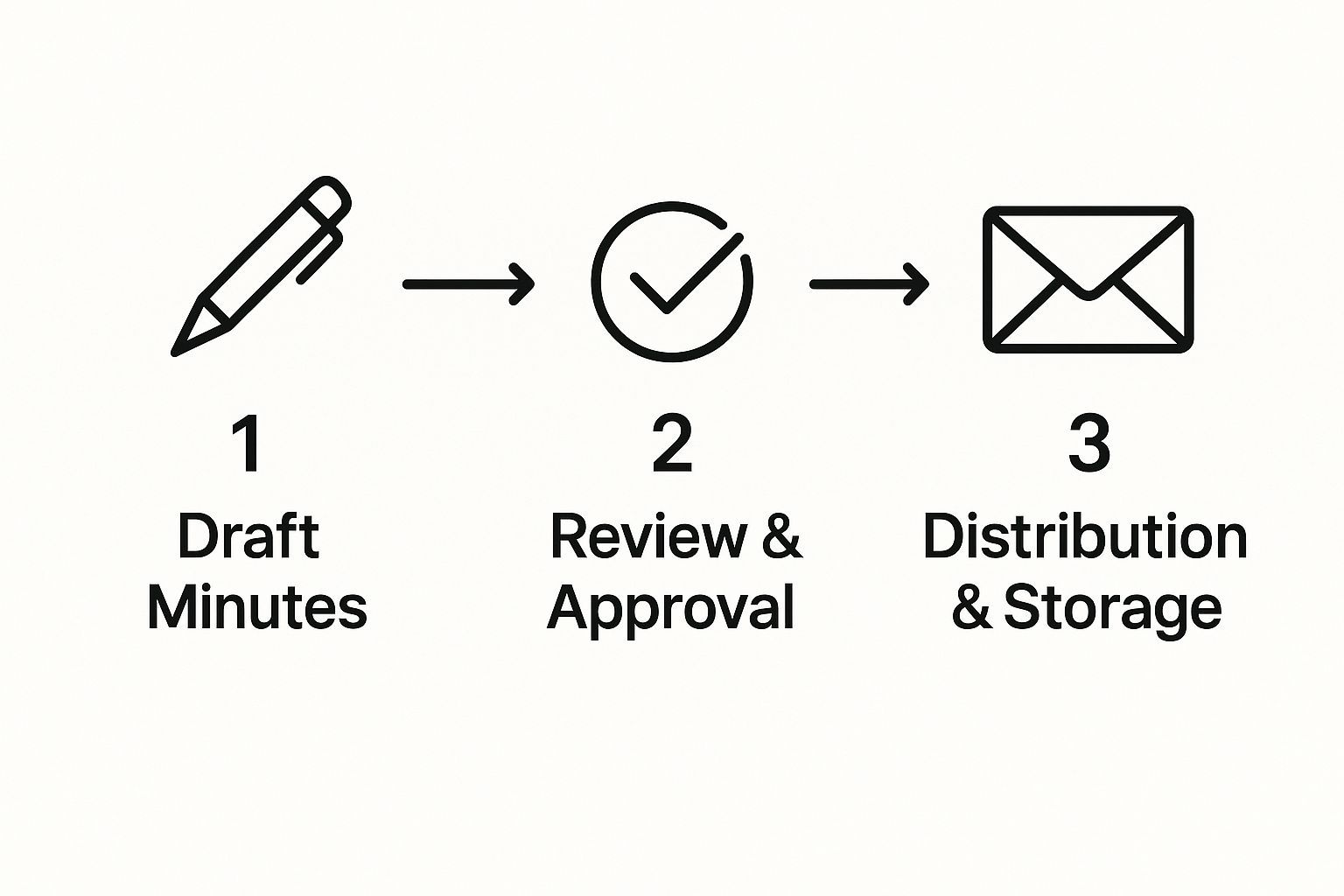
Este flujo de trabajo no es solo una sugerencia; es una parte vital de la creación de un registro que realmente impulsa el trabajo.
Esta claridad es especialmente crítica hoy en día. Las reuniones son cada vez más cortas y frecuentes. En EE. UU., aproximadamente el 55% de las reuniones duran entre 30 y 60 minutos. Con el 42% de las reuniones siendo completamente en línea y otro 38% híbridas, tener un registro cristalino es innegociable. Puedes profundizar en estas tendencias en estas estadísticas de reuniones de MyHours.com.
Un Método Híbrido Potente para la Precisión
Aquí es donde un enfoque híbrido realmente brilla. En lugar de intentar hacerlo todo tú mismo, deja que una herramienta de IA se encargue del trabajo pesado de transcribir la conversación completa. Esto te libera para concentrarte en la estrategia de alto nivel.
Deja que la tecnología sea tu taquígrafa para que tú seas la estratega. Tu trabajo es escuchar los compromisos y las decisiones, no solo las palabras.
Con una transcripción completa como red de seguridad, puedes estar más presente y comprometido, identificando los momentos clave sin el estrés de capturarlos textualmente. Tenemos una guía completa sobre cómo dominar esto con transcripción de reuniones en línea. Transforma la toma de notas de una tarea frenética a una actividad enfocada y de alto valor.
Convirtiendo Notas Crudas en un Registro Pulido
La reunión puede haber terminado, pero el trabajo real acaba de comenzar. Aquí es donde tus notas desordenadas y crudas se transforman en un registro valioso y permanente que realmente proporciona claridad para todo el equipo.
No dejes que tu borrador se quede hasta mañana. La primera hora justo después de una reunión es la ventana dorada para editar. El contexto está fresco, las conversaciones aún están claras en tu cabeza y puedes pulir las cosas rápidamente. Si esperas, olvidarás los pequeños detalles y un trabajo rápido de limpieza puede convertirse en un rompecabezas frustrante.
Creando un Documento Escaneable
Seamos honestos: tus compañeros de trabajo están abrumados. Si les envías una pared de texto, será ignorada. El objetivo es estructurar tus notas para que alguien pueda captar la esencia, las conclusiones más importantes, en 60 segundos o menos.
Necesitas un formato simple y limpio que priorice la claridad. Olvídate de intentar capturar cada palabra. Aquí tienes una estructura que he encontrado que funciona de maravilla:
- Resumen Rápido: Comienza con dos o tres oraciones. ¿Cuál fue el propósito de la reunión y cuáles fueron las mayores victorias?
- Decisiones Clave: Esto es perfecto para una lista con viñetas. Enumera cada decisión importante que se tomó. Usa texto en negrita en las palabras cruciales para que resalten en la página.
- Tabla de Elementos de Acción: Esta es, posiblemente, la parte más crítica. Crea una tabla simple con tres columnas: la tarea, quién es responsable y el plazo. No hay lugar para la confusión aquí.
Esto no se trata solo de documentar lo que sucedió; se trata de crear una herramienta que impulse el trabajo y mantenga a todos responsables.
La verdadera prueba de unas buenas notas no es lo que incluyen, sino lo que una persona ocupada puede entender de un vistazo. Prioriza la claridad y la brevedad por encima de todo.
Haciendo Correr la Voz
Una vez que tus notas estén pulidas y listas, sácalas. Mi regla general es enviar las notas a todos los asistentes y a otras partes interesadas clave dentro de las 24 horas. Esto mantiene el impulso y asegura que todos estén en la misma página mientras la reunión sigue siendo relevante.
Mantén el correo electrónico de distribución corto y dulce. Simplemente adjunta el documento y agrega una línea rápida pidiendo a las personas que revisen sus elementos de acción específicos. Es un simple recordatorio que refuerza la responsabilidad y evita que las cosas se pierdan.
Usando la Tecnología a Tu Favor
 Seamos honestos, intentar escribir frenéticamente cada palabra mientras participas en una reunión es una receta para el desastre. Las herramientas modernas pueden cambiar completamente el juego, convirtiendo esta tarea estresante en una tarea manejable e incluso estratégica.
Piénsalo. En lugar de tener la cabeza enterrada en un portátil, puedes concentrarte en el flujo de la conversación, sabiendo que se está creando una transcripción precisa para ti en segundo plano. No se trata de reemplazar al tomador de notas; se trata de darle el superpoder de ser un participante más valioso.
Esto es un gran problema si consideras que el 65% de los trabajadores dicen que las reuniones les impiden hacer su trabajo real. Suma a eso el hecho de que el 75% de los empleados admiten realizar multitarea durante las llamadas, y está claro que necesitamos un mejor sistema. Puedes profundizar en estos asesinos de productividad y aprender sobre estadísticas de reuniones de Rev.com.
Aprovechando la Automatización para la Precisión
Tener una transcripción automatizada es como tener una memoria perfecta a demanda. Puedes verificar instantáneamente una decisión, extraer una cita exacta o confirmar un elemento de acción sin dudar de ti mismo. He descubierto que usar un servicio como Transcript.LOL para capturar la conversación completa me permite concentrarme en resumir los resultados más críticos, no solo en cada palabra.
Este enfoque híbrido realmente te brinda lo mejor de ambos mundos:
- Cobertura Completa: Obtienes un registro completo y buscable de todo lo que se dijo.
- Enfoque Estratégico: Te liberas para escuchar las grandes ideas, las decisiones clave y los compromisos firmes.
- Precisión Inequívoca: No hay lugar para "él dijo, ella dijo" cuando puedes señalar la redacción exacta.
La tecnología actúa como una copia de seguridad perfecta, asegurando que nada importante se pierda si te distraes o necesitas aclarar un punto complejo. Captura los detalles para que puedas capturar la intención.
De la Transcripción a la Perspicacia
Una transcripción cruda es un excelente punto de partida, pero la verdadera magia ocurre cuando conviertes esa montaña de texto en inteligencia procesable. Por ejemplo, puedes usar herramientas integradas para detectar temas clave o generar un resumen rápido y conciso de una discusión larga.
Aprender cómo usar las perspectivas de tus transcripciones puede acelerar seriamente tu flujo de trabajo posterior a la reunión. Si buscas la herramienta adecuada para el trabajo, consultar una lista de las 12 mejores aplicaciones de voz a texto para Windows puede dirigirte hacia algunas soluciones robustas.
Preguntas Comunes Sobre la Toma de Notas
Incluso con la mejor preparación, las cosas pueden volverse extrañas cuando estás tomando notas. Saber cómo manejar los imprevistos es lo que separa a un registrador decente de uno excelente. Se trata de mantener la calma y mantener el registro limpio.
Hablemos de uno de los dolores de cabeza más comunes: las discusiones acaloradas. Cuando la gente empieza a apasionarse, tu trabajo no es ser taquígrafo del drama. Tu objetivo es documentar el resultado. Concéntrate en los argumentos centrales presentados y, lo que es más importante, en la decisión final. Deja de lado el relato emocional y cíñete a los hechos.
Otro clásico es la conversación que se desvía completamente del camino. En lugar de seguir la tangente con tus notas, puedes redirigir sutilmente. A menudo anoto algo como: "La discusión sobre los objetivos de ventas del tercer trimestre se pospone para una futura reunión de marketing". Esto reconoce el punto sin permitir que secuestre el propósito de toda la reunión.
Notas Formales vs. Informales
También necesitas saber qué tipo de juego estás jugando. La distinción entre notas formales e informales es enorme.
-
Notas Formales: Piensa en juntas directivas o procedimientos oficiales. Estos suelen ser registros legales. Siguen un formato súper estricto y deben incluir cosas como mociones, quién votó qué y cualquier abstención. Cada detalle debe ser preciso.
-
Notas Informales: Esto es lo que usarás para la mayoría de las reuniones internas de equipo. El objetivo aquí es la claridad y la acción. Estás resumiendo las decisiones clave y asegurándote de que todos sepan quién está haciendo qué. No es necesario registrar cada paso del procedimiento.
Descubrir qué tipo necesitas desde el principio te ahorra mucho trabajo y asegura que estás capturando el nivel de detalle correcto.
No importa si son formales o informales, las notas existen para crear una única fuente de verdad. El formato puede cambiar, pero la misión —proporcionar claridad e impulsar la acción— nunca lo hace.
Manejar estas situaciones de manera efectiva hace que tus notas sean consistentemente útiles y construye tu reputación como alguien que sabe lo que hace. Si tienes preguntas más específicas, probablemente las hayamos respondido en nuestra sección de preguntas frecuentes.
Deja de perder tiempo en la toma de notas manual y empieza a crear registros perfectos y buscables de cada conversación. Con Transcript.LOL, puedes obtener transcripciones, resúmenes y elementos de acción generados por IA en segundos. ¡Prueba Transcript.LOL gratis hoy mismo!