
Los mejores ejemplos de automatización de procesos empresariales para aumentar la efici...
Descubra ejemplos clave de automatización de procesos empresariales que pueden transformar sus operaciones. Aprenda a optimizar tareas y mejorar la productividad hoy mismo.
Praveen
May 8, 2025
La Automatización de Procesos de Negocio (BPA, por sus siglas en inglés) ya no es un concepto futurista; es una estrategia operativa fundamental para las empresas centradas en el crecimiento. El verdadero desafío no es entender qué es la automatización, sino identificar dónde aplicarla para obtener el máximo impacto. Dejar atrás las tareas repetitivas y que consumen mucho tiempo libera a su equipo para que se concentre en iniciativas de alto valor que impulsan el negocio. Esta transición es esencial para escalar operaciones, reducir errores humanos y crear flujos de trabajo más eficientes y confiables.
La clave para una implementación exitosa radica en identificar procesos específicos de alto impacto. Este artículo proporciona una hoja de ruta clara al desglosar ocho ejemplos prácticos de automatización de procesos de negocio en funciones críticas como finanzas, recursos humanos, marketing y TI. Para cada ejemplo, iremos más allá de las descripciones superficiales para analizar la estrategia subyacente, detallar los pasos tácticos para la implementación y proporcionar conclusiones prácticas que pueda aplicar directamente a su propia organización. Nuestro objetivo es equiparlo con métodos replicables para transformar sus flujos de trabajo y desbloquear ganancias significativas de productividad. Para ampliar su comprensión de las aplicaciones prácticas, también puede explorar más ejemplos de automatización de procesos de negocio que demuestran ganancias de eficiencia en el mundo real. Sumergámonos en los casos de uso que ofrecen resultados tangibles.
La automatización es un multiplicador de crecimiento
Las empresas que automatizan flujos de trabajo repetitivos experimentan un escalado hasta 3 veces más rápido en comparación con las que dependen de procesos manuales.
1. Cambio de Juego en Finanzas: Automatización del Procesamiento de Facturas
El procesamiento manual de facturas es un cuello de botella notorio en los departamentos de finanzas, plagado de errores de entrada de datos, documentos perdidos y ciclos de aprobación lentos. La automatización del procesamiento de facturas transforma esta tarea engorrosa en un flujo de trabajo optimizado y eficiente, convirtiéndola en uno de los ejemplos de automatización de procesos empresariales más impactantes para cualquier organización. Esta tecnología utiliza software para capturar, extraer, validar y dirigir automáticamente las facturas para su pago sin intervención humana.
En su núcleo, el sistema emplea el Reconocimiento Óptico de Caracteres (OCR) para leer y digitalizar datos de varios formatos de facturas, ya sea que lleguen como PDFs, correos electrónicos o incluso escaneos en papel. Luego, compara inteligentemente esta información con las órdenes de compra (OC) y las notas de recepción de mercancías correspondientes en lo que se conoce como una "coincidencia de tres vías". Esta validación automatizada marca las discrepancias al instante, dirigiendo las excepciones a la persona adecuada mientras envía las facturas coincidentes directamente a través de una cadena de aprobación predefinida.
Transcript.LOL potencia la automatización con IA
IA de última generación
Impulsado por Whisper de OpenAI para una precisión líder en la industria. Soporte para vocabularios personalizados, archivos de hasta 10 horas y resultados ultra rápidos.

Importar desde múltiples fuentes
Importa archivos de audio y video desde diversas fuentes, incluyendo carga directa, Google Drive, Dropbox, URLs, Zoom y más.

Exportar en múltiples formatos
Exporta tus transcripciones en múltiples formatos incluyendo TXT, DOCX, PDF, SRT y VTT con opciones de formato personalizables.
Análisis Estratégico y Conclusiones Accionables
Gigantes globales como Siemens y Coca-Cola han aprovechado esta automatización para lograr resultados asombrosos. Siemens redujo su tiempo de procesamiento de facturas en un 70%, mientras que Coca-Cola automatizó un increíble 95% de su volumen global de facturas. Estos éxitos resaltan un camino estratégico claro: dirigirse a tareas financieras repetitivas y de alto volumen genera el mayor retorno de la inversión.
Conclusión Clave: El verdadero valor de la automatización de facturas no es solo la velocidad; se trata de recuperar capacidad estratégica. Cuando los equipos de finanzas se liberan de la entrada manual de datos, pueden centrarse en actividades de mayor valor como el análisis del flujo de caja, la negociación con proveedores y la previsión financiera.
Para replicar este éxito, las empresas deben implementar las siguientes tácticas:
- Estandarizar Primero: Comience por automatizar los procesos para sus proveedores de mayor volumen que envían facturas estandarizadas. Esto crea una base para el éxito antes de abordar formatos más complejos y variables.
- Definir Flujos de Trabajo Claros: Antes de la implementación, mapee su jerarquía de aprobación existente. Esto asegura que el software dirija las facturas a los aprobadores correctos según el departamento, el monto o el proveedor, evitando retrasos.
- Establecer Protocolos de Excepción: Ningún sistema es perfecto. Defina reglas claras para el manejo de excepciones, como números de orden de compra faltantes o discrepancias de precios, para garantizar que se resuelvan rápidamente sin interrumpir todo el flujo de trabajo.
Este infográfico del flujo del proceso visualiza las etapas centrales del procesamiento automatizado de facturas, desde la captura inicial de datos hasta el enrutamiento de la aprobación final.
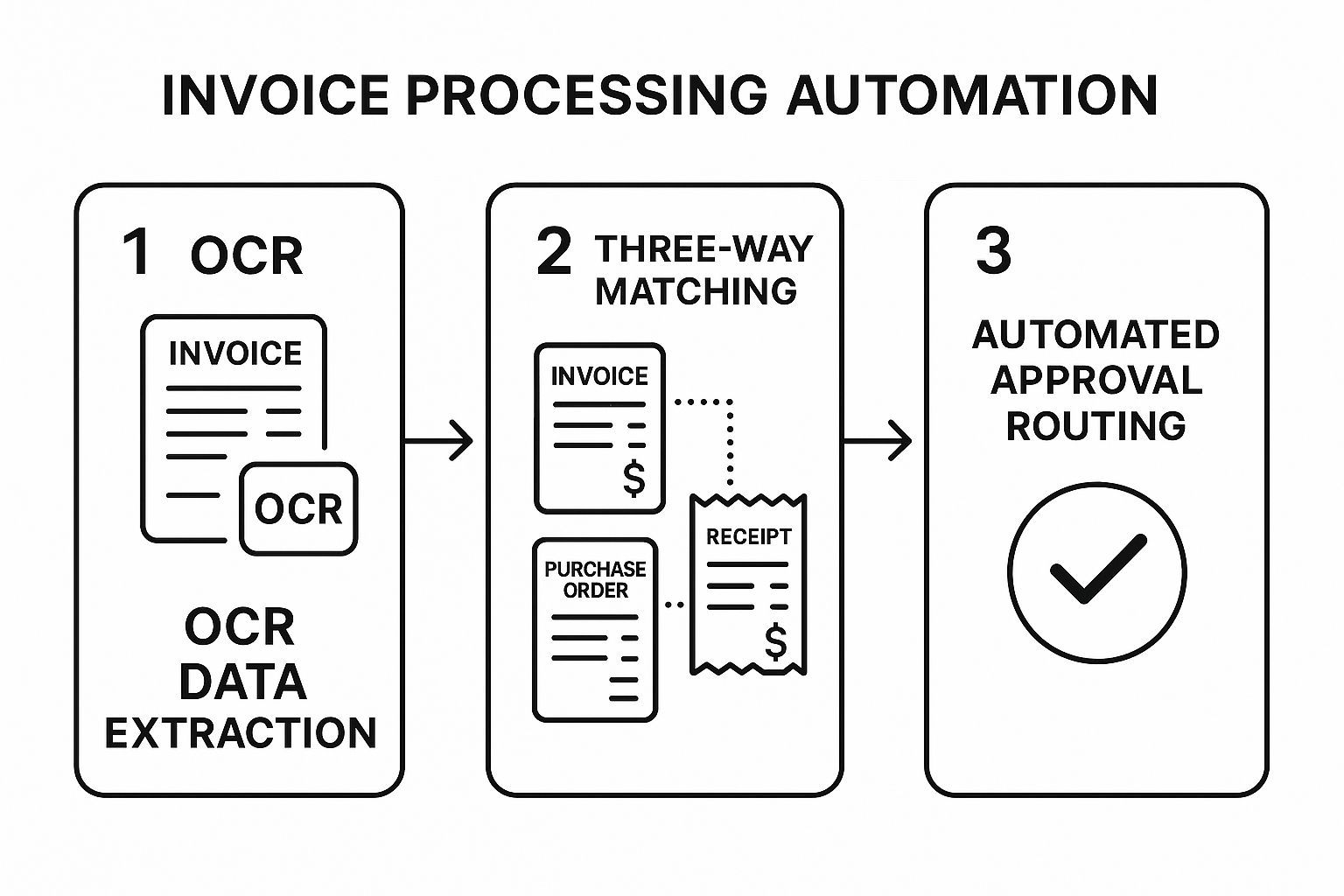
La visualización demuestra cómo cada paso se basa lógicamente en el anterior, asegurando la integridad de los datos y el cumplimiento antes de que una factura continúe.
2. Automatización de la Incorporación de Clientes
Un proceso de incorporación desarticulado o lento puede provocar la pérdida inmediata de clientes y oportunidades de ingresos perdidas. La automatización de la incorporación de clientes aborda esta primera impresión crítica al crear una experiencia estructurada y fluida para los nuevos usuarios. Este poderoso tipo de ejemplo de automatización de procesos de negocio utiliza software para guiar a los nuevos clientes a través de la configuración, activación y uso inicial del producto con correos electrónicos de bienvenida automatizados, tutoriales dentro de la aplicación y flujos de trabajo de verificación de documentos.
En esencia, el sistema orquesta una serie de acciones predefinidas desencadenadas por el registro de un cliente. Puede crear automáticamente cuentas de usuario, enviar mensajes de bienvenida personalizados, asignar un administrador de éxito del cliente y entregar contenido educativo en intervalos programados. Esto garantiza que cada nuevo cliente reciba una bienvenida consistente y de alta calidad, reduciendo su tiempo para obtener valor y liberando a su equipo para que se centre en necesidades más complejas.

Dónde la automatización ofrece victorias rápidas
💸 Finanzas
Aprobaciones de facturas más rápidas, reducción de errores.
👥 RR. HH.
Incorporación fluida y precisión en la nómina.
📈 Ventas
Mejor puntuación de leads y conversiones más rápidas.
💻 TI
Resolución más rápida de tickets de soporte técnico.
Análisis Estratégico y Conclusiones Accionables
Líderes tecnológicos como Stripe y Salesforce han dominado esta automatización para acelerar la adopción por parte de los usuarios. La incorporación basada en API de Stripe permite a los desarrolladores integrar el procesamiento de pagos en minutos, un proceso que antes requería días de verificación manual. De manera similar, Salesforce utiliza flujos de trabajo automatizados para guiar a los nuevos usuarios hacia funciones clave, aumentando la participación desde el primer día. Estos casos demuestran que la automatización exitosa de la incorporación se centra en eliminar la fricción y ofrecer valor inmediato.
Conclusión Clave: La automatización eficaz de la incorporación de clientes no se trata solo de enviar correos electrónicos; se trata de guiar proactivamente a los usuarios hacia su momento "¡ajá!" lo más rápido posible. Esto genera un impulso inicial y aumenta significativamente la retención a largo plazo.
Para implementar esto con éxito, las empresas deben adoptar las siguientes tácticas:
- Mapear el Viaje del Cliente: Antes de escribir un solo flujo de trabajo, mapee visualmente cada paso que da un nuevo cliente, desde el registro hasta el primer éxito. Esto revela posibles puntos de fricción que son candidatos principales para la automatización.
- Segmentar su Incorporación: No todos los clientes son iguales. Cree diferentes rutas de incorporación automatizadas basadas en los roles de los usuarios, el tamaño de la empresa o los planes de suscripción para ofrecer una experiencia más relevante y personalizada.
- Incorporar Puntos de Contacto Humanos: Para clientes de alto valor, cree desencadenantes automatizados que alerten a su equipo de éxito para que se comunique personalmente en momentos críticos, como después de que completen un paso de configuración clave o si se estancan en el proceso.
3. Automatización de la Gestión de Gastos de Empleados
El tedioso ciclo de recopilación de recibos, llenado de hojas de cálculo y persecución de aprobaciones hace que la presentación manual de informes de gastos sea un punto de dolor universal tanto para los empleados como para los equipos de finanzas. La automatización de la gestión de gastos de empleados aborda esto al digitalizar todo el flujo de trabajo, desde la captura de recibos hasta el reembolso. Este sistema es uno de los ejemplos de automatización de procesos empresariales más fáciles de relacionar porque mejora directamente la experiencia del empleado al tiempo que aplica controles financieros.
En su núcleo, esta automatización aprovecha la tecnología móvil y la IA. Los empleados utilizan una aplicación para tomar fotos de los recibos, y la tecnología de Reconocimiento Óptico de Caracteres (OCR) extrae instantáneamente datos clave como el proveedor, la fecha y el monto. Luego, el sistema verifica automáticamente el gasto con las políticas de la empresa preconfiguradas, marcando los gastos fuera de política en tiempo real. Los gastos aprobados se enrutan a través de un flujo de trabajo digital, integrándose directamente con el software de contabilidad para un reembolso rápido y preciso.
Análisis Estratégico y Conclusiones Accionables
Las empresas líderes demuestran los claros beneficios financieros y operativos de esta automatización. Netflix ahorró un informe de $2.7 millones anuales al implementar un sistema automatizado, mientras que GitHub redujo su tiempo de procesamiento de gastos de ocho horas a solo 30 minutos. Estos resultados demuestran que la automatización de la gestión de gastos es un camino directo para reducir los gastos administrativos y mejorar el cumplimiento.
Conclusión Clave: Automatizar la gestión de gastos no se trata solo de eficiencia; se trata de integrar la política financiera directamente en el flujo de trabajo. Este enfoque proactivo evita gastos no conformes antes de que ocurran, en lugar de corregirlos después del hecho.
Para lograr resultados similares, las empresas pueden implementar estas tácticas enfocadas:
- Integrar con Tarjetas Corporativas: Conecte el software de automatización directamente a sus fuentes de tarjetas de crédito corporativas. Esto importa automáticamente las transacciones, eliminando la necesidad de que los empleados creen manualmente la mayoría de las entradas de gastos y simplificando la conciliación.
- Establecer Reglas de Política Claras: Antes de lanzar, defina y construya sus políticas de gasto específicas en el sistema. Establezca reglas para límites de gasto, recibos requeridos y proveedores preferidos para automatizar la aplicación y reducir las revisiones manuales.
- Priorizar la Experiencia Móvil: El éxito del sistema depende de la adopción por parte de los empleados. Elija una solución con una aplicación móvil altamente intuitiva y fácil de usar para garantizar que el personal pueda enviar fácilmente gastos sobre la marcha, lo que mejora drásticamente la presentación de informes oportuna.
Transcript.LOL simplifica los flujos de trabajo complejos

Detección de hablantes
Identifica automáticamente diferentes hablantes en tus grabaciones y etiquétalos con sus nombres.

Herramientas de edición
Edita transcripciones con herramientas potentes como buscar y reemplazar, asignación de hablantes, formatos de texto enriquecido y resaltado.
Resúmenes y Chatbot
Genera resúmenes y otros análisis de tu transcripción, prompts personalizados reutilizables y chatbot para tu contenido.
4. Calificación y Puntuación Automatizada de Leads
Los equipos de ventas y marketing a menudo luchan por identificar qué prospectos están realmente listos para comprar, lo que genera un esfuerzo desperdiciado en leads no calificados. La automatización de la calificación y puntuación de leads aborda este desafío de frente, utilizando lógica basada en reglas y datos de comportamiento para clasificar y priorizar prospectos. Este sistema es uno de los ejemplos de automatización de procesos empresariales más potentes para alinear los esfuerzos de ventas y marketing y acelerar el ciclo de ventas.
El proceso funciona asignando puntos a los leads en función de criterios predefinidos, como el cargo, el tamaño de la empresa y el comportamiento en línea, como la apertura de correos electrónicos o las visitas a páginas. El sistema rastrea estas interacciones automáticamente, construyendo una puntuación que refleja la preparación para la venta de un prospecto. Cuando un lead alcanza un cierto umbral, se marca automáticamente como Lead Calificado por Marketing (MQL) y se dirige al equipo de ventas para un seguimiento inmediato.
Análisis Estratégico y Conclusiones Accionables
Las principales plataformas de automatización de marketing han demostrado el inmenso valor de este enfoque. HubSpot, por ejemplo, utilizó su propia puntuación automatizada para aumentar los leads calificados en un 45%, mientras que Marketo ayudó a Dell a mejorar la calidad de sus leads en un asombroso 200%. Estos casos demuestran que un enfoque sistemático y basado en datos para la priorización de leads impacta directamente en los ingresos.
Conclusión Clave: La automatización eficaz de la puntuación de leads crea un potente bucle de retroalimentación entre marketing y ventas. Obliga a ambos equipos a acordar la definición de un "buen lead", eliminando la fricción y asegurando que los esfuerzos de marketing estén directamente vinculados a los resultados de ventas.
Para implementar esto con éxito, las empresas deben adoptar estas tácticas:
- Definir Criterios Claros de MQL: Antes de automatizar, marketing y ventas deben colaborar para definir los rasgos demográficos y de comportamiento exactos de un lead listo para la venta. Esta alineación es la base de un modelo de puntuación eficaz.
- Combinar Puntuación Implícita y Explícita: Utilice tanto datos explícitos proporcionados por el lead (por ejemplo, cargo de un formulario) como datos implícitos basados en su comportamiento (por ejemplo, visitar la página de precios). Esto crea una visión más precisa y holística de su intención.
- Establecer un Bucle de Retroalimentación: Cree un proceso formal para que el equipo de ventas informe sobre la calidad de los leads automatizados. Esta retroalimentación, similar a las ideas obtenidas al analizar datos de entrevistas, es crucial para refinar y ajustar las reglas de puntuación con el tiempo para mejorar la precisión.
5. Automatización de Tickets de Soporte de TI
Un servicio de asistencia de TI sobrecargado es un punto de dolor común, que conduce a tiempos de respuesta lentos, empleados frustrados y pérdida de productividad. La automatización de tickets de soporte de TI aborda esto optimizando todo el ciclo de vida del soporte, desde la presentación de la solicitud hasta la resolución. Este sistema recibe, categoriza, prioriza y dirige de manera inteligente las solicitudes de soporte de TI, a menudo resolviendo problemas comunes sin la intervención de ningún técnico humano, lo que lo convierte en uno de los ejemplos de automatización de procesos empresariales críticos para mantener la continuidad operativa.
El proceso comienza cuando un empleado envía una solicitud a través de un portal, correo electrónico o chat. La plataforma de automatización analiza la solicitud utilizando Procesamiento del Lenguaje Natural (PLN) para comprender su intención y urgencia. Luego crea automáticamente un ticket, lo asigna a la cola de soporte o al técnico apropiado según reglas predefinidas, e incluso puede sugerir artículos relevantes de la base de conocimientos al usuario para autoservicio. Para problemas comunes como restablecimientos de contraseña o solicitudes de acceso a software, el sistema puede ejecutar la solución automáticamente.
Análisis Estratégico y Conclusiones Accionables
Los líderes de la industria han visto enormes ganancias de eficiencia con esta tecnología. ServiceNow ayudó a Coca-Cola a automatizar el 40% de sus solicitudes de TI, y Microsoft redujo su volumen de tickets internos en un 30% al implementar soluciones automatizadas de autoservicio. Estos casos demuestran que la automatización de tareas de soporte de alta frecuencia y baja complejidad es la clave para desbloquear el potencial del equipo de TI y mejorar la satisfacción de los empleados.
Conclusión Clave: El verdadero poder de la automatización del servicio de asistencia es su capacidad para transformar el soporte de TI de una función reactiva y de "apagar incendios" a un facilitador proactivo y estratégico. Al manejar las solicitudes rutinarias, libera a los técnicos calificados para que se concentren en la resolución de problemas complejos, las mejoras del sistema y los proyectos de infraestructura.
Para lograr resultados similares, las organizaciones deben adoptar estas tácticas:
- Automatizar Primero las Solicitudes Comunes: Identifique y automatice las 5-10 solicitudes de soporte más frecuentes y sencillas, como restablecimientos de contraseña o instalación de software. Esto genera un impacto inmediato y crea impulso para el programa.
- Mantener una Base de Conocimientos Rica: Una base de conocimientos completa y actualizada es el motor de la automatización del autoservicio. Actualice regularmente los artículos y utilice los datos de los tickets para identificar lagunas de conocimiento.
- Establecer Rutas de Escalada Claras: Defina flujos de trabajo automatizados para cuando un ticket requiera intervención humana. Esto garantiza que los problemas complejos o de alta prioridad se escalen al experto adecuado sin demora, evitando cuellos de botella. Esto es crucial para gestionar los elementos de acción que surgen de problemas de TI más complejos.
La automatización libera a los equipos de TI para la estrategia
Las empresas que utilizan la automatización de tickets de TI resuelven problemas entre un 40% y un 60% más rápido y liberan al personal para la innovación.
6. Automatización del Procesamiento de Nóminas
El procesamiento manual de nóminas es una de las funciones de RR. HH. más críticas y propensas a errores, donde un solo error puede acarrear sanciones por incumplimiento y disminuir la moral de los empleados. La automatización del procesamiento de nóminas elimina estos riesgos al gestionar todo el ciclo, desde la integración de datos de seguimiento de tiempo hasta el cálculo de impuestos, la gestión de deducciones y la ejecución de depósitos directos. Este sistema se destaca como uno de los ejemplos de automatización de procesos empresariales más esenciales para mantener la integridad operativa y la confianza de los empleados.
Esta automatización funciona creando un motor basado en reglas que extrae datos de diversas fuentes, como hojas de tiempo y registros de RR. HH. Aplica automáticamente reglas de pago complejas, calcula impuestos federales y estatales, gestiona las deducciones de beneficios y genera recibos de pago precisos. Luego, el sistema inicia los pagos a través de integraciones bancarias y compila informes detallados para contabilidad y cumplimiento, todo con una supervisión humana mínima. Esto garantiza la precisión y la puntualidad, convirtiendo una tarea de alta presión y orientada a plazos en un proceso fluido y confiable.
Análisis Estratégico y Conclusiones Accionables
Gigantes de la industria como Walmart y proveedores de servicios como ADP demuestran la escala masiva y las ganancias de eficiencia posibles. Walmart procesa con éxito las nóminas de más de dos millones de empleados, mientras que las soluciones automatizadas de ADP atienden a más de 810.000 clientes, lo que demuestra la escalabilidad y confiabilidad del modelo. De manera similar, Paychex ha ayudado a sus clientes a reducir su tiempo de procesamiento de nóminas en un 50%, un testimonio del impacto directo del sistema en la productividad.
Conclusión Clave: El beneficio principal de la automatización de nóminas se extiende más allá de la eficiencia; se trata de mitigar el riesgo de cumplimiento. Al automatizar los cálculos complejos de impuestos y el cumplimiento normativo, las empresas pueden evitar sanciones costosas y garantizar que los empleados reciban su pago de manera correcta y puntual, siempre.
Para implementar esta automatización de manera efectiva, las empresas deben centrarse en estas tácticas clave:
- Garantizar una Seguridad de Datos Robusta: Los datos de nóminas son muy sensibles. Priorice las soluciones con cifrado sólido, controles de acceso y auditorías de seguridad periódicas para proteger la información de los empleados.
- Probar Exhaustivamente Antes del Lanzamiento: Antes de entrar en funcionamiento, ejecute ciclos de nómina paralelos con su antiguo sistema manual y el nuevo sistema automatizado. Esto ayuda a identificar y corregir cualquier discrepancia en los cálculos o el mapeo de datos.
- Mantener Capacidades de Anulación Manual: La automatización puede manejar la mayoría de los escenarios, pero ocurrirán excepciones como bonos o correcciones. Asegúrese de que su sistema permita ajustes manuales autorizados sin comprometer todo el flujo de trabajo.
7. Automatización de la Gestión de Inventario
El seguimiento manual del inventario es un juego de adivinanzas de alto riesgo, que conduce a desabastecimientos costosos, excesivos costos de mantenimiento y errores de cumplimiento. La automatización de la gestión de inventario reemplaza las conjeturas con precisión basada en datos, utilizando tecnología como RFID, sensores y análisis predictivos para monitorear los niveles de stock en tiempo real. Este sistema automatiza la reposición, optimiza la distribución de almacenes y garantiza la disponibilidad del producto, lo que lo convierte en un ejemplo de automatización de procesos empresariales crítico para el comercio minorista, la fabricación y la logística.
En esencia, esta automatización crea un gemelo digital del almacén físico. Las etiquetas RFID y los escáneres de códigos de barras actualizan automáticamente los recuentos de inventario a medida que los artículos se mueven desde la recepción hasta el envío. Luego, el software analiza la velocidad de ventas y los tiempos de entrega para predecir la demanda futura, activando automáticamente las órdenes de compra cuando el stock alcanza un punto de reorden predeterminado. Este flujo de información sin interrupciones evita desabastecimientos y minimiza el capital inmovilizado en inventario de baja rotación.
Análisis Estratégico y Conclusiones Accionables
Líderes de la industria como Amazon y Walmart demuestran el poder transformador de esta automatización. El uso de robótica por parte de Amazon en sus centros de cumplimiento le permite gestionar una gran cantidad de SKU con una velocidad sin precedentes, mientras que la implementación de seguimiento RFID por parte de Walmart en miles de tiendas proporciona visibilidad granular y en tiempo real de su stock. De manera similar, el gigante de la moda rápida Zara utiliza un sistema de inventario altamente automatizado para mantener su cadena de suministro ágil.
Conclusión Clave: La automatización efectiva del inventario se trata menos de contar artículos y más de optimizar el flujo de efectivo. Convierte el inventario de un activo estático en un componente dinámico y receptivo de su estrategia financiera, asegurando que el capital se despliegue donde genera más ingresos.
Para lograr una excelencia operativa similar, las empresas deben aplicar estas estrategias:
- Implementar el Análisis ABC: Priorice sus esfuerzos de automatización categorizando el inventario. Enfóquese primero en los artículos "A" (alto valor, alta rotación) donde el seguimiento preciso tiene el mayor impacto financiero, antes de pasar a los artículos "B" y "C" de menor prioridad.
- Establecer Líneas de Base Precisas: Antes de entrar en funcionamiento, realice un recuento físico exhaustivo del inventario. Un sistema automatizado es tan bueno como sus datos iniciales; una línea de base precisa evita discrepancias iniciales que pueden propagarse por todo el sistema.
- Establecer Puntos de Reorden Dinámicos: No utilice un enfoque de "configurar y olvidar". Configure el sistema para ajustar los puntos de reorden y los niveles de stock de seguridad en función de la estacionalidad, las previsiones de demanda y las variaciones en los tiempos de entrega de los proveedores para mantenerse ágil.
8. Automatización de la Gestión del Ciclo de Vida del Contrato
La gestión manual de contratos es un proceso laborioso y de alto riesgo que expone a las empresas a problemas de cumplimiento, fechas de renovación omitidas y una fuga de ingresos significativa. La automatización de la Gestión del Ciclo de Vida del Contrato (CLM) digitaliza y agiliza cada etapa del recorrido de un contrato, desde la creación y negociación hasta la ejecución, el seguimiento y la renovación. Esto lo convierte en un ejemplo crítico de ejemplos de automatización de procesos empresariales para los equipos legales, de ventas y de adquisiciones.
En esencia, la automatización de CLM utiliza un repositorio central con plantillas estandarizadas, flujos de trabajo de aprobación automatizados y capacidades de firma electrónica. El sistema guía un contrato desde el borrador inicial hasta la aprobación final, rastreando cada cambio y corrección a lo largo del camino. Las plataformas avanzadas también incorporan IA para analizar el texto del contrato, identificar cláusulas no estándar, señalar riesgos potenciales y extraer automáticamente fechas y obligaciones clave, asegurando que nada se pierda.
Análisis Estratégico y Conclusiones Accionables
Líderes de la industria como Microsoft y Salesforce han demostrado el inmenso valor de la automatización de CLM. Microsoft redujo con éxito su tiempo de procesamiento de contratos en un 60%, mientras que Salesforce gestiona eficientemente miles de contratos de clientes complejos a través de su sistema automatizado. Estos casos muestran que la automatización del ciclo de vida del contrato impacta directamente la velocidad de ventas, la eficiencia operativa y la mitigación de riesgos.
Conclusión Clave: El poder estratégico de la automatización de CLM radica en transformar los contratos de documentos legales estáticos en activos dinámicos y ricos en datos. Esta visibilidad permite a las empresas gestionar proactivamente las obligaciones, identificar oportunidades de venta adicional y hacer cumplir el cumplimiento en toda la organización.
Para lograr resultados similares, las empresas deben centrarse en estas tácticas:
- Estandarizar Primero: Comience por crear y digitalizar una biblioteca de plantillas de contratos estándar para sus acuerdos más comunes (por ejemplo, NDAs, SOWs). Esto establece una base controlada antes de automatizar negociaciones más complejas.
- Mapear Flujos de Trabajo Multifuncionales: Involucre a los equipos legales, de ventas y financieros desde el principio para diseñar flujos de trabajo de aprobación. Defina claramente quién necesita revisar y aprobar los contratos en función del valor, la región o el nivel de riesgo.
- Automatizar Alertas de Hitos: Configure el sistema para enviar notificaciones automáticas para fechas clave, como vencimiento, plazos de renovación y revisiones de desempeño. Esto evita oportunidades perdidas y renovaciones automáticas no deseadas.
Comparación de Ejemplos de Automatización de Procesos Empresariales
| Tipo de Automatización | Complejidad de Implementación 🔄 | Requisitos de Recursos ⚡ | Resultados Esperados 📊 | Casos de Uso Ideales 💡 | Ventajas Clave ⭐ |
|---|---|---|---|---|---|
| Automatización del Procesamiento de Facturas | Moderada a Alta (flujos de trabajo personalizados, integración de sistemas) | Se requiere integración con sistema ERP/contabilidad | Reduce el tiempo de procesamiento en ~70%, reduce costos hasta en un 80% | Departamentos de Cuentas por Pagar, facturación de alto volumen | Reducción de errores, pagos más rápidos, cumplimiento |
| Automatización de la Incorporación de Clientes | Moderada (integración de múltiples sistemas, configuración de flujo de trabajo) | Se requiere integración con CRM y sistema de facturación | Reduce el tiempo de incorporación 50-70%, mejora la satisfacción | Configuración de nuevos clientes, procesos de incorporación escalables | Consistencia, reducción de la rotación, visibilidad en tiempo real |
| Gestión de Gastos de Empleados | Moderada (integración móvil e IA, se necesita capacitación) | Aplicaciones móviles, integración de tarjetas de crédito | Tiempo de procesamiento de gastos reducido en un 75%, cumplimiento mejorado | Informes de gastos de empleados y reembolso | Reembolsos más rápidos, aplicación de políticas |
| Calificación y Puntuación de Leads | Alta (recopilación de datos, entrenamiento de modelos de ML) | Datos significativos y herramientas de ventas y marketing | Productividad de ventas aumentada 30-40%, tasas de conversión mejoradas | Equipos de ventas que priorizan leads | Manejo escalable de leads, información basada en datos |
| Automatización de Tickets de Soporte de TI | Moderada (base de conocimientos, configuración de enrutamiento) | Entradas multicanal, plataformas de autoservicio | Tiempo de resolución reducido 40-60%, autoservicio 24/7 | Mesas de soporte de TI, altos volúmenes de tickets | Mayor productividad tecnológica, resolución de problemas más rápida |
| Automatización del Procesamiento de Nóminas | Alta (integración compleja, requisitos de cumplimiento) | Sistemas de tiempo, integración de impuestos y beneficios | Tiempo de nómina reducido en un 80%, errores minimizados | Grandes departamentos de RR. HH./nóminas | Precisión, cumplimiento, pistas de auditoría |
| Automatización de la Gestión de Inventario | Alta (sensores, RFID, análisis predictivos) | Hardware (RFID), integraciones de sistemas | Costos de inventario reducidos 20-30%, precisión superior al 95% | Almacenamiento, cadena de suministro, inventario en múltiples ubicaciones | Optimización de stock, seguimiento en tiempo real |
| Gestión del Ciclo de Vida del Contrato | Alta (flujo de trabajo legal, IA, coordinación multifuncional) | Integraciones de sistemas legales y de adquisiciones | Tiempo del ciclo de contrato reducido 50-70%, cumplimiento mejorado | Industrias con muchos contratos (legal, adquisiciones, ventas) | Reducción de riesgos, gestión centralizada |
Elegir la automatización adecuada para su negocio
⚡ Victorias rápidas
Aprobaciones de gastos, soporte técnico de TI.
🔒 Reducción de riesgos
Nómina, gestión de contratos.
📊 Escalabilidad
Inventario, puntuación de leads.
🎯 Experiencia del cliente
Flujos de trabajo de incorporación, compromiso personalizado.
De los Ejemplos a la Acción: Tus Próximos Pasos en la Automatización
El viaje a través de estos diversos ejemplos de automatización de procesos empresariales, desde finanzas y RR. HH. hasta marketing y TI, revela un tema poderoso y unificador. La automatización no se trata de reemplazar el ingenio humano, sino de liberarlo. Ya sea optimizando las aprobaciones de facturas, acelerando la incorporación de clientes o garantizando un procesamiento de nóminas impecable, el objetivo principal sigue siendo el mismo: redirigir la valiosa experiencia humana de tareas repetitivas y basadas en reglas hacia trabajos estratégicos, creativos y de alto impacto.
Los ejemplos que hemos explorado, como la calificación de clientes potenciales y la gestión de inventario, demuestran que las iniciativas de automatización más exitosas son específicas e incrementales. No comienzan con una revisión revolucionaria en toda la empresa. En cambio, comienzan identificando un único cuello de botella persistente: un proceso que consume un tiempo excesivo, es propenso a errores humanos y ofrece un bajo valor estratégico. Al centrarse en uno de estos puntos débiles, puede lograr una victoria medible que genere impulso y asegure la aceptación para futuros proyectos.
Sintetizando las Conclusiones Clave
Para pasar de la teoría a la implementación, es crucial destilar las ideas estratégicas de estos casos de uso. Los patrones observados en proyectos de automatización exitosos proporcionan una hoja de ruta clara para sus propios esfuerzos.
- Comience con Procesos de Alto Impacto y Baja Complejidad: No intente automatizar un flujo de trabajo complejo y multidepartamental en su primer intento. Busque las "frutas maduras", como el enrutamiento de tickets del servicio de asistencia de TI o las aprobaciones de gastos de empleados, para demostrar un valor inmediato.
- Priorice la Integridad de los Datos: La automatización es tan confiable como los datos que utiliza. Antes de implementar una solución para la gestión de contratos o la nómina, asegúrese de que sus fuentes de datos estén limpias, estandarizadas y sean accesibles.
- Enfóquese en el Elemento Humano: El objetivo es el empoderamiento, no el reemplazo. Comuníquese claramente con su equipo sobre cómo la automatización eliminará tareas tediosas, permitiéndoles centrarse en responsabilidades más atractivas y valiosas. Preséntelo como una herramienta que mejora sus capacidades.
Su Plan de Acción para Implementar la Automatización
Comprender el potencial de la automatización de procesos empresariales es el primer paso; tomar medidas decisivas es lo que impulsa la transformación. Utilice los siguientes pasos como una guía práctica para comenzar su viaje.
- Identificar y Auditar: Reúna un pequeño equipo para mapear los procesos clave dentro de un solo departamento. Identifique qué tareas son las más repetitivas, consumen más tiempo y se basan en reglas. Cuantifique las horas dedicadas a estas actividades.
- Seleccionar un Proyecto Piloto: Elija un proceso de su auditoría que ofrezca un ROI claro y medible. Un proyecto como la automatización de la puntuación inicial de clientes potenciales, por ejemplo, proporciona un enlace directo a la eficiencia de las ventas y el potencial de ingresos.
- Investigar y Elegir las Herramientas Adecuadas: No todas las plataformas de automatización son iguales. Basándose en las necesidades de su proyecto piloto, investigue software que se integre perfectamente con sus sistemas existentes (por ejemplo, su CRM, ERP o software de contabilidad).
- Medir, Iterar y Escalar: Una vez que su piloto esté en funcionamiento, rastree los indicadores clave de rendimiento (KPI) como el tiempo de procesamiento, las tasas de error y el tiempo ahorrado por los empleados. Utilice estas métricas para justificar la expansión de la automatización a otros procesos y departamentos.
Al adoptar este enfoque metódico y estratégico, transforma la automatización de procesos empresariales de un concepto abstracto a una ventaja competitiva tangible. Los ejemplos proporcionados son solo el principio. Para una inmersión más profunda en aplicaciones prácticas del mundo real, considere explorar estos Ejemplos de Automatización de Procesos Empresariales para Transformar su Flujo de Trabajo para obtener más inspiración para sus necesidades específicas. El camino hacia una organización más eficiente, escalable e inteligente comienza hoy, con un solo proceso bien elegido.
¿Listo para automatizar una de las tareas manuales que más tiempo consumen para creadores de contenido y profesionales? Transcript.LOL utiliza IA para transcribir su contenido de audio y video con velocidad y precisión asombrosas. Deje de perder horas en transcripciones manuales y comience a centrarse en crear valor visitando Transcript.LOL para automatizar su flujo de trabajo hoy mismo.
¿Listo para automatizar sus flujos de trabajo?
Desde la transcripción hasta la gestión de contratos, el futuro de los negocios está automatizado.
👉 Pruebe Transcript.LOL gratis hoy