
Plantilla de acta de reunión con puntos de acción que funciona
Deja de tener reuniones improductivas. Utiliza nuestra plantilla de acta de reunión con puntos de acción para impulsar la responsabilidad y obtener resultados reales de cada discusión.
Praveen
September 27, 2023
Una plantilla de actas de reuniones de elementos de acción no es solo un documento; es una herramienta diseñada para capturar tareas concretas y asignables que realmente impulsan los proyectos. Es la diferencia entre notas pasivas y un sistema activo de rendición de cuentas.
Por qué tus notas de reunión actuales te fallan
Seamos realistas por un segundo. La mayoría de las notas de reuniones son donde las buenas ideas mueren. Se convierten en un agujero negro de intenciones: resúmenes vagos y pensamientos brillantes que nunca ven la luz del día.
¿Te suena familiar? Sales de una reunión sintiéndote animado, lleno de impulso, solo para comprobar una semana después y darte cuenta de que no pasó nada. Si eso es algo habitual, tu sistema de toma de notas es el culpable.
A menudo, estos problemas no se refieren a la reunión en sí, sino a la falta de consejos efectivos de gestión de reuniones. El verdadero fracaso es no traducir toda esa conversación en compromisos tangibles.
El cambio de resúmenes pasivos a compromisos activos
Las actas tradicionales tienden a ser un relato de quién dijo qué. Es un registro pasivo. Un enfoque de "primero la acción" cambia completamente el guion al priorizar los resultados sobre la conversación. Es un cambio completo de mentalidad.
En lugar de simplemente documentar la charla, este método te obliga a escuchar compromisos específicos. Nociones vagas como "Alguien debería revisar el presupuesto del tercer trimestre" se convierten en tareas reales y asignadas.
El objetivo de una plantilla de elementos de acción es transformar el diálogo en una lista de tareas clara con nombres y fechas adjuntas. Es el puente entre hablar del trabajo y hacer el trabajo.
Esta estructura incorpora la rendición de cuentas directamente en el proceso. Todos se van sabiendo exactamente:
- Qué hay que hacer.
- Quién es responsable de ello.
- Cuándo vence.
Superando las frustraciones comunes de la toma de notas
Sin un sistema sólido, las notas de reunión solo crean más problemas. Conducen a confusión, esfuerzos duplicados y tareas olvidadas, todos dolores de cabeza importantes, especialmente para los equipos de ingeniería de rápido movimiento. Una plantilla dedicada de elementos de acción corta ese ruido, un punto que profundizamos en nuestra guía sobre cómo mejorar las notas de reuniones de ingeniería.
Y no estamos solos en pensar así. Una encuesta reciente encontró que aproximadamente el 70% de las empresas ahora dependen de plantillas estandarizadas para sus actas de reuniones para mantener los flujos de trabajo en marcha. Adoptar esta práctica no se trata solo de mejores notas; se trata de construir un sistema confiable que mantenga el impulso mucho después de que todos hayan salido de la sala.
Bien, construyamos esa plantilla. Pasar de simplemente hablar de mejores reuniones a tenerlas realmente comienza con un marco sólido. Una buena plantilla de elementos de acción no se trata de complejidad; se trata de claridad.
Todo este proceso consiste en convertir las conversaciones en tareas concretas y rastreables. Estás construyendo un sistema que garantiza que nada se pierda en la traducción.
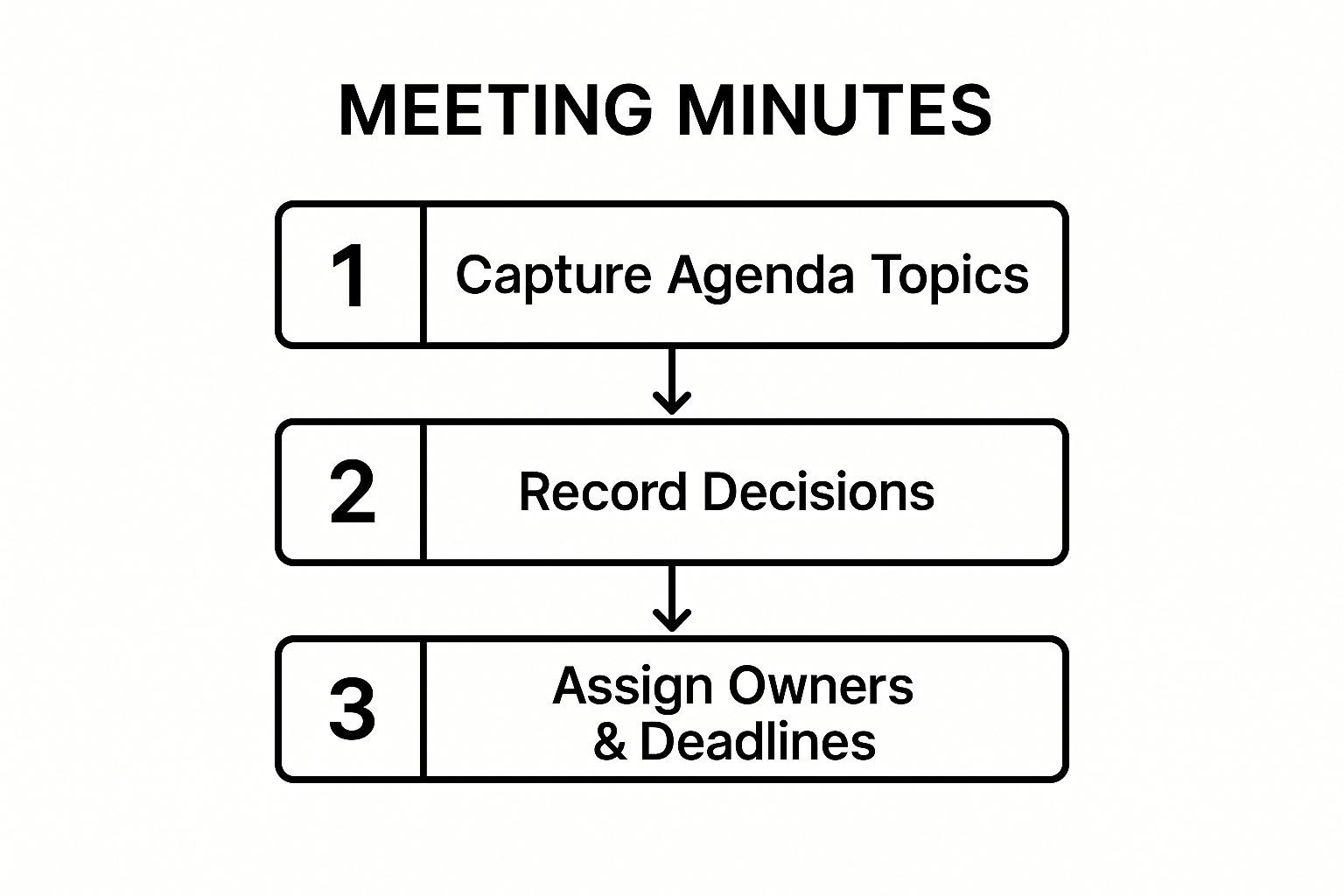
Piénsalo de esta manera: tu plantilla es el puente entre una buena idea discutida en una reunión y una tarea completada en el mundo real.
Las tres partes centrales de una plantilla matadora
He descubierto que las mejores plantillas, las que la gente realmente usa, siempre tienen tres partes innegociables.
Primero, asegúrate de tener los detalles clave de la reunión en la parte superior. Este es tu contexto básico: título de la reunión, fecha, hora y quién estuvo presente. Parece obvio, pero cuando estás revisando notas de hace seis semanas, esto es oro.
A continuación, necesitas un resumen rápido de la discusión. No estoy hablando de una novela. Esta es la vista general: ¿cuáles fueron los temas principales y qué decisiones importantes tomamos? Es el "por qué" que da contexto a los elementos de acción.
Finalmente, y lo más importante, viene la tabla de elementos de acción. Aquí es donde ocurre la magia. Es el motor de tu plantilla, la parte que convierte los compromisos en realidad. Si esta sección es débil o falta, podrías no haber tomado notas en absoluto.
Una gran plantilla no solo registra lo que se dijo; aclara lo que hay que hacer. La tabla de elementos de acción es el puente innegociable entre la conversación y la ejecución.
Ahora, analicemos exactamente qué va en esa tabla para que funcione.
Componentes centrales de una plantilla orientada a la acción
El verdadero poder de tu plantilla de elementos de acción proviene de los detalles dentro de la tabla misma. Cada columna tiene una función, y juntas, eliminan cualquier ambigüedad o confusión. Aquí tienes un vistazo a las partes esenciales.
| Componente | Propósito | Información de ejemplo |
|---|---|---|
| Descripción de la tarea | Definir claramente la acción específica requerida. | "Redactar el informe de marketing del tercer trimestre para la revisión de la dirección." |
| Propietario | Asignar responsabilidad directa a una sola persona. | "Sarah Jenkins" (no "Equipo de Marketing"). |
| Fecha límite | Establecer una fecha de vencimiento clara y específica para la finalización. | "Viernes, 25 de octubre" (no "Fin de semana"). |
| Estado | Proporcionar una actualización rápida y de un vistazo sobre el progreso. | "No iniciado", "En progreso" o "Completado". |
Esta estructura no es complicada, pero es increíblemente efectiva. Cuando cada elemento de acción tiene esta información, la rendición de cuentas se integra en tu proceso.
Puedes crear una versión reutilizable de esto en minutos utilizando herramientas que ya tienes, como Google Docs o Notion. Una vez que estandarices este formato, todos en el equipo sabrán exactamente qué esperar. Crea un lenguaje compartido para hacer las cosas.
Usando la plantilla en el fragor de la batalla
Tener una gran plantilla es una cosa. ¿Realmente usarla mientras una docena de personas hablan unas sobre otras? Ahí es donde ocurre la verdadera magia. Se trata de escuchar activamente y convertir una conversación rápida en tareas claras y estructuradas.
Tu objetivo no es ser un reportero judicial, transcribiendo cada palabra. Olvídate de eso. En cambio, entrena tu oído para que se agudice cuando escuches frases que señalan un compromiso. Cosas como: "Yo me encargo de eso", "Apuntemos al viernes" o "Sarah puede encargarse del contacto con el cliente". Esas son tus señales.
Estas frases son los desencadenantes. Tan pronto como escuches una, tu trabajo es capturar la esencia de esa promesa y enchufarla directamente en la sección de elementos de acción de tu plantilla.
Un ejemplo del mundo real
Digamos que estás en una reunión de seguimiento de proyecto. Alex, el gerente de proyecto, menciona un problema con una nueva función del sitio web. María, una desarrolladora, interviene.
- Alex: "El cliente está nervioso por ese error de inicio de sesión. Necesitamos una solución, y la necesitamos ayer".
- María: "Puedo ejecutar un diagnóstico completo esta tarde. Debería tener un parche listo para pruebas mañana por la mañana, pero necesitaré que Ben lo revise antes de que podamos implementar algo".
¡Boom! Dos elementos de acción distintos surgieron de ese breve intercambio. Antes de que la conversación avance, deberías tener esto anotado:
| Descripción de la tarea | Propietario | Fecha límite | Estado |
|---|---|---|---|
| Ejecutar diagnóstico completo del error de inicio de sesión y crear parche. | María | Fin del día de mañana | No iniciado |
| Revisar y aprobar el parche del error de inicio de sesión. | Ben | Pendiente | No iniciado |
Al capturar las tareas a medida que se asignan, eliminas la ambigüedad. La clásica lucha posterior a la reunión de "¿Espera, quién estaba haciendo eso?" desaparece por completo. Las ideas vagas se convierten en tareas concretas con propietarios claros.
El pulido de 5 minutos
Una vez que la reunión termina, casi has terminado. Antes de que te absorba algo más, tómate cinco minutos, en serio, solo cinco, para limpiar tus notas.
Esta es tu oportunidad de aclarar cualquier taquigrafía, asegurarte de que cada elemento de acción tenga un propietario y una fecha límite realista, y corregir cualquier error tipográfico. Si descubres que consistentemente te faltan detalles en reuniones rápidas, usar una herramienta para transcripción de reuniones en línea puede ser un salvavidas, proporcionándote un registro completo para consultar.
Luego, envíalo. Envía el enlace al documento compartido o un PDF a todos los asistentes, idealmente dentro de la hora. Ese rápido seguimiento mantiene el impulso y asegura que todos estén en la misma página antes de que los detalles se vuelvan confusos.
Automatización de tu flujo de trabajo de elementos de acción
Rellenar manualmente una plantilla de elementos de acción es un primer paso sólido, pero seamos sinceros, sigue siendo trabajo manual. El verdadero cambio de juego es automatizar todo el proceso, convirtiendo las palabras habladas de una reunión directamente en tareas en tu herramienta de gestión de proyectos. Esto no es un futuro lejano; así es como operan los equipos más eficientes ahora mismo.
Lo creas o no, esto es sorprendentemente fácil de configurar. Herramientas de IA como Transcript.LOL pueden digerir una grabación de reunión, crear un resumen e incluso detectar los elementos de acción por ti. Piénsalo: tu reunión termina y, unos minutos después, un borrador de conclusiones y tareas asignadas ya está en tu bandeja de entrada.
Conectando tus herramientas para un flujo sin interrupciones
La magia realmente ocurre cuando conectas estos servicios a tus otras plataformas. Puedes construir un flujo de trabajo simple que envíe automáticamente un elemento de acción identificado en una grabación de reunión directamente a Asana, Trello o Jira.
Esto crea un canal directo desde la conversación hasta la ejecución. Una tarea que se menciona en una llamada puede aparecer en tu tablero de proyecto con un propietario y una fecha límite momentos después. Nada se olvida.
Esto no es solo un "agradable tener"; marca una diferencia real. Hemos visto que las organizaciones con una forma sistemática de rastrear elementos de acción obtienen un aumento del 25% en las tasas de finalización de tareas en comparación con los equipos que no lo hacen. ¿Por qué? Porque la automatización elimina el error humano y los retrasos que hacen que las cosas se pierdan.
Si realmente quieres mejorar, vale la pena aprender a automatizar tareas repetitivas en otras partes de tu día también.
Así es como se ve esto en el mundo real
Imagina una sincronización semanal típica. Tu líder de equipo dice: "Ok, Mark, ¿puedes darme las proyecciones de ventas del cuarto trimestre para el viernes?"
En una configuración automatizada, esto es lo que sucede detrás de escena:
- La herramienta de transcripción de IA marca esa oración como un elemento de acción probable.
- Determina que "Mark" es el propietario, "proyecciones de ventas del cuarto trimestre" es la tarea y "viernes" es la fecha límite.
- La integración con tu herramienta de proyecto crea instantáneamente una nueva tarea: "Preparar proyecciones de ventas del cuarto trimestre", la asigna a Mark y establece la fecha de vencimiento para el viernes.
Aquí es hacia dónde se dirigen las reuniones. Tu plantilla de elementos de acción deja de ser un documento estático y se convierte en un sistema vivo y dinámico que mantiene a todos responsables y asegura que ninguna buena idea se pierda.
Cómo personalizar tu plantilla para cualquier reunión
Un enfoque único para las reuniones es una receta para el desastre. Tu plantilla de actas de reuniones de elementos de acción no debería ser diferente. Una reunión diaria tiene necesidades completamente diferentes a las de una reunión trimestral de la junta directiva, pero eso no significa que necesites empezar de cero cada vez. El secreto es la adaptación, no la reinvención total.
Piénsalo de esta manera: tienes una plantilla central que ya incluye tu tabla esencial de elementos de acción. Ahora, solo pregúntate cuál es el objetivo específico de la próxima reunión. ¿Estás tratando de tomar decisiones? ¿Generar nuevas ideas? ¿O simplemente alinear a todos sobre el estado del proyecto? Tu respuesta te dirá exactamente cómo ajustar la plantilla.
Digamos que tienes una reunión de inicio con un cliente. Esa es una conversación de alto riesgo que necesita más que una simple plantilla de sincronización de equipo. Querrías agregar campos dedicados para rastrear Decisiones Clave del Cliente o Hitos del Proyecto Aprobados. Este pequeño cambio marca una gran diferencia, manteniendo esa información crítica de cara al cliente justo donde puedes verla.
Adaptación para tipos de reuniones específicas
Por otro lado, una sesión de lluvia de ideas creativas necesita una estructura mucho más flexible. La tabla estándar de elementos de acción sigue siendo excelente para capturar seguimientos, pero la verdadera magia ocurre cuando agregas un par de secciones nuevas.
- Ideas y Conceptos Abiertos: Un espacio libre para volcar cada idea, sin juicios.
- Sala de Espera: El lugar perfecto para esos temas importantes pero no para ahora que pueden descarrilar una buena conversación.
Este es el tipo de flexibilidad que anhelan los equipos modernos. De hecho, las encuestas de mercado muestran que más del 80% de las empresas buscan activamente soluciones de plantillas que puedan adaptar fácilmente a diferentes formatos de reunión.
Personalizar tu plantilla no se trata de hacer las cosas más complicadas. Se trata de agregar claridad para que el documento realmente sirva al propósito único de la reunión.
Al realizar estos ajustes pequeños y estratégicos, tu plantilla pasa de ser un simple documento a una herramienta poderosa. Aporta un enfoque personalizado a cada discusión y asegura que captures la información correcta, cada vez. Si tienes alguna pregunta mientras configuras todo, tenemos más orientación práctica en nuestra colección de preguntas frecuentes.
Preguntas comunes sobre plantillas de elementos de acción
Incluso con la plantilla de actas de reuniones de elementos de acción perfecta, acostumbrarse a usarla puede sentirse un poco incómodo al principio. A medida que comiences a poner este sistema en práctica, surgirán algunas preguntas del mundo real. Abordémoslas de frente para que tu nuevo proceso se mantenga.
Uno de los mayores obstáculos no es diseñar la plantilla, sino conseguir que todos se sumen. Es un punto de fricción común, especialmente para los equipos que están acostumbrados a seguimientos informales y poco estructurados.
Otra cosa que tropieza a la gente es el lenguaje. ¿Qué separa realmente un elemento de acción de otra tarea pendiente? Aclarar esto hace que todo el sistema funcione.
¿Cómo consigo que mi equipo use realmente la plantilla?
El secreto para que tu equipo adopte la plantilla es hacerla increíblemente fácil y obviamente valiosa. ¿La mejor manera de hacerlo? Lidera con el ejemplo.
Cada vez que dirijas una reunión, rellena tú mismo la plantilla y envíala de inmediato. Cuando tu equipo vea una lista clara y concisa de quién está haciendo qué, pasarán menos tiempo buscando en correos electrónicos antiguos y más tiempo haciendo cosas. Eso es una victoria que notarán de inmediato.
La verdadera adopción ocurre cuando el equipo se da cuenta de que la plantilla no se trata de controlar su trabajo; se trata de hacer su trabajo más fácil y visible. Es un mapa compartido, no un informe de calificaciones.
Si puedes, intenta integrar los elementos de acción directamente en la herramienta de gestión de proyectos que ya estés utilizando. Cuando una tarea de una reunión aparece automáticamente en su cola, deja de sentirse como una tarea adicional y simplemente se convierte en parte del flujo de trabajo natural.
¿Cuál es la diferencia entre un elemento de acción y una tarea?
Es una distinción sutil pero importante. Piensa en un elemento de acción como una tarea específica nacida directamente de una reunión. Es un compromiso que alguien hizo, en voz alta, frente al equipo.
Tu plantilla existe para capturar esos momentos exactos. Esto es lo que los diferencia de tu lista personal de tareas pendientes: están directamente vinculados a una conversación específica y a una decisión que se tomó. Por ejemplo, las notas detalladas de una sesión de capacitación pueden proporcionar un contexto crucial para por qué se creó una tarea determinada. Puedes obtener más información sobre cómo capturar estos detalles de manera efectiva con nuestra guía de transcripción de capacitación y talleres.
¿Quién debe ser responsable de tomar las actas?
Honestamente, es una gran idea rotar el rol de tomador de notas.
Cuando diferentes personas toman un turno, fomenta un sentido compartido de propiedad sobre los resultados de la reunión. También obliga a todos a agudizar sus habilidades de escucha y a prestar más atención a las decisiones y compromisos que se toman.
Además, una vez que hayas sido el responsable de las notas, es mucho más probable que aprecies los elementos de acción claros. Sin embargo, para esas reuniones realmente críticas y de alto riesgo, probablemente sea mejor tener un gerente de proyecto o administrador dedicado a cargo. De esa manera, todos los demás pueden mantenerse 100% enfocados en la discusión.
¿Listo para dejar de perseguir tareas y empezar a impulsar acciones? Transcript.LOL genera automáticamente resúmenes y extrae elementos de acción de tus grabaciones de reuniones, integrándose perfectamente con tu flujo de trabajo. Deshazte de la toma de notas manual y descubre cómo la IA puede mantener a tu equipo responsable. Comienza tu prueba gratuita en https://transcript.lol hoy mismo.