
Ein moderner Leitfaden zur Protokollführung bei Besprechungen
Entdecken Sie, wie Sie die Protokollführung bei Besprechungen meistern. Unser Leitfaden beschreibt die Vorbereitung vor der Besprechung, die Erfassung in Echtzeit, KI-Tools und die Umwandlung von Notizen in umsetzbare Ergebnisse.
Kate, Praveen
February 7, 2026
Das Führen guter Besprechungsprotokolle bedeutet nicht, dass man alles, was man hört, wie wild tippt. Es geht darum, eine offizielle Aufzeichnung dessen zu erstellen, was besprochen, was entschieden wurde und wer für die nächsten Schritte verantwortlich ist. Wenn dies richtig gemacht wird, wird eine einfache administrative Aufgabe zu einem leistungsstarken Werkzeug für Abstimmung und Rechenschaftspflicht.
Vorbereitung auf effektive Besprechungsprotokolle
Das Geheimnis großartiger Besprechungsprotokolle? Sie werden lange vor Beginn der Besprechung erstellt. Solide Vorbereitung ist der wichtigste Schritt. Sie ist der Unterschied zwischen der Erstellung einer klaren, genauen Aufzeichnung und einem unübersichtlichen Notizenchaos.
Zuerst das Wichtigste: Sprechen Sie kurz mit dem Besprechungsorganisator, um Ihre Rolle zu klären. Suchen sie eine übergeordnete Zusammenfassung der wichtigsten Entscheidungen? Oder benötigen sie ein detailliertes, fast wortwörtliches Protokoll aus rechtlichen oder Compliance-Gründen? Wenn Sie die Erwartungen im Voraus kennen, wird dies genau bestimmen, wie Sie Notizen machen.
Besprechungsagenda erhalten und Umfang definieren
Ihr bester Freund in diesem Prozess ist die Besprechungsagenda. Eine gute Agenda ist eine Roadmap, die Ihnen zeigt, welche Themen anstehen und Ihnen hilft, Ihre Notizen im Voraus zu strukturieren. Sie ermöglicht es Ihnen, den Gesprächsverlauf zu antizipieren und zu wissen, worauf Sie Ihre Aufmerksamkeit richten müssen.
Seien wir ehrlich – unvorbereitete Besprechungen sind ein massiver Produktivitätskiller. Wir alle waren schon in solchen. Es ist keine Überraschung, dass 79 % der Arbeitnehmer zustimmen, dass eine klare Agenda Besprechungen produktiver macht, obwohl schockierende 64 % der Besprechungen ohne eine stattfinden. Die Kosten sind erschreckend und führen jedes Jahr zu einem Verlust von 399 Milliarden US-Dollar in den USA durch verschwendete Zeit.
Dieser einfache Arbeitsablauf zeigt, wie entscheidend diese anfänglichen Schritte sind.
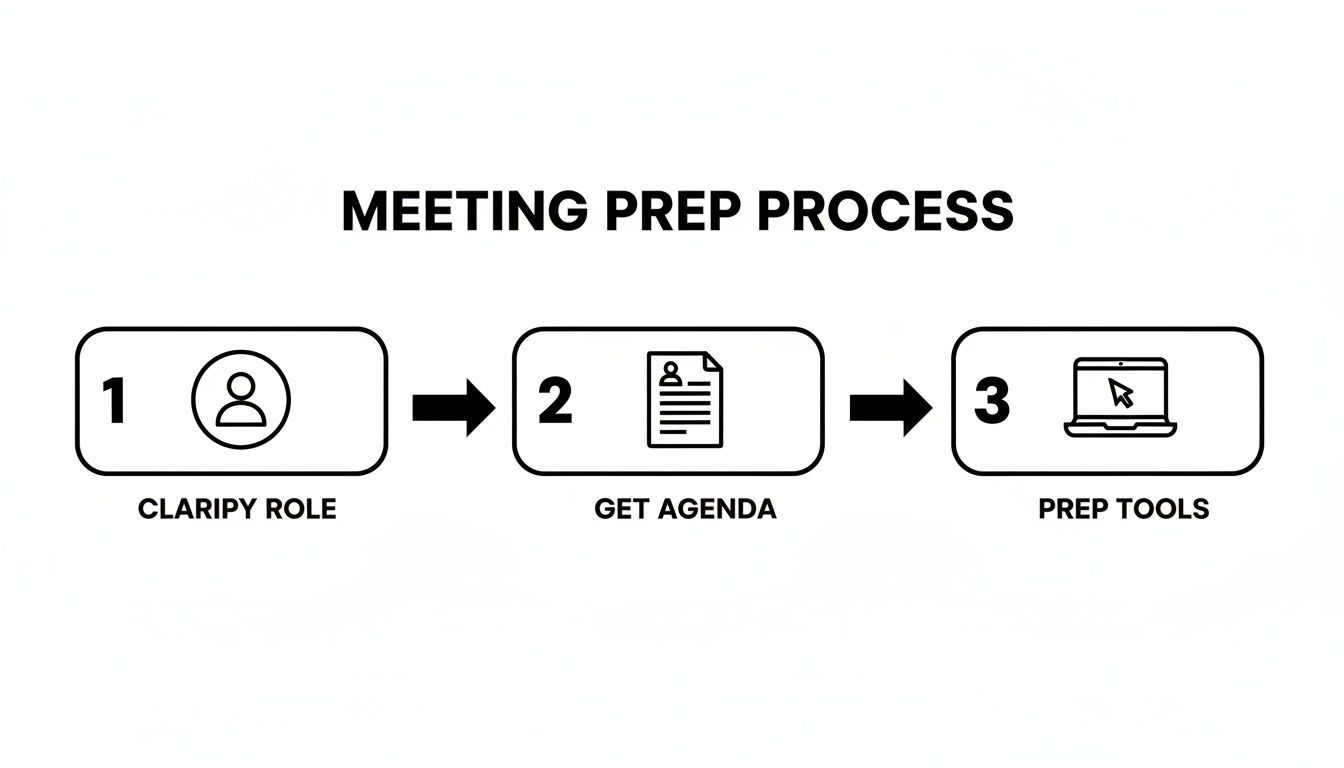
Es läuft auf drei Säulen hinaus: kennen Sie Ihre Rolle, erhalten Sie die Agenda und halten Sie Ihre Werkzeuge bereit.
Um sicherzustellen, dass Sie vollständig vorbereitet sind, gehen Sie diese schnelle Checkliste vor jeder Besprechung durch.
Wichtige Checkliste für die Vorbereitung vor der Protokollführung
Diese Tabelle fasst die wesentlichen Schritte vor der Besprechung zusammen, die Sie auf Erfolg vorbereiten.
| Vorbereitungsschritt | Warum er wichtig ist | Profi-Tipp |
|---|---|---|
| Rolle klären | Bestimmt den erforderlichen Detaillierungsgrad (Zusammenfassung vs. wörtlich). | Fragen Sie den Organisator: "Was ist der Hauptzweck dieser Protokolle? Rechenschaftspflicht, Archivierung oder allgemeine Informationen?" |
| Agenda erhalten | Bietet eine vorgefertigte Struktur für Ihre Notizen und hilft Ihnen, Themen zu antizipieren. | Wenn Sie mindestens 24 Stunden im Voraus keine Agenda erhalten, fordern Sie sie höflich an. |
| Vorlage vorbereiten | Spart Ihnen das hektische Formatieren von Notizen während der Besprechung. | Erstellen Sie eine einfache Vorlage mit Feldern für Teilnehmer, Datum und Agendapunkte. Halten Sie sie einfach. |
| Werkzeuge testen | Stellt sicher, dass Ihre Technik (Aufnahmesoftware, Laptop) einwandfrei funktioniert und technische Störungen vermieden werden. | Machen Sie eine schnelle 30-Sekunden-Testaufnahme, um die Audioqualität und die Softwarefunktionalität zu überprüfen. |
Wenn Sie diese einfachen Schritte befolgen, entfällt das Rätselraten, und Sie können sich ganz auf das Gespräch konzentrieren.
Vorbereitung vervielfacht Genauigkeit
Die meisten Fehler im Besprechungsprotokoll passieren nicht während der Besprechung – sie entstehen durch schlechte Vorbereitung. Eine klare Rolle, eine Agenda und eine Vorlage eliminieren 80 % der Verwirrung, bevor überhaupt jemand spricht. Wenn die Einrichtung stimmt, wird das Notieren mühelos.
Wählen Sie Ihre Werkzeuge mit Bedacht
Nachdem Ihre Rolle und Agenda geklärt sind, ist Ihr Werkzeugkasten das letzte Puzzleteil. Das kann ein klassischer Stift und Notizblock sein, ein Laptop mit einer vorgefertigten Vorlage oder ein modernes KI-Transkriptionstool. Viele Teams schauen sich jetzt an, wie sie KI zur Besprechungstranskription nutzen, was den Protokollanten entlastet, damit er sich darauf konzentrieren kann, den Kontext und die Nuancen zu erfassen, anstatt nur die Worte.
Das eigentliche Ziel der Vorbereitung ist es, Reibungsverluste während der Besprechung zu eliminieren. Wenn Ihre Vorlage geöffnet ist, Ihr Aufnahmegerät getestet wurde und die Agenda vor Ihnen liegt, können Sie vom hektischen Tippen zum aktiven Zuhören wechseln.
🎯 Kern-Transkriptionsfähigkeiten
Modernste KI
Angetrieben von OpenAIs Whisper für branchenführende Genauigkeit. Unterstützung für benutzerdefinierte Vokabulare, bis zu 10 Stunden lange Dateien und ultraschnelle Ergebnisse.

Aus mehreren Quellen importieren
Importiere Audio- und Videodateien aus verschiedenen Quellen, einschließlich direktem Upload, Google Drive, Dropbox, URLs, Zoom und mehr.

In mehreren Formaten exportieren
Exportiere deine Transkripte in mehreren Formaten, einschließlich TXT, DOCX, PDF, SRT und VTT mit anpassbaren Formatierungsoptionen.
Diese Bereitschaft stellt sicher, dass Sie nicht nur ein Protokollführer, sondern ein strategischer Gewinn für den Erfolg des Meetings sind. Für einen tieferen Einblick in die Mechanik ist dieser praktische Leitfaden zur Beherrschung von Meeting-Protokollen eine fantastische Ressource.
Erfassung wichtiger Informationen während des Meetings
Sobald das Meeting beginnt, muss sich Ihre Denkweise vom Vorbereitungsmodus auf die aktive Erfassung umstellen. Ihre Aufgabe ist es nicht, jedes einzelne Wort aufzuschreiben – dafür gibt es Aufzeichnungen und Transkriptionen. Ihr wirklicher Wert liegt darin, das Rauschen zu durchdringen und zu identifizieren, was wirklich wichtig ist.
Hier wird aktives Zuhören zu Ihrer Superkraft. Sie hören nicht nur Worte; Sie hören auf die Absicht, auf Schlussfolgerungen. Trainieren Sie Ihr Gehör für Signalwörter, die einen Übergang von der Diskussion zur Entscheidung signalisieren, wie z. B. „Also, wir haben uns darauf geeinigt, dass…“ oder „Die Aufgabe hier ist…“. Das sind Ihre Hinweise, mit dem Tippen zu beginnen.
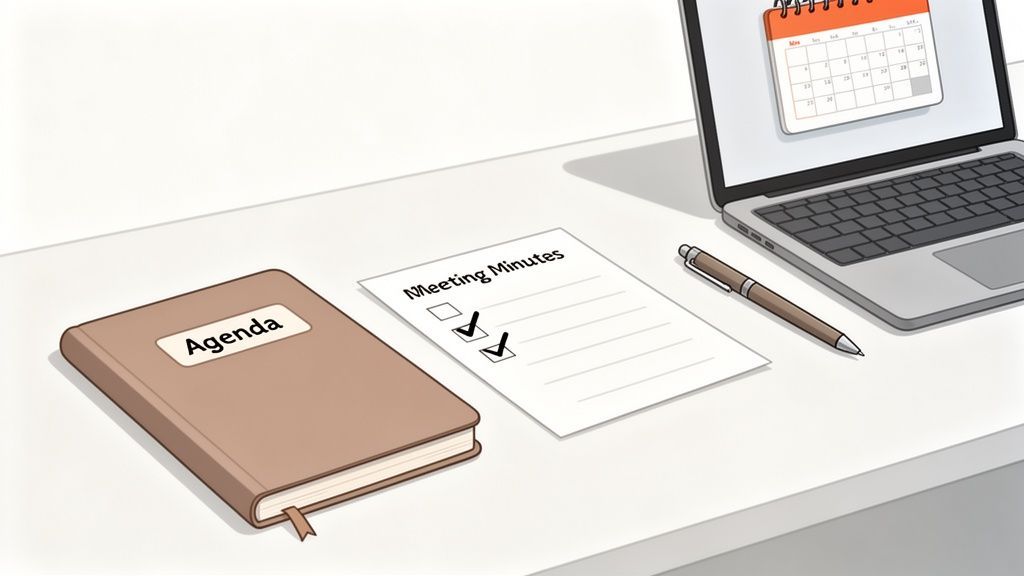
Denken Sie an eine langwierige Debatte über einen Projektzeitplan. Ihre Rolle ist es nicht, jedes Argument hin und her zu dokumentieren. Stattdessen erfassen Sie das Endergebnis: „Entscheidung: Projektfrist bis zum 31. Oktober verlängert, um mehr QA-Tests zu ermöglichen.“ Sie haben das Was und das Warum erfasst, was alles ist, was jemand braucht.
Ein praktischer Rahmen für die Notiznahme
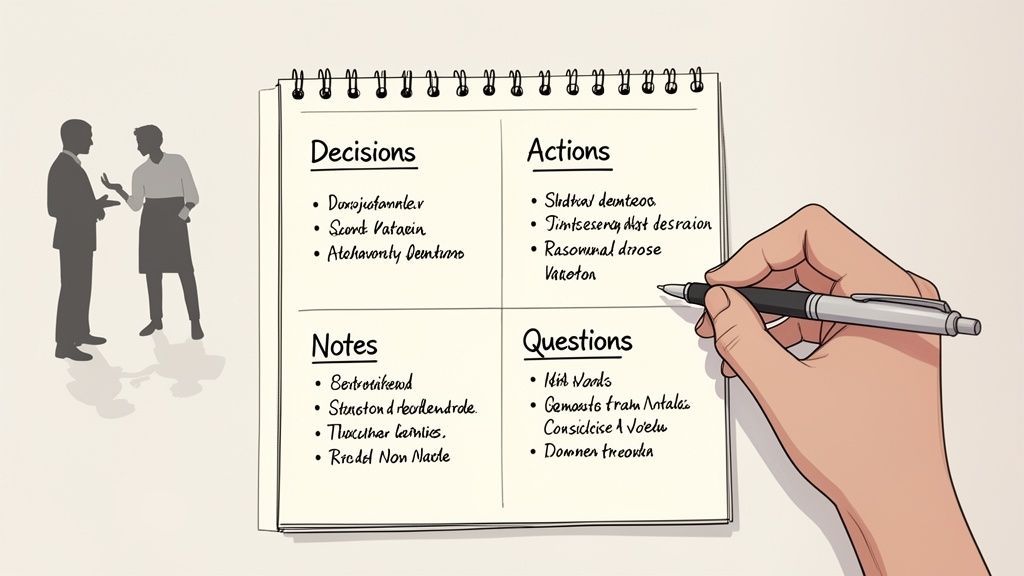
Ohne ein System einzusteigen, ist ein Rezept für ein chaotisches, unbrauchbares Dokument. Eine der effektivsten Methoden, die ich gefunden habe, ist die Quadrantentechnik. Sie ist einfach: Teilen Sie Ihre Seite oder Ihr Dokument einfach in vier Abschnitte auf.
Dieser kleine Trick zwingt Sie, Informationen zu kategorisieren, während Sie sie hören, was die Bereinigung Ihrer Notizen danach so viel einfacher macht. Es verwandelt einen unordentlichen Bewusstseinsstrom in organisierte, nützliche Daten.
- Entscheidungen: Hier werden endgültige Vereinbarungen und Beschlüsse festgehalten. Seien Sie spezifisch.
- Aufgaben: Wer macht was und bis wann? Dies ist Ihr Verantwortlichkeits-Tracker.
- Allgemeine Notizen: Erfassen Sie wichtige Diskussionspunkte, wichtigen Kontext oder Statistiken, die eine Entscheidung beeinflusst haben.
- Fragen: Notieren Sie alle ungelösten Probleme oder Themen, die später nachverfolgt werden müssen.
Diese Struktur ist ein Game-Changer. Zum Beispiel sagt der Marketingleiter: „Ich werde Ihnen die endgültige Werbeanzeige bis Freitag zukommen lassen.“ Das kommt direkt in das Quadrant „Aufgaben“: AI: Sarah liefert die endgültige Werbeanzeige bis Freitagabend. Das Sortieren im laufenden Betrieb spart eine Menge Zeit.
Warum die meisten Protokolle scheitern?
Alles aufschreiben
Der Versuch, jedes Wort festzuhalten, verlangsamt Sie und begräbt die wichtigen Entscheidungen im Rauschen.
Keine klaren Verantwortlichen
Aufgaben ohne zugewiesene Namen verschwinden nach Ende der Besprechung leise.
Verzögerte Verteilung
Das Versenden von Notizen Tage später tötet die Dynamik und reduziert die Verantwortlichkeit.
Unordentliche Formatierung
Dichte Absätze machen Protokolle unleserlich, sodass Teammitglieder sie einfach ignorieren.
Ein klassischer Fehler ist der Versuch, zu viel festzuhalten. Gute Protokolle sind eine Zusammenfassung der Ergebnisse, keine Novelle über das Gespräch. Ihr Ziel ist eine Aufzeichnung, die schnell erfassbar, nützlich ist und Handlungen vorantreibt.
Mit dem Gespräch Schritt halten
Besprechungen können in rasantem Tempo ablaufen, und es ist überraschend einfach, den Anschluss zu verlieren. Ein persönliches Kurzschriftsystem ist Ihr bester Freund, um Schritt zu halten, ohne an Genauigkeit zu verlieren. Es muss nicht kompliziert sein – Konsistenz zählt wirklich.
Hier sind ein paar einfache Symbole, die Sie sofort verwenden können:
- [ ] - Ein leeres Feld für eine Aufgabe.
- E: - Eine schnelle Kennzeichnung für eine endgültige Entscheidung.
- ? - Markiert eine Frage oder einen ungelösten Punkt.
- @ - Verwenden Sie es vor einem Namen, um die Verantwortung zuzuweisen (@Sarah).
Die Kombination dieser Techniken ist, wo die Magie passiert. Die Quadrantenmethode gibt Ihnen Struktur, aktives Zuhören sagt Ihnen, was Sie schreiben sollen, und Kurzschrift gibt Ihnen die Geschwindigkeit, alles festzuhalten. Dieser Dreifachansatz stellt sicher, dass Ihre Rohnotizen klar, organisiert und bereit sind, zu einem offiziellen Protokoll poliert zu werden, das die Leute tatsächlich verwenden werden.
KI für schnellere und genauere Protokolle nutzen
Seien wir ehrlich, das Führen von Protokollen kann sich wie eine undankbare Aufgabe mit hohem Druck anfühlen. Sie versuchen, zuzuhören, zu tippen und eine sich schnell entwickelnde Konversation gleichzeitig zu verstehen. Aber was wäre, wenn Sie automatisch ein perfektes, wortwörtliches Transkript erstellen lassen könnten?
Hier kommen KI-Tools ins Spiel und verwandeln einen hektischen manuellen Prozess in einen überraschend einfachen Arbeitsablauf.
Die Art und Weise, wie Teams Protokolle führen, hat sich geändert
Manuelles Tippen wird schnell durch automatisierte Transkription ersetzt. Moderne Teams erwarten durchsuchbare Aufzeichnungen und sofortige Dokumentation. KI wird zum Standard, nicht zum Upgrade.
Der Bedarf an einem besseren System ist offensichtlich, wenn man sich die Zahlen ansieht. Führungskräfte verbringen inzwischen fast 23 Stunden pro Woche in Besprechungen, ein enormer Anstieg gegenüber nur 10 Stunden in den 1960er Jahren. Bei 36 bis 56 Millionen täglich stattfindenden Besprechungen in den USA summieren sich die Ineffizienzen zu einem erschreckenden Verlust von 37 Milliarden US-Dollar. KI ist einer der direktesten Wege, um diese Produktivität zurückzugewinnen.
Wie KI den Protokollierungsprozess verändert
Moderne KI-Transkription ist nicht nur eine Textwand. Es ist ein intelligentes, strukturiertes Dokument, das die größten Kopfschmerzen bei der Protokollierung sofort löst. Denken Sie an Sprecherbezeichnungen, Zeitstempel und nahezu perfekte Genauigkeit.
Stellen Sie sich einen hektischen Projekt-Kick-off mit Designern, Ingenieuren und einem Kunden vor, die alle zu Wort kommen. Ein KI-Transkript macht aus dem Chaos Sinn:
- Wortgenaue Genauigkeit: Jede einzelne Idee, jeder Einwand und jede Entscheidung wird präzise erfasst. Nichts geht verloren.
- Sprechererkennung: Das Transkript kennzeichnet automatisch, wer was gesagt hat, sodass keine Verwirrung darüber besteht, woher ein bestimmter Kommentar stammt.
- Zeitgestempelte Aufzeichnungen: Müssen Sie den Ton oder den Kontext einer Bemerkung noch einmal überprüfen? Zeitstempel ermöglichen es Ihnen, per Klick direkt zu diesem Moment in der Aufnahme zu springen.
Dieses detaillierte Protokoll wird zum Rohmaterial für die Erstellung perfekter Protokolle. Es ist besonders wirkungsvoll, wenn die anfängliche Einrichtung stimmt, wie z. B. die ordnungsgemäße Konfiguration von Speech-to-Text, um Ihre spezifischen Besprechungsaufnahmen zu verarbeiten.
Die wahre Magie der KI liegt nicht nur in der Transkription. Es geht darum, ein langes, verschlungenes Gespräch in ein prägnantes, umsetzbares Protokoll zu verwandeln. Sie hören auf, ein einfacher Aufzeichner zu sein, und werden zum Strategen.
Mit einem sauberen, nach Sprecher und Zeit geordneten Transkript wird das Herausziehen der wichtigsten Informationen fast mühelos.
⚡ Produktivitätsfunktionen

Sprechererkennung
Identifiziere automatisch verschiedene Sprecher in deinen Aufnahmen und beschrifte sie mit ihren Namen.

Bearbeitungswerkzeuge
Bearbeite Transkripte mit leistungsstarken Werkzeugen wie Suchen und Ersetzen, Sprecherzuordnung, Rich-Text-Formate und Hervorhebungen.
Zusammenfassungen und Chatbot
Erstelle Zusammenfassungen und andere Erkenntnisse aus deinem Transkript, wiederverwendbare benutzerdefinierte Prompts und Chatbot für deine Inhalte.
Von Transkript zu umsetzbaren Erkenntnissen
Das Roh-Transkript ist nur Ihr Ausgangspunkt. Der eigentliche Zeitsparer ist das, was Sie damit tun können. Nachdem Sie Ihre Besprechungsaufzeichnung hochgeladen haben, kann KI das gesamte Gespräch analysieren und die wichtigsten Punkte für Sie herausziehen.
Was früher eine Stunde Lesen und Organisieren kostete, dauert jetzt Sekunden. Anstatt Seiten von Notizen zu durchforsten, können Sie die KI automatisch Folgendes tun lassen:
- Eine prägnante Zusammenfassung generieren: Erhalten Sie einen schnellen Überblick über die Ziele und wichtigsten Ergebnisse des Meetings.
- Wichtige Aktionspunkte extrahieren: Die KI identifiziert, wer wofür verantwortlich ist, und schlägt oft Fristen basierend auf dem Gesagten vor.
- Thematische Mindmaps erstellen: Erhalten Sie eine visuelle Aufschlüsselung der Hauptthemen und ihrer Zusammenhänge.
Dies gibt Ihnen die Freiheit, sich auf das zu konzentrieren, was Menschen am besten können – sicherzustellen, dass das endgültige Protokoll den Geist und die Absicht der Diskussion genau widerspiegelt. Wie Sie diese Funktionen nutzen können, erfahren Sie in unserer offiziellen Transcript.LOL-Dokumentation. Indem Sie die KI die Transkription und Zusammenfassung übernehmen lassen, erhalten Sie Genauigkeit und Ihre Zeit zurück.
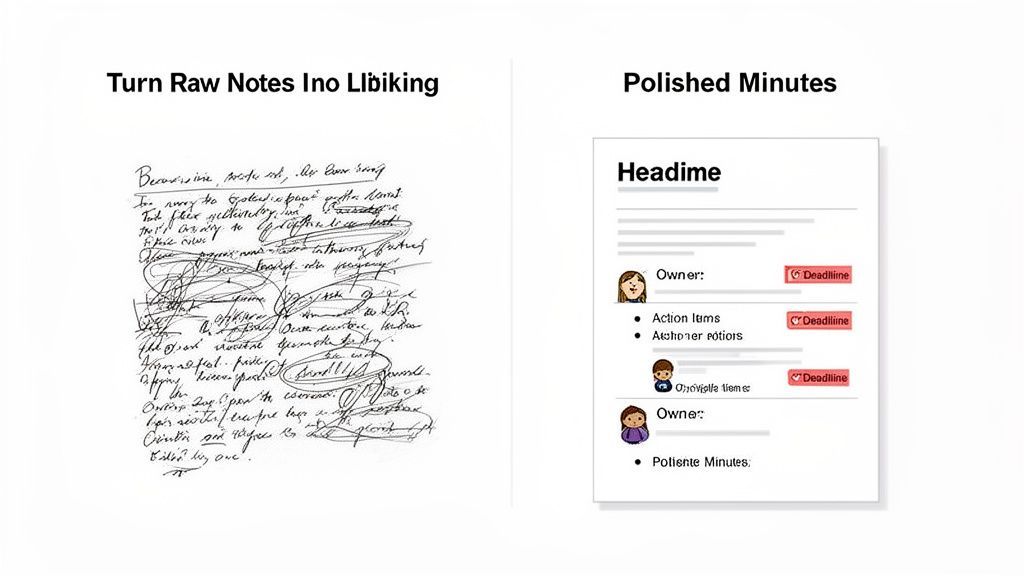
Sobald das Meeting beendet ist, beginnt die eigentliche Arbeit. Hier werden Ihre unordentlichen Kritzeleien oder ein sauberes KI-Transkript in ein poliertes Dokument verwandelt, das wirklich etwas bewirkt. Mein bester Rat? Machen Sie sich sofort daran, solange die Unterhaltung noch frisch ist.
Das Ziel ist nicht, einen Roman zu schreiben. Es geht darum, eine möglicherweise lange, verschlungene Diskussion in eine knappe Zusammenfassung zu destillieren, die die Zeit aller respektiert. Betrachten Sie das endgültige Dokument als Werkzeug für die Aktion, nicht als historisches Artefakt, das dazu bestimmt ist, in einem gemeinsam genutzten Laufwerk vergraben zu werden.
Mit der Explosion der Fernarbeit war diese Fähigkeit noch nie so entscheidend. Zwischen 2020 und 2022 stiegen virtuelle Besprechungen von 48 % auf 77 % aller Geschäftstreffen. Allein im Jahr 2023 veranstaltete Zoom beeindruckende 3,3 Billionen Besprechungsminuten. Für heutige verteilte Teams sind klare, prägnante Protokolle der Kitt, der alles zusammenhält. Mehr solche Trends finden Sie in diesem detaillierten Bericht über Besprechungsgewohnheiten.
Strukturieren Sie Ihr Protokoll für Klarheit
Das Erste, was ich beim Bearbeiten tue, ist, den Notizen eine klare, übersichtliche Struktur zu geben. Verzichten Sie auf dichte Absätze. Verwenden Sie Formatierungen, um die wichtigsten Erkenntnisse unübersehbar zu machen. Ihr zukünftiges Ich – und Ihr gesamtes Team – werden es Ihnen danken.
Überkomplizieren Sie das Dokument nicht
Lange Absätze und unnötige Details erschweren die Nutzung von Protokollen. Wenn jemand sie nicht in unter einer Minute scannen kann, ist sie zu lang. Klarheit schlägt Vollständigkeit jedes Mal.
Ich verwende gerne einfache, beschreibende Überschriften für jeden Tagesordnungspunkt. Darunter verlasse ich mich stark auf Aufzählungspunkte und Fettdruck, um den Blick direkt auf das Wesentliche zu lenken.
Dieser Ansatz bedeutet, dass jeder die Kernaussagen des gesamten Meetings in weniger als zwei Minuten erfassen kann. Die gesamte Struktur sollte auf drei Dingen aufgebaut sein:
- Getroffene Entscheidungen: Worauf haben wir uns geeinigt?
- Zugewiesene Aufgaben: Wer macht was und bis wann?
- Wichtige Diskussionspunkte: Was war der wesentliche Kontext hinter den Entscheidungen?
Das Kennzeichen guter Besprechungsprotokolle sind Klarheit und Kürze. Wenn ein Stakeholder die wichtigsten Ergebnisse nicht in 60 Sekunden erfassen kann, ist das Dokument gescheitert. Ihre Aufgabe ist es, Gespräche in Handlungen zu übersetzen, nicht nur aufzuzeichnen.
Notizen in Aktionspunkte umwandeln
Das ist der Teil, der echte Verantwortlichkeit schafft. Ich gehe meine Notizen oder das Transkript mit einem Ziel durch: Finde jede einzelne Aufgabe, die zugewiesen wurde. Für jede einzelne müssen Sie drei wichtige Informationen festhalten.
Zum Beispiel ist eine rohe Notiz wie "Frank wird die Q3-Budgetzahlen prüfen" viel zu vage. Sie lässt zu viel Raum für Interpretationen.
Ein richtig ausgearbeiteter Aktionspunkt ist eine ganz andere Sache:
- Aktionspunkt: Frank soll den vorläufigen Q3-Budgetbericht analysieren und wesentliche Abweichungen identifizieren.
- Verantwortlicher: Frank Miller
- Frist: Ende des Tages, Freitag, 25. Oktober
Sehen Sie den Unterschied? Dieses Detail beseitigt jede Mehrdeutigkeit. Es schafft eine konkrete Aufzeichnung, die direkt in ein Projektmanagement-Tool wie Asana oder Trello übernommen werden kann, um sicherzustellen, dass die in der Besprechung getroffenen Entscheidungen tatsächlich zu Fortschritten führen. So verwandeln Sie eine einfache Aufzeichnung in ein Kraftpaket für die Teamproduktivität.
Verteilung von Protokollen zur Förderung der Verantwortlichkeit
Seien wir ehrlich: Selbst perfekt ausgearbeitete Besprechungsprotokolle sind nutzlos, wenn sie nur digitalen Staub in einem vergessenen Ordner sammeln. Die wahre Magie geschieht, nachdem Sie mit dem Schreiben fertig sind. Der letzte Schritt besteht darin, sicherzustellen, dass diese Notizen tatsächlich zu Handlungen führen. Hier verwandelt sich Ihre sorgfältige Dokumentation in ein mächtiges Werkzeug für die Verantwortlichkeit.
Wenn Sie sich eines merken, dann dies: Geschwindigkeit ist alles. Sie müssen die Protokolle innerhalb von 24 Stunden nach Ende der Besprechung versenden. Dieses Zeitfenster ist entscheidend. Der Kontext ist noch frisch im Gedächtnis aller, und Sie haben das Momentum der Diskussion nicht verloren.
Auswahl der richtigen Vertriebskanäle
Wie Sie die Protokolle teilen, ist genauso wichtig wie wann. Sicher, Sie können einfach eine E-Mail mit einem Dokument versenden und es dabei belassen, aber das ist eine verpasste Gelegenheit. Die Integration der Protokolle direkt in den Workflow Ihres Teams ist ein viel klügerer Schachzug. Wenn Sie sie an einem zentralen, durchsuchbaren Ort speichern, werden sie zu einer lebendigen Wissensbasis für das gesamte Unternehmen.
Denken Sie über E-Mail hinaus. Hier sind einige Kanäle, die tatsächlich funktionieren:
- Projektmanagement-Tools: Fügen Sie die Protokolle direkt in den relevanten Projektkanal in Slack, Asana oder Trello ein. So sind die Informationen genau dort, wo die Arbeit stattfindet.
- Gemeinsame Laufwerke: Speichern Sie das endgültige Dokument in einem klar benannten Ordner auf Google Drive oder OneDrive. Eine konsistente Benennungskonvention wie "ProjektName_Besprechungsprotokoll_JJJJ-MM-TT" erleichtert das spätere Auffinden.
- Team-Wikis: Für wichtige Entscheidungen oder Prozessänderungen fügen Sie die wichtigsten Erkenntnisse in das Confluence oder Notion Ihres Unternehmens ein. Dies festigt sie als Teil der offiziellen Aufzeichnung.
Ihr Ziel ist es nicht nur zu informieren. Es ist, Verantwortlichkeit direkt in die Kultur des Teams einzubauen. Das Speichern von Protokollen an einem Ort, an dem sie leicht nachgeschlagen werden können, sendet eine klare Botschaft: Was wir in Besprechungen vereinbaren, soll auch erledigt werden.
Was großartige Protokolle tatsächlich liefern
Schnellere Nachverfolgungen
Teammitglieder beginnen sofort mit Aufgaben, da die Erwartungen kristallklar sind.
Weniger wiederholte Besprechungen
Entscheidungen werden dokumentiert, sodass Sie keine Zeit mit der erneuten Diskussion derselben Themen verschwenden.
Stärkere Verantwortlichkeit
Jeder weiß genau, was er zu verantworten hat und wann es fällig ist.
Durchsuchbares Wissen
Vergangene Besprechungen werden zu einer Referenzbibliothek statt zu vergessenen Gesprächen.
Das ist ein überraschend häufiges Problem. Eine aktuelle Umfrage ergab, dass zwar 86 % der Menschen Besprechungsprotokolle erhalten, aber nur 54 % das Gefühl haben, dass die Aktionspunkte auch wirklich nachverfolgt werden. Diese Lücke zu schließen, ist der Beweis dafür, dass Sie es richtig machen. Um zu sehen, wie andere Teams dieses Problem angehen, finden Sie hier eine Fülle von Ideen in diesen Kundenrezensionen zu Transkriptionstools.
Erstellung einer Nachverfolgung, die zum Handeln anregt
Das letzte Puzzleteil ist die Nachricht, die Sie mit den Protokollen versenden. Bitte hängen Sie nicht einfach eine Datei an und klicken Sie auf "Senden". Das ist ein Rezept für Untätigkeit. Sie müssen die kritischsten Informationen – die Aktionspunkte – in den Vordergrund rücken.
Hier ist ein einfaches, aber unglaublich effektives Format für Ihre Nachfass-E-Mail:
- Kurze Zusammenfassung: Beginnen Sie mit ein oder zwei Sätzen, die direkt zum Hauptergebnis des Meetings kommen.
- Link zur vollständigen Geschichte: Geben Sie einen klaren Link zum vollständigen Dokument an seinem gemeinsamen Speicherort an.
- Aktionspunkt-Spotlight: Dies ist der wichtigste Teil. Erstellen Sie eine übersichtliche Tabelle oder eine Aufzählung, die jeden Aktionspunkt, dessen Verantwortlichen und das Fälligkeitsdatum hervorhebt.
Dieser Ansatz macht es unmöglich, dass jemand behauptet, er habe seine Verantwortlichkeiten verpasst. Er schließt die Schleife offiziell und verwandelt Ihr Meeting von einer weiteren Diskussion in einen echten Fortschrittskatalysator.
Häufig gestellte Fragen zur Protokollführung
Selbst die erfahrensten Protokollanten geraten in knifflige Situationen. Wenn Sie in der Verantwortung stehen, tauchen immer wieder einige häufige Fragen auf. Wenn Sie diese im Voraus klären, kann das den Unterschied zwischen einer prägnanten, nützlichen Aufzeichnung und einem Dokument ausmachen, das nur mehr Verwirrung stiftet.
Lassen Sie uns einige der häufigsten Fragen angehen.
Wie viele Details sollte ich einbeziehen?
Das ist die Millionen-Dollar-Frage, und die ehrliche Antwort lautet: Es hängt ganz vom Zweck des Meetings ab. Hier gibt es keine Einheitslösung.
Für ein formelles Vorstandstreffen oder alles mit rechtlichen Auswirkungen benötigen Sie eine sehr detaillierte Aufzeichnung, die Anträge, Gegenanträge und endgültige Abstimmungen festhält. Auf der anderen Seite benötigt ein schnelles tägliches Stand-up wahrscheinlich nur eine kurze Aufzählung von Entscheidungen und Aktionspunkten.
Der beste Weg ist immer, die Erwartungen im Voraus mit dem Meeting-Organisator zu klären. Eine einfache Frage wie: "Suchen Sie nach einer allgemeinen Zusammenfassung oder etwas Detaillierteres?" wird Sie auf den richtigen Weg bringen.
Als Faustregel gilt: Halten Sie immer jede endgültige Entscheidung, jeden Aktionspunkt (mit wem, was und wann) und die Hauptthemen fest, die besprochen wurden. Sie können den gesprächigen Füllstoff, Insider-Witze oder Nebenthemen, die nicht zu einem Ergebnis führten, sicher weglassen.
Wie gehe ich mit Meinungsverschiedenheiten oder vertraulichen Themen um?
Die Navigation in sensiblen Bereichen ist, wo ein guter Protokollant wirklich glänzt. Wenn Meinungsverschiedenheiten auftreten, ist es Ihre Aufgabe, völlig objektiv zu bleiben. Konzentrieren Sie sich auf die Fakten der unterschiedlichen Standpunkte, nicht auf die emotionale Sprache oder persönliche Sticheleien.
Anstatt zum Beispiel zu schreiben: "Team A wurde sehr hitzig und hat die Idee von Team B abgewiesen", würden Sie einfach die Fakten darlegen: "Die Diskussion umfasste zwei Vorschläge für die Marketingkampagne im 4. Quartal. Vorschlag A konzentrierte sich auf digitale Anzeigen, während Vorschlag B die Influencer-Reichweite priorisierte. Der Vorstand genehmigte Vorschlag A."
Bei vertraulichen Themen ist die Richtlinie Ihres Unternehmens Ihr Leitstern. Manchmal bedeutet dies, dass Sie nur vermerken, dass ein sensibles Thema besprochen wurde und eine Entscheidung getroffen wurde, ohne auf die Einzelheiten in den allgemeinen Protokollen einzugehen. In bestimmten Fällen kann ein separater, vertraulicher Nachtrag erforderlich sein.
Im Zweifelsfall sollten Sie sich immer an den Sitzungsleiter wenden, um Rat zu erhalten. Detailliertere Antworten für spezifische Szenarien finden Sie in diesen FAQs zur Protokollführung.
Kann KI einen menschlichen Protokollanten vollständig ersetzen?
Das ist die große Frage, die sich jeder stellt, und die Antwort lautet ein klares "Nein". KI-Tools sind brillant darin, eine perfekte, wortwörtliche Aufzeichnung dessen zu erstellen, wer was gesagt hat – eine Aufgabe, die für einen Menschen in Echtzeit fast unmöglich zu bewältigen ist. Sie erledigen die mühsame Arbeit der Transkription fehlerfrei.
Aber ein Mensch ist immer noch unerlässlich, um den Kontext zu verstehen, den die KI übersieht. Wir sind hervorragend darin, unausgesprochene Übereinstimmung zu erkennen, die strategische Absicht hinter einer Entscheidung zu interpretieren und das Rauschen herauszufiltern, um das eigentliche Signal zu finden.
Der leistungsfähigste Ansatz ist eine Partnerschaft:
- Lassen Sie die KI die Transkription übernehmen. Dies garantiert 100 % Genauigkeit und entlastet den Menschen von dem Versuch, jedes Wort hektisch mitzuschreiben.
- Lassen Sie den Menschen den Kontext übernehmen. Der Protokollant kann sich dann darauf konzentrieren, zu beobachten, wichtige Erkenntnisse zu identifizieren und sicherzustellen, dass die endgültigen Notizen den Geist und die Absicht des Meetings widerspiegeln, nicht nur die gesprochenen Worte.
Bereit, Ihre Protokollführung mit der Kraft der KI zu verbessern? Transcript.LOL erstellt in Sekundenschnelle perfekte, sprecherbeschriftete Transkripte, damit Sie sich darauf konzentrieren können, das Wesentliche festzuhalten. Probieren Sie Transcript.LOL noch heute kostenlos aus!