
So schreiben Sie eine effektive Zusammenfassung eines Meetings in wenigen Minuten
Erfahren Sie, wie Sie eine klare und prägnante Zusammenfassung eines Meetings schreiben. Unser Leitfaden behandelt umsetzbare Schritte für manuelle Notizen und KI-gestützte Tools, um Ihnen Zeit zu sparen.
Kate, Praveen
January 30, 2026
Eine gute Zusammenfassung eines Meetings ist mehr als nur Notizen. Es ist ein prägnantes, fokussiertes Dokument, das wichtige Entscheidungen festhält, die wichtigsten Diskussionspunkte hervorhebt und klare Aufgaben zuweist. Betrachten Sie es weniger als Transkript und mehr als strategisches Werkzeug, um lange nach dem Ende des Meetings Schwung aufzubauen.
Warum eine großartige Meeting-Zusammenfassung ein Produktivitätsmultiplikator ist
Meetings können der Motor des Fortschritts oder eine massive Belastung für die Unternehmensressourcen sein. Der entscheidende Faktor ist normalerweise, was passiert, nachdem alle den Raum verlassen haben. Eine gut ausgearbeitete Zusammenfassung ist die Geheimwaffe Ihres Teams, um Gespräche in greifbare Ergebnisse umzuwandeln.
Warum das wichtig ist
Meeting-Zusammenfassungen sind nicht nur Dokumentation – sie schützen Entscheidungen, verhindern Missverständnisse und halten alle auf dem gleichen Stand. Ohne eine klare Wiederholung verschwenden Teams Zeit mit wiederholten Diskussionen und der Behebung vermeidbarer Fehler. Eine starke Zusammenfassung hält den Schwung lange nach dem Ende des Meetings aufrecht.
Es geht darum, eine einzige Quelle der Wahrheit zu schaffen. Dieser einfache Schritt verhindert das allzu häufige Problem, dass jeder mit einer leicht abweichenden Vorstellung davon, was beschlossen wurde, nach Hause geht. Ohne eine klare Zusammenfassung fallen wichtige Aufgaben durchs Raster, Fristen werden verpasst und Sie müssen nächste Woche dieselben Themen wieder aufgreifen. Das ist ein echter Bremsklotz für den Schwung.
Die erschreckenden Kosten ineffektiver Besprechungen
Das Ausmaß dieses Problems ist wirklich gewaltig. Allein in den USA finden täglich irgendwo zwischen 36 und 56 Millionen Besprechungen statt. Die ineffektiven kosten jährlich satte 37 Milliarden US-Dollar an verlorener Produktivität.
Führungskräfte spüren diesen Schmerz am stärksten und verbringen fast 23 Stunden pro Woche in Besprechungen. Um die Sache noch schlimmer zu machen, blockieren 70 % dieser Sitzungen letztendlich andere produktive Arbeiten.
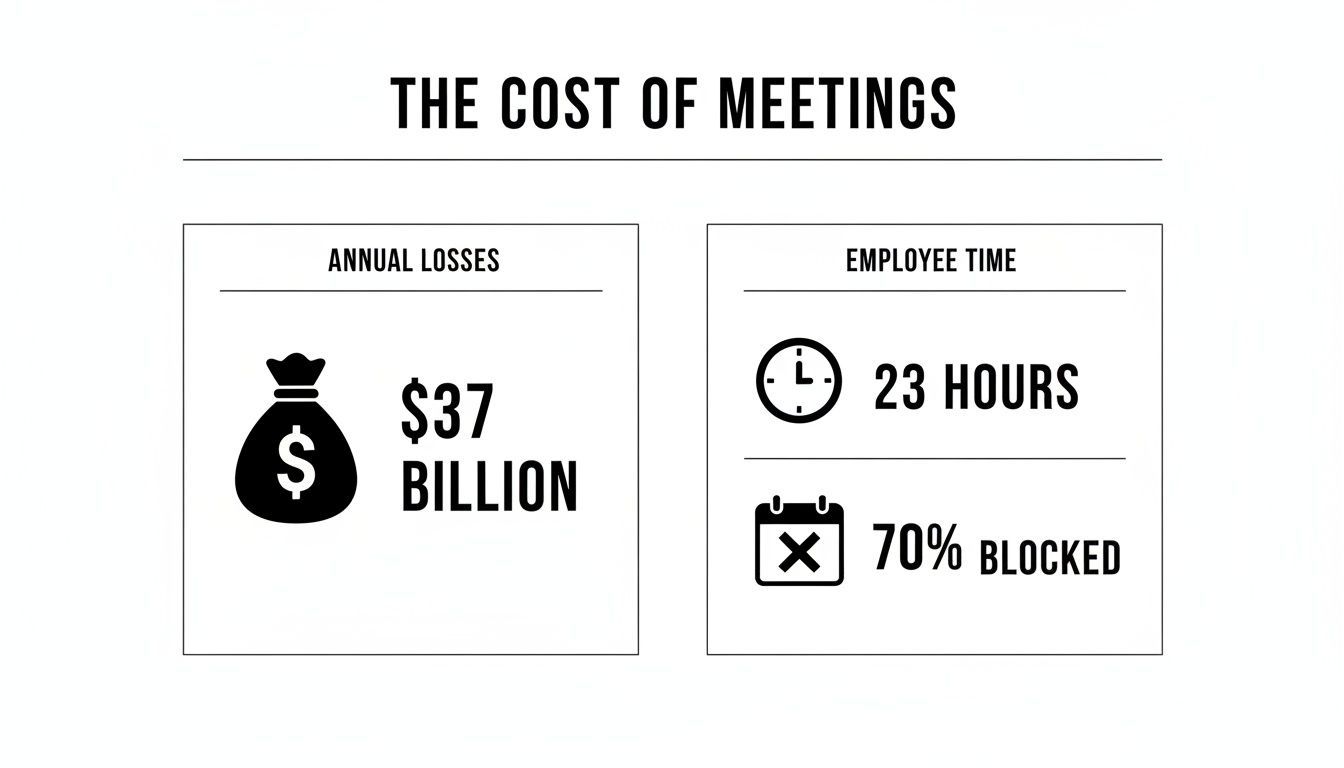
Das sind keine abstrakten Zahlen; sie unterstreichen, warum effiziente Nachfassaktionen nach Besprechungen kein bloßes "Nice-to-have" sind. Sie sind eine geschäftliche Notwendigkeit.
Gespräche in Handlungen umwandeln
Eine aussagekräftige Zusammenfassung verwandelt stundenlange Diskussionen in eine klare, umsetzbare Roadmap. Hier verändern moderne KI-Tools wirklich das Spiel und ermöglichen es, diese wesentlichen Dokumente im Handumdrehen zu erstellen.
Was eine großartige Meeting-Zusammenfassung liefert?
Klarheit
Eine starke Meeting-Zusammenfassung beseitigt Verwirrung, indem sie klar festhält, was besprochen wurde und welche Entscheidungen genau getroffen wurden. Jeder geht mit dem gleichen Verständnis davon, sodass kein Raum für gemischte Interpretationen oder spätere Nachfragen bleibt. Sie hält das gesamte Team von Anfang an auf dem gleichen Stand.
Verantwortlichkeit
Großartige Zusammenfassungen verwandeln Gespräche in Verantwortung, indem sie jeder Aufgabe einen bestimmten Verantwortlichen mit einer klaren Frist zuweisen. Nichts geht verloren oder wird zwischen Personen weitergegeben. Wenn die Zuständigkeit klar definiert ist, schreitet die Arbeit schneller voran und Aufgaben werden tatsächlich erledigt.
Zeitersparnis
Anstatt lange Aufzeichnungen erneut anzusehen oder ständig Teammitglieder nach Updates zu fragen, gibt Ihnen eine prägnante Zusammenfassung alles, was Sie brauchen, in wenigen Minuten. Wichtige Punkte sind leicht zu überfliegen und nachzuschlagen, was jeden Tag wertvolle Zeit spart. Diese kleinen Zeitersparnisse summieren sich schnell für das gesamte Team.
Suchbarkeit
Wenn Zusammenfassungen richtig gespeichert werden, werden vergangene Meetings zu einer durchsuchbaren Wissensdatenbank und nicht zu vergessenen Gesprächen. Sie können Entscheidungen, Aktionspunkte oder wichtige Diskussionen sofort finden, ohne in Dateien wühlen zu müssen. Mit der Zeit verwandelt sich Ihre Meeting-Historie in eine leistungsstarke Ressource anstelle von Unordnung.
Zum Beispiel kann ein Tool wie Transcript.LOL eine rohe Besprechungsaufzeichnung aufnehmen und Ihnen in Sekundenschnelle nicht nur eine genaue Transkription, sondern auch eine saubere Zusammenfassung, eine Liste von Aktionspunkten und alle wichtigen Entscheidungen liefern. Es ist ein Game-Changer, um verlorene Zeit zurückzugewinnen und Verantwortlichkeit durchzusetzen.
Durch die Automatisierung dieses Teils Ihres Workflows erstellen Sie eine verlässliche Aufzeichnung, legen fest, wer wofür verantwortlich ist, und halten den Schwung aufrecht. Wenn Sie tiefer eintauchen möchten, lesen Sie unseren Leitfaden, wie Sie mit intelligenteren Systemen die Produktivität Ihres Teams verbessern können: Wie Sie die Produktivität Ihres Teams verbessern können.
Die Kernkomponenten einer umsetzbaren Besprechungszusammenfassung
Seien wir ehrlich, nicht alle Besprechungszusammenfassungen sind gleich. Eine wirklich effektive Zusammenfassung einer Besprechung ist nicht nur eine Transkription dessen, wer was gesagt hat; sie ist ein strategisches Dokument, das darauf ausgelegt ist, die Arbeit voranzutreiben. Der gesamte Sinn besteht darin, das Rauschen herauszufiltern und nur die kritischen Informationen zu liefern, die vielbeschäftigte Menschen tatsächlich benötigen.
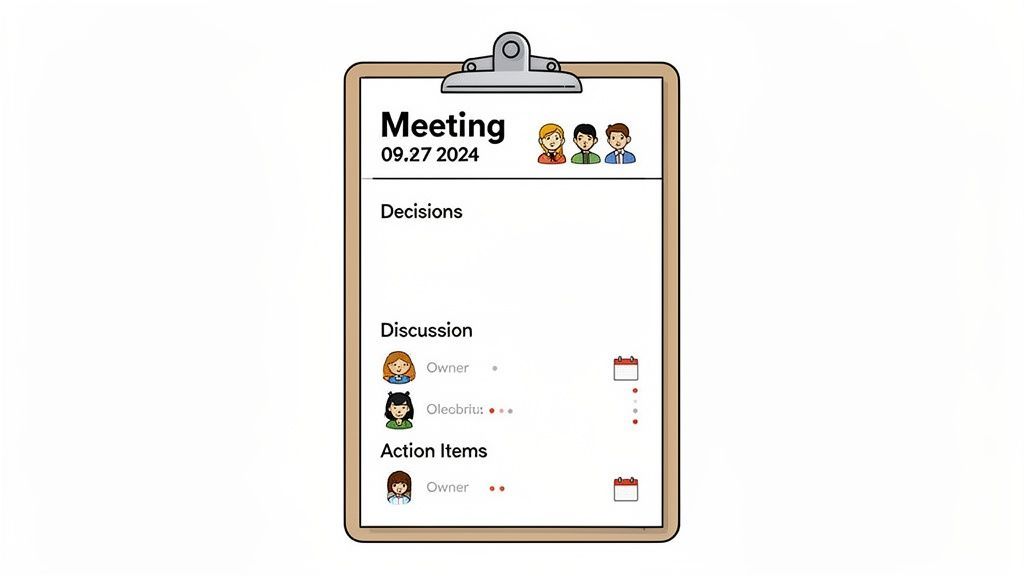
Betrachten Sie es als die Highlight-Reel der Besprechung. Während eine vollständige Aufzeichnung ihren Platz für tiefgehende Analysen hat, sollte die Zusammenfassung in weniger als fünf Minuten überflogen werden können. Dazu muss sie auf einigen Kernpfeilern aufgebaut sein, die tatsächlich Fortschritte ermöglichen.
Wichtige Entscheidungen und Diskussionspunkte
Zuerst die wichtigsten Dinge: Was haben wir eigentlich entschieden? Dies ist der wichtigste Teil. Wurde ein Budget genehmigt? Haben wir uns auf die Marketingstrategie für das dritte Quartal geeinigt? Nennen Sie jede endgültige Entscheidung klar und unmissverständlich. Dies bietet sofortige Klarheit für das gesamte Team.
Als Nächstes sollten Sie kurz auf die wichtigsten Diskussionspunkte eingehen, die zu diesen Entscheidungen geführt haben. Sie benötigen keine wortwörtliche Wiederholung der Debatte. Ziehen Sie stattdessen die Kernthemen, wichtige Daten, die geteilt wurden, oder signifikante Hürden heraus, die während des Gesprächs beseitigt wurden.
Das Ziel hier ist nicht, die gesamte Argumentation zu dokumentieren, sondern den Kontext hinter der endgültigen Entscheidung zu bewahren. Dies hilft Teammitgliedern, die nicht anwesend waren, das "Warum" zu verstehen, was entscheidend ist, um zu verhindern, dass das Team nächste Woche dieselben Themen erneut diskutiert.
Eine gute Zusammenfassung ist eine Checkliste dessen, was wirklich wichtig ist. Im Folgenden finden Sie die absoluten Essentials, die Sie für eine Zusammenfassung aufnehmen sollten, die die Leute tatsächlich lesen und darauf reagieren werden.
Kernkomponenten einer umsetzbaren Besprechungszusammenfassung
| Komponente | Warum sie entscheidend ist | Beispiel |
|---|---|---|
| Besprechungsgrundlagen | Bietet Kontext und erleichtert das spätere Auffinden. | Besprechung: Projekt-Kickoff Q3, Datum: 26. Okt. 2023, Teilnehmer: Jane D., Mark L., Sarah P. |
| Wichtige Entscheidungen | Das "Was nun" der Besprechung. Dies ist das Ergebnis. | Entscheidung: Das Projekt wird mit dem "Alpha"-Framework fortgesetzt. Budget von 15.000 $ genehmigt. |
| Aktionspunkte | Wandelt Diskussionen in konkrete, verantwortliche Aufgaben um. | Aktion: Mark erstellt bis Freitagabend den Entwurf des ersten Projektumfangs. |
| Nächste Schritte | Klärt, was unmittelbar nach Ende der Besprechung geschieht. | Nächste Schritte: Eine Folgebesprechung ist für den 2. November angesetzt, um den Entwurf des Umfangs zu überprüfen. |
Letztendlich ist eine Besprechungszusammenfassung, der klare Aktionen fehlen, nur Lärm. Hier verbinden Sie das Gespräch mit realer Verantwortlichkeit.
Klar zugewiesene Aktionspunkte
Dies ist der Teil, der Ihre Zusammenfassung von einer einfachen Aufzeichnung in ein leistungsstarkes Produktivitätswerkzeug verwandelt. Jede einzelne Aufgabe, die aus einer Besprechung hervorgeht, muss mit drei spezifischen Details dokumentiert werden. Wenn Sie eines davon verpassen, fallen Dinge durchs Raster.
- Die Aufgabe: Was genau muss getan werden? "Bericht fertigstellen" ist vage. "Q3-Verkaufsdaten in den endgültigen Projektbericht einarbeiten" ist spezifisch.
- Der Verantwortliche: Wer ist persönlich dafür verantwortlich, dass sie erledigt wird? Weisen Sie einen Namen zu, um Verwirrung zu vermeiden.
- Die Frist: Wann ist sie fällig? "Nächste Woche" ist ein Rezept für eine Katastrophe. "Freitag, 3. November, bis Geschäftsschluss" ist eine echte Frist.
Ohne diese drei Elemente werden Aufgaben zu vagen Vorschlägen, die leicht vergessen werden. Die Festlegung von Aktionspunkten ist ein nicht verhandelbarer Bestandteil jedes soliden Besprechungsprotokollformats und der wichtigste Faktor für die Aufrechterhaltung des Schwungs nach dem Anruf.
Häufiger Fehler
Vage Notizen wie „später nachfassen“ oder „jemand wird sich darum kümmern“ mögen harmlos erscheinen, aber sie zerstören heimlich die Produktivität. Wenn Zuständigkeit und Fristen nicht klar definiert sind, stocken Aufgaben, verschwindet die Verantwortlichkeit und nichts bewegt sich tatsächlich vorwärts. Jede Aktion, die aus einem Meeting hervorgeht, sollte eine verantwortliche Person und ein bestimmtes Datum haben, sonst wird sie wahrscheinlich vergessen.
Beherrschen der manuellen Zusammenfassung: Der traditionelle Ansatz
Bevor KI eine Besprechungszusammenfassung in Sekundenschnelle erstellen konnte, war die Fähigkeit, eine von Hand zu verfassen, eine unabdingbare Fähigkeit. Bei der altmodischen Methode geht es nicht darum, jedes Wort zu transkribieren; es ist eine Kunstform, die auf scharfem Zuhören und einem klaren System beruht, um das Wesentliche zu erfassen.
Dieser Prozess beginnt in dem Moment, in dem die Besprechung beginnt. Anstatt alles Gesagte hektisch zu tippen, müssen Sie Ihre Ohren auf die wichtigen Dinge einstellen. Achten Sie auf Schlüsselphrasen wie: „Okay, die Entscheidung ist also…“ oder „Der nächste Schritt hier wird sein…“. Das sind Ihre Hinweise. Viele Leute schwören auf ein einfaches Zwei-Spalten-System auf einem Notizblock: eine Spalte für allgemeine Diskussionspunkte, die andere ausschließlich für Entscheidungen und Aktionspunkte.
Strukturieren Sie Ihre Notizen für Klarheit
Sobald die Besprechung beendet ist, beginnt die eigentliche Arbeit. Das Ziel ist es, Ihre unordentlichen, rohen Notizen in eine saubere, kohärente Zusammenfassung zu formen, während die Details noch frisch in Ihrem Gedächtnis sind. Listen Sie nicht einfach nur die besprochenen Themen auf – das ist ein häufiger Fehler. Gruppieren Sie stattdessen Ihre Notizen in logische Kategorien.
Eine einfache, bewährte Struktur sieht so aus:
- Getroffene Entscheidungen: Eine schnelle, stichpunktartige Liste jeder konkreten Entscheidung.
- Wichtige Diskussionspunkte: Kurze Sätze, die die Hauptargumente oder großen Ideen erfassen.
- Aktionspunkte: Eine klare Tabelle, die die Aufgabe, den Verantwortlichen und die Frist auflistet.
Dieses Format trennt die Ergebnisse klar von der Konversation, die Sie dorthin gebracht hat. Wenn Sie tiefer in diese Methode eintauchen möchten, haben wir in unserem Blog einen detaillierten Leitfaden zum Thema Besprechungsprotokoll führen.
Die größten Hürden bei manuellen Zusammenfassungen waren schon immer Geschwindigkeit und Konsistenz. Es erfordert intensive Konzentration während der Besprechung und dann direkt danach Zeit, um alles zusammenzufügen, was nicht immer realistisch ist.
Diese manuelle Plackerei wird immer schwieriger. Da die Anzahl der Besprechungen explodiert – Microsoft Teams-Besprechungen haben sich seit 2020 verdreifacht und 41 % der Planer erwarten laut dem Bericht über den Zustand der Meeting-Branche ein Buchungswachstum –, ist die Menge der zu verarbeitenden Informationen überwältigend.
Das Verständnis dieses altmodischen Prozesses lässt Sie wirklich schätzen, wie revolutionär automatisierte Werkzeuge sein können.
Automatisieren Sie Ihre Besprechungszusammenfassung mit KI-Tools
Seien wir ehrlich, manuelles Notieren ist eine Qual. Es ist zwar eine zuverlässige altmodische Methode, aber sie erfordert viel Zeit und Konzentration – zwei Dinge, von denen wir alle nicht genug haben. Hier drehen KI-gestützte Tools das Blatt komplett und verwandeln eine mühsame administrative Aufgabe in einen sofortigen strategischen Vorteil. Anstatt eine Stunde damit zu verbringen, eine Zusammenfassung zusammenzustellen, können Sie in Sekundenschnelle eine perfekte Zusammenfassung einer Besprechung erstellen.
Funktionen für echte Team-Workflows

Sprechererkennung
Identifiziere automatisch verschiedene Sprecher in deinen Aufnahmen und beschrifte sie mit ihren Namen.

In mehreren Formaten exportieren
Exportiere deine Transkripte in mehreren Formaten, einschließlich TXT, DOCX, PDF, SRT und VTT mit anpassbaren Formatierungsoptionen.
Zusammenfassungen und Chatbot
Erstelle Zusammenfassungen und andere Erkenntnisse aus deinem Transkript, wiederverwendbare benutzerdefinierte Prompts und Chatbot für deine Inhalte.
Der Prozess ist erfrischend unkompliziert. Mit einem Tool wie Transcript.LOL lädst du einfach deine Meeting-Aufnahme hoch. Es spielt keine Rolle, ob es sich um eine Zoom-Cloud-Datei, einen Link von Google Drive oder eine Audiodatei direkt von deinem Computer handelt.
Die KI macht sich sofort an die Arbeit und erstellt eine hochpräzise Transkription. Wichtiger noch, sie erkennt automatisch, wer spricht, und kennzeichnet jeden Sprecher, sodass du immer eine klare Aufzeichnung davon hast, wer was gesagt hat. Dieser Teil ist entscheidend, da er sicherstellt, dass die endgültige Zusammenfassung auf einer präzisen Grundlage aufgebaut ist.
Vom Transkript zu umsetzbaren Erkenntnissen
Sobald das Transkript fertig ist, geschieht die eigentliche Magie mit einem einzigen Klick. Du kannst sofort eine straffe, prägnante Zusammenfassung generieren, die direkt zum Kern der Diskussion vordringt und all den unnötigen Ballast weglässt. Aber moderne Tools hören nicht nur bei einer einfachen Wiederholung auf.
Diese Technologie dient mehr als nur der Zeitersparnis; es geht darum, den maximalen Wert aus jedem Gespräch zu ziehen. Du kannst sofort eine saubere Liste von Aktionspunkten extrahieren, eine Mindmap erstellen, um komplexe Ideen zu visualisieren, oder sogar eine Reihe von Social-Media-Posts aus einer einzigen Webinar-Aufnahme erstellen.
Diese Art von Effizienz wird schnell zu einer Notwendigkeit, nicht nur zu einem netten Extra. Der globale Meeting-Markt wurde 2024 auf 706,46 Milliarden US-Dollar geschätzt und wird voraussichtlich bis 2032 auf 1.557,17 Milliarden US-Dollar ansteigen. Da das Ausmaß von Geschäftsgesprächen wächst, sind Tools, die Stunden von Gesprächen in sofortige Erkenntnisse umwandeln können, kein Luxus mehr. Du kannst mehr Details über diesen wachsenden Markt auf Fortune Business Insights erfahren.
Branchenwandel
KI-Meeting-Assistenten werden schnell zum Standard in modernen Teams, da Unternehmen auf schnellere und effizientere Arbeitsabläufe umsteigen. Automatisierte Zusammenfassungen werden mittlerweile als Teil des täglichen Betriebs erwartet und helfen Teams, Zeit zu sparen und auf dem gleichen Stand zu bleiben. Infolgedessen wird manuelles Notieren schnell veraltet und unnötig.
KI in Ihren Workflow integrieren
Die Automatisierung Ihrer Zusammenfassung eines Meetings ist ein fantastischer erster Schritt. Die wahre Stärke liegt jedoch darin, diesen Prozess direkt in Ihre anderen Produktivitätssysteme einzubinden. Ein guter KI-Meeting-Assistent kann Aktionspunkte direkt in Ihre Projektmanagement-Software übertragen oder wichtige Entscheidungen in einer gemeinsamen Wissensdatenbank wie Notion oder Confluence speichern.
Um das Beste daraus zu machen, sollten Sie sich mit den besten Workflow-Automatisierungstools befassen, um alle Ihre Apps zu verbinden. Auf diese Weise können Sie einen nahtlosen Informationsfluss von der Konversation bis zum Abschluss schaffen und sicherstellen, dass kein wichtiges Detail mehr im Durcheinander verloren geht.
Best Practices für das Teilen und Archivieren von Zusammenfassungen
Eine fantastische Zusammenfassung eines Meetings zu erstellen, ist nur die halbe Miete. Eine Zusammenfassung, die niemand sieht, ist verschwendete Mühe. Der letzte, entscheidende Schritt ist, sie in die richtigen Hände zu bekommen und sicherzustellen, dass sie langfristig zugänglich bleibt.
Ihre Verteilungsmethode sollte sich natürlich in den Workflow Ihres Teams einfügen. Verlassen Sie sich nicht einfach auf E-Mails, wo sie in einem überfüllten Posteingang verloren gehen kann. Für Teams, die in Slack oder Microsoft Teams arbeiten, stellt das Einfügen der Zusammenfassung in den relevanten Projektkanal sicher, dass sie sofort gesehen wird. Dies hält auch die Konversation an demselben Ort am Laufen, an dem die eigentliche Arbeit stattfindet.
Wenn Sie für strukturiertere Projekte noch einen Schritt weiter gehen möchten, verlinken Sie die Zusammenfassung direkt mit einer Aufgabe in Ihrem Projektmanagement-Tool wie Asana oder Jira. Dieser Ansatz verbindet Entscheidungen und Aktionspunkte direkt mit der laufenden Arbeit und schafft eine klare und nachvollziehbare Spur.
Aufbau einer durchsuchbaren Wissensdatenbank
Das Versenden der Zusammenfassung dient der sofortigen Aktion, aber das Archivieren dient dem langfristigen Wert. Betrachten Sie jede von Ihnen erstellte Zusammenfassung als ein wertvolles Stück Unternehmensgeschichte. Sie dokumentieren nicht nur ein einzelnes Meeting; Sie bauen einen durchsuchbaren Datensatz der Entscheidungen, Fortschritte und Denkprozesse Ihres Teams im Laufe der Zeit auf.
Genau deshalb ist ein zentraler, gemeinsamer Speicherort nicht verhandelbar.
Ein dedizierter Ordner in Google Drive, SharePoint oder Notion ist dafür perfekt geeignet. Mit der Zeit wird dieses Archiv zu einer unglaublichen Ressource für neue Teammitglieder, um sich schnell einzuarbeiten, oder für jeden, um eine frühere Entscheidung nachzuschlagen, ohne jemanden jagen zu müssen.
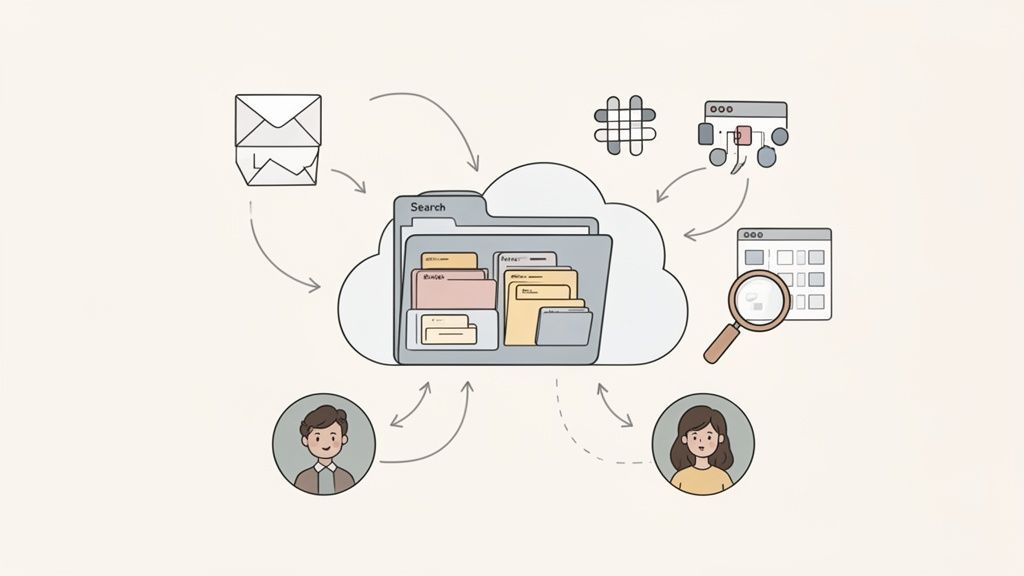
Der Schlüssel ist Konsistenz. Eine willkürlich benannte Sammlung von Dateien ist fast so nutzlos wie kein Archiv. Legen Sie eine einfache, klare Namenskonvention fest und halten Sie sich eisern daran.
Ein großartiges, leicht verständliches Format ist: JJJJ-MM-TT - [Projekt/Teamname] - [Thema des Meetings]
Zum Beispiel: 2024-10-28 - Marketing Team - Q4 Kampagnen Kickoff. Diese einfache Struktur macht Ihre gesamte Meeting-Historie sofort sortierbar und durchsuchbar. Es ist eine kleine Gewohnheit, die Ihre Zusammenfassungen von wegwerfbaren Notizen in ein bleibendes, wertvolles Gut verwandelt.
Beantwortung häufiger Fragen zu Meeting-Zusammenfassungen
Selbst mit den besten Tools tauchen immer wieder ein paar praktische Fragen auf, wenn Sie versuchen, eine gute Zusammenfassung eines Meetings zu erstellen. Das Beherrschen dieser Details ist der Unterschied zwischen einer Zusammenfassung, die zu Aktionen führt, und einer, die nur mehr Arbeit verursacht.
Wie lang sollte sie also sein? Das ist wahrscheinlich die häufigste Frage, die ich bekomme. Eine gute Zusammenfassung sollte schnell zu lesen sein – denken Sie an zwei bis fünf Minuten, maximal. Denken Sie daran, es ist kein wortwörtliches Transkript. Der Sinn der Sache ist, einen Überblick auf hoher Ebene zu geben, den vielbeschäftigte Menschen tatsächlich verdauen können, und sich ausschließlich auf die getroffenen Entscheidungen und die anstehenden Aktionen zu konzentrieren.
Ein weiterer wichtiger Punkt ist die Verantwortung. Wer ist eigentlich dafür zuständig, die Zusammenfassung zu schreiben?
Klärung von Rollen und Zeitpunkten
Traditionell fällt diese Aufgabe dem Organisator des Meetings oder einem benannten Protokollanten zu. Bei wiederkehrenden Team-Meetings bin ich ein großer Fan davon, diese Verantwortung zu rotieren. Es ist eine einfache Praxis, die gemeinsame Verantwortung fördert und jedem im Team die Möglichkeit gibt, diese entscheidende Kommunikationsfähigkeit zu schärfen.
Natürlich verändert die Verwendung eines KI-Tools wie Transcript.LOL diese gesamte Dynamik und ermöglicht es jedem, der die Aufnahme hat, sofort eine Zusammenfassung zu erstellen.
Aber der wichtigste Faktor für den Erfolg? Timing. Eine Zusammenfassung verliert mit jedem Tag, der vergeht, an Wirkung. Sie müssen unbedingt darauf abzielen, sie innerhalb von 24 Stunden nach Ende des Meetings zu versenden.
Diese Geschwindigkeit ist aus zwei Gründen so wichtig:
- Frische: Alle Details sind noch frisch im Gedächtnis aller. Das reduziert das Hin und Her darüber, was tatsächlich entschieden wurde.
- Schwung: Es ermöglicht Ihrem Team, sich sofort um seine Aktionspunkte zu kümmern und den Schwung aus dem Meeting am Leben zu erhalten.
Letztendlich ist eine zeitnahe, prägnante Zusammenfassung nicht nur ein Dokument – sie ist ein Werkzeug zur Rechenschaftspflicht. Sie hält das gesamte Team auf dem Laufenden und in Bewegung. Es ist eine einfache Gewohnheit, die ein Gespräch in greifbare Fortschritte verwandelt und sicherstellt, dass keine wichtige Entscheidung oder Aufgabe im Durcheinander verloren geht.
Sind Sie bereit, keine Zeit mehr mit manuellen Zusammenfassungen zu verschwenden? Probieren Sie Transcript.LOL aus und verwandeln Sie Ihre Meeting-Aufzeichnungen in Sekundenschnelle in perfekte, umsetzbare Zusammenfassungen. Starten Sie noch heute kostenlos!