
Wie man ein Meeting zusammenfasst und jedes wichtige Detail festhält
Erfahren Sie, wie Sie ein Meeting mit bewährten Strategien zusammenfassen. Gehen Sie über einfache Notizen hinaus mit praxisnahen Tipps, Vorlagen und KI-Tools, die für perfekte Klarheit sorgen.
Kate
January 22, 2025
Eine gute Meeting-Zusammenfassung ist nicht nur ein Transkript. Sie ist eine Highlight-Rolle, die sich auf die spielentscheidenden Momente konzentriert: wichtige Entscheidungen, wer was als Nächstes übernimmt und die Fristen, die zählen. Ziel ist es, eine klare, übersichtliche Aufzeichnung zu erstellen, die alle auf dem Laufenden hält – egal, ob sie im Raum waren oder nicht.
Warum das Beherrschen von Meeting-Zusammenfassungen eine Karrierestärke ist
Wir alle kennen das. Man verlässt ein Meeting mit dem Gefühl, einen Marathon ohne Ziellinie gelaufen zu sein. Die Unterhaltung mäanderte, wichtige Entscheidungen fühlten sich unklar an, und eine Woche später kann sich niemand mehr daran erinnern, wer zugestimmt hat, was zu tun. Das ist nicht nur frustrierend; es ist eine massive Belastung für Zeit, Geld und Schwung eines Unternehmens.
Die Fähigkeit, ein Meeting effektiv zusammenzufassen, durchschneidet dieses Chaos.
Warum diese Fähigkeit Sie auszeichnet?
Das Zusammenfassen von Meetings ist keine administrative Arbeit – es ist strategische Kommunikation. Es zeigt Klarheit des Denkens, Verantwortungsbewusstsein und Führungspräsenz. Profis, die diese Fähigkeit beherrschen, reduzieren Verwirrung, sparen Zeit und halten Teams ohne zusätzliche Meetings auf Kurs.
Das ist nicht nur eine Frage des Notizenmachens. Es ist eine echte Führungsfähigkeit. Es beweist, dass Sie aktiv zuhören, das Signal aus dem Rauschen herausfiltern und Menschen zur Rechenschaft ziehen können. Wenn Sie diese klare Aufzeichnung erstellen, werden Sie zur Person, die für Ausrichtung sorgt und verhindert, dass Projekte ins Stocken geraten. Ehrlich gesagt, ist es ein Kernbestandteil des Trainings für Führungskommunikation, in das Führungskräfte investieren – um aus Worten Taten zu machen.
Das Problem hat sich mit der Remote- und Hybridarbeit nur noch verschärft. Diese Infografik zeigt, wie schlimm es ist.
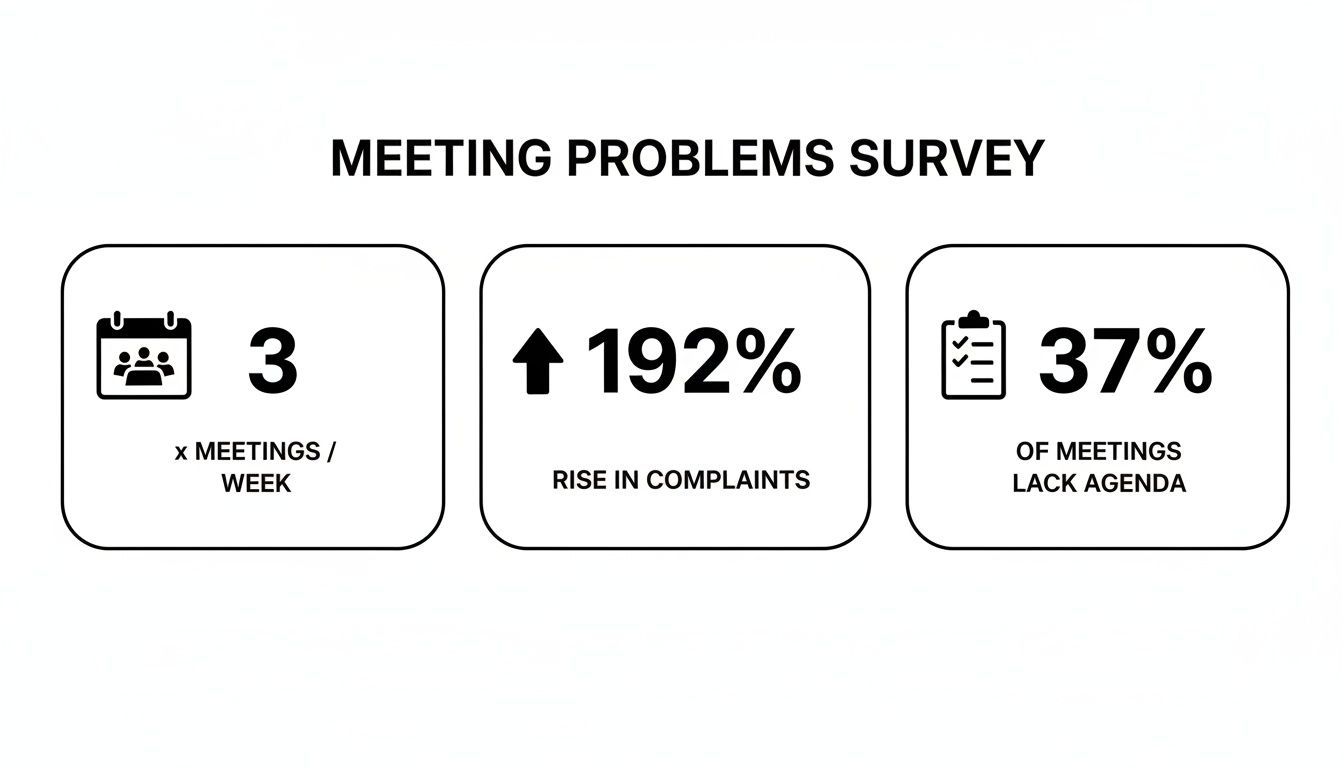
Wie Sie sehen, haben wir mehr Meetings als je zuvor, aber unsere Gewohnheiten haben sich nicht angepasst, was zu einer Menge verschwendeter Zeit führt.
Die hohen Kosten unproduktiver Meetings
Ein kurzer Blick auf die Daten unterstreicht, warum effektive Meeting-Zusammenfassungen für die Geschäftseffizienz entscheidend sind.
| Statistik | Auswirkung auf Ihre Arbeit |
|---|---|
| Die Teilnahme an virtuellen Meetings ist seit Anfang 2020 um ~192 % gestiegen. | Mehr Zeit in Anrufen, weniger Zeit für konzentriertes Arbeiten. |
| Nur 37 % der Meetings haben eine formelle Agenda. | Gespräche driften ohne klare Ziele oder Struktur ab. |
| Ein ähnlicher Prozentsatz führt zu einer konkreten Entscheidung. | Projekte stocken und dieselben Themen werden nächste Woche wieder aufgewärmt. |
Diese Daten zeigen eine massive Diskrepanz. Wir treffen uns mehr, entscheiden aber weniger.
Wenn Sie zur Person werden, die zuverlässig Ergebnisse klärt und die nächsten Schritte festlegt, machen Sie sich unverzichtbar. Sie tippen nicht nur Notizen ab; Sie bauen das Fundament für den Erfolg Ihres Teams und beweisen Ihren Wert als jemand, der Dinge erledigt.
Die Bühne für eine perfekte Zusammenfassung bereiten, bevor das Meeting beginnt
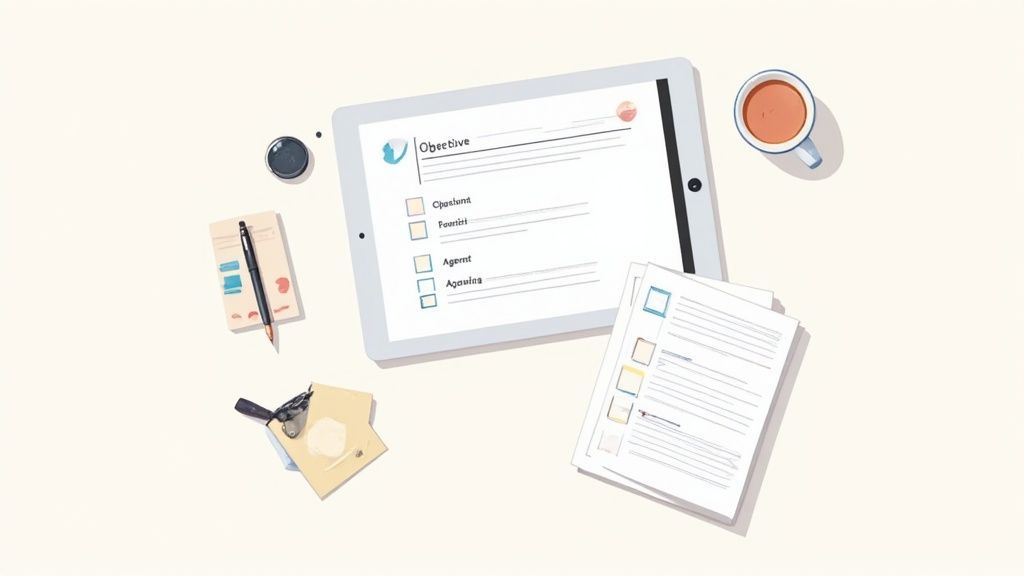
Eine großartige Meeting-Zusammenfassung beginnt nicht, wenn der Anruf endet; sie beginnt mit gezielter Vorarbeit. Ich habe gelernt, dass das Geheimnis einer effizienten Zusammenfassung darin liegt, bevor das Meeting überhaupt beginnt, zu wissen, worauf man achten muss. Ihr Ziel ist es, ein Gerüst zu schaffen, das Ihnen hilft, nur das Wesentliche zu erfassen und Sie davor bewahrt, später Seiten mit irrelevanten Notizen durchsuchen zu müssen.
Tools, die Ihnen helfen, intelligenter vorzubereiten
Modernste KI
Angetrieben von OpenAIs Whisper für branchenführende Genauigkeit. Unterstützung für benutzerdefinierte Vokabulare, bis zu 10 Stunden lange Dateien und ultraschnelle Ergebnisse.

Aus mehreren Quellen importieren
Importiere Audio- und Videodateien aus verschiedenen Quellen, einschließlich direktem Upload, Google Drive, Dropbox, URLs, Zoom und mehr.

In mehreren Formaten exportieren
Exportiere deine Transkripte in mehreren Formaten, einschließlich TXT, DOCX, PDF, SRT und VTT mit anpassbaren Formatierungsoptionen.
Das Wichtigste zuerst: Identifizieren Sie das eine Hauptziel des Meetings. Geht es darum, ein Budget zu genehmigen, eine Marketingstrategie zu beschließen oder ein Projektproblem zu lösen? Dieses einzelne Ziel dient als Ihr Filter. Jeder erfasste Diskussionspunkt sollte sich direkt darauf beziehen.
Als Nächstes müssen Sie die Tagesordnung wirklich zerlegen. Überfliegen Sie sie nicht nur; nutzen Sie sie, um die wichtigsten Momente des Gesprächs vorherzusehen.
- Entscheidungspunkte erkennen: Suchen Sie nach Tagesordnungspunkten, die ausdrücklich eine Wahl oder eine formelle Genehmigung erfordern. Dies sind Ihre unverzichtbaren Erfassungspunkte.
- Potenzielle Hindernisse markieren: Machen Sie sich mental Notizen zu Themen, bei denen Sie Uneinigkeit oder eine lange Debatte erwarten. Dort finden die kritischsten – und oft hitzigsten – Diskussionen statt.
- Wichtige Stakeholder auflisten: Wissen Sie, wessen Input für jeden Tagesordnungspunkt entscheidend ist. Das hilft Ihnen, sich darauf zu konzentrieren, was sie sagen, wenn sie sich äußern.
Dieser proaktive Ansatz verändert das Spiel komplett. Er verwandelt Sie von einem passiven Notizenschreiber in einen strategischen Zuhörer, der bereits einen Schritt voraus ist.
Was eine großartige Meeting-Zusammenfassung liefert?
Klarheit statt Chaos
Eine starke Zusammenfassung beseitigt Mehrdeutigkeiten, indem sie lange Diskussionen in klare Ergebnisse destilliert. Teammitglieder verstehen sofort, was entschieden wurde und warum es wichtig ist. Kein erneutes Aufwärmen derselben Punkte im nächsten Meeting.
Verantwortlichkeit, die bleibt
Aufgaben sind an echte Personen gebunden, nicht an vage Teams. Dies schafft Verantwortungsbewusstsein und reduziert Verwirrung bei der Nachverfolgung. Jeder weiß genau, wofür er verantwortlich ist.
Schnellere Ausführung
Wenn die nächsten Schritte klar dokumentiert sind, beginnt die Arbeit sofort. Teams verschwenden weniger Zeit mit Nachfragen zur Klärung. Der Schwung setzt sich fort, anstatt ins Stocken zu geraten.
Eine einzige Quelle der Wahrheit
Meeting-Zusammenfassungen dienen als Referenzpunkt für zukünftige Entscheidungen. Sie helfen, neue Stakeholder schnell einzuarbeiten. Keine Abhängigkeit von Erinnerungen oder fragmentierten Chat-Threads.
Wählen Sie Ihr Notizsystem
Ihre Werkzeuge sind wichtig. Das richtige System hängt wirklich von der Komplexität des Meetings und Ihrem persönlichen Stil ab. Für ein schnelllebiges Brainstorming könnte ein digitales Whiteboard am besten funktionieren. Aber für ein strukturiertes wöchentliches Check-in ist eine vorgefertigte Vorlage in einem Dokument weitaus effektiver.
Für formellere Diskussionen kann die Umgebung selbst die Produktivität erheblich beeinflussen und zu klareren Ergebnissen führen. Wenn es sich um ein Meeting mit hohen Einsätzen handelt, können Sie sogar Optionen für die Suche nach einem Konferenzraum erkunden, um sicherzustellen, dass sich alle auf die Entscheidungsfindung konzentrieren.
Je besser Ihre Vorbereitung, desto weniger Arbeit müssen Sie danach haben. Ein gut strukturierter Satz von Notizen vor dem Meeting ist bereits 50 % Ihrer endgültigen Zusammenfassung.
Diese Vorbereitung wird jetzt noch wichtiger, da persönliche und hybride Meetings wieder zunehmen. Aktuelle Branchentrends zeigen beispielsweise, dass etwa 65 % der Planer erwarten, dass die Teilnehmerzahlen im Jahr 2025 steigen werden. Größere Meetings bedeuten komplexere Diskussionen, was klare Ziele und strukturierte Notizen absolut unerlässlich macht. Indem Sie die Bühne richtig bereiten, stellen Sie sicher, dass Sie jedes Meeting genau und vor allem schnell zusammenfassen können.
Wie man aktiv zuhört und festhält, was wirklich wichtig ist
Das Meeting läuft, und die Ideen fliegen herum. Ihre Aufgabe ist es nicht, ein Gerichtsstenograf zu sein, der jedes "Ähm" und "Äh" festhält. Es ist, ein Filter zu sein. Sie müssen die Informationen mit hohem Signalwert erfassen – die Dinge, die tatsächlich Entscheidungen vorantreiben und Arbeit erledigen. Das bedeutet, vom bloßen Hören zum aktiven Zuhören zu wechseln.
Sie können damit beginnen, Ihr Gehör darauf zu trainieren, bei bestimmten Auslöserphrasen aufmerksam zu werden. Betrachten Sie sie als Hinweise darauf, dass etwas Wichtiges gesagt werden wird.
Wenn Sie Sätze wie diese hören, ist es Zeit zu tippen:
- "Also, die Entscheidung ist..."
- "Der nächste Schritt wird sein..."
- "Wer wird die Führung übernehmen bei...?"
- "Lasst uns uns einigen auf..."
- "Um es klar zu sagen, die Frist dafür ist..."
Diese Sätze sind pures Gold. Sie sind die verbalen Wegweiser dafür, dass ein Gespräch vom Brainstorming zu einer konkreten Lösung übergegangen ist. Was als Nächstes kommt, ist das Herzstück jeder nützlichen Meeting-Zusammenfassung.
Echtzeit-Klärung zahlt sich aus
Das Klären von Entscheidungen während des Meetings verhindert kostspielige Missverständnisse später. Eine einzige Bestätigungsfrage kann Tage an Nacharbeit sparen. Starke Zusammenfassungen beginnen mit der Gewissheit dessen, worauf tatsächlich geeinigt wurde.
Ein einfaches Framework für Aktionspunkte
Der wichtigste Teil Ihrer Notizen ist die Festlegung, wer was bis wann erledigt. Ein einfaches, wiederholbares Format ist hier Ihr bester Freund. Ich habe festgestellt, dass eine schnelle Kurzform wie [Aufgabe] – [Verantwortlicher] – [Fälligkeitsdatum] Wunder wirkt.
Zum Beispiel wird eine ausschweifende Diskussion über eine neue Werbekampagne auf Folgendes reduziert: "[Entwurf Q3 Werbetexte] – Sarah – Ende der Woche."
Diese einfache Struktur durchdringt den Nebel. Sie schafft eine klare Aufzeichnung der Verantwortlichkeiten, die Sie später leicht herausziehen können, wenn Sie die endgültige Zusammenfassung verfassen. Für eine tiefere Betrachtung bietet unser Leitfaden zum Protokollieren in einem Meeting detailliertere Frameworks, die Sie übernehmen können.
Und scheuen Sie sich nie, taktvoll einzugreifen, wenn ein wichtiger Punkt unklar erscheint. Eine schnelle Frage wie: "Nur zur Bestätigung, haben wir uns für Freitag oder nächsten Montag für diese Frist entschieden?" kann allen später Kopfschmerzen ersparen.
Es ist weitaus besser, im Moment um Klärung zu bitten, als eine Zusammenfassung mit falschen Informationen zu verbreiten. Eine präzise Frage kann Wochen falsch ausgerichteter Arbeit verhindern.
Dieser aktive Ansatz stellt sicher, dass Sie das Meeting mit einem Satz hochwertiger, strukturierter Notizen verlassen, die bereits 80 % des Weges zu einer fertigen Zusammenfassung darstellen. Sie haben die harte Arbeit geleistet, den Lärm in Echtzeit herauszufiltern, was das endgültige Verfassen schneller und wesentlich genauer macht.
Wandeln Sie Gespräche sofort in Handlungen um

Sprechererkennung
Identifiziere automatisch verschiedene Sprecher in deinen Aufnahmen und beschrifte sie mit ihren Namen.

Bearbeitungswerkzeuge
Bearbeite Transkripte mit leistungsstarken Werkzeugen wie Suchen und Ersetzen, Sprecherzuordnung, Rich-Text-Formate und Hervorhebungen.
Zusammenfassungen und Chatbot
Erstelle Zusammenfassungen und andere Erkenntnisse aus deinem Transkript, wiederverwendbare benutzerdefinierte Prompts und Chatbot für deine Inhalte.
Von Rohnotizen zu einem aussagekräftigen Protokoll
Sobald das Meeting beendet ist, haben Sie nur die rohen Zutaten. Die eigentliche Arbeit beginnt jetzt: die Umwandlung dieses Durcheinanders von Notizen in ein sauberes, wertvolles Protokoll, das jedem sofort Klarheit verschafft, insbesondere denen, die nicht teilnehmen konnten. Das Ziel ist einfach: Verfeinern Sie Ihre unordentlichen Notizen zu einem Dokument, das jeder in weniger als zwei Minuten überfliegen und erfassen kann.
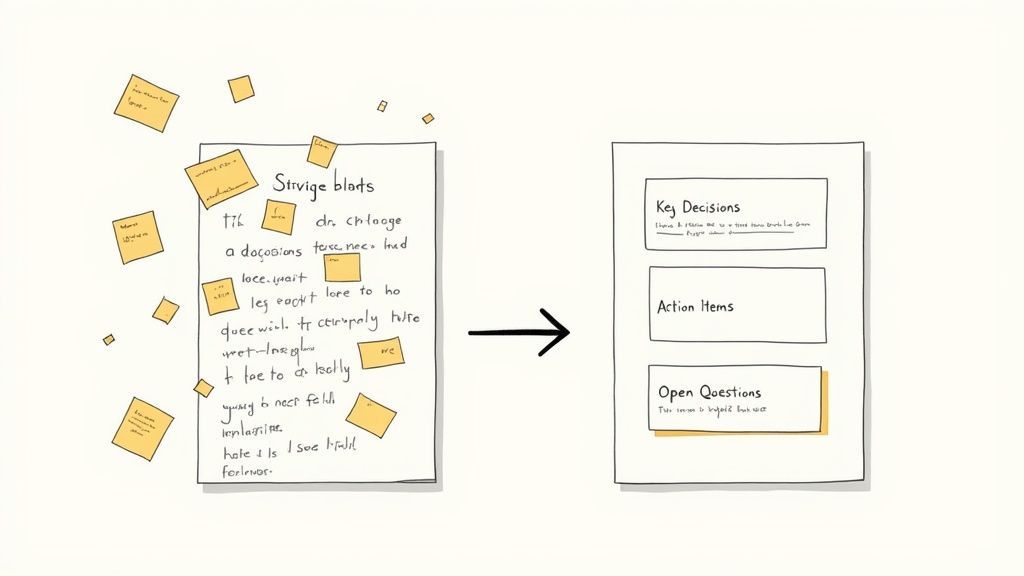
Hier geht es nicht nur darum, das Gesagte zu transkribieren. Sie fügen echten Mehrwert hinzu, indem Sie konversationelles Chaos in objektive, prägnante Aussagen übersetzen und verstreute Punkte in einen logischen Fluss organisieren.
Struktur für maximale Übersichtlichkeit
Die besten Meeting-Zusammenfassungen sind auf Geschwindigkeit ausgelegt. Verzichten Sie auf lange, narrative Absätze. Rahmen Sie Ihre Zusammenfassung stattdessen um die drei Elemente, die tatsächlich Handlungen vorantreiben und alle auf dem gleichen Stand halten.
- Wichtige Entscheidungen: Nennen Sie die Endergebnisse in klarer, unmissverständlicher Sprache. Anstatt eines vagen "Wir haben über die Website gesprochen", machen Sie es konkret: "Entscheidung: Das Design der neuen Website-Startseite ist genehmigt."
- Aufgaben: Dies ist der wichtigste Teil. Listen Sie klar auf, was getan werden muss, wer dafür verantwortlich ist und wann es fällig ist. Das Format [Verantwortlicher] – [Aufgabe] – [Frist] ist mein Favorit wegen seiner unschlagbaren Klarheit.
- Offene Fragen: Lassen Sie gute Fragen oder ungelöste Probleme nicht verschwinden. Dokumentieren Sie sie, damit sie später behandelt werden können. Dies verhindert, dass wichtige lose Enden vergessen werden, bevor das nächste Treffen stattfindet.
Diese Struktur richtig hinzubekommen, ist ein Game-Changer. Wenn Sie tiefer eintauchen möchten, haben wir einen vollständigen Leitfaden zur Erstellung eines Protokollformats mit Aufgaben zusammengestellt, der sicherstellt, dass nichts durch die Maschen fällt.
Die wahre Kraft einer Zusammenfassung liegt nicht nur darin, was sie enthält, sondern auch darin, was sie weglässt. Ihre Aufgabe ist es, den Lärm zu durchdringen und nur die Schlussfolgerungen und Verpflichtungen zu liefern, die wichtig sind.
Wenn Sie ein Meeting zusammenfassen auf diese Weise, schaffen Sie ein Werkzeug für Rechenschaftspflicht. Es beseitigt Mehrdeutigkeiten und wird zur einzigen Quelle der Wahrheit, auf die sich das gesamte Team verlassen kann. So stellen Sie sicher, dass die Energie aus der Diskussion auch danach in echte Fortschritte umgesetzt wird.
Ein Meeting in Minuten statt Stunden mit KI zusammenfassen
Seien wir ehrlich: Meetings manuell zusammenzufassen ist eine zermürbende Aufgabe. Sie raubt Stunden, die Sie für tatsächliche Arbeit aufwenden könnten. Aber moderne KI-Tools drehen den Spieß um und verwandeln diese stundenlange Plackerei in eine schnelle zehnminütige Überprüfung. Anstatt mühsam stundenlange Aufnahmen erneut anzuhören, können Sie den gesamten ersten Entwurf an eine KI übergeben.
Wie funktioniert das? Diese Tools erstellen zunächst eine vollständige, durchsuchbare Transkription Ihres Gesprächs. Von dort aus macht sich die KI daran, eine Entwurfzusammenfassung zu erstellen, wichtige Entscheidungen zu identifizieren und sogar eine übersichtliche Liste aller zugewiesenen Aufgaben herauszuziehen. Sie erledigt die gesamte schwere Arbeit und liefert Ihnen einen soliden, strukturierten Ausgangspunkt.
Vom Rohprotokoll zur polierten Zusammenfassung
Die wahre Magie geschieht, wenn Sie eingreifen, um das von der KI Erstellte zu verfeinern. Ihre Rolle verschiebt sich vollständig vom Schreiber zum Redakteur. Sie transkribieren nicht mehr nur Worte; Sie leiten die KI an, die genaue Nuance der Diskussion zu erfassen.
Sie können beispielsweise spezifische Aufforderungen verwenden, um die Ergebnisse zu schärfen und genau das zu erhalten, was Sie brauchen:
- "Fassen Sie die wichtigsten Entscheidungen zum Q4-Budget zusammen."
- "Listen Sie alle Aufgaben auf, die dem Marketingteam zugewiesen wurden, zusammen mit ihren Fristen."
- "Extrahieren Sie die Hauptpunkte der Meinungsverschiedenheiten während der Diskussion zur Produkt-Roadmap."
Es ist ein interaktiver Prozess, der Ihr Urteilsvermögen verbessert, nicht ersetzt. Um zu sehen, wie dies in der Praxis funktioniert, taucht unser Leitfaden zur Auswahl eines KI-Notiznehmers für Zoom tief in diese Fähigkeiten ein.
Das Ziel ist nicht nur eine schnellere Zusammenfassung, sondern eine intelligentere. KI liefert Ihnen die Rohmaterialien, aber Ihre Erkenntnisse formen sie zu einem wirklich nützlichen Dokument, das Handlungen vorantreibt.
Diese Bildschirmaufnahme zeigt die einfache Benutzeroberfläche, auf der Sie Ihre Audio- oder Videodatei hochladen, um loszulegen.
Von hier aus macht sich die Plattform an die Arbeit und verarbeitet die Datei, um das Transkript zu erstellen, das die Grundlage für Ihre Zusammenfassung bildet. Dieser Wandel hin zur Nutzung künstlicher Intelligenz verändert die Art und Weise, wie wir Informationen im Allgemeinen verarbeiten. Wenn Sie tiefer eintauchen möchten, bieten Trends wie KI-Integration in die Inhaltserstellung eine breitere Perspektive.
Durch die Nutzung dieser Tools können Sie ein Meeting zusammenfassen in einem Bruchteil der Zeit und sich so die strategische Arbeit freihalten, die wirklich wichtig ist.
Best Practices und häufige Fallstricke bei Meeting-Zusammenfassungen
Nun, Sie haben Ihre verfeinerten Notizen. Das letzte Puzzleteil ist, sie Ihrem Team zukommen zu lassen – aber wie und wann Sie diese Zusammenfassung versenden, kann über deren Wirkung entscheiden. Das eigentliche Ziel ist es, die Informationen zu verbreiten, solange das Gespräch noch frisch im Gedächtnis aller ist, um die Dynamik aufrechtzuerhalten.
Das Timing ist absolut entscheidend. Einer der größten Fehler, die ich bei Teams sehe, ist, mehr als 24 Stunden mit dem Versenden einer Zusammenfassung zu warten. Diese Verzögerung tötet die Projektgeschwindigkeit. Sie sollten darauf abzielen, sie innerhalb weniger Stunden zu teilen, oder zumindest, bevor alle für den Tag Feierabend machen. Es ist eine Kleinigkeit, aber sie signalisiert Dringlichkeit und zeigt, dass Sie ihre Zeit respektieren.
Verzögerte Zusammenfassungen töten den Schwung
Zu langes Warten auf die Weitergabe einer Zusammenfassung führt dazu, dass Teams Entscheidungen vergessen. Aufgaben verlieren an Dringlichkeit und die Verantwortlichkeit schwächt sich ab. Senden Sie Zusammenfassungen immer, solange das Meeting noch frisch ist.
Zusammenfassung formulieren und speichern
Wie Sie die Zusammenfassung formulieren, ist wichtig. Wenn Sie sie per E-Mail oder Slack versenden, hängen Sie nicht einfach eine Datei an und belassen es dabei. Ziehen Sie den wichtigsten Aktionspunkt oder die wichtigste Entscheidung direkt in den Nachrichtentext. Sie müssen sofort die Aufmerksamkeit erregen.
Zum Beispiel gibt ein einfacher Einstieg wie „Hier ist die Zusammenfassung unseres Gesprächs – die wichtigste Erkenntnis ist, dass Sarah die endgültigen Designs bis Freitag fertig haben wird“ sofort Kontext. Die Leute wissen, was wichtig ist, ohne das Dokument überhaupt zu öffnen.
Sie benötigen auch eine intelligente Methode, um diese Zusammenfassungen zu speichern, damit sie zu einem langfristigen Vermögenswert werden. Wenn sie in E-Mail-Threads untergehen, ist das ein Rezept für eine Katastrophe. Erstellen Sie stattdessen einen zentralen, durchsuchbaren Ort dafür.
- Gemeinsames Laufwerk: Ein einfacher Ordner in Google Drive oder SharePoint leistet gute Dienste.
- Projektmanagement-Tool: Hängen Sie Zusammenfassungen direkt an Aufgaben oder Projekte in Tools wie Asana, Jira oder Trello an.
- Wiki/Intranet: Erstellen Sie eine spezielle Seite in Confluence oder Notion Ihres Unternehmens.
Eine gut gespeicherte Zusammenfassung ist nicht nur eine Aufzeichnung eines vergangenen Ereignisses; sie ist eine durchsuchbare Blaupause für zukünftige Entscheidungen. Sie verhindert, dass das Team alte Gespräche wieder aufwärmt, und bringt neue Mitglieder sofort auf den neuesten Stand.
Achten Sie schließlich auf einige häufige Fallstricke. Schreiben Sie keinen Roman – seien Sie kurz. Und immer, immer wichtige Namen und Fristen fett hervorheben. Bei einer guten Zusammenfassung geht es um Klarheit. Je einfacher Sie sie scannen können, desto höher ist die Wahrscheinlichkeit, dass Ihr Team sie tatsächlich liest und handelt.
Ein paar verbleibende Fragen
Haben Sie noch ein paar Fragen, die Ihnen im Kopf herumschwirren? Sie sind nicht allein. Hier sind die Antworten auf einige Dinge, die Leute oft fragen, wenn sie sich mit Besprechungszusammenfassungen vertraut machen.
Wie lang sollte eine Besprechungszusammenfassung eigentlich sein?
Es ist immer verlockend, mehr aufzunehmen, aber die goldene Regel lautet: kurz und prägnant halten. Für ein typisches einstündiges Meeting sollte die Zusammenfassung etwas sein, das ein vielbeschäftigter Kollege in weniger als zwei Minuten scannen und verstehen kann.
Betrachten Sie es als die Highlight-Reel, nicht als den vollständigen Film. Sie streben eine Handvoll aussagekräftiger Stichpunkte an, die die wichtigsten Entscheidungen und Aktionspunkte auf den Punkt bringen. Wenn jemand wirklich neugierig auf die Details ist, steht ihm die vollständige Abschrift jederzeit zur Verfügung. Die Aufgabe der Zusammenfassung ist es, die wesentlichen Punkte schnell zu vermitteln.
Was passiert, wenn jemand mit der Zusammenfassung nicht einverstanden ist?
Das ist häufiger, als man denkt, besonders wenn die Diskussion komplex oder ein wenig hitzig war. Das Erste, woran Sie sich erinnern sollten, ist, es nicht persönlich zu nehmen. Ihr Ziel ist es, der objektive Protokollant zu sein.
Wenn ein Stakeholder einen Punkt ablehnt, laden Sie ihn ein, ihn zu korrigieren. Anstatt sich auf eine Debatte einzulassen, bitten Sie ihn, einen besseren Weg vorzuschlagen, es zu formulieren.
Ein einfaches „Danke für dieses Feedback. Wie würden Sie es formulieren, um die Entscheidung besser zu erfassen?“ wirkt Wunder. Es verlagert das Gespräch sofort von einer Konfrontation zu einer Zusammenarbeit.
Dieser kleine Trick hält den gesamten Prozess konstruktiv. Es stellt auch sicher, dass die endgültige Zusammenfassung etwas ist, dem alle tatsächlich zugestimmt haben und das widerspiegelt, worauf sich die Gruppe kollektiv geeinigt hat.
Sind Sie bereit, keine Zeit mehr mit manuellen Besprechungsnotizen zu verschwenden? Transcript.LOL verwendet KI, um in wenigen Minuten genaue Transkripte, Zusammenfassungen und Aktionspunkte zu erstellen. Probieren Sie es kostenlos aus und überzeugen Sie sich selbst.