
So transkribieren Sie Audio in Text wie ein Profi
Erfahren Sie, wie Sie Audio in Text transkribieren, mit unserem vollständigen Leitfaden. Entdecken Sie die besten KI-Tools, Tipps zur Audioaufbereitung und erweiterte Workflows für perfekte Transkripte.
Kate, Praveen
November 1, 2023
Stunden. Das hat sich alles geändert. Heute basiert der Prozess auf intelligenten, KI-gestützten Tools, die die mühsame Arbeit erledigen und Ihnen die endgültigen, menschlichen Korrekturen überlassen. Es ist eine komplette Umkehrung des Drehbuchs.
Warum sich überhaupt noch die Mühe machen, Audio zu transkribieren?
Früher bedeutete die Umwandlung von Audio in Text, sich an einen Schreibtisch zu fesseln und stundenlang zu tippen. Machen wir uns nichts vor: Die Zeiten des mühsamen Wiederhörens und Abtippens jedes einzelnen Wortes sind offiziell vorbei. Der moderne Ansatz dreht sich alles um Effizienz – KI erstellt den Entwurf, und Sie fungieren als Redakteur. Diese Fähigkeit ist nicht mehr nur etwas für Journalisten oder Rechtsanwaltsgehilfen. Sie ist ein Muss für Podcaster, Vermarkter, akademische Forscher und ehrlich gesagt für jeden, der seine gesprochenen Inhalte durchsuchbar, teilbar und weitaus zugänglicher machen möchte.
Das ist kein Nischen-Trend. Der globale Markt für Audio-Transkriptionssoftware wurde bereits 2025 auf rund 2,5 Milliarden US-Dollar geschätzt und wächst weiter. Weitere Daten zum Marktwachstum finden Sie auf archivemarketresearch.com. Dieses explosive Wachstum zeigt, wie unverzichtbar Transkriptionen in den Bereichen Medien, Bildung und Wirtschaft geworden sind.
Ein explodierender Markt
Die Transkriptionssoftware-Branche wird voraussichtlich von 2,5 Milliarden US-Dollar im Jahr 2025 auf über 19 Milliarden US-Dollar bis 2034 wachsen. Das beweist, dass dies kein bloßer Trend ist – es wird zu einem Kernbestandteil der Content-Erstellung.
Die neue Art, mit Audio zu arbeiten
Die Kernidee ist einfach: Lassen Sie die Maschine einen überraschend guten ersten Entwurf erstellen. Ihre Aufgabe ist es, sie zur Perfektion zu führen, nicht bei Null anzufangen. Dies verwandelt eine Aufgabe, die einst eine totale Zeitverschwendung war, in etwas, das Sie in einem Bruchteil der Zeit erledigen können.
Um Ihnen eine bessere Vorstellung davon zu geben, wie dies in der Praxis funktioniert, hier ist eine kurze Aufschlüsselung des modernen Workflows.
| Heutiger Workflow für Audio-Transkription
So wählen Sie das richtige Transkriptionstool aus
Die Wahl des richtigen Tools kann den Unterschied zwischen einem schnellen Erfolg und einem projektbeendenden Kopfschmerz ausmachen. Bei so vielen verfügbaren Optionen kann man sich leicht verlieren. Aber eine einfache Preisvergleichung hinausgehend ist der Schlüssel, um eine Plattform zu finden, die Ihnen tatsächlich Zeit spart, anstatt nur mehr mühsame Arbeit zu schaffen.
Der Bereich der KI-Transkription boomt. Mit einem Wert von 4,5 Milliarden US-Dollar im Jahr 2024 wird prognostiziert, dass er bis 2034 beeindruckende 19,2 Milliarden US-Dollar erreichen wird. Einen tieferen Einblick in dieses Wachstum erhalten Sie im vollständigen KI-Transkriptionsmarktbericht. Dieses ganze Wachstum bedeutet mehr Auswahl für uns, aber es bedeutet auch viel mehr Rauschen, das durchdrungen werden muss.
Was also unterscheidet ein gutes Tool von einem großartigen? Es läuft wirklich auf ein paar Kernfunktionen hinaus, die sich direkt auf die Qualität Ihres endgültigen Transkripts und, was noch wichtiger ist, auf die Zeit auswirken, die Sie im Bearbeitungsstuhl verbringen werden.
Genauigkeit und Sprecheridentifikation sind am wichtigsten
Rohe Genauigkeit ist die Hauptfunktion für jeden Dienst, aber nehmen Sie die beworbenen Raten nicht für bare Münze. Diese Zahlen stammen oft von perfekten Audioaufnahmen in Studioqualität. Der wahre Test? Wie gut das Tool Ihre spezifischen Dateien verarbeitet – sei es ein sauberes Podcast mit einem einzelnen Sprecher oder ein chaotisches Teammeeting mit starkem Akzent und Hintergrundgeräuschen.
Ebenso wichtig ist die Sprecheridentifikation (manchmal auch Diarisierung genannt). Ein solides Tool rät nicht nur, wer spricht; es ermöglicht Ihnen, jede Person einfach zu kennzeichnen (z. B. "Host", "Gast") und diesen Namen im gesamten Transkript anzuwenden. Dies ist eine enorme Zeitersparnis für Interviews, Podiumsdiskussionen und Fokusgruppen.
Ihr Ziel ist es, ein Tool zu finden, das die mühsame Arbeit automatisch erledigt. Wenn Sie mehr als ein paar Sekunden damit verbringen, jede einzelne Sprecherbezeichnung zu korrigieren, leistet die Software nicht ihren Beitrag.
Verlassen Sie sich nicht nur auf Genauigkeitswerte
Echte Genauigkeit hängt von Ihrer Audioqualität ab, nicht von Laborbedingungen. Testen Sie immer mit einer schwierigen Datei, bevor Sie sich für ein Tool entscheiden.
Prüfen Sie auf Dateikompatibilität und intelligente Integrationen
Bevor Sie sich festlegen, stellen Sie sicher, dass das Tool gut mit Ihren Dateien funktioniert. Die meisten Dienste unterstützen die Grundlagen wie MP3, WAV und MP4, aber wenn Sie regelmäßig mit weniger gängigen Formaten arbeiten, ist dies ein unverzichtbarer Prüfpunkt.
Denken Sie darüber nach, wie das Tool in Ihren Workflow passt.
- Direkte Uploads: Können Sie Dateien direkt von Ihrem Desktop per Drag & Drop hochladen?
- Cloud-Verbindungen: Verbindet es sich mit Google Drive, Dropbox oder anderen Cloud-Speichern, die Sie täglich nutzen?
- Link-Unterstützung: Können Sie einfach eine YouTube- oder Vimeo-URL einfügen und es seine Magie wirken lassen?
Diese Integrationen mögen geringfügig erscheinen, aber sie eliminieren Reibungsverluste und lassen den gesamten Prozess nahtlos erscheinen. Für alle, die gerade erst anfangen, gibt es einige großartige Möglichkeiten, Audio kostenlos in Text zu transkribieren, mit denen Sie diese Funktionen testen können.
Vergleich der Hauptfunktionen von KI-Transkriptionstools
Um Ihnen bei der Entscheidung zu helfen, finden Sie hier eine detaillierte Aufschlüsselung der Funktionen, die einfache Tools von Premium-Diensten unterscheiden, damit Sie eine kluge Wahl treffen können.
| Funktion | Was einfache Tools bieten | Was Premium-Dienste bieten | Warum es für Sie wichtig ist |
|---|---|---|---|
| Genauigkeit | Allgemeine Genauigkeit, Schwierigkeiten mit Akzenten und Rauschen. | Hohe Genauigkeit mit spezialisierten Modellen für verschiedene Akzente, Branchen und Audiobedingungen. | Bessere Genauigkeit bedeutet drastisch weniger Zeit für die manuelle Bearbeitung des endgültigen Transkripts. |
| Sprechererkennung | Einfache Trennung von Sprechern, oft mit Fehlern. | Präzise Sprecherbeschriftung (Diarisierung), die Sie einfach benennen und global korrigieren können. | Spart Ihnen die manuelle Zuweisung von Sprechern Zeile für Zeile in Interviews oder Besprechungen. |
| Benutzerdefiniertes Vokabular | Keine Option zum Hinzufügen benutzerdefinierter Wörter. | Ermöglicht Ihnen das Hinzufügen eines benutzerdefinierten Wörterbuchs für Fachbegriffe, Namen oder branchenspezifische Begriffe. | Verhindert ständige Rechtschreibfehler bei wichtigen Begriffen, Markennamen und Namen von Personen. |
| Dateiunterstützung | Beschränkt auf gängige Formate wie MP3 und MP4. | Umfassende Unterstützung für Dutzende von Audio- und Video-Dateitypen sowie direkte URL-Importe. | Stellt sicher, dass Sie jede Datei transkribieren können, ohne sie vorher konvertieren zu müssen. |
| Exportoptionen | Nur Text (.txt) oder vielleicht ein Word-Dokument (.docx). | Eine breite Palette von Formaten wie SRT, VTT, JSON und PDF mit Zeitstempel- und Sprecheroptionen. | Bietet Ihnen die Flexibilität, Ihr Transkript für alles zu verwenden, von Blogbeiträgen bis hin zu Video-Untertitelungen. |
Letztendlich ist der beste Weg, um zu wählen, das Tool tatsächlich zu benutzen. Fast jede Plattform bietet eine kostenlose Testversion oder einige Credits für den Einstieg. Verschwenden Sie sie nicht mit einer sauberen, perfekten Audiodatei.
Werfen Sie ihm einen Knochenjob. Verwenden Sie eine Aufnahme von einem lauten Konferenzgespräch oder einem Interview mit einem leise sprechenden Gast. Dieser reale Test ist der einzige Weg, um sicher zu wissen, ob ein Tool Ihr Leben wirklich einfacher macht.
Vorbereitung Ihres Audios für maximale Genauigkeit

Die Genauigkeit Ihres Transkripts wird so gut wie entschieden, bevor Sie überhaupt auf die Schaltfläche "Hochladen" klicken. Wenn es um KI-Transkription geht, ist der alte Spruch „Müll rein, Müll raus“ die absolute Wahrheit. Eine saubere, qualitativ hochwertige Audiodatei liefert Ihnen ein nahezu perfektes Transkript, während eine unordentliche Aufnahme Stunden frustrierender Bereinigungsarbeiten verursacht.
Stellen Sie es sich so vor: Wenn Sie nicht klar verstehen können, was jemand sagt, wie können Sie erwarten, dass ein Algorithmus das tut? Nur ein paar Minuten für die Vorbereitung Ihres Audios sind das Beste, was Sie tun können, um ein besseres Ergebnis zu erzielen und sich am Ende eine Menge Zeit zu sparen.
Best Practices für die Aufnahme von sauberem Audio
Ihr erster und bester Versuch, ein genaues Transkript zu erhalten, findet während der Aufnahme selbst statt. Selbst kleine Anpassungen in dieser Phase können einen großen Unterschied darin machen, wie gut die KI Ihr Audio in Text transkribiert.
- Verwenden Sie ein externes Mikrofon: Das integrierte Mikrofon Ihres Laptops oder Telefons ist darauf ausgelegt, alles aufzunehmen – Tastaturklicks, Raumhall, den bellenden Hund im Flur. Ein einfaches USB- oder Ansteckmikrofon ist ein echter Gewinn, da es sich nur auf die Stimme des Sprechers konzentriert.
- Minimieren Sie Hintergrundgeräusche: Suchen Sie einen ruhigen Ort. Die Aufnahme abseits von Straßenverkehr, summenden Klimaanlagen oder allgemeinem Bürogelärm ist von enormer Bedeutung. Diese scheinbar kleinen Geräusche können die KI leicht verwirren.
- Reduzieren Sie Übersprechen: Wenn Sie mehrere Sprecher haben, versuchen Sie, sie davon abzuhalten, sich gegenseitig zu unterbrechen. Überlappende Sprache ist eines der größten Hindernisse für jedes Transkriptionstool.
Alles beginnt mit klarem Quellmaterial. Zum Beispiel kann das Wissen über die Grundlagen der Aufnahme von qualitativ hochwertigem Audio für Videointerviews von Anfang an eine erstklassige Genauigkeit gewährleisten.
Einfache Bereinigung für vorhandene Audiodateien
Was ist, wenn die Aufnahme bereits abgeschlossen ist? Keine Sorge – Sie können mit kostenlosen Tools immer noch erhebliche Verbesserungen erzielen. Ich bin ein großer Fan von Software wie Audacity für schnelle, grundlegende Audiobereinigungen.
Auf dem obigen Screenshot sehen Sie die Audacity-Oberfläche. Sie ermöglicht es Ihnen, die Audio-Wellenform visuell zu sehen und einfache Effekte wie Rauschunterdrückung anzuwenden. Sie müssen nur einen Abschnitt mit reinem Hintergrundrauschen hervorheben, und Sie können der Software beibringen, welches Geräusch aus der gesamten Spur entfernt werden soll.
Ein paar schnelle Bearbeitungen in einem solchen Tool können Wunder wirken.
Wichtiger Hinweis: Ein paar Minuten Audioaufbereitung können Ihnen buchstäblich Stunden manueller Bearbeitung ersparen. Die Normalisierung der Lautstärke und die Reduzierung von Hintergrundrauschen sind zwei der wirkungsvollsten Korrekturen, die Sie vornehmen können.
Sie können auch tote Luft oder irrelevantes Geplapper vom Anfang und Ende der Datei kürzen. Dies verkürzt nicht nur die Dateigröße, sondern hilft der KI auch, sich nur auf den Inhalt zu konzentrieren, der tatsächlich wichtig ist.
Der Zusammenhang zwischen Audioklarheit und Ihrem endgültigen Transkript ist direkt. Wenn Sie tiefer eintauchen möchten, können Sie in unserem detaillierten Leitfaden mehr über alle Faktoren erfahren, die die Genauigkeit von Sprache-zu-Text beeinflussen. Die Durchführung dieser Schritte liefert der KI das bestmögliche Quellmaterial.
Ihr praktischer Transkriptions-Workflow
Okay, genug der Theorie. Hier rollen Sie die Ärmel hoch und machen sich an die Arbeit. Sie haben ein Tool ausgewählt und Ihr Audio vorbereitet – jetzt gehen wir durch, wie Sie diese Aufnahme in sauberen, bearbeitbaren Text umwandeln, ohne den Verstand zu verlieren. Der moderne Workflow dreht sich weniger um mühsames Tippen und mehr um intelligente, fokussierte Bearbeitung.
Vergessen Sie die alten Zeiten, in denen Sie ständig pausiert, zurückgespult und jedes einzelne Wort getippt haben. KI erledigt diese anfängliche schwere Arbeit für Sie und liefert in nur wenigen Minuten einen soliden ersten Entwurf. Ihre neue Aufgabe ist die eines Redakteurs, der sich auf die Optimierung und Perfektionierung der Ausgabe konzentriert.
Dieses Bild verdeutlicht den Unterschied zwischen dem alten und dem neuen Weg.
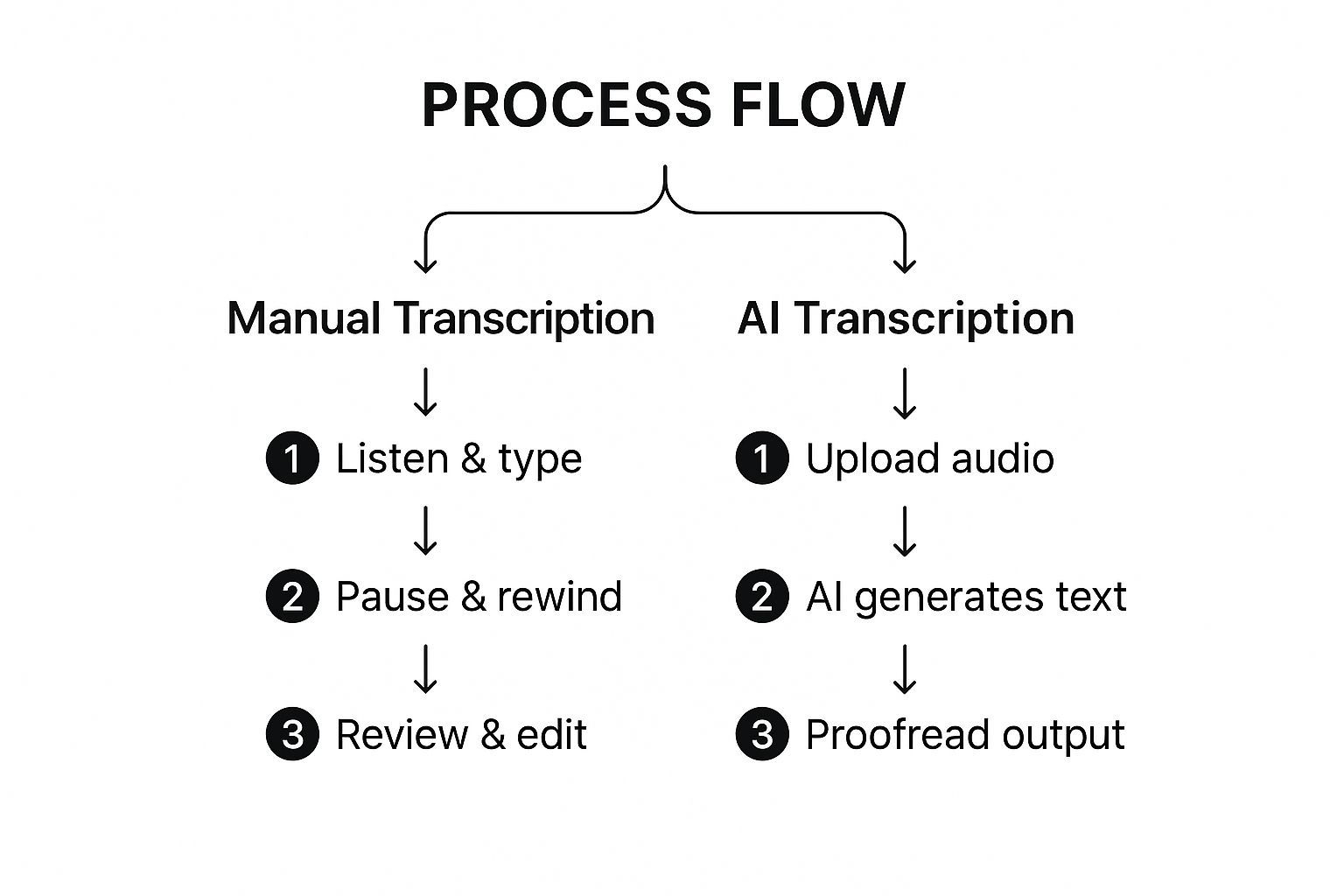
Wie Sie sehen können, liefert der KI-Ansatz zuerst den Rohtext. Dies stellt die Weichen komplett neu und macht Sie vom Tipper zum Korrekturleser – eine viel bessere Nutzung Ihrer Zeit.
Einrichten Ihres Transkriptionsprojekts
Sobald Ihre Datei hochgeladen ist, müssen Sie als Erstes die Projekteinstellungen konfigurieren. Klicken Sie nicht einfach an diesem Bildschirm vorbei. Ein paar Sekunden hier sparen Ihnen später eine Menge Kopfschmerzen.
- Sprache und Dialekt: Seien Sie spezifisch. Wenn Ihr Sprecher einen australischen Akzent hat, wählen Sie nicht einfach "Englisch". Wählen Sie "Englisch (Australien)". Dies hilft der KI, sich auf die richtigen Aussprachen und Vokabeln einzustellen.
- Anzahl der Sprecher: Wenn Sie wissen, dass drei Personen am Anruf teilgenommen haben, sagen Sie es dem Tool. Dies gibt der Sprechererkennung (auch Diarisierung genannt) einen enormen Vorsprung bei der Ermittlung, wer was gesagt hat.
- Benutzerdefiniertes Vokabular: Enthält Ihr Audio viele Fachbegriffe, seltsame Firmennamen oder einzigartige Akronyme? Fügen Sie sie einem benutzerdefinierten Glossar hinzu. Dies trainiert die KI, diese kritischen Begriffe nicht zu verhunzen.
Die korrekte Einstellung dieser anfänglichen Parameter kann Dutzende, vielleicht sogar Hunderte von wiederholten Korrekturen im weiteren Verlauf verhindern. Es ist eine kleine Zeitinvestition mit einem riesigen Ertrag.
Die Kunst der interaktiven Bearbeitung
Nachdem die KI ihre Magie gewirkt und den ersten Entwurf generiert hat, landen Sie im interaktiven Editor. Hier glänzen die meisten modernen Plattformen wirklich. Der Text ist mit dem Audio synchronisiert, sodass Sie auf jedes Wort klicken und sofort den genauen Moment hören können, in dem es gesprochen wurde.
Ihr Ziel hier ist es, schnell und präzise zu sein. Der beste Weg, dies zu tun? Lernen Sie die Tastenkombinationen. Mit der Maus herumzufuchteln ist ein großer Produktivitätskiller.
Profi-Tipp: Ich halte immer eine Hand auf den Wiedergabetasten (wie Wiedergabe/Pause und Zurückspulen) und die andere bereit zum Tippen. Dieser Zwei-Hand-Ansatz ermöglicht es Ihnen, schnell durch den Text zu fliegen, ohne Ihren Fluss zu unterbrechen.
Sie werden hauptsächlich drei Dinge tun:
- Falsch gehörte Wörter korrigieren: Die KI kann "their" und "they're" verwechseln oder einen Fachbegriff falsch interpretieren. Eine schnelle Korrektur genügt.
- Sprecherbeschriftungen zuweisen: Die KI wird wahrscheinlich jeden als "Sprecher 1", "Sprecher 2" usw. kennzeichnen. Ihre Aufgabe ist es, diese generischen Tags durch tatsächliche Namen wie "Sarah" oder "John" zu ersetzen.
- Interpunktion bereinigen: KI ist gut, aber sie kann nicht immer die natürlichen Pausen und den Fluss eines echten Gesprächs perfekt erfassen. Sie müssen Kommas hinzufügen, lange Sätze aufteilen und neue Absätze erstellen, um den Text lesbar zu machen.
Für einen tieferen Einblick, wie Sie mehr aus Ihrem Transkript herausholen können, lesen Sie unseren Leitfaden zur Nutzung von Erkenntnissen zur Analyse Ihrer Inhalte.
Exportieren für verschiedene Anwendungsfälle
Sobald Sie das gesamte Transkript endgültig Korrektur gelesen haben und mit seiner Genauigkeit zufrieden sind, ist es Zeit zum Exportieren. Das von Ihnen gewählte Format hängt wirklich davon ab, was Sie als Nächstes mit dem Text vorhaben.
Hier ist eine kurze Aufschlüsselung der gängigsten Formate und wofür sie verwendet werden:
| Dateiformat | Am besten geeignet für | Warum es funktioniert |
|---|---|---|
| .DOCX | Blogbeiträge, Berichte, Artikel und Dokumentationen. | Es lässt sich leicht in Microsoft Word oder Google Docs bearbeiten und behält Ihre gesamte Formatierung bei. |
| .TXT | Rohtext zum Einfügen in andere Apps. | Dies ist ein super einfaches, schnörkelloses Format, das sauber und leicht überall zu kopieren ist. |
| .SRT | Video-Untertitel und -Texte für YouTube oder Vimeo. | Es enthält Zeitstempel, die den Text für die Barrierefreiheit direkt mit Ihrem Video synchronisieren. |
| Endgültige, nicht bearbeitbare Dokumente, die Sie teilen müssen. | Dies ist ein sicheres, schreibgeschütztes Format, das sicherstellt, dass das Transkript überall gleich aussieht. |
Die Wahl des richtigen Formats von Anfang an erspart Ihnen den Aufwand, die Datei später konvertieren zu müssen. Mit Ihrem aufpolierten Transkript können Sie diese Audioinhalte nun für jede gewünschte Plattform wiederverwenden.

Aus mehreren Quellen importieren
Importiere Audio- und Videodateien aus verschiedenen Quellen, einschließlich direktem Upload, Google Drive, Dropbox, URLs, Zoom und mehr.

Bearbeitungswerkzeuge
Bearbeite Transkripte mit leistungsstarken Werkzeugen wie Suchen und Ersetzen, Sprecherzuordnung, Rich-Text-Formate und Hervorhebungen.

In mehreren Formaten exportieren
Exportiere deine Transkripte in mehreren Formaten, einschließlich TXT, DOCX, PDF, SRT und VTT mit anpassbaren Formatierungsoptionen.
Fortgeschrittene Tipps für ein professionelles Transkript
Okay, Sie haben die Grundlagen verstanden. Sie können ein solides, meist genaues Transkript aus einer Audiodatei erstellen. Aber jetzt ist es an der Zeit, aufzurüsten.
Der Unterschied zwischen einem ordentlichen Transkript und einem professionellen liegt in den Details. Es geht darum, über das bloße Korrigieren von Tippfehlern hinauszugehen und bewusste Entscheidungen zu treffen, die eine Textwand in ein wertvolles, nützliches Dokument verwandeln.
Das Ziel ist nicht nur Genauigkeit; es ist die Erstellung eines Transkripts, das perfekt auf seinen endgültigen Zweck zugeschnitten ist.
Wortgetreu oder "Clean Read"?
Eine der ersten Entscheidungen, die Sie treffen müssen, ist die Wahl des Transkriptionsstils. Diese Wahl bestimmt das gesamte Gefühl des endgültigen Textes, und alles hängt davon ab, wofür Sie ihn benötigen.
Ein streng wortgetreues Transkript ist so wörtlich wie möglich. Es erfasst alles – jedes "Äh", "Öh", jeden falschen Anfang ("Ich dachte... nein, warte") und jedes nervöse Zucken. Dies ist absolut unerlässlich für Dinge wie juristische Vernehmungen oder klinische Forschung, bei denen wie etwas gesagt wurde, genauso wichtig ist wie was gesagt wurde.
Dann gibt es das "Clean Read"-Transkript, manchmal auch "intelligentes Wortgetreues" genannt. Dieser Stil poliert den Text, indem er all diese kleinen gesprächigen Stolpersteine herausfiltert. Das Ergebnis ist ein weitaus besser lesbares Transkript, das die Bedeutung des Sprechers beibehält, ohne all die Ablenkungen. Das ist es, was Sie für die meisten Geschäfts-, Marketing- oder Bildungsinhalte benötigen werden.
Die Wahl des richtigen Stils ist entscheidend. Eine juristische Vernehmung erfordert wortgetreue Genauigkeit, während ein "Clean Read" ein Podcast-Transkript für einen Blog-Leser viel angenehmer macht. Berücksichtigen Sie immer zuerst Ihr Endpublikum.
Geben Sie Ihrem Transkript Struktur mit Zeitstempeln und Formatierung
Ein rohes Transkript ist nur Text. Es ist die Struktur, die Sie hinzufügen, die es wirklich nützlich macht. Zeitstempel sind hier Ihr bester Freund. Dies sind kleine Markierungen, die einen bestimmten Punkt im Text mit der genauen Zeit in der Audio- oder Videodatei synchronisieren.
Sie sind eine Rettung für jeden, der zu einem bestimmten Zeitpunkt springen muss – denken Sie an Videoeditoren, die nach einem Soundbite suchen, oder an Forscher, die ein Zitat überprüfen.
Intelligente Formatierung ist genauso wichtig. Verwenden Sie klare Sprecherkennzeichnungen, um anzuzeigen, wer spricht. Teilen Sie lange, ausschweifende Monologe in kürzere, überschaubare Absätze auf. Verwenden Sie Überschriften, um verschiedene Themen im Gespräch zu markieren. Diese Art der durchdachten Formatierung schaltet auch leistungsstarke Funktionen frei, wie z. B. Videos mit Transkripten durchsuchbar machen.
Wenn Sie sich mit den technischen Details befassen möchten, behandeln wir dies in unserem vollständigen Leitfaden zur Transkription mit Zeitcodes.
Erstellen Sie ein Glossar für unschlagbare Konsistenz
Arbeiten Sie an einem Projekt mit vielen Fachbegriffen, spezifischen Namen oder technischen Begriffen? Ein Glossar ist nicht verhandelbar. Es ist wirklich nur eine einfache Liste von Schlüsselbegriffen mit ihrer korrekten Schreibweise, aber sie macht den Unterschied bei der Aufrechterhaltung der Konsistenz.
- Firmennamen: Stellen Sie sicher, dass "TechSolutions Inc." nicht zu "Tech Solutions, Ink." wird.
- Technische Fachbegriffe: Legen Sie Begriffe wie "SaaS" oder "API" fest, damit sie jedes Mal richtig geschrieben werden.
- Sprechernamen: Listen Sie die Namen aller Personen mit der richtigen Schreibweise auf. Kein Rätselraten mehr.
Dieses Detailniveau ist genau der Grund, warum spezialisierte Transkription so wichtig ist. Der US-Transkriptionsmarkt wurde bis Ende 2025 voraussichtlich auf massive 32,6 Milliarden US-Dollar anwachsen, wobei die juristische und medizinische Transkription die Führung übernehmen.
Schließlich überspringen Sie niemals, niemals die abschließende Korrektur. Sobald Sie denken, dass Sie mit der Bearbeitung fertig sind, treten Sie eine Weile zurück. Kommen Sie mit frischen Augen zurück und lesen Sie das gesamte Transkript laut vor – Sie werden erstaunt sein, welche umständlichen Formulierungen oder Zeichensetzungsfehler Sie entdecken. Ein letzter Durchgang mit einem Grammatikprüfer ist ebenfalls immer eine gute Idee.
Beantwortung Ihrer Top-Transkriptionsfragen
Selbst mit den besten Werkzeugen in der Hand werden Sie Fragen haben, wenn Sie sich zum ersten Mal mit der Transkription von Audio beschäftigen. Direkte, praktische Antworten zu erhalten, kann den Unterschied zwischen einem reibungslosen Arbeitsablauf und einem Tag voller Kopfschmerzen ausmachen. Lassen Sie uns also einige der häufigsten Fragen angehen, die wir von Benutzern hören.
Wir werden uns mit realistischen Zeitplänen, den tatsächlichen Grenzen der KI und der Frage befassen, ob Sie automatisierten Tools für Branchen mit hohen Einsätzen wie Recht und Medizin wirklich vertrauen können. Betrachten Sie dies als die realen Hürden, denen Sie begegnen werden, und beantworten Sie sie direkt, um Ihnen zu helfen, die Dinge richtig zu erledigen.
Wie lange dauert es wirklich, 1 Stunde Audio zu transkribieren?
Das ist die große Frage, und die ehrliche Antwort lautet: Es kommt darauf an. Der erste KI-Durchlauf für eine Stunde Audio ist schockierend schnell – Sie warten normalerweise nur 10 bis 20 Minuten, bis die Maschine den ersten Entwurf erstellt hat.
Aber die eigentliche Arbeit, der Teil, der Ihr Fachwissen erfordert, liegt in der Bearbeitung.
- Für sauberes Audio mit einem klaren Sprecher und ohne komplexe Fachbegriffe benötigen Sie möglicherweise nur 30 bis 60 Minuten, um den Text zu überprüfen und zu polieren. Es ist eine schnelle und einfache Bereinigung.
- Für anspruchsvolles Audio – denken Sie an mehrere Sprecher, die sich gegenseitig überlappen, Hintergrundgeräusche oder starke Akzente – kann die Bearbeitungszeit leicht auf 2-4 Stunden ansteigen.
Die KI erledigt die schwere Arbeit, aber eine menschliche Note ist das, was Sie zu diesem endgültigen, polierten Dokument bringt.
Kann KI starke Akzente oder Hintergrundgeräusche bewältigen?
Moderne KI ist beeindruckend, aber sie ist keine Magie. Sie hat ihre Grenzen. Deutliche Hintergrundgeräusche aus einem belebten Café oder einer Stadtstraße werden die Genauigkeit der Transkription absolut beeinträchtigen. Dasselbe gilt für Überlappungen, bei denen mehrere Personen gleichzeitig sprechen. Die KI wird einfach verwirrt, wenn sie versucht, die Stimmen zu trennen.
Starke Akzente fordern auch Standard-KI-Modelle heraus. Sie erhalten immer noch ein Transkript, mit dem Sie arbeiten können, aber Sie sollten mit mehr Fehlern rechnen, die manuell korrigiert werden müssen.
Genau deshalb ist die Vorbereitung Ihres Audios im Voraus so wichtig. Ein paar Minuten Bereinigung können Ihnen später eine Menge Bearbeitungszeit sparen. Für wirklich unordentliches Audio ist ein Hybrid-Service, der sowohl KI als auch einen menschlichen Prüfer nutzt, oft die beste Wahl.
Ist KI für juristische oder medizinische Arbeiten genau genug?
Für offizielle Dokumente in kritischen Bereichen wie Recht oder Medizin sollten Sie ein KI-generiertes Transkript immer als ersten Entwurf behandeln. Punkt.
Auch wenn KI unter perfekten Bedingungen eine Genauigkeit von 98 % erreichen kann, sind es die letzten 2 %, in denen sich die Fehler verstecken, die wichtig sind. Ein einziges falsches Wort kann die Bedeutung einer juristischen Aussage oder einer ärztlichen Diagnose vollständig verändern.
In diesen Bereichen ist die Standardpraxis, KI zur Beschleunigung zu nutzen, aber das endgültige Transkript muss sorgfältig von einem geschulten menschlichen Fachmann überprüft und zertifiziert werden. Das Risiko selbst eines kleinen Fehlers ist einfach zu hoch, um alles der Automatisierung zu überlassen.
Bereit, mit dem Rätseln aufzuhören und mit Geschwindigkeit und Präzision zu transkribieren? Transcript.LOL verwendet fortschrittliche KI, um Ihnen in wenigen Minuten einen hochgenauen ersten Entwurf zu liefern. Laden Sie Ihr Audio hoch, bearbeiten Sie es einfach und exportieren Sie es in jedem benötigten Format. Probieren Sie es jetzt aus und sehen Sie, wie viel Zeit Sie sparen können.
Integrationen
Verbinde dich mit deinen bevorzugten Tools und Plattformen, um deinen Transkriptions-Workflow zu optimieren.