
So transkribieren Sie Audiodateien: Ein Expertenleitfaden
Entdecken Sie, wie Sie Audiodateien mit unserem Expertenleitfaden transkribieren. Lernen Sie praktische Tipps für KI- und manuelle Methoden, um schnell genaue Transkripte zu erhalten.
Kate
January 3, 2024
Beim Transkribieren von Audio geht es darum, gesprochene Worte in geschriebenen Text umzuwandeln. Sie können dies auf die altmodische Art tun – indem Sie es manuell abtippen – oder Sie können ein KI-Tool verwenden, das die schwere Arbeit für Sie erledigt. Ehrlich gesagt, die beste Methode ist normalerweise eine Mischung aus beidem: Lassen Sie die KI einen schnellen ersten Entwurf erstellen und lassen Sie dann einen Menschen ihn für perfekte Genauigkeit bereinigen.
Warum sich die Mühe einer genauen Transkription machen?
Bevor wir zum "Wie" kommen, sprechen wir über das "Warum". Wenn Sie dies richtig machen, ist es weit mehr als nur ein einfacher Komfort. Eine gute Transkription ist der Schlüssel, um den gesamten Wert Ihrer Audiodateien freizusetzen und Ihre Inhalte leicht auffindbar und nutzbar zu machen.
Denken Sie darüber nach. Ohne eine Transkription sind all diese brillanten Interviews, Teambesprechungen und Podcast-Episoden für Suchmaschinen im Wesentlichen unsichtbar und für Gehörlose oder Schwerhörige völlig unzugänglich. Es ist, als würde man seine besten Inhalte in einer schallgedämmten Box einsperren.
Transkripte schalten Ihre Inhalte frei
Ohne Transkripte ist Ihr Audio für Suchmaschinen unsichtbar und für Millionen unzugänglich. Eine einzige Transkription verwandelt eine Aufnahme in ein durchsuchbares, wiederverwendbares Asset.
Die Nachfrage nach Transkriptionen explodiert
Der Bedarf an qualitativ hochwertigen Transkriptionen wächst rasant in nahezu jeder Branche, die Sie sich vorstellen können. Der US-Markt für allgemeine Transkriptionen wird voraussichtlich im Jahr 2025 die 32-Milliarden-Dollar-Marke überschreiten und weiter steigen. Das ist keine Überraschung, wenn man bedenkt, wie sehr alle, von Ärzten bis zu Anwälten, auf präzise schriftliche Aufzeichnungen angewiesen sind, um ihre Arbeit zu erledigen.
Dieser Boom unterstreicht eine einfache Wahrheit: Eine Audiodatei ist nur so nützlich wie ihr Transkript.
So sieht das in der Praxis aus:
- Für Content-Marketer: Ein Podcaster kann ein einziges einstündiges Interview nehmen und mit einem Transkript daraus einen vollständigen Blogbeitrag, ein Dutzend Social-Media-Schnipsel und einen Newsletter erstellen.
- Für Juristen: Ein Rechtsanwaltsfachangestellter erstellt eine perfekte schriftliche Aufzeichnung einer Zeugenvernehmung und stellt sicher, dass jedes einzelne Wort für die Überprüfung durch das Rechtsteam erfasst wird.
- Für akademische Forscher: Ein Forscher kann stundenlange Interviewaufnahmen durchsuchen, indem er einfach nach Schlüsselwörtern in den Transkripten sucht und so Tage oder sogar Wochen Arbeit spart.
Die richtige Transkription ist auch ein Eckpfeiler vieler Erfolgsfaktoren für Podcasts, von der Steigerung Ihrer SEO bis zur besseren Zugänglichkeit Ihrer Sendung.
Die wahre Stärke der Transkription liegt darin, dass sie Ihre Audioinhalte auffindbar, wiederverwendbar und für jedermann zugänglich macht. Sie verwandelt eine Aufnahme in ein echtes Asset.
Letztendlich streben Sie nicht nur eine Textwand an. Sie benötigen ein sauberes, genaues Dokument, das Sie tatsächlich verwenden können. Die Erreichung einer Genauigkeit der Sprach-zu-Text-Umwandlung ist der kritischste Teil des gesamten Prozesses. Selbst kleinste Fehler können die Bedeutung eines Satzes verfälschen und zu peinlichen Fehlzitaten oder schwerwiegenden Missverständnissen führen. Dieser Fokus auf die Richtigkeit ist die Grundlage für alles, was wir als Nächstes behandeln werden.
Wie Transcript.LOL jede Branche unterstützt
Modernste KI
Angetrieben von OpenAIs Whisper für branchenführende Genauigkeit. Unterstützung für benutzerdefinierte Vokabulare, bis zu 10 Stunden lange Dateien und ultraschnelle Ergebnisse.

Aus mehreren Quellen importieren
Importiere Audio- und Videodateien aus verschiedenen Quellen, einschließlich direktem Upload, Google Drive, Dropbox, URLs, Zoom und mehr.

In mehreren Formaten exportieren
Exportiere deine Transkripte in mehreren Formaten, einschließlich TXT, DOCX, PDF, SRT und VTT mit anpassbaren Formatierungsoptionen.
So bereiten Sie Ihr Audio für eine perfekte Transkription vor
Hier ist ein Geheimnis, das erfahrene Transkriptionisten gut kennen: Die Magie geschieht nicht beim Bearbeiten. Sie beginnt lange vorher, mit der Roh-Audiodatei.
Eine saubere, qualitativ hochwertige Aufnahme ist bei weitem das Wichtigste, was Sie für die Genauigkeit der Transkription tun können. Es spielt keine Rolle, ob Sie es von Hand machen oder ein KI-Tool wie Transcript.LOL damit beauftragen. Stellen Sie es sich vor, als würden Sie einem Bauherrn einen perfekten Bauplan im Vergleich zu einer mit Kaffee befleckten Skizze geben.
Wenn das Audio klar ist, kann die KI jedes Wort, jeden Akzent und jeden Sprecher mit unglaublicher Präzision erfassen. Aber füttern Sie es mit einer unordentlichen Aufnahme voller Hintergrundgeräusche, sich überschneidender Stimmen oder leiser Stimmen, und Sie bitten die Software nur zu raten. Diese Vermutungen führen zu Fehlern, und diese Fehler führen zu stundenlanger frustrierender Bereinigung.
Vertrauen Sie mir, ein paar Minuten Vorarbeit im Voraus ersparen Ihnen eine Menge Ärger später.
Optimieren Sie Ihre Aufnahmeumgebung
Sie brauchen kein schickes, schallgedämmtes Studio, um großartiges Audio zu erhalten. Das eigentliche Ziel ist einfach: Töten Sie jeden Ton, der nicht Teil des eigentlichen Gesprächs ist. Ein paar kleine Anpassungen an Ihrem Aufnahmebereich können einen riesigen Unterschied machen.
Hier sind ein paar praktische Dinge, die ich immer tue:
- Finden Sie einen ruhigen Ort. Das bedeutet, sich von summenden Kühlschränken, Straßenlärm oder geschwätzigen Kollegen im Nebenzimmer fernzuhalten. Ich habe sogar schon einmal in einem begehbaren Kleiderschrank aufgenommen – die Kleidung dämpft den Schall hervorragend.
- Dämpfen Sie den Raum. Harte Oberflächen sind Ihr Feind. Kahle Wände und Fenster erzeugen Echo, das den Klang verschwimmt. Teppiche, Vorhänge, Sofas und andere weiche Möbel absorbieren dieses Echo und lassen Stimmen viel klarer klingen.
- Platzieren Sie das Mikrofon richtig. Der Sweet Spot liegt normalerweise etwa 15-30 cm vom Mund des Sprechers entfernt. Das ist nah genug, um seine Stimme klar aufzunehmen, ohne jedes kleine Atemgeräusch oder zu viel Umgebungsgeräusche einzufangen.
Die Wahl der richtigen Ausrüstung ist ebenfalls ein wichtiger Teil der Gleichung. Die Investition in eines der besten Mikrofone für Sprachaufnahmen kann Ihre Audioqualität von Anfang an drastisch verbessern.
Profi-Tipps für klareres Audio
🎤 Mikrofonabstand
Halten Sie 6–12 Zoll Abstand zum Mund für Klarheit.
🪟 Hall vermeiden
Verwenden Sie Teppiche, Vorhänge oder sogar Schränke, um den Nachhall zu reduzieren.
🔇 Ruhiger Raum
Vermeiden Sie Lüfter, Klimaanlagengeräusche und Straßenlärm.
🎧 Erst testen
Machen Sie immer eine 10-Sekunden-Testaufnahme, bevor Sie live gehen.
Ein wenig Nachbearbeitung bewirkt Wunder
Ihre Aufnahme ist fertig? Großartig. Bevor Sie sie hochladen, kann eine schnelle Audiobereinigung sie von gut zu großartig machen. Sie müssen kein Audioingenieur sein. Es gibt viele kostenlose Tools mit einfachen Funktionen, die Wunder wirken.
Zum Beispiel ist ein Rauschunterdrückungsfilter perfekt, um das ständige tiefe Brummen einer Klimaanlage oder eines Computerlüfters zu beseitigen. Ein weiterer Lebensretter ist die Normalisierung, die die Lautstärke über die gesamte Datei ausgleicht. Dies ist entscheidend, wenn Sie eine Person haben, die leise spricht, und eine andere, die laut spricht, um sicherzustellen, dass die KI jeden gleich gut hören kann.
Eine fünfminütige Audiobereinigung kann den Unterschied zwischen einer 98 % genauen KI-Transkription und einer mit nur 80 % Genauigkeit ausmachen. Es ist eine geringe Zeitinvestition, die sich immer auszahlt.
Schließlich sprechen wir über Dateiformate. Die meisten Dienste akzeptieren MP3, aber wenn Sie die Wahl haben, entscheiden Sie sich für ein unkomprimiertes Format wie WAV oder FLAC. Diese Formate speichern viel mehr Audiodaten und geben der Transkriptionssoftware mehr Informationen zur Verarbeitung. Es ist der beste Weg, um Ihrer Transkription den bestmöglichen Start zu ermöglichen.
Kleine Anpassungen, große Genauigkeitssteigerung
Eine 5-minütige Geräuschbereinigung kann eine 80%ige Transkription in eine 98%ige Transkription verwandeln – und Ihnen Stunden an Bearbeitungszeit später ersparen.
Die Wahl der richtigen Transkriptionsmethode für Sie
Sie müssen also Ihre Audiodaten in Text umwandeln. Sie haben im Grunde zwei Hauptwege, die Sie einschlagen können: den altmodischen Weg der manuellen Transkription oder die Überholspur mit KI-gestützter Transkription wie Transcript.LOL.
Es gibt hier keine einzige "beste" Wahl. Der richtige Weg hängt vollständig davon ab, woran Sie arbeiten, wie hoch Ihr Budget ist und wie schnell Sie es erledigt haben müssen.
Bei manchen Projekten kommt man an der menschlichen Note einfach nicht vorbei. Denken Sie an eine juristische Aussage, bei der ein falsches Wort alles ändern könnte, oder an ein sensibles Forschungsinterview, bei dem der subtile Tonfall und die Pausen genauso wichtig sind wie die Worte selbst. Ein menschlicher Transkriptionist versteht das. Er kann sich durch Fachjargon kämpfen, Gespräche entwirren, bei denen sich Leute gegenseitig ins Wort fallen, und den Kontext erfassen, den die KI noch nicht versteht.
Aber wenn Geschwindigkeit und Kosten im Vordergrund stehen, verändert die KI-Transkription die Gleichung komplett. Sie ist oft die intelligentere und praktischere Wahl.
Wann KI-Transkription die intelligente Wahl ist
Für eine Vielzahl alltäglicher Transkriptionsanforderungen ist KI nicht nur eine Option – sie ist ein Game-Changer. Podcaster, Journalisten, Studenten und Marketer können in wenigen Minuten einen brauchbaren Entwurf erhalten. Eine Aufgabe, die früher einen ganzen Tag in Anspruch nahm, wird nun zu einer schnellen Korrektursitzung.
Und die Kosteneinsparungen sind enorm. Sie machen Transkription zu einem praktikablen Werkzeug für fast jedes Projekt, nicht nur für solche mit großen Budgets.
Schauen wir uns ein paar reale Beispiele an:
- Ein Student hat eine zweistündige Vorlesung, aus der er lernen muss. Ein KI-Tool kann in weniger als 20 Minuten ein durchsuchbares Transkript ausgeben. Kein mühsames Durchsuchen der Aufnahme mehr, um diesen einen wichtigen Punkt zu finden.
- Ein Marketer hat gerade ein Webinar beendet und möchte es in Blogbeiträge und Social-Media-Inhalte aufteilen. KI liefert ihm den Rohtext fast sofort, sodass er sich direkt an die kreative Arbeit machen kann, anstatt sich mit dem Tippen aufzuhalten.
- Ein Podcaster benötigt Shownotes und ein Transkript für seine Website, um die Zugänglichkeit und das SEO zu verbessern. Die automatische Transkription erledigt dies schnell und günstig und passt perfekt in seinen Produktionsworkflow.
Wenn Sie versuchen herauszufinden, welchen Weg Sie einschlagen sollen, kann dieser Entscheidungsbaum Ihnen helfen, den besten Weg basierend auf Ihren spezifischen Bedürfnissen zu visualisieren.
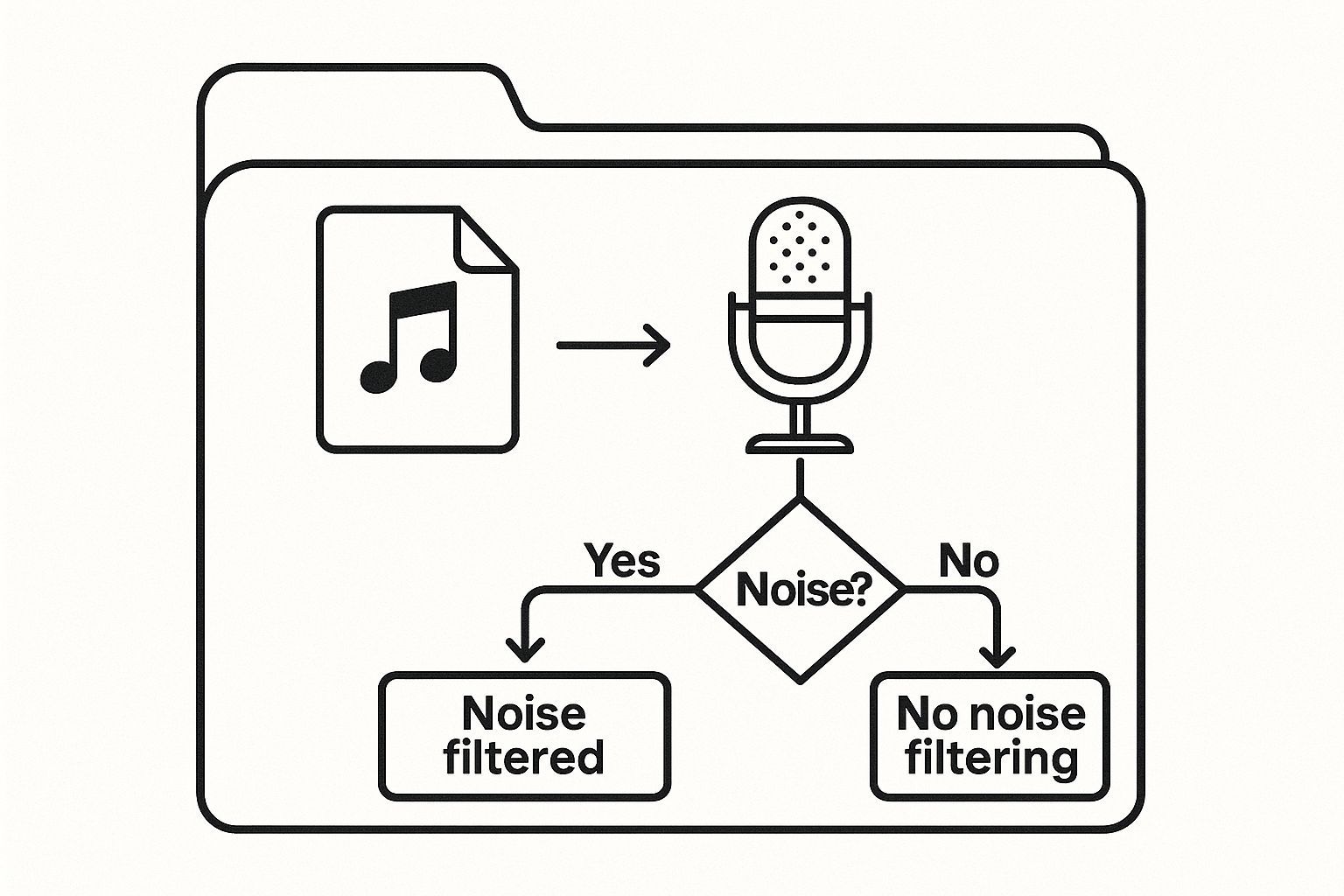
Das Wichtigste ist, Ihren Bedarf an Geschwindigkeit gegen Ihr Budget und das erforderliche Genauigkeitsniveau abzuwägen.
Um diese Entscheidung noch klarer zu machen, hier ein direkter Vergleich, wie manuelle und KI-Transkription abschneiden.
Manuelle vs. KI-Transkription: Ein schneller Vergleich
Diese Tabelle zeigt die wichtigsten Unterschiede, um Ihnen bei der Auswahl der besten Option für Ihr Projekt zu helfen.
| Merkmal | Manuelle Transkription | KI-gestützte Transkription (z. B. Transcript.LOL) |
|---|---|---|
| Geschwindigkeit | Langsam; Stunden oder Tage | Extrem schnell; Minuten |
| Kosten | Hoch; typischerweise pro Minute | Niedrig; oft eine Pauschal- oder Abonnementgebühr |
| Genauigkeit | Sehr hoch (99 %+), erfasst Nuancen | Gut bis sehr gut (85-95 %), kann mit Akzenten oder schlechter Audioqualität Probleme haben |
| Am besten geeignet für | Juristische, medizinische, akademische Forschung | Podcasts, Interviews, Meetings, Content-Erstellung |
| Skalierbarkeit | Begrenzt durch menschliche Verfügbarkeit | Praktisch unbegrenzt |
Letztendlich hängt die Wahl von Ihren Prioritäten ab. Für makellose Genauigkeit, bei der jedes Detail zählt, ist manuell unschlagbar. Für Geschwindigkeit, Skalierbarkeit und Kosteneffizienz ist KI der klare Gewinner.
Das Beste aus beiden Welten vereinen
Ehrlich gesagt, die effizienteste Strategie für die meisten Menschen ist eine hybride.
Beginnen Sie damit, Ihr Audio durch ein KI-Tool laufen zu lassen, um einen ersten Entwurf zu erhalten, der bereits 85-95 % genau ist. Von dort aus genügt eine schnelle menschliche Überprüfung, um kleine Fehler zu beheben, die Zeichensetzung zu korrigieren und alles zu polieren.
Diese Hybridmethode bietet Ihnen das Beste aus beiden Welten: die nahezu sofortige Bearbeitungszeit der KI und die ausgefeilte, zuverlässige Genauigkeit einer menschlichen Überprüfung, und das alles zu einem Bruchteil der Kosten eines rein manuellen Dienstes.
Dies ist der ideale Punkt für die meisten Geschäfts- und Content-Anforderungen. Indem Sie die Stärken beider Methoden nutzen, schaffen Sie einen Workflow, der schnell, erschwinglich und genau ist. Wenn Sie tiefer in die KI-Seite eintauchen möchten, haben wir einen großartigen Leitfaden, wie Sie Audio kostenlos in Text transkribieren können, der Ihnen den Einstieg erleichtert.
Ein praktischer Leitfaden zur Verwendung von KI-Transkriptionstools
https://www.youtube.com/embed/5aImmaTUgOA
Der Einstieg in ein KI-Transkriptionstool ist viel einfacher, als Sie vielleicht denken. Diese Plattformen sind intuitiv aufgebaut und verwandeln einen Prozess, der früher stundenlange manuelle Arbeit erforderte, in etwas, das Sie mit nur wenigen Klicks erledigen können. Das gesamte Konzept ist wunderbar einfach: Sie geben der KI Ihr Audio, und sie liefert Ihnen ein schriftliches Transkript zurück.
Moderne Tools wie Transcript.LOL bieten Ihnen eine Vielzahl von Möglichkeiten, Ihr Audio in das System zu bekommen. Sie können eine Datei per Drag & Drop von Ihrem Desktop ziehen, sie aus Cloud-Speichern wie Google Drive oder Dropbox importieren oder sogar einfach einen YouTube-Link einfügen. Diese Flexibilität bedeutet, dass Sie sofort loslegen können, egal wo sich Ihr Audio befindet.
Das Wachstum in diesem Bereich war explosiv. Der globale Markt für Audio-Transkriptionssoftware erreichte im Jahr 2025 eine Bewertung von rund 2,5 Milliarden US-Dollar und wird voraussichtlich jedes Jahr um 15 % wachsen. Das ist nicht überraschend, wenn man die schiere Menge an Audioinhalten bedenkt, die täglich erstellt werden. KI macht es einfach schneller und billiger, all das Gerede in Text umzuwandeln.
Konfigurieren Ihrer Transkriptionseinstellungen
Okay, Ihre Datei ist hochgeladen. Und jetzt? Drücken Sie nicht einfach auf den "Transkribieren"-Button. Nehmen Sie sich einen Moment Zeit, um die Einstellungen zu überprüfen. Dies ist Ihre erste und beste Chance, von Anfang an einen sauberen, genauen Entwurf zu erhalten.
Diese kurze Demo von der Homepage von Transcript.LOL zeigt, wie einfach der Upload-Prozess ist.
Sie sehen, wie die Drag-and-Drop-Funktion den Einstieg zum Kinderspiel macht.
Hier sind die Einstellungen, die Sie unbedingt überprüfen müssen:
- Sprachauswahl: Scheint einfach, ist aber entscheidend. Geben Sie immer die richtige Sprache an. Wenn Sie die Option für einen Dialekt haben, nutzen Sie diese. Eine KI, die auf amerikanischem Englisch trainiert wurde, könnte mit einem starken schottischen Akzent Schwierigkeiten haben. Wenn Sie ihr also sagen, was sie erwartet, macht das einen riesigen Unterschied.
- Sprechererkennung (Diarisierung): Das ist ein Lebensretter. Wenn mehr als eine Person spricht, schalten Sie diese Funktion ein. Die KI erkennt automatisch, wer spricht, und kennzeichnet das Transkript mit "Sprecher 1", "Sprecher 2" usw. Das spart unglaublich viel Zeit, die Sie sonst damit verbringen würden, das Gespräch zu entwirren.
- Benutzerdefiniertes Vokabular: Haben Sie viele Fachbegriffe, Eigennamen oder Akronyme in Ihrem Audio? Das ist die Funktion für Sie. Sie können der KI diese spezifischen Begriffe im Voraus "beibringen", was ihre Genauigkeit dramatisch erhöht, wenn sie diese hört.
Smarte Einstellungen = bessere Ergebnisse
🌐 Sprachauswahl
Stellen Sie immer die richtige Sprache/Dialekt ein.
👥 Sprecheridentifikation
Beschriften Sie automatisch, wer spricht.
📖 Benutzerdefiniertes Vokabular
Laden Sie Fachbegriffe, Akronyme und Namen vorab.
⚙️ Formatoptionen
Exportieren Sie in TXT, DOCX oder SRT.
Erstellen und Überprüfen Ihres ersten Entwurfs
Sobald Ihre Einstellungen optimiert sind, ist es an der Zeit, die KI ihre Arbeit tun zu lassen. Für eine typische einstündige Audiodatei haben die meisten Tools in der Regel in weniger als 15 Minuten einen Entwurf für Sie bereit. Vergleichen Sie das mit den vier bis sechs Stunden, die eine Person für dieselbe Aufgabe benötigen würde, und Sie werden verstehen, warum dies so wichtig ist.
Sie erhalten ein bearbeitbares Dokument zurück, das überraschend nah an der Perfektion liegt, insbesondere wenn Sie Ihre Audioaufnahmen und Einstellungen korrekt vorbereitet haben. Der nächste Schritt ist der wichtigste: die Überprüfung und Verfeinerung dieses Entwurfs, um 100%ige Genauigkeit zu erzielen. Für alle, die regelmäßig Team-Calls oder Interviews transkribieren, lohnt es sich auch, die 12 besten Meeting-Transkriptionssoftware zu prüfen, um herauszufinden, welche Tools die nützlichsten Funktionen für Ihre spezifischen Bedürfnisse bieten.
Denken Sie daran, dass das Ziel eines KI-Tools nicht nur darin besteht, Text zu produzieren; es geht darum, Ihnen einen qualitativ hochwertigen Entwurf zu liefern, den Sie mit minimalem Aufwand finalisieren können. Betrachten Sie es als einen erfahrenen Assistenten, der 95 % der Arbeit für Sie erledigt.
Bearbeiten und Verfeinern Ihres KI-generierten Transkripts

Seien wir ehrlich: Ein KI-generiertes Transkript ist ein absoluter Game-Changer. Es kann in wenigen Minuten einen Entwurf mit über 90 % Genauigkeit ausspucken und Ihnen Stunden mühsamer Arbeit ersparen. Aber die letzten 10 %? Dort passiert die Magie. Hier verwandelt eine menschliche Note einen ordentlichen Entwurf in ein poliertes, professionelles Dokument, das Sie tatsächlich verwenden können.
Betrachten Sie die KI als Ihren superschnellen, leicht ahnungslosen Assistenten. Sie ist brillant darin, die rohen Worte zu erfassen, stolpert aber oft über die Nuancen, den Kontext und die spezifische Terminologie, die eine Person sofort erkennen würde. Die Verfeinerungsphase ist Ihre Chance, diese entscheidende Schicht menschlicher Intelligenz hinzuzufügen.
Unter idealen Bedingungen können die besten KI-Transkriptionstools bis zu 99 % Genauigkeit erreichen. Die Technologie wird ständig besser, aber vorerst ist es eine leistungsstarke Partnerschaft: Die KI liefert die Geschwindigkeit, und Sie liefern die endgültige Überprüfung.
Ihre unverzichtbare Checkliste für die Bearbeitung
Tauchen Sie nicht einfach ein und fangen Sie an zu lesen. Das ist ein sicherer Weg, Dinge zu übersehen. Ich habe gelernt, eine spezifische Checkliste zu verwenden, um sicherzustellen, dass der Prozess effizient und gründlich ist.
Hier ist, worauf ich immer zuerst achte:
- Namen und Eigennamen: KI hat Schwierigkeiten mit einzigartigen Namen, Marken oder spezifischen Orten. Sie könnte "Caitlin" hören und "Katelyn" tippen. Halten Sie immer eine zuverlässige Quelle bereit, um diese zu überprüfen.
- Branchenjargon und Akronyme: Wenn Ihre Audioaufnahmen voller Fachbegriffe sind, wird die KI zwangsläufig einige Fehler machen. Sie könnte "SaaS" als "sass" oder "Fintech" als "fun tech" transkribieren, was die Bedeutung völlig verändern kann.
- Homophone: Das sind Wörter, die gleich klingen, aber unterschiedliche Schreibweisen und Bedeutungen haben, wie "their", "there" und "they're". KI vermischt diese ständig, daher ist eine sorgfältige Korrektur unerlässlich.
Der Bearbeitungsprozess dient nicht nur der Korrektur von Tippfehlern. Es geht darum, sicherzustellen, dass der endgültige Text die Absicht und Bedeutung des ursprünglichen Gesprächs perfekt widerspiegelt. Das schafft Vertrauen bei Ihrem Publikum.
Sobald Sie die spezifischen Wörter gemeistert haben, ist es an der Zeit, herauszuzoomen und das Gesamtbild zu betrachten. Das gesamte Dokument muss natürlich fließen. Hier geht es um mehr als nur Rechtschreibprüfung; es geht darum, den Inhalt klar und authentisch zu gestalten. Wenn Sie tiefer eintauchen möchten, gibt es einige großartige Ratschläge, wie Sie KI-Text vermenschlichen können, die Ihnen helfen können, diese roboterhaften Entwürfe zu verwandeln.
Mensch + KI = 99% Genauigkeit
Die schnellsten Ergebnisse erzielen Sie mit KI-gestützter Transkription, die durch eine schnelle menschliche Überprüfung verfeinert wird. Das ist der Sweet Spot für Unternehmen und Kreative gleichermaßen.
Formatierung für ultimative Lesbarkeit
Niemand möchte eine riesige Textwand lesen. Das ist einschüchternd und fast unmöglich zu verfolgen. Gute Formatierung macht Ihre Transkriptionen wirklich nützlich. Ihr Ziel ist es, den Inhalt in logische, leicht zu überfliegende Abschnitte zu unterteilen, die den Leser leiten.
Beginnen Sie mit der Zuweisung korrekter Sprecherkennzeichnungen. Wenn die KI nicht alle richtig erkannt hat, gehen Sie hinein und passen Sie sie manuell an (z. B. "Interviewer", "Dr. Evans"). Dies ist entscheidend, um den Dialog leicht verständlich zu machen.
Fügen Sie als Nächstes logische Absatzumbrüche hinzu. Meine Faustregel ist, einen neuen Absatz zu beginnen, wann immer ein Sprecher das Thema wechselt oder eine neue Idee einführt. Dieser einfache visuelle Hinweis hilft den Lesern, dem Gespräch zu folgen, ohne den Faden zu verlieren.
Machen Sie schließlich einen letzten Durchgang, während Sie sich die Audioaufnahme anhören. Dieses Synchronlesen ist Ihre Geheimwaffe, um umständliche Formulierungen zu erkennen und sicherzustellen, dass die Interpunktion – wie Kommas und Punkte – die natürlichen Pausen in der Sprache widerspiegelt. Dieser letzte Schritt garantiert, dass Ihre Transkription nicht nur genau, sondern auch tatsächlich eine Freude zu lesen ist.
Ihre häufigsten Transkriptionsfragen, beantwortet
Der Einstieg in die Transkription kann sich wie das Erlernen einer neuen Sprache anfühlen, selbst wenn Sie die besten Werkzeuge an Ihrer Seite haben. Wahrscheinlich werden Ihnen einige Fragen einfallen, wenn Sie beginnen.
Lassen Sie uns einige der häufigsten Dinge durchgehen, die Leute fragen, wenn sie herausfinden, wie man Audio in Text umwandelt. Das wird Ihnen helfen, von Anfang an die richtigen Erwartungen zu setzen.
Wie lange dauert das eigentlich?
Das ist die große Frage. Jeder möchte wissen, wie viel Zeit er einplanen muss, und die Antwort hängt wirklich von Ihrem Ansatz ab.
Wenn Sie es von Hand abtippen, benötigen selbst Profis etwa vier Stunden, um eine Stunde kristallklaren Audios zu transkribieren. Wenn Sie mit einer Aufnahme zu tun haben, die Hintergrundgeräusche, überlappende Sprecher oder viele Fachbegriffe aufweist, kann diese Zahl leicht auf sechs Stunden oder mehr steigen. Es ist eine echte Plackerei.
Auf der anderen Seite kann ein KI-Tool wie Transcript.LOL die gleiche einstündige Datei in etwa 10 bis 15 Minuten durcharbeiten und einen Entwurf für Sie bereithalten. Sie möchten ihn natürlich trotzdem Korrektur lesen. Bei einer guten Aufnahme kann eine schnelle Bearbeitung weitere 30 bis 60 Minuten dauern. Die Zeitersparnis ist enorm.
Verbatim vs. Clean Read: Was ist der Unterschied?
Sie werden diese Begriffe oft hören, und sie sind nicht austauschbar. Der von Ihnen gewählte Stil verändert das Endergebnis vollständig.
- Verbatim-Transkription: Dies ist die Version "mit allen Ecken und Kanten". Sie erfasst alles – jedes einzelne "Ähm", "Äh" und "Wie". Sie enthält auch Stottern, falsche Anfänge und sogar Hintergrundgeräusche. Dieser rohe, ungefilterte Ansatz ist entscheidend für Dinge wie juristische Zeugenaussagen oder eingehende Forschung, bei denen jedes winzige Detail zählt.
- Clean Read-Transkription: Betrachten Sie dies als die polierte, bearbeitete Version (manchmal auch als intelligente Verbatim bezeichnet). Sie schneidet den ganzen Füllstoff heraus – die Füllwörter, versehentlichen Wiederholungen und Stotterer –, um eine Transkription zu liefern, die flüssig und leicht zu lesen ist. Das ist es, was Sie wollen, wenn Sie einen Podcast in einen Blogbeitrag umwandeln oder saubere Besprechungsprotokolle erstellen möchten.
Ihr Endziel ist hier entscheidend. Benötigen Sie eine rechtlich präzise Aufzeichnung? Gehen Sie verbatim. Benötigen Sie klare, lesbare Inhalte? Eine Clean Read ist fast immer Ihr bester Freund.
Kann KI Akzente und verschiedene Dateitypen verarbeiten?
Das ist eine berechtigte Sorge – wie geht die KI mit der Art und Weise um, wie echte Menschen sprechen? Moderne KI wurde mit einer riesigen Menge globaler Daten trainiert, sodass sie bemerkenswert gut darin geworden ist, eine Vielzahl von Akzenten zu verstehen. Dennoch kann die Genauigkeit bei besonders starken Akzenten manchmal abnehmen. Ein guter Tipp ist die Verwendung eines Dienstes, mit dem Sie die Sprache angeben können, was der KI einen hilfreichen Anstoß in die richtige Richtung gibt.
Und was ist mit Dateiformaten? Während die meisten Dienste gängige Dateien wie MP3 oder M4A akzeptieren, erzielen Sie die absolut besten Ergebnisse mit einem verlustfreien Format wie WAV oder FLAC. Da diese Dateien unkomprimiert sind, liefern sie der KI mehr rohe Audiodaten zur Analyse, was fast immer zu einer genaueren Transkription führt.
Wenn Sie weitere Fragen haben, haben wir sie wahrscheinlich in unserer Liste der häufig gestellten Fragen beantwortet.
Bereit, Ihr Audio in wenigen Minuten in genauen, nutzbaren Text zu verwandeln? Transcript.LOL verwendet fortschrittliche KI, um schnelle, erschwingliche und zuverlässige Transkriptionen zu liefern. Probieren Sie es noch heute kostenlos aus!

Sprechererkennung
Identifiziere automatisch verschiedene Sprecher in deinen Aufnahmen und beschrifte sie mit ihren Namen.

Bearbeitungswerkzeuge
Bearbeite Transkripte mit leistungsstarken Werkzeugen wie Suchen und Ersetzen, Sprecherzuordnung, Rich-Text-Formate und Hervorhebungen.
Zusammenfassungen und Chatbot
Erstelle Zusammenfassungen und andere Erkenntnisse aus deinem Transkript, wiederverwendbare benutzerdefinierte Prompts und Chatbot für deine Inhalte.