
So führen Sie Besprechungsprotokolle – Ein moderner Ansatz
Erfahren Sie, wie Sie Besprechungsprotokolle mit unserem modernen Leitfaden effektiv führen. Entdecken Sie praktische Tipps, Vorbereitungsarbeiten und KI-Tools für genaue, umsetzbare Notizen.
Kate, Praveen
July 10, 2024
Seien wir ehrlich, das Führen von Besprechungsprotokollen fühlt sich oft wie eine lästige Pflicht an – eine administrative Aufgabe, die niemand wirklich will. Aber in einer Welt voller virtueller Calls hintereinander ist das Beherrschen dieser Fähigkeit zu einer Superkraft geworden.
Gutes Protokollieren bedeutet nicht nur, Notizen zu machen. Es geht darum, Klarheit zu schaffen, Verantwortlichkeit zu fördern und den massiven Produktivitätsverlust zu verhindern, der aus schlecht dokumentierten Besprechungen resultiert.
Warum das Beherrschen von Besprechungsprotokollen wichtiger ist als je zuvor
Der Übergang zu Remote- und Hybridarbeit hat diese Fähigkeit noch kritischer gemacht. Zwischen 2020 und 2022 stieg der Anteil virtueller Besprechungen sprunghaft von 48 % auf 77 %, was die Art und Weise, wie wir alle zusammenarbeiten, grundlegend veränderte.
Dieser Anstieg an Online-Besprechungen bedeutet, dass wir dringend genaue Aufzeichnungen benötigen, um verteilte Teams auf dem gleichen Stand zu halten. Ohne sie reden wir nur ins Leere.

Die wahren Kosten schlechter Dokumentation
Wenn es keine klare Aufzeichnung gibt, verhallen Gespräche im Nichts. Entscheidungen werden unklar und Aktionspunkte gehen im Durcheinander verloren. Dies führt zu Zeitverschwendung, doppelter Arbeit und ins Stocken geratenen Projekten – ein echter Killer für den Schwung.
Dieses Problem ist in der heutigen verteilten Arbeitsumgebung noch größer. Weitere Informationen zum Zusammenhalt Ihres Teams finden Sie in diesen Best Practices für das Management von Remote-Teams.
Ein großartiges Besprechungsprotokoll fungiert als kollektives Gedächtnis des Teams. Es ist nicht nur eine Aufzeichnung dessen, was gesagt wurde, sondern eine Roadmap für das, was getan werden muss. Es verwandelt ein flüchtiges Gespräch in ein permanentes, umsetzbares Gut.
Warum gute Protokolle wirkungsvoll sind?
Klare Dokumentation vermeidet Missverständnisse, stärkt die Verantwortlichkeit und beschleunigt die Entscheidungsfindung. Aussagekräftige Protokolle dienen als „Gedächtnis“ Ihres Teams und halten alle auch nach komplexen Diskussionen auf dem gleichen Stand.
Dieser Leitfaden führt Sie durch einen modernen Ansatz, der zeitlose Notizstrategien mit leistungsstarken KI-Tools wie Transcript.LOL kombiniert. Betrachten Sie ihn als Fahrplan, um jede Besprechung wertvoll zu machen und Diskussionen in klare Ergebnisse zu verwandeln, die Ihr Unternehmen tatsächlich voranbringen.
KI-gestützte Effizienzwerkzeuge
Modernste KI
Angetrieben von OpenAIs Whisper für branchenführende Genauigkeit. Unterstützung für benutzerdefinierte Vokabulare, bis zu 10 Stunden lange Dateien und ultraschnelle Ergebnisse.

Aus mehreren Quellen importieren
Importiere Audio- und Videodateien aus verschiedenen Quellen, einschließlich direktem Upload, Google Drive, Dropbox, URLs, Zoom und mehr.

In mehreren Formaten exportieren
Exportiere deine Transkripte in mehreren Formaten, einschließlich TXT, DOCX, PDF, SRT und VTT mit anpassbaren Formatierungsoptionen.
Durch die Behebung dieses einen Prozesses können Sie die Effizienz Ihres Teams erheblich steigern. Weitere Strategien finden Sie in unserem Leitfaden zum Thema Wie Sie die Teamproduktivität verbessern können.
Hier geht es nicht nur darum, zu lernen, wie man ein Meeting protokolliert – es geht darum, dieses Protokoll zu einem Eckpfeiler des Erfolgs Ihres Teams zu machen.
Die Vorbereitung vor Beginn des Meetings
Großartige Meeting-Protokolle werden fast nie spontan erstellt. Die genauesten und wertvollsten Aufzeichnungen stammen aus sorgfältiger Vorbereitung, lange bevor jemand überhaupt auf 'Beitreten' klickt. Es geht nicht nur darum, das Gesagte zu transkribieren; es geht darum, strategisch zu dokumentieren, was wirklich wichtig ist.
Betrachten Sie die Meeting-Agenda als Ihren Nordstern. Bevor es losgeht, sprechen Sie mit dem Organisator, um die Ziele wirklich zu verstehen. Welche Entscheidungen stehen zur Debatte? Welche Probleme versuchen wir hier wirklich zu lösen? Eine solide Agenda mit klaren Themen, Referenten und Zeitfenstern wird Ihr bester Freund sein.
Erstellen Sie eine einfache Vorlage für Notizen
Basierend auf dieser Agenda erstellen Sie ein kurzes Dokument, das Sie als Vorlage für Ihre Notizen verwenden können. Es muss nicht ausgefallen sein – eine einfache Gliederung in einem Texteditor oder Ihrer bevorzugten Notizen-App reicht aus.
Vorbereitung vor der Besprechung
Zuerst die Agenda
Gut geplante Agenden verhindern Verwirrung und helfen Ihnen, Diskussionen leicht zu verfolgen.
Kennen Sie das Ziel
Identifizieren Sie den Zweck der Besprechung, damit Sie nur das festhalten, was wirklich wichtig ist.
Ressourcen vorbereiten
Halten Sie frühere Protokolle, Berichte oder Gliederungen bereit, um ein schnelleres Verständnis zu ermöglichen.
Vorlage organisieren
Eine strukturierte Vorlage ermöglicht es Ihnen, sich auf Entscheidungen statt auf die Formatierung zu konzentrieren.
Stellen Sie sicher, dass Ihre Vorbesprechungsvorlage diese Grundlagen enthält:
- Besprechungstitel, Datum und Uhrzeit: Die nicht verhandelbaren Punkte. Sie werden sich später dankbar sein, wenn Sie danach suchen.
- Teilnehmerliste: Es ist klug, aufzuschreiben, wer eingeladen wurde und wer tatsächlich erschienen ist. Dies ist äußerst nützlich, um zu verfolgen, wer bei wichtigen Entscheidungen anwesend war.
- Tagesordnungspunkte als Überschriften: Wandeln Sie jedes Tagesordnungsthema in eine Überschrift in Ihrem Dokument um. Lassen Sie einfach etwas Platz darunter, um die Details auszufüllen, während sich das Gespräch entwickelt.
Diese einfache Struktur verhindert, dass Sie sich während einer schnelllebigen Diskussion mit der Organisation abmühen müssen. Sie gibt Ihnen einen logischen Fluss, damit Sie sich auf das Gespräch konzentrieren können, nicht auf Ihre Formatierung.
Sammeln Sie Ihre Ressourcen im Voraus
Gehen Sie nicht unvorbereitet in die Besprechung. Nehmen Sie sich fünf Minuten Zeit, um alle Dokumente zusammenzutragen, die Ihnen Kontext geben. Dies kann alles sein, von den Protokollen der letzten Besprechung bis hin zu Projektübersichten oder Datenberichten, die zur Diskussion anstehen. Wenn Sie diese Dateien zur Hand haben, können Sie besser folgen und wesentlich aufschlussreichere Notizen machen.
Die schiere Anzahl von Besprechungen, an denen wir alle teilnehmen, macht diese Vorarbeit unerlässlich. Allein in den USA finden schätzungsweise 36 bis 56 Millionen Besprechungen pro Tag statt. Wenn diese Besprechungen ineffektiv sind, kosten sie die US-Wirtschaft rund 37 Milliarden US-Dollar pro Jahr. Das macht eine gute Dokumentation mehr als nur eine administrative Aufgabe – es ist eine kritische Geschäftsfunktion.
Diese Vorbereitung ist für virtuelle Besprechungen noch wichtiger. Wenn Sie eine Plattform wie Microsoft Teams verwenden, kann die Kenntnis der integrierten Aufzeichnungsfunktionen eine Rettung sein. Unser Leitfaden zur Aufzeichnung einer Besprechung in Teams erläutert die Schritte, um sicherzustellen, dass Sie alles erfassen.
Nur 15 Minuten Vorbereitung können Ihre Rolle von einem passiven Schreiber zu einem aktiven, informierten Teilnehmer verändern. Diese kleine Voraussicht ermöglicht es Ihnen, vorherzusehen, wohin sich die Diskussion entwickelt, und bereit zu sein, Entscheidungen mit völliger Klarheit zu dokumentieren.
Erfassen Sie, was während der Besprechung wirklich zählt
Wenn eine Diskussion schnell voranschreitet, kann es sich wie ein Trinken aus einem Feuerwehrschlauch anfühlen, wenn man versucht, wertvolle Erkenntnisse von oberflächlichem Gerede zu trennen. Das Geheimnis großartiger Besprechungsprotokolle liegt nicht darin, jedes einzelne Wort zu transkribieren – es liegt darin, zu lernen, das Signal zu erfassen und das Rauschen zu ignorieren. Das bedeutet, Ihre Denkweise von einem passiven Stenografen zu einem aktiven Zuhörer zu ändern, der sich auf Ergebnisse konzentriert, nicht nur auf den Dialog.
Vergessen Sie den Versuch, jedes Zitat aufzuschreiben. Es sei denn, Sie sind bei einer juristischen Anhörung, das ist ein sicherer Weg, um überfordert zu werden und zu verpassen, was wirklich wichtig ist. Entwickeln Sie stattdessen Ihre eigene Kurzschrift. Ich verwende gerne Symbole, um wichtige Informationen zu kennzeichnen: ein Sternchen (*) für eine Aufgabe, ein Dollarzeichen ($) für Budgetgespräche oder ein Fragezeichen (?) für etwas, das nachverfolgt werden muss. Das macht meine Notizen später sofort durchsuchbar.
Ein wenig Vorbereitung ist sehr hilfreich. Dieser einfache Ablauf zeigt, wie Sie sich vor Beginn der Besprechung auf das Spiel einstellen können, damit Sie bereit sind, das Wichtige zu erfassen.
Profi-Tipp: Visuelle Abkürzungen nutzen
Symbole, Farbcodierungen und Kurzbefehle helfen Ihnen, Notizen schneller zu scannen. Kleine Gewohnheiten wie diese machen Ihre Dokumentation schärfer und organisierter.
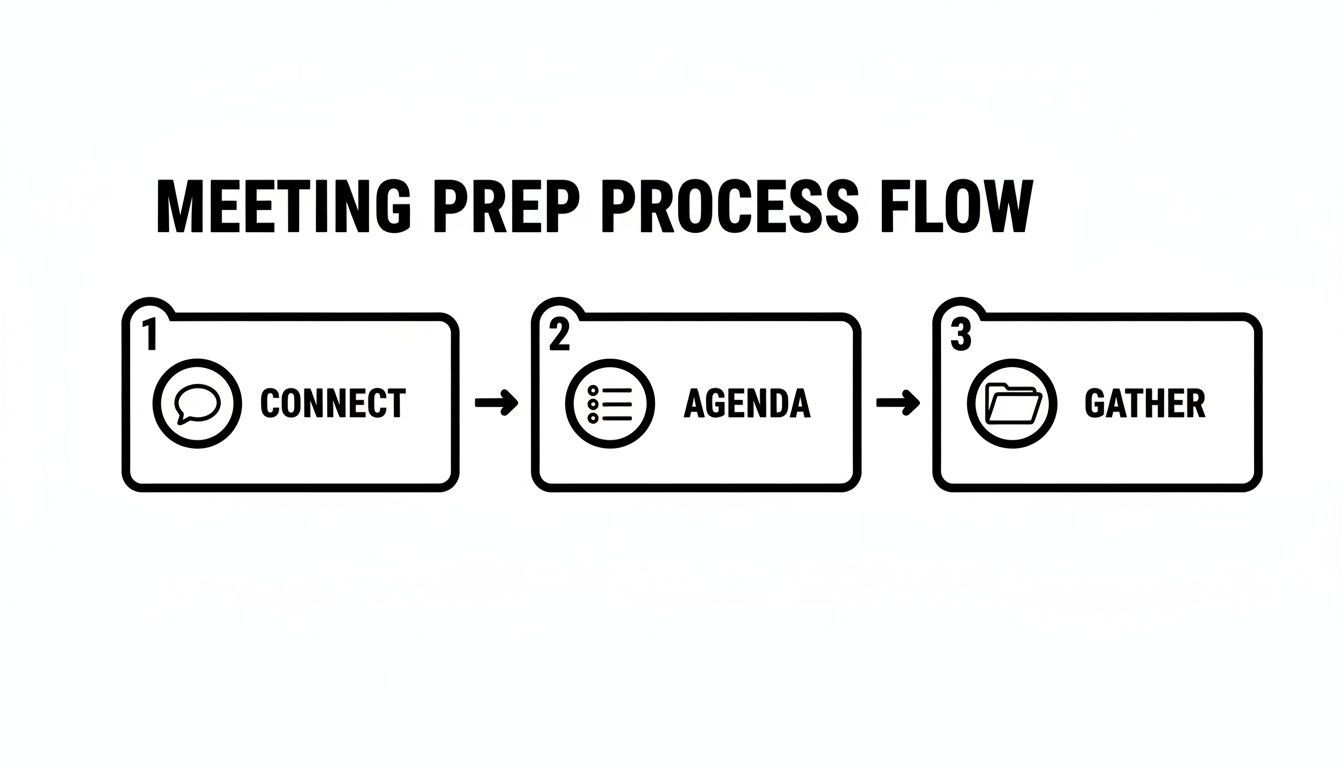
Indem Sie sich mit dem Organisator verbinden, die Agenda verstehen und die richtigen Dokumente im Voraus erhalten, schaffen Sie die Grundlage für fokussiertes und effektives Notieren.
Selektives Notieren meistern
Ihre eigentliche Aufgabe ist es, die Momente zu identifizieren, die zu Handlungen führen. Meine Ohren spitzen sich immer, wenn ich Formulierungen höre, die auf eine Entscheidungsfindung hindeuten. Sätze wie „Also, wir haben uns darauf geeinigt…“ oder „Der nächste Schritt ist…“ sind Gold wert. Das ist Ihr Signal, mit dem Schreiben zu beginnen, denn das sind die Ergebnisse, die die Dinge voranbringen.
Ein klassischer Fehler ist es, sich in den Details einer Debatte zu verlieren, anstatt sich auf das Ergebnis zu konzentrieren. Eine zehnminütige Hin-und-Her-Diskussion kann auf eine einzige, entscheidende Entscheidung hinauslaufen. Ihre Aufgabe ist es, diese Entscheidung klar und prägnant festzuhalten – nicht den gesamten malerischen Weg, den das Team dorthin zurückgelegt hat.
Um die Protokolle einer Besprechung effektiv zu erstellen, konzentrieren Sie sich auf drei Kernelemente: getroffene Entscheidungen, zugewiesene Aktionspunkte (wer, was, wann) und die wichtigsten erzielten Schlussfolgerungen. Alles andere ist zweitrangig. Dieser Fokus stellt sicher, dass Ihr finales Dokument ein Werkzeug für die Aktion ist, keine Abschrift von Geplauder.
Das Auffrischen allgemeiner Best Practices für das Besprechungsmanagement kann ebenfalls einen großen Unterschied machen. Wenn Sie verstehen, was eine Besprechung produktiv macht, werden Sie besser darin, die wichtigsten Ergebnisse zu erkennen, die dokumentiert werden müssen, sobald sie eintreten.
Wählen Sie Ihr Notiz-Toolkit
Das richtige Werkzeug kann Ihre Fähigkeit, Schritt zu halten, verbessern oder beeinträchtigen. Während ein klassischer Stift und Papier großartig sind, um präsent zu bleiben, bieten digitale Werkzeuge erhebliche Vorteile in Bezug auf Geschwindigkeit und Organisation. Es hängt wirklich von der Besprechung ab.
- Stift und Papier: Perfekt für kleinere, fokussierte Besprechungen, bei denen Sie der Versuchung von Benachrichtigungen widerstehen möchten. Es zwingt Sie zur Prägnanz.
- Textverarbeitung oder Notiz-App: Eine großartige Option für schnelle Tipper. Sie können Ihre Notizen direkt in eine Vorlage einfügen und sie später leicht bereinigen.
- KI-Transkriptionstools: Dies ist die moderne Antwort, um alles zu erfassen, ohne Ihre Fähigkeit zur Teilnahme zu opfern. Ein Tool wie Transcript.LOL erstellt ein vollständiges, genaues Transkript, auf das Sie später zurückgreifen können. Dies gibt Ihnen die Freiheit, sich am Gespräch zu beteiligen, in dem Wissen, dass Sie eine perfekte Aufzeichnung haben, aus der Sie nach Ende der Besprechung wichtige Entscheidungen und Aktionspunkte entnehmen können.
Intelligente Funktionen zur Verbesserung von Protokollen

Sprechererkennung
Identifiziere automatisch verschiedene Sprecher in deinen Aufnahmen und beschrifte sie mit ihren Namen.

Bearbeitungswerkzeuge
Bearbeite Transkripte mit leistungsstarken Werkzeugen wie Suchen und Ersetzen, Sprecherzuordnung, Rich-Text-Formate und Hervorhebungen.
Zusammenfassungen und Chatbot
Erstelle Zusammenfassungen und andere Erkenntnisse aus deinem Transkript, wiederverwendbare benutzerdefinierte Prompts und Chatbot für deine Inhalte.
Die folgende Tabelle vergleicht die Vor- und Nachteile der herkömmlichen Methode mit der Verwendung eines KI-gestützten Ansatzes.
Vergleich der Methoden zur Protokollierung von Besprechungen
| Merkmal | Manuelle Notizen (z. B. Stift & Papier, Word-Dokument) | KI-Transkriptionstools (z. B. Transcript.LOL) |
|---|---|---|
| Genauigkeit | Anfällig für menschliche Fehler, Interpretationen und Geschwindigkeit. | Nahezu 100% genaue, wortwörtliche Aufzeichnung der Konversation. |
| Teilnahme | Teilt die Aufmerksamkeit zwischen Zuhören und Schreiben. | Ermöglicht volle Teilnahme und Engagement in der Diskussion. |
| Vollständigkeit | Erfasst Kernpunkte, lässt aber Nuancen und Details aus. | Erstellt ein vollständiges, durchsuchbares Transkript der gesamten Besprechung. |
| Effizienz | Erfordert sofortigen und konzentrierten Aufwand während der Besprechung. | Automatisiert den gesamten Erfassungsprozess; die Arbeit findet nach der Besprechung statt. |
| Aufgaben | Verlässt sich darauf, dass der Notizenschreiber sie manuell identifiziert und verfolgt. | Kann Aufgaben und Sprecher automatisch identifizieren und auflisten. |
| Nachbesprechungsarbeit | Beinhaltet das Bereinigen, Organisieren und Strukturieren von Notizen. | Liefert ein sofort einsatzbereites Transkript für schnelle Zusammenfassungen und Überprüfungen. |
Letztendlich ist die beste Methode diejenige, die es Ihnen ermöglicht, sowohl ein aufmerksamer Teilnehmer als auch ein genauer Protokollführer zu sein. Für viele funktioniert ein hybrider Ansatz am besten – volle Teilnahme, während ein KI-Tool die Hauptlast der Transkription übernimmt.
Von Rohnotizen zu einem polierten Protokoll
Die Besprechung ist vorbei, aber hier beginnt die eigentliche Arbeit. Nun müssen Sie dieses Durcheinander aus Abkürzungen und wirren Gedanken in ein poliertes, wertvolles Gut für das gesamte Team verwandeln. Das Ziel ist es, eine einzige Quelle der Wahrheit zu schaffen, die klar, objektiv und tatsächlich handlungsorientiert ist.
Mein Rat? Machen Sie sich sofort nach Ende der Besprechung daran. Schon ein Tag Wartezeit kann es erheblich erschweren, sich an die kleinen Details und Nuancen einer komplexen Diskussion zu erinnern. Bei Ihrem ersten Durchgang geht es darum, die richtige Struktur zu finden.
Strukturieren Sie Ihr Protokoll für maximale Klarheit
Ein gut strukturiertes Dokument wird auch tatsächlich gelesen. Sie möchten Ihr endgültiges Protokoll in logische Abschnitte unterteilen, damit die Leute genau das finden, was sie brauchen, ohne sich durch eine Textwand wühlen zu müssen.
Eine einfache, effektive Struktur sieht ungefähr so aus:
- Das Wesentliche: Beginnen Sie mit den Grundlagen – Besprechungstitel, Datum, Uhrzeit und eine Liste der Anwesenden. Ich notiere auch gerne, wer eingeladen war, aber nicht teilnehmen konnte.
- Getroffene Entscheidungen: Dies benötigt einen eigenen Abschnitt. Listen Sie jede einzelne getroffene Entscheidung klar und prägnant auf. Mehrdeutigkeit ist hier Ihr Feind.
- Wichtige Diskussionspunkte: Fassen Sie kurz die Hauptargumente zusammen, die zu diesen Entscheidungen geführt haben. Dies ist kein wortwörtliches Transkript, nur genug Kontext, damit jemand das Warum versteht.
- Aufgaben: Dies ist mit Abstand der wichtigste Teil. Isolieren Sie jede Aufgabe, weisen Sie einen klaren Verantwortlichen zu und geben Sie ein festes Fälligkeitsdatum an.
Für eine tiefere Betrachtung bietet unser Leitfaden zu einem professionellen Format für Besprechungsprotokolle mit Aufgaben eine vollständige Vorlage, die Sie verwenden können. Dieser Ansatz verwandelt Ihr Protokoll von einer einfachen Aufzeichnung in ein echtes Projektmanagement-Tool.
Bearbeiten Sie auf Objektivität und Kürze
Ihr nächster Durchgang dient der Verfeinerung der Sprache. Die besten Protokolle sind völlig neutral und frei von persönlichen Meinungen. Sie sind ein Reporter, kein Kommentator. Ihre Aufgabe ist es, festzuhalten, was passiert ist, nicht, was Sie denken, was passiert ist.
Vermeiden Sie vage Formulierungen. Anstatt zu schreiben "wir sollten uns wahrscheinlich mit ... befassen", machen Sie daraus eine konkrete Aufgabe: "Aufgabe: Maria recherchiert bis Freitag, 25. Oktober, neue Marketingsoftware." Dieser einfache Wechsel schafft echte Verantwortlichkeit.
Hier ist es auch von Vorteil, ein KI-Transkriptionstool zur Hand zu haben. Anstatt sich nur auf Ihr Gedächtnis zu verlassen, kann eine Plattform wie Transcript.LOL Ihnen ein perfektes, wortwörtliches Transkript zur Verfügung stellen, mit dem Sie arbeiten können.
Mit einer genauen Aufzeichnung können Sie aufhören, sich Sorgen zu machen, jemanden falsch zu zitieren oder ein wichtiges Detail zu vergessen. Ihre Rolle verschiebt sich vom hektischen Schreiber zum strategischen Redakteur, sodass Sie sich ausschließlich auf die Zusammenfassung der wichtigsten Erkenntnisse konzentrieren können. So erstellen Sie Protokolle, die die Leute tatsächlich nutzen.
Lassen Sie KI Ihre Besprechungsdokumentation übernehmen
Was wäre, wenn Sie eine Besprechung mit einem perfekten, detaillierten Protokoll verlassen könnten, ohne während des Gesprächs ein einziges Wort tippen zu müssen? Das ist kein futuristischer Traum; moderne KI-gestützte Tools machen dies zur alltäglichen Realität. Dies verändert die Art und Weise, wie wir Besprechungsprotokolle erstellen, grundlegend und verwandelt sie von einer manuellen, ablenkenden Pflicht in einen automatisierten Prozess, der einfach passiert.
Dabei geht es nicht nur darum, ein Transkript zu erhalten. Es geht darum, Sie von dem hektischen Kampf zu befreien, jedes Detail festzuhalten. Anstatt mit einer schnelllebigen Diskussion Schritt zu halten, können Sie einfach im Nachhinein eine Aufnahme hochladen und erhalten in wenigen Minuten ein strukturiertes, durchsuchbares Dokument. Ihre Rolle verschiebt sich vom bloßen Notizenschreiber zum strategischen Teilnehmer, der sich tatsächlich auf das Gespräch konzentrieren kann.
Verlassen Sie sich nicht nur auf Ihr Gedächtnis
Das Auslassen der Dokumentation führt zu verpassten Aufgaben, vergessenen Entscheidungen und ins Stocken geratenen Fortschritten. Halten Sie immer die wichtigsten Ergebnisse fest, um eine Fehlausrichtung im Team zu vermeiden.
Automatisierte Assistenten sind die neue Norm
Der Trend zu KI-Meeting-Software ist mehr als nur ein Nischenphänomen – er explodiert. Der Markt wird voraussichtlich von 1,42 Millionen US-Dollar im Jahr 2024 auf beeindruckende 7,47 Milliarden US-Dollar bis 2033 anwachsen. Dies signalisiert eine massive Veränderung in der Art und Weise, wie Unternehmen agieren.
Wir sehen diesen Wandel bereits. Satte 33 % der amerikanischen Wissensarbeiter nutzen KI bereits, um ihre Meeting-Notizen aufzuzeichnen, und drei Viertel von ihnen verlassen sich auf KI-Tools, um produktiver zu sein. Wie Azeus Convene hervorhebt, treibt dieser Trend schnellere Entscheidungen voran und hält Teams auf dem gleichen Stand.
Die Nutzung von KI bietet Ihnen ein unvoreingenommenes und vollständiges Protokoll, das das Risiko menschlicher Fehler oder falsch erinnerter Gespräche reduziert. Es ist eine einfache Möglichkeit, ein standardisiertes, leicht zugängliches Archiv der wichtigsten Diskussionen Ihres Teams aufzubauen.
Wie KI-Transkriptionswerkzeuge tatsächlich funktionieren
Plattformen wie Transcript.LOL machen diesen Prozess unglaublich einfach. Alles, was Sie tun müssen, ist Ihre Audio- oder Videodatei des Meetings hochzuladen, und die KI kümmert sich um den Rest.
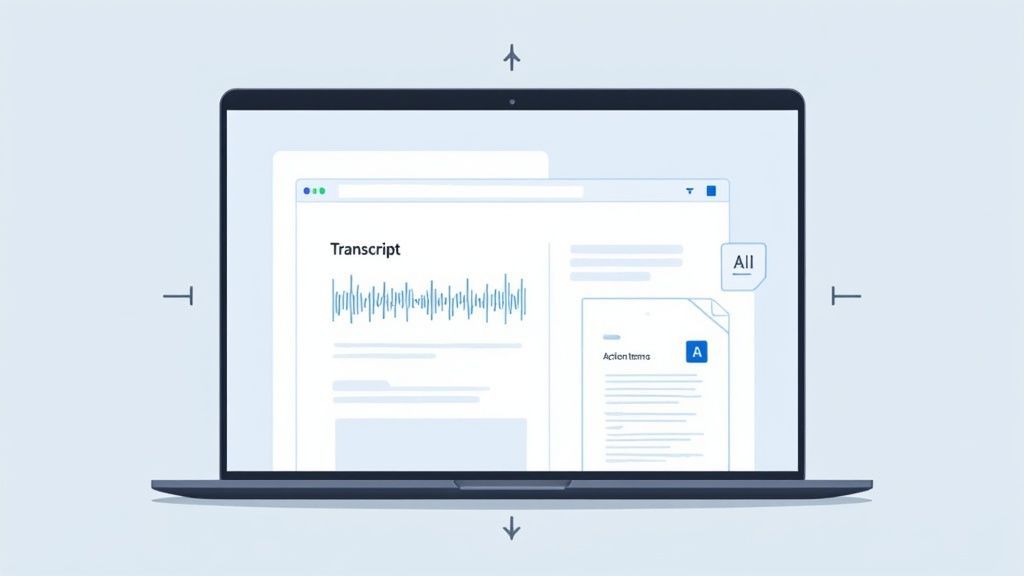
Der obige Screenshot gibt Ihnen einen Einblick, wie das in der Praxis aussieht. Sie erhalten das vollständige Transkript, synchronisiert mit dem Audio, plus eine organisierte Zusammenfassung. Die gesamte Benutzeroberfläche ist darauf ausgelegt, das Finden dessen, was Sie brauchen, kinderleicht zu machen.
Aber was Sie zurückbekommen, ist weit mehr als eine Textwand. Die besten Tools können:
- Ein sofortiges Transkript erstellen: Erhalten Sie eine hochgenaue, Wort-für-Wort-Aufzeichnung des gesamten Gesprächs.
- Sprecher identifizieren: Die KI ermittelt automatisch, wer was gesagt hat, und liefert Ihnen wichtigen Kontext ohne manuelle Kennzeichnung.
- Aktionspunkte erkennen: Viele Plattformen können sogar Phrasen erkennen, die auf eine Aufgabe hinweisen, und eine Entwurfsliste von Aktionspunkten erstellen, die Sie überprüfen und zuweisen können.
Wenn Sie die Transkription an eine KI auslagern, gewinnen Sie Ihre Gehirnkapazität zurück. Sie können sich tatsächlich an der Diskussion beteiligen, Folgefragen stellen und Ideen einbringen, in dem Wissen, dass im Hintergrund eine perfekte Aufzeichnung erstellt wird.
Dieser Ansatz revolutioniert die Protokollführung. Anstatt ein Engpass zu sein, wird die Dokumentation zu einem Werkzeug zur Steigerung der Produktivität. Wenn Sie Ihre Optionen abwägen, kann unser Leitfaden zur besten Meeting-Transkriptionssoftware Ihnen helfen, das richtige Werkzeug für Ihr Team zu finden. Die Zukunft effektiver Meetings ist da – lassen Sie die Technologie die Mechanik übernehmen, damit Sie sich auf das konzentrieren können, was wirklich zählt.
Fragen zu Meeting-Protokollen?
Selbst mit dem besten Plan kann es bei der Protokollführung etwas knifflig werden. Lassen Sie uns einige der häufigsten Fragen angehen, die in der Praxis auftreten.
Wie viele Details sind zu viele?
Ehrlich gesagt, es kommt ganz auf den Zweck des Meetings an. Für ein formelles Vorstandstreffen müssen Sie wahrscheinlich sehr gründlich sein, um rechtliche oder Compliance-Standards zu erfüllen. Aber für den täglichen Stand-up Ihres Teams? Eine kurze Liste von Entscheidungen und Aktionspunkten ist alles, was Sie brauchen.
Eine gute Faustregel ist, gerade genug Informationen zu erfassen, damit jemand, der das Meeting verpasst hat, verstehen kann, was entschieden wurde und warum. Konzentrieren Sie sich auf die Ergebnisse, nicht auf jedes einzelne Wort der Konversation.
Das Ziel ist kein Wort-für-Wort-Transkript; es ist eine nützliche Aufzeichnung dessen, was passiert ist. Sofern die Anwälte nichts anderes sagen, sollten Sie immer Klarheit und Handlungsaufforderungen über erschöpfende Details stellen. Das macht das Dokument wertvoll.
Muss ich aufzeichnen, wer wofür gestimmt hat?
Für die meisten alltäglichen Meetings reicht es aus, die endgültige Entscheidung zu vermerken. Aber wenn es formeller wird, wie bei einem Vorstandstreffen oder einer Ausschusssitzung, müssen Sie oft spezifisch werden. Das bedeutet, den Antrag, wer ihn gestellt hat, wer ihn unterstützt hat und das Endergebnis der Abstimmung zu protokollieren.
So sieht das in der Praxis aus:
- Informelle Meetings: "Das Team hat zugestimmt, mit der neuen Marketingkampagne fortzufahren."
- Formelle Meetings: "Ein Antrag zur Genehmigung des Q4-Budgets wurde von Jane Doe gestellt, unterstützt von John Smith. Der Antrag wurde mit 5 Ja-Stimmen und 2 Nein-Stimmen angenommen."
Im Zweifelsfall prüfen Sie immer die eigenen Governance-Regeln Ihrer Organisation.
Wie schnell sollte ich das Protokoll versenden?
Meeting-Protokolle sind wie frisches Brot – sie werden schnell alt. Ich bemühe mich immer, meine Notizen zu bereinigen und sie innerhalb von 24 Stunden in die Posteingänge aller zu bringen.
Warum die Eile? Die Konversation ist noch frisch im Gedächtnis aller, daher ist es der perfekte Zeitpunkt, um Klärungen zu bitten oder Fehler zu entdecken.
Das schnelle Versenden hält auch den Schwung aufrecht und stellt sicher, dass alle ihre nächsten Schritte und Fristen klar verstehen. Eine Woche zu warten, kann ein Projekt ins Stocken bringen, während die Leute auf Anweisungen warten. Diese eine einfache Gewohnheit kann einen großen Unterschied dabei machen, Gespräche in Handlungen umzuwandeln.
Sind Sie bereit, sich keine Sorgen mehr um manuelle Notizen zu machen und bessere Meetings abzuhalten? Transcript.LOL nutzt KI, um Ihre Diskussionen automatisch zu transkribieren, zu identifizieren, wer was gesagt hat, und klare Aktionspunkte herauszuziehen. Sie können sich auf das Gespräch konzentrieren, nicht auf die Tastatur.
👉 Starten Sie kostenlos auf Transcript.LOL und sehen Sie, wie einfach Meeting-Dokumentation sein kann.