
Comment obtenir la transcription d'une vidéo YouTube : le guide du créateur
Découvrez comment obtenir facilement la transcription d'une vidéo YouTube. Notre guide couvre les outils natifs de YouTube, les puissants transcripteurs IA et les conseils professionnels pour les créateurs.
Praveen
September 3, 2025
Si vous cherchez juste une réponse rapide sur comment obtenir la transcription d'une vidéo YouTube, c'est simple : cliquez sur le bouton « ...plus » juste en dessous de la description d'une vidéo, puis sur « Afficher la transcription ». Cela vous donne une transcription instantanée et cliquable, parfaite pour une référence rapide. Mais ce simple fichier texte recèle bien plus de puissance que vous ne le pensez.
Pourquoi les transcriptions YouTube sont votre arme secrète
Une transcription n'est pas juste un mur de texte ; c'est un moteur de croissance, d'accessibilité et de création de contenu. Lorsque vous commencez à la considérer comme un atout essentiel plutôt que comme une réflexion après coup, vous ouvrez de nouvelles façons d'étendre votre portée et de tirer le maximum de valeur de vos vidéos.
Les transcriptions améliorent la découvrabilité et l'accessibilité
Lorsqu'elles sont traitées comme un atout essentiel, les transcriptions améliorent la découvrabilité, l'accessibilité et la réutilisation, transformant une seule vidéo en une ressource de contenu à long terme plutôt qu'en un simple téléchargement unique.
C'est l'arme pas si secrète que les créateurs avisés utilisent pour travailler plus intelligemment, pas plus dur.
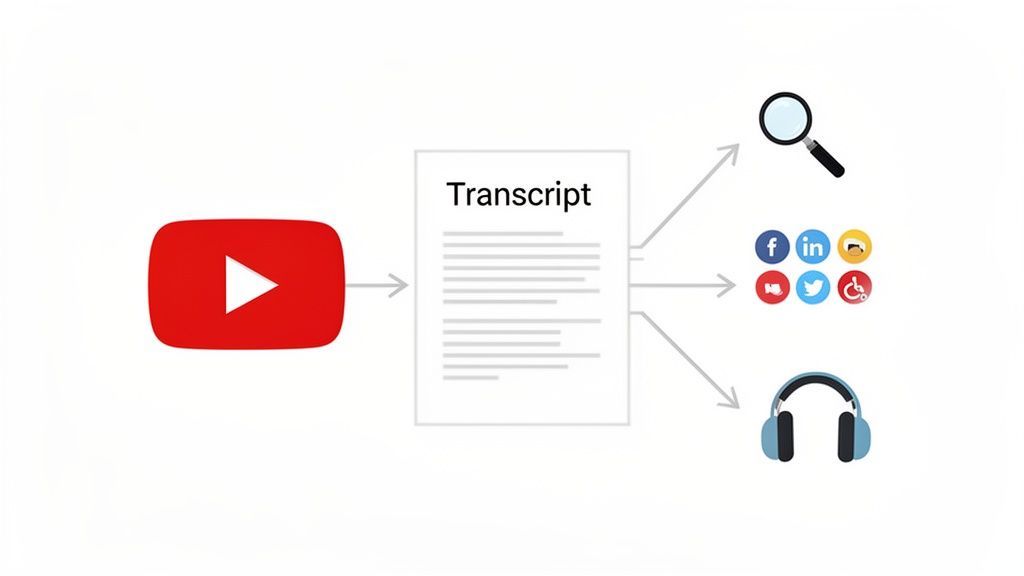
Optimiser le SEO et l'accessibilité
L'un des plus grands avantages immédiats est de rendre votre contenu vidéo totalement indexable par les moteurs de recherche. Google ne peut pas "regarder" votre vidéo, mais croyez bien qu'il peut parcourir chaque mot d'une transcription ou d'un fichier de sous-titres précis. C'est ainsi que vous commencez à vous classer pour des mots-clés spécifiques et de longue traîne prononcés dans vos vidéos, attirant un trafic de recherche ultra-ciblé que vous manqueriez autrement.
Au-delà de cela, les transcriptions sont absolument indispensables pour l'accessibilité. Plus de 1,5 milliard de personnes dans le monde vivent avec une forme de perte auditive, ce qui fait des sous-titres précis une nécessité mondiale. Mais voici le point crucial : les transcriptions générées automatiquement par YouTube atteignent souvent une précision médiocre de 61,92 %, ce qui est juste un désastre frustrant pour les spectateurs.
C'est pourquoi 80 % des téléspectateurs américains déclarent être plus susceptibles de regarder une vidéo si elle comporte des sous-titres, ce qui peut augmenter les vues de plus de 7 %.
En outre, les transcriptions sont incroyablement utiles pour quiconque cherche à améliorer sa compréhension orale, car elles fournissent un texte tangible à suivre. Elles changent la donne pour les locuteurs non natifs, les personnes dans des environnements bruyants, ou toute personne qui préfère simplement lire tout en écoutant.
"Une transcription de haute qualité transforme une seule vidéo d'un média autonome en un atout polyvalent qui peut alimenter l'ensemble de votre moteur de marketing de contenu."
Fonctionnalités qui alimentent les outils de transcription modernes
IA de pointe
Alimenté par Whisper d'OpenAI pour une précision de premier plan. Prise en charge des vocabulaires personnalisés, des fichiers jusqu'à 10 heures et des résultats ultra rapides.

Importer depuis plusieurs sources
Importez des fichiers audio et vidéo depuis diverses sources, y compris le téléchargement direct, Google Drive, Dropbox, les URL, Zoom et plus encore.

Exporter en plusieurs formats
Exportez vos transcriptions en plusieurs formats dont TXT, DOCX, PDF, SRT et VTT avec des options de formatage personnalisables.
Alimenter votre écosystème de contenu
C'est là que la vraie magie opère. Une seule transcription vidéo peut servir de matière première pour une douzaine d'autres contenus, vous faisant gagner un temps fou en brainstorming et en création. Les possibilités sont pratiquement infinies.
Vous pouvez facilement transformer une transcription en :
- Articles de blog détaillés : Transformez cette vidéo de 15 minutes en un article de 2 000 mots, avec des titres et des images.
- Contenu engageant pour les réseaux sociaux : Extrayez des citations mémorables, des statistiques clés ou des conseils rapides pour des fils Twitter, des carrousels Instagram ou des mises à jour LinkedIn.
- Newsletters par e-mail : Résumez les principaux points à retenir de la vidéo pour vos abonnés, en les ramenant directement sur votre chaîne.
- Aimants à prospects : Créez des listes de contrôle, de courts e-books ou des guides de ressources pratiques basés sur le message principal de votre vidéo.
Penser de cette manière crée un puissant effet d'entraînement où une vidéo pilier soutient plusieurs canaux. Consultez notre guide sur les stratégies de réutilisation de contenu puissantes pour approfondir la transformation d'une seule vidéo en plusieurs atouts. Il s'agit de maximiser votre retour sur investissement et de vous assurer que chaque vidéo que vous créez travaille aussi dur que possible pour votre marque.
La valeur stratégique d'une transcription YouTube
Pour bien comprendre leur impact, il est utile de relier les avantages des transcriptions directement aux objectifs que vous cherchez à atteindre en tant que créateur ou marketeur.
| Bénéfice | Impact sur votre stratégie de contenu | Qui cela aide le plus |
|---|---|---|
| Optimisation pour les moteurs de recherche | Rend le contenu parlé de votre vidéo découvrable, vous classant pour des mots-clés spécifiques. | Marketeurs de contenu, spécialistes SEO, créateurs de niche |
| Accessibilité pour le public | Ouvre votre contenu aux spectateurs malentendants et aux locuteurs non natifs. | Tous les créateurs, chaînes éducatives, marques mondiales |
| Réutilisation du contenu | Fournit la matière première pour les blogs, les publications sur les réseaux sociaux, les newsletters, et plus encore. | Gestionnaires de réseaux sociaux, blogueurs, solopreneurs |
| Expérience utilisateur | Permet aux spectateurs de parcourir, rechercher et référencer rapidement les points clés de la vidéo. | Chercheurs, étudiants, professionnels |
| Compréhension améliorée | Renforce l'apprentissage et la compréhension en fournissant une version textuelle de l'audio. | Apprenants de langues, éducateurs, formateurs techniques |
En considérant les transcriptions sous cet angle stratégique, vous pouvez constater qu'il ne s'agit pas seulement d'une fonctionnalité, mais d'une partie fondamentale d'une stratégie de contenu plus intelligente et plus efficace.
Utiliser la fonction de transcription intégrée de YouTube
Le moyen le plus rapide d'obtenir une transcription vidéo YouTube est d'utiliser l'outil intégré de la plateforme. C'est un point de départ fantastique pour une première ébauche, vous permettant de récupérer le texte de la plupart des vidéos publiques sans avoir besoin de logiciel externe.
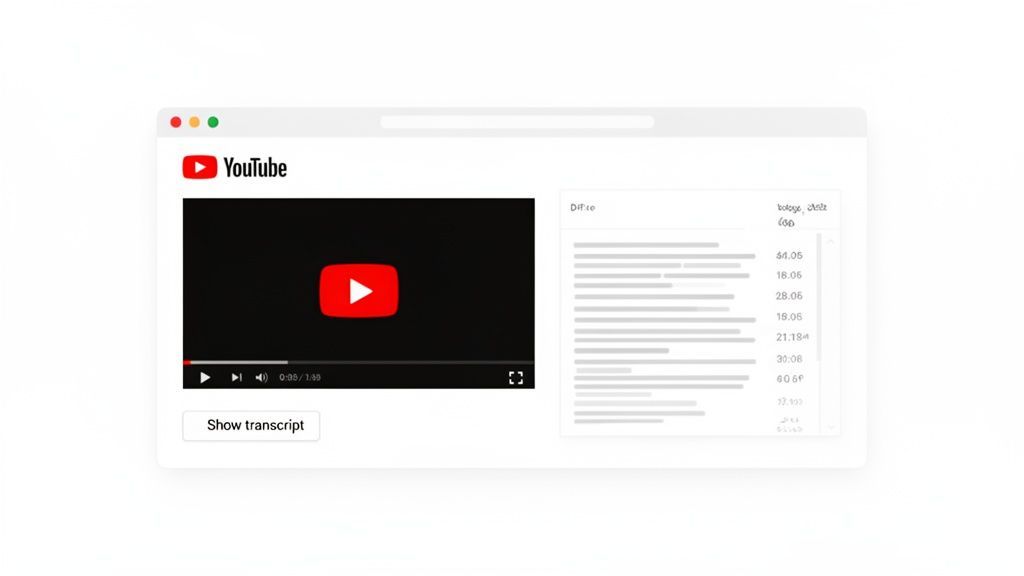
Cette capture d'écran montre le panneau de transcription ouvert juste à côté de la vidéo, ce qui permet de suivre facilement ou de sauter à des points spécifiques.
Trouver et utiliser la transcription
L'accès à cette fonctionnalité est assez simple. Sur un ordinateur de bureau, recherchez la boîte de description de la vidéo juste en dessous du lecteur. Vous devrez probablement cliquer sur "...plus" pour l'agrandir complètement.
Une fois agrandie, faites défiler vers le bas jusqu'à ce que vous voyiez le bouton "Afficher la transcription". Cliquer dessus ouvre un nouveau panneau sur le côté droit de la vidéo, affichant le texte complet avec des horodatages cliquables. Si vous ne voyez pas ce bouton, cela signifie simplement que le créateur a désactivé les transcriptions pour cette vidéo particulière.
Voici une astuce utile : désactivez les horodatages pour une lecture plus facile. Cliquez sur les trois points en haut du panneau de transcription pour trouver l'option "Désactiver les horodatages". Cela supprime les marqueurs de temps, vous donnant un bloc de texte propre beaucoup plus simple à copier et coller. Si vous souhaitez approfondir, consultez notre guide sur la façon de télécharger une transcription vidéo YouTube en utilisant plusieurs méthodes.
Comprendre les limites
Bien que pratique, vous devez être réaliste quant à la qualité des transcriptions générées automatiquement par YouTube. L'écosystème de la plateforme est immense, avec 2,49 milliards d'utilisateurs mensuels, et pourtant, obtenir un texte fiable reste un véritable défi avec ses outils natifs. La précision tourne souvent autour de 61,92 %, surtout lorsque vous avez affaire à une mauvaise qualité audio, des accents forts ou du jargon technique. Vous pouvez trouver plus de statistiques et d'informations sur YouTube dans ce rapport complet.
Ne dépendez jamais de transcriptions de faible précision
Se fier à des transcriptions de faible précision peut nuire à votre crédibilité, confondre votre public et entraîner un travail manuel supplémentaire qui annule tout gain de temps.
Considérez la fonctionnalité intégrée comme une première passe solide. Elle est parfaite pour :
- Trouver rapidement une citation ou une donnée spécifique.
- Avoir une idée générale du contenu de la vidéo.
- Créer un brouillon que vous prévoyez de modifier en profondeur de toute façon.
Pour des cas d'utilisation professionnels comme le contenu marketing, le matériel éducatif ou les sous-titres précis, cette méthode est souvent insuffisante. Elle fournit la matière première mais nécessite des corrections manuelles importantes pour atteindre un niveau professionnel.
Fonctionnalités qui distinguent les outils de base des outils professionnels

Détection des intervenants
Identifiez automatiquement les différents intervenants dans vos enregistrements et étiquetez-les avec leurs noms.

Outils d'édition
Modifiez les transcriptions avec des outils puissants incluant rechercher et remplacer, attribution des intervenants, formats de texte enrichi et surlignage.
Résumés et Chatbot
Générez des résumés et d'autres analyses de votre transcription, des prompts personnalisés réutilisables et un chatbot pour votre contenu.
Libérez la vitesse et la précision avec les outils de transcription IA
Soyons honnêtes : bien que l'outil de transcription intégré de YouTube soit un bon point de départ, il crée souvent plus de travail qu'il n'en économise. Pour quiconque a sérieusement besoin d'une transcription YouTube fiable — créateurs, spécialistes du marketing, chercheurs — les outils IA dédiés sont la seule véritable réponse. C'est là que le processus passe d'une corvée fastidieuse à un flux de travail transparent en un clic.
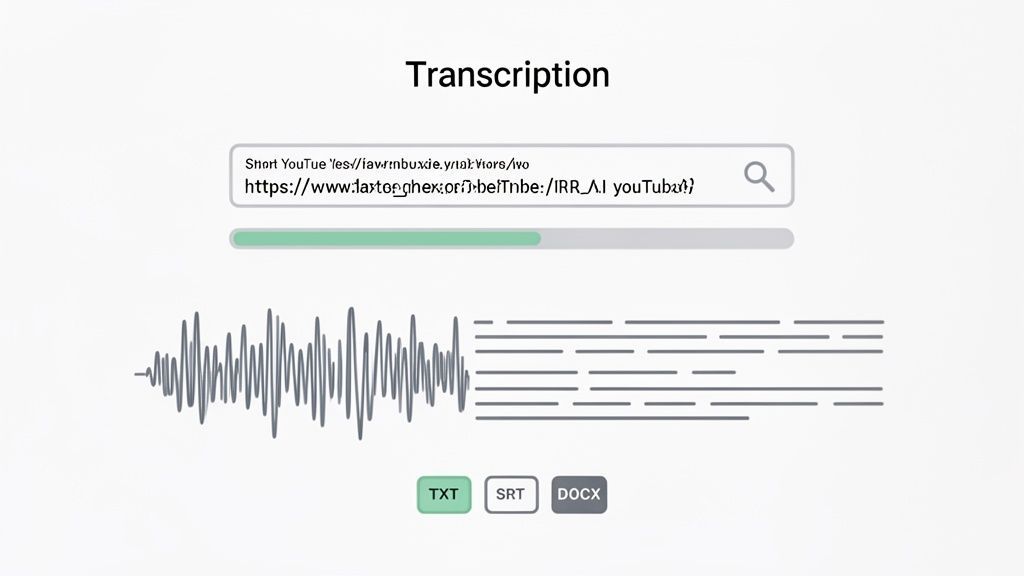
L'ensemble du processus est aussi simple qu'il y paraît : il suffit de coller une URL et d'obtenir un fichier prêt à l'emploi dans le format dont vous avez besoin.
Le problème de le faire à la main
Pour mettre en perspective le gain de temps, la transcription manuelle d'une seule heure de vidéo peut prendre à un être humain réel quatre à six heures. C'est une énorme partie de votre journée qui disparaît.
Imaginez que vous êtes un podcasteur avec une interview de 45 minutes. Vous passeriez le reste de votre après-midi à mettre en pause, à rembobiner et à corriger les fautes de frappe juste pour obtenir un texte utilisable. Ce n'est pas seulement ennuyeux ; cela coûte cher aux entreprises. Engager un freelance pour cela peut facilement vous coûter 100 $ par vidéo.
Les outils IA renversent complètement la situation, transformant des heures de travail fastidieux en quelques secondes de traitement.
La puissance des modèles IA spécialisés
Les services de transcription modernes n'utilisent pas simplement un moteur générique de reconnaissance vocale que vous trouveriez sur votre téléphone. Des outils comme Transcript.LOL s'appuient sur des modèles avancés comme Whisper d'OpenAI, qui a été entraîné sur un ensemble de données audio Internet massif et incroyablement diversifié.
Le résultat ? Les taux de précision peuvent atteindre 99 %, même avec du contenu délicat rempli de jargon ou de plusieurs locuteurs.
Ce niveau de précision change complètement la donne car il élimine pratiquement le besoin de corrections manuelles. L'IA identifie correctement :
- Le jargon de niche : Les termes techniques spécifiques à votre secteur sont capturés correctement, pas devinés.
- Les étiquettes de locuteur : L'outil détermine automatiquement qui parle et quand, ce qui est essentiel pour les interviews ou les tables rondes.
- La ponctuation correcte : Vous obtenez des phrases claires avec des virgules, des points et des points d'interrogation, ce qui rend le résultat immédiatement lisible.
Si vous recherchez le bon outil pour le travail, notre guide sur le meilleur logiciel de transcription IA détaille les meilleures options disponibles aujourd'hui.
En utilisant un outil spécialisé, vous n'obtenez pas seulement un amas de mots. Vous obtenez un document propre, structuré et professionnel, prêt à être utilisé immédiatement.
Un flux de travail conçu pour les créateurs
La vraie magie de ces plateformes réside dans la simplicité qu'elles apportent à l'ensemble du processus. Oubliez le téléchargement de vidéos ou la manipulation de logiciels compliqués. C'est presque d'une facilité déconcertante : copiez simplement l'URL de la vidéo YouTube et collez-la directement dans l'outil.
L'interface épurée est conçue pour faire une chose et la faire bien : transformer une vidéo en texte sans aucun tracas.
En quelques secondes, l'IA traite l'audio et vous fournit une transcription entièrement modifiable. À partir de là, vous pouvez exporter le fichier dans une multitude de formats différents, chacun conçu pour un objectif spécifique.
- TXT : Texte brut, parfait pour copier rapidement dans n'importe quel document ou e-mail.
- DOCX : Un document Word formaté, prêt à être transformé en article de blog ou en notes de spectacle.
- SRT : Un fichier de sous-titres avec des horodatages parfaits, que vous pouvez télécharger directement sur d'autres plateformes vidéo pour des légendes sans faille.
Cette polyvalence permet d'économiser d'innombrables heures de reformatage. Au lieu de lutter avec les horodatages et les étiquettes de locuteur, vous obtenez un produit final soigné, vous libérant pour vous concentrer sur ce qui compte vraiment : créer plus de contenu génial.
Transformez votre transcription en une mine d'or de contenu
Obtenir le texte de votre vidéo n'est que le début. La vraie magie opère lorsque vous traitez cette transcription brute comme la base de votre stratégie de contenu entière. Au lieu de la laisser simplement là, vous pouvez en faire un moteur pour créer du nouveau contenu, améliorer votre accessibilité et vous connecter avec votre public sur différentes plateformes.
C'est là que vous arrêtez de penser à comment obtenir une transcription et commencez à penser comme un créateur de contenu avisé.
Ce que vous pouvez faire une fois que vous avez une transcription YouTube propre
Transformez les vidéos en articles axés sur la recherche
Une seule transcription peut être développée en articles de blog longs optimisés pour le SEO, aidant votre vidéo à se classer au-delà de YouTube et à attirer du trafic organique.
Créez des légendes de haute qualité partout
L'exportation de fichiers SRT ou VTT précis garantit des légendes professionnelles sur toutes les plateformes, améliorant l'accessibilité et le temps de visionnage.
Alimentez le contenu des réseaux sociaux et des e-mails
Extrayez des citations, des conseils et des résumés directement des transcriptions pour créer des publications sur les réseaux sociaux, des newsletters et des fils de discussion en quelques minutes.
Créez des ressources éducatives et internes
Les transcriptions peuvent être réutilisées pour créer de la documentation, du matériel de formation, des quiz ou des bases de connaissances internes.
Du texte brut au contenu peaufiné
Votre transcription initiale générée par l'IA est probablement assez propre, mais ce n'est encore que de la matière brute. La première étape consiste à la transformer en quelque chose de peaufiné et prêt à l'emploi. Un bon outil de transcription avec un éditeur intégré rend cela très facile : vous pouvez rapidement parcourir et apporter de petites modifications à la volée.
Il ne s'agit pas de corriger d'énormes erreurs ; une IA solide devrait s'en charger. Il s'agit plutôt de la mise en forme pour la lisibilité.
- Ajouter des titres : Divisez les longs blocs de texte avec des H2 et des H3 clairs. C'est indispensable si vous transformez le contenu en article de blog.
- Mettre l'accent sur les points clés : Utilisez le gras ou l'italique pour faire ressortir les statistiques importantes, les citations ou les points à retenir.
- Nettoyer les dialogues : Si vous réutilisez le contenu pour un article, supprimez les "euh" et les "ah" pour une expérience de lecture beaucoup plus fluide.
Cette passe d'édition rapide transforme un simple enregistrement verbatim en un document professionnel que vous pouvez utiliser partout.
Créer des légendes et des sous-titres parfaits
L'une des meilleures utilisations immédiates d'une transcription est de créer des légendes impeccables. En exportant le texte sous forme de fichier SRT ou VTT, vous obtenez un document avec des horodatages précis qui se synchronisent parfaitement avec votre vidéo.
C'est un avantage considérable pour les plateformes autres que YouTube. Vous pouvez télécharger ces fichiers sur Vimeo, LinkedIn ou le lecteur vidéo de votre propre site web pour vous assurer que votre contenu est accessible et professionnel partout où vous le publiez. Cela garantit également que vos légendes sont 100 % précises, vous aidant à éviter ces erreurs gênantes et préjudiciables à votre marque dont les légendes automatiques sont célèbres. Ce processus est beaucoup plus fiable que d'essayer de transcrire manuellement un MP4, ce qui peut être douloureusement lent et plein d'erreurs. Si vous avez déjà dû vous battre avec des fichiers vidéo directement, vous pouvez en apprendre davantage sur les meilleures méthodes de transcription MP4 vers texte dans notre guide.
Un fichier SRT parfaitement synchronisé fait plus que simplement aider à l'accessibilité ; il signale un haut niveau de professionnalisme et d'attention aux détails que les spectateurs remarquent et apprécient.
Réutiliser votre contenu avec l'IA
C'est là que vous multipliez réellement la valeur de votre vidéo originale. L'une des façons les plus efficaces d'utiliser vos transcriptions YouTube est de les réutiliser. Découvrir des stratégies efficaces de réutilisation de contenu peut transformer une seule vidéo en une tonne de contenus précieux.
Les outils d'IA modernes peuvent faire la majeure partie du travail difficile pour vous.
Mise à jour
En 2026, la transcription par IA n'est plus une fonctionnalité de support, elle devient le fondement des flux de travail évolutifs en matière de contenu, d'éducation et d'accessibilité.
En un clic, vous pouvez demander à un assistant IA de :
- Générer des résumés : Créez instantanément de courts résumés pour la description de votre chaîne YouTube, votre newsletter par e-mail ou les notes de votre podcast.
- Rédiger des publications sur les réseaux sociaux : Demandez à l'IA d'extraire cinq citations dignes d'un tweet ou de créer une publication LinkedIn attrayante basée sur les idées principales de la vidéo.
- Créer des quiz : Pour les vidéos éducatives, vous pouvez générer un quiz à choix multiples pour tester ce que vos spectateurs ont appris et les maintenir engagés.
- Construire des cartes mentales : Obtenez une carte mentale générée automatiquement pour visualiser les concepts clés de votre vidéo, parfaite à partager comme ressource bonus.
Cette approche transforme votre transcription d'un fichier statique en un outil dynamique de création de contenu, vous faisant gagner des heures de brainstorming et de rédaction.
Résoudre les problèmes courants de transcription YouTube
Même le meilleur flux de travail rencontre des obstacles. Vous avez trouvé la vidéo parfaite et vous êtes prêt à en extraire la transcription, mais soudain, vous êtes bloqué. Peut-être que le bouton est manquant, ou que l'audio est un vrai désastre. Ne vous inquiétez pas, ce sont des problèmes courants, et ils ont tous une solution.
Savoir comment surmonter ces obstacles est ce qui sépare un après-midi frustrant d'un après-midi efficace. Plongeons dans les problèmes de transcription les plus courants et comment les résoudre définitivement.
Lorsque le bouton de transcription est manquant
Vous suivez les étapes, cliquez sur le bouton « …plus » dans la description, mais l'option « Afficher la transcription » n'est tout simplement pas là. C'est un problème classique et cela signifie presque toujours une chose : le créateur l'a désactivé.
Les propriétaires de vidéos peuvent désactiver les transcriptions pour toutes sortes de raisons : peut-être protègent-ils des informations propriétaires d'un webinaire ou ne veulent-ils tout simplement pas d'une transcription automatique bancale liée à leur contenu. Lorsque cela se produit, l'outil intégré de YouTube est une impasse.
Votre meilleure option ici est d'utiliser un service de transcription IA tiers. Un outil comme Transcript.LOL peut traiter l'audio de la vidéo directement à partir de son URL, contournant ainsi complètement les paramètres internes de YouTube.
Gérer les vidéos privées et non répertoriées
Une autre lacune majeure de la fonctionnalité de YouTube est qu'elle ne fonctionne que sur les vidéos publiques. Si vous avez besoin d'une transcription d'une formation d'équipe privée, d'un témoignage client non répertorié ou d'un tutoriel réservé aux membres, l'option native ne vous aidera pas.
Encore une fois, la solution est un outil externe capable d'accéder et de transcrire le contenu à partir d'un lien direct. Tant que vous avez la permission de regarder la vidéo privée ou non répertoriée, un transcripteur dédié peut extraire l'audio et générer une transcription sans problème. C'est une solution de contournement cruciale pour le contenu interne et exclusif.
Ne laissez pas un bouton manquant ou une vidéo privée vous arrêter. Le bon outil peut obtenir une transcription de presque n'importe quelle URL YouTube à laquelle vous avez accès, quels que soient les paramètres publics de la vidéo.
Améliorer la précision sur un audio bruyant
Et si vous obtenez la transcription, mais que c'est un désastre ? Cela se produit généralement lorsque l'audio source est difficile pour l'IA.
Les coupables courants incluent :
- Bruit de fond : La musique, le brouhaha d'un café ou le vent peuvent facilement confondre l'algorithme.
- Plusieurs locuteurs : Les personnes qui se parlent par-dessus la tête sont un cauchemar classique pour la transcription.
- Accents forts ou jargon : Le langage spécialisé se traduit souvent par du charabia.
Bien qu'aucune IA ne soit parfaite, les modèles plus avancés comme Whisper d'OpenAI sont bien meilleurs pour gérer ces problèmes que le système par défaut de YouTube. Pour de meilleurs résultats, utilisez un service de transcription de haute qualité. Il est également utile de réécouter les sections les plus délicates avec un casque. Corriger manuellement quelques noms ou termes est toujours plus rapide que de corriger un document entier à partir de zéro.
Ce diagramme de flux montre comment une seule transcription peut être réutilisée en légendes, résumés ou même en contenu pour les réseaux sociaux.
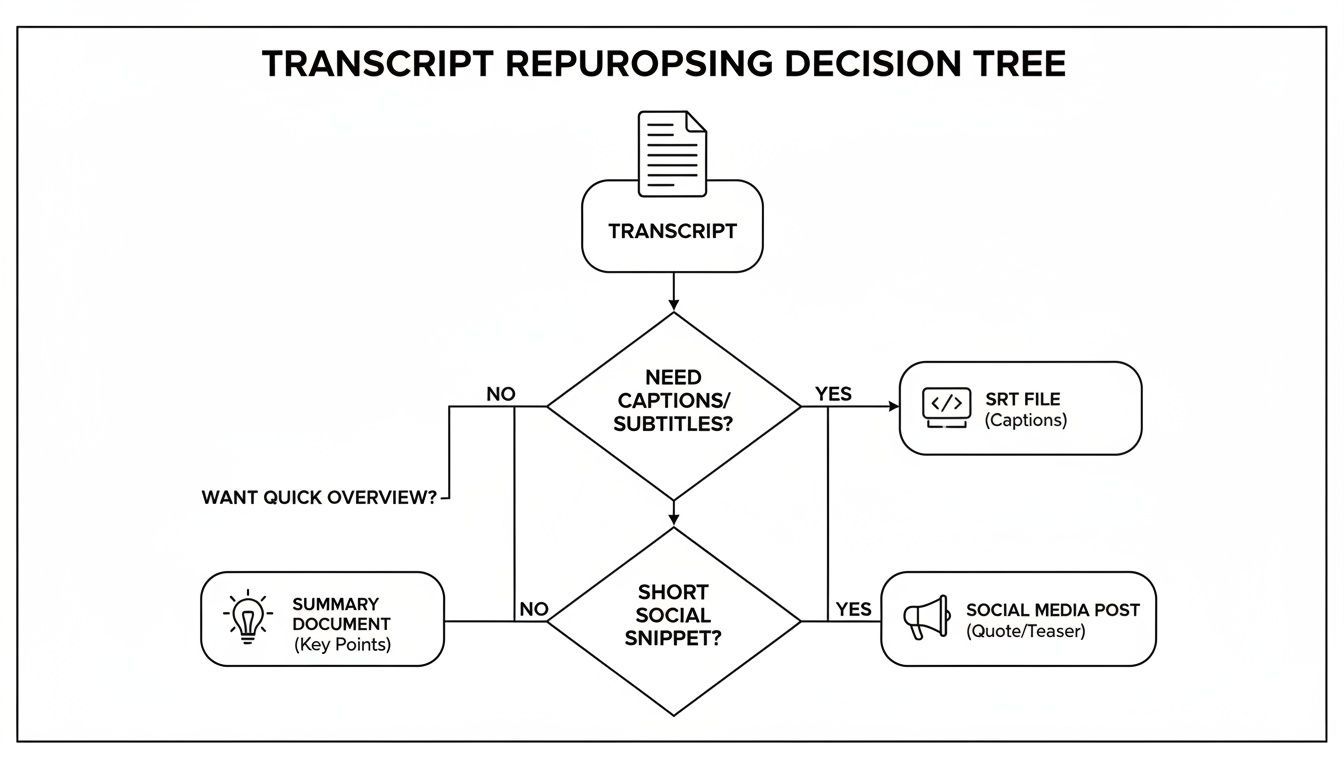 La conclusion est simple : votre flux de travail doit s'adapter à votre objectif final, qu'il s'agisse d'accessibilité (fichiers SRT), de résumé (notes) ou de marketing (publications).
Les créateurs les plus efficaces conçoivent des flux de travail de transcription autour des résultats, et non des outils, en choisissant les formats et les fonctionnalités en fonction de la manière dont le contenu sera réutilisé.
Votre guide de dépannage des transcriptions YouTube
Parfois, vous avez juste besoin d'une réponse rapide. Nous avons créé ce tableau de référence rapide pour vous aider à résoudre les problèmes les plus fréquents de génération de transcriptions en quelques secondes.
| Le problème | Pourquoi cela arrive | Votre meilleure solution |
|---|---|---|
| Le bouton "Afficher la transcription" a disparu. | Le créateur de la vidéo a désactivé manuellement les transcriptions pour cette vidéo spécifique. | Utilisez un outil tiers comme Transcript.LOL qui transcrit directement à partir de l'URL de la vidéo, contournant ainsi le paramètre de YouTube. |
| La vidéo est privée ou non répertoriée. | La fonction de transcription native de YouTube ne fonctionne que sur les vidéos publiques. | Tant que vous avez accès à la visualisation, un service tiers peut générer une transcription à partir de l'URL privée. |
| La transcription est pleine d'erreurs. | La mauvaise qualité audio, le bruit de fond, plusieurs locuteurs ou des accents marqués confondent l'IA. | Exécutez la vidéo via un outil qui utilise un modèle d'IA plus avancé (comme Whisper d'OpenAI) pour une plus grande précision. |
| La transcription n'a pas d'horodatages. | Vous copiez et collez probablement directement depuis la fenêtre de transcription de YouTube sans utiliser l'option "Basculer les horodatages". | Avant de copier, cliquez sur les trois points dans la fenêtre de transcription et sélectionnez "Basculer les horodatages" pour les supprimer. |
Considérez ceci comme votre antisèche. Avec ces solutions à portée de main, vous pourrez obtenir une transcription propre et précise de presque toutes les vidéos YouTube que vous rencontrerez.
Vos questions les plus fréquentes sur les transcriptions YouTube – Répondues
Clarifions certaines des questions les plus courantes que les gens se posent sur l'obtention de transcriptions à partir de YouTube. Considérez ceci comme votre guide pour obtenir le texte dont vous avez besoin, sans les tracas.
Puis-je obtenir une transcription de n'importe quelle vidéo YouTube ?
Dans la plupart des cas, oui, mais il y a un hic.
En utilisant la fonctionnalité intégrée de YouTube, vous ne pouvez obtenir une transcription que si le créateur l'a activée. S'il a désactivé cette option, le bouton "Afficher la transcription" sera simplement absent. C'est aussi simple que cela.
Mais que faire si elle est manquante ? C'est là que les outils d'IA tiers entrent en jeu. Tant que la vidéo est publique, ces services peuvent traiter l'audio directement à partir de l'URL, contournant complètement les paramètres de YouTube. C'est une solution de contournement fiable lorsque l'option native n'est pas disponible.
Est-il possible de transcrire une vidéo privée ?
L'outil de YouTube ne fonctionne pas sur les vidéos privées ou non répertoriées. Il est strictement conçu pour le contenu disponible publiquement.
Ainsi, si vous avez besoin d'une transcription pour une vidéo de formation interne, une revue client non répertoriée ou un webinaire réservé aux membres, vous aurez besoin d'une approche différente. Un service de transcription dédié est la solution. Si vous avez le lien direct et l'autorisation de visualiser la vidéo, vous pouvez simplement coller l'URL dans un outil comme Transcript.LOL pour générer le texte. C'est une méthode essentielle pour gérer le contenu non public en toute sécurité.
Comment transcrire des vidéos dans une langue différente ?
Les transcriptions automatiques de YouTube sont presque toujours créées dans la langue d'origine parlée dans la vidéo. Si vous avez besoin d'une transcription en anglais d'une vidéo parlée en espagnol, par exemple, vous aurez besoin d'un outil intégrant la traduction.
De nombreuses plateformes de transcription IA avancées offrent désormais la traduction dans le cadre de leur service. Elles transcrivent d'abord l'audio d'origine, puis peuvent traduire le texte dans des dizaines de langues différentes, souvent en un seul clic. C'est un gain de temps considérable pour quiconque s'adresse à un public mondial.
Point clé : Alors que YouTube fournit une transcription de base dans la langue source, des outils d'IA spécialisés sont nécessaires pour une transcription et une traduction multilingues précises. Cela ouvre votre contenu à un public beaucoup plus large.
Quel est le meilleur format pour exporter une transcription ?
Le "meilleur" format dépend vraiment de ce que vous comptez faire du texte. Il n'y a pas de réponse unique, juste le bon outil pour le travail.
Voici un bref aperçu des formats les plus courants :
- TXT : Un fichier texte brut est parfait pour le texte brut et non formaté. Utilisez-le si vous avez juste besoin de copier et coller le contenu dans un document ou une autre application sans aucun style. C'est simple et propre.
- DOCX : Choisissez-le si vous réutilisez la transcription dans un article de blog, des notes d'émission ou un guide détaillé. Il conserve une mise en forme de base et est prêt à être édité dans Microsoft Word ou Google Docs.
- SRT/VTT : Ce sont les fichiers de sous-titres standard de l'industrie. L'exportation en SRT ou VTT est essentielle si votre objectif est de créer des légendes précises et parfaitement synchronisées pour votre vidéo sur YouTube, Vimeo ou LinkedIn.
Prêt à arrêter de vous battre avec du texte inexact et à commencer à créer du contenu plus rapidement ? Avec Transcript.LOL, vous pouvez obtenir une transcription quasi parfaite de n'importe quelle vidéo YouTube en quelques secondes. Il suffit de coller un lien et d'exporter du texte propre dans n'importe quel format dont vous avez besoin – c'est aussi simple que cela. Essayez Transcript.LOL gratuitement et constatez la différence.