
Dominando a Transcrição de Reuniões do Zoom
Desbloqueie insights acionáveis de cada chamada. Nosso guia de transcrição de reuniões do Zoom abrange ferramentas nativas, soluções de IA e dicas profissionais para precisão perfeita.
Kate, Praveen
October 18, 2023
Hai mai terminato una riunione Zoom cruciale, solo per renderti conto che i dettagli importanti stanno già diventando sfocati? Non sei l'unico. Una trascrizione di riunioni Zoom è semplicemente il processo di conversione dell'audio dalle tue riunioni virtuali in un file di testo scritto.
Crea un record permanente e ricercabile di ogni singola conversazione.
Perché una Trascrizione Accurata è la Tua Arma Segreta

Preziose intuizioni, decisioni chiave e elementi d'azione cruciali spesso svaniscono nel momento in cui una riunione finisce. Affidarsi solo alla memoria è un gioco rischioso, specialmente quando sono in gioco dettagli specifici del progetto e feedback dei clienti. È qui che una buona trascrizione passa dall'essere una semplice registrazione a una vera risorsa strategica.
Pensala come trasformare quelle conversazioni fugaci in una base di conoscenza permanente che puoi cercare in qualsiasi momento. Improvvisamente, puoi trovare il momento esatto in cui un cliente ha menzionato un nuovo requisito o ricontrollare la scadenza concordata da uno stakeholder, senza dover riguardare una registrazione di un'ora. È un enorme aumento di produttività e mette l'intero team sulla stessa lunghezza d'onda.
Sbloccare l'Intelligenza Aziendale dalle Conversazioni
Una trascrizione solida fa più che documentare ciò che è stato detto. Sblocca l'oro strategico nascosto nelle discussioni del tuo team. Quando hai una versione testuale affidabile di una chiamata, puoi iniziare ad analizzare il linguaggio, individuare temi ricorrenti ed estrarre intelligenza aziendale critica. Ad esempio, un team di vendita potrebbe rivedere le trascrizioni per individuare le obiezioni comuni dei clienti e perfezionare le loro presentazioni.
Questo semplice processo trasforma le riunioni quotidiane in una fonte di dati concreti.
✨ Principais Recursos de IA para Transcrições Mais Inteligentes
IA all'avanguardia
Alimentato da Whisper di OpenAI per una precisione leader nel settore. Supporto per vocabolari personalizzati, file fino a 10 ore e risultati ultra rapidi.

Importa da più fonti
Importa file audio e video da varie fonti tra cui caricamento diretto, Google Drive, Dropbox, URL, Zoom e altro.

Esporta in più formati
Esporta le tue trascrizioni in più formati tra cui TXT, DOCX, PDF, SRT e VTT con opzioni di formattazione personalizzabili.
Alcuni dei maggiori vantaggi includono:
- Migliore responsabilità: Un registro scritto rende cristallino chi si è impegnato a fare cosa. Niente più ambiguità riguardo alle azioni da intraprendere o alle responsabilità.
- Maggiore accessibilità: Le trascrizioni aprono i contenuti delle riunioni ai membri del team sordi o con problemi di udito, per non parlare di coloro che preferiscono leggere piuttosto che guardare.
- Maggiore conservazione delle conoscenze: I nuovi assunti possono aggiornarsi sulle decisioni passate dei progetti leggendo le trascrizioni chiave delle riunioni invece di affidarsi al riassunto di seconda mano di qualcuno.
Trasformando le parole pronunciate in dati strutturati, dai al tuo team la possibilità di prendere decisioni più intelligenti, il tutto supportato dalle conversazioni effettive che guidano la tua attività.
In definitiva, padroneggiare https://transcript.lol/usecases/online-meeting-transcription significa smettere di lasciare che informazioni preziose sfuggano. Garantisce che ogni decisione, idea e impegno venga catturato, catalogato e pronto all'uso quando ne hai più bisogno.
Utilizzo delle funzionalità di trascrizione integrate di Zoom
Prima di passare a software specializzati, è sempre saggio vedere cosa possono fare gli strumenti che hai già. Zoom offre una funzionalità di trascrizione nativa sorprendentemente solida e, per molti team, è il punto di partenza perfetto per creare un registro ricercabile delle loro conversazioni.
Questa trascrizione di riunioni Zoom integrata è spesso più che sufficiente per riunioni interne, stand-up giornalieri o brainstorming informali in cui non è necessaria un'accuratezza impeccabile. Il vantaggio maggiore? È perfettamente integrato: nessuna installazione aggiuntiva, nessun costo aggiuntivo. Funziona e basta.
Come farlo funzionare
Prima di tutto, devi assicurarti che il tuo piano lo includa. La trascrizione live è disponibile sugli account Zoom Pro, Business, Business Plus, Education e Enterprise. Se hai uno di questi, un amministratore dell'account deve semplicemente attivare l'interruttore nelle impostazioni.
Ecco il percorso che dovranno seguire:
- Accedi al portale web di Zoom come amministratore in grado di modificare le impostazioni dell'account.
- Vai al menu "Impostazioni" sulla sinistra.
- Fai clic sulla scheda "Registrazione" e trova la sezione "Registrazione cloud".
- Basta selezionare la casella per "Trascrizione audio" e Zoom creerà automaticamente un file di trascrizione insieme alle tue registrazioni cloud.
Una volta fatto a livello di account, chiunque ospiti una riunione può attivarla. In qualità di host, vedrai un pulsante "Mostra didascalie" nella barra degli strumenti della riunione. Fai clic su quello e inizierai a generare una trascrizione live che tutti potranno vedere.
Trovare e correggere la tua trascrizione
Al termine della riunione e dopo che la registrazione cloud è stata elaborata, Zoom ti invierà un'e-mail. La tua trascrizione viene salvata accanto ai file video e audio come file .vtt separato.
Puoi accedervi navigando nella sezione "Registrazioni" del tuo portale Zoom. Da lì, puoi visualizzare la trascrizione, che è ben contrassegnata con timestamp e identifica persino i diversi relatori. Zoom dispone anche di un semplice editor integrato, che ti consente di fare clic su qualsiasi frase per correggere errori di battitura o pulire la punteggiatura prima di condividerla.
Suggerimento Pro: Se hai bisogno di importare questa trascrizione in un altro strumento, consulta la nostra guida su importazione di registrazioni Zoom. Questo cambia le regole del gioco quando vuoi eseguire analisi più approfondite o generare riassunti con una piattaforma AI dedicata.
Ottenere la migliore accuratezza possibile
Sebbene la funzionalità nativa di Zoom sia conveniente, la qualità dipende davvero da quanto è chiaro il tuo audio. Ad essere onesti, Zoom è in modo impressionante accurato, con un tasso di errore di parola (WER) di soli 7,40%. È molto meglio di altre piattaforme, ma alcune buone abitudini possono aumentare ulteriormente tale accuratezza.
Per ottenere i risultati più puliti:
- Attieniti a un relatore alla volta. Le persone che parlano contemporaneamente sono il killer numero 1 delle trascrizioni accurate.
- Utilizza un microfono esterno. Anche un microfono di base di un auricolare ti fornirà un audio più pulito rispetto al microfono integrato di un laptop, riducendo il rumore di fondo.
- Parla chiaramente e non affrettarti. Mormorare o parlare troppo velocemente può facilmente ingannare il motore di trascrizione.
Prendendoti un minuto per ottimizzare la tua configurazione e l'etichetta della riunione, puoi davvero migliorare la qualità della tua trascrizione di riunioni Zoom nativa. È così che trasformi una funzionalità "abbastanza buona" in una risorsa veramente utile per il tuo team.
Você Sabia?
Mesmo pequenas mudanças — como usar um microfone externo ou pedir aos falantes para não se sobreporem — podem melhorar a precisão da transcrição em até 20%. Melhor áudio significa transcrições mais nítidas, independentemente da ferramenta que você usar.
Aggiornare le tue trascrizioni con strumenti AI
La trascrizione integrata di Zoom è un buon punto di partenza per le chat informali, ma siamo onesti: ha i suoi limiti. Quando hai bisogno che una trascrizione sia più di un semplice file di testo grezzo per chiamate di scoperta con i clienti, ricerche sugli utenti o deposizioni legali, "abbastanza buono" semplicemente non lo è.
È qui che entrano in gioco strumenti AI dedicati, che trasformano una semplice trascrizione di riunioni Zoom in qualcosa di molto più potente.
Queste piattaforme vanno ben oltre la semplice conversione da voce a testo. Parliamo di accuratezza superiore, etichette automatiche degli oratori che non si confondono e analisi che la funzione nativa di Zoom non può nemmeno sognare. È la differenza tra ottenere un dump di dati grezzi e ricevere un rapporto di intelligence raffinato.
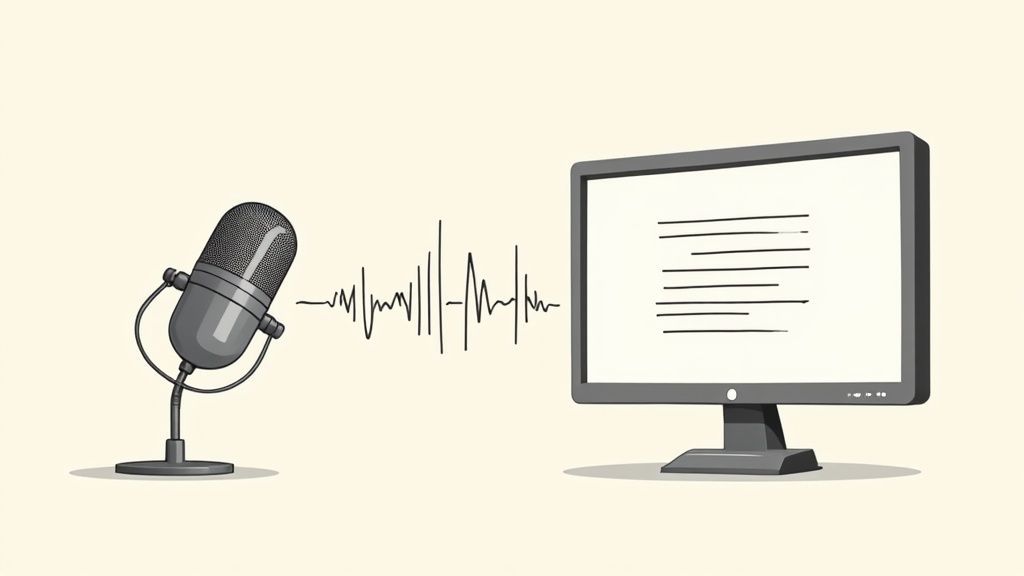
Come puoi vedere, uno strumento creato appositamente come Transcript.LOL è progettato per l'azione. Puoi importare registrazioni da qualsiasi luogo e trasformarle rapidamente in risorse utilizzabili.
Dal testo grezzo a insight azionabili
Dipingiamo un quadro. Hai appena terminato una riunione di avvio progetto di un'ora. Il vecchio modo? Avresti passato il giorno successivo a riguardare la registrazione, digitando meticolosamente appunti.
Il nuovo modo? Carichi il file su un servizio di trascrizione AI.
In pochi minuti, ricevi un pacchetto completo di materiale utile:
- Una trascrizione altamente accurata: Pulita, formattata correttamente, con ogni oratore chiaramente etichettato.
- Un riassunto esecutivo: Un paragrafo conciso perfetto per aggiornare gli stakeholder che non hanno bisogno di leggere tutto.
- Un elenco di azioni: L'AI ha già estratto ogni attività, l'ha assegnata alla persona giusta e ha annotato la scadenza.
- Un'analisi del sentiment: Un rapido controllo dell'atmosfera della riunione, evidenziando momenti di entusiasmo o preoccupazione.
Questo non è solo un risparmio di tempo; è un aggiornamento completo del flusso di lavoro. Entro il 2025, il mercato per l'analisi delle riunioni guidata dall'AI è diventato essenziale per le aziende che desiderano ottenere un valore reale dalle loro riunioni virtuali. Questi strumenti trasformano l'audio grezzo in informazioni azionabili in una frazione del tempo.
Costruire una base di conoscenza ricercabile
La vera magia avviene nel tempo. Ogni riunione trascritta diventa un'altra voce ricercabile nella memoria istituzionale della tua azienda.
Hai bisogno di trovare quella specifica funzionalità che un cliente ha menzionato tre mesi fa? Basta digitarla nella barra di ricerca. Boom. Sei nel momento esatto in cui è stata discussa. Questo crea una risorsa evergreen costruita sulle conversazioni effettive del tuo team.
L'obiettivo è smettere di trattare le riunioni come eventi singoli e iniziare a trattarle come risorse ricche di dati. Uno strumento AI è il ponte che rende possibile tutto ciò, fornendo un ritorno sull'investimento chiaro e misurabile risparmiando centinaia di ore e impedendo che informazioni critiche vadano perse.
Queste sono le tipologie di capacità avanzate che distinguono le piattaforme dedicate. Se sei pronto a esplorare le tue opzioni, abbiamo preparato un confronto dettagliato del https://transcript.lol/blog/best-meeting-transcription-software per aiutarti a trovare lo strumento giusto per il tuo team.
E non dimenticare, puoi andare ancora oltre. Molti dei migliori strumenti AI per la creazione di contenuti possono aiutarti a riutilizzare quelle trascrizioni in materiali di marketing o documenti di formazione. Quando scegli lo strumento giusto, sblocchi un livello di produttività completamente nuovo.
Scegliere il metodo di trascrizione giusto
Come decidi tra gratuito, veloce e impeccabile? Scegliere il metodo giusto per la trascrizione di riunioni Zoom non significa trovare uno strumento perfetto. Si tratta di abbinare l'approccio giusto alla situazione giusta.
La tua scelta si riduce essenzialmente a tre cose: il tuo budget, quanto velocemente hai bisogno della trascrizione e quanto impeccabile deve essere.
Per una sincronizzazione informale del team interno o una rapida riunione giornaliera, la trascrizione integrata di Zoom è spesso l'opzione più sensata. È gratuita con i piani idonei, è istantanea ed è già parte della piattaforma. L'accuratezza è solitamente sufficiente per cogliere le azioni e i punti chiave senza ulteriori complicazioni.
Ma quando la posta in gioco aumenta, le crepe di uno strumento di base iniziano a mostrarsi.
Valutare le tue esigenze
Pensa a una chiamata di scoperta critica con un cliente o a una sessione formale di ricerca sugli utenti. Per qualsiasi riunione in cui ogni singola parola ha un peso, investire in un servizio AI di terze parti ad alta accuratezza è una mossa molto più intelligente. Questi strumenti offrono un'accuratezza molto migliore, oltre a funzionalità come l'identificazione precisa degli oratori e riepiloghi automatizzati che possono farti risparmiare ore di lavoro di pulizia.
La chiave è considerare l'uso finale della tua trascrizione. È solo per appunti interni o la condividerai esternamente?
Recursos Avançados de Produtividade

Rilevamento dei parlanti
Identifica automaticamente diversi parlanti nelle tue registrazioni e etichettali con i loro nomi.

Strumenti di modifica
Modifica le trascrizioni con strumenti potenti tra cui trova e sostituisci, assegnazione dei parlanti, formati di testo arricchito ed evidenziazione.
Riassunti e Chatbot
Genera riassunti e altri approfondimenti dalla tua trascrizione, prompt personalizzati riutilizzabili e chatbot per i tuoi contenuti.
È per un verbale legale o solo per una rapida revisione? Rispondere prima a queste domande guiderà la tua decisione, aiutandoti a evitare spese eccessive o a ritrovarti con una trascrizione che non soddisfa le tue esigenze. Se sei agli inizi e non hai un budget, ci sono diversi modi per trascrivere audio in testo gratuitamente.
Il miglior metodo di trascrizione è quello che si allinea al valore della conversazione. Una riunione a basso rischio richiede una soluzione a basso attrito, mentre una riunione ad alto rischio richiede un output ad alta fedeltà.
Infine, c'è la trascrizione manuale. Questo è il percorso più costoso e dispendioso in termini di tempo, ma offre il più alto livello di accuratezza, raggiungendo spesso il 99% o più. È meglio riservarlo a situazioni in cui la precisione assoluta è non negoziabile: pensate a procedimenti legali o a contenuti destinati alla pubblicazione.
La tabella seguente ti dà un'idea dei tassi di accuratezza che puoi aspettarti dagli strumenti avanzati di trascrizione AI in diverse lingue.
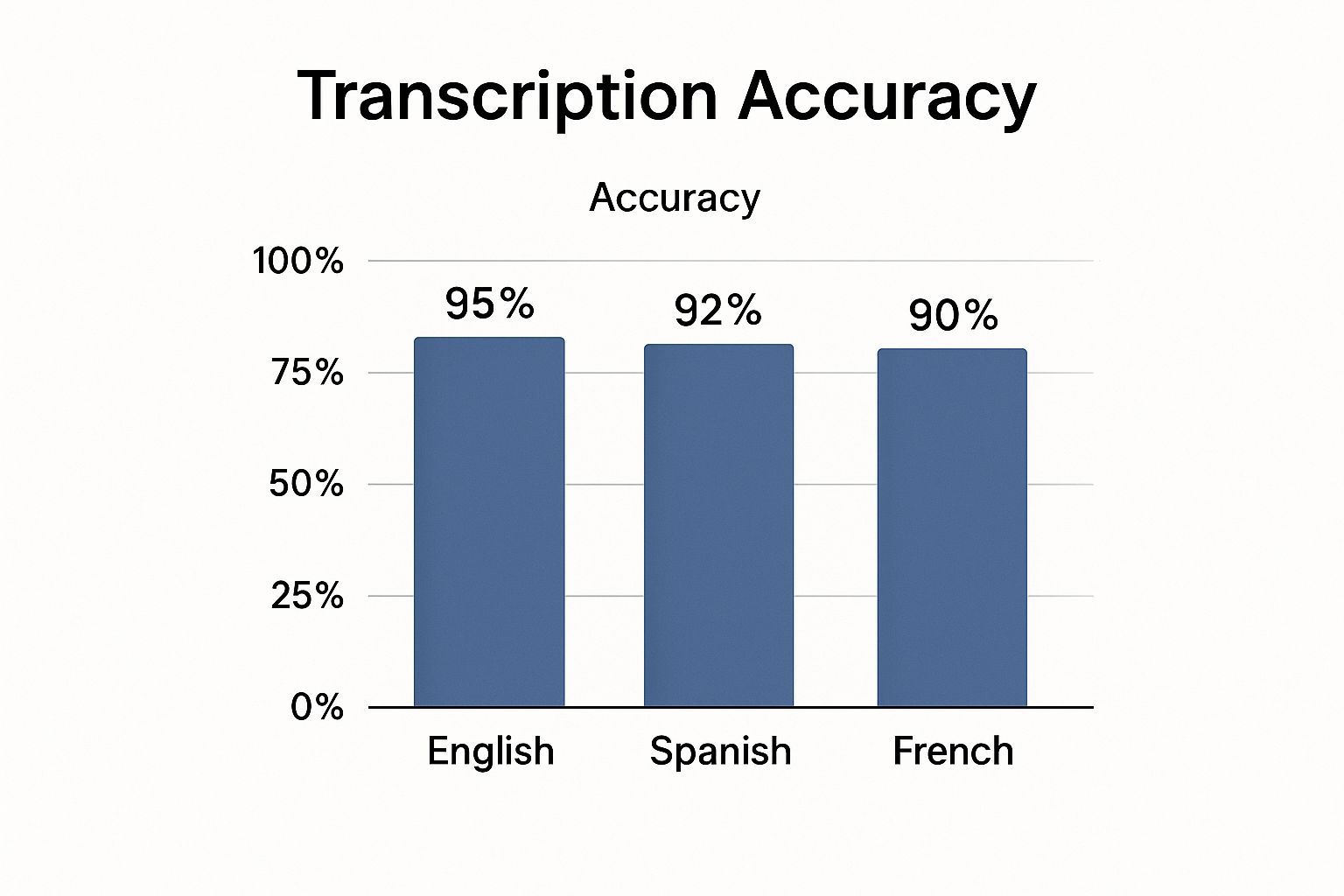
Questi dati mostrano quanto sia diventata affidabile l'IA moderna, rendendola una scelta solida per i team multilingue.
Metodi di trascrizione di Zoom a colpo d'occhio
Per aiutarti a valutare i compromessi, ecco un rapido confronto dei tre approcci principali.
| Caratteristica | Trascrizione nativa di Zoom | Strumenti AI di terze parti | Servizio di trascrizione manuale |
|---|---|---|---|
| Costo | Gratuito (con piani a pagamento) | Commissione di abbonamento da bassa a moderata | Tariffe elevate per minuto |
| Velocità | Istantanea / quasi istantanea | Minuti | Ore o giorni |
| Accuratezza | Buona (~90%) | Molto alta (95%+) | Quasi perfetta (99%+) |
| Funzionalità | Testo di base, timestamp | ID relatore, riepiloghi, analisi | Verificato da esseri umani, opzioni verbatim |
In definitiva, lo strumento giusto è quello che trova il miglior equilibrio per le tue esigenze specifiche, offrendoti il giusto mix di costo, velocità e qualità per il lavoro da svolgere.
Ottieni il tuo audio perfetto per trascrizioni cristalline
Guarda, l'IA di trascrizione più sofisticata del pianeta è valida quanto l'audio che le fornisci. Se le dai una registrazione confusa e rumorosa, otterrai una trascrizione confusa e disordinata. È semplice.
Ma ecco la buona notizia: alcune piccole abitudini possono fare una grande differenza nella qualità del tuo audio. Pensala in questo modo: il tuo microfono è l'orecchio dell'IA. Se non riesce a sentire chiaramente, non può capire cosa viene detto. Ottenere una buona igiene audio è il modo migliore per ottenere una trascrizione pulita e utilizzabile ogni volta.
Preparati al successo prima della chiamata
Il modo più semplice per risolvere i problemi audio è impedirne il verificarsi in primo luogo. Un po' di lavoro preparatorio fa molta strada. La base assoluta per un audio chiaro è una connessione Internet solida. Investire in un servizio affidabile come banda larga in fibra per le aziende può ridurre drasticamente i balbettii digitali e i ritardi che rovinano le registrazioni.
Prima ancora di fare clic su "Avvia riunione", esegui questo rapido controllo mentale:
- Richiedi microfoni esterni: Chiedi gentilmente ai tuoi partecipanti di utilizzare un auricolare o un microfono USB esterno. Anche uno economico fa un'enorme differenza rispetto al microfono integrato del laptop che ama catturare il rumore della tastiera e l'eco della stanza.
- Trova un posto tranquillo: Questo è ovvio ma spesso ignorato. Chiudi la porta, le finestre e stai lontano da stanze con molte superfici dure e riflettenti come piastrelle o vetro.
- Fai un controllo del microfono di 30 secondi: Accedi alle impostazioni audio di Zoom ed esegui un test rapido. È il modo più veloce per assicurarti che sia selezionato il microfono giusto e che i tuoi livelli non siano troppo alti o troppo bassi.
Un approccio proattivo all'audio è non negoziabile per le riunioni ad alto rischio. Stabilendo aspettative chiare per i partecipanti, crei un ambiente in cui ogni parola può essere catturata con precisione.
Abitudini durante la riunione per trascrizioni migliori
Una volta che la riunione è in corso, le buone maniere diventano il tuo migliore amico per una registrazione pulita. Queste semplici regolazioni al momento faranno una grande differenza per qualsiasi strumento di trascrizione tu utilizzi, che si tratti della funzione integrata di Zoom o di un servizio dedicato.
Prova a integrare queste abitudini nelle tue chiamate:
- Dichiara il tuo nome: Soprattutto nelle riunioni più numerose, incoraggia tutti a dire il proprio nome prima di parlare. Questo è di enorme aiuto per il rilevamento del relatore da parte dell'IA e rende molto più veloce qualsiasi pulizia manuale.
- Elimina le interruzioni: Questo è il punto cruciale. Fai uno sforzo consapevole per lasciare che una persona finisca prima che inizi la successiva. Le voci sovrapposte sono la causa principale di frasi confuse e insensate in una trascrizione completata.
- Usa sempre la registrazione cloud: Quando registri, scegli la registrazione cloud di Zoom invece di salvarla localmente sul tuo computer. Cattura in modo intelligente un flusso audio separato per ogni persona, fornendo all'IA una sorgente più pulita con cui lavorare.
Questi piccoli cambiamenti richiedono quasi nessuno sforzo ma ripagano enormemente in termini di qualità della tua trascrizione finale.
💡 Maneiras Práticas de Usar Sua Transcrição
Pronto para Blog
Transforme conversas em posts de blog ricos em palavras-chave com edição mínima.
Pequenos Trechos para Redes Sociais
Extraia citações e estatísticas para atualizações instantâneas no LinkedIn ou Twitter.
Material de Treinamento
Crie guias de integração e bases de conhecimento internas mais rapidamente.
Insights do Cliente
Identifique temas recorrentes em chamadas para refinar sua estratégia de vendas ou de produto.
Domande Frequenti sulla Trascrizione di Zoom
Una volta che inizi a usare regolarmente la trascrizione delle riunioni Zoom, alcune domande emergono sempre. Avere risposte immediate a queste domande fa una grande differenza, aiutandoti a evitare problemi comuni e a usare gli strumenti con sicurezza.
Approfondiamo le questioni più importanti, dalla privacy alla gestione di tutto il gergo tecnico che il tuo team ama usare.
Chi Vede le Mie Trascrizioni?
Questa è solitamente la prima domanda, e per una buona ragione. Chi può vedere le tue conversazioni trascritte? Sia con le funzionalità di Zoom che con strumenti affidabili come Transcript.LOL, la risposta è semplice: i tuoi dati sono tuoi.
Il contenuto delle tue riunioni non viene utilizzato per addestrare modelli di intelligenza artificiale senza il tuo esplicito consenso. È sempre una buona idea controllare l'informativa sulla privacy di qualsiasi strumento che stai considerando, ma lo standard del settore è trattare le tue conversazioni come completamente riservate.
E le Lingue Multiple?
Questi strumenti possono tenere il passo con un team globale? Assolutamente. La maggior parte dei moderni servizi di trascrizione AI gestisce decine di lingue senza sforzo.
Spesso possono rilevare automaticamente la lingua principale parlata, oppure puoi impostarla in anticipo. Per le riunioni in cui le persone cambiano lingua, alcuni strumenti avanzati possono persino tenere il passo, anche se l'accuratezza potrebbe diminuire leggermente.
Quanto è Accurata, Davvero?
Questa è la domanda da un milione di dollari. Sebbene l'accuratezza sia aumentata negli ultimi anni, non è sempre perfetta al 100%. Fattori come audio scadente, forti accenti, rumori di fondo e terminologia super specifica possono influenzare la trascrizione finale.
Per la maggior parte delle riunioni interne quotidiane, un tasso di accuratezza del 90-95% è più che sufficiente per cogliere le decisioni importanti e gli elementi d'azione. Ma se hai bisogno di una trascrizione impeccabile, ad esempio per una deposizione legale o un report per un cliente, prevedi di dedicare qualche minuto a una rapida revisione umana.
Il trucco è far corrispondere le tue esigenze di accuratezza all'importanza della riunione. Un incontro informale di team non necessita dello stesso livello di perfezione di un'intervista formale che intendi pubblicare.
Come Gestisco il Vocabolario Tecnico o di Nicchia?
Cosa succede quando il tuo team inizia a usare un gergo altamente specifico o acronimi interni? È qui che molti sistemi automatizzati possono inciampare. I modelli AI standard sono addestrati sul linguaggio generale e spesso interpretano erroneamente i termini specifici del settore.
La soluzione? Cerca uno strumento che offra una funzionalità di vocabolario personalizzato.
Questo ti permette di "insegnare" all'AI un elenco di nomi unici, funzionalità di prodotto o termini tecnici che il tuo team usa continuamente. Aggiungere queste parole in anticipo fa una grande differenza nell'accuratezza della tua trascrizione delle riunioni Zoom, assicurando che la tua terminologia chiave venga sempre catturata correttamente. È un piccolo passo che può trasformare una trascrizione discreta in una fantastica.
Questa richiesta di funzionalità più intelligenti fa parte di una tendenza molto più ampia. Con il massiccio spostamento verso il lavoro da remoto, l'industria della trascrizione è in piena espansione. Le proiezioni mostrano che il mercato crescerà da 21 miliardi di dollari nel 2022 a una stima di 35 miliardi di dollari entro il 2032. Puoi leggere di più sulle tendenze della trascrizione delle riunioni AI su superagi.com. Questa crescita è ciò che spinge gli strumenti a migliorare sempre di più nella risoluzione di problemi aziendali reali.
Pronto a trasformare le tue chiamate Zoom in testo che puoi effettivamente utilizzare?
Não Perca
Você quer que eu também mostre uma versão do blog com esses trechos visualmente inseridos (para que você possa ver o fluxo exato), ou apenas mantê-los como "instruções + conteúdo do trecho" como acima?
Com o Transcript.LOL, você pode fazer upload de suas gravações e obter uma transcrição limpa e com identificação de falantes em minutos. Veja por si mesmo como é fácil criar uma biblioteca pesquisável do conhecimento da sua equipe. Obtenha sua transcrição gratuita em Transcript.LOL