
Top Beispiele für Business Process Automation zur Steigerung der Effizie...
Entdecken Sie wichtige Beispiele für Business Process Automation, die Ihre Abläufe transformieren können. Erfahren Sie noch heute, wie Sie Aufgaben optimieren und die Produktivität steigern.
Praveen
May 8, 2025
Geschäftsprozessautomatisierung (BPA) ist kein futuristisches Konzept mehr; sie ist eine zentrale operative Strategie für wachstumsorientierte Unternehmen. Die eigentliche Herausforderung besteht nicht darin, zu verstehen, was Automatisierung ist, sondern vielmehr darin, zu identifizieren, wo sie mit maximaler Wirkung eingesetzt werden kann. Wenn Sie zeitaufwändige, repetitive Aufgaben hinter sich lassen, kann sich Ihr Team auf hochwertige Initiativen konzentrieren, die das Unternehmen voranbringen. Dieser Übergang ist unerlässlich, um Abläufe zu skalieren, menschliche Fehler zu reduzieren und effizientere, zuverlässigere Arbeitsabläufe zu schaffen.
Der Schlüssel zur erfolgreichen Implementierung liegt darin, spezifische, wirkungsvolle Prozesse zu identifizieren. Dieser Artikel bietet eine klare Roadmap, indem er acht praktische Beispiele für die Automatisierung von Geschäftsprozessen in kritischen Funktionen wie Finanzen, Personalwesen, Marketing und IT analysiert. Für jedes Beispiel gehen wir über oberflächliche Beschreibungen hinaus, um die zugrunde liegende Strategie zu analysieren, die taktischen Schritte zur Implementierung detailliert darzulegen und umsetzbare Erkenntnisse zu liefern, die Sie direkt in Ihrem eigenen Unternehmen anwenden können. Unser Ziel ist es, Sie mit replizierbaren Methoden auszustatten, um Ihre Arbeitsabläufe zu transformieren und signifikante Produktivitätssteigerungen zu erzielen. Um Ihr Verständnis für praktische Anwendungen zu erweitern, können Sie auch weitere Beispiele für die Automatisierung von Geschäftsprozessen erkunden, die reale Effizienzsteigerungen aufzeigen. Tauchen wir ein in die Anwendungsfälle, die greifbare Ergebnisse liefern.
Automatisierung ist ein Wachstumsmultiplikator
Unternehmen, die repetitive Arbeitsabläufe automatisieren, skalieren bis zu 3-mal schneller im Vergleich zu Unternehmen, die auf manuelle Prozesse setzen.
1. Finanz-Game-Changer: Automatisierung der Rechnungsverarbeitung
Die manuelle Rechnungsverarbeitung ist ein berüchtigter Engpass in Finanzabteilungen, geplagt von Dateneingabefehlern, verlorenen Dokumenten und langsamen Genehmigungszyklen. Die Automatisierung der Rechnungsverarbeitung verwandelt diese mühsame Aufgabe in einen optimierten, effizienten Arbeitsablauf und macht sie zu einem der wirkungsvollsten Beispiele für die Automatisierung von Geschäftsprozessen für jede Organisation. Diese Technologie nutzt Software, um Rechnungen automatisch zu erfassen, zu extrahieren, zu validieren und zur Zahlung weiterzuleiten, ohne menschliches Eingreifen.
Im Kern setzt das System Optical Character Recognition (OCR) ein, um Daten aus verschiedenen Rechnungsformaten zu lesen und zu digitalisieren, unabhängig davon, ob sie als PDFs, E-Mails oder sogar gescannte Papierdokumente eintreffen. Anschließend gleicht es diese Informationen intelligent mit entsprechenden Bestellungen (POs) und Wareneingangsnoten ab, was als "Drei-Wege-Abgleich" bekannt ist. Diese automatisierte Validierung kennzeichnet Unstimmigkeiten sofort, leitet Ausnahmen an die richtige Person weiter und sendet abgeglichene Rechnungen direkt durch eine vordefinierte Genehmigungskette.
Transcript.LOL treibt Automatisierung mit KI voran
Modernste KI
Angetrieben von OpenAIs Whisper für branchenführende Genauigkeit. Unterstützung für benutzerdefinierte Vokabulare, bis zu 10 Stunden lange Dateien und ultraschnelle Ergebnisse.

Aus mehreren Quellen importieren
Importiere Audio- und Videodateien aus verschiedenen Quellen, einschließlich direktem Upload, Google Drive, Dropbox, URLs, Zoom und mehr.

In mehreren Formaten exportieren
Exportiere deine Transkripte in mehreren Formaten, einschließlich TXT, DOCX, PDF, SRT und VTT mit anpassbaren Formatierungsoptionen.
Strategische Analyse & Umsetzbare Erkenntnisse
Globale Giganten wie Siemens und Coca-Cola haben diese Automatisierung genutzt, um beeindruckende Ergebnisse zu erzielen. Siemens hat seine Rechnungsverarbeitungszeit um 70 % reduziert, während Coca-Cola unglaubliche 95 % seines globalen Rechnungsvolumens automatisiert hat. Diese Erfolge unterstreichen einen klaren strategischen Weg: Die Fokussierung auf volumenstarke, repetitive Finanzaufgaben liefert den höchsten Return on Investment.
Schlüsselerkenntnis: Der wahre Wert der Rechnungsautomatisierung liegt nicht nur in der Geschwindigkeit, sondern darin, strategische Kapazitäten zurückzugewinnen. Wenn Finanzteams von manueller Dateneingabe befreit sind, können sie sich auf höherwertige Aktivitäten wie Cashflow-Analysen, Lieferantenverhandlungen und Finanzprognosen konzentrieren.
Um diesen Erfolg zu replizieren, sollten Unternehmen die folgenden Taktiken anwenden:
- Zuerst standardisieren: Beginnen Sie mit der Automatisierung von Prozessen für Ihre volumenstärksten Lieferanten, die standardisierte Rechnungen einreichen. Dies schafft eine Grundlage für den Erfolg, bevor komplexere, variable Formate angegangen werden.
- Klare Workflows definieren: Ordnen Sie vor der Implementierung Ihre bestehende Genehmigungshierarchie ab. Dies stellt sicher, dass die Software Rechnungen basierend auf Abteilung, Betrag oder Lieferant an die richtigen Genehmigenden weiterleitet und Verzögerungen vermeidet.
- Ausnahmeprotokolle festlegen: Kein System ist perfekt. Definieren Sie klare Regeln für die Behandlung von Ausnahmen, wie z. B. fehlende PO-Nummern oder Preisabweichungen, um sicherzustellen, dass diese schnell gelöst werden, ohne den gesamten Workflow zu unterbrechen.
Diese Infografik zum Prozessablauf visualisiert die Kernphasen der automatisierten Rechnungsverarbeitung, von der anfänglichen Datenerfassung bis zur endgültigen Genehmigungsweiterleitung.
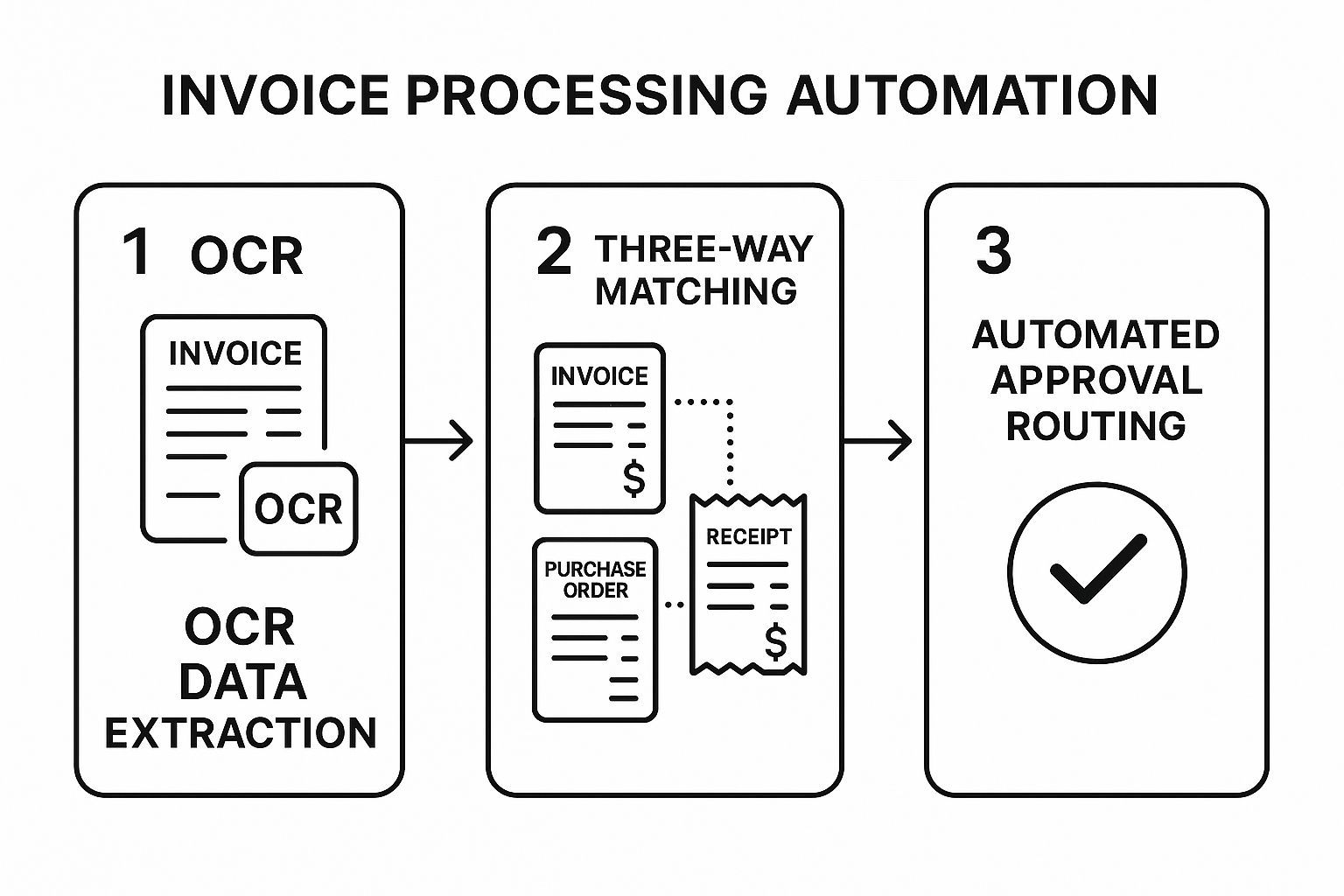
Die Visualisierung zeigt, wie jeder Schritt logisch auf dem vorherigen aufbaut und die Datenintegrität und Compliance sicherstellt, bevor eine Rechnung weiterbearbeitet wird.
2. Automatisierung des Kunden-Onboardings
Ein unzusammenhängender oder langsamer Onboarding-Prozess kann zu sofortigem Kundenverlust und verpassten Umsatzmöglichkeiten führen. Die Automatisierung des Kunden-Onboardings adressiert diesen kritischen ersten Eindruck, indem sie eine strukturierte, nahtlose Erfahrung für neue Benutzer schafft. Diese leistungsstarke Art von Beispiel für die Automatisierung von Geschäftsprozessen nutzt Software, um neue Kunden durch Einrichtung, Aktivierung und erstmalige Produktnutzung mit automatisierten Willkommens-E-Mails, In-App-Tutorials und Dokumentenverifizierungs-Workflows zu führen.
Im Kern orchestriert das System eine Reihe vordefinierter Aktionen, die ausgelöst werden, wenn sich ein Kunde anmeldet. Es kann automatisch Benutzerkonten erstellen, personalisierte Willkommensnachrichten senden, einen Customer Success Manager zuweisen und Bildungsinhalte in zeitgesteuerten Intervallen bereitstellen. Dies stellt sicher, dass jeder neue Kunde ein konsistentes, qualitativ hochwertiges Willkommen erhält, seine Time-to-Value reduziert und Ihr Team entlastet, damit es sich auf komplexere Bedürfnisse konzentrieren kann.

Wo Automatisierung schnelle Erfolge erzielt
💸 Finanzen
Schnellere Rechnungsfreigaben, reduzierte Fehler.
👥 HR
Reibungslose Einarbeitung und genaue Gehaltsabrechnung.
📈 Vertrieb
Bessere Lead-Bewertung und schnellere Konversionen.
💻 IT
Schnellere Lösung von Helpdesk-Tickets.
Strategische Analyse & Umsetzbare Erkenntnisse
Technologieführer wie Stripe und Salesforce beherrschen diese Automatisierung, um die Benutzerakzeptanz zu beschleunigen. Das API-gesteuerte Onboarding von Stripe ermöglicht es Entwicklern, die Zahlungsabwicklung in wenigen Minuten zu integrieren, ein Prozess, der früher Tage manueller Verifizierung erforderte. Ebenso nutzt Salesforce automatisierte Workflows, um neue Benutzer zu wichtigen Funktionen zu führen und die Interaktion vom ersten Tag an zu fördern. Diese Fälle zeigen, dass sich erfolgreiche Onboarding-Automatisierung darauf konzentriert, Reibungsverluste zu beseitigen und sofortigen Mehrwert zu liefern.
Wichtige Erkenntnis: Effektive Automatisierung des Kunden-Onboardings bedeutet nicht nur das Versenden von E-Mails; es geht darum, Benutzer proaktiv so schnell wie möglich zu ihrem "Aha!"-Moment zu führen. Dies schafft frühe Dynamik und erhöht die langfristige Kundenbindung erheblich.
Um dies erfolgreich umzusetzen, sollten Unternehmen die folgenden Taktiken anwenden:
- Kundenreise abbilden: Bevor Sie einen einzigen Workflow schreiben, bilden Sie visuell jeden Schritt ab, den ein neuer Kunde vom Anmelden bis zum ersten Erfolg durchläuft. Dies deckt potenzielle Reibungspunkte auf, die sich hervorragend für die Automatisierung eignen.
- Onboarding segmentieren: Nicht alle Kunden sind gleich. Erstellen Sie verschiedene automatisierte Onboarding-Pfade basierend auf Benutzerrollen, Unternehmensgröße oder Abonnementplänen, um ein relevanteres und personalisierteres Erlebnis zu bieten.
- Menschliche Berührungspunkte einbeziehen: Bauen Sie für hochwertige Kunden automatisierte Auslöser ein, die Ihr Erfolgsteam alarmieren, damit es sich in kritischen Momenten persönlich meldet, z. B. nachdem ein wichtiger Einrichtungsschritt abgeschlossen ist oder wenn der Prozess ins Stocken gerät.
3. Automatisierung des Spesenmanagements für Mitarbeiter
Der mühsame Kreislauf des Sammelns von Belegen, des Ausfüllens von Tabellenkalkulationen und des Einholens von Genehmigungen macht die manuelle Spesenabrechnung zu einem universellen Schmerzpunkt für Mitarbeiter und Finanzteams gleichermaßen. Die Automatisierung des Spesenmanagements für Mitarbeiter löst dieses Problem, indem der gesamte Workflow von der Belegaufnahme bis zur Erstattung digitalisiert wird. Dieses System ist eines der nachvollziehbarsten Beispiele für die Automatisierung von Geschäftsprozessen, da es die Mitarbeitererfahrung direkt verbessert und gleichzeitig die Finanzkontrolle durchsetzt.
Im Kern nutzt diese Automatisierung mobile Technologie und KI. Mitarbeiter verwenden eine App, um Fotos von Belegen zu machen, und die Optical Character Recognition (OCR)-Technologie extrahiert sofort wichtige Daten wie Händler, Datum und Betrag. Das System prüft dann automatisch die Ausgabe anhand vordefinierter Unternehmensrichtlinien und kennzeichnet Ausgaben, die von den Richtlinien abweichen, in Echtzeit. Genehmigte Ausgaben werden dann durch einen digitalen Workflow geleitet und direkt mit der Buchhaltungssoftware integriert, um eine schnelle und genaue Erstattung zu gewährleisten.
Strategische Analyse & Umsetzbare Erkenntnisse
Führende Unternehmen zeigen die klaren finanziellen und operativen Vorteile dieser Automatisierung. Netflix sparte jährlich angeblich 2,7 Millionen US-Dollar durch die Implementierung eines automatisierten Systems, während GitHub die Bearbeitungszeit für Spesen von acht Stunden auf nur 30 Minuten verkürzte. Diese Ergebnisse beweisen, dass die Automatisierung des Spesenmanagements ein direkter Weg zur Reduzierung des Verwaltungsaufwands und zur Verbesserung der Compliance ist.
Wichtige Erkenntnis: Die Automatisierung des Spesenmanagements dient nicht nur der Effizienz; sie dient der Einbettung der Finanzrichtlinien direkt in den Workflow. Dieser proaktive Ansatz verhindert nicht konforme Ausgaben, bevor sie auftreten, anstatt sie nachträglich zu korrigieren.
Um ähnliche Ergebnisse zu erzielen, können Unternehmen diese gezielten Taktiken anwenden:
- Integration mit Firmenkreditkarten: Verbinden Sie die Automatisierungssoftware direkt mit Ihren Firmenkreditkarten. Dies importiert Transaktionen automatisch, wodurch Mitarbeiter die meisten Spesenpositionen nicht manuell erstellen müssen und die Abstimmung vereinfacht wird.
- Klare Richtlinienregeln festlegen: Definieren und integrieren Sie Ihre spezifischen Ausgabenrichtlinien vor dem Start in das System. Legen Sie Regeln für Ausgabenlimits, erforderliche Belege und bevorzugte Händler fest, um die Durchsetzung zu automatisieren und manuelle Überprüfungen zu reduzieren.
- Priorisierung des mobilen Erlebnisses: Der Erfolg des Systems hängt von der Akzeptanz der Mitarbeiter ab. Wählen Sie eine Lösung mit einer hochgradig intuitiven und benutzerfreundlichen mobilen App, um sicherzustellen, dass die Mitarbeiter unterwegs problemlos Ausgaben einreichen können, was die zeitnahe Berichterstattung drastisch verbessert.
Transcript.LOL macht komplexe Arbeitsabläufe einfach

Sprechererkennung
Identifiziere automatisch verschiedene Sprecher in deinen Aufnahmen und beschrifte sie mit ihren Namen.

Bearbeitungswerkzeuge
Bearbeite Transkripte mit leistungsstarken Werkzeugen wie Suchen und Ersetzen, Sprecherzuordnung, Rich-Text-Formate und Hervorhebungen.
Zusammenfassungen und Chatbot
Erstelle Zusammenfassungen und andere Erkenntnisse aus deinem Transkript, wiederverwendbare benutzerdefinierte Prompts und Chatbot für deine Inhalte.
4. Lead-Qualifizierung und Scoring-Automatisierung
Vertriebs- und Marketingteams haben oft Schwierigkeiten, potenzielle Kunden zu identifizieren, die wirklich kaufbereit sind, was zu verschwendeten Anstrengungen bei nicht qualifizierten Leads führt. Die Automatisierung der Lead-Qualifizierung und des Scorings begegnet dieser Herausforderung direkt, indem sie regelbasierte Logik und Verhaltensdaten verwendet, um potenzielle Kunden zu ranken und zu priorisieren. Dieses System ist eines der leistungsstärksten Beispiele für die Automatisierung von Geschäftsprozessen, um Vertriebs- und Marketingbemühungen abzustimmen und den Vertriebszyklus zu beschleunigen.
Der Prozess funktioniert, indem Leads Punkte basierend auf vordefinierten Kriterien zugewiesen werden, wie z. B. Berufsbezeichnung, Unternehmensgröße und Online-Verhalten wie E-Mail-Öffnungen oder Seitenbesuche. Das System verfolgt diese Interaktionen automatisch und erstellt einen Score, der die Verkaufsbereitschaft eines potenziellen Kunden widerspiegelt. Wenn ein Lead einen bestimmten Schwellenwert erreicht, wird er automatisch als Marketing Qualified Lead (MQL) markiert und zur sofortigen Nachverfolgung an das Vertriebsteam weitergeleitet.
Strategische Analyse & Umsetzbare Erkenntnisse
Führende Marketing-Automatisierungsplattformen haben den immensen Wert dieses Ansatzes gezeigt. HubSpot beispielsweise nutzte sein eigenes automatisiertes Scoring, um qualifizierte Leads um 45 % zu steigern, während Marketo Dell half, die Qualität seiner Leads um beeindruckende 200 % zu verbessern. Diese Fälle beweisen, dass ein systematischer, datengesteuerter Ansatz zur Priorisierung von Leads direkte Auswirkungen auf den Umsatz hat.
Schlüsselerkenntnis: Eine effektive Automatisierung des Lead-Scorings schafft eine leistungsstarke Feedbackschleife zwischen Marketing und Vertrieb. Sie zwingt beide Teams, sich auf die Definition eines "guten Leads" zu einigen, beseitigt Reibungsverluste und stellt sicher, dass Marketingbemühungen direkt mit den Vertriebsergebnissen verknüpft sind.
Um dies erfolgreich umzusetzen, sollten Unternehmen die folgenden Taktiken anwenden:
- Klare MQL-Kriterien definieren: Vor der Automatisierung müssen Marketing und Vertrieb zusammenarbeiten, um die genauen demografischen und verhaltensbezogenen Merkmale eines verkaufsbereiten Leads zu definieren. Diese Abstimmung ist die Grundlage eines effektiven Scoring-Modells.
- Implizites und explizites Scoring kombinieren: Verwenden Sie sowohl explizite Daten, die vom Lead bereitgestellt werden (z. B. Berufsbezeichnung aus einem Formular), als auch implizite Daten, die auf seinem Verhalten basieren (z. B. Besuch der Preisseite). Dies schafft eine genauere, ganzheitlichere Sicht auf seine Absicht.
- Eine Feedbackschleife einrichten: Richten Sie einen formellen Prozess ein, bei dem das Vertriebsteam über die Qualität der automatisierten Leads berichtet. Dieses Feedback, ähnlich den Erkenntnissen, die Sie gewinnen, wenn Sie Interviewdaten analysieren, ist entscheidend für die Verfeinerung und Anpassung der Scoring-Regeln im Laufe der Zeit, um die Genauigkeit zu verbessern.
5. Automatisierung von IT-Helpdesk-Tickets
Ein überlasteter IT-Helpdesk ist ein häufiges Problem, das zu langsamen Reaktionszeiten, frustrierten Mitarbeitern und Produktivitätsverlusten führt. Die Automatisierung von IT-Helpdesk-Tickets löst dieses Problem, indem sie den gesamten Support-Lebenszyklus von der Anforderungseinreichung bis zur Lösung optimiert. Dieses System empfängt, kategorisiert, priorisiert und leitet IT-Supportanfragen intelligent weiter und löst oft häufige Probleme ohne menschliches Eingreifen, was es zu einem kritischen Beispiel für die Automatisierung von Geschäftsprozessen zur Aufrechterhaltung der operativen Kontinuität macht.
Der Prozess beginnt, wenn ein Mitarbeiter eine Anfrage über ein Portal, E-Mail oder Chat einreicht. Die Automatisierungsplattform analysiert die Anfrage mithilfe von Natural Language Processing (NLP), um deren Absicht und Dringlichkeit zu verstehen. Anschließend erstellt sie automatisch ein Ticket, weist es basierend auf vordefinierten Regeln der entsprechenden Support-Warteschlange oder dem entsprechenden Techniker zu und kann dem Benutzer sogar relevante Wissensdatenbankartikel zur Selbstbedienung vorschlagen. Bei häufigen Problemen wie Passwort-Resets oder Anfragen nach Softwarezugriff kann das System die Behebung automatisch durchführen.
Strategische Analyse & Umsetzbare Erkenntnisse
Branchenführer haben mit dieser Technologie massive Effizienzsteigerungen erzielt. ServiceNow half Coca-Cola, 40 % seiner IT-Anfragen zu automatisieren, und Microsoft reduzierte sein internes Ticketvolumen um 30 %, indem es automatisierte Self-Service-Lösungen implementierte. Diese Fälle zeigen, dass die Automatisierung von häufigen, wenig komplexen Supportaufgaben der Schlüssel zur Erschließung des Potenzials von IT-Teams und zur Verbesserung der Mitarbeiterzufriedenheit ist.
Schlüsselerkenntnis: Die wahre Stärke der Helpdesk-Automatisierung liegt in ihrer Fähigkeit, den IT-Support von einer reaktiven, Brandbekämpfungsfunktion zu einem proaktiven, strategischen Ermöglicher zu transformieren. Durch die Bearbeitung routinemäßiger Anfragen werden qualifizierte Techniker entlastet, damit sie sich auf die Lösung komplexer Probleme, Systemverbesserungen und Infrastrukturprojekte konzentrieren können.
Um ähnliche Ergebnisse zu erzielen, sollten Organisationen die folgenden Taktiken anwenden:
- Zuerst häufige Anfragen automatisieren: Identifizieren und automatisieren Sie die 5-10 häufigsten und einfachsten Supportanfragen, wie z. B. Passwort-Resets oder Softwareinstallationen. Dies erzielt sofortige Wirkung und baut Schwung für das Programm auf.
- Eine reichhaltige Wissensdatenbank pflegen: Eine umfassende und aktuelle Wissensdatenbank ist die treibende Kraft der Self-Service-Automatisierung. Aktualisieren Sie Artikel regelmäßig und nutzen Sie Ticketdaten, um Wissenslücken zu identifizieren.
- Klare Eskalationspfade einrichten: Definieren Sie automatisierte Workflows für den Fall, dass ein Ticket menschliches Eingreifen erfordert. Dies stellt sicher, dass komplexe oder dringende Probleme ohne Verzögerung an den richtigen Experten eskaliert werden, und verhindert Engpässe. Dies ist entscheidend für die Verwaltung der Aktionspunkte, die sich aus komplexeren IT-Problemen ergeben.
Automatisierung entlastet IT-Teams für strategische Aufgaben
Unternehmen, die IT-Ticket-Automatisierung nutzen, lösen Probleme 40–60 % schneller und entlasten Mitarbeiter für Innovationen.
6. Automatisierung der Lohn- und Gehaltsabrechnung
Die manuelle Lohn- und Gehaltsabrechnung ist eine der kritischsten, aber auch fehleranfälligsten HR-Funktionen, bei der ein einziger Fehler zu Compliance-Strafen und einer geringeren Mitarbeitermoral führen kann. Die Automatisierung der Lohn- und Gehaltsabrechnung eliminiert diese Risiken, indem sie den gesamten Zyklus verwaltet, von der Integration von Zeiterfassungsdaten über die Berechnung von Steuern, die Abwicklung von Abzügen bis hin zur Ausführung von Direktüberweisungen. Dieses System sticht als eines der wichtigsten Beispiele für die Automatisierung von Geschäftsprozessen zur Aufrechterhaltung der operativen Integrität und des Vertrauens der Mitarbeiter hervor.
Diese Automatisierung funktioniert durch die Schaffung einer regelbasierten Engine, die Daten aus verschiedenen Quellen wie Stundenzetteln und HR-Aufzeichnungen abruft. Sie wendet automatisch komplexe Gehaltsregeln an, berechnet Bundes- und Landessteuern, verwaltet Abzüge für Sozialleistungen und erstellt genaue Gehaltsabrechnungen. Das System leitet dann Zahlungen über Bankintegrationen ein und erstellt detaillierte Berichte für Buchhaltung und Compliance, alles mit minimaler menschlicher Aufsicht. Dies gewährleistet Genauigkeit und Pünktlichkeit und verwandelt eine stressige, deadline-getriebene Aufgabe in einen nahtlosen, zuverlässigen Prozess.
Strategische Analyse & umsetzbare Erkenntnisse
Branchenriesen wie Walmart und Dienstleister wie ADP zeigen die enormen Skalierungs- und Effizienzgewinne, die möglich sind. Walmart wickelt erfolgreich die Lohn- und Gehaltsabrechnung für über zwei Millionen Mitarbeiter ab, während die automatisierten Lösungen von ADP über 810.000 Kunden bedienen, was die Skalierbarkeit und Zuverlässigkeit des Modells unterstreicht. Ebenso hat Paychex seinen Kunden geholfen, ihre Lohn- und Gehaltsabrechnungszeit um 50 % zu verkürzen, ein Beweis für die direkten Auswirkungen des Systems auf die Produktivität.
Schlüsselerkenntnis: Der Hauptvorteil der Automatisierung der Lohn- und Gehaltsabrechnung geht über die Effizienz hinaus; es geht darum, Compliance-Risiken zu mindern. Durch die Automatisierung komplexer Steuerberechnungen und die Einhaltung von Vorschriften können Unternehmen kostspielige Strafen vermeiden und sicherstellen, dass die Mitarbeiter jedes Mal korrekt und pünktlich bezahlt werden.
Um diese Automatisierung effektiv zu implementieren, sollten sich Unternehmen auf diese Schlüsselstrategien konzentrieren:
- Robuste Datensicherheit gewährleisten: Lohn- und Gehaltsdaten sind hochsensibel. Priorisieren Sie Lösungen mit starker Verschlüsselung, Zugriffskontrollen und regelmäßigen Sicherheitsüberprüfungen zum Schutz der Mitarbeiterinformationen.
- Vor dem Start gründlich testen: Führen Sie vor der Inbetriebnahme parallele Lohn- und Gehaltsabrechnungszyklen sowohl mit Ihrem alten manuellen System als auch mit dem neuen automatisierten System durch. Dies hilft, Diskrepanzen bei Berechnungen oder Datenzuordnungen zu identifizieren und zu korrigieren.
- Manuelle Überschreibungsfunktionen beibehalten: Die Automatisierung kann die meisten Szenarien bewältigen, aber Ausnahmen wie Boni oder Korrekturen werden auftreten. Stellen Sie sicher, dass Ihr System autorisierte manuelle Anpassungen zulässt, ohne den gesamten Workflow zu beeinträchtigen.
7. Automatisierung des Bestandsmanagements
Die manuelle Bestandsverfolgung ist ein riskantes Ratespiel, das zu kostspieligen Fehlbeständen, übermäßigen Lagerkosten und Erfüllungsfehlern führt. Die Automatisierung des Bestandsmanagements ersetzt das Raten durch datengesteuerte Präzision und nutzt Technologien wie RFID, Sensoren und prädiktive Analysen, um Lagerbestände in Echtzeit zu überwachen. Dieses System automatisiert Nachbestellungen, optimiert Lagerlayouts und stellt die Produktverfügbarkeit sicher, was es zu einem kritischen Beispiel für die Automatisierung von Geschäftsprozessen für den Einzelhandel, die Fertigung und die Logistik macht.
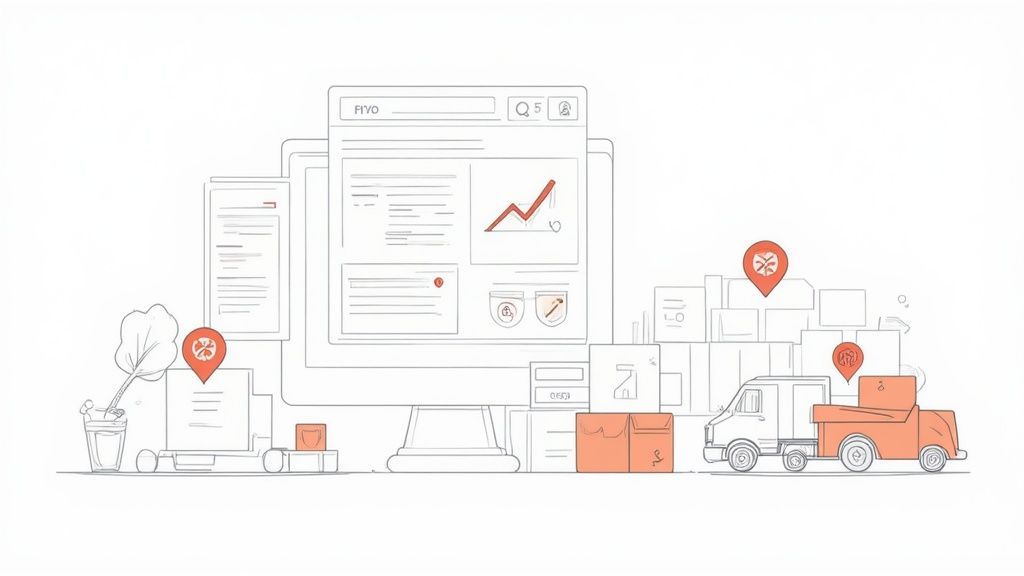
Im Kern schafft diese Automatisierung einen digitalen Zwilling des physischen Lagers. RFID-Tags und Barcode-Scanner aktualisieren automatisch die Lagerbestände, wenn Artikel vom Wareneingang zum Versand bewegt werden. Die Software analysiert dann die Verkaufsgeschwindigkeit und die Lieferzeiten, um die zukünftige Nachfrage vorherzusagen und automatisch Bestellungen auszulösen, wenn der Lagerbestand einen vordefinierten Nachbestellpunkt erreicht. Dieser nahtlose Informationsfluss verhindert Fehlbestände und minimiert das in langsam drehendem Bestand gebundene Kapital.
Strategische Analyse & umsetzbare Erkenntnisse
Branchenführer wie Amazon und Walmart demonstrieren die transformative Kraft dieser Automatisierung. Amazons Einsatz von Robotik in seinen Fulfillment-Centern ermöglicht es dem Unternehmen, eine riesige SKU-Anzahl mit beispielloser Geschwindigkeit zu verwalten, während Walmarts Einführung von RFID-Tracking in Tausenden von Filialen eine granulare Echtzeit-Transparenz seines Bestands bietet. Ebenso nutzt der Fast-Fashion-Gigant Zara ein hochautomatisiertes Bestandssystem, um seine agile Lieferkette aufrechtzuerhalten.
Schlüsselerkenntnis: Effektive Bestandsautomatisierung dreht sich weniger um das Zählen von Artikeln als vielmehr um die Optimierung des Cashflows. Sie verwandelt den Bestand von einem statischen Vermögenswert in eine dynamische, reaktionsfähige Komponente Ihrer Finanzstrategie und stellt sicher, dass Kapital dort eingesetzt wird, wo es den höchsten Umsatz generiert.
Um eine ähnliche operative Exzellenz zu erzielen, sollten Unternehmen diese Strategien anwenden:
- ABC-Analyse implementieren: Priorisieren Sie Ihre Automatisierungsbemühungen, indem Sie den Bestand kategorisieren. Konzentrieren Sie sich zuerst auf "A"-Artikel (hochwertig, schnell drehend), bei denen eine genaue Verfolgung die größten finanziellen Auswirkungen hat, bevor Sie zu Artikeln der niedrigeren Priorität "B" und "C" übergehen.
- Genaue Basiswerte festlegen: Führen Sie vor der Inbetriebnahme eine gründliche physische Inventur durch. Ein automatisiertes System ist nur so gut wie seine Ausgangsdaten; ein genauer Basiswert verhindert anfängliche Diskrepanzen, die sich im System fortsetzen können.
- Dynamische Nachbestellpunkte festlegen: Verwenden Sie keinen "Einstellen und Vergessen"-Ansatz. Konfigurieren Sie das System so, dass Nachbestellpunkte und Sicherheitsbestände basierend auf Saisonalität, Nachfrageprognosen und Lieferzeitenvariationen der Lieferanten angepasst werden, um agil zu bleiben.
8. Automatisierung des Vertragslebenszyklus-Managements
Die manuelle Verwaltung von Verträgen ist ein risikoreicher, arbeitsintensiver Prozess, der Unternehmen Compliance-Problemen, verpassten Verlängerungsdaten und erheblichen Einnahmeverlusten aussetzt. Die Automatisierung des Vertragslebenszyklus-Managements (CLM) digitalisiert und optimiert jede Phase der Vertragsreise, von der Erstellung und Verhandlung über die Ausführung bis hin zur Überwachung und Verlängerung. Dies macht es zu einem kritischen Beispiel für Beispiele für die Automatisierung von Geschäftsprozessen für Rechts-, Vertriebs- und Beschaffungsteams.
Im Kern nutzt die CLM-Automatisierung ein zentrales Repository mit standardisierten Vorlagen, automatisierten Genehmigungsworkflows und Funktionen für elektronische Signaturen. Das System führt einen Vertrag vom ersten Entwurf bis zur endgültigen Unterzeichnung und verfolgt dabei jede Änderung und jede Rotstift-Anmerkung. Fortgeschrittene Plattformen integrieren auch KI, um Vertragstexte zu analysieren, nicht standardmäßige Klauseln zu identifizieren, potenzielle Risiken zu kennzeichnen und wichtige Daten und Verpflichtungen automatisch zu extrahieren, um sicherzustellen, dass nichts durchrutscht.
Strategische Analyse & umsetzbare Erkenntnisse
Branchenführer wie Microsoft und Salesforce haben den immensen Wert der CLM-Automatisierung demonstriert. Microsoft konnte seine Vertragsbearbeitungszeit um 60 % reduzieren, während Salesforce Tausende von komplexen Kundenverträgen über sein automatisiertes System effizient verwaltet. Diese Fälle zeigen, dass die Automatisierung des Vertragslebenszyklus direkte Auswirkungen auf die Vertriebsgeschwindigkeit, die betriebliche Effizienz und die Risikominderung hat.
Schlüsselerkenntnis: Die strategische Stärke der CLM-Automatisierung liegt in der Umwandlung von Verträgen von statischen Rechtsdokumenten in dynamische, datenreiche Vermögenswerte. Diese Transparenz ermöglicht es Unternehmen, Verpflichtungen proaktiv zu verwalten, Upselling-Möglichkeiten zu identifizieren und die Compliance im gesamten Unternehmen durchzusetzen.
Um ähnliche Ergebnisse zu erzielen, sollten sich Unternehmen auf diese Taktiken konzentrieren:
- Zuerst standardisieren: Beginnen Sie mit der Erstellung und Digitalisierung einer Bibliothek von Standardvertragsvorlagen für Ihre häufigsten Vereinbarungen (z. B. NDAs, SOWs). Dies schafft eine kontrollierte Grundlage, bevor komplexere Verhandlungen automatisiert werden.
- Funktionsübergreifende Workflows abbilden: Beziehen Sie von Anfang an Rechts-, Vertriebs- und Finanzteams ein, um Genehmigungsworkflows zu entwerfen. Definieren Sie klar, wer Verträge basierend auf Wert, Region oder Risikostufe prüfen und genehmigen muss.
- Meilensteinbenachrichtigungen automatisieren: Konfigurieren Sie das System so, dass automatische Benachrichtigungen für wichtige Daten gesendet werden, wie z. B. Ablauf-, Verlängerungsfristen und Leistungsüberprüfungen. Dies verhindert verpasste Gelegenheiten und unerwünschte automatische Verlängerungen.
Vergleich von Automatisierungsbeispielen für Geschäftsprozesse
| Automatisierungstyp | Implementierungskomplexität 🔄 | Ressourcenanforderungen ⚡ | Erwartete Ergebnisse 📊 | Ideale Anwendungsfälle 💡 | Hauptvorteile ⭐ |
|---|---|---|---|---|---|
| Automatisierung der Rechnungsverarbeitung | Mittel bis hoch (benutzerdefinierte Workflows, Systemintegration) | ERP/Buchhaltungssystemintegration erforderlich | Reduziert die Bearbeitungszeit um ca. 70 %, senkt Kosten um bis zu 80 % | Kreditorenbuchhaltungsabteilungen, Rechnungen mit hohem Volumen | Fehlerreduzierung, schnellere Zahlungen, Compliance |
| Automatisierung des Kunden-Onboardings | Mittel (Integration mehrerer Systeme, Workflow-Konfiguration) | CRM- und Abrechnungssystemintegration erforderlich | Reduziert die Onboarding-Zeit um 50-70 %, verbessert die Zufriedenheit | Neukunden-Setup, skalierbare Onboarding-Prozesse | Konsistenz, reduzierte Abwanderung, Echtzeit-Transparenz |
| Automatisierung der Mitarbeiterausgabenverwaltung | Mittel (Integration von Mobilgeräten und KI, Schulung erforderlich) | Mobile Apps, Kreditkartenintegration | Reduziert die Ausgabenbearbeitungszeit um 75 %, verbesserte Compliance | Spesenabrechnung und -erstattung durch Mitarbeiter | Schnellere Erstattungen, Durchsetzung von Richtlinien |
| Lead-Qualifizierung und -Bewertung | Hoch (Datenerfassung, Training von ML-Modellen) | Erhebliche Daten und Vertriebsmarketing-Tools | Vertriebsproduktivität um 30-40 % gestiegen, Konversionsraten verbessert | Vertriebsteams, die Leads priorisieren | Skalierbare Lead-Bearbeitung, datengesteuerte Einblicke |
| Automatisierung von IT-Helpdesk-Tickets | Mittel (Wissensdatenbank, Routing-Einrichtung) | Multi-Channel-Eingänge, Self-Service-Plattformen | Lösungszeit um 40-60 % reduziert, 24/7 Self-Service | IT-Support-Desks, hohes Ticketaufkommen | Erhöhte technische Produktivität, schnellere Problemlösung |
| Automatisierung der Lohn- und Gehaltsabrechnung | Hoch (komplexe Integration, Compliance-Anforderungen) | Zeiterfassungssysteme, Steuer- und Sozialleistungs-Integration | Lohn- und Gehaltsabrechnungszeit um 80 % reduziert, Fehler minimiert | Große HR/Gehaltsabrechnungsabteilungen | Genauigkeit, Compliance, Audit-Trails |
| Automatisierung des Bestandsmanagements | Hoch (Sensoren, RFID, prädiktive Analysen) | Hardware (RFID), Systemintegrationen | Lagerkosten um 20-30 % gesenkt, Genauigkeit über 95 % | Lagerhaltung, Lieferkette, Bestandsverwaltung an mehreren Standorten | Lageroptimierung, Echtzeit-Tracking |
| Automatisierung des Vertragslebenszyklus | Hoch (rechtlicher Workflow, KI, Koordination mehrerer Teams) | Integration von Rechts-, Beschaffungssystemen | Vertragszykluszeit um 50-70 % reduziert, Compliance verbessert | Branchen mit hohem Vertragsaufkommen (Recht, Beschaffung, Vertrieb) | Risikoreduzierung, zentralisierte Verwaltung |
Die richtige Automatisierung für Ihr Unternehmen wählen
⚡ Schnelle Erfolge
Ausgabenfreigaben, IT-Helpdesk.
🔒 Risikoreduzierung
Gehaltsabrechnung, Vertragsmanagement.
📊 Skalierbarkeit
Inventar, Lead-Bewertung.
🎯 Kundenerlebnis
Onboarding-Workflows, personalisierte Interaktion.
Von Beispielen zur Tat: Ihre nächsten Schritte in der Automatisierung
Die Reise durch diese vielfältigen Beispiele zur Automatisierung von Geschäftsprozessen, von Finanzen und Personalwesen bis hin zu Marketing und IT, offenbart ein mächtiges, einheitliches Thema. Bei der Automatisierung geht es nicht darum, menschliche Genialität zu ersetzen, sondern sie zu befreien. Ob es darum geht, Rechnungsfreigaben zu optimieren, die Kundenaufnahme zu beschleunigen oder eine reibungslose Gehaltsabrechnung sicherzustellen, das Kernziel bleibt dasselbe: wertvolle menschliche Expertise von sich wiederholenden, regelbasierten Aufgaben hin zu strategischer, kreativer und wirkungsvoller Arbeit umzuleiten.
Die von uns untersuchten Beispiele, wie die Lead-Qualifizierung und das Bestandsmanagement, zeigen, dass die erfolgreichsten Automatisierungsinitiativen gezielt und schrittweise erfolgen. Sie beginnen nicht mit einer unternehmensweiten, revolutionären Überholung. Stattdessen beginnen sie mit der Identifizierung eines einzelnen, hartnäckigen Engpasses – eines Prozesses, der übermäßige Zeit in Anspruch nimmt, fehleranfällig ist und wenig strategischen Wert liefert. Indem Sie sich auf einen solchen Schmerzpunkt konzentrieren, können Sie einen messbaren Erfolg erzielen, der Schwung aufbaut und die Zustimmung für zukünftige Projekte sichert.
Synthese der wichtigsten Erkenntnisse
Um von der Theorie zur Umsetzung zu gelangen, ist es entscheidend, die strategischen Erkenntnisse aus diesen Anwendungsfällen zu destillieren. Die Muster, die in erfolgreichen Automatisierungsprojekten beobachtet werden, bieten eine klare Roadmap für Ihre eigenen Bemühungen.
- Beginnen Sie mit Prozessen mit hoher Auswirkung und geringer Komplexität: Versuchen Sie nicht, bei Ihrem ersten Versuch einen komplexen, abteilungsübergreifenden Workflow zu automatisieren. Suchen Sie nach der "leichtesten Beute", wie der Weiterleitung von IT-Helpdesk-Tickets oder der Genehmigung von Mitarbeiterausgaben, um sofortigen Wert zu demonstrieren.
- Priorisieren Sie die Datenintegrität: Automatisierung ist nur so zuverlässig wie die Daten, die sie verwendet. Stellen Sie sicher, dass Ihre Datenquellen sauber, standardisiert und zugänglich sind, bevor Sie eine Lösung für das Vertragsmanagement oder die Gehaltsabrechnung implementieren.
- Konzentrieren Sie sich auf das menschliche Element: Das Ziel ist die Ermächtigung, nicht der Ersatz. Kommunizieren Sie klar mit Ihrem Team darüber, wie die Automatisierung mühsame Aufgaben eliminieren wird, sodass es sich auf ansprechendere und wertvollere Verantwortlichkeiten konzentrieren kann. Stellen Sie es als ein Werkzeug dar, das seine Fähigkeiten verbessert.
Ihr Aktionsplan zur Implementierung von Automatisierung
Das Verständnis des Potenzials der Automatisierung von Geschäftsprozessen ist der erste Schritt; entschlossenes Handeln treibt die Transformation voran. Nutzen Sie die folgenden Schritte als praktischen Leitfaden für den Beginn Ihrer Reise.
- Identifizieren und Prüfen: Bilden Sie ein kleines Team, um Schlüsselprozesse innerhalb einer einzelnen Abteilung abzubilden. Identifizieren Sie, welche Aufgaben am repetitivsten, zeitaufwendigsten und regelbasiertesten sind. Quantifizieren Sie die für diese Aktivitäten aufgewendeten Stunden.
- Wählen Sie ein Pilotprojekt: Wählen Sie einen Prozess aus Ihrer Prüfung aus, der einen klaren und messbaren ROI bietet. Ein Projekt wie die Automatisierung der anfänglichen Lead-Bewertung bietet beispielsweise eine direkte Verbindung zur Vertriebseffizienz und zum Umsatzpotenzial.
- Recherchieren und wählen Sie die richtigen Werkzeuge: Nicht alle Automatisierungsplattformen sind gleich. Recherchieren Sie basierend auf den Anforderungen Ihres Pilotprojekts nach Software, die sich nahtlos in Ihre bestehenden Systeme integriert (z. B. Ihre CRM-, ERP- oder Buchhaltungssoftware).
- Messen, iterieren und skalieren: Sobald Ihr Pilotprojekt live ist, verfolgen Sie wichtige Leistungsindikatoren (KPIs) wie Verarbeitungszeit, Fehlerraten und eingesparte Mitarbeiterzeit. Nutzen Sie diese Kennzahlen, um die Ausweitung der Automatisierung auf andere Prozesse und Abteilungen zu rechtfertigen.
Durch die Übernahme dieses methodischen und strategischen Ansatzes verwandeln Sie die Automatisierung von Geschäftsprozessen von einem abstrakten Konzept in einen greifbaren Wettbewerbsvorteil. Die bereitgestellten Beispiele sind nur der Anfang. Für eine tiefere Auseinandersetzung mit praktischeren, realen Anwendungen sollten Sie diese Top-Beispiele zur Automatisierung von Geschäftsprozessen zur Transformation Ihres Workflows erkunden, um weitere Inspiration für Ihre spezifischen Bedürfnisse zu erhalten. Der Weg zu einer effizienteren, skalierbareren und intelligenteren Organisation beginnt heute mit einem einzigen, gut gewählten Prozess.
Bereit, eine der zeitaufwendigsten manuellen Aufgaben für Content-Ersteller und Fachleute zu automatisieren? Transcript.LOL nutzt KI, um Ihre Audio- und Videoinhalte mit blitzschneller Geschwindigkeit und Präzision zu transkribieren. Verschwenden Sie keine Stunden mehr mit manueller Transkription und konzentrieren Sie sich stattdessen auf die Wertschöpfung, indem Sie Transcript.LOL besuchen, um Ihren Workflow noch heute zu automatisieren.
Bereit, Ihre Arbeitsabläufe zu automatisieren?
Von Transkription bis Vertragsmanagement – die Zukunft des Geschäfts ist automatisiert. 👉 Transcript.LOL kostenlos testen